





Verdict
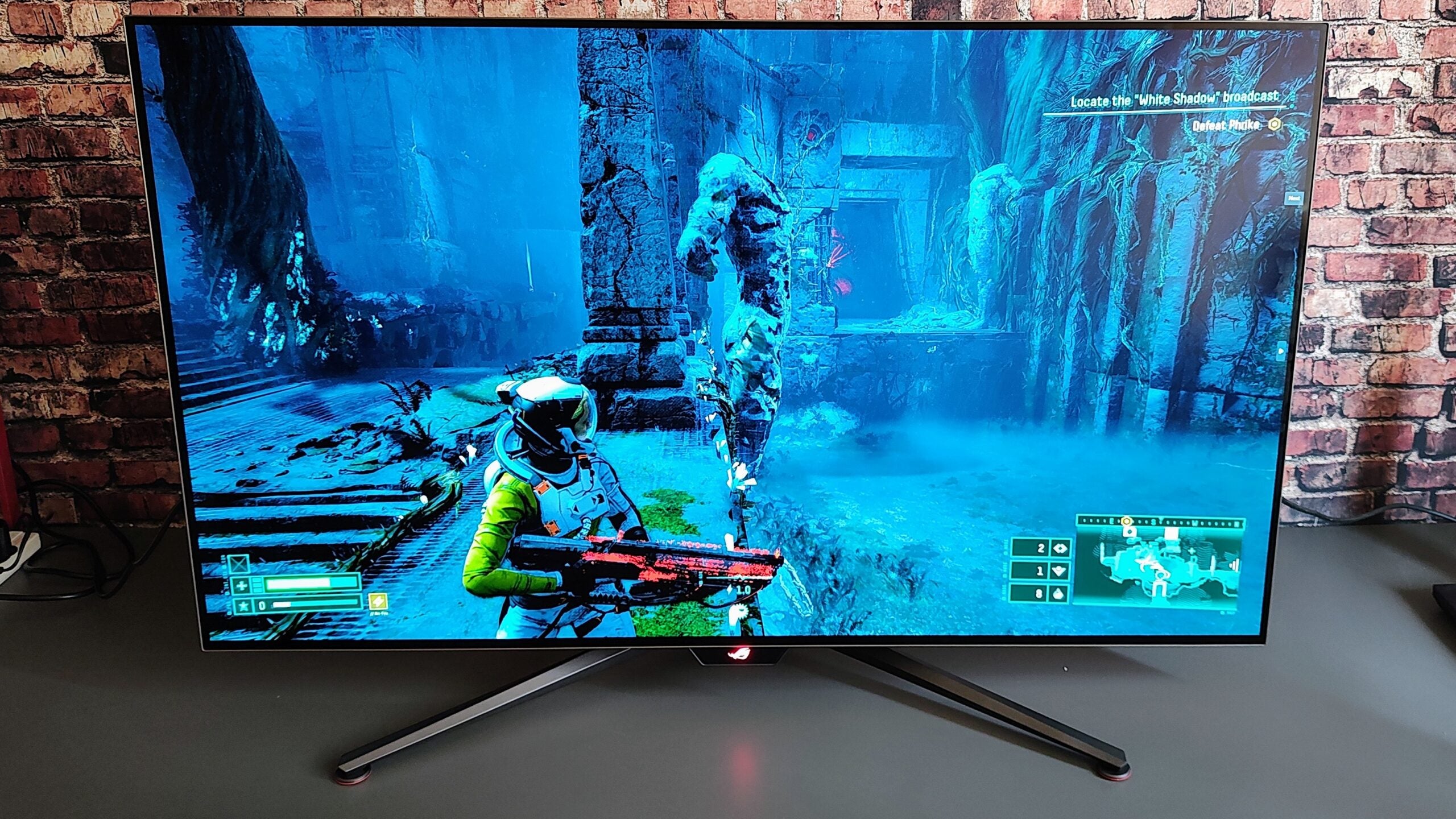
Thanks to a sumptuous 48-inch 4K OLED panel and a stellar 2.1 speaker system, the Asus ROG Swift OLED PG48UQ is hugely impressive. Of course, it’s also just plain huge for a monitor, so you must carefully consider where to position it.
Pros
- Sumptuous 4K 138Hz OLED panel
- Excellent 2.1 speaker system
- Good remote control
Cons
- No Type-C video input
- Stand has zero adjustability
-
48-inch 4K OLEDA 10-bit 3,840 x 2,160 display with a refresh rate of 138Hz and a G2G response time of 0.1ms is the absolute state-of-the-art for a 48-inch OLED gaming monitor. -
2.1 speaker system with 35W outputThe built-in speakers have a high-quality, rich and resonant sound. -
Massive size and weightAt 16.2kg and no adjustability in the stand, wrestling the PG48UQ into a usable position is not easy.
Introduction
Does size matter? The product designers at Asus’ Republic of Gamers skunk works think so because how else could you justify a gaming monitor with a massive 48-inch display? That’s 107 x 61cm in more easily visualised numbers.
The Asus ROG Swift OLED PG48UQ is a specific horse for a particular course because if you park it on a normal-sized desk like a 32-inch monitor, it will be unusable. Like Van Dyck’s monumental portrait of Charles I, you have to look at it from some considerable distance.
It lends itself more to console than PC gaming; set up a few meters away from a recliner so you can kick back with your controller rather than sit hunched over a keyboard and mouse. That’s a situation in which the PG48UQ’s other strengths, the colourful OLED panel and a banging 2.1 speaker system, also come into their own, delivering a top-notch audio-visual experience.
Design and Features
- Plenty of I/O ports
- Weighs 16.2Kg
- Comes with full remote control
At the risk of stating the obvious, given that this is a 48-inch monitor, the PG48UQ is big. Very big. It weighs a whopping 16.2Kg and measures 1068 x 686 x 266mm. Before buying one of these things, you must consider where to position it. For most home-office or study setups, a 48-inch monitor is simply too large because you need to sit a minimum of 1.5m away for it not to feel uncomfortably close.
Asus clearly recognises this because it offers an Instagram link from its website that lets you create a virtual image of the PG48UQ in situ so you can get a better idea of just it will dominate its environment.
Despite its sheer size, the PG48UQ is remarkably slim. The panel is only 4mm thick, and even the housing that contains the electronics, I/O ports and heat sink is only 40mm back-to-front. The display bezels are 10mm all around, but they vanish from view in relation to the overall size of the panel.
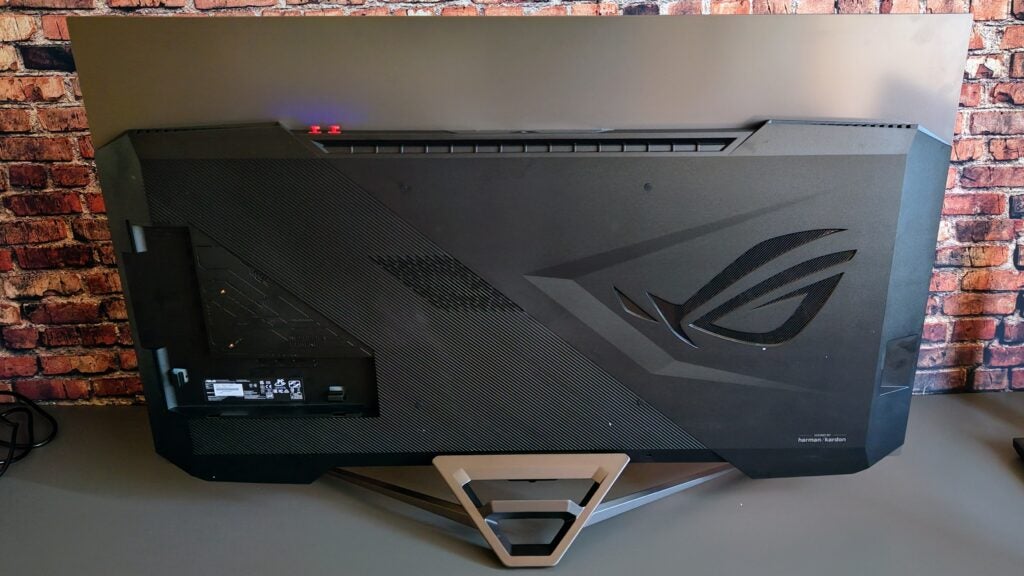
The PG48UQ has no physical adjustment options whatsoever once you’ve attached the monitor to the stand with the four Allen screws. I can live without swivel, pivot, and height adjustment, but not tilt. Especially when the one position you get has the monitor leaning forward ever so slightly. If you have nightmares about being crushed to death by a monolithic PC monitor, the PG48UQ is not for you.
My personal preference is to have my monitor tilted back by a few degrees but to achieve this and to get my colourimeter to lie against the screen for testing rather than dangle in mid-air, I was forced to jam a paperback book under each leg of the stand. For comparison, BenQ’s equally heavy and massive 48in EX480UZ tilts between -2 and +15°.
There are four mounting screws on the back of the unit for wall mounting, but there isn’t a standard 100m VESA bracket. There’s also a 1/4″ tripod socket screw on the top of the stand, handy if you want to mount a camera or your phone to record yourself in action.
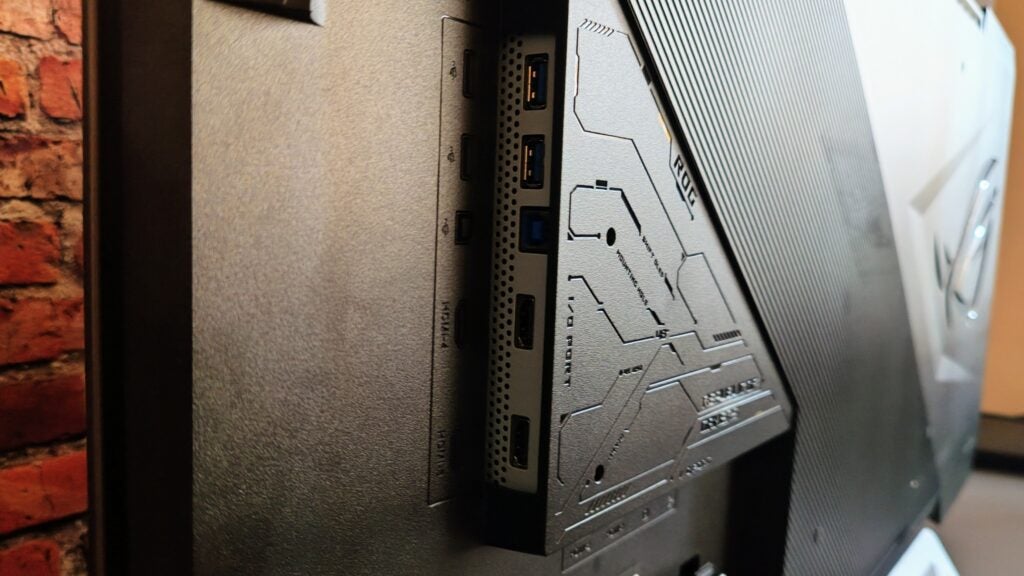
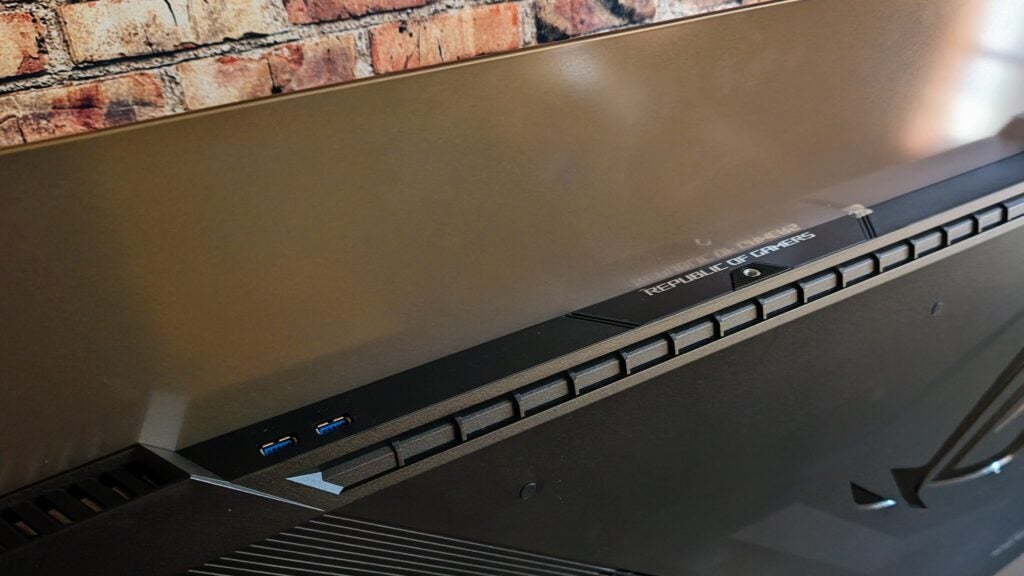
Video inputs consist of two HDMI 2.1, two HDMI 2.0 and one DisplayPort 1.4. For data, you get an upstream USB-B connector and four downstream USB-A 3.2 Gen 1 ports. Two of the USB-A connectors can be found on the top of the monitor housing, while all the rest are tucked away about the back where a clip-on plastic panel (which is home to the Allen key you need to assemble the thing) can partially conceal them.
Given the size and price of the PG48UQ, I would have liked to have seen a Type-C port with DP Alt Mode to provide full KVM capability (i.e. the capability to control two input sources with the same keyboard and mouse). Given the wide range of other ports and the built-in PbP/PiP functionality, it seems like a missed opportunity.
The speaker system consists of two 10W full-range drivers and a 15W woofer; they work well together. There’s ample volume with 82dB(A) measured from a pink noise source at 1m, and the soundscape is as wide as it is deep, with plenty of bass at one end and clear, expansive detail at the other.
If you want your audio via an external source, there’s a 3.5mm headphone jack below the front of the panel and a Mini-TOSLINK digital S/PDIF out socket on the rear.
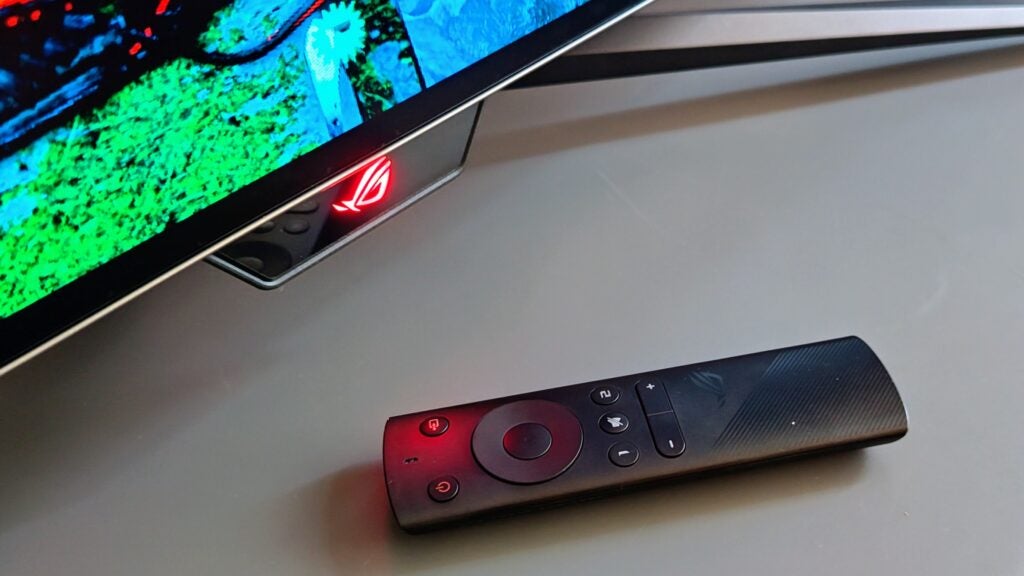
Asus ROG always does a good job with the layouts of its on-screen menus, and the PG48UQ is no exception. Accessing the settings using the small joystick below the centre of the display is a bit of a pain, but luckily Asus bundles a good remote control to access all the settings from a safe distance.
Image Quality
- The colourful 4K OLED panel is visually impressive
- Motion handling is excellent
- Handy Uniform Brightness setting
I’ve yet to look at a 4K OLED monitor and experience anything close to a sense of disappointment, and the 10-bit PG48UQ doesn’t come close to breaking that run. It looks glorious to the naked eye; colourful, sumptuous and limpid.
Point a colourimeter at the PG48UQ, and you’ll discover some healthy gamut coverage with 100% sRGB, 95.7% DCI-P3 and 87.7% Adobe RGB. The matte finish to the screen removes some of the lustre that a gloss finish would impart, but it’s better at keeping reflections in check.
As ever with any OLED monitor, a definitive brightness figure was elusive. In SDR mode and from a small (<10%) area, the highest number I recorded was 363nits; in HDR mode, that jumped to 885nits.
Both are excellent results which, thanks to the absolute blacks that per-pixel lit OLED panel can achieve, generates a contrast ratio that is, in effect, infinite, to the great benefit of HDR content.
As always with OLED panels, if you expand the measurement swatch to cover the entire screen, that 363nits figure drops. In this case, to around 200nits. If fluctuating brightness annoys you, then Asus has you covered with a Uniform Brightness setting that, in SDR, locks the panel to around 200nits no matter how much or little of the screen is taken up by a bright image like a browser page.
The factory calibration report in the box recorded a Delta E variation of 1.71 using the Racing picture setting and the sRGB colour mode. When I measured it, I got a figure of 1.9 which isn’t wildly adrift. I would have expected the best result to be obtained using the sRGB picture mode, but when I measured that, the Delta E jumped to 2.2. The best result against the DCI-P3 profile was 2.5, which still isn’t too bad: Nothing below 3 needs to cause concern.
If you still want to improve the colour accuracy, the Colour menu allows you to change the colour temperature, overall saturation, six-axis saturation and gamma, so there is ample scope to fiddle and recalibrate.
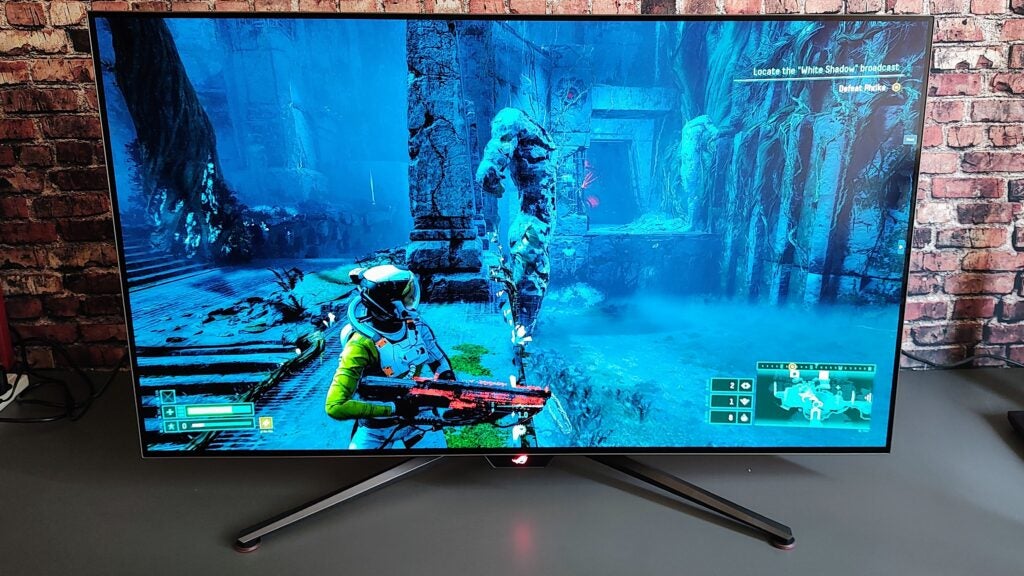
By default, the refresh rate is set to 120Hz, but if you engage overdrive in the menu, you can up that to 138Hz. That’s still not what I’d call high for a gaming monitor, but when combined with a typically low OLED-level 0.1ms G2G response time, there’s virtually no ghosting or motion blurring to be seen. You don’t need to worry about screen tearing thanks to Nvidia G-Sync Compatible certification.
The PG48UQ doesn’t have any sort of VESA HDR certification, so you will need to be content with the basic HDR10 standard, but given that it’s an OLED panel, HDR performance is still excellent.
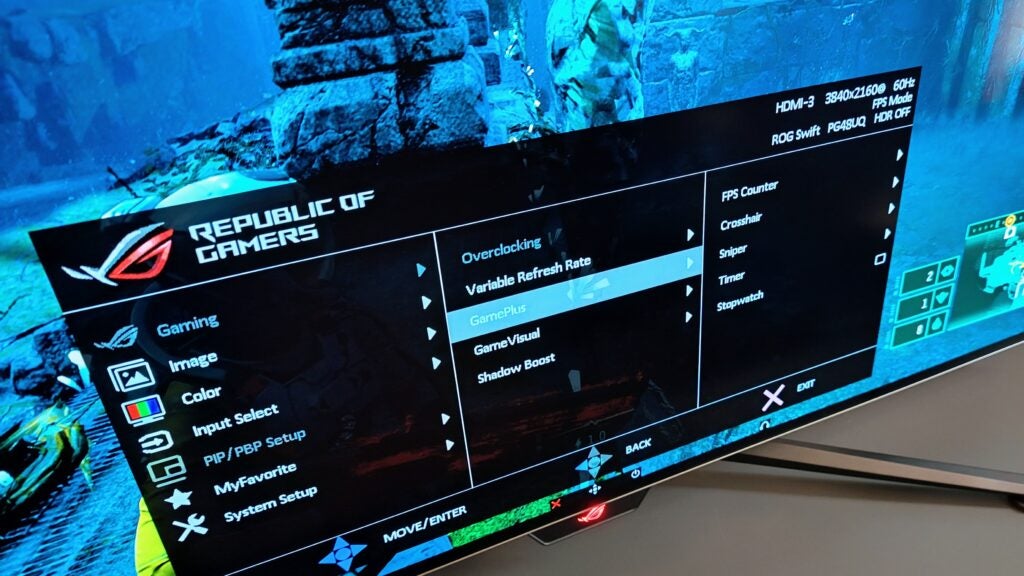
As you would expect from a monitor carrying the Republic of Gamers logo, there are some handy gaming-centric features squirrelled away in the GamePlus menu, including a frame counter, crosshair overlay and sniper mode (both with half a dozen different styles), a stopwatch and a timer.
The last is quite useful if, like me, you decide to spend an hour gaming and then glance at your watch only to realise three hours have slipped by. There’s also a four-setting (1-3 plus Dynamic) Shadow Boost to make it easier to see what is lurking in the shadows.
A final feature worth mentioning is Aspect Control, an option to force the display to render as either a 24-inch or 27-inch 16:9 or 32-inch 21:9 space. A sea of black surrounds the picture (but you can move the image up or down so it sits at the top or bottom of the panel), but it at least makes the PG48UQ usable if you have to sit close to it.
The various picture modes in the Game Visual menu are unusually intrusive, each making quite dramatic changes to the brightness, gamma and saturation, and while there is an sRGB option, which I’d recommend using with the Windows desktop, there isn’t an option to turn the system off.
One negative feature of OLED technology is the possibility of screen burn. That’s more of a worry with a PC monitor than a TV because televisions tend not to have static images like the Windows taskbar rendered on them for hours on end. Asus has provided some helpful features to combat this, including pixel move and pixel refresh, so longevity shouldn’t be an issue.
Latest deals
Should you buy it?
You crave a massive OLED gaming monitor
There’s no doubting the quality of the massive OLED display and the superb 2.1 speaker system, while the remote control makes adjusting the monitor settings a piece of cake. Motion handling is typically OLED-excellent, and the Uniform Brightness setting is beneficial when working on a PC desktop.
You don’t have the space or want to avoid a costly outlay
The sheer size of the PG48UQ renders it difficult to locate in many domestic environments, and the lack of even a small degree of tilt adjustment is a serious drawback. Having to prop up a monitor costing this sort of money with a couple of tatty old paperbacks is silly.
Final Thoughts
Every time I review a 48-inch OLED monitor, I have to remind myself that impressive though they are, I have absolutely nowhere to put one unless I unscrew my 52-inch TV from the lounge wall and stick it there. Put simply, in the vast majority of circumstances, the Asus ROG Swift OLED PG48UQ is too big, so the 42-inch model (called, unsurprisingly, the ROG Swift OLED PG42UQ) may be a safer bet, even if it’s barely any cheaper.
Unless the football pitch dimensions are a prime requirement, then the Evnia 42M2N8900 is another good alternative, offering the same refresh rate on an equally impressive OLED screen but with the convenience of a full KVM setup and a decent range of adjustability. For the more hardcore gamers out there, the 240Hz LG UltraGear is worth a look. Granted, the 27in panel is much smaller, but the refresh rate is almost twice as fast, which has righteous implications for esports, and it’s two-thirds the price of the monster ROG monitor.
That said, there’s no denying that, technically, the PG48UQ is a tour-de-force. Picture quality is excellent in both SDR and HDR modes, as is motion handling. I particularly like the Uniform Brightness feature that eradicates the common OLED monitor habit of suddenly readjusting brightness levels when, for example, you expand a bright window to cover the whole desktop, which can be both jarring and distracting. It also has a good range of I/O ports, though I think Asus should have added a Type-C port.
How we test
We use every monitor we test for at least a week. During that time, we’ll check it for ease of use and put it through its paces by using it for both everyday tasks and more specialist, colour-sensitive work.
We also check its colours and image quality with a colorimeter to test its coverage and the display’s quality.
We used a colorimeter to get benchmark results.
We used it as our main monitor for at least a week.
We use our own expert judgement for image quality
FAQs
OLED screens vary in brightness depending on how much of the screen is being asked to generate a bright image. In SDR mode, the PG48UQ peaks at 363nits, but when the whole display is showing a bright or white image, that drops to around 200 nits.
The PG48UQ is a genuine 4K monitor with a resolution of 3,840 x 2,160 and a pixel density of 92.7DPI.
Trusted Reviews test data

Verdict
Thanks to a sumptuous 48-inch 4K OLED panel and a stellar 2.1 speaker system, the Asus ROG Swift OLED PG48UQ is hugely impressive. Of course, it’s also just plain huge for a monitor, so you must carefully consider where to position it.
Pros
- Sumptuous 4K 138Hz OLED panel
- Excellent 2.1 speaker system
- Good remote control
Cons
- No Type-C video input
- Stand has zero adjustability
-
48-inch 4K OLEDA 10-bit 3,840 x 2,160 display with a refresh rate of 138Hz and a G2G response time of 0.1ms is the absolute state-of-the-art for a 48-inch OLED gaming monitor. -
2.1 speaker system with 35W outputThe built-in speakers have a high-quality, rich and resonant sound. -
Massive size and weightAt 16.2kg and no adjustability in the stand, wrestling the PG48UQ into a usable position is not easy.
Introduction
Does size matter? The product designers at Asus’ Republic of Gamers skunk works think so because how else could you justify a gaming monitor with a massive 48-inch display? That’s 107 x 61cm in more easily visualised numbers.
The Asus ROG Swift OLED PG48UQ is a specific horse for a particular course because if you park it on a normal-sized desk like a 32-inch monitor, it will be unusable. Like Van Dyck’s monumental portrait of Charles I, you have to look at it from some considerable distance.
It lends itself more to console than PC gaming; set up a few meters away from a recliner so you can kick back with your controller rather than sit hunched over a keyboard and mouse. That’s a situation in which the PG48UQ’s other strengths, the colourful OLED panel and a banging 2.1 speaker system, also come into their own, delivering a top-notch audio-visual experience.
Design and Features
- Plenty of I/O ports
- Weighs 16.2Kg
- Comes with full remote control
At the risk of stating the obvious, given that this is a 48-inch monitor, the PG48UQ is big. Very big. It weighs a whopping 16.2Kg and measures 1068 x 686 x 266mm. Before buying one of these things, you must consider where to position it. For most home-office or study setups, a 48-inch monitor is simply too large because you need to sit a minimum of 1.5m away for it not to feel uncomfortably close.
Asus clearly recognises this because it offers an Instagram link from its website that lets you create a virtual image of the PG48UQ in situ so you can get a better idea of just it will dominate its environment.
Despite its sheer size, the PG48UQ is remarkably slim. The panel is only 4mm thick, and even the housing that contains the electronics, I/O ports and heat sink is only 40mm back-to-front. The display bezels are 10mm all around, but they vanish from view in relation to the overall size of the panel.
The PG48UQ has no physical adjustment options whatsoever once you’ve attached the monitor to the stand with the four Allen screws. I can live without swivel, pivot, and height adjustment, but not tilt. Especially when the one position you get has the monitor leaning forward ever so slightly. If you have nightmares about being crushed to death by a monolithic PC monitor, the PG48UQ is not for you.
My personal preference is to have my monitor tilted back by a few degrees but to achieve this and to get my colourimeter to lie against the screen for testing rather than dangle in mid-air, I was forced to jam a paperback book under each leg of the stand. For comparison, BenQ’s equally heavy and massive 48in EX480UZ tilts between -2 and +15°.
There are four mounting screws on the back of the unit for wall mounting, but there isn’t a standard 100m VESA bracket. There’s also a 1/4″ tripod socket screw on the top of the stand, handy if you want to mount a camera or your phone to record yourself in action.
Video inputs consist of two HDMI 2.1, two HDMI 2.0 and one DisplayPort 1.4. For data, you get an upstream USB-B connector and four downstream USB-A 3.2 Gen 1 ports. Two of the USB-A connectors can be found on the top of the monitor housing, while all the rest are tucked away about the back where a clip-on plastic panel (which is home to the Allen key you need to assemble the thing) can partially conceal them.
Given the size and price of the PG48UQ, I would have liked to have seen a Type-C port with DP Alt Mode to provide full KVM capability (i.e. the capability to control two input sources with the same keyboard and mouse). Given the wide range of other ports and the built-in PbP/PiP functionality, it seems like a missed opportunity.
The speaker system consists of two 10W full-range drivers and a 15W woofer; they work well together. There’s ample volume with 82dB(A) measured from a pink noise source at 1m, and the soundscape is as wide as it is deep, with plenty of bass at one end and clear, expansive detail at the other.
If you want your audio via an external source, there’s a 3.5mm headphone jack below the front of the panel and a Mini-TOSLINK digital S/PDIF out socket on the rear.
Asus ROG always does a good job with the layouts of its on-screen menus, and the PG48UQ is no exception. Accessing the settings using the small joystick below the centre of the display is a bit of a pain, but luckily Asus bundles a good remote control to access all the settings from a safe distance.
Image Quality
- The colourful 4K OLED panel is visually impressive
- Motion handling is excellent
- Handy Uniform Brightness setting
I’ve yet to look at a 4K OLED monitor and experience anything close to a sense of disappointment, and the 10-bit PG48UQ doesn’t come close to breaking that run. It looks glorious to the naked eye; colourful, sumptuous and limpid.
Point a colourimeter at the PG48UQ, and you’ll discover some healthy gamut coverage with 100% sRGB, 95.7% DCI-P3 and 87.7% Adobe RGB. The matte finish to the screen removes some of the lustre that a gloss finish would impart, but it’s better at keeping reflections in check.
As ever with any OLED monitor, a definitive brightness figure was elusive. In SDR mode and from a small (<10%) area, the highest number I recorded was 363nits; in HDR mode, that jumped to 885nits.
Both are excellent results which, thanks to the absolute blacks that per-pixel lit OLED panel can achieve, generates a contrast ratio that is, in effect, infinite, to the great benefit of HDR content.
As always with OLED panels, if you expand the measurement swatch to cover the entire screen, that 363nits figure drops. In this case, to around 200nits. If fluctuating brightness annoys you, then Asus has you covered with a Uniform Brightness setting that, in SDR, locks the panel to around 200nits no matter how much or little of the screen is taken up by a bright image like a browser page.
The factory calibration report in the box recorded a Delta E variation of 1.71 using the Racing picture setting and the sRGB colour mode. When I measured it, I got a figure of 1.9 which isn’t wildly adrift. I would have expected the best result to be obtained using the sRGB picture mode, but when I measured that, the Delta E jumped to 2.2. The best result against the DCI-P3 profile was 2.5, which still isn’t too bad: Nothing below 3 needs to cause concern.
If you still want to improve the colour accuracy, the Colour menu allows you to change the colour temperature, overall saturation, six-axis saturation and gamma, so there is ample scope to fiddle and recalibrate.
By default, the refresh rate is set to 120Hz, but if you engage overdrive in the menu, you can up that to 138Hz. That’s still not what I’d call high for a gaming monitor, but when combined with a typically low OLED-level 0.1ms G2G response time, there’s virtually no ghosting or motion blurring to be seen. You don’t need to worry about screen tearing thanks to Nvidia G-Sync Compatible certification.
The PG48UQ doesn’t have any sort of VESA HDR certification, so you will need to be content with the basic HDR10 standard, but given that it’s an OLED panel, HDR performance is still excellent.
As you would expect from a monitor carrying the Republic of Gamers logo, there are some handy gaming-centric features squirrelled away in the GamePlus menu, including a frame counter, crosshair overlay and sniper mode (both with half a dozen different styles), a stopwatch and a timer.
The last is quite useful if, like me, you decide to spend an hour gaming and then glance at your watch only to realise three hours have slipped by. There’s also a four-setting (1-3 plus Dynamic) Shadow Boost to make it easier to see what is lurking in the shadows.
A final feature worth mentioning is Aspect Control, an option to force the display to render as either a 24-inch or 27-inch 16:9 or 32-inch 21:9 space. A sea of black surrounds the picture (but you can move the image up or down so it sits at the top or bottom of the panel), but it at least makes the PG48UQ usable if you have to sit close to it.
The various picture modes in the Game Visual menu are unusually intrusive, each making quite dramatic changes to the brightness, gamma and saturation, and while there is an sRGB option, which I’d recommend using with the Windows desktop, there isn’t an option to turn the system off.
One negative feature of OLED technology is the possibility of screen burn. That’s more of a worry with a PC monitor than a TV because televisions tend not to have static images like the Windows taskbar rendered on them for hours on end. Asus has provided some helpful features to combat this, including pixel move and pixel refresh, so longevity shouldn’t be an issue.
Latest deals
Should you buy it?
You crave a massive OLED gaming monitor
There’s no doubting the quality of the massive OLED display and the superb 2.1 speaker system, while the remote control makes adjusting the monitor settings a piece of cake. Motion handling is typically OLED-excellent, and the Uniform Brightness setting is beneficial when working on a PC desktop.
You don’t have the space or want to avoid a costly outlay
The sheer size of the PG48UQ renders it difficult to locate in many domestic environments, and the lack of even a small degree of tilt adjustment is a serious drawback. Having to prop up a monitor costing this sort of money with a couple of tatty old paperbacks is silly.
Final Thoughts
Every time I review a 48-inch OLED monitor, I have to remind myself that impressive though they are, I have absolutely nowhere to put one unless I unscrew my 52-inch TV from the lounge wall and stick it there. Put simply, in the vast majority of circumstances, the Asus ROG Swift OLED PG48UQ is too big, so the 42-inch model (called, unsurprisingly, the ROG Swift OLED PG42UQ) may be a safer bet, even if it’s barely any cheaper.
Unless the football pitch dimensions are a prime requirement, then the Evnia 42M2N8900 is another good alternative, offering the same refresh rate on an equally impressive OLED screen but with the convenience of a full KVM setup and a decent range of adjustability. For the more hardcore gamers out there, the 240Hz LG UltraGear is worth a look. Granted, the 27in panel is much smaller, but the refresh rate is almost twice as fast, which has righteous implications for esports, and it’s two-thirds the price of the monster ROG monitor.
That said, there’s no denying that, technically, the PG48UQ is a tour-de-force. Picture quality is excellent in both SDR and HDR modes, as is motion handling. I particularly like the Uniform Brightness feature that eradicates the common OLED monitor habit of suddenly readjusting brightness levels when, for example, you expand a bright window to cover the whole desktop, which can be both jarring and distracting. It also has a good range of I/O ports, though I think Asus should have added a Type-C port.
How we test
We use every monitor we test for at least a week. During that time, we’ll check it for ease of use and put it through its paces by using it for both everyday tasks and more specialist, colour-sensitive work.
We also check its colours and image quality with a colorimeter to test its coverage and the display’s quality.
We used a colorimeter to get benchmark results.
We used it as our main monitor for at least a week.
We use our own expert judgement for image quality
FAQs
OLED screens vary in brightness depending on how much of the screen is being asked to generate a bright image. In SDR mode, the PG48UQ peaks at 363nits, but when the whole display is showing a bright or white image, that drops to around 200 nits.
The PG48UQ is a genuine 4K monitor with a resolution of 3,840 x 2,160 and a pixel density of 92.7DPI.



