
• Washington DC |
  • New York |
  • Toronto |
  • Distribution: (800) 510 9863
Wednesday, June 10, 2026
  • Login
No Result
View All Result
NEWSLETTER
New Edge Times
  • World
  • U.S.
  • Politics
  • Business
  • Science
  • Tech
  • Youth
  • Entertainment
    • All
    • Arts
    • Gaming
    • Movie
    • Music
    Nick Reiner, Accused of Killing Parents, Asks to Use Trust Fund for His Defense

    Nick Reiner, Accused of Killing Parents, Asks to Use Trust Fund for His Defense

    Video: Maximalism Is Back at the Tonys

    Video: Maximalism Is Back at the Tonys

    2026 Tony Awards: What to Expect

    2026 Tony Awards: What to Expect

    Video: ‘Ask E. Jean’ Illuminates Cultural Shifts

    Video: ‘Ask E. Jean’ Illuminates Cultural Shifts

    Video: Why Do Most New Movies Look Meh?

    Video: Why Do Most New Movies Look Meh?

    Andy Halliday, a Star of ‘Vampire Lesbians of Sodom,’ Dies at 73

    Andy Halliday, a Star of ‘Vampire Lesbians of Sodom,’ Dies at 73

    Tribeca Festival 25th Anniversary: An Interview With Robert De Niro, Jane Rosenthal, Rebecca Glashow

    Tribeca Festival 25th Anniversary: An Interview With Robert De Niro, Jane Rosenthal, Rebecca Glashow

    Azniv Korkejian on Bedouine’s ‘Neon Summer Skin’

    Azniv Korkejian on Bedouine’s ‘Neon Summer Skin’

    • Gaming
    • Movie
    • Music
    • Arts
  • Sports
  • Lifestyle
    • All
    • Fashion
    • Food
    • Health
    • Travel
    Tony Awards 2026 Red Carpet: See the Looks of Broadway’s Biggest Stars

    Tony Awards 2026 Red Carpet: See the Looks of Broadway’s Biggest Stars

    Rubio Suggests U.S. Return to Global Vaccine Program in Rebuke of Kennedy

    Rubio Suggests U.S. Return to Global Vaccine Program in Rebuke of Kennedy

    Video: The Fashion References in ‘Cats: The Jellicle Ball’

    Video: The Fashion References in ‘Cats: The Jellicle Ball’

    Marilyn Monroe Fans Descended on Palm Springs For Her 100th Birthday

    Marilyn Monroe Fans Descended on Palm Springs For Her 100th Birthday

    Dua Lipa Wears Bianca Jagger-Inspired Wedding Look to Marry Callum Turner

    Dua Lipa Wears Bianca Jagger-Inspired Wedding Look to Marry Callum Turner

    Giant Stone Urns Hint at the Death Rites of a Lost People in Laos

    Giant Stone Urns Hint at the Death Rites of a Lost People in Laos

    Dijon Chicken, Tomatoes and Scallions

    Dijon Chicken, Tomatoes and Scallions

    By September, Nearly a Third of Americans Will Live in States With Legal Aid in Dying

    By September, Nearly a Third of Americans Will Live in States With Legal Aid in Dying

    • Fashion
    • Food
    • Health
    • Travel
  • Reviews
  • Trending
  • World
  • U.S.
  • Politics
  • Business
  • Science
  • Tech
  • Youth
  • Entertainment
    • All
    • Arts
    • Gaming
    • Movie
    • Music
    Nick Reiner, Accused of Killing Parents, Asks to Use Trust Fund for His Defense

    Nick Reiner, Accused of Killing Parents, Asks to Use Trust Fund for His Defense

    Video: Maximalism Is Back at the Tonys

    Video: Maximalism Is Back at the Tonys

    2026 Tony Awards: What to Expect

    2026 Tony Awards: What to Expect

    Video: ‘Ask E. Jean’ Illuminates Cultural Shifts

    Video: ‘Ask E. Jean’ Illuminates Cultural Shifts

    Video: Why Do Most New Movies Look Meh?

    Video: Why Do Most New Movies Look Meh?

    Andy Halliday, a Star of ‘Vampire Lesbians of Sodom,’ Dies at 73

    Andy Halliday, a Star of ‘Vampire Lesbians of Sodom,’ Dies at 73

    Tribeca Festival 25th Anniversary: An Interview With Robert De Niro, Jane Rosenthal, Rebecca Glashow

    Tribeca Festival 25th Anniversary: An Interview With Robert De Niro, Jane Rosenthal, Rebecca Glashow

    Azniv Korkejian on Bedouine’s ‘Neon Summer Skin’

    Azniv Korkejian on Bedouine’s ‘Neon Summer Skin’

    • Gaming
    • Movie
    • Music
    • Arts
  • Sports
  • Lifestyle
    • All
    • Fashion
    • Food
    • Health
    • Travel
    Tony Awards 2026 Red Carpet: See the Looks of Broadway’s Biggest Stars

    Tony Awards 2026 Red Carpet: See the Looks of Broadway’s Biggest Stars

    Rubio Suggests U.S. Return to Global Vaccine Program in Rebuke of Kennedy

    Rubio Suggests U.S. Return to Global Vaccine Program in Rebuke of Kennedy

    Video: The Fashion References in ‘Cats: The Jellicle Ball’

    Video: The Fashion References in ‘Cats: The Jellicle Ball’

    Marilyn Monroe Fans Descended on Palm Springs For Her 100th Birthday

    Marilyn Monroe Fans Descended on Palm Springs For Her 100th Birthday

    Dua Lipa Wears Bianca Jagger-Inspired Wedding Look to Marry Callum Turner

    Dua Lipa Wears Bianca Jagger-Inspired Wedding Look to Marry Callum Turner

    Giant Stone Urns Hint at the Death Rites of a Lost People in Laos

    Giant Stone Urns Hint at the Death Rites of a Lost People in Laos

    Dijon Chicken, Tomatoes and Scallions

    Dijon Chicken, Tomatoes and Scallions

    By September, Nearly a Third of Americans Will Live in States With Legal Aid in Dying

    By September, Nearly a Third of Americans Will Live in States With Legal Aid in Dying

    • Fashion
    • Food
    • Health
    • Travel
  • Reviews
  • Trending
No Result
View All Result
New Edge Times
No Result
View All Result
Home Reviews

KeePass

by New Edge Times Report
September 5, 2022
in Reviews
KeePass
Share on FacebookShare on Twitter

Verdict

KeePass is an excellent free-to-use password manager, with lots and lots of customisation options and wide support for third-party apps. The interface may be a little too complicated for some, while the lack of integrated sharing may turn off users too. But this is still nevertheless one of the very best password manager options available.

Pros

  • Entirely free and open source
  • Highly customisable
  • Wide range of third-party apps and extensions
  • In-app TOTP password generation

Cons

  • No integrated sharing
  • More hands-on configuration than most rivals

  • SecurityAES-256, ChaCha20 (the latter for memory protection), third-party extensions allow the addition of other algorithms

  • Stand-alone clientsWindows, Linux, macOS, BSD, Android (Play & F-Droid), iOS

  • Browser extensionsChrome, Firefox, IE, Edge Chrome, Opera, Safari

Introduction

KeePass is free, open source software to the core, with no paid-for components or licenses whatsoever. It’s both an application and a standard, with multiple apps that can access KeePass database (KDBX) files and handle their associated encryption standard.

My own setup uses KeeWeb on Linux, the first-party KeePass 2 app for Windows, and AuthPass on Android – all accessing a shared database file that I keep on a secure cloud server that I control. You can customise everything from your encryption protocol, to your interface and browser plugin selection, to your second factors and passwordless logins.

It’s obviously the perfect choice for security enthusiasts, but it isn’t just for the hardcore.

Pricing

Neither KeePass nor its extensions and compatible applications cost a penny.

Features

  • Unfriendly interface
  • Supports biometric unlock

KeePass and its cross-platform port, KeePassXC, have an unparalleled range of features, but can feel unfriendly to use. Some of their features require you to enter code strings in specific locations, and both have interfaces that feel like something out of the early 2000s.

If you want to get into using the KeePass ecosystem, I recommend using a friendlier app. Both KeeWeb and AuthPass support the KDBX database standard, and you can activate features such as one-time codes, browser plugins, attached files, and cloud storage support with a click or two. Although they have friendly interfaces, there’s still enough flexibility to add support for non-standard stuff, such as the Steam game client’s proprietary one-time codes.

Unlike most password managers, KeePass delivers full control over where and how your database is stored, so you don’t have to trust it to someone else’s computer – although popular cloud storage services are fully supported.
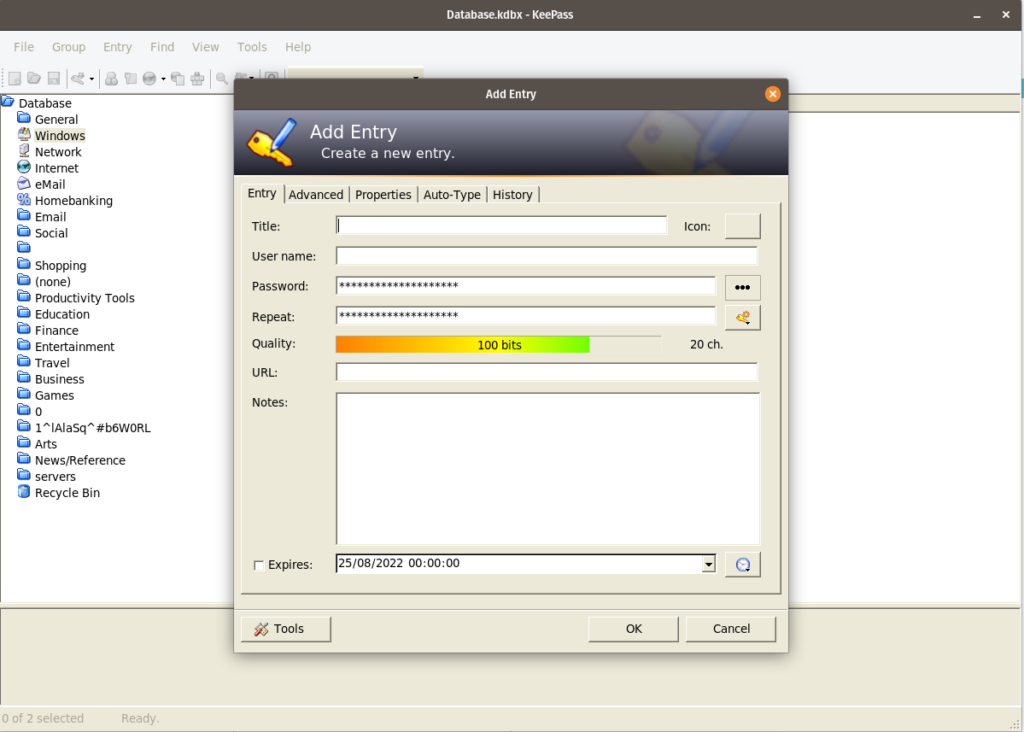
KeePass desktop app

The main supported multifactor authentication (actually multifactor decryption) option is secure key files, and passwordless login is available through biometric unlock – depending on app and extension configuration – or a security key to be used instead of your master password. Other options are available through extensions. Previously configured biometric unlock also provides the only avenue to reset your master password if you forget it.

Both apps and browser extensions allow you to autofill and even autosave passwords for the web, but a killer feature of all KeePass derivatives is “autotype”, which virtually types in your passwords one character at a time, neatly supporting applications and websites that disable pasting, as well as keeping your password out of the clipboard.

Logout timers depend on exactly which app you’re using to access your KeePass database. The first-party KeePass 2 desktop application remains logged in indefinitely and requires user configuration, while most third-party implementations lock after 5 to 15 minutes of being inactive, or when they’re minimised.

One thing KeePass isn’t great at is sharing passwords. If you need to share an entire database, you can email the file to someone, or even put it online, sharing the keys with everyone who needs access over an encrypted messenger such as Signal. However, there’s no built-in secure messaging system to share individual password entries or groups.

Latest deals

Should you buy it?

If you require sophisticated and customisable security:

There’s almost nothing you can’t configure here, and if you find something you can’t, then you can always make your own custom data strings or add extensions.

If you’re looking for convenience:

While polished apps are available to take the effort out of many KeePass functions, you’ll always have to choose your storage location. You don’t need to be an expert to use a KeePass database effectively, but understanding files, networks and online storage is a plus.

Final Thoughts

Quality-of-life features have been massively improved as a result of recent app and extension developments, so you can find a perfect balance between customisability and ease of use. The only real feature gap is password sharing and group folders – for that, you might want to consider a Bitwarden subscription instead.

How we test

We test each password manager ourselves on a variety of computer and mobile operating systems. We carry out comparative feature analysis against industry standards and rival products, and test security and convenience settings such as default logout behaviour and offline access.,

We used for at least a week.

Tested all of the available features.

FAQs

Can KeePass be hacked?

Like any software, it is possible for KeePass to be hacked. However, your passwords should still be safe since they’re encrypted.

Is KeePass free?

Yes, KeePass is a free open source password manager.

Verdict

KeePass is an excellent free-to-use password manager, with lots and lots of customisation options and wide support for third-party apps. The interface may be a little too complicated for some, while the lack of integrated sharing may turn off users too. But this is still nevertheless one of the very best password manager options available.

Pros

  • Entirely free and open source
  • Highly customisable
  • Wide range of third-party apps and extensions
  • In-app TOTP password generation

Cons

  • No integrated sharing
  • More hands-on configuration than most rivals

  • SecurityAES-256, ChaCha20 (the latter for memory protection), third-party extensions allow the addition of other algorithms

  • Stand-alone clientsWindows, Linux, macOS, BSD, Android (Play & F-Droid), iOS

  • Browser extensionsChrome, Firefox, IE, Edge Chrome, Opera, Safari

Introduction

KeePass is free, open source software to the core, with no paid-for components or licenses whatsoever. It’s both an application and a standard, with multiple apps that can access KeePass database (KDBX) files and handle their associated encryption standard.

My own setup uses KeeWeb on Linux, the first-party KeePass 2 app for Windows, and AuthPass on Android – all accessing a shared database file that I keep on a secure cloud server that I control. You can customise everything from your encryption protocol, to your interface and browser plugin selection, to your second factors and passwordless logins.

It’s obviously the perfect choice for security enthusiasts, but it isn’t just for the hardcore.

Pricing

Neither KeePass nor its extensions and compatible applications cost a penny.

Features

  • Unfriendly interface
  • Supports biometric unlock

KeePass and its cross-platform port, KeePassXC, have an unparalleled range of features, but can feel unfriendly to use. Some of their features require you to enter code strings in specific locations, and both have interfaces that feel like something out of the early 2000s.

If you want to get into using the KeePass ecosystem, I recommend using a friendlier app. Both KeeWeb and AuthPass support the KDBX database standard, and you can activate features such as one-time codes, browser plugins, attached files, and cloud storage support with a click or two. Although they have friendly interfaces, there’s still enough flexibility to add support for non-standard stuff, such as the Steam game client’s proprietary one-time codes.

Unlike most password managers, KeePass delivers full control over where and how your database is stored, so you don’t have to trust it to someone else’s computer – although popular cloud storage services are fully supported.

KeePass desktop app

The main supported multifactor authentication (actually multifactor decryption) option is secure key files, and passwordless login is available through biometric unlock – depending on app and extension configuration – or a security key to be used instead of your master password. Other options are available through extensions. Previously configured biometric unlock also provides the only avenue to reset your master password if you forget it.

Both apps and browser extensions allow you to autofill and even autosave passwords for the web, but a killer feature of all KeePass derivatives is “autotype”, which virtually types in your passwords one character at a time, neatly supporting applications and websites that disable pasting, as well as keeping your password out of the clipboard.

Logout timers depend on exactly which app you’re using to access your KeePass database. The first-party KeePass 2 desktop application remains logged in indefinitely and requires user configuration, while most third-party implementations lock after 5 to 15 minutes of being inactive, or when they’re minimised.

One thing KeePass isn’t great at is sharing passwords. If you need to share an entire database, you can email the file to someone, or even put it online, sharing the keys with everyone who needs access over an encrypted messenger such as Signal. However, there’s no built-in secure messaging system to share individual password entries or groups.

Latest deals

Should you buy it?

If you require sophisticated and customisable security:

There’s almost nothing you can’t configure here, and if you find something you can’t, then you can always make your own custom data strings or add extensions.

If you’re looking for convenience:

While polished apps are available to take the effort out of many KeePass functions, you’ll always have to choose your storage location. You don’t need to be an expert to use a KeePass database effectively, but understanding files, networks and online storage is a plus.

Final Thoughts

Quality-of-life features have been massively improved as a result of recent app and extension developments, so you can find a perfect balance between customisability and ease of use. The only real feature gap is password sharing and group folders – for that, you might want to consider a Bitwarden subscription instead.

How we test

We test each password manager ourselves on a variety of computer and mobile operating systems. We carry out comparative feature analysis against industry standards and rival products, and test security and convenience settings such as default logout behaviour and offline access.,

We used for at least a week.

Tested all of the available features.

FAQs

Can KeePass be hacked?

Like any software, it is possible for KeePass to be hacked. However, your passwords should still be safe since they’re encrypted.

Is KeePass free?

Yes, KeePass is a free open source password manager.

Previous Post

Xbox brings exciting games in September 2022; Check the list of games

Next Post

Judge to appoint special master to review Trump’s Mar-a-Lago documents

Related Posts

Hoover HF6 TurboSense Review
Reviews

Hoover HF6 TurboSense Review

by New Edge Times Report
May 4, 2026
JBL Charge 6 Review
Reviews

JBL Charge 6 Review

by New Edge Times Report
May 1, 2026
Stihl ASA 20 Cordless Secateurs Review: Pruning made much easier
Reviews

Stihl ASA 20 Cordless Secateurs Review: Pruning made much easier

by New Edge Times Report
May 1, 2026
Leave Comment
New Edge Times

© 2025 New Edge Times or its affiliated companies. All rights reserved.

Navigate Site

  • About
  • Advertise
  • Terms & Conditions
  • Privacy Policy
  • Disclaimer
  • Contact

Follow Us

No Result
View All Result
  • World
  • U.S.
  • Politics
  • Business
  • Science
  • Tech
  • Youth
  • Entertainment
    • Gaming
    • Movie
    • Music
    • Arts
  • Sports
  • Lifestyle
    • Fashion
    • Food
    • Health
    • Travel
  • Reviews
  • Trending

© 2025 New Edge Times or its affiliated companies. All rights reserved.

Welcome Back!

Login to your account below

Forgotten Password?

Retrieve your password

Please enter your username or email address to reset your password.

Log In
