
• Washington DC |
  • New York |
  • Toronto |
  • Distribution: (800) 510 9863
Monday, May 18, 2026
  • Login
No Result
View All Result
NEWSLETTER
New Edge Times
  • World
  • U.S.
  • Politics
  • Business
  • Science
  • Tech
  • Youth
  • Entertainment
    • All
    • Arts
    • Gaming
    • Movie
    • Music
    Video: ‘Faces of Death’ Confronts Our Viewing Habits

    Video: ‘Faces of Death’ Confronts Our Viewing Habits

    Video: ‘The Devil Wears Prada 2’ | Anatomy of a Scene

    Video: ‘The Devil Wears Prada 2’ | Anatomy of a Scene

    Ye Must Pay Musicians for Using Sample Without Permission

    Ye Must Pay Musicians for Using Sample Without Permission

    Claire Maurier, the Narcissistic Mother in ‘400 Blows,’ Dies at 97

    Claire Maurier, the Narcissistic Mother in ‘400 Blows,’ Dies at 97

    Man Who Stole Unreleased Beyoncé Music Is Sentenced to 5 Years

    Man Who Stole Unreleased Beyoncé Music Is Sentenced to 5 Years

    How Much Art Is Too Much? A Guide to the New York Fairs.

    How Much Art Is Too Much? A Guide to the New York Fairs.

    Kevin Hart Roast: Highlights From Tom Brady, the Rock, Katt Williams and More

    Kevin Hart Roast: Highlights From Tom Brady, the Rock, Katt Williams and More

    Video: Why Are So Many Celebrities Co-Producing On Broadway?

    Video: Why Are So Many Celebrities Co-Producing On Broadway?

    • Gaming
    • Movie
    • Music
    • Arts
  • Sports
  • Lifestyle
    • All
    • Fashion
    • Food
    • Health
    • Travel
    Ibiza before the rush: early island escape

    Ibiza before the rush: early island escape

    Our Summer Cooking List: 24 Fresh Recipes to Seize the Season

    Our Summer Cooking List: 24 Fresh Recipes to Seize the Season

    The Good List: 6 Things to Add Joy to Your Day

    The Good List: 6 Things to Add Joy to Your Day

    Tiny Love Stories: ‘Life Suddenly Made Sense’

    Tiny Love Stories: ‘Life Suddenly Made Sense’

    These Summery Chickpeas Are Coming for Your Potato Salad

    These Summery Chickpeas Are Coming for Your Potato Salad

    Video: How Worried Should We Be About Hantavirus?

    Video: How Worried Should We Be About Hantavirus?

    Cruise Ship Hit by Hantavirus Leaves Canary Islands and Sails Toward Netherlands

    Cruise Ship Hit by Hantavirus Leaves Canary Islands and Sails Toward Netherlands

    A Sheet-Pan Chicken for Peak Asparagus

    A Sheet-Pan Chicken for Peak Asparagus

    • Fashion
    • Food
    • Health
    • Travel
  • Reviews
  • Trending
  • World
  • U.S.
  • Politics
  • Business
  • Science
  • Tech
  • Youth
  • Entertainment
    • All
    • Arts
    • Gaming
    • Movie
    • Music
    Video: ‘Faces of Death’ Confronts Our Viewing Habits

    Video: ‘Faces of Death’ Confronts Our Viewing Habits

    Video: ‘The Devil Wears Prada 2’ | Anatomy of a Scene

    Video: ‘The Devil Wears Prada 2’ | Anatomy of a Scene

    Ye Must Pay Musicians for Using Sample Without Permission

    Ye Must Pay Musicians for Using Sample Without Permission

    Claire Maurier, the Narcissistic Mother in ‘400 Blows,’ Dies at 97

    Claire Maurier, the Narcissistic Mother in ‘400 Blows,’ Dies at 97

    Man Who Stole Unreleased Beyoncé Music Is Sentenced to 5 Years

    Man Who Stole Unreleased Beyoncé Music Is Sentenced to 5 Years

    How Much Art Is Too Much? A Guide to the New York Fairs.

    How Much Art Is Too Much? A Guide to the New York Fairs.

    Kevin Hart Roast: Highlights From Tom Brady, the Rock, Katt Williams and More

    Kevin Hart Roast: Highlights From Tom Brady, the Rock, Katt Williams and More

    Video: Why Are So Many Celebrities Co-Producing On Broadway?

    Video: Why Are So Many Celebrities Co-Producing On Broadway?

    • Gaming
    • Movie
    • Music
    • Arts
  • Sports
  • Lifestyle
    • All
    • Fashion
    • Food
    • Health
    • Travel
    Ibiza before the rush: early island escape

    Ibiza before the rush: early island escape

    Our Summer Cooking List: 24 Fresh Recipes to Seize the Season

    Our Summer Cooking List: 24 Fresh Recipes to Seize the Season

    The Good List: 6 Things to Add Joy to Your Day

    The Good List: 6 Things to Add Joy to Your Day

    Tiny Love Stories: ‘Life Suddenly Made Sense’

    Tiny Love Stories: ‘Life Suddenly Made Sense’

    These Summery Chickpeas Are Coming for Your Potato Salad

    These Summery Chickpeas Are Coming for Your Potato Salad

    Video: How Worried Should We Be About Hantavirus?

    Video: How Worried Should We Be About Hantavirus?

    Cruise Ship Hit by Hantavirus Leaves Canary Islands and Sails Toward Netherlands

    Cruise Ship Hit by Hantavirus Leaves Canary Islands and Sails Toward Netherlands

    A Sheet-Pan Chicken for Peak Asparagus

    A Sheet-Pan Chicken for Peak Asparagus

    • Fashion
    • Food
    • Health
    • Travel
  • Reviews
  • Trending
No Result
View All Result
New Edge Times
No Result
View All Result
Home Reviews

TP-Link Deco X50-5G

by New Edge Times Report
August 14, 2023
in Reviews
TP-Link Deco X50-5G
Share on FacebookShare on Twitter

Verdict

Simple to use, packed full of features and good value for a router with a 5G modem built in, the TP-Link Deco X50-5G is a good device where you need a cellular connection for backup or your main internet. It is good at close range, but I found performance dropped off at range, so those with a house will most likely need to invest in some Deco satellites to boost signal strength.

Pros

  • Works with all Deco systems
  • Supports 4G/5G backup
  • Good value

Cons

  • Offers limited range
  • Few Ethernet ports


  • 4G/5G Has a SIM card slot for connection to a 4G or 5G network.

  • Ethernet portsOne 2.5 Gigabit Ethernet port, two Gigabit Ethernet ports.

Introduction

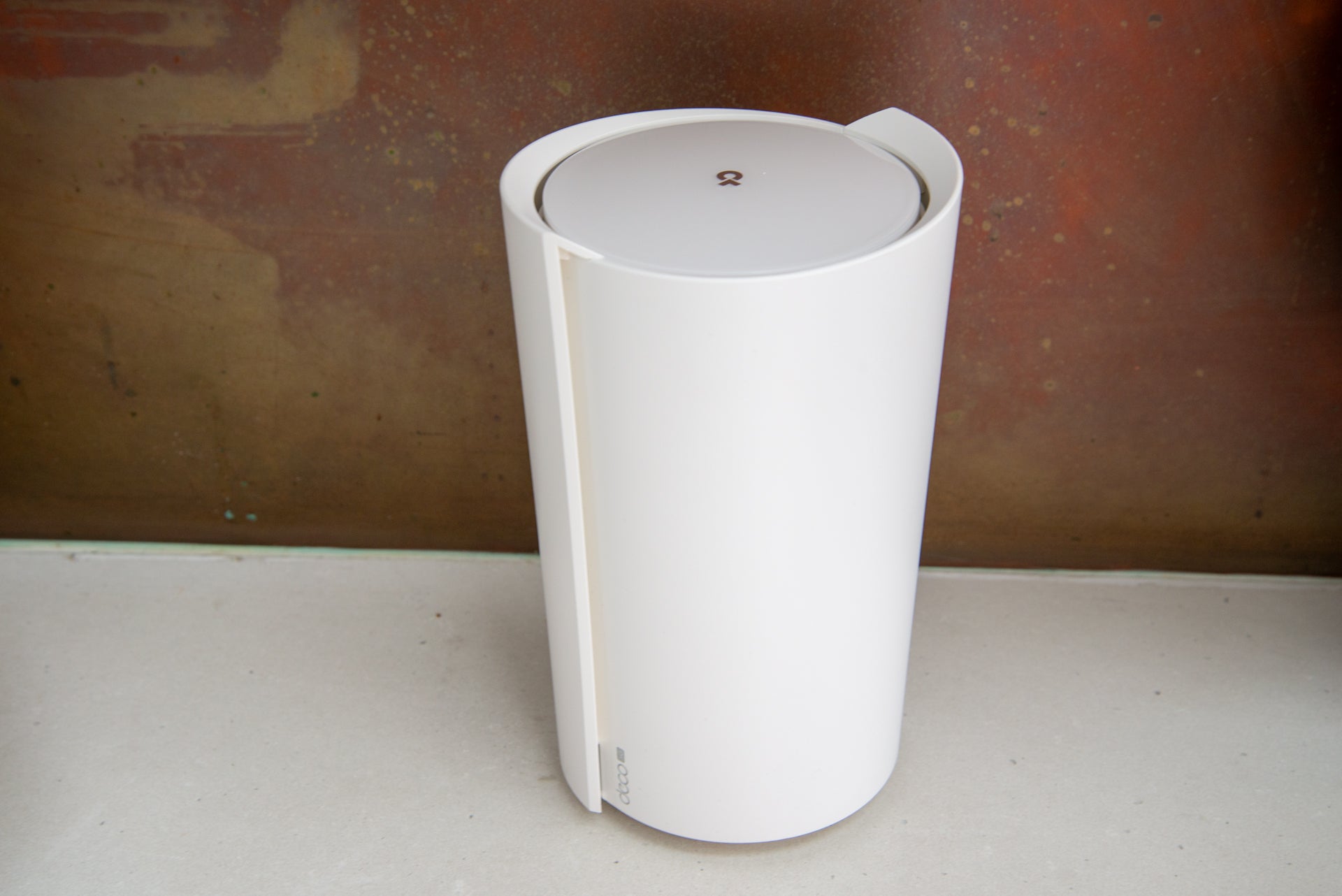
Although TP-Link sells an X50 mesh system as a bundle, it has since branched out to add a range of X50 products that do something different.

For those that want their internet backed up with a cellular connection (or just need to run internet from a SIM card), the Deco X50-5G could be for them.

A powerful router in its own right, this model can be used with any other Deco devices, not just X50 versions, as part of a mesh system, giving you options if you need to boost its signal.

Design and features

  • Built-in SIM slot
  • Slightly limited number of LAN ports

Looking a little like a fancy vase thanks to its plastic case wrapping around the side, the TP-Link Deco X50-5G is a neat and relatively compact router. It’s a touch light on Ethernet ports, with only two Gigabit Ethernet ports and one 2.5 Gigabit Ethernet port at the rear.

Either can be used as WAN or LAN ports, with the system auto-detecting how they’re used. Or, if you set the router up to use its 5G connection only, then all ports function as LAN ports. Even so, if you’ve got a lot of wired devices, you’ll likely need a switch.
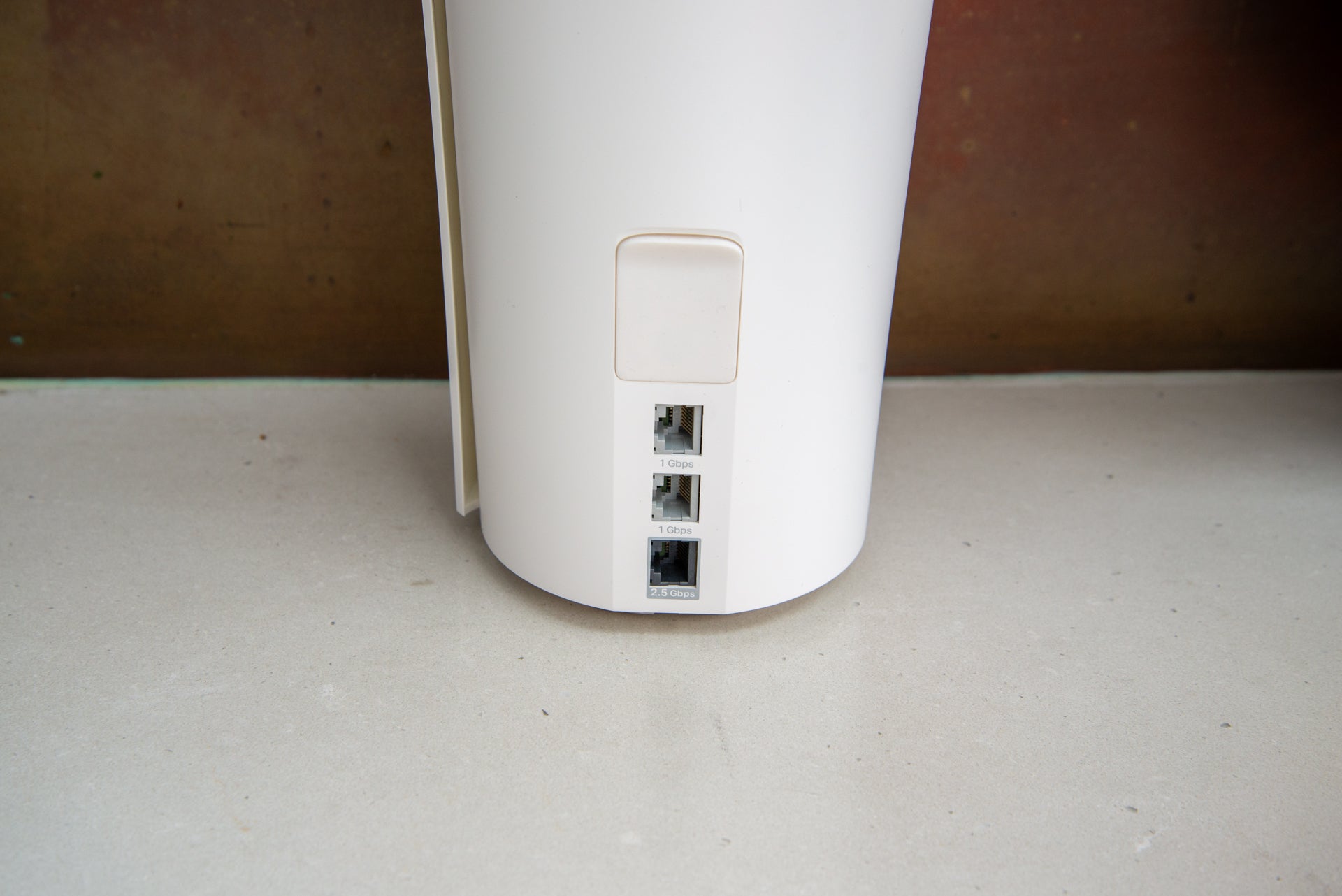
TP-Link Deco X50-5G ports
Image Credit (Trusted Reviews)

Flip the router over and there’s a Nano SIM card slot underneath. This will work with SIM cards from any network, running over 4G or 5G, depending on what the signal is like where you live. Having the choice of network at least means that you can buy the best SIM for where you live.
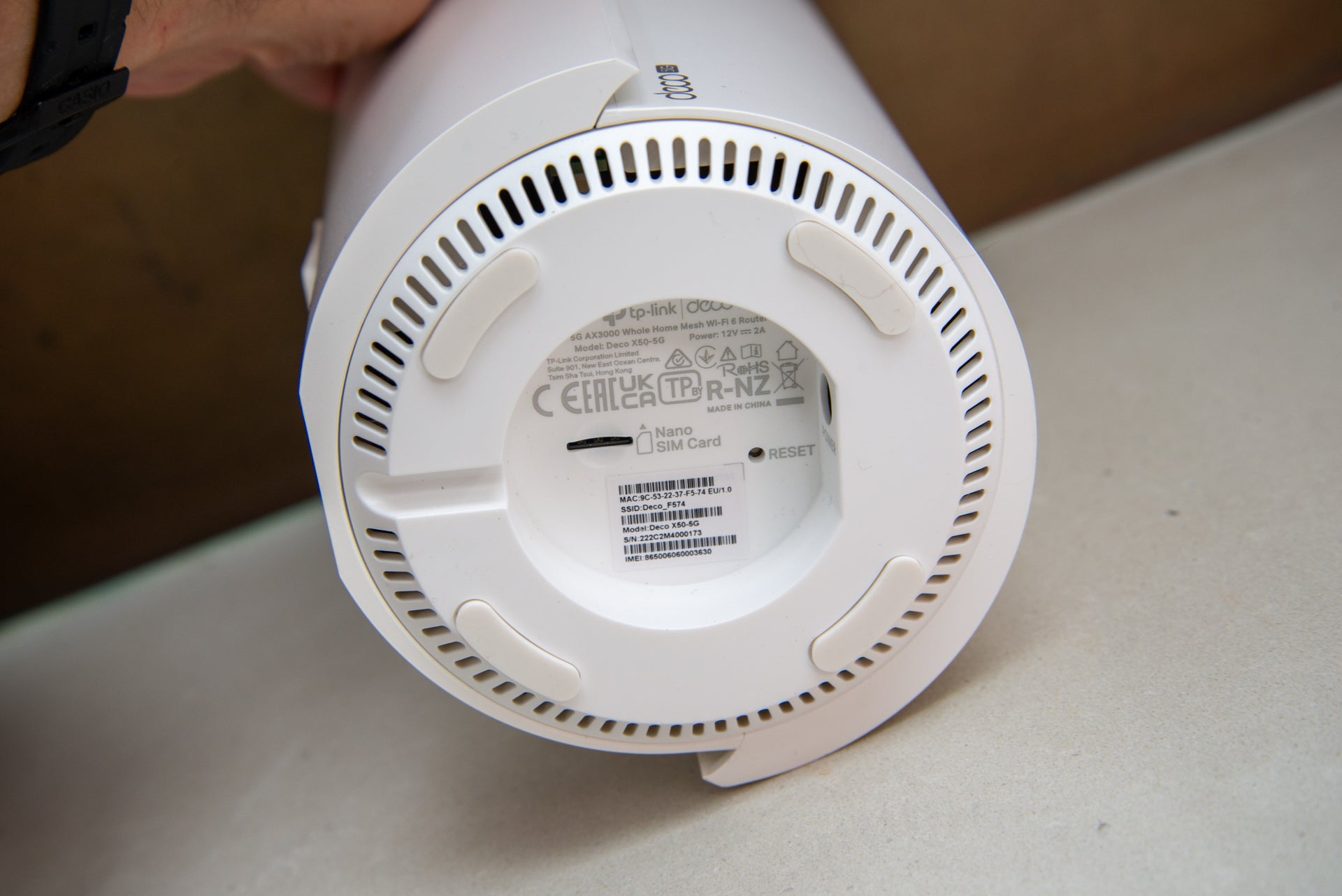
TP-Link Deco X50-5G SIM slot
Image Credit (Trusted Reviews)

To help boost the signal, there are twin antenna ports on the rear of the router. That’s a similar setup to the Netgear Orbi NBK752 system.
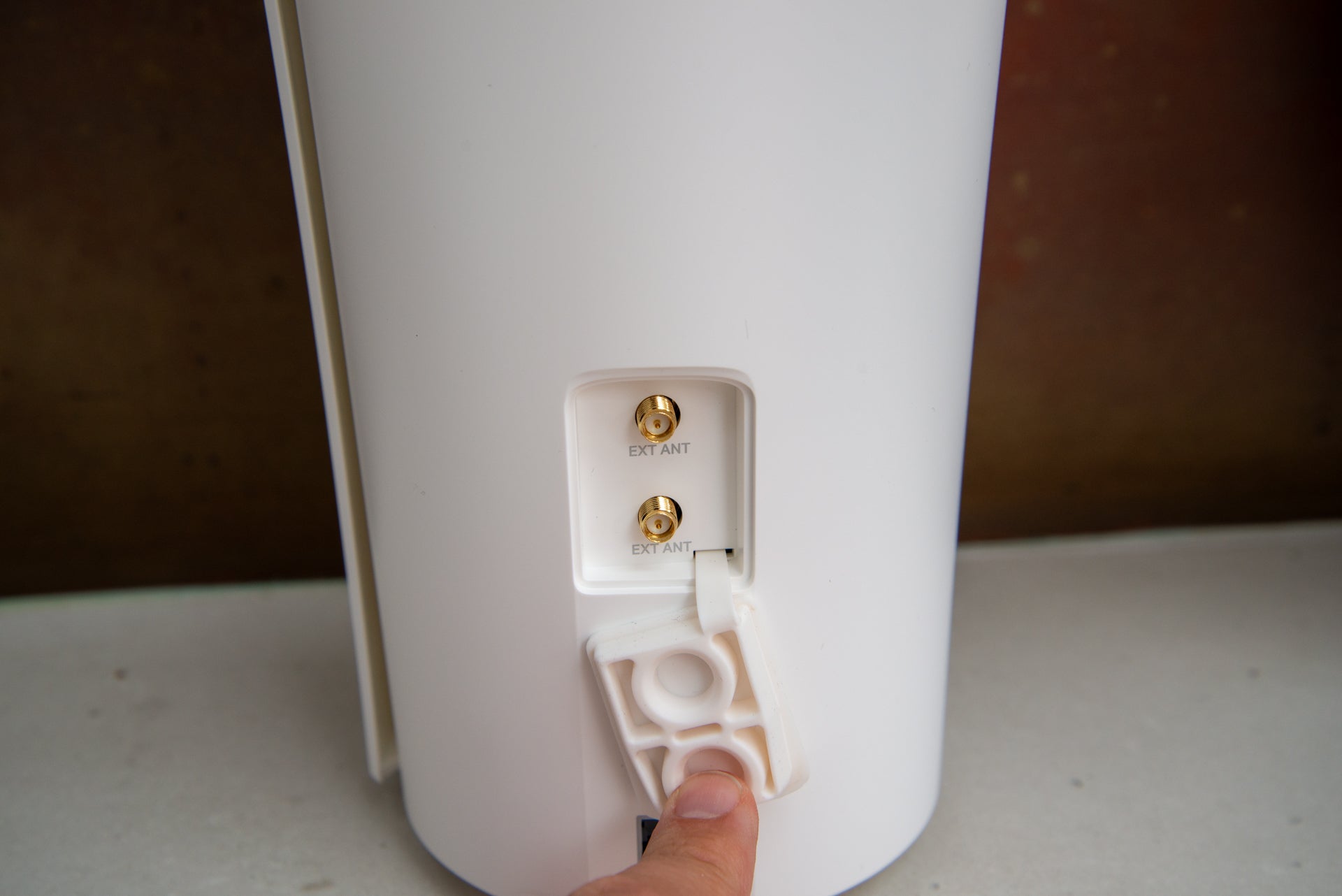
TP-Link Deco X50-5G antenna
Image Credit (Trusted Reviews)

Configuration is through the TP-Link Deco app. This makes it supremely easy to install the router: just follow the wizard through, and the app connects to the router, sets up the internet connection and prompts you to create a secure network.

TP-Link has one of the best apps going, and some of the best features. While many router manufacturers require you to pay for parental controls, such as with the Eero 6 Plus, TP-Link bundles generous free controls.

With this system, you can create profiles for people in your home and assign their devices. Websites can be filtered by category, with the age you set in the profile creating handy defaults. And, there’s an option to set a single bedtime.
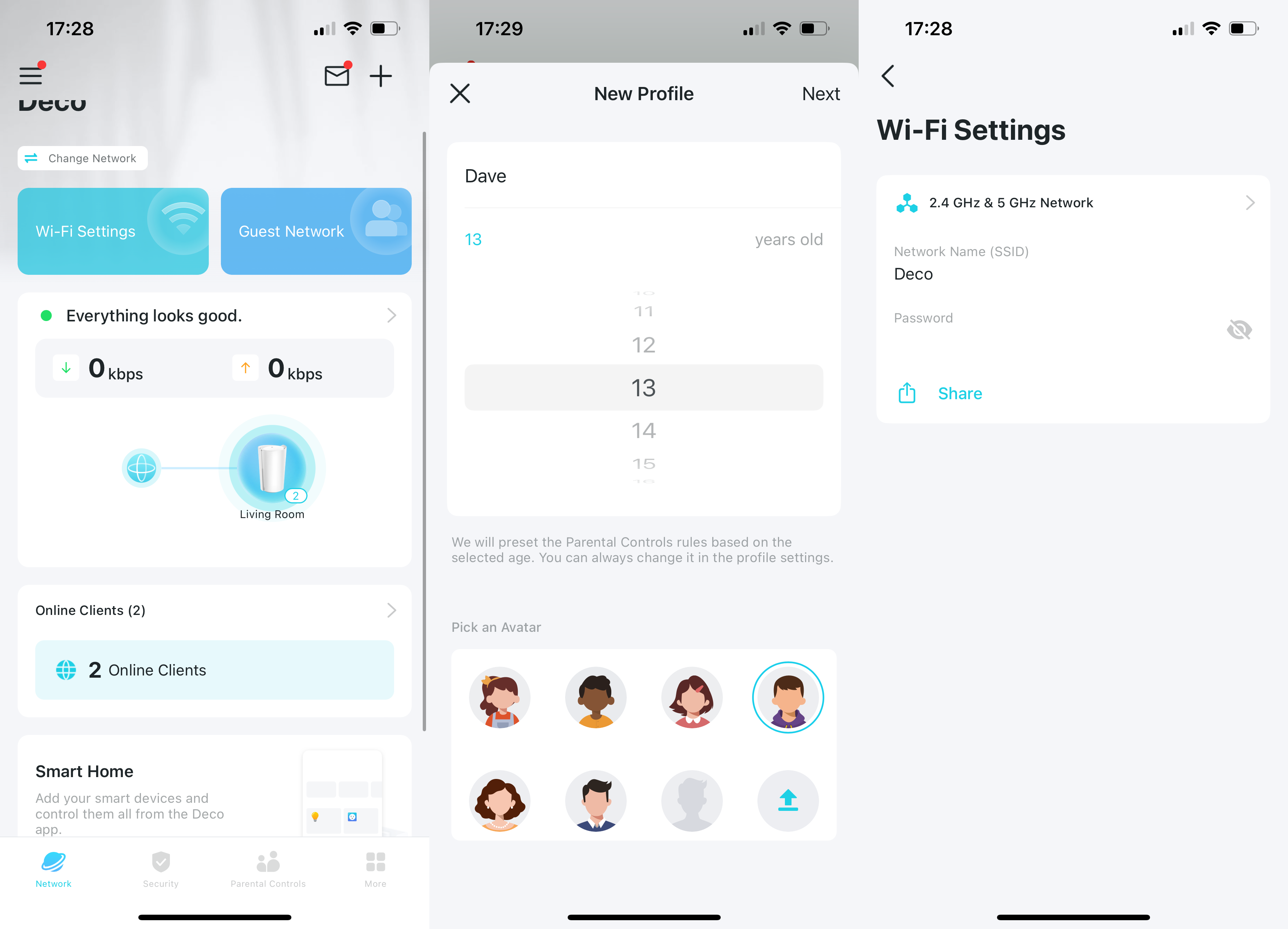
TP-Link Deco X50-5G app
Image Credit (Trusted Reviews)

Upgrade to Advanced Parental Controls (£2.99 a month or £17.99 a year), and you can set different bedtimes for the weekend and custom days, set time limits for internet use, and create Offtime when the internet is not available (handy for setting a homework time, for example).

If you want built-in security against malware, phishing and the like, TP-Link offers this via its Security+ service, which costs £4.99 a month or £34.99 a year. I quite like the way that the charges for parental controls and security are split, as you can choose the services that apply to you.

Wi-Fi settings are a little basic, with the TP-Link Deco X50-5G setting its own 2.4GHz and 5GHz channels automatically. Wi-Fi settings also include a guest network.

If the TP-Link Deco X50-5G is connected via an Ethernet connection, 4G/5G can be set as backup. It can take a little while for the system to switch from one connection to another, but that’s the same with all cellular backup systems that I’ve tested.

Cellular speeds will depend on your location. I can get around 25Mbit/s when running on 4G, although I’ve got over 100Mbit/s in areas with a 5G connection.

Performance

  • Decent at close range
  • Needs a satellite or two at long range

The TP-Link Deco X50-5G is an AX3000 Wi-Fi 6 system. Its 5GHz band runs at a maximum speed of 2402Mbit/s and its 2.4GHz band at a maximum of 574Mbit/s. That’s relatively mid-range by today’s standards.

At close range, performance was pretty good, topping out at 337.72Mbit/s. Moving to the first floor, speeds dropped to 123.33Mbit/s. On my second floor, I barely got a signal, and speeds dropped to 15.12Mbit/s.
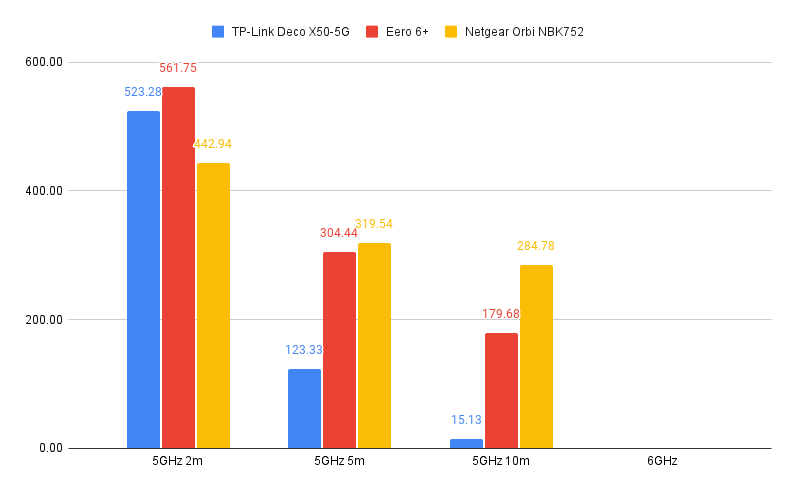
TP-Link Deco X50-5G performance
Image Credit (Trusted Reviews)

That may sound bad compared to the likes of the Eero 6 Plus, but I’m testing here with just the router. Adding a mesh satellite into the mix, such as the TP-Link Deco X50-POE, improves speeds, as you can see in the graph below.
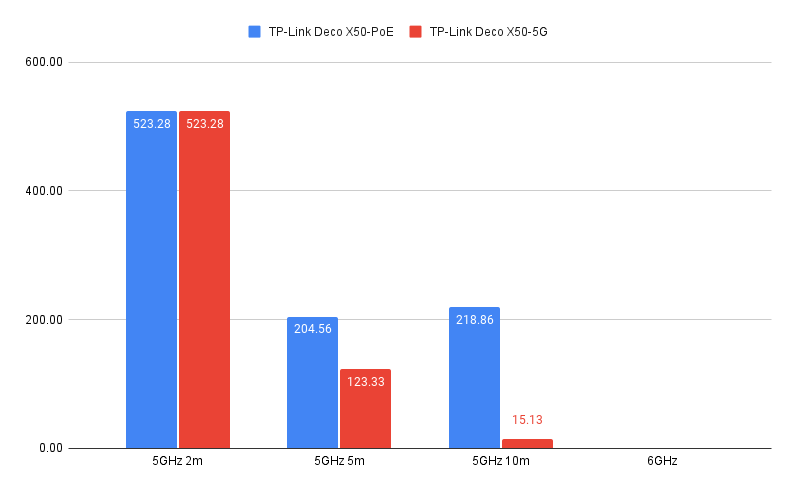
TP-Link Deco X50-PoE performance chart

Latest deals

Should you buy it?

You have a Deco system and unreliable broadband: This is a quick upgrade to add a cellular backup option.

You don’t need cellular backup: If your broadband is reliable, a standard mesh system will do the job. Check out our Best Routers guide for more options.

Final Thoughts

If you have more modest network needs and need 4G/5G as either a backup or main connection, the TP-Link Deco X50-5G is a good value system, with lots of features. It does need additional Deco satellites to boost range but, even so, remains good value.

Alternatively, if you have a wireless hotspot device, then the Eero 6 Plus system may suit you, as this can be set to use an alternative Wi-Fi hotspot (your 4G/5G device) as a backup should the main internet go down. Have a read of our Best Routers guide for even more options.

How we test

Unlike other sites, we test every wireless router we review thoroughly over an extended period of time. We use industry standard tests to compare features properly. We’ll always tell you what we find. We never, ever, accept money to review a product.

Find out more about how we test in our ethics policy.

Used as our main wireless router for the review period

We throughput test all wireless devices using the same equipment in the same locations so that we have accurate comparisons

You might like…
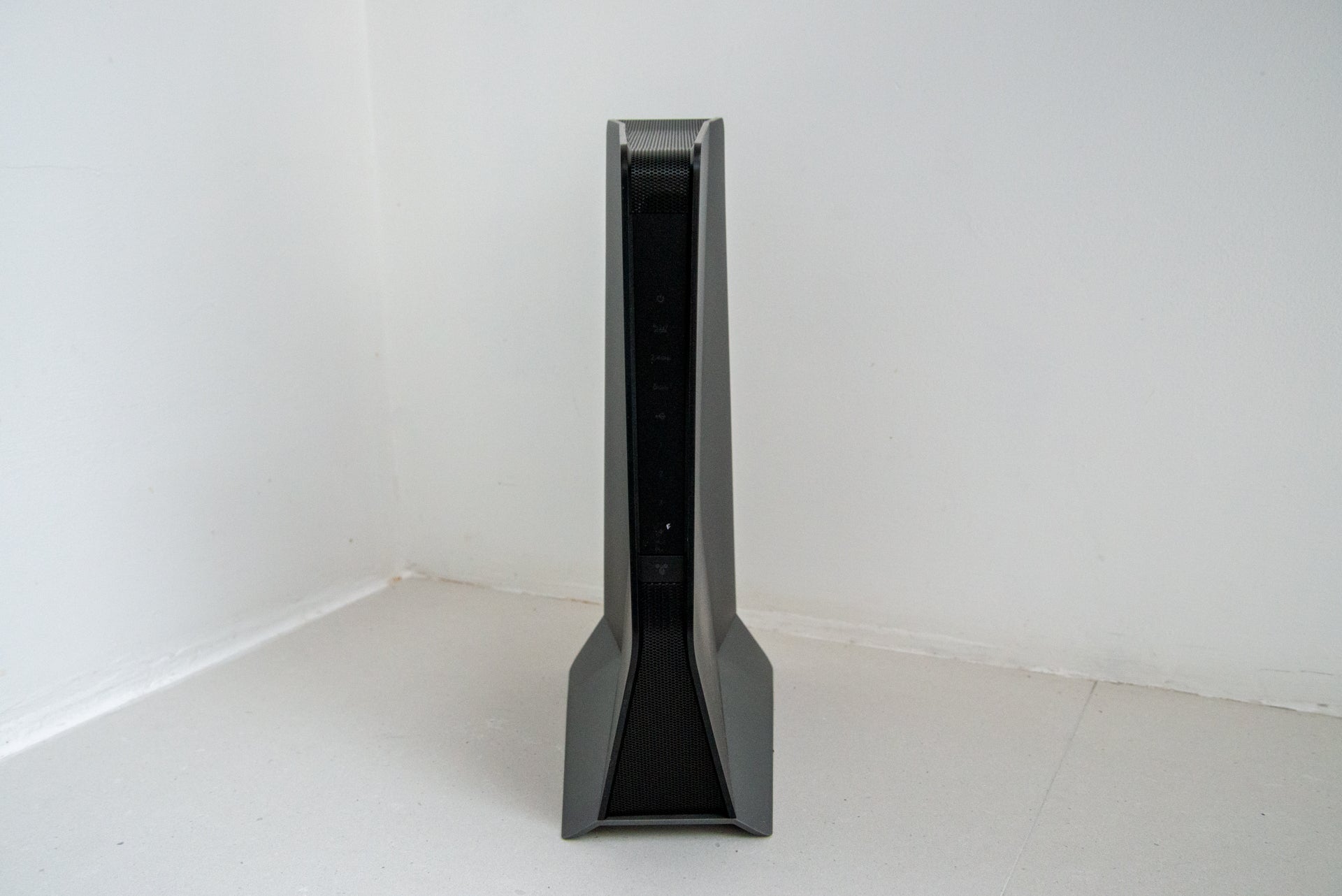

Best Wi-Fi extenders 2023: Better coverage made easy


Best Router 2023: Top options for upgrading your Wi-Fi speeds

FAQs

What systems is the TP-Link Deco X50-5G compatible with?

It will work with any existing Deco system, not just X50 ones.

What networks does the TP-Link Deco X50-5G work with?

It will work with any network as it is unlocked.

Trusted Reviews test data

‹

5GHz (close)

5GHz (first floor)

5GHz (second floor)

TP-Link Deco X50-5G

523.28 Mbps

123.33 Mbps

15.13 Mbps

›

‹

UK RRP

Manufacturer

Size (Dimensions)

Weight

ASIN

Release Date

First Reviewed Date

Model Number

Wifi Spec

Special features

Number of Ethernet ports

TP-Link Deco X50-5G

£379.99

TP-Link

130 x 123 x 211 MM

500 G

B0BZWMLS6P

2023

31/07/2023

TP-Link Deco X50-5G

Wi-Fi 6 (2402Mbit/s 5GHz, 574Mbit/s 2.4GHz)

Mobile backup

3

›

Verdict

Simple to use, packed full of features and good value for a router with a 5G modem built in, the TP-Link Deco X50-5G is a good device where you need a cellular connection for backup or your main internet. It is good at close range, but I found performance dropped off at range, so those with a house will most likely need to invest in some Deco satellites to boost signal strength.

Pros

  • Works with all Deco systems
  • Supports 4G/5G backup
  • Good value

Cons

  • Offers limited range
  • Few Ethernet ports


  • 4G/5G Has a SIM card slot for connection to a 4G or 5G network.

  • Ethernet portsOne 2.5 Gigabit Ethernet port, two Gigabit Ethernet ports.

Introduction

Although TP-Link sells an X50 mesh system as a bundle, it has since branched out to add a range of X50 products that do something different.

For those that want their internet backed up with a cellular connection (or just need to run internet from a SIM card), the Deco X50-5G could be for them.

A powerful router in its own right, this model can be used with any other Deco devices, not just X50 versions, as part of a mesh system, giving you options if you need to boost its signal.

Design and features

  • Built-in SIM slot
  • Slightly limited number of LAN ports

Looking a little like a fancy vase thanks to its plastic case wrapping around the side, the TP-Link Deco X50-5G is a neat and relatively compact router. It’s a touch light on Ethernet ports, with only two Gigabit Ethernet ports and one 2.5 Gigabit Ethernet port at the rear.

Either can be used as WAN or LAN ports, with the system auto-detecting how they’re used. Or, if you set the router up to use its 5G connection only, then all ports function as LAN ports. Even so, if you’ve got a lot of wired devices, you’ll likely need a switch.

TP-Link Deco X50-5G ports
Image Credit (Trusted Reviews)

Flip the router over and there’s a Nano SIM card slot underneath. This will work with SIM cards from any network, running over 4G or 5G, depending on what the signal is like where you live. Having the choice of network at least means that you can buy the best SIM for where you live.

TP-Link Deco X50-5G SIM slot
Image Credit (Trusted Reviews)

To help boost the signal, there are twin antenna ports on the rear of the router. That’s a similar setup to the Netgear Orbi NBK752 system.

TP-Link Deco X50-5G antenna
Image Credit (Trusted Reviews)

Configuration is through the TP-Link Deco app. This makes it supremely easy to install the router: just follow the wizard through, and the app connects to the router, sets up the internet connection and prompts you to create a secure network.

TP-Link has one of the best apps going, and some of the best features. While many router manufacturers require you to pay for parental controls, such as with the Eero 6 Plus, TP-Link bundles generous free controls.

With this system, you can create profiles for people in your home and assign their devices. Websites can be filtered by category, with the age you set in the profile creating handy defaults. And, there’s an option to set a single bedtime.

TP-Link Deco X50-5G app
Image Credit (Trusted Reviews)

Upgrade to Advanced Parental Controls (£2.99 a month or £17.99 a year), and you can set different bedtimes for the weekend and custom days, set time limits for internet use, and create Offtime when the internet is not available (handy for setting a homework time, for example).

If you want built-in security against malware, phishing and the like, TP-Link offers this via its Security+ service, which costs £4.99 a month or £34.99 a year. I quite like the way that the charges for parental controls and security are split, as you can choose the services that apply to you.

Wi-Fi settings are a little basic, with the TP-Link Deco X50-5G setting its own 2.4GHz and 5GHz channels automatically. Wi-Fi settings also include a guest network.

If the TP-Link Deco X50-5G is connected via an Ethernet connection, 4G/5G can be set as backup. It can take a little while for the system to switch from one connection to another, but that’s the same with all cellular backup systems that I’ve tested.

Cellular speeds will depend on your location. I can get around 25Mbit/s when running on 4G, although I’ve got over 100Mbit/s in areas with a 5G connection.

Performance

  • Decent at close range
  • Needs a satellite or two at long range

The TP-Link Deco X50-5G is an AX3000 Wi-Fi 6 system. Its 5GHz band runs at a maximum speed of 2402Mbit/s and its 2.4GHz band at a maximum of 574Mbit/s. That’s relatively mid-range by today’s standards.

At close range, performance was pretty good, topping out at 337.72Mbit/s. Moving to the first floor, speeds dropped to 123.33Mbit/s. On my second floor, I barely got a signal, and speeds dropped to 15.12Mbit/s.

TP-Link Deco X50-5G performance
Image Credit (Trusted Reviews)

That may sound bad compared to the likes of the Eero 6 Plus, but I’m testing here with just the router. Adding a mesh satellite into the mix, such as the TP-Link Deco X50-POE, improves speeds, as you can see in the graph below.

TP-Link Deco X50-PoE performance chart

Latest deals

Should you buy it?

You have a Deco system and unreliable broadband: This is a quick upgrade to add a cellular backup option.

You don’t need cellular backup: If your broadband is reliable, a standard mesh system will do the job. Check out our Best Routers guide for more options.

Final Thoughts

If you have more modest network needs and need 4G/5G as either a backup or main connection, the TP-Link Deco X50-5G is a good value system, with lots of features. It does need additional Deco satellites to boost range but, even so, remains good value.

Alternatively, if you have a wireless hotspot device, then the Eero 6 Plus system may suit you, as this can be set to use an alternative Wi-Fi hotspot (your 4G/5G device) as a backup should the main internet go down. Have a read of our Best Routers guide for even more options.

How we test

Unlike other sites, we test every wireless router we review thoroughly over an extended period of time. We use industry standard tests to compare features properly. We’ll always tell you what we find. We never, ever, accept money to review a product.

Find out more about how we test in our ethics policy.

Used as our main wireless router for the review period

We throughput test all wireless devices using the same equipment in the same locations so that we have accurate comparisons

You might like…


Best Wi-Fi extenders 2023: Better coverage made easy


Best Router 2023: Top options for upgrading your Wi-Fi speeds

FAQs

What systems is the TP-Link Deco X50-5G compatible with?

It will work with any existing Deco system, not just X50 ones.

What networks does the TP-Link Deco X50-5G work with?

It will work with any network as it is unlocked.

Trusted Reviews test data

‹

5GHz (close)

5GHz (first floor)

5GHz (second floor)

TP-Link Deco X50-5G

523.28 Mbps

123.33 Mbps

15.13 Mbps

›

‹

UK RRP

Manufacturer

Size (Dimensions)

Weight

ASIN

Release Date

First Reviewed Date

Model Number

Wifi Spec

Special features

Number of Ethernet ports

TP-Link Deco X50-5G

£379.99

TP-Link

130 x 123 x 211 MM

500 G

B0BZWMLS6P

2023

31/07/2023

TP-Link Deco X50-5G

Wi-Fi 6 (2402Mbit/s 5GHz, 574Mbit/s 2.4GHz)

Mobile backup

3

›

Previous Post

How Donald Trump tried to undo his loss in Georgia in 2020

Next Post

International Museum Leader to Head Jewish Museum

Related Posts

Hoover HF6 TurboSense Review
Reviews

Hoover HF6 TurboSense Review

by New Edge Times Report
May 4, 2026
JBL Charge 6 Review
Reviews

JBL Charge 6 Review

by New Edge Times Report
May 1, 2026
Stihl ASA 20 Cordless Secateurs Review: Pruning made much easier
Reviews

Stihl ASA 20 Cordless Secateurs Review: Pruning made much easier

by New Edge Times Report
May 1, 2026
Leave Comment
New Edge Times

© 2025 New Edge Times or its affiliated companies. All rights reserved.

Navigate Site

  • About
  • Advertise
  • Terms & Conditions
  • Privacy Policy
  • Disclaimer
  • Contact

Follow Us

No Result
View All Result
  • World
  • U.S.
  • Politics
  • Business
  • Science
  • Tech
  • Youth
  • Entertainment
    • Gaming
    • Movie
    • Music
    • Arts
  • Sports
  • Lifestyle
    • Fashion
    • Food
    • Health
    • Travel
  • Reviews
  • Trending

© 2025 New Edge Times or its affiliated companies. All rights reserved.

Welcome Back!

Login to your account below

Forgotten Password?

Retrieve your password

Please enter your username or email address to reset your password.

Log In
