





Verdict
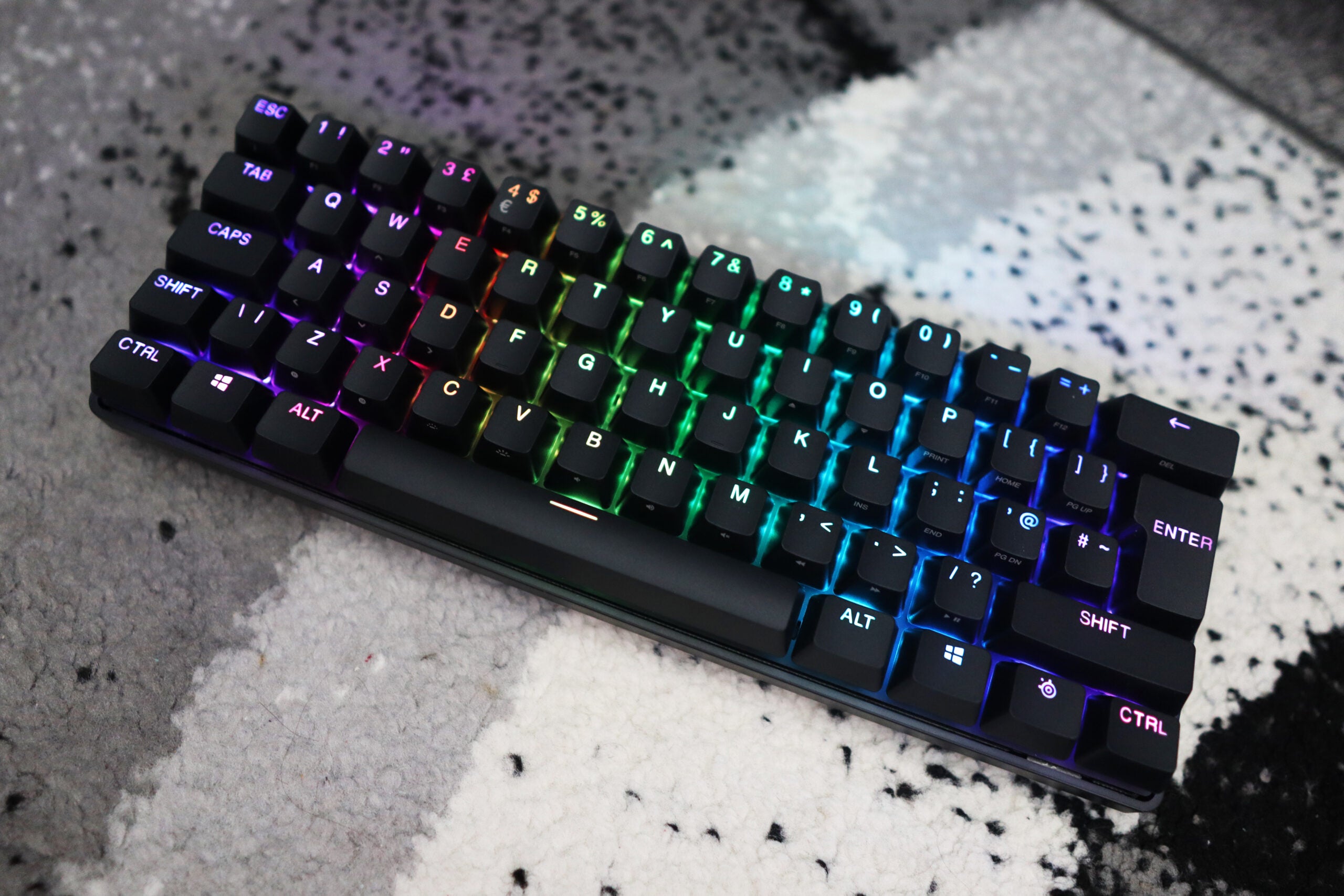
The SteelSeries Apex Pro Mini Wireless offers all the benefits of a small and fast gaming keyboard in a solid overall package. It combines the powers of adjustable actuation point switches that feel great with a functional and space-saving 60% layout, appealing to the gamer who wants it all. Add to this great looks, bright RGB lighting, and decent battery life, and you’ve got a brilliant keyboard, albeit a rather expensive one.
Pros
- Adjustable actuation point switches are a game changer
- Solid build quality
- Bright RGB lighting
Cons
- Expensive
- 60% layout may be too small for some
Availability
- UKRRP: £219.99
- USARRP: $239.99
- EuropeRRP: €278.99
-
SteelSeries OmniPoint switchesThe Apex Pro Mini Wireless features SteelSeries’ own adjustable actuation point switches, OmniPoint. -
Bluetooth/USB-C wireless connectivityIt can connect wirelessly in two different ways: Bluetooth 5.0 or the Quantum 2.0 USB-C receiver. -
40 hours of battery life (with RGB enabled)The Apex Pro Mini Wireless is quoted to last for up to 40 hours with RGB lighting enabled.
Introduction
The past couple of years have been quite an exciting time for gaming keyboards.
We’ve seen keyboards with analogue switches that offer controller-like precision, ones with OLED screens and some with adjustable actuation input switches. We’ve also seen smaller form factor keyboards become a key part of mainstream manufacturers’ product line-ups.
What if I told you there was a keyboard that combined the innovation offered by the current crop of premium boards with the smaller form factor of a 60%? Well, SteelSeries Apex Pro Mini Wireless looks to bring the two features together in one very clever package.
As you might expect, however, it doesn’t come cheap – the SteelSeries Apex Pro Mini Wireless clocks in at £219.99, which actually makes it more expensive than the standard Apex Pro we took a look at a while back. Here are my thoughts on whether it’s deserving of a place in our best gaming keyboard roundup.
Design
- Premium build quality
- 60% layout is convenient
- Sturdy feet
The closest competitor to the SteelSeries Apex Pro Mini Wireless is arguably the Razer Huntsman Mini Analog, which I had the pleasure of taking a look at a few months back, and there are a few similarities.
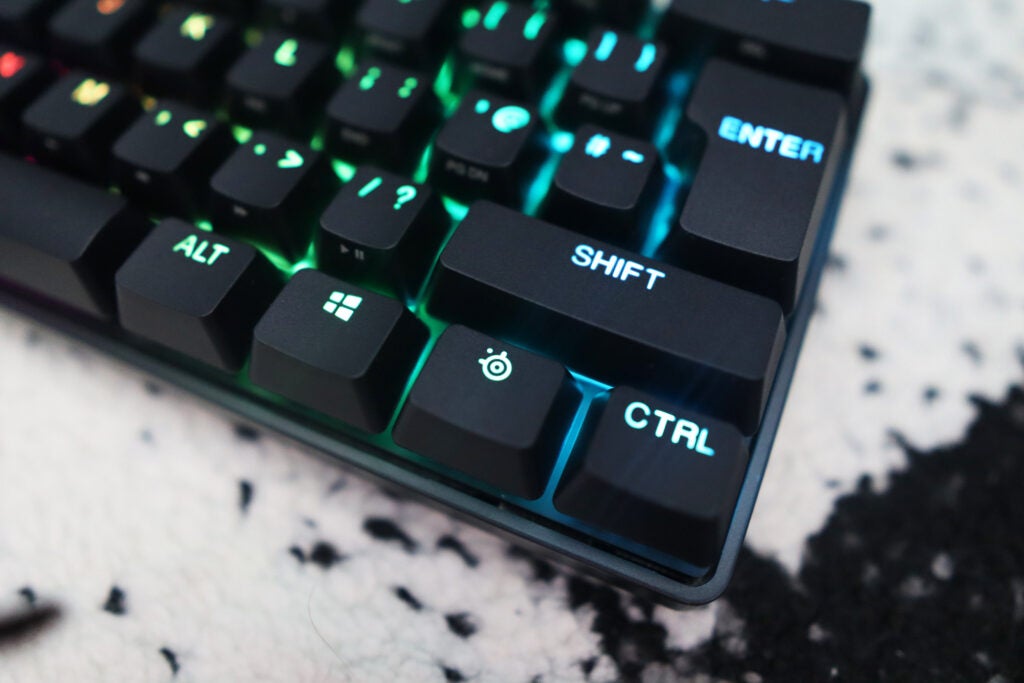
Both are 60% keyboards, meaning you get a mega space-saving layout, with only the standard alphanumeric keys and little else. You won’t find a nav cluster, arrow keys, number pad, or function row with the Apex Pro Mini Wireless. If you’re someone moving from a full-size keyboard to a nifty sixty, there will be an adjustment period.
Admittedly, even when I moved from a 65% down to a 60% for the purposes of writing this review, it was a little fiddly: I had to remind myself not to use the arrow keys that my 65% keyboard has in the bottom-right corner.
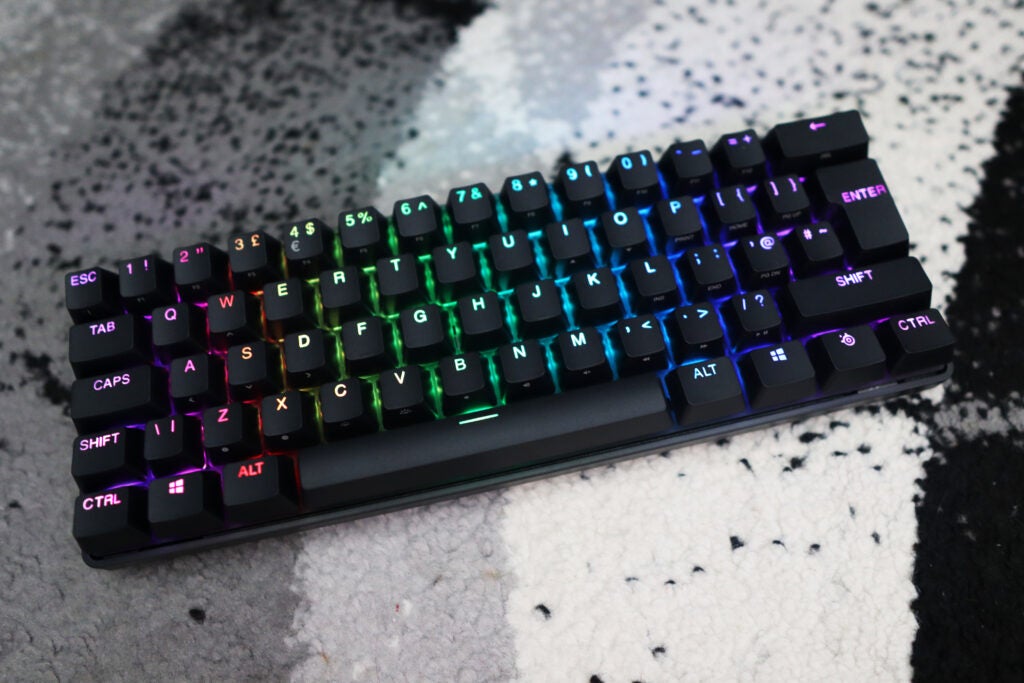
The SteelSeries Apex Pro Mini Wireless also features an especially premium build and feel that looks to justify that high asking price with an aircraft-grade aluminium top plate and a relatively thick chassis that features no deck flex whatsoever.
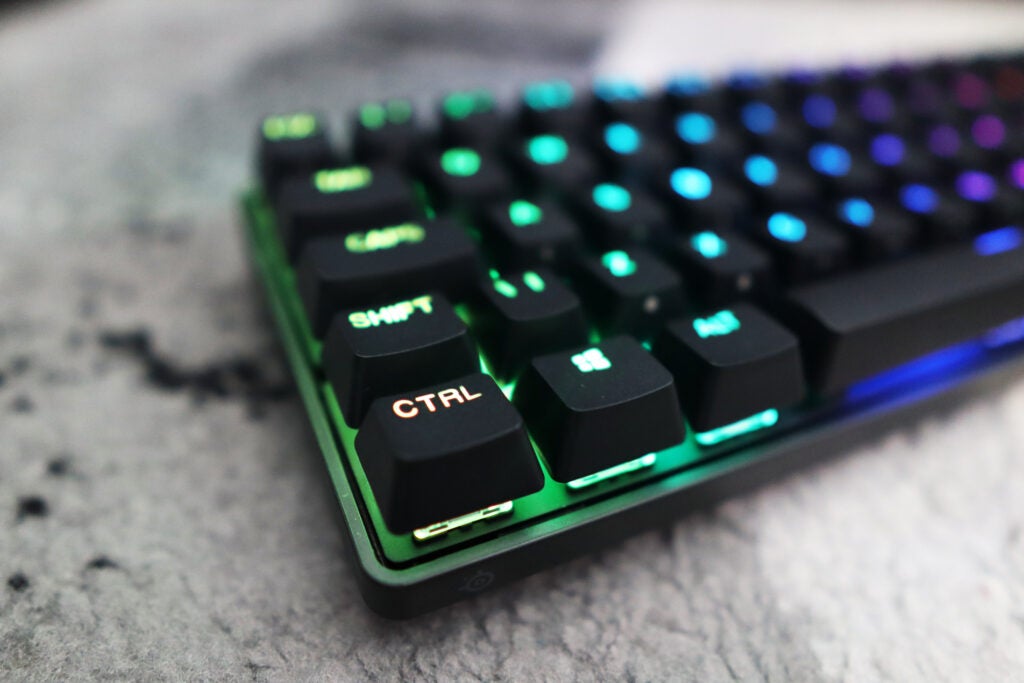
This smaller wireless board also comes with textured doubleshot PBT keycaps that feel great under fingers. It’s nice to see higher-quality flourishes take hold in the mainstream keyboard world, and it’s indicative of SteelSeries looking to justify the Apex Pro Mini Wireless’s high outlay at every opportunity.
Round the back, things are kept simple with a USB-C port for charging and a switch that turns the Apex Pro Mini Wireless on and allows you to select connectivity either by bundled USB-C receiver or Bluetooth. The underside also houses some rubber pads for keeping the board planted on your desk, as well as two-stage feet for you to raise the typing angle up a bit if you so wish.
The feet themselves are made of thick plastic and have a sturdy hinge, so you can be sure they won’t be coming down in a hurry. The fact that there are two stages to choose from keeps things handy.
Performance
- Adjustable actuation point switches are a game changer
- Solid typing experience
- Brilliant and reliable wireless connections
The main draw of the SteelSeries Apex Mini Pro Wireless – much like that of its bigger, wired brother – is the inclusion of SteelSeries clever OmniPoint switches. They feel like pretty standard linear switches with an especially smooth actuation and a light keypress, with a quoted actuation force of 45cN.
Where these switches truly come alive, however, isn’t based on their force and the style of keypress but as a result of the clever trickery inside them. They are, in essence, Hall effect switches and register actuations as a magnet is sent down the switch’s stem to a sensor.
The fact that there isn’t a physical mechanism for contact is what allows these switches to have an adjustable actuation point, meaning you can configure how far you have to push a key before it registers an input. The scale at which this can be configured is anything from 5% to 95% of the total key travel, meaning you can have switches that actuate as high as 0.2mm or as low as 3.8mm.
The higher actuation points proved especially useful for FPS games in my testing, as I mapped the highest points to my WASD keys for movement, so I didn’t have to push the key down as much to move. This resulted in super-speedy movements.
The same also goes for keys mapped for near-instant use of grenades or C4 in rounds of Counter-Strike: Global Offensive. In addition, these switches support double inputs when configured in software, as the Razer Huntsman V2 Analog does, so you can push the switch down to a certain level and get the initial function and then go to the end of the travel and get the second. That’s especially handy if you want to walk and crouch with just one key – as opposed to enabling crouching with a modifier key as you normally would.
The OmniPoint switches are some of the most powerful switches available for PC gaming, especially given how responsive they feel with those adjustable actuation points and the fact that they offer one of the smoothest keypresses I’ve experienced on a gaming board to date.
Outside of its clever switches, the SteelSeries Apex Pro Mini Wireless also offers a wireless connection with practically no latency with SteelSeries’ Quantum 2.0-enabled USB-C receiver. For added convenience, Bluetooth 5.0 is also available here. Switching between modes is easy with the physical switch on the back of the keyboard, and both means of connectivity felt super responsive in my testing.
As this is a wireless keyboard, battery life is also integral to its success. The SteelSeries Apex Pro Mini Wireless is quoted to last for 30 hours on its USB-C wireless receiver with the default lighting, and up to 40 hours with Bluetooth. This provides you with a full working week’s worth of gaming before this board will need charging.
Software and Lighting
- RGB lighting is especially vibrant
- SteelSeries Engine is a clever piece of kit
The RGB lighting on the Apex Pro Mini Wireless looks great. It provides a major splash of colour on its mean-looking black frame and offers a vibrant and stylish touch in the way that a premium gaming board like this should do.
SteelSeries Engine is the accompanying software to this board, and it provides an extensive feature set. As well as doing more traditional things, such as remapping keys and configuring with lighting, it’s in SteelSeries Engine where you can adjust the actuations of the switches and assign secondary functions.
The process for doing so is remarkably easy: you select a key and drag on a bar how far up or down the key travel you’d like the actuation to be. For dual bindings, you enable it on a certain key and pick a primary and secondary function at separate points on the key travel.
The software itself offers a clean and easy-to-use interface, unlike some of the other packages I’ve used in the past that insist on throwing marketing at you even after you’ve set up the product.
Latest deals
Should you buy it?
You want a powerful, small form factor keyboard: The SteelSeries Apex Pro Mini Wireless brings together the powers of adjustable actuation point switches and a 60% layout in an amazing package.
You want more of an affordable 60% keyboard: While it may be an amazing premium small-layout keyboard, the Apex Pro Mini Wireless is expensive. If you want a more affordable option, you’re better off looking elsewhere.
Final Thoughts
The SteelSeries Apex Pro Mini Wireless has all the makings of an amazing premium gaming board, with adjustable actuation point switches, a reliable and convenient wireless connection, and gorgeous looks, too, especially with its vibrant RGB lighting.
The £220 price makes it an expensive option, however, and in this climate, that’s hard to ignore. But, as the old saying goes, you get what you pay for – and the SteelSeries Apex Pro Mini Wireless packs in so much it might just justify that price.
How we test
We use every keyboard we test for at least a week. During that time, we’ll check it for ease of use and put it through its paces by playing a variety of different genres, including FPS, strategy and MOBAs.
We also check each keyboard’s software to see how easy it is to customise and set up.
Tested for at least a week.
During my time with the review unit, I played a series of games including FPS and action titles.
FAQs
No, the SteelSeries Apex Pro Mini Wireless does not have arrow keys.
Jargon buster
GPU
The graphics processing unit is designed to render graphics, which is particularly important for gaming, creating 3D models and editing video.
SSD
Known as Solid State Drive, this is a faster form of a memory than a standard hard drive. Results in faster loading times and more ambitious games.

Verdict
The SteelSeries Apex Pro Mini Wireless offers all the benefits of a small and fast gaming keyboard in a solid overall package. It combines the powers of adjustable actuation point switches that feel great with a functional and space-saving 60% layout, appealing to the gamer who wants it all. Add to this great looks, bright RGB lighting, and decent battery life, and you’ve got a brilliant keyboard, albeit a rather expensive one.
Pros
- Adjustable actuation point switches are a game changer
- Solid build quality
- Bright RGB lighting
Cons
- Expensive
- 60% layout may be too small for some
Availability
- UKRRP: £219.99
- USARRP: $239.99
- EuropeRRP: €278.99
-
SteelSeries OmniPoint switchesThe Apex Pro Mini Wireless features SteelSeries’ own adjustable actuation point switches, OmniPoint. -
Bluetooth/USB-C wireless connectivityIt can connect wirelessly in two different ways: Bluetooth 5.0 or the Quantum 2.0 USB-C receiver. -
40 hours of battery life (with RGB enabled)The Apex Pro Mini Wireless is quoted to last for up to 40 hours with RGB lighting enabled.
Introduction
The past couple of years have been quite an exciting time for gaming keyboards.
We’ve seen keyboards with analogue switches that offer controller-like precision, ones with OLED screens and some with adjustable actuation input switches. We’ve also seen smaller form factor keyboards become a key part of mainstream manufacturers’ product line-ups.
What if I told you there was a keyboard that combined the innovation offered by the current crop of premium boards with the smaller form factor of a 60%? Well, SteelSeries Apex Pro Mini Wireless looks to bring the two features together in one very clever package.
As you might expect, however, it doesn’t come cheap – the SteelSeries Apex Pro Mini Wireless clocks in at £219.99, which actually makes it more expensive than the standard Apex Pro we took a look at a while back. Here are my thoughts on whether it’s deserving of a place in our best gaming keyboard roundup.
Design
- Premium build quality
- 60% layout is convenient
- Sturdy feet
The closest competitor to the SteelSeries Apex Pro Mini Wireless is arguably the Razer Huntsman Mini Analog, which I had the pleasure of taking a look at a few months back, and there are a few similarities.
Both are 60% keyboards, meaning you get a mega space-saving layout, with only the standard alphanumeric keys and little else. You won’t find a nav cluster, arrow keys, number pad, or function row with the Apex Pro Mini Wireless. If you’re someone moving from a full-size keyboard to a nifty sixty, there will be an adjustment period.
Admittedly, even when I moved from a 65% down to a 60% for the purposes of writing this review, it was a little fiddly: I had to remind myself not to use the arrow keys that my 65% keyboard has in the bottom-right corner.
The SteelSeries Apex Pro Mini Wireless also features an especially premium build and feel that looks to justify that high asking price with an aircraft-grade aluminium top plate and a relatively thick chassis that features no deck flex whatsoever.
This smaller wireless board also comes with textured doubleshot PBT keycaps that feel great under fingers. It’s nice to see higher-quality flourishes take hold in the mainstream keyboard world, and it’s indicative of SteelSeries looking to justify the Apex Pro Mini Wireless’s high outlay at every opportunity.
Round the back, things are kept simple with a USB-C port for charging and a switch that turns the Apex Pro Mini Wireless on and allows you to select connectivity either by bundled USB-C receiver or Bluetooth. The underside also houses some rubber pads for keeping the board planted on your desk, as well as two-stage feet for you to raise the typing angle up a bit if you so wish.
The feet themselves are made of thick plastic and have a sturdy hinge, so you can be sure they won’t be coming down in a hurry. The fact that there are two stages to choose from keeps things handy.
Performance
- Adjustable actuation point switches are a game changer
- Solid typing experience
- Brilliant and reliable wireless connections
The main draw of the SteelSeries Apex Mini Pro Wireless – much like that of its bigger, wired brother – is the inclusion of SteelSeries clever OmniPoint switches. They feel like pretty standard linear switches with an especially smooth actuation and a light keypress, with a quoted actuation force of 45cN.
Where these switches truly come alive, however, isn’t based on their force and the style of keypress but as a result of the clever trickery inside them. They are, in essence, Hall effect switches and register actuations as a magnet is sent down the switch’s stem to a sensor.
The fact that there isn’t a physical mechanism for contact is what allows these switches to have an adjustable actuation point, meaning you can configure how far you have to push a key before it registers an input. The scale at which this can be configured is anything from 5% to 95% of the total key travel, meaning you can have switches that actuate as high as 0.2mm or as low as 3.8mm.
The higher actuation points proved especially useful for FPS games in my testing, as I mapped the highest points to my WASD keys for movement, so I didn’t have to push the key down as much to move. This resulted in super-speedy movements.
The same also goes for keys mapped for near-instant use of grenades or C4 in rounds of Counter-Strike: Global Offensive. In addition, these switches support double inputs when configured in software, as the Razer Huntsman V2 Analog does, so you can push the switch down to a certain level and get the initial function and then go to the end of the travel and get the second. That’s especially handy if you want to walk and crouch with just one key – as opposed to enabling crouching with a modifier key as you normally would.
The OmniPoint switches are some of the most powerful switches available for PC gaming, especially given how responsive they feel with those adjustable actuation points and the fact that they offer one of the smoothest keypresses I’ve experienced on a gaming board to date.
Outside of its clever switches, the SteelSeries Apex Pro Mini Wireless also offers a wireless connection with practically no latency with SteelSeries’ Quantum 2.0-enabled USB-C receiver. For added convenience, Bluetooth 5.0 is also available here. Switching between modes is easy with the physical switch on the back of the keyboard, and both means of connectivity felt super responsive in my testing.
As this is a wireless keyboard, battery life is also integral to its success. The SteelSeries Apex Pro Mini Wireless is quoted to last for 30 hours on its USB-C wireless receiver with the default lighting, and up to 40 hours with Bluetooth. This provides you with a full working week’s worth of gaming before this board will need charging.
Software and Lighting
- RGB lighting is especially vibrant
- SteelSeries Engine is a clever piece of kit
The RGB lighting on the Apex Pro Mini Wireless looks great. It provides a major splash of colour on its mean-looking black frame and offers a vibrant and stylish touch in the way that a premium gaming board like this should do.
SteelSeries Engine is the accompanying software to this board, and it provides an extensive feature set. As well as doing more traditional things, such as remapping keys and configuring with lighting, it’s in SteelSeries Engine where you can adjust the actuations of the switches and assign secondary functions.
The process for doing so is remarkably easy: you select a key and drag on a bar how far up or down the key travel you’d like the actuation to be. For dual bindings, you enable it on a certain key and pick a primary and secondary function at separate points on the key travel.
The software itself offers a clean and easy-to-use interface, unlike some of the other packages I’ve used in the past that insist on throwing marketing at you even after you’ve set up the product.
Latest deals
Should you buy it?
You want a powerful, small form factor keyboard: The SteelSeries Apex Pro Mini Wireless brings together the powers of adjustable actuation point switches and a 60% layout in an amazing package.
You want more of an affordable 60% keyboard: While it may be an amazing premium small-layout keyboard, the Apex Pro Mini Wireless is expensive. If you want a more affordable option, you’re better off looking elsewhere.
Final Thoughts
The SteelSeries Apex Pro Mini Wireless has all the makings of an amazing premium gaming board, with adjustable actuation point switches, a reliable and convenient wireless connection, and gorgeous looks, too, especially with its vibrant RGB lighting.
The £220 price makes it an expensive option, however, and in this climate, that’s hard to ignore. But, as the old saying goes, you get what you pay for – and the SteelSeries Apex Pro Mini Wireless packs in so much it might just justify that price.
How we test
We use every keyboard we test for at least a week. During that time, we’ll check it for ease of use and put it through its paces by playing a variety of different genres, including FPS, strategy and MOBAs.
We also check each keyboard’s software to see how easy it is to customise and set up.
Tested for at least a week.
During my time with the review unit, I played a series of games including FPS and action titles.
FAQs
No, the SteelSeries Apex Pro Mini Wireless does not have arrow keys.
Jargon buster
GPU
The graphics processing unit is designed to render graphics, which is particularly important for gaming, creating 3D models and editing video.
SSD
Known as Solid State Drive, this is a faster form of a memory than a standard hard drive. Results in faster loading times and more ambitious games.



