





First Impressions
The Lenovo ThinkBook Plus Gen 5 Hybrid makes a good first impression and there has been a lot of thought put into the design. Ultimately, the lack of smart software might make it better to just buy the two devices separately.
-
2-in-1This combines both an Android tablet and Windows laptop -
OLED screenMaximises contrast, resulting in inky blacks and bright colours
Introduction
Lenovo launched a whole host of new tech at CES 2024, but nothing caught my eye quite as much as the Lenovo ThinkBook Plus Gen 5 Hybrid.
On the surface, this looks like any other ThinBook laptop. Squared off on the edges, silver in colour and fairly nondescript in its design. It even looks fairly ordinary when opened.
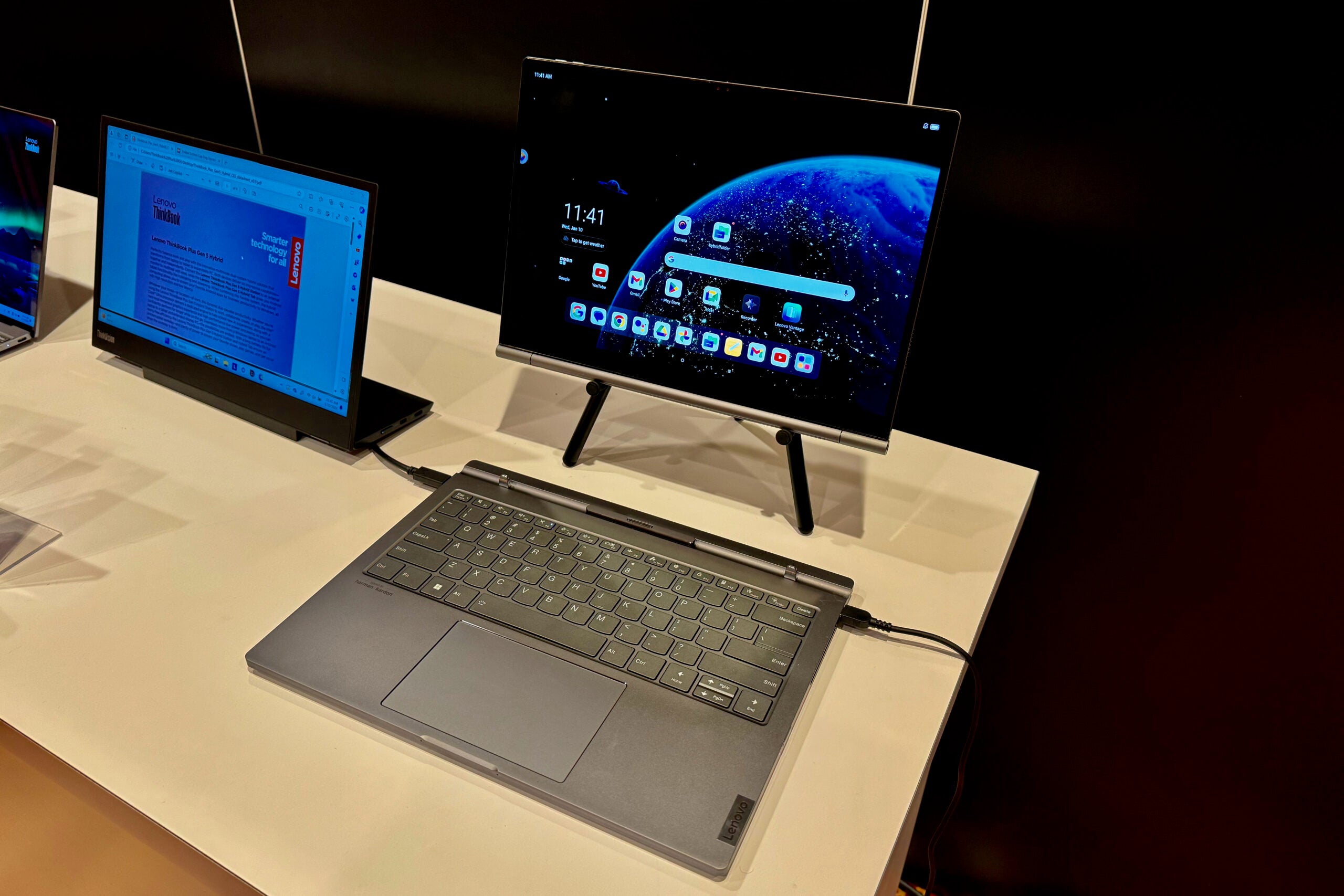
The ThinkBook Plus Gen 5 Hybrid gets interesting when you pull the screen off and it becomes two distinct products: a Windows PC and a very separate Android tablet that can be used independently.
There are some striking similarities to Microsoft’s ill-fated Surface Book, though not relying on Windows for the tablet software could help Lenovo’s option stand out.
I spent a couple of hours trying out the unique machine at Lenovo’s CES demo room and here are my initial thoughts.
Price and Availability
Lenovo has said that the ThinkBook Plus Gen 5 will be available in September 2024, with pricing available
closer to that release date.
Design
- The display pops off and can be used as an Android tablet
- All the Windows components are in the keyboard
- 3x USB-C (2 Thunderbolt 4) and an audio jack
The star of the show here is the detachable screen that turns this from a fairly standard Lenovo ThinkBook laptop to an Android tablet. There’s no button you press to detach, you just sort of pull the screen from its clamp and it comes away from the base. The first few times I tried nothing happened, but once you find the right angle and pull it does come away quite easily.
To dock the screen again just press it back in and it reattaches, automatically switching back to Windows mode. It’s a seamless process and I was impressed at just how quick everything was.
Now, there have been some sacrifices made to accommodate this unique design. As the display packs in all the tablet components, including a Qualcomm chip and battery, the weight distribution is very different to a traditional laptop. Instead of having all the weight centred around the keyboard, here it’s more spread out. You can’t open the screen comfortably without holding the keyboard down, for instance, and it does feel a little unbalanced – very much in the same way the Surface Book did.
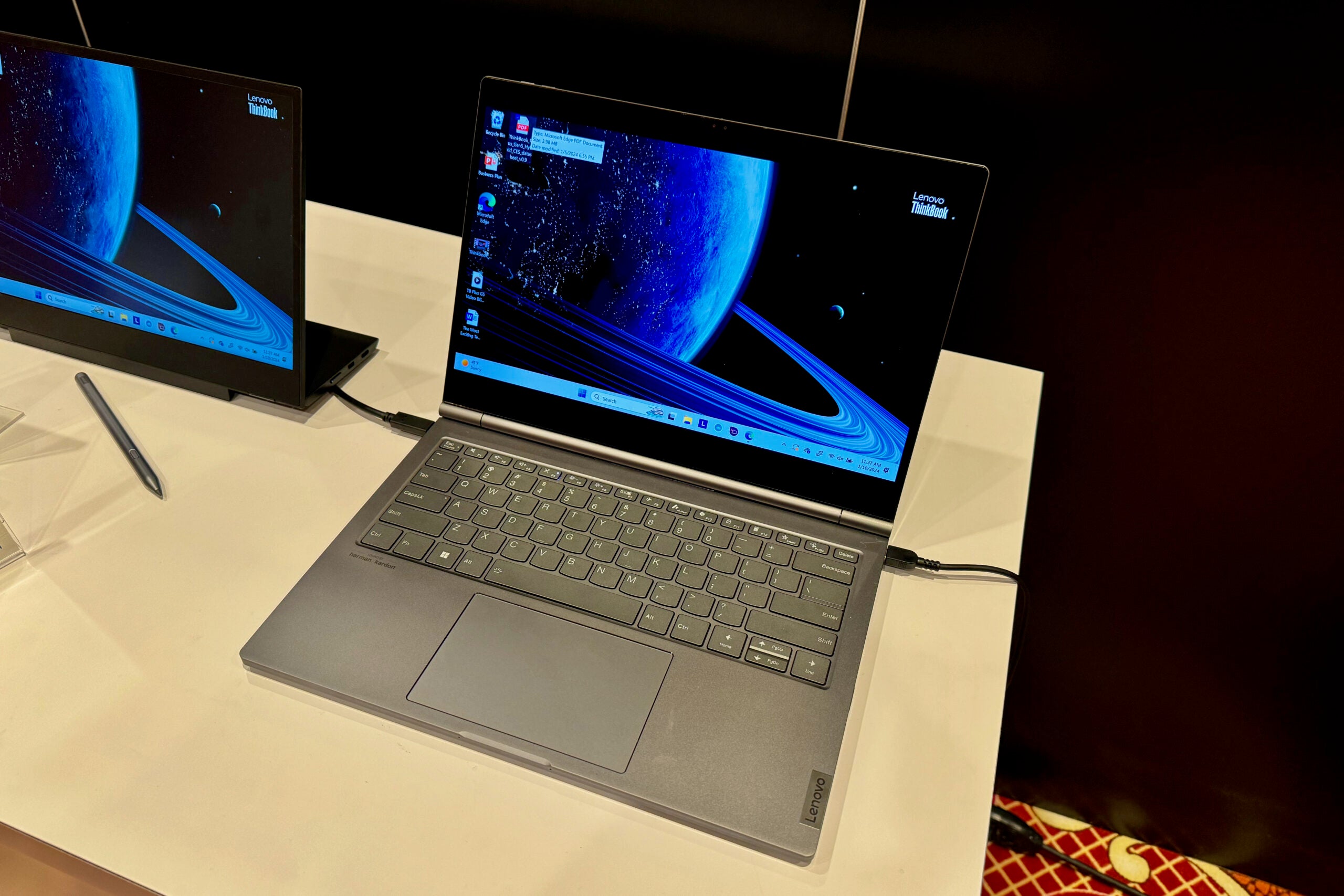
The display is a 14-inch OLED which is a good size for a laptop but large for a tablet. When detached, I did find the tablet cumbersome to use due to the size, but the benefits come when you want to watch a video.
I can imagine this would be great on a plane when using the stand. It’s a sharp panel too, at 2.8K, and the OLED panel has plenty of oomph in its colours and it wasn’t too reflective – even in a very brightly lit demo room. As it’s a tablet, the display is touch-enabled and there’s a bundled stylus in the box.
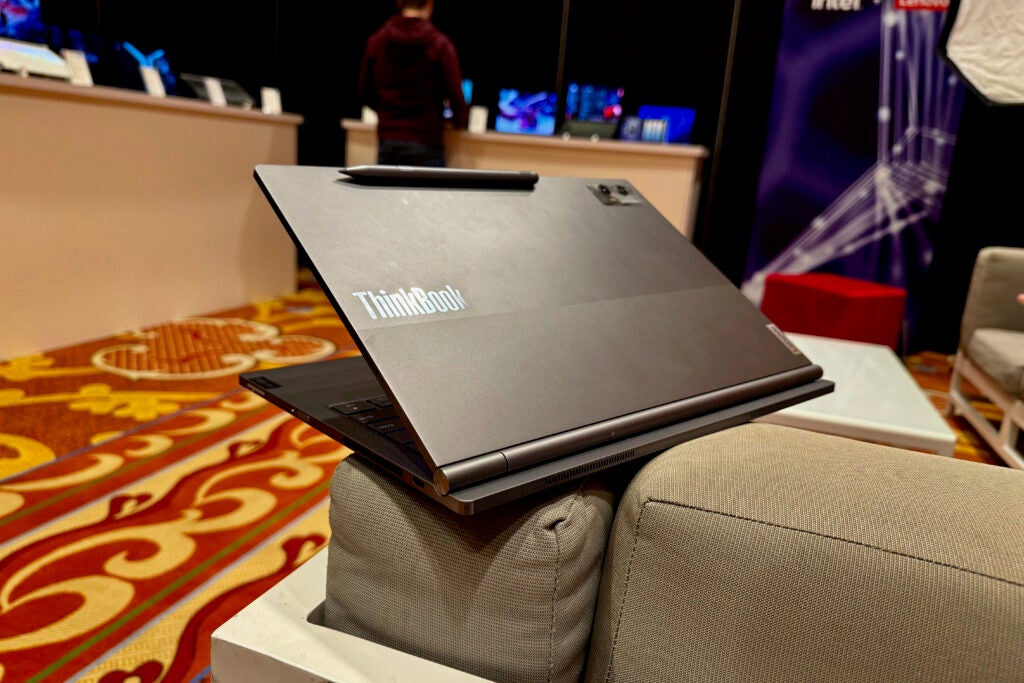
The biggest giveaway that this isn’t a regular laptop is the camera placement on the lid. This looks very out of place for a laptop and I am not necessarily sure a 14-inch tablet needs a large camera array on the back. Not all tablets need cameras, and this feels like the perfect device where a very good selfie camera would have sufficed.
Elsewhere, the keyword was nice to type on and the large trackpad was responsive.
Specs and Performance
- Separate chips power both parts of the device
- Minimal interoperability between the Android and Windows side
- Intel Arc GPU, Wi-FI 6E and a fingerprint sensor included
Due to the way the Lenovo ThinkBook Plus Gen 5 Hybrid has been designed, there’s a lot to discuss when it comes to specs. Both the computer and the tablet have separate chips, separate memory, separate storage and separate batteries. The display panel is the only thing they both share.
For the tablet, there’s a Qualcomm Snapdragon 8 Gen 1 running the show, with 12GB RAM, 256GB of storage and a 38Whr battery. That’s a fairly decent selection of specs for an Android tablet and during my short time with it felt smooth and quick.
The Windows half runs on an Intel Core Ultra 7 processor, 32GB RAM, 1TB of SSD and a 75Whr battery. Because all the computer components are housed in the keyboard, you can use it independently of the screen by plugging it into an external monitor. This would then give you both a tablet and a Windows PC that can be used at the same time. That seems like a niche use case, but I am sure it will appeal to someone.
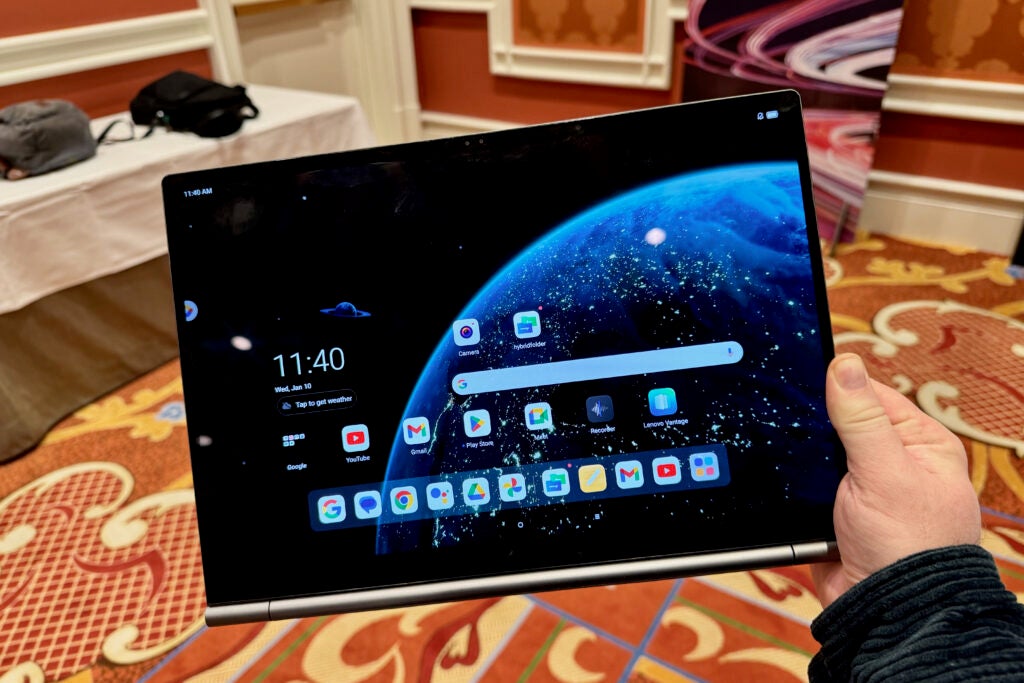
One of the biggest questions I had before my hands-on demo was about the software. With the Surface Book, you could pop the tablet screen off and still have access to all the same files and apps. That’s not the case here as the two parts are very separate. Lenovo reps did tell me there was a folder files could be placed in that would then be synced with both parts of the devices, but if you have a video playing in laptop mode you couldn’t keep it playing and pop the screen off. You can switch between Windows and Android with the screen attached, just not the other way around.
I think this could make this a confusing device to use, unless you have the Windows part reserved for work and the tablet for entertainment, It doesn’t seem like they are built to be used together.
Early Verdict
The Lenovo ThinkBook Plus Gen 5 Hybrid makes a good first impression and there has been a lot of thought put into the design. The tablet portion pops off easily, the display is great and both parts of powerful. Yet, unless you want to save space in a bag I can’t see why you wouldn’t just buy a laptop and separate tablet and have a better overall experience.
Lenovo is missing a trick by not having the two parts work closer together and allowing you to easily move things between the two operating systems. At least it solves the problem of hybrid 2-in-1 machines having to use Microsoft’s poor Windows tablet offering.
Full Specs

First Impressions
The Lenovo ThinkBook Plus Gen 5 Hybrid makes a good first impression and there has been a lot of thought put into the design. Ultimately, the lack of smart software might make it better to just buy the two devices separately.
-
2-in-1This combines both an Android tablet and Windows laptop -
OLED screenMaximises contrast, resulting in inky blacks and bright colours
Introduction
Lenovo launched a whole host of new tech at CES 2024, but nothing caught my eye quite as much as the Lenovo ThinkBook Plus Gen 5 Hybrid.
On the surface, this looks like any other ThinBook laptop. Squared off on the edges, silver in colour and fairly nondescript in its design. It even looks fairly ordinary when opened.
The ThinkBook Plus Gen 5 Hybrid gets interesting when you pull the screen off and it becomes two distinct products: a Windows PC and a very separate Android tablet that can be used independently.
There are some striking similarities to Microsoft’s ill-fated Surface Book, though not relying on Windows for the tablet software could help Lenovo’s option stand out.
I spent a couple of hours trying out the unique machine at Lenovo’s CES demo room and here are my initial thoughts.
Price and Availability
Lenovo has said that the ThinkBook Plus Gen 5 will be available in September 2024, with pricing available
closer to that release date.
Design
- The display pops off and can be used as an Android tablet
- All the Windows components are in the keyboard
- 3x USB-C (2 Thunderbolt 4) and an audio jack
The star of the show here is the detachable screen that turns this from a fairly standard Lenovo ThinkBook laptop to an Android tablet. There’s no button you press to detach, you just sort of pull the screen from its clamp and it comes away from the base. The first few times I tried nothing happened, but once you find the right angle and pull it does come away quite easily.
To dock the screen again just press it back in and it reattaches, automatically switching back to Windows mode. It’s a seamless process and I was impressed at just how quick everything was.
Now, there have been some sacrifices made to accommodate this unique design. As the display packs in all the tablet components, including a Qualcomm chip and battery, the weight distribution is very different to a traditional laptop. Instead of having all the weight centred around the keyboard, here it’s more spread out. You can’t open the screen comfortably without holding the keyboard down, for instance, and it does feel a little unbalanced – very much in the same way the Surface Book did.
The display is a 14-inch OLED which is a good size for a laptop but large for a tablet. When detached, I did find the tablet cumbersome to use due to the size, but the benefits come when you want to watch a video.
I can imagine this would be great on a plane when using the stand. It’s a sharp panel too, at 2.8K, and the OLED panel has plenty of oomph in its colours and it wasn’t too reflective – even in a very brightly lit demo room. As it’s a tablet, the display is touch-enabled and there’s a bundled stylus in the box.
The biggest giveaway that this isn’t a regular laptop is the camera placement on the lid. This looks very out of place for a laptop and I am not necessarily sure a 14-inch tablet needs a large camera array on the back. Not all tablets need cameras, and this feels like the perfect device where a very good selfie camera would have sufficed.
Elsewhere, the keyword was nice to type on and the large trackpad was responsive.
Specs and Performance
- Separate chips power both parts of the device
- Minimal interoperability between the Android and Windows side
- Intel Arc GPU, Wi-FI 6E and a fingerprint sensor included
Due to the way the Lenovo ThinkBook Plus Gen 5 Hybrid has been designed, there’s a lot to discuss when it comes to specs. Both the computer and the tablet have separate chips, separate memory, separate storage and separate batteries. The display panel is the only thing they both share.
For the tablet, there’s a Qualcomm Snapdragon 8 Gen 1 running the show, with 12GB RAM, 256GB of storage and a 38Whr battery. That’s a fairly decent selection of specs for an Android tablet and during my short time with it felt smooth and quick.
The Windows half runs on an Intel Core Ultra 7 processor, 32GB RAM, 1TB of SSD and a 75Whr battery. Because all the computer components are housed in the keyboard, you can use it independently of the screen by plugging it into an external monitor. This would then give you both a tablet and a Windows PC that can be used at the same time. That seems like a niche use case, but I am sure it will appeal to someone.
One of the biggest questions I had before my hands-on demo was about the software. With the Surface Book, you could pop the tablet screen off and still have access to all the same files and apps. That’s not the case here as the two parts are very separate. Lenovo reps did tell me there was a folder files could be placed in that would then be synced with both parts of the devices, but if you have a video playing in laptop mode you couldn’t keep it playing and pop the screen off. You can switch between Windows and Android with the screen attached, just not the other way around.
I think this could make this a confusing device to use, unless you have the Windows part reserved for work and the tablet for entertainment, It doesn’t seem like they are built to be used together.
Early Verdict
The Lenovo ThinkBook Plus Gen 5 Hybrid makes a good first impression and there has been a lot of thought put into the design. The tablet portion pops off easily, the display is great and both parts of powerful. Yet, unless you want to save space in a bag I can’t see why you wouldn’t just buy a laptop and separate tablet and have a better overall experience.
Lenovo is missing a trick by not having the two parts work closer together and allowing you to easily move things between the two operating systems. At least it solves the problem of hybrid 2-in-1 machines having to use Microsoft’s poor Windows tablet offering.



