
• Washington DC |
  • New York |
  • Toronto |
  • Distribution: (800) 510 9863
Friday, June 19, 2026
  • Login
No Result
View All Result
NEWSLETTER
New Edge Times
  • World
  • U.S.
  • Politics
  • Business
  • Science
  • Tech
  • Youth
  • Entertainment
    • All
    • Arts
    • Gaming
    • Movie
    • Music
    Netflix Cancels Duffer Brothers’ ‘The Boroughs’ After One Season

    Netflix Cancels Duffer Brothers’ ‘The Boroughs’ After One Season

    ‘Curse of the Seven Jackals’: A Film Made to Be Exhumed

    ‘Curse of the Seven Jackals’: A Film Made to Be Exhumed

    ‘Are You Now or Have You Ever Been’ Review: Who Is Naming Names?

    ‘Are You Now or Have You Ever Been’ Review: Who Is Naming Names?

    7 Great Artists Playing SummerStage This Year

    7 Great Artists Playing SummerStage This Year

    Dawn Richard’s Lawsuit Against Sean Combs Is Dismissed

    Dawn Richard’s Lawsuit Against Sean Combs Is Dismissed

    Singer Oliver Tree Is Said to Have Died in Collision of Helicopters in Brazil

    Singer Oliver Tree Is Said to Have Died in Collision of Helicopters in Brazil

    Video: Spielberg Gets Paranoid With ‘Disclosure Day’

    Video: Spielberg Gets Paranoid With ‘Disclosure Day’

    A Kennedy Center Drama: Whether Trump’s Name Stays

    A Kennedy Center Drama: Whether Trump’s Name Stays

    • Gaming
    • Movie
    • Music
    • Arts
  • Sports
  • Lifestyle
    • All
    • Fashion
    • Food
    • Health
    • Travel
    Claudette’s Second Act

    Claudette’s Second Act

    The World Cup (of Clothes)

    The World Cup (of Clothes)

    DR Congo Soccer Team’s Leopard Suits Bring Pride to the World Cup

    DR Congo Soccer Team’s Leopard Suits Bring Pride to the World Cup

    Spaghetti Carbonara Is a Classic for a Reason

    Spaghetti Carbonara Is a Classic for a Reason

    Can’t Pay Medical Bills? Trump Administration Suggests Getting a Loan

    Can’t Pay Medical Bills? Trump Administration Suggests Getting a Loan

    Tony Awards 2026 Red Carpet: See the Looks of Broadway’s Biggest Stars

    Tony Awards 2026 Red Carpet: See the Looks of Broadway’s Biggest Stars

    Rubio Suggests U.S. Return to Global Vaccine Program in Rebuke of Kennedy

    Rubio Suggests U.S. Return to Global Vaccine Program in Rebuke of Kennedy

    Video: The Fashion References in ‘Cats: The Jellicle Ball’

    Video: The Fashion References in ‘Cats: The Jellicle Ball’

    • Fashion
    • Food
    • Health
    • Travel
  • Reviews
  • Trending
  • World
  • U.S.
  • Politics
  • Business
  • Science
  • Tech
  • Youth
  • Entertainment
    • All
    • Arts
    • Gaming
    • Movie
    • Music
    Netflix Cancels Duffer Brothers’ ‘The Boroughs’ After One Season

    Netflix Cancels Duffer Brothers’ ‘The Boroughs’ After One Season

    ‘Curse of the Seven Jackals’: A Film Made to Be Exhumed

    ‘Curse of the Seven Jackals’: A Film Made to Be Exhumed

    ‘Are You Now or Have You Ever Been’ Review: Who Is Naming Names?

    ‘Are You Now or Have You Ever Been’ Review: Who Is Naming Names?

    7 Great Artists Playing SummerStage This Year

    7 Great Artists Playing SummerStage This Year

    Dawn Richard’s Lawsuit Against Sean Combs Is Dismissed

    Dawn Richard’s Lawsuit Against Sean Combs Is Dismissed

    Singer Oliver Tree Is Said to Have Died in Collision of Helicopters in Brazil

    Singer Oliver Tree Is Said to Have Died in Collision of Helicopters in Brazil

    Video: Spielberg Gets Paranoid With ‘Disclosure Day’

    Video: Spielberg Gets Paranoid With ‘Disclosure Day’

    A Kennedy Center Drama: Whether Trump’s Name Stays

    A Kennedy Center Drama: Whether Trump’s Name Stays

    • Gaming
    • Movie
    • Music
    • Arts
  • Sports
  • Lifestyle
    • All
    • Fashion
    • Food
    • Health
    • Travel
    Claudette’s Second Act

    Claudette’s Second Act

    The World Cup (of Clothes)

    The World Cup (of Clothes)

    DR Congo Soccer Team’s Leopard Suits Bring Pride to the World Cup

    DR Congo Soccer Team’s Leopard Suits Bring Pride to the World Cup

    Spaghetti Carbonara Is a Classic for a Reason

    Spaghetti Carbonara Is a Classic for a Reason

    Can’t Pay Medical Bills? Trump Administration Suggests Getting a Loan

    Can’t Pay Medical Bills? Trump Administration Suggests Getting a Loan

    Tony Awards 2026 Red Carpet: See the Looks of Broadway’s Biggest Stars

    Tony Awards 2026 Red Carpet: See the Looks of Broadway’s Biggest Stars

    Rubio Suggests U.S. Return to Global Vaccine Program in Rebuke of Kennedy

    Rubio Suggests U.S. Return to Global Vaccine Program in Rebuke of Kennedy

    Video: The Fashion References in ‘Cats: The Jellicle Ball’

    Video: The Fashion References in ‘Cats: The Jellicle Ball’

    • Fashion
    • Food
    • Health
    • Travel
  • Reviews
  • Trending
No Result
View All Result
New Edge Times
No Result
View All Result
Home Reviews

Firefox Password Manager

by New Edge Times Report
September 14, 2022
in Reviews
Firefox Password Manager
Share on FacebookShare on Twitter

Firefox has built a real, free password manager into its Sync accounts. It does its job, but activation is fiddly and features are limited, so most people will be better off with a dedicated product.

Pros

  • Conveniently integrated into the browser
  • Allows local encryption with primary password

Cons

  • Local passwords remain accessible unless you manually set a primary password on each device

  • SecurityAES-256, password to encryption key derivation via 1000 rounds of PBKDF2

Introduction

Firefox has been taking user-side security tools more seriously than arch-rival Google Chrome for quite some time now.

Formerly known as Firefox Lockwise, the Firefox Password Manager is integrated into every Firefox Sync account and, once activated, will synchronize and secure your passwords across every Firefox browser you have signed into your account.

With a user-defined, zero-knowledge primary password and consistently rolled-out versions, Firefox Password Manager is a far more solid proposition than Google’s Password Manager – but it’s still seriously lacking in features.

Pricing

Like a Firefox Sync account, which it requires, Firefox Password Manager is completely free.

Features

  • Baked into the Firefox web browser
  • Requires different primary password for each device
  • Mobile users can use biometrics to unlock browser

Firefox Password Manager isn’t fully set up by default when you first create a Firefox Sync account, even if you enable password syncing. That’s not to say there’s no security. Your passwords are encrypted before being synced, subject to the usual HTTPS-grade TLS encryption when in transit, and still encrypted when stored online and on your hard drive, using a unique key based on your Firefox account password.

However, anyone with physical access to your browser can simply view your passwords in Firefox’s password page. This is a really poor default setting. It’s obviously been made for the benefit of Sync users who don’t want to deal with entering an extra password every time they open their browser, but in pure security terms, I’d like to see Firefox oblige primary password use for any account that stores passwords in the browser.

However, the ability to set a primary password is something that Firefox does much better than rival Chrome, which has only just started rolling out a comparable feature to select users. In Firefox’s main settings, you can tick a box to enable a primary password, and this will then be required every time you view your passwords on any synced version of Firefox, and every time you restart the browser to avoid autofill abuse by someone with access to your browser.
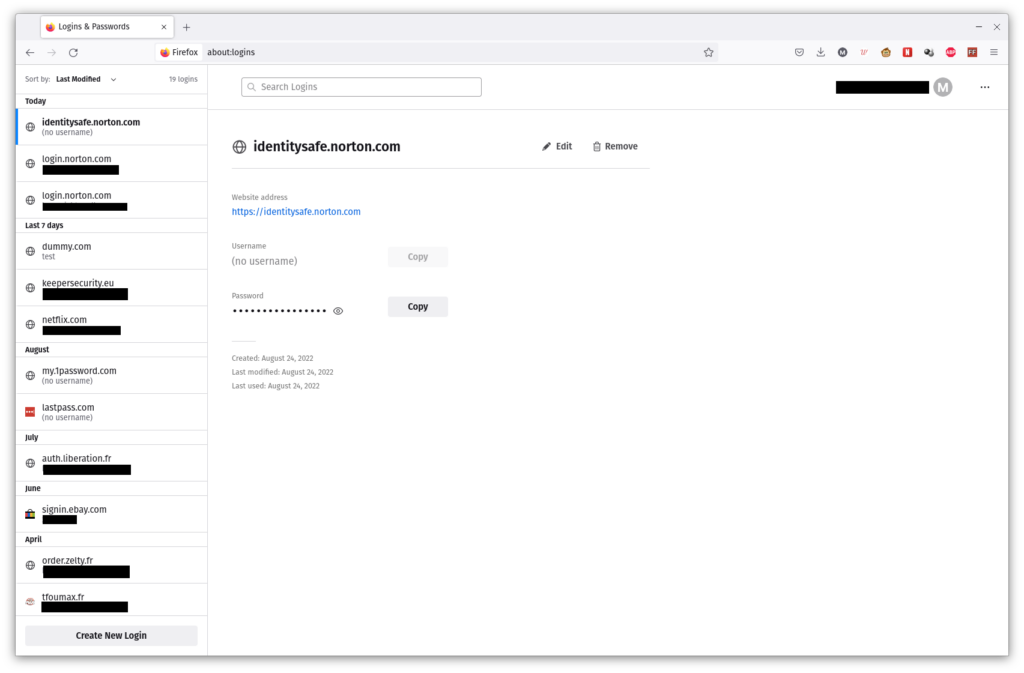
Firefox password management interface

Unfortunately, unlike every other password manager I’ve tested, Firefox requires a different primary password for each device, which removes much convenience and means that you have to manually secure every computer you have Firefox installed and your passwords synced on.

Mobile users can use biometrics to unlock their browser, and a breach monitoring service is also available for stored credentials. You can enable two-factor authentication, requiring a TOTP (Time-Based One Time Password) or single-use recovery code as well as your password to connect.

You can reset your primary password if you forget it, but as you’d expect from a zero-knowledge system, this will erase all stored passwords. You can set up a recovery key, though, plus there’s even a secondary email address takeover option if you lose access to your primarily email address.

Firefox Password Manager lacks any kind of quality-of-life features, from password history to secure sharing. It’s better than nothing, and it’s better than Chrome’s current offering to most users. For a person who doesn’t want to juggle multiple applications but still understands the need for password management, Firefox is an acceptable option; but LastPass’s extension-based model is better.

Latest deals

Should you buy it?

If you’re looking for convenience

Activating Firefox Password Manager makes some sense if you do everything in the browser and want to keep that safe, and if using multiple apps doesn’t work for you.

If you require sophisticated and customisable security

There are very few features here. Instead, use a different, dedicated password manager; LastPass or Bitwarden are great choices.

Final Thoughts

This browser-integrated password manager is actually useful if you need to run a bare minimum of apps – whether to avoid complexity, save system resources or because you’re in a locked-down environment. However, that’s the only scenario where you should use it instead of a dedicated password manager.

How we test

We test each password manager ourselves on a variety of computer and mobile operating systems. We carry out comparative feature analysis against industry standards and rival products.

We used for at least a week.

Tested all of the available features.

FAQs

Where is password manager in Firefox?

Click on the hamburger settings menu in the browser, and then click on ‘Passwords’.

Does Firefox have a built in password manager?

Yes it does, although it doesn’t have as many features as a dedicated password manager.

Firefox has built a real, free password manager into its Sync accounts. It does its job, but activation is fiddly and features are limited, so most people will be better off with a dedicated product.

Pros

  • Conveniently integrated into the browser
  • Allows local encryption with primary password

Cons

  • Local passwords remain accessible unless you manually set a primary password on each device

  • SecurityAES-256, password to encryption key derivation via 1000 rounds of PBKDF2

Introduction

Firefox has been taking user-side security tools more seriously than arch-rival Google Chrome for quite some time now.

Formerly known as Firefox Lockwise, the Firefox Password Manager is integrated into every Firefox Sync account and, once activated, will synchronize and secure your passwords across every Firefox browser you have signed into your account.

With a user-defined, zero-knowledge primary password and consistently rolled-out versions, Firefox Password Manager is a far more solid proposition than Google’s Password Manager – but it’s still seriously lacking in features.

Pricing

Like a Firefox Sync account, which it requires, Firefox Password Manager is completely free.

Features

  • Baked into the Firefox web browser
  • Requires different primary password for each device
  • Mobile users can use biometrics to unlock browser

Firefox Password Manager isn’t fully set up by default when you first create a Firefox Sync account, even if you enable password syncing. That’s not to say there’s no security. Your passwords are encrypted before being synced, subject to the usual HTTPS-grade TLS encryption when in transit, and still encrypted when stored online and on your hard drive, using a unique key based on your Firefox account password.

However, anyone with physical access to your browser can simply view your passwords in Firefox’s password page. This is a really poor default setting. It’s obviously been made for the benefit of Sync users who don’t want to deal with entering an extra password every time they open their browser, but in pure security terms, I’d like to see Firefox oblige primary password use for any account that stores passwords in the browser.

However, the ability to set a primary password is something that Firefox does much better than rival Chrome, which has only just started rolling out a comparable feature to select users. In Firefox’s main settings, you can tick a box to enable a primary password, and this will then be required every time you view your passwords on any synced version of Firefox, and every time you restart the browser to avoid autofill abuse by someone with access to your browser.

Firefox password management interface

Unfortunately, unlike every other password manager I’ve tested, Firefox requires a different primary password for each device, which removes much convenience and means that you have to manually secure every computer you have Firefox installed and your passwords synced on.

Mobile users can use biometrics to unlock their browser, and a breach monitoring service is also available for stored credentials. You can enable two-factor authentication, requiring a TOTP (Time-Based One Time Password) or single-use recovery code as well as your password to connect.

You can reset your primary password if you forget it, but as you’d expect from a zero-knowledge system, this will erase all stored passwords. You can set up a recovery key, though, plus there’s even a secondary email address takeover option if you lose access to your primarily email address.

Firefox Password Manager lacks any kind of quality-of-life features, from password history to secure sharing. It’s better than nothing, and it’s better than Chrome’s current offering to most users. For a person who doesn’t want to juggle multiple applications but still understands the need for password management, Firefox is an acceptable option; but LastPass’s extension-based model is better.

Latest deals

Should you buy it?

If you’re looking for convenience

Activating Firefox Password Manager makes some sense if you do everything in the browser and want to keep that safe, and if using multiple apps doesn’t work for you.

If you require sophisticated and customisable security

There are very few features here. Instead, use a different, dedicated password manager; LastPass or Bitwarden are great choices.

Final Thoughts

This browser-integrated password manager is actually useful if you need to run a bare minimum of apps – whether to avoid complexity, save system resources or because you’re in a locked-down environment. However, that’s the only scenario where you should use it instead of a dedicated password manager.

How we test

We test each password manager ourselves on a variety of computer and mobile operating systems. We carry out comparative feature analysis against industry standards and rival products.

We used for at least a week.

Tested all of the available features.

FAQs

Where is password manager in Firefox?

Click on the hamburger settings menu in the browser, and then click on ‘Passwords’.

Does Firefox have a built in password manager?

Yes it does, although it doesn’t have as many features as a dedicated password manager.

Previous Post

Eve Aqua

Next Post

MSI Summit E16 Flip Evo

Related Posts

Hoover HF6 TurboSense Review
Reviews

Hoover HF6 TurboSense Review

by New Edge Times Report
May 4, 2026
JBL Charge 6 Review
Reviews

JBL Charge 6 Review

by New Edge Times Report
May 1, 2026
Stihl ASA 20 Cordless Secateurs Review: Pruning made much easier
Reviews

Stihl ASA 20 Cordless Secateurs Review: Pruning made much easier

by New Edge Times Report
May 1, 2026
Leave Comment
New Edge Times

© 2025 New Edge Times or its affiliated companies. All rights reserved.

Navigate Site

  • About
  • Advertise
  • Terms & Conditions
  • Privacy Policy
  • Disclaimer
  • Contact

Follow Us

No Result
View All Result
  • World
  • U.S.
  • Politics
  • Business
  • Science
  • Tech
  • Youth
  • Entertainment
    • Gaming
    • Movie
    • Music
    • Arts
  • Sports
  • Lifestyle
    • Fashion
    • Food
    • Health
    • Travel
  • Reviews
  • Trending

© 2025 New Edge Times or its affiliated companies. All rights reserved.

Welcome Back!

Login to your account below

Forgotten Password?

Retrieve your password

Please enter your username or email address to reset your password.

Log In
