
• Washington DC |
  • New York |
  • Toronto |
  • Distribution: (800) 510 9863
Wednesday, May 6, 2026
  • Login
No Result
View All Result
NEWSLETTER
New Edge Times
  • World
  • U.S.
  • Politics
  • Business
  • Science
  • Tech
  • Youth
  • Entertainment
    • All
    • Arts
    • Gaming
    • Movie
    • Music
    6 Stellar All-Female Country Duets

    6 Stellar All-Female Country Duets

    Blake Lively and Justin Baldoni Settle ‘It Ends With Us’ Lawsuit

    Blake Lively and Justin Baldoni Settle ‘It Ends With Us’ Lawsuit

    Video: ‘The Devil Wears Prada 2’ Lobs a Shot at Corporate Media

    Video: ‘The Devil Wears Prada 2’ Lobs a Shot at Corporate Media

    Five International Movies to Stream Now

    Five International Movies to Stream Now

    Britney Spears Is Charged With D.U.I. Involving Drugs and Alcohol

    Britney Spears Is Charged With D.U.I. Involving Drugs and Alcohol

    Dean Tavoularis, Oscar-Winning Production Designer for Coppola, Dies at 93

    Dean Tavoularis, Oscar-Winning Production Designer for Coppola, Dies at 93

    Roger Sweet, Creator of the He-Man Action Figure, Dies at 91

    Roger Sweet, Creator of the He-Man Action Figure, Dies at 91

    FCC Orders a Review of ABC’s Licenses Amid Feud Between Trump and Kimmel

    FCC Orders a Review of ABC’s Licenses Amid Feud Between Trump and Kimmel

    • Gaming
    • Movie
    • Music
    • Arts
  • Sports
  • Lifestyle
    • All
    • Fashion
    • Food
    • Health
    • Travel
    Tiny Love Stories: ‘I Could Feel Him Watching Me’

    Tiny Love Stories: ‘I Could Feel Him Watching Me’

    Heidi Klum turned to stone for her Met Gala look.

    Heidi Klum turned to stone for her Met Gala look.

    Street Style Look of the Week: A Brand Loyalist Steps Out in Blue

    Street Style Look of the Week: A Brand Loyalist Steps Out in Blue

    Met Gala 2026 Red Carpet Photos: All the Looks

    Met Gala 2026 Red Carpet Photos: All the Looks

    Every Cook Needs a Reset. This Was Mine.

    Every Cook Needs a Reset. This Was Mine.

    3 Dead in Hantavirus Outbreak Aboard Cruise Ship, W.H.O. Says

    3 Dead in Hantavirus Outbreak Aboard Cruise Ship, W.H.O. Says

    Supreme Court Asked to Restore Access to Abortion Pill by Mail

    Supreme Court Asked to Restore Access to Abortion Pill by Mail

    Is This the Perfect Mother’s Day Breakfast?

    Is This the Perfect Mother’s Day Breakfast?

    • Fashion
    • Food
    • Health
    • Travel
  • Reviews
  • Trending
  • World
  • U.S.
  • Politics
  • Business
  • Science
  • Tech
  • Youth
  • Entertainment
    • All
    • Arts
    • Gaming
    • Movie
    • Music
    6 Stellar All-Female Country Duets

    6 Stellar All-Female Country Duets

    Blake Lively and Justin Baldoni Settle ‘It Ends With Us’ Lawsuit

    Blake Lively and Justin Baldoni Settle ‘It Ends With Us’ Lawsuit

    Video: ‘The Devil Wears Prada 2’ Lobs a Shot at Corporate Media

    Video: ‘The Devil Wears Prada 2’ Lobs a Shot at Corporate Media

    Five International Movies to Stream Now

    Five International Movies to Stream Now

    Britney Spears Is Charged With D.U.I. Involving Drugs and Alcohol

    Britney Spears Is Charged With D.U.I. Involving Drugs and Alcohol

    Dean Tavoularis, Oscar-Winning Production Designer for Coppola, Dies at 93

    Dean Tavoularis, Oscar-Winning Production Designer for Coppola, Dies at 93

    Roger Sweet, Creator of the He-Man Action Figure, Dies at 91

    Roger Sweet, Creator of the He-Man Action Figure, Dies at 91

    FCC Orders a Review of ABC’s Licenses Amid Feud Between Trump and Kimmel

    FCC Orders a Review of ABC’s Licenses Amid Feud Between Trump and Kimmel

    • Gaming
    • Movie
    • Music
    • Arts
  • Sports
  • Lifestyle
    • All
    • Fashion
    • Food
    • Health
    • Travel
    Tiny Love Stories: ‘I Could Feel Him Watching Me’

    Tiny Love Stories: ‘I Could Feel Him Watching Me’

    Heidi Klum turned to stone for her Met Gala look.

    Heidi Klum turned to stone for her Met Gala look.

    Street Style Look of the Week: A Brand Loyalist Steps Out in Blue

    Street Style Look of the Week: A Brand Loyalist Steps Out in Blue

    Met Gala 2026 Red Carpet Photos: All the Looks

    Met Gala 2026 Red Carpet Photos: All the Looks

    Every Cook Needs a Reset. This Was Mine.

    Every Cook Needs a Reset. This Was Mine.

    3 Dead in Hantavirus Outbreak Aboard Cruise Ship, W.H.O. Says

    3 Dead in Hantavirus Outbreak Aboard Cruise Ship, W.H.O. Says

    Supreme Court Asked to Restore Access to Abortion Pill by Mail

    Supreme Court Asked to Restore Access to Abortion Pill by Mail

    Is This the Perfect Mother’s Day Breakfast?

    Is This the Perfect Mother’s Day Breakfast?

    • Fashion
    • Food
    • Health
    • Travel
  • Reviews
  • Trending
No Result
View All Result
New Edge Times
No Result
View All Result
Home Reviews

Bitwarden

by New Edge Times Report
September 5, 2023
in Reviews
Bitwarden
Share on FacebookShare on Twitter

Verdict

Bitwarden provides both the best free and best paid-for online password management service. There are a few specific niches where users might need something else, but this is the ideal password manager for almost everyone.

Pros

  • Unlimited free tier
  • Inexpensive paid tiers
  • Easy to use
  • TOTP password generation

Availability

  • UKRRP: £8.50
  • USARRP: $10

  • SecurityBitwarden uses AES-CBC 256-bit encryption for your Vault data and PBKDF2 SHA-256 to derive your encryption key

  • Sharing:Ephemeral sharing (up to 31 days) with any Bitwarden user via Bitwarden Send; share collections with up to one other user via a free organisation or with anyone in your your Bitwarden Families organisation

  • Storage: 1GB encrypted attachment or secure file storage for paid subscribers

Introduction

Bitwarden is one of the best password manager options currently available.

Not only does it have an excellent paid-for subscription, with features that more than justify the cost, but also one of the best free tiers around for those who aren’t willing to spend a dime.

It’s powerful, customisable but, most importantly, remains easy to use. After using Bitwarden for multiple weeks, here are my thoughts.

Pricing

A Bitwarden Premium account costs $10 (£8.50) per year, while a Bitwarden Families subscription gets you six accounts for $40 (£34.00) per year, as well as a share group account (an Organisation) to go with your family account.

A free Bitwarden account is fully functional. Unlike LastPass, you can access your passwords on all kinds of devices, and unlike Dashlane’s free tier, there’s no limit on the number of passwords you can save.

Bitwarden does reserve more advanced features for paying users. Free accounts don’t get an emergency access contact, secure file storage, in-client TOTP (Time-based One Time Password) two-factor authentication code generation for stored services, and have fewer 2FA options.

You need a paid account if you want to use Duo for multifactor authentication, and only paid organisations (including families) can use FIDO security keys such as YubiKey devices for 2FA.

Features

  • Easy to use, and clearly designed
  • Biometric unlocking is available on all platforms
  • Advanced features available with paid-for subscription

At its simplest, Bitwarden provides a web vault, browser extensions, autofill and autosave functionality. Just set up an account, plug it into your browser and go. By default, you’ll have to enter your master password every time you restart your browser, while the desktop apps and web vault re-lock themselves on restart or after 15 minutes. Its browser plugins are cleanly designed and very easy to use, and the standalone apps and web vault have recently been streamlined to look a little less cluttered, while keeping everything clearly labelled and well documented.

Logout and lock settings are highly configurable, and biometric unlocking is available for all platforms. You can also use a second installation of the Bitwarden client as a passwordless login instead of your master password. If you can’t connect to the internet, an offline cache of your password database is available for read-only access. There’s even a fully offline Bitwarden Portable version for static password collections.

Bitwarden allows you to store logins, payment cards, identity data including your address, national insurance and passport number, and secure notes. Paying users can attach files to entries, allowing you to store passport scans or PGP keys.

The Organisations model is worth paying attention to, because Bitwarden does things a little differently to some of its rivals. If you want to share large numbers of passwords with someone, you’ll need an Organisation, an extra shared password library in addition to your own private one.
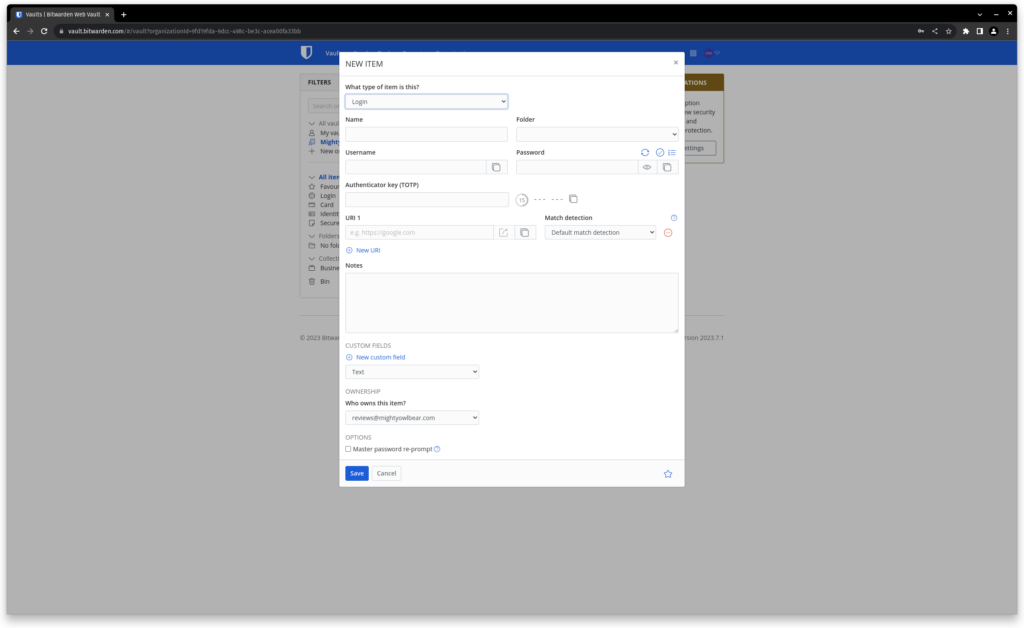
Bitwarden screenshot

Free Organisations can be shared between up to two people, Family organisations by up to six, and there are larger options if you need them, primarily aimed at businesses. You can also share specific passwords (or other secret information) with any other Bitwarden user for a maximum of 31 days via the ephemeral Bitwarden Send tool.

Like most password managers, Bitwarden is a zero-knowledge service, which means that it does not know and cannot discover your master password. If you lose it, you’ll have to reset your account, deleting all stored passwords. However, Organisation administrators can reset the passwords of members of their organisation, and that includes family subscriptions.

Paying users can also designate an emergency contact, who, once set up, can request and be manually or automatically granted access to your account. If you’ve granted them account Takeover access, this emergency contact can also create a new master password for your account if you’ve forgotten it.

Bitwarden is open source and highly transparent in its development and issue reporting process. This helps to ensure that security vulnerabilities are promptly patched and allows the community to request new features. The company has proven to be responsive to user and industry criticism, recently taking measures to increase the number of hash iterations and prompting older users to rehash their passwords with more iterations via a very visible pop-up.

It’s good to see measures to improve the service being regularly rolled out as the threat landscape changes, rather than only being announced in response to a notable breach, such as Lastpass‘s 2022 incident. The only downside is that Bitwarden’s user communications sometimes lean into rather technical language, such as telling users with older accounts to increase the number of KDF iterations (the number of times a password is hashed before being stored) to improve the security of their passwords and taking them to a page where they were prompted to make the change manually.

A friendlier option might have been to auto-suggest a number, rather than just telling users that 600,000 or more was best and leaving them to change the number of iterations in a text entry box. It’s a minor point of friction, but one that could result in nervous users not making the change. New accounts are automatically set to use this higher number of iterations.

User-facing features are also regularly updated, with recent additions including wider device support for the passwordless “log in with device” feature, support for new encryption algorithms such as Argon2, and an email alias integration via your own domain, by using + addresses, or a range of third-party service a that allow users to generate unique email forwarding addresses for every account they create, making it easy to see who’s selling your data and minimising your risk in case a service you use loses your data in a breach.

Bitwarden also is one of a number of password management firms that’ll shortly be rolling out support for Passkeys, a recent passwordless login standard that uses a pair of secret cryptographic keys instead of a username and password to log you into sites that support it, but this hadn’t been rolled out at the time of writing.

Latest deals

Should you buy it?

If you’re looking for convenience: Bitwarden can be as simple as you want it to be, running as an unobtrusive extension to autofill what’s needed in your browser.

If you require sophisticated and customisable security: Bitwarden offers a high level of user configurability and control under the bonnet, but can’t quite match that of the KeePass family of applications.

Final Thoughts

Bitwarden is the ideal password manager for most people. It’s secure, transparent and has more features than any other paid-for password manager we’ve reviewed, while still being very easy to use.

How we test

We test each password manager ourselves on a variety of computer and mobile operating systems.

We carry out comparative feature analysis against industry standards and rival products, and test security and convenience settings such as default logout behaviour and offline access.

We used for at least a week.

Tested all of the available features.

FAQs

Is Bitwarden unsafe?

Bitwarden is perfectly safe to use, with AES-CBC 256-bit encryption preventing hackers from stealing your data and regular updates to help users stay secure.

Can you trust a free password manager?

Yes, a free password manager from a reputable vendor typically has the same level of security as the paid-for versions. By subscribing, you just get access to a greater number of advanced features.

Verdict

Bitwarden provides both the best free and best paid-for online password management service. There are a few specific niches where users might need something else, but this is the ideal password manager for almost everyone.

Pros

  • Unlimited free tier
  • Inexpensive paid tiers
  • Easy to use
  • TOTP password generation

Availability

  • UKRRP: £8.50
  • USARRP: $10

  • SecurityBitwarden uses AES-CBC 256-bit encryption for your Vault data and PBKDF2 SHA-256 to derive your encryption key

  • Sharing:Ephemeral sharing (up to 31 days) with any Bitwarden user via Bitwarden Send; share collections with up to one other user via a free organisation or with anyone in your your Bitwarden Families organisation

  • Storage: 1GB encrypted attachment or secure file storage for paid subscribers

Introduction

Bitwarden is one of the best password manager options currently available.

Not only does it have an excellent paid-for subscription, with features that more than justify the cost, but also one of the best free tiers around for those who aren’t willing to spend a dime.

It’s powerful, customisable but, most importantly, remains easy to use. After using Bitwarden for multiple weeks, here are my thoughts.

Pricing

A Bitwarden Premium account costs $10 (£8.50) per year, while a Bitwarden Families subscription gets you six accounts for $40 (£34.00) per year, as well as a share group account (an Organisation) to go with your family account.

A free Bitwarden account is fully functional. Unlike LastPass, you can access your passwords on all kinds of devices, and unlike Dashlane’s free tier, there’s no limit on the number of passwords you can save.

Bitwarden does reserve more advanced features for paying users. Free accounts don’t get an emergency access contact, secure file storage, in-client TOTP (Time-based One Time Password) two-factor authentication code generation for stored services, and have fewer 2FA options.

You need a paid account if you want to use Duo for multifactor authentication, and only paid organisations (including families) can use FIDO security keys such as YubiKey devices for 2FA.

Features

  • Easy to use, and clearly designed
  • Biometric unlocking is available on all platforms
  • Advanced features available with paid-for subscription

At its simplest, Bitwarden provides a web vault, browser extensions, autofill and autosave functionality. Just set up an account, plug it into your browser and go. By default, you’ll have to enter your master password every time you restart your browser, while the desktop apps and web vault re-lock themselves on restart or after 15 minutes. Its browser plugins are cleanly designed and very easy to use, and the standalone apps and web vault have recently been streamlined to look a little less cluttered, while keeping everything clearly labelled and well documented.

Logout and lock settings are highly configurable, and biometric unlocking is available for all platforms. You can also use a second installation of the Bitwarden client as a passwordless login instead of your master password. If you can’t connect to the internet, an offline cache of your password database is available for read-only access. There’s even a fully offline Bitwarden Portable version for static password collections.

Bitwarden allows you to store logins, payment cards, identity data including your address, national insurance and passport number, and secure notes. Paying users can attach files to entries, allowing you to store passport scans or PGP keys.

The Organisations model is worth paying attention to, because Bitwarden does things a little differently to some of its rivals. If you want to share large numbers of passwords with someone, you’ll need an Organisation, an extra shared password library in addition to your own private one.

Bitwarden screenshot

Free Organisations can be shared between up to two people, Family organisations by up to six, and there are larger options if you need them, primarily aimed at businesses. You can also share specific passwords (or other secret information) with any other Bitwarden user for a maximum of 31 days via the ephemeral Bitwarden Send tool.

Like most password managers, Bitwarden is a zero-knowledge service, which means that it does not know and cannot discover your master password. If you lose it, you’ll have to reset your account, deleting all stored passwords. However, Organisation administrators can reset the passwords of members of their organisation, and that includes family subscriptions.

Paying users can also designate an emergency contact, who, once set up, can request and be manually or automatically granted access to your account. If you’ve granted them account Takeover access, this emergency contact can also create a new master password for your account if you’ve forgotten it.

Bitwarden is open source and highly transparent in its development and issue reporting process. This helps to ensure that security vulnerabilities are promptly patched and allows the community to request new features. The company has proven to be responsive to user and industry criticism, recently taking measures to increase the number of hash iterations and prompting older users to rehash their passwords with more iterations via a very visible pop-up.

It’s good to see measures to improve the service being regularly rolled out as the threat landscape changes, rather than only being announced in response to a notable breach, such as Lastpass‘s 2022 incident. The only downside is that Bitwarden’s user communications sometimes lean into rather technical language, such as telling users with older accounts to increase the number of KDF iterations (the number of times a password is hashed before being stored) to improve the security of their passwords and taking them to a page where they were prompted to make the change manually.

A friendlier option might have been to auto-suggest a number, rather than just telling users that 600,000 or more was best and leaving them to change the number of iterations in a text entry box. It’s a minor point of friction, but one that could result in nervous users not making the change. New accounts are automatically set to use this higher number of iterations.

User-facing features are also regularly updated, with recent additions including wider device support for the passwordless “log in with device” feature, support for new encryption algorithms such as Argon2, and an email alias integration via your own domain, by using + addresses, or a range of third-party service a that allow users to generate unique email forwarding addresses for every account they create, making it easy to see who’s selling your data and minimising your risk in case a service you use loses your data in a breach.

Bitwarden also is one of a number of password management firms that’ll shortly be rolling out support for Passkeys, a recent passwordless login standard that uses a pair of secret cryptographic keys instead of a username and password to log you into sites that support it, but this hadn’t been rolled out at the time of writing.

Latest deals

Should you buy it?

If you’re looking for convenience: Bitwarden can be as simple as you want it to be, running as an unobtrusive extension to autofill what’s needed in your browser.

If you require sophisticated and customisable security: Bitwarden offers a high level of user configurability and control under the bonnet, but can’t quite match that of the KeePass family of applications.

Final Thoughts

Bitwarden is the ideal password manager for most people. It’s secure, transparent and has more features than any other paid-for password manager we’ve reviewed, while still being very easy to use.

How we test

We test each password manager ourselves on a variety of computer and mobile operating systems.

We carry out comparative feature analysis against industry standards and rival products, and test security and convenience settings such as default logout behaviour and offline access.

We used for at least a week.

Tested all of the available features.

FAQs

Is Bitwarden unsafe?

Bitwarden is perfectly safe to use, with AES-CBC 256-bit encryption preventing hackers from stealing your data and regular updates to help users stay secure.

Can you trust a free password manager?

Yes, a free password manager from a reputable vendor typically has the same level of security as the paid-for versions. By subscribing, you just get access to a greater number of advanced features.

Previous Post

He Wanted His Texas Home to Resemble a ‘Groovy’ Opium Den

Next Post

The Burden of Inheritance

Related Posts

Hoover HF6 TurboSense Review
Reviews

Hoover HF6 TurboSense Review

by New Edge Times Report
May 4, 2026
JBL Charge 6 Review
Reviews

JBL Charge 6 Review

by New Edge Times Report
May 1, 2026
Stihl ASA 20 Cordless Secateurs Review: Pruning made much easier
Reviews

Stihl ASA 20 Cordless Secateurs Review: Pruning made much easier

by New Edge Times Report
May 1, 2026
Leave Comment
New Edge Times

© 2025 New Edge Times or its affiliated companies. All rights reserved.

Navigate Site

  • About
  • Advertise
  • Terms & Conditions
  • Privacy Policy
  • Disclaimer
  • Contact

Follow Us

No Result
View All Result
  • World
  • U.S.
  • Politics
  • Business
  • Science
  • Tech
  • Youth
  • Entertainment
    • Gaming
    • Movie
    • Music
    • Arts
  • Sports
  • Lifestyle
    • Fashion
    • Food
    • Health
    • Travel
  • Reviews
  • Trending

© 2025 New Edge Times or its affiliated companies. All rights reserved.

Welcome Back!

Login to your account below

Forgotten Password?

Retrieve your password

Please enter your username or email address to reset your password.

Log In
