
• Washington DC |
  • New York |
  • Toronto |
  • Distribution: (800) 510 9863
Thursday, April 16, 2026
  • Login
No Result
View All Result
NEWSLETTER
New Edge Times
  • World
  • U.S.
  • Politics
  • Business
  • Science
  • Tech
  • Youth
  • Entertainment
    • All
    • Arts
    • Gaming
    • Movie
    • Music
    Video: Movie Review: You, Me & Tuscany

    Video: Movie Review: You, Me & Tuscany

    Josefina Aguilar, Who Depicted Mexican Life in Clay, Dies at 80

    Josefina Aguilar, Who Depicted Mexican Life in Clay, Dies at 80

    At ‘Baywatch’ Tryouts, Hoping to Be the Next Pam Anderson or Jason Momoa

    At ‘Baywatch’ Tryouts, Hoping to Be the Next Pam Anderson or Jason Momoa

    Video: Why Are We Obsessed With Antigone?

    Video: Why Are We Obsessed With Antigone?

    Video: Our Spring Book Recommendations

    Video: Our Spring Book Recommendations

    John Lithgow’s Career Spans 200 Roles — From ‘3rd Rock’ to Roald Dahl

    John Lithgow’s Career Spans 200 Roles — From ‘3rd Rock’ to Roald Dahl

    Video: Michael B. Jordan Wins Best Actor

    Video: Michael B. Jordan Wins Best Actor

    Hope Breaker: The First African American Bronx Hero in the Heartline Universe

    Hope Breaker: The First African American Bronx Hero in the Heartline Universe

    • Gaming
    • Movie
    • Music
    • Arts
  • Sports
  • Lifestyle
    • All
    • Fashion
    • Food
    • Health
    • Travel
    Video: Designer Fashion Hits the 2026 WNBA Draft

    Video: Designer Fashion Hits the 2026 WNBA Draft

    Video: The New Aesthetic of ‘Euphoria’

    Video: The New Aesthetic of ‘Euphoria’

    Is There a Perfect Way to Cook Eggs?

    Is There a Perfect Way to Cook Eggs?

    Bran Muffins Can Be Tender and Moist. Here’s How.

    Bran Muffins Can Be Tender and Moist. Here’s How.

    A Salmon and Potato Recipe That Only Feels Fancy

    A Salmon and Potato Recipe That Only Feels Fancy

    This Old-Fashioned Dish Deserves a Place on Your Easter Table

    This Old-Fashioned Dish Deserves a Place on Your Easter Table

    55 Silver Nathan Young – Turning Life Lessons Into Healthcare Leadership

    55 Silver Nathan Young – Turning Life Lessons Into Healthcare Leadership

    This Stunning Chocolate Dessert Is Simpler Than It Looks

    This Stunning Chocolate Dessert Is Simpler Than It Looks

    • Fashion
    • Food
    • Health
    • Travel
  • Reviews
  • Trending
  • World
  • U.S.
  • Politics
  • Business
  • Science
  • Tech
  • Youth
  • Entertainment
    • All
    • Arts
    • Gaming
    • Movie
    • Music
    Video: Movie Review: You, Me & Tuscany

    Video: Movie Review: You, Me & Tuscany

    Josefina Aguilar, Who Depicted Mexican Life in Clay, Dies at 80

    Josefina Aguilar, Who Depicted Mexican Life in Clay, Dies at 80

    At ‘Baywatch’ Tryouts, Hoping to Be the Next Pam Anderson or Jason Momoa

    At ‘Baywatch’ Tryouts, Hoping to Be the Next Pam Anderson or Jason Momoa

    Video: Why Are We Obsessed With Antigone?

    Video: Why Are We Obsessed With Antigone?

    Video: Our Spring Book Recommendations

    Video: Our Spring Book Recommendations

    John Lithgow’s Career Spans 200 Roles — From ‘3rd Rock’ to Roald Dahl

    John Lithgow’s Career Spans 200 Roles — From ‘3rd Rock’ to Roald Dahl

    Video: Michael B. Jordan Wins Best Actor

    Video: Michael B. Jordan Wins Best Actor

    Hope Breaker: The First African American Bronx Hero in the Heartline Universe

    Hope Breaker: The First African American Bronx Hero in the Heartline Universe

    • Gaming
    • Movie
    • Music
    • Arts
  • Sports
  • Lifestyle
    • All
    • Fashion
    • Food
    • Health
    • Travel
    Video: Designer Fashion Hits the 2026 WNBA Draft

    Video: Designer Fashion Hits the 2026 WNBA Draft

    Video: The New Aesthetic of ‘Euphoria’

    Video: The New Aesthetic of ‘Euphoria’

    Is There a Perfect Way to Cook Eggs?

    Is There a Perfect Way to Cook Eggs?

    Bran Muffins Can Be Tender and Moist. Here’s How.

    Bran Muffins Can Be Tender and Moist. Here’s How.

    A Salmon and Potato Recipe That Only Feels Fancy

    A Salmon and Potato Recipe That Only Feels Fancy

    This Old-Fashioned Dish Deserves a Place on Your Easter Table

    This Old-Fashioned Dish Deserves a Place on Your Easter Table

    55 Silver Nathan Young – Turning Life Lessons Into Healthcare Leadership

    55 Silver Nathan Young – Turning Life Lessons Into Healthcare Leadership

    This Stunning Chocolate Dessert Is Simpler Than It Looks

    This Stunning Chocolate Dessert Is Simpler Than It Looks

    • Fashion
    • Food
    • Health
    • Travel
  • Reviews
  • Trending
No Result
View All Result
New Edge Times
No Result
View All Result
Home Reviews

Asus Vivobook Pro 15 OLED

by New Edge Times Report
April 17, 2024
in Reviews
Asus Vivobook Pro 15 OLED
Share on FacebookShare on Twitter

Verdict

The multipurpose and omnicompetent Asus Vivobook Pro 15 has no mentionable weaknesses and is excellent value, considering its up-to-date underpinnings and range of features. Creatives, gamers, animators, modellers, and anyone just wanting a top-notch laptop will be hard-pressed to find a better one at the price.

Pros

  • Colour-accurate 120Hz OLED screen
  • Large, smooth touchpad with Asus DialPad
  • Solid, expansive keyboard
  • Room for a second SSD

Cons

  • 8GB of RAM is soldered
  • The I/O port layout is lopsided


  • Modern graphicsFeatures RTX 40-series with a healthy 115W TGP

  • Asus DialPadA clever wheel is built into the touchpad to help manage system settings and creative apps

  • Wide-gamut OLED screenThe 120Hz 2.8K OLED display is smooth, colourful and perfect for HDR content

Introduction

The new Asus Vivobook Pro 15 is a laptop designed for content creation and graphics-intensive productivity but with useful gaming capacity, thanks to its potent hardware.

The Vivobook Pro 15’s hardware is current, with the option of two Intel Meteor Lake-H CPUs (the Ultra 7 155H or the Ultra 9 185H) and two Nvidia RTX 4000 GPUs, the 4050 and the 4060. No matter which model you buy, you’ll get a very colourful and colour-accurate 3K (2880 x 1620) OLED panel with a 120Hz refresh rate and a MUX switch to unleash the full power of the GPU.

The price for all this tech goodness? The Core Ultra 7 155H RTX 4050 model I’ve tested won’t be ranging in the UK but will cost you $1,299 in the US. For the higher specification, which is coming to the UK, it’ll cost £1,599/$1,699. That’s not a bad price when the obvious competition in the form of Apple’s MacBook Pro 16 will set you back over £1,000 more.

Design and Keyboard

  • Rock solid keyboard
  • MIL-STD 810H robust
  • Room for more storage and memory

The Vivobook Pro 15 is available in just one colourway in the UK, Earl Grey, which logically would be brown rather than grey. Both the colour and the design are rather anonymous. The only part of the proceedings with any glamour is the high-gloss silver Asus Vivobook script on the lid. While the lid is made from metal, the base of the Vivobook Pro 15 is plastic, but it still feels like a solid and premium product.
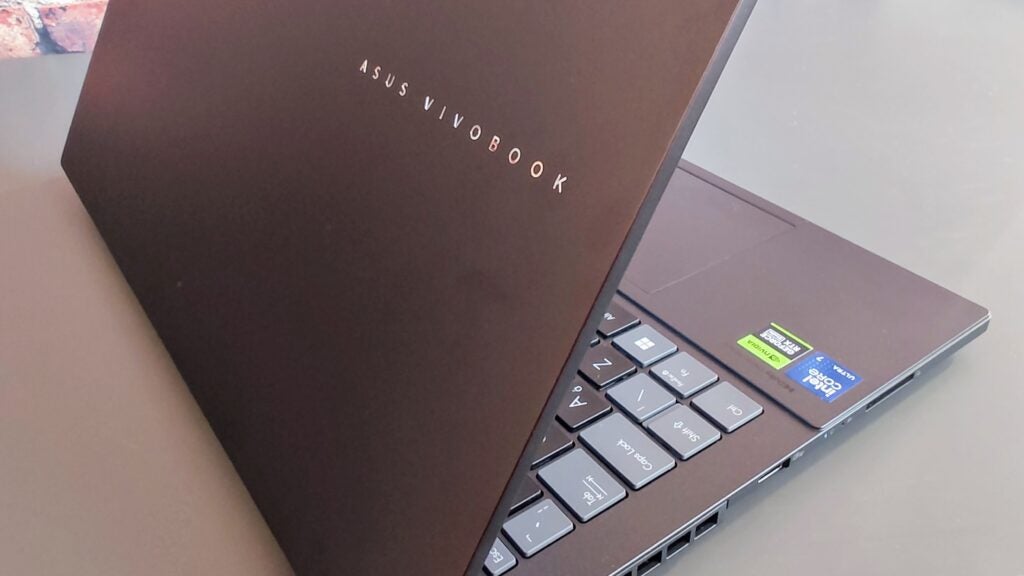
Asus Vivobook Pro 15 OLED - Lid
Image Credit (Trusted Reviews)

At 1.8kg the Vivobook Pro 15 is quite light, and at under 20mm thick, it is not too chunky either. Like many Asus laptops, it meets the US MIL-STD 810H standard for resistance to shock, temperature, and particle ingress.

The sides of the Vivobook Pro are home to a generous array of I/O ports. On the right are two Type-C ports, one Thunderbolt 4 spec and one USB 3.2 Gen 2, a 3.2 Gen 1 spec USB-A port, HDMI 2.1, Gigabit Ethernet, 3.5mm audio, and a power jack. On the left, there’s a second USB-A port and an SD 4.0 card reader.
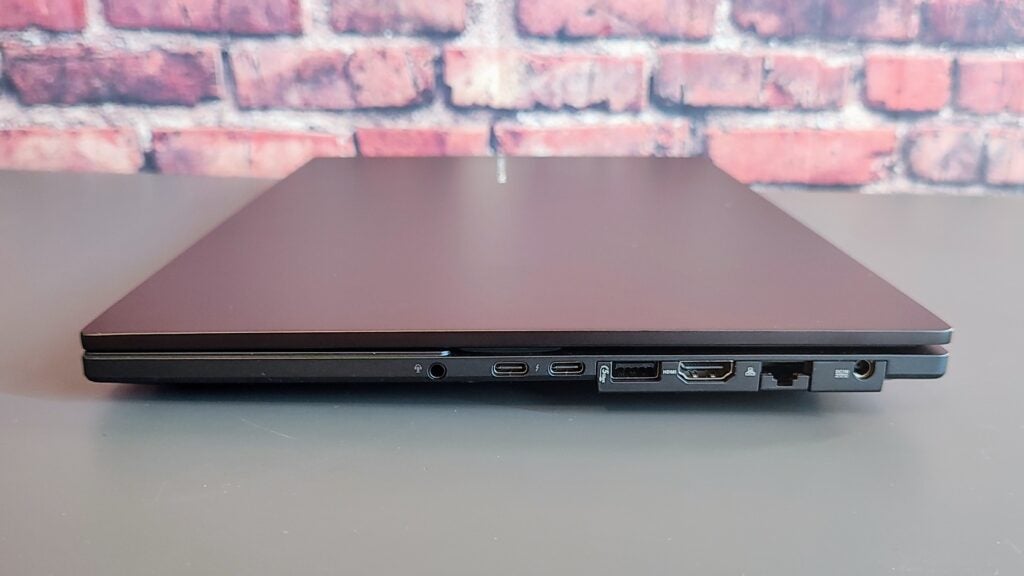
Asus Vivobook Pro 15 OLED - right
Image Credit (Trusted Reviews)

That’s a solid selection, even if the layout is unnecessarily lopsided. Only the Thunderbolt 4 port supports video output, though you can charge via either Type-C if you don’t want to carry the standard 200W Asus power brick around.

With the Intel AX211 wireless card supporting Bluetooth 5.3 and 6GHz Wi-Fi 6E, there’s no need to worry about the modernity of cable-free communications. 

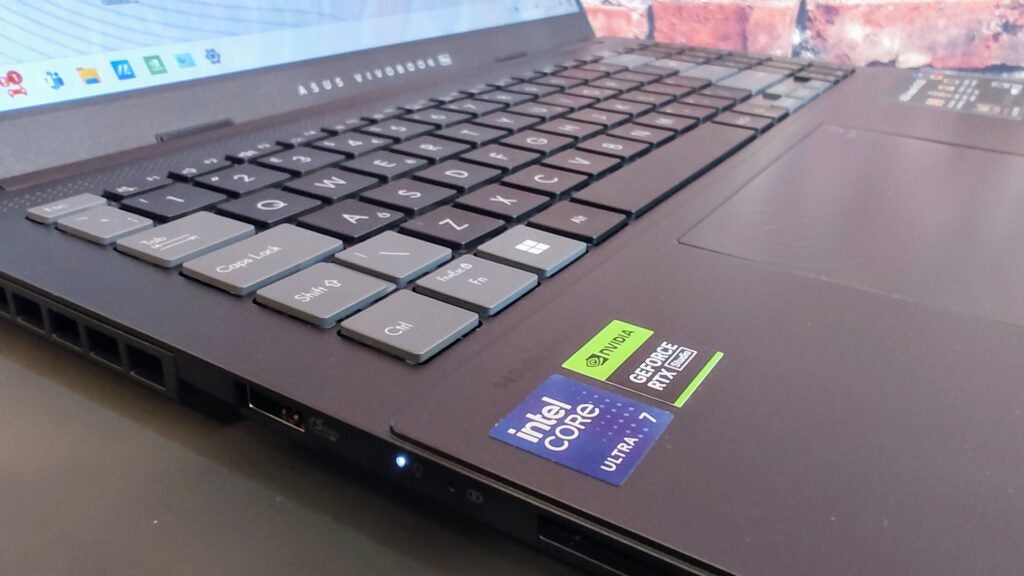
The first thing that strikes one about the keyboard is its solidity. You have to press down brutally in the centre to get the slightest flex from the deck. In normal use, it is effectively solid. It’s expansive, too, with a two-thirds-width numeric keyboard. If I had to pick a layout issue, I’d mention the half-height cursor keys.
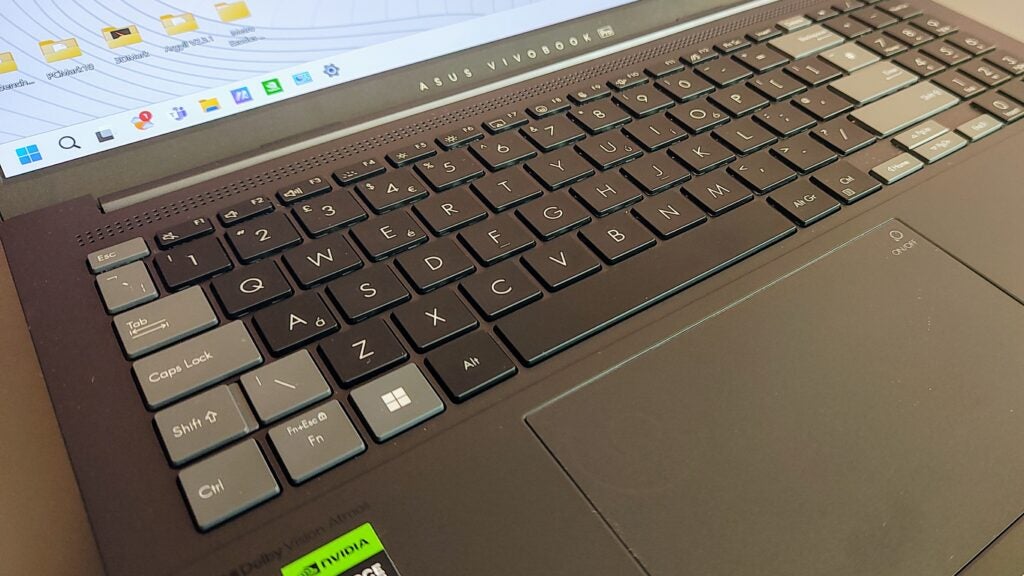
Asus Vivobook Pro 15 OLED - keyboard
Image Credit (Trusted Reviews)

The black and grey keyboard is easy on the eye, and the colour difference between the grey enter keys, black alphanumeric keys, and numeric keypad isn’t just a question of aesthetics. I found it improved my focus on the central part of the keyboard when typing or the number pad when using that. 

The keys have a perfectly judged 1.4mm travel, a comfortable 0.3 mm key-cap dish, and a clean action with a positive end stop. The typing action is silent.

The Asus DialPad is built into the top-left corner of the touchpad and activated by a swipe from the top right. If you want to know more about the DialPad, Asus has created a handy video. In short, it’s a circular controller that gives you fingertip control over your creative apps. For example, you can use it to change brush size. It’s fully customisable and can be used for mundane tasks like adjusting the volume or display brightness.
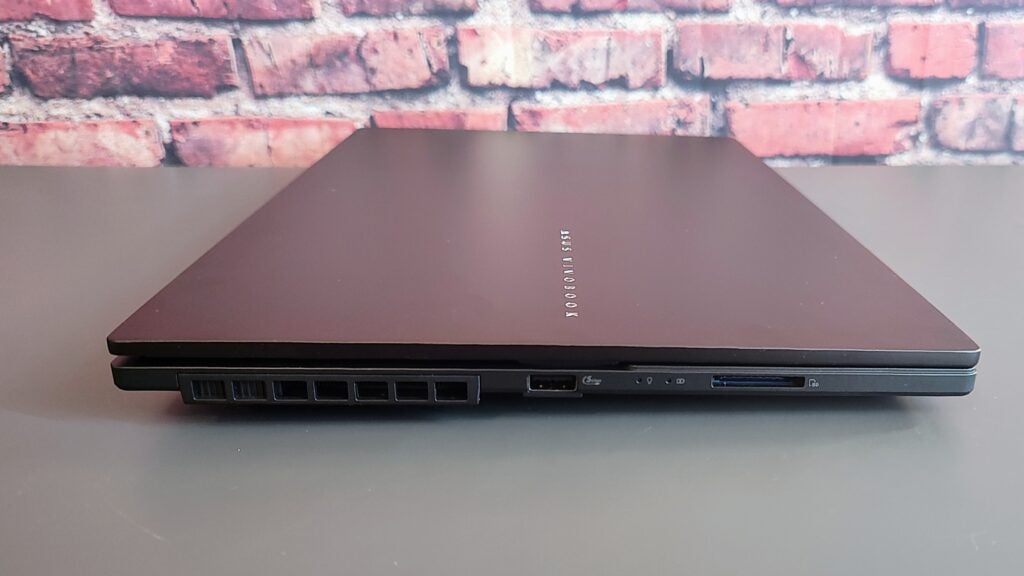
Asus Vivobook Pro 15 OLED - Left
Image Credit (Trusted Reviews)

Getting inside the Vivobook Pro 15 is straightforward, and once open, you’ll find space for a second 2280 PCIe 4 SSD and one free SODIMM RAM slot. With 8GB of RAM soldered to the motherboard, you can load a maximum of another 16GB onto the Vivobook Pro taking the total to 24GB. The Intel AX211 Wi-Fi card is also easily accessible, and the battery can be replaced with just the removal of four Philips screws.

Asus makes no specific claims regarding the Vivobook Pro 15’s environmental impact or lack thereof, but the packing is minimal and made entirely of easily recycled cardboard. You can even disassemble the box lid and fashion it into an impromptu stand, holding the Vivobook Pro vertically or propping the rear up to improve the typing angle.

Display and Sound

  • Colour-accurate 120Hz OLED screen
  • Loud and punchy sound system
  • All-singing, all-dancing webcam

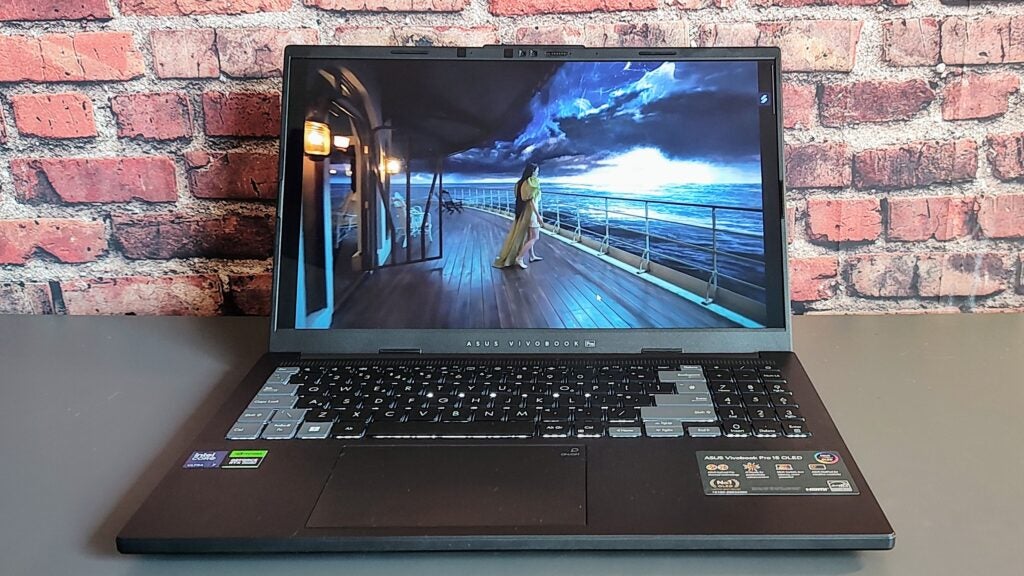
The Samsung-made display is a very impressive 15.6-inch, 16:9 120Hz OLED affair. The 2,880 x 1,620-pixel panel isn’t quite as sharp as the MacBook Pro’s at 212dpi to 254dpi, but the difference is hard to discern with the naked eye. It’s bright, hitting 330nits in SDR mode and 603nits in HDR mode, earning it a VESA DisplayHDR True Black 600 award. 

Colour is abundant thanks to the wide gamut coverage of 100% sRGB, 98.6% DCI-P3, and 95.3% Adobe RGB, all validated by Pantone. The display is also superbly accurate, with Delta E variances of just 0.66 vs the Display-P3 profile, 0.91 vs DCI-P3, and 0.7 vs sRGB. Those results are outstandingly good, amongst the best I’ve encountered on any laptop.
Asus Vivobook Pro 15 OLED - Movie
Image Credit (Trusted Reviews)

HDR performance is hugely impressive, with infinite contrast and superbly saturated colours. Whether just watching a movie or creating content, the Vivobook Pro’s display is a joy to behold, even if it can’t match the searing brightness of the MacBook Pro’s Mini LED display. 

Asus claims a 0.2ms response time for the screen and motion fidelity looks excellent, with hardly any discernible ghosting or smearing. Gaming and 3D modelling animations look superb on the Vivobook.

The Vivobook Pro 15’s two Harman Kardon” speakers produce an impressive sound with plenty of bass and detail. The speaker system is loud, too, pumping out 80dB(A) as measured against a pink noise source at a 1m distance.

The webcam is fully featured and outstanding. It can shoot video at a crisp and colourful 1440p and supports Windows Hello IR facial recognition. Thanks to the Intel AI Boost tile that forms part of the Core Ultra 7 CPU, it also comes with Microsoft’s Studio Effects features like background blur, automatic framing, and eye contact. 

You also get a physical privacy shutter, and the camera works as a presence detector, so it can dim or turn off the display when you move away and turn it back on when you return.

Performance

  • Intel Core Ultra 7 155H and RTX 4050 (115W) combo
  • MUX switch for optimal dGPU performance
  • Good for FullHD gaming and 3D modeling

The most powerful model for the series is the Core Ultra 9 185H and GeForce RTX 4060 machine, which will soon go on sale for £1,599. My review model is the lesser 155H / RTX 4050 beast; price and UK availability are to be confirmed. Both models come with 16GB of RAM as standard.

With an eye on gaming performance, the RTX 4050 GPU has a healthy 115W TGP, which means you can run even demanding titles like Cyberpunk 2077 and Returnal at decent Full HD speeds, 47 and 48fps, respectively, if you forgo ray tracing. Engage Nvidia’s DLSS3 upscaling and you’ll see those frame rates double. 

Moving pixels for business rather than pleasure, the Vivobook Pro 15 scored 75 points in the SPECviewperf 3dsmax workstation 3D modelling test, which compares well with the sort of result I’d expect from a 140W RTX 4060 GPU of 90-95.

The Ultra 7 155H is one of Intel’s very latest models. It has a 4.8GHz, 16-core, 22-thread processor with 6 performance cores. The GeekBench 6 and Cinebench R23 multi-core scores of 12,561 and 16,388 are very healthy and mean the Vivobook Pro 15 is capable of good productivity performance. 

My review machine’s 1TB Western Digital SSD proved a rather mundane performer. The sequential read speed of 4,015MB/s was fine, but the corresponding average write speed of 1,985MB/s was somewhat unimpressive for a machine that, by definition, will be used to shunt large media and data files around. 

Software

  • MyAsus app provides a simple management interface
  • Asus Dial Control Panel is a stand-alone feature
  • Dolby Access to tune audio and video

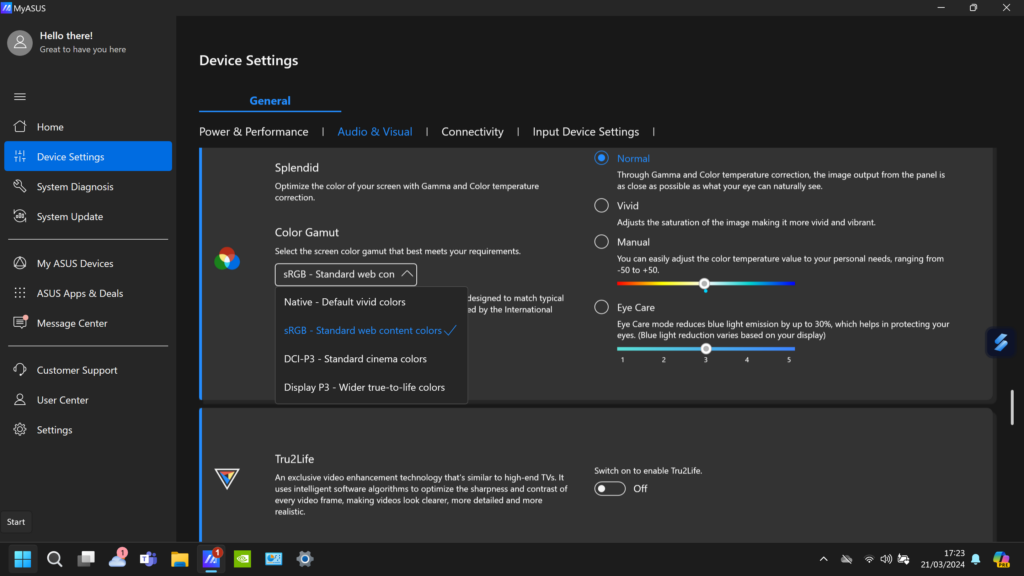
The MyAsus app is an intuitive and simple catch-all control panel for managing the Vivobook Pro 15’s sound, performance, and display profiles. It’s especially handy for the latter, letting you easily switch between sRGB, DCI-P3, Display P3, and Native (in SDR mode). MyAsus also houses the MUX switch, which lets you reboot into or out of RTX 4050-only mode.
Asus Vivobook Pro 15 OLED - Asus CP
Image Credit (Trusted Reviews)

Also included are Dolby’s Access app to improve audio and video playback performance, Asus GlideX, which enables you to share screens across devices even if they don’t run Windows, like an Android or iOS smartphone or tablet, and Asus ScreenXpert, which helps you manage app windows across connected Windows displays. 

If you regularly work across connected devices or with more than one monitor, both GlideX and ScreenXpert are genuinely useful tools.

Battery Life

  • 75Wh battery gives a good runtime
  • Can be recharged via the Thunderbolt 4 port

The PCMark 10 Modern Office battery bench test put the lights out after 8 hours and 2 minutes, which isn’t bad for a laptop with a 75Wh battery. Of course, that’s with the integrated GPU doing all the heavy lifting. With the Nvidia RTX 4050 running, the battery can be drained in a few hours. 
Asus Vivobook Pro 15 OLED - keyboard angle
Image Credit (Trusted Reviews)

Running a locally stored video file drained the battery of its full charge in just over 9 hours while streaming Netflix for 60 minutes took 12% of the battery. Getting through a full working day is possible, though you will find yourself looking at the battery meter at 6pm, wondering if you should plug it in quickly before leaving the office.

Latest deals

Should you buy it?

If you want a good do-it-all laptop

If you have a grand and a half to spare, very few other laptops do everything as well as the Vivobook Pro 15. From gaming to basic production, design and animation work to professional-standard image rendering, the Vivobook Pro never puts a foot wrong.

If you can’t recharge during the day

Though the Vivobook Pro 15’s battery life is good, it’s only good by Windows and Intel standards. The MacBook Pro, admittedly a far more expensive option, has it beaten hands down.

Final Thoughts

As an all-rounder, the Asus Vivobook Pro comes very close to matching the evergreen Apple MacBook Pro 16. Granted, the MacBook has significantly superior battery life, but so it should: If you want one with a Vivobook-matching 1TB SSD, you’ll be paying almost three grand for the privilege.

The 2024 Asus ROG Zephyrus G16 is worth a look if money is no object. It’s a highly impressive bit of kit, but for four grand in the top-end form that we were sent to review, it should be! If you lean more towards the gaming than the creating side of things, HP’s latest Omen 16 is a well-balanced alternative,

Lenovo’s impressive Yoga Pro 9i is the most direct competitor, which boasts a 3.2K Mini LED touchscreen and a potent Core i9-13905H CPU. The sound system is extremely good, too. Price is an issue, though, with the Yoga Pro 9i costing only a few pence below £2,000/$2,000, and battery life is poor.

If you want a laptop that fully deserves its “Pro” moniker but don’t want to end up light in the wallet to the tune of 2 or 3 grand, the new Vivobook Pro is a slam-dunk, and remember, I’m basing that on the price of the range-topping RTX 4060 model.

How we test

Every laptop we review goes through a series of uniform checks designed to gauge key things, including build quality, performance, screen quality and battery life.

These include formal synthetic benchmarks and scripted tests, plus a series of real-world checks, such as how well it runs popular apps.

We test the performance via both benchmark tests and real-world use.

We test the screen with a colorimeter and real-world use.

We test the battery with a benchmark test and real-world use.

We used as our main laptop for at least a week.

FAQs

Is an OLED laptop worth the extra money?

OLED laptops offer several advantages over traditional liquid crystal display (LCD) laptops. Firstly, OLED displays provide richer and more vivid colours, making images and videos appear more lifelike. Secondly, OLED technology allows for deeper blacks and higher contrast ratios, enhancing the overall visual experience.

Is OLED burn-in still a problem on laptop

Burn-in is possible with OLED but unlikely with normal use. Most “burn-in” is image retention, which goes away after a few minutes. You’ll almost certainly see image retention long before it becomes permanent burn-in. Generally speaking, burn-in is something to be aware of but not worry about.

Trusted Reviews test data

‹

PCMark 10

Cinebench R23 multi core

Cinebench R23 single core

Geekbench 5 single core

Geekbench 5 multi core

Geekbench 6 single core

Geekbench 6 multi core

3DMark Time Spy

CrystalDiskMark Read speed

CrystalDiskMark Write Speed

Brightness (SDR)

Brightness (HDR)

Black level

Contrast ratio

White Visual Colour Temperature

sRGB

Adobe RGB

DCI-P3

PCMark Battery (office)

Battery discharge after 60 minutes of online Netflix playback

Cyberpunk 2077 (Quad HD)

Cyberpunk 2077 (Full HD)

Cyberpunk 2077 (Full HD + RT)

Cyberpunk 2077 (Full HD + Supersampling)

Returnal (Quad HD)

Returnal (Full HD)

F1 22 (Quad HD)

F1 22 (Full HD)

Fan noise under stress

Temperature under stress

Asus Vivobook Pro 15 OLED

6468

16388

1743

1745

12100

2334

12559

8707

4015 MB/s

1983 MB/s

330 nits

603 nits

0 nits

Infinite

6195 K

100 %

95.3 %

98.6 %

8 hrs

12 %

21 fps

48 fps

11.5 fps

96 fps

35 fps

47 fps

81 fps

111 fps

56 dB

33 °C

›

‹

UK RRP

CPU

Manufacturer

Screen Size

Storage Capacity

Front Camera

Battery

Battery Hours

Size (Dimensions)

Weight

Operating System

Release Date

First Reviewed Date

Model Number

Resolution

HDR

Refresh Rate

Ports

GPU

RAM

Connectivity

Colours

Display Technology

Touch Screen

Convertible?

Asus Vivobook Pro 15 OLED

£1599

Intel Core Ultra 7 155H

Asus

15.6 inches

1TB

1440p

75 Whr

8 2

355.7 x 235.3 x 19.9 MM

1.8 KG

Windows 11 Home

2024

02/04/2024

N6506MV

2880 x 1620

Yes

120 Hz

1x USB-C 3.2 Gen 2, 1 x Thunderbolt 4, 2x USB-A 3.2 Gen 1, 1x HDMI 2.1, 1x 3.5mm, 1x RJ45 Gigabit Ethernet, 1 x SD 4.0 card reader

Nvidia RTX 4050

16GB

Wi-Fi 6E, Bluetooth 5.3

Gray

OLED

No

No

›

Verdict

The multipurpose and omnicompetent Asus Vivobook Pro 15 has no mentionable weaknesses and is excellent value, considering its up-to-date underpinnings and range of features. Creatives, gamers, animators, modellers, and anyone just wanting a top-notch laptop will be hard-pressed to find a better one at the price.

Pros

  • Colour-accurate 120Hz OLED screen
  • Large, smooth touchpad with Asus DialPad
  • Solid, expansive keyboard
  • Room for a second SSD

Cons

  • 8GB of RAM is soldered
  • The I/O port layout is lopsided


  • Modern graphicsFeatures RTX 40-series with a healthy 115W TGP

  • Asus DialPadA clever wheel is built into the touchpad to help manage system settings and creative apps

  • Wide-gamut OLED screenThe 120Hz 2.8K OLED display is smooth, colourful and perfect for HDR content

Introduction

The new Asus Vivobook Pro 15 is a laptop designed for content creation and graphics-intensive productivity but with useful gaming capacity, thanks to its potent hardware.

The Vivobook Pro 15’s hardware is current, with the option of two Intel Meteor Lake-H CPUs (the Ultra 7 155H or the Ultra 9 185H) and two Nvidia RTX 4000 GPUs, the 4050 and the 4060. No matter which model you buy, you’ll get a very colourful and colour-accurate 3K (2880 x 1620) OLED panel with a 120Hz refresh rate and a MUX switch to unleash the full power of the GPU.

The price for all this tech goodness? The Core Ultra 7 155H RTX 4050 model I’ve tested won’t be ranging in the UK but will cost you $1,299 in the US. For the higher specification, which is coming to the UK, it’ll cost £1,599/$1,699. That’s not a bad price when the obvious competition in the form of Apple’s MacBook Pro 16 will set you back over £1,000 more.

Design and Keyboard

  • Rock solid keyboard
  • MIL-STD 810H robust
  • Room for more storage and memory

The Vivobook Pro 15 is available in just one colourway in the UK, Earl Grey, which logically would be brown rather than grey. Both the colour and the design are rather anonymous. The only part of the proceedings with any glamour is the high-gloss silver Asus Vivobook script on the lid. While the lid is made from metal, the base of the Vivobook Pro 15 is plastic, but it still feels like a solid and premium product.

Asus Vivobook Pro 15 OLED - Lid
Image Credit (Trusted Reviews)

At 1.8kg the Vivobook Pro 15 is quite light, and at under 20mm thick, it is not too chunky either. Like many Asus laptops, it meets the US MIL-STD 810H standard for resistance to shock, temperature, and particle ingress.

The sides of the Vivobook Pro are home to a generous array of I/O ports. On the right are two Type-C ports, one Thunderbolt 4 spec and one USB 3.2 Gen 2, a 3.2 Gen 1 spec USB-A port, HDMI 2.1, Gigabit Ethernet, 3.5mm audio, and a power jack. On the left, there’s a second USB-A port and an SD 4.0 card reader.

Asus Vivobook Pro 15 OLED - right
Image Credit (Trusted Reviews)

That’s a solid selection, even if the layout is unnecessarily lopsided. Only the Thunderbolt 4 port supports video output, though you can charge via either Type-C if you don’t want to carry the standard 200W Asus power brick around.

With the Intel AX211 wireless card supporting Bluetooth 5.3 and 6GHz Wi-Fi 6E, there’s no need to worry about the modernity of cable-free communications. 

The first thing that strikes one about the keyboard is its solidity. You have to press down brutally in the centre to get the slightest flex from the deck. In normal use, it is effectively solid. It’s expansive, too, with a two-thirds-width numeric keyboard. If I had to pick a layout issue, I’d mention the half-height cursor keys.

Asus Vivobook Pro 15 OLED - keyboard
Image Credit (Trusted Reviews)

The black and grey keyboard is easy on the eye, and the colour difference between the grey enter keys, black alphanumeric keys, and numeric keypad isn’t just a question of aesthetics. I found it improved my focus on the central part of the keyboard when typing or the number pad when using that. 

The keys have a perfectly judged 1.4mm travel, a comfortable 0.3 mm key-cap dish, and a clean action with a positive end stop. The typing action is silent.

The Asus DialPad is built into the top-left corner of the touchpad and activated by a swipe from the top right. If you want to know more about the DialPad, Asus has created a handy video. In short, it’s a circular controller that gives you fingertip control over your creative apps. For example, you can use it to change brush size. It’s fully customisable and can be used for mundane tasks like adjusting the volume or display brightness.

Asus Vivobook Pro 15 OLED - Left
Image Credit (Trusted Reviews)

Getting inside the Vivobook Pro 15 is straightforward, and once open, you’ll find space for a second 2280 PCIe 4 SSD and one free SODIMM RAM slot. With 8GB of RAM soldered to the motherboard, you can load a maximum of another 16GB onto the Vivobook Pro taking the total to 24GB. The Intel AX211 Wi-Fi card is also easily accessible, and the battery can be replaced with just the removal of four Philips screws.

Asus makes no specific claims regarding the Vivobook Pro 15’s environmental impact or lack thereof, but the packing is minimal and made entirely of easily recycled cardboard. You can even disassemble the box lid and fashion it into an impromptu stand, holding the Vivobook Pro vertically or propping the rear up to improve the typing angle.

Display and Sound

  • Colour-accurate 120Hz OLED screen
  • Loud and punchy sound system
  • All-singing, all-dancing webcam

The Samsung-made display is a very impressive 15.6-inch, 16:9 120Hz OLED affair. The 2,880 x 1,620-pixel panel isn’t quite as sharp as the MacBook Pro’s at 212dpi to 254dpi, but the difference is hard to discern with the naked eye. It’s bright, hitting 330nits in SDR mode and 603nits in HDR mode, earning it a VESA DisplayHDR True Black 600 award. 

Colour is abundant thanks to the wide gamut coverage of 100% sRGB, 98.6% DCI-P3, and 95.3% Adobe RGB, all validated by Pantone. The display is also superbly accurate, with Delta E variances of just 0.66 vs the Display-P3 profile, 0.91 vs DCI-P3, and 0.7 vs sRGB. Those results are outstandingly good, amongst the best I’ve encountered on any laptop.

Asus Vivobook Pro 15 OLED - Movie
Image Credit (Trusted Reviews)

HDR performance is hugely impressive, with infinite contrast and superbly saturated colours. Whether just watching a movie or creating content, the Vivobook Pro’s display is a joy to behold, even if it can’t match the searing brightness of the MacBook Pro’s Mini LED display. 

Asus claims a 0.2ms response time for the screen and motion fidelity looks excellent, with hardly any discernible ghosting or smearing. Gaming and 3D modelling animations look superb on the Vivobook.

The Vivobook Pro 15’s two Harman Kardon” speakers produce an impressive sound with plenty of bass and detail. The speaker system is loud, too, pumping out 80dB(A) as measured against a pink noise source at a 1m distance.

The webcam is fully featured and outstanding. It can shoot video at a crisp and colourful 1440p and supports Windows Hello IR facial recognition. Thanks to the Intel AI Boost tile that forms part of the Core Ultra 7 CPU, it also comes with Microsoft’s Studio Effects features like background blur, automatic framing, and eye contact. 

You also get a physical privacy shutter, and the camera works as a presence detector, so it can dim or turn off the display when you move away and turn it back on when you return.

Performance

  • Intel Core Ultra 7 155H and RTX 4050 (115W) combo
  • MUX switch for optimal dGPU performance
  • Good for FullHD gaming and 3D modeling

The most powerful model for the series is the Core Ultra 9 185H and GeForce RTX 4060 machine, which will soon go on sale for £1,599. My review model is the lesser 155H / RTX 4050 beast; price and UK availability are to be confirmed. Both models come with 16GB of RAM as standard.

With an eye on gaming performance, the RTX 4050 GPU has a healthy 115W TGP, which means you can run even demanding titles like Cyberpunk 2077 and Returnal at decent Full HD speeds, 47 and 48fps, respectively, if you forgo ray tracing. Engage Nvidia’s DLSS3 upscaling and you’ll see those frame rates double. 

Moving pixels for business rather than pleasure, the Vivobook Pro 15 scored 75 points in the SPECviewperf 3dsmax workstation 3D modelling test, which compares well with the sort of result I’d expect from a 140W RTX 4060 GPU of 90-95.

The Ultra 7 155H is one of Intel’s very latest models. It has a 4.8GHz, 16-core, 22-thread processor with 6 performance cores. The GeekBench 6 and Cinebench R23 multi-core scores of 12,561 and 16,388 are very healthy and mean the Vivobook Pro 15 is capable of good productivity performance. 

My review machine’s 1TB Western Digital SSD proved a rather mundane performer. The sequential read speed of 4,015MB/s was fine, but the corresponding average write speed of 1,985MB/s was somewhat unimpressive for a machine that, by definition, will be used to shunt large media and data files around. 

Software

  • MyAsus app provides a simple management interface
  • Asus Dial Control Panel is a stand-alone feature
  • Dolby Access to tune audio and video

The MyAsus app is an intuitive and simple catch-all control panel for managing the Vivobook Pro 15’s sound, performance, and display profiles. It’s especially handy for the latter, letting you easily switch between sRGB, DCI-P3, Display P3, and Native (in SDR mode). MyAsus also houses the MUX switch, which lets you reboot into or out of RTX 4050-only mode.

Asus Vivobook Pro 15 OLED - Asus CP
Image Credit (Trusted Reviews)

Also included are Dolby’s Access app to improve audio and video playback performance, Asus GlideX, which enables you to share screens across devices even if they don’t run Windows, like an Android or iOS smartphone or tablet, and Asus ScreenXpert, which helps you manage app windows across connected Windows displays. 

If you regularly work across connected devices or with more than one monitor, both GlideX and ScreenXpert are genuinely useful tools.

Battery Life

  • 75Wh battery gives a good runtime
  • Can be recharged via the Thunderbolt 4 port

The PCMark 10 Modern Office battery bench test put the lights out after 8 hours and 2 minutes, which isn’t bad for a laptop with a 75Wh battery. Of course, that’s with the integrated GPU doing all the heavy lifting. With the Nvidia RTX 4050 running, the battery can be drained in a few hours. 

Asus Vivobook Pro 15 OLED - keyboard angle
Image Credit (Trusted Reviews)

Running a locally stored video file drained the battery of its full charge in just over 9 hours while streaming Netflix for 60 minutes took 12% of the battery. Getting through a full working day is possible, though you will find yourself looking at the battery meter at 6pm, wondering if you should plug it in quickly before leaving the office.

Latest deals

Should you buy it?

If you want a good do-it-all laptop

If you have a grand and a half to spare, very few other laptops do everything as well as the Vivobook Pro 15. From gaming to basic production, design and animation work to professional-standard image rendering, the Vivobook Pro never puts a foot wrong.

If you can’t recharge during the day

Though the Vivobook Pro 15’s battery life is good, it’s only good by Windows and Intel standards. The MacBook Pro, admittedly a far more expensive option, has it beaten hands down.

Final Thoughts

As an all-rounder, the Asus Vivobook Pro comes very close to matching the evergreen Apple MacBook Pro 16. Granted, the MacBook has significantly superior battery life, but so it should: If you want one with a Vivobook-matching 1TB SSD, you’ll be paying almost three grand for the privilege.

The 2024 Asus ROG Zephyrus G16 is worth a look if money is no object. It’s a highly impressive bit of kit, but for four grand in the top-end form that we were sent to review, it should be! If you lean more towards the gaming than the creating side of things, HP’s latest Omen 16 is a well-balanced alternative,

Lenovo’s impressive Yoga Pro 9i is the most direct competitor, which boasts a 3.2K Mini LED touchscreen and a potent Core i9-13905H CPU. The sound system is extremely good, too. Price is an issue, though, with the Yoga Pro 9i costing only a few pence below £2,000/$2,000, and battery life is poor.

If you want a laptop that fully deserves its “Pro” moniker but don’t want to end up light in the wallet to the tune of 2 or 3 grand, the new Vivobook Pro is a slam-dunk, and remember, I’m basing that on the price of the range-topping RTX 4060 model.

How we test

Every laptop we review goes through a series of uniform checks designed to gauge key things, including build quality, performance, screen quality and battery life.

These include formal synthetic benchmarks and scripted tests, plus a series of real-world checks, such as how well it runs popular apps.

We test the performance via both benchmark tests and real-world use.

We test the screen with a colorimeter and real-world use.

We test the battery with a benchmark test and real-world use.

We used as our main laptop for at least a week.

FAQs

Is an OLED laptop worth the extra money?

OLED laptops offer several advantages over traditional liquid crystal display (LCD) laptops. Firstly, OLED displays provide richer and more vivid colours, making images and videos appear more lifelike. Secondly, OLED technology allows for deeper blacks and higher contrast ratios, enhancing the overall visual experience.

Is OLED burn-in still a problem on laptop

Burn-in is possible with OLED but unlikely with normal use. Most “burn-in” is image retention, which goes away after a few minutes. You’ll almost certainly see image retention long before it becomes permanent burn-in. Generally speaking, burn-in is something to be aware of but not worry about.

Trusted Reviews test data

‹

PCMark 10

Cinebench R23 multi core

Cinebench R23 single core

Geekbench 5 single core

Geekbench 5 multi core

Geekbench 6 single core

Geekbench 6 multi core

3DMark Time Spy

CrystalDiskMark Read speed

CrystalDiskMark Write Speed

Brightness (SDR)

Brightness (HDR)

Black level

Contrast ratio

White Visual Colour Temperature

sRGB

Adobe RGB

DCI-P3

PCMark Battery (office)

Battery discharge after 60 minutes of online Netflix playback

Cyberpunk 2077 (Quad HD)

Cyberpunk 2077 (Full HD)

Cyberpunk 2077 (Full HD + RT)

Cyberpunk 2077 (Full HD + Supersampling)

Returnal (Quad HD)

Returnal (Full HD)

F1 22 (Quad HD)

F1 22 (Full HD)

Fan noise under stress

Temperature under stress

Asus Vivobook Pro 15 OLED

6468

16388

1743

1745

12100

2334

12559

8707

4015 MB/s

1983 MB/s

330 nits

603 nits

0 nits

Infinite

6195 K

100 %

95.3 %

98.6 %

8 hrs

12 %

21 fps

48 fps

11.5 fps

96 fps

35 fps

47 fps

81 fps

111 fps

56 dB

33 °C

›

‹

UK RRP

CPU

Manufacturer

Screen Size

Storage Capacity

Front Camera

Battery

Battery Hours

Size (Dimensions)

Weight

Operating System

Release Date

First Reviewed Date

Model Number

Resolution

HDR

Refresh Rate

Ports

GPU

RAM

Connectivity

Colours

Display Technology

Touch Screen

Convertible?

Asus Vivobook Pro 15 OLED

£1599

Intel Core Ultra 7 155H

Asus

15.6 inches

1TB

1440p

75 Whr

8 2

355.7 x 235.3 x 19.9 MM

1.8 KG

Windows 11 Home

2024

02/04/2024

N6506MV

2880 x 1620

Yes

120 Hz

1x USB-C 3.2 Gen 2, 1 x Thunderbolt 4, 2x USB-A 3.2 Gen 1, 1x HDMI 2.1, 1x 3.5mm, 1x RJ45 Gigabit Ethernet, 1 x SD 4.0 card reader

Nvidia RTX 4050

16GB

Wi-Fi 6E, Bluetooth 5.3

Gray

OLED

No

No

›

Previous Post

Sleep Apnea Reduced in People Who Took Weight-Loss Drug, Eli Lilly Reports

Next Post

Heavy Rain and Floods Kill 19 in Oman and Disrupt Dubai Airport

Related Posts

Anker SOLIX C2000 Gen 2 Review
Reviews

Anker SOLIX C2000 Gen 2 Review

by New Edge Times Report
April 15, 2026
Amazfit Active 3 Premium Review
Reviews

Amazfit Active 3 Premium Review

by New Edge Times Report
April 15, 2026
Sony Inzone H6 Air Review
Reviews

Sony Inzone H6 Air Review

by New Edge Times Report
April 14, 2026
Leave Comment
New Edge Times

© 2025 New Edge Times or its affiliated companies. All rights reserved.

Navigate Site

  • About
  • Advertise
  • Terms & Conditions
  • Privacy Policy
  • Disclaimer
  • Contact

Follow Us

No Result
View All Result
  • World
  • U.S.
  • Politics
  • Business
  • Science
  • Tech
  • Youth
  • Entertainment
    • Gaming
    • Movie
    • Music
    • Arts
  • Sports
  • Lifestyle
    • Fashion
    • Food
    • Health
    • Travel
  • Reviews
  • Trending

© 2025 New Edge Times or its affiliated companies. All rights reserved.

Welcome Back!

Login to your account below

Forgotten Password?

Retrieve your password

Please enter your username or email address to reset your password.

Log In
