





Verdict
The Asus ROG Raikiri Pro has the makings of an excellent pro controller. It’s comfortable to use and straightforward to customise. But with no wireless Xbox connectivity and a largely pointless OLED screen inflating its price tag, there’s little to set it apart from other Xbox and PC gamepads.
Pros
- Very comfortable
- Straightforward customisation
Cons
- Pointless OLED screen
- Pricey for its features
- Only wired Xbox connection
-
Customizable Response curves, button mapping and more can be adjusted -
Xbox and PC compatibleAlthough it can’t wirelessly connect to consoles -
OLED screenIt’s fun and flashy, even if it doesn’t do a whole lot
Introduction
The ROG Raikiri Pro is a perfectly serviceable controller with an obsolete OLED screen plonked on the front and an inflated price tag to boot. It’s comfortable, it’s robustly customizable, and even with its strangely angled back buttons, it served me well in competitive shooters, soulslikes and even the odd RTS.
But for all Asus’s claims that the ROG Raikiri Pro has been designed with the Xbox in mind, it can only connect to the console over a USB cable, not wirelessly. And the OLED screen might look flashy, but doesn’t add up to much more than a glorified screensaver.
If you’re an Xbox player, splashing £149.99/$169.99 on the Rog Raikiri Pro while the Xbox Elite Controller 2 and Scuf Instinct Pro Controller can be had for a touch extra doesn’t make a whole lot of sense. And if you play mainly on PC, most of our other picks of the best game controllers will be superior. Don’t be fooled by the OLED gimmick.
Design
- An OLED screen bang in the middle
- Wireless PC and wired Xbox support
- Four rear paddles
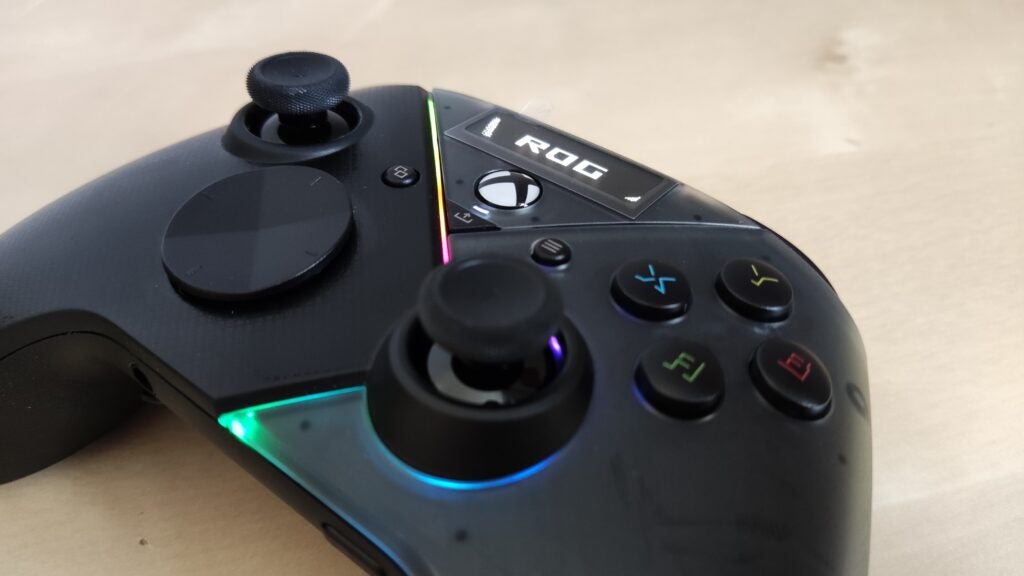
The main feature of the ROG Raikiri Pro is the inch-long OLED screen at the top of its faceplate, though why it’s been put there at all is still something of a mystery to me. Its main purpose is to act as a screensaver, showing a splashy animation or string of text. By default, it’s set to a short, looped animation of a ROG logo, which comes in several varieties, although you can import a custom animations and string of your own. Other than that, it’s used to change button-mapping profiles with the aid of a couple of side buttons. That’s it.
It’s basically a gimmick, and one that feels deliberately designed to serve as fodder for scoffing news headlines and keyword-laden Amazon listings. It’s also something of a distraction. I found the default ROG logo animations so gaudy that I ended up turning the whole screen off only a few days into my testing, and am yet to turn it back on.
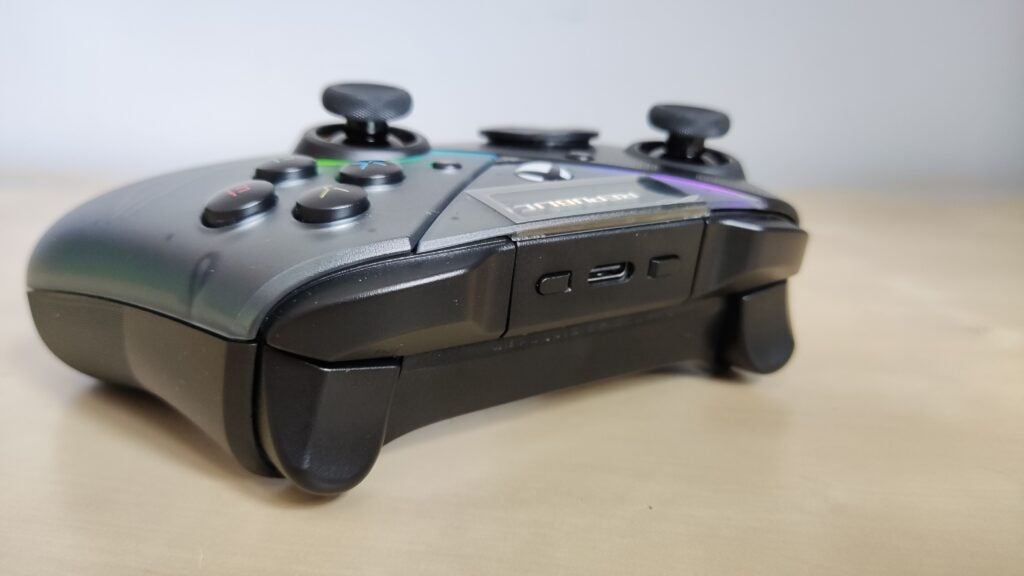
The back of the controller also looks a bit peculiar. In the middle of four rear buttons is a magnetic compartment hiding a USB dongle used to wirelessly connect the controller to a PC. It’s a snazzy way of integrating the receiver, although you can forget about it you’ll just be playing on Xbox, as the ROG Raikiri can only be wired up to consoles. It does, fortunately, come with a generous 3m braided USB cable. But even so, with wireless controllers the norm for console controllers, it’s a big omission.
The rest of the ROG Raikiri will feel familiar to anyone who’s used the standard Xbox Wireless Controller, bar a few adjustments. The d-pad is larger and flatter, which I found to be more comfortable. The middle View, Share and Menu buttons are smaller and protrude less – handy if, like me, you sometimes find yourself accidentally catching those middle buttons with the tips of your thumbs. And the triggers have a more accentuated curve, giving them more of a trigger feel.
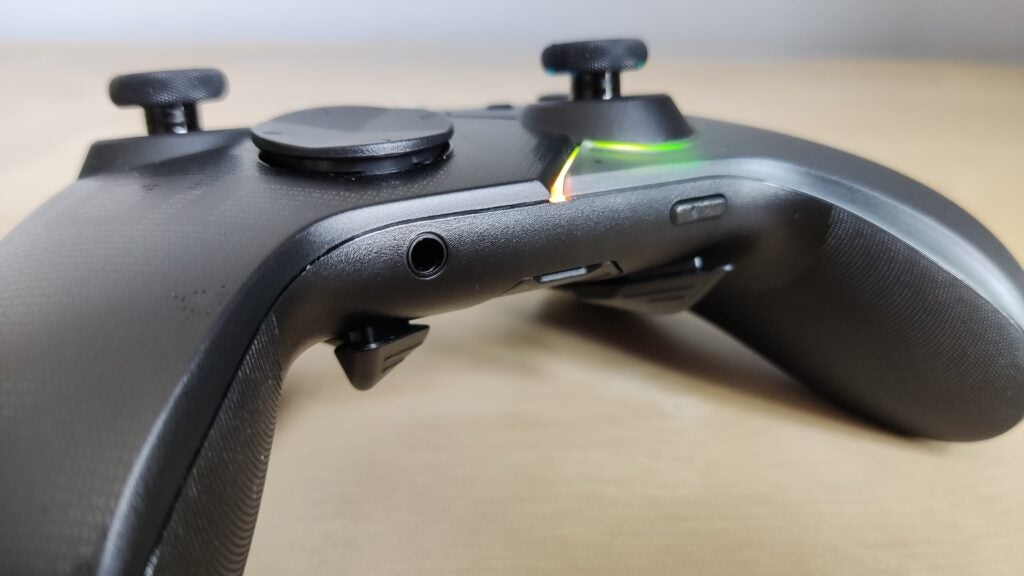
The 3.5mm headphone jack and a handy adjacent mute-microphone button round off what is a very comfortable controller, although its conservative RGB lighting sits somewhat at odds with the flashy, bizarre, and largely functionless OLED screen slapped in the middle.
Performance
- Granular customization
- Optional hair triggers
- Oddly shaped but well-performing back buttons
The ROG Raikiri’s back paddles are high up on its body and close to its spine. It’s an unusual positioning, and means your fingers rest next to the buttons rather than on top of them. I found that worked nicely enough and prevented me from accidentally tapping them at any inopportune times, although it did take a while to get used to stretching my middle and ring finger upwards to reach them. They do the usual, and can be assigned to specific in-game controls or used to change more granular settings of the ROG Raikiri on the fly, such as the sensitivity of its analogue sticks.
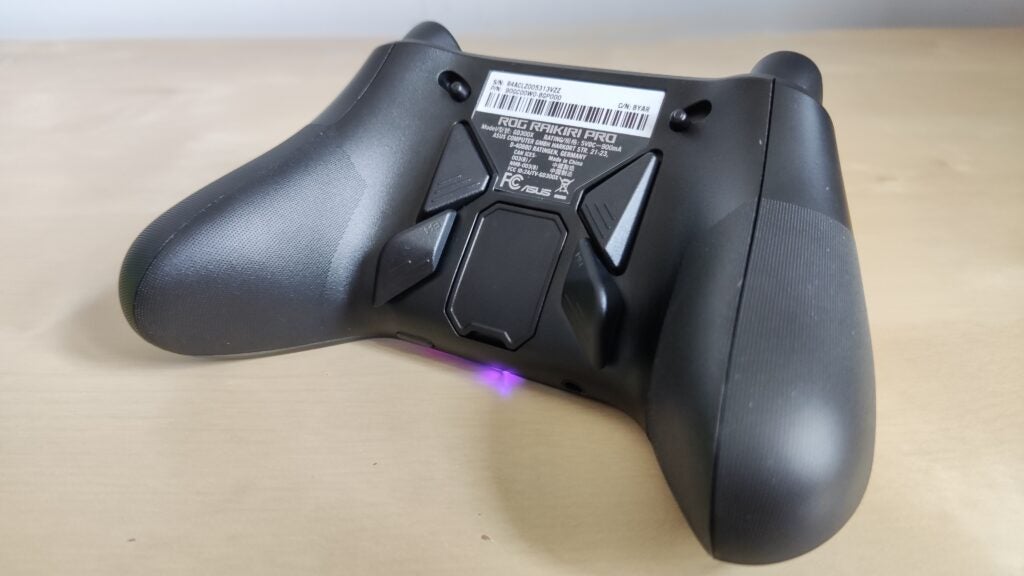
Their shape is a little unintuitive, too. They’re angled and have a few grooves, but they’re not exactly ergonomic. I often found myself hitting their edges rather the flat part of their bodies, and while that didn’t cause any major problems, I can imagine anyone who is used to precisely tapping the rear paddles of their controller with lightning speed will find it an irritating adjustment.
The hair triggers work better. They can be set to a short-range mode for minimal actuation, which comes in handy when you’re playing a twitch shooter and need to rapidly pull the trigger, or a long-range mode for standard travel distance. You can switch between them using a pair of sliders on the controller’s back, and customise their dead zones and input thresholds using the accompanying Armoury Crate app.
That level of granular customization extends across the controller. The response curve, dead zone, and threshold of each analogue stick can be adjusted, as can the intensity of the controller’s four vibration zones. That covers essentially everything you’d want to adjust, and I found it powerful enough to change the controller to exactly my preference.
Battery life is also solid. I got over 40 hours of juice from the controller when using it wirelessly with my PC. Although if you’re wiring it up to an Xbox, you won’t have to worry about that.
Software
- Slow-going at times
- Straightforward to use
To access any of those adjustment features, you need to use Asus’s Armoury Crate PC app, which didn’t go wholly smoothly for me. For starters, you can only adjust the ROG Raikiri’s settings when it’s wired up to your PC – somewhat frustrating given its wireless functionality – and even getting it set up became a chore. I had to reconnect the gamepad several times before the app would recognize it all, and was then repeatedly met with a vague error message for a few hours before it miraculously fixed itself. Bugs like that don’t exactly fill you with confidence.
Once it was up and running, using the app was smoother. The interface is responsive and clear, and adjusting the various parameters is simple enough. Even better, the changes are made in real time, so you can check what you just did and if any further changes are needed.
Latest deals
Should you buy it?
You really like flashy OLED screens
The OLED screen is the ROG Raikiri’s big draw. It doesn’t do much, but is a fun gimmick.
You want better value for your money
The ROG Raikiri Pro doesn’t offer anything of substance you can’t find elsewhere at a comparable price.
Final Thoughts
The Asus ROG Raikiri Pro is a solid all-round gamepad that ticks most boxes. But the lack of wireless Xbox connectivity and the addition of an OLED screen that does little more than bump up the price does it no favours.
If you’re going to spend this much on a PC and Xbox pro controller, you may as well shell out on something more substantial, like the Xbox Elite Controller 2 or Scuf Instinct Pro Controller.
How we test
We use every game controller we test for at least a week. During that time, we’ll check it for ease of use and put it through its paces by playing a variety of different genres.
We also check the controller’s software support and battery life if applicable.
We used as our main controller for at least a week.
Played a variety of games to test all the features.
Tested on both Xbox and PC.
Tested out the battery life.
FAQs
While the standard Raikiri connects to PC and Xbox via a USB cable, the pro model can also pair to PC through Bluetooth and a USB receiver.
Yes, but only when using it with a PC. If you’re connecting it to an Xbox, you’ll have to wire it up with a USB cable.

Verdict
The Asus ROG Raikiri Pro has the makings of an excellent pro controller. It’s comfortable to use and straightforward to customise. But with no wireless Xbox connectivity and a largely pointless OLED screen inflating its price tag, there’s little to set it apart from other Xbox and PC gamepads.
Pros
- Very comfortable
- Straightforward customisation
Cons
- Pointless OLED screen
- Pricey for its features
- Only wired Xbox connection
-
Customizable Response curves, button mapping and more can be adjusted -
Xbox and PC compatibleAlthough it can’t wirelessly connect to consoles -
OLED screenIt’s fun and flashy, even if it doesn’t do a whole lot
Introduction
The ROG Raikiri Pro is a perfectly serviceable controller with an obsolete OLED screen plonked on the front and an inflated price tag to boot. It’s comfortable, it’s robustly customizable, and even with its strangely angled back buttons, it served me well in competitive shooters, soulslikes and even the odd RTS.
But for all Asus’s claims that the ROG Raikiri Pro has been designed with the Xbox in mind, it can only connect to the console over a USB cable, not wirelessly. And the OLED screen might look flashy, but doesn’t add up to much more than a glorified screensaver.
If you’re an Xbox player, splashing £149.99/$169.99 on the Rog Raikiri Pro while the Xbox Elite Controller 2 and Scuf Instinct Pro Controller can be had for a touch extra doesn’t make a whole lot of sense. And if you play mainly on PC, most of our other picks of the best game controllers will be superior. Don’t be fooled by the OLED gimmick.
Design
- An OLED screen bang in the middle
- Wireless PC and wired Xbox support
- Four rear paddles
The main feature of the ROG Raikiri Pro is the inch-long OLED screen at the top of its faceplate, though why it’s been put there at all is still something of a mystery to me. Its main purpose is to act as a screensaver, showing a splashy animation or string of text. By default, it’s set to a short, looped animation of a ROG logo, which comes in several varieties, although you can import a custom animations and string of your own. Other than that, it’s used to change button-mapping profiles with the aid of a couple of side buttons. That’s it.
It’s basically a gimmick, and one that feels deliberately designed to serve as fodder for scoffing news headlines and keyword-laden Amazon listings. It’s also something of a distraction. I found the default ROG logo animations so gaudy that I ended up turning the whole screen off only a few days into my testing, and am yet to turn it back on.
The back of the controller also looks a bit peculiar. In the middle of four rear buttons is a magnetic compartment hiding a USB dongle used to wirelessly connect the controller to a PC. It’s a snazzy way of integrating the receiver, although you can forget about it you’ll just be playing on Xbox, as the ROG Raikiri can only be wired up to consoles. It does, fortunately, come with a generous 3m braided USB cable. But even so, with wireless controllers the norm for console controllers, it’s a big omission.
The rest of the ROG Raikiri will feel familiar to anyone who’s used the standard Xbox Wireless Controller, bar a few adjustments. The d-pad is larger and flatter, which I found to be more comfortable. The middle View, Share and Menu buttons are smaller and protrude less – handy if, like me, you sometimes find yourself accidentally catching those middle buttons with the tips of your thumbs. And the triggers have a more accentuated curve, giving them more of a trigger feel.
The 3.5mm headphone jack and a handy adjacent mute-microphone button round off what is a very comfortable controller, although its conservative RGB lighting sits somewhat at odds with the flashy, bizarre, and largely functionless OLED screen slapped in the middle.
Performance
- Granular customization
- Optional hair triggers
- Oddly shaped but well-performing back buttons
The ROG Raikiri’s back paddles are high up on its body and close to its spine. It’s an unusual positioning, and means your fingers rest next to the buttons rather than on top of them. I found that worked nicely enough and prevented me from accidentally tapping them at any inopportune times, although it did take a while to get used to stretching my middle and ring finger upwards to reach them. They do the usual, and can be assigned to specific in-game controls or used to change more granular settings of the ROG Raikiri on the fly, such as the sensitivity of its analogue sticks.
Their shape is a little unintuitive, too. They’re angled and have a few grooves, but they’re not exactly ergonomic. I often found myself hitting their edges rather the flat part of their bodies, and while that didn’t cause any major problems, I can imagine anyone who is used to precisely tapping the rear paddles of their controller with lightning speed will find it an irritating adjustment.
The hair triggers work better. They can be set to a short-range mode for minimal actuation, which comes in handy when you’re playing a twitch shooter and need to rapidly pull the trigger, or a long-range mode for standard travel distance. You can switch between them using a pair of sliders on the controller’s back, and customise their dead zones and input thresholds using the accompanying Armoury Crate app.
That level of granular customization extends across the controller. The response curve, dead zone, and threshold of each analogue stick can be adjusted, as can the intensity of the controller’s four vibration zones. That covers essentially everything you’d want to adjust, and I found it powerful enough to change the controller to exactly my preference.
Battery life is also solid. I got over 40 hours of juice from the controller when using it wirelessly with my PC. Although if you’re wiring it up to an Xbox, you won’t have to worry about that.
Software
- Slow-going at times
- Straightforward to use
To access any of those adjustment features, you need to use Asus’s Armoury Crate PC app, which didn’t go wholly smoothly for me. For starters, you can only adjust the ROG Raikiri’s settings when it’s wired up to your PC – somewhat frustrating given its wireless functionality – and even getting it set up became a chore. I had to reconnect the gamepad several times before the app would recognize it all, and was then repeatedly met with a vague error message for a few hours before it miraculously fixed itself. Bugs like that don’t exactly fill you with confidence.
Once it was up and running, using the app was smoother. The interface is responsive and clear, and adjusting the various parameters is simple enough. Even better, the changes are made in real time, so you can check what you just did and if any further changes are needed.
Latest deals
Should you buy it?
You really like flashy OLED screens
The OLED screen is the ROG Raikiri’s big draw. It doesn’t do much, but is a fun gimmick.
You want better value for your money
The ROG Raikiri Pro doesn’t offer anything of substance you can’t find elsewhere at a comparable price.
Final Thoughts
The Asus ROG Raikiri Pro is a solid all-round gamepad that ticks most boxes. But the lack of wireless Xbox connectivity and the addition of an OLED screen that does little more than bump up the price does it no favours.
If you’re going to spend this much on a PC and Xbox pro controller, you may as well shell out on something more substantial, like the Xbox Elite Controller 2 or Scuf Instinct Pro Controller.
How we test
We use every game controller we test for at least a week. During that time, we’ll check it for ease of use and put it through its paces by playing a variety of different genres.
We also check the controller’s software support and battery life if applicable.
We used as our main controller for at least a week.
Played a variety of games to test all the features.
Tested on both Xbox and PC.
Tested out the battery life.
FAQs
While the standard Raikiri connects to PC and Xbox via a USB cable, the pro model can also pair to PC through Bluetooth and a USB receiver.
Yes, but only when using it with a PC. If you’re connecting it to an Xbox, you’ll have to wire it up with a USB cable.



