








Verdict
A step towards the future of the smart home, the SwitchBot Hub 2 brings Matter support to the company’s Blind Tilt and Curtain products today, with other devices getting upgrades in the future. Currently, Matter support is available through Google Home and HomeKit, which makes this a better upgrade for users of either of those systems today; in the future, a wider range of systems will be supported. For those that don’t have SwitchBot Matter devices, there’s not so much reason to upgrade, although new buyers can still use the Hub 2’s temperature, humidity and light sensors, and physical controls, while laying the foundations for future Matter upgrades.
Pros
- Brings Matter to some SwitchBot devices
- Useful temperature and humidity sensors
- Physical controls
Cons
- Limited Matter support currently
Availability
- UKRRP: £80.99
- USARRP: $76.99
-
Matter supportBrings Matter support to existing SwitchBot devices: Curtain and Blind Tilt today, other products in the future. -
ConnectionConnects to home network via Wi-Fi and SwitchBot products via Bluetooth.
Introduction
The Matter standard is all well and good for new devices, making it easier to connect and control them, but what about older devices? That’s where products, such as the SwitchBot Hub 2, come in.
Built to add Matter to SwitchBot’s Blind Tilt and Curtain products, this Hub also acts as a temperature sensor, smart controller and humidity sensor.
Design and features
- Combines the old hub and meter into one
- Works with Wi-Fi and Matter
- Matter only supports Blind Tilt and Curtain products
Externally, the SwitchBot Hub 2 is a little larger than its predecessor. Part of the reason for this is that this model acts as two products: a hub and the SwitchBot Meter, thanks to its indoor temperature sensor and humidity sensor. For the latter, the Meter has a large LCD screen to show the current temperature and relative humidity.
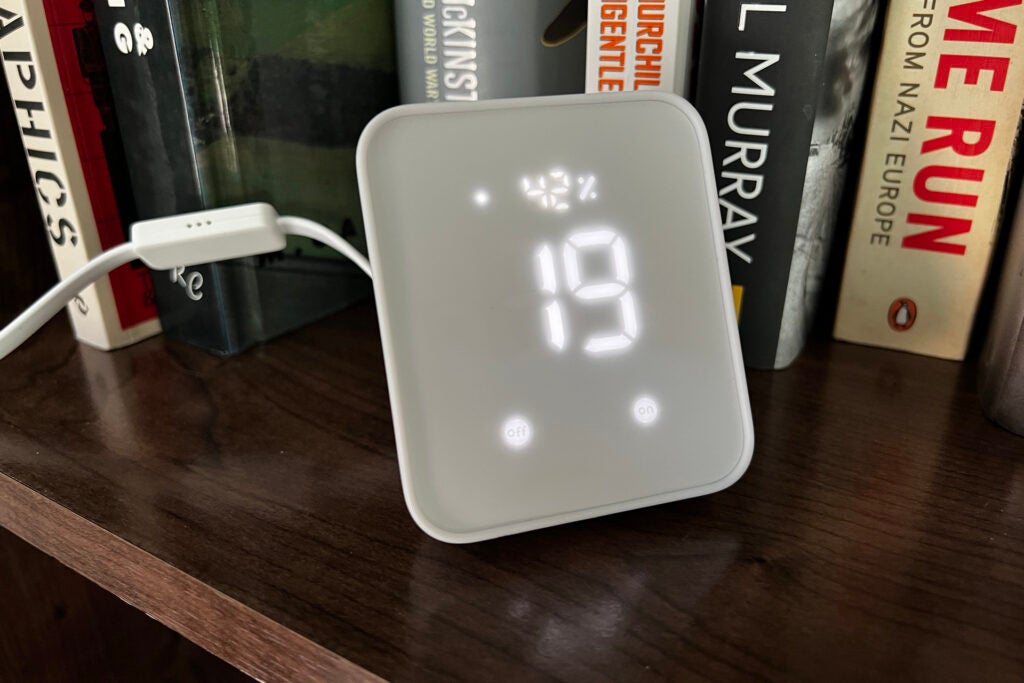
Rather than hiding this hub away, then, it should be placed on a table, standing upright thanks to its flip-out stand.
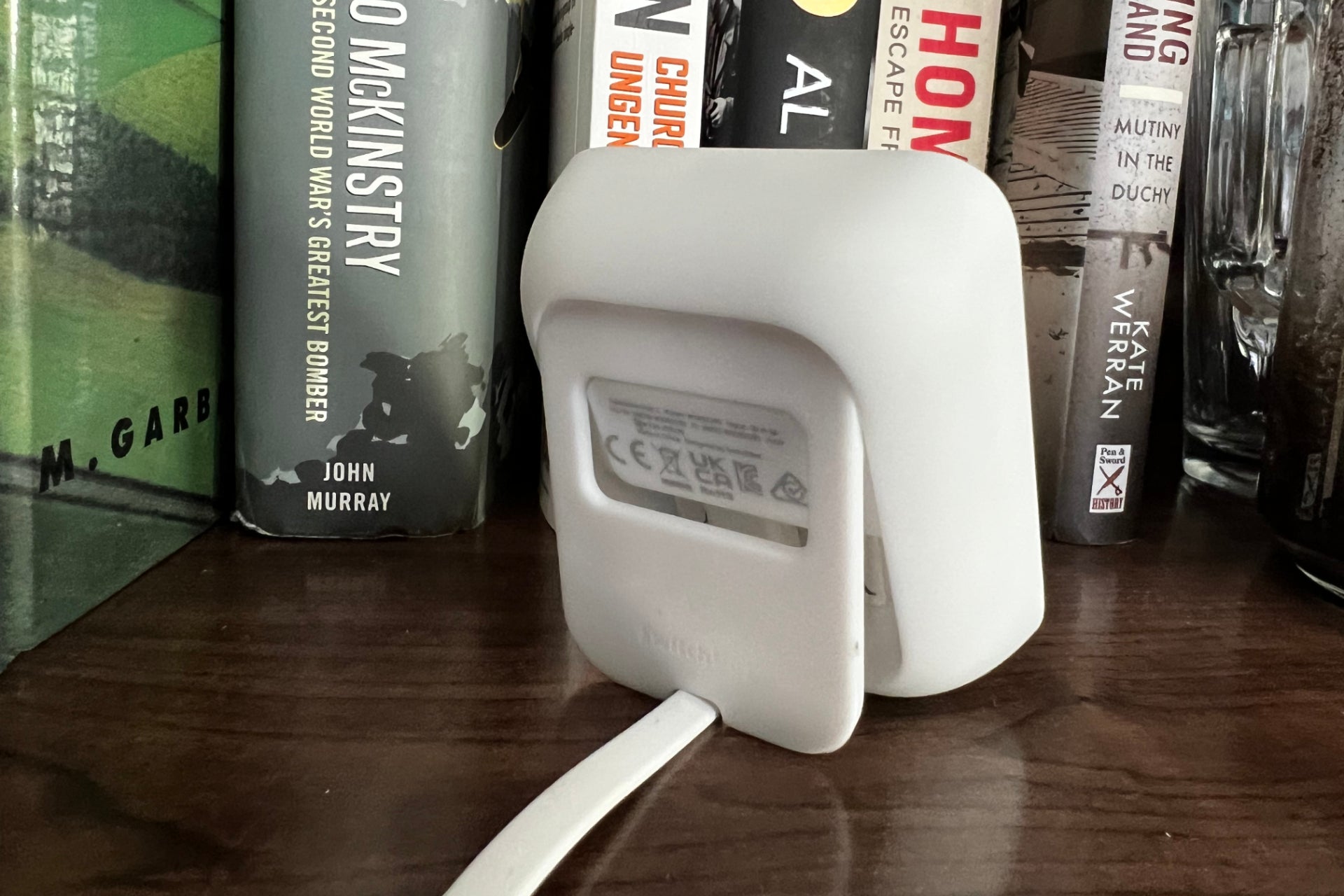
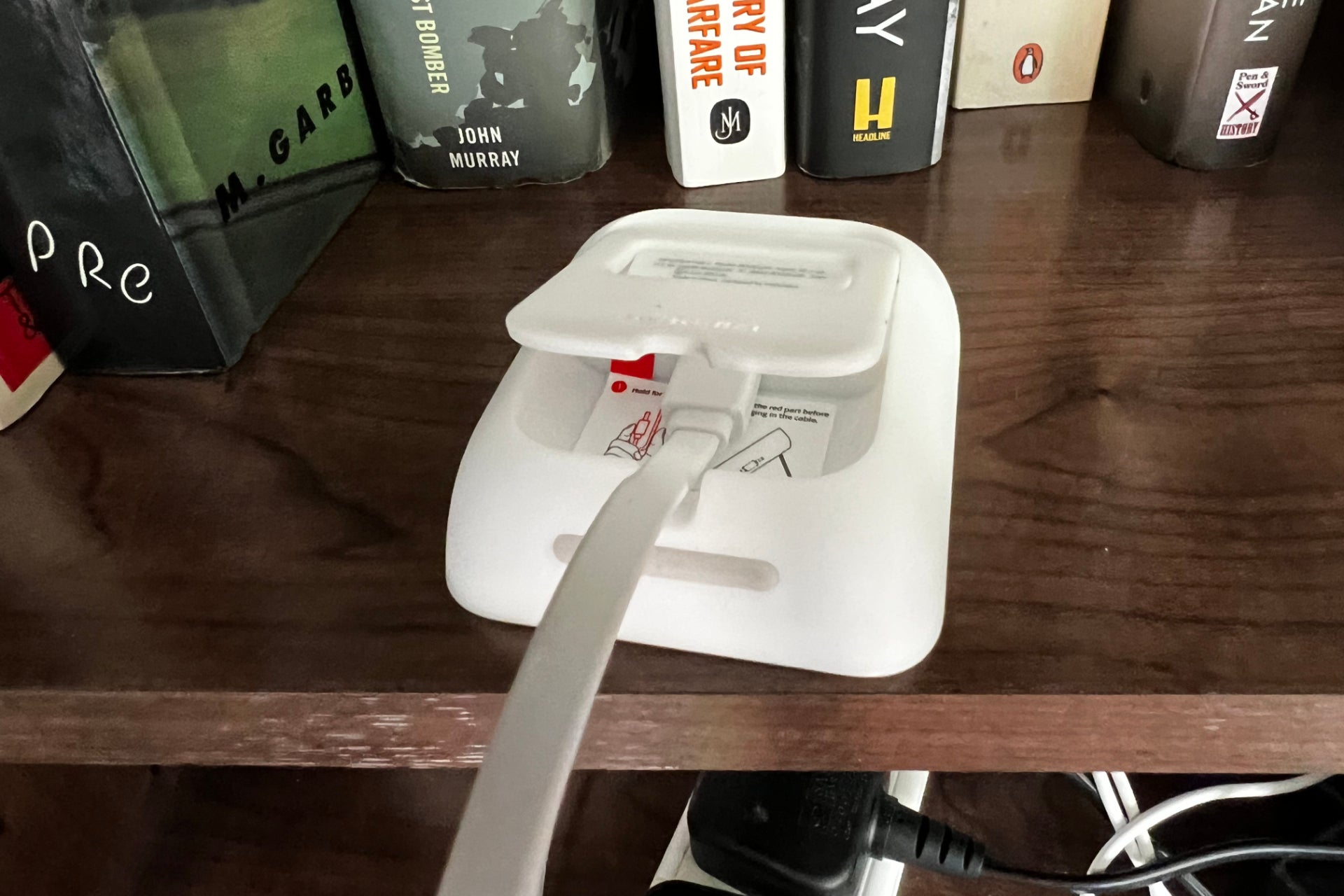
Once connected to power via its USB lead, the SwitchBot Hub 2 can be added to the SwitchBot Hub. At this point, it acts like the previous model: any SwitchBot device, including the SwitchBot Lock and SwitchBot Bot.
These devices connect to the Hub via Bluetooth, and then the Hub provides Cloud access, including control via Alexa and Google Assistant, as well as out-of-home control.
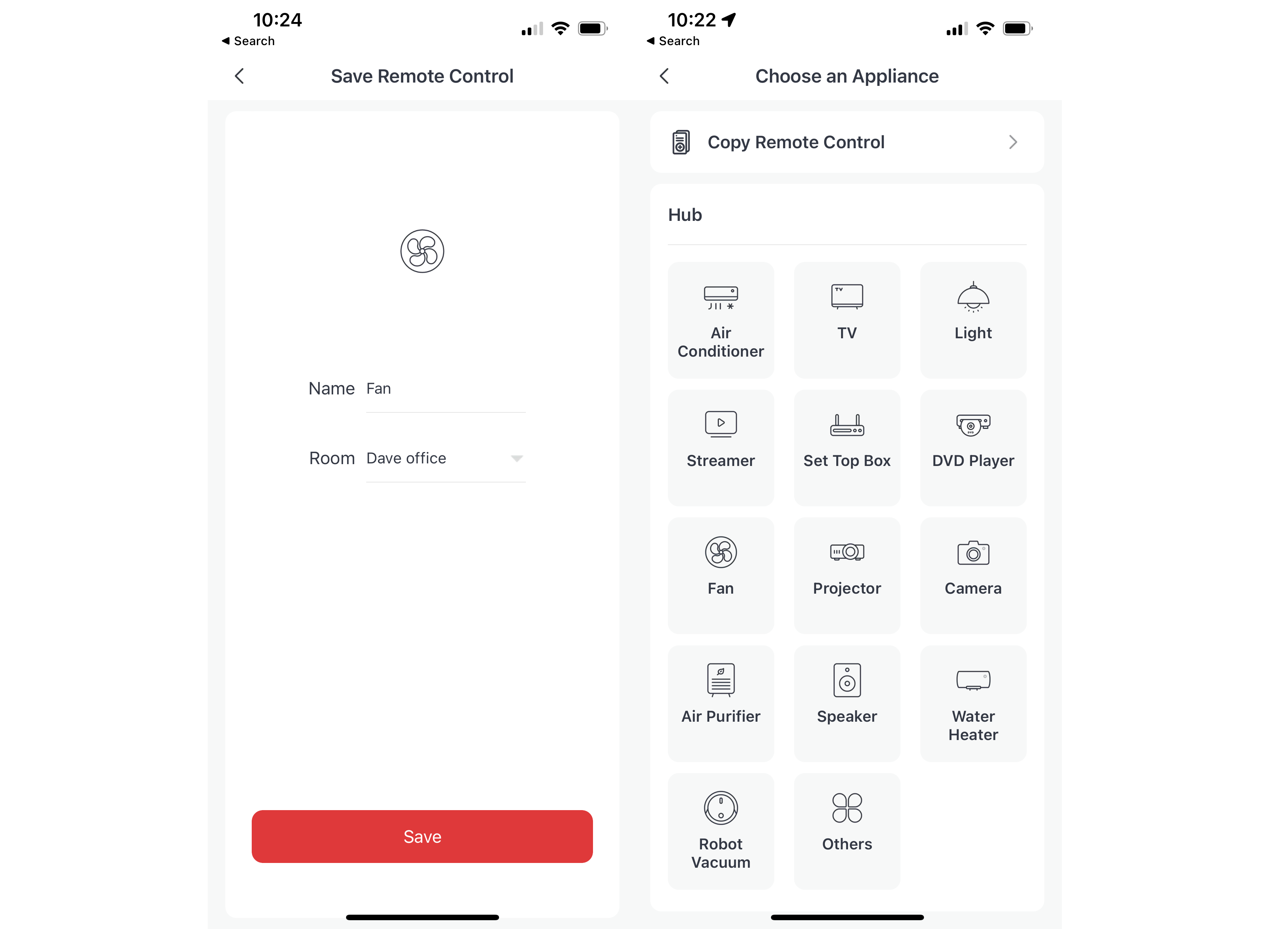
As with the previous Hub, the Hub 2 also has a built-in IR transmitter. Once programmed, the Hub can control various devices, from TVs to fans and air conditioning units. It’s a handy way to make some devices smart.
So far, so normal, but this device is also Matter enabled. Once turned on, the app generates a QR code, which can be scanned by a Matter-compliant controller. Currently, that’s Google Home and HomeKit; Amazon Alexa doesn’t currently support the correct device types for SwitchBot, although I’d imagine that this will change over time.
Once Matter has been turned on and the Hub added to a controller, I could select which devices I wanted to pair with Matter. Currently, only the SwitchBot Curtain and SwitchBot Blind Tilt devices are compatible, although SwitchBot is working on upgrading its other devices, including the Lock and Bot.
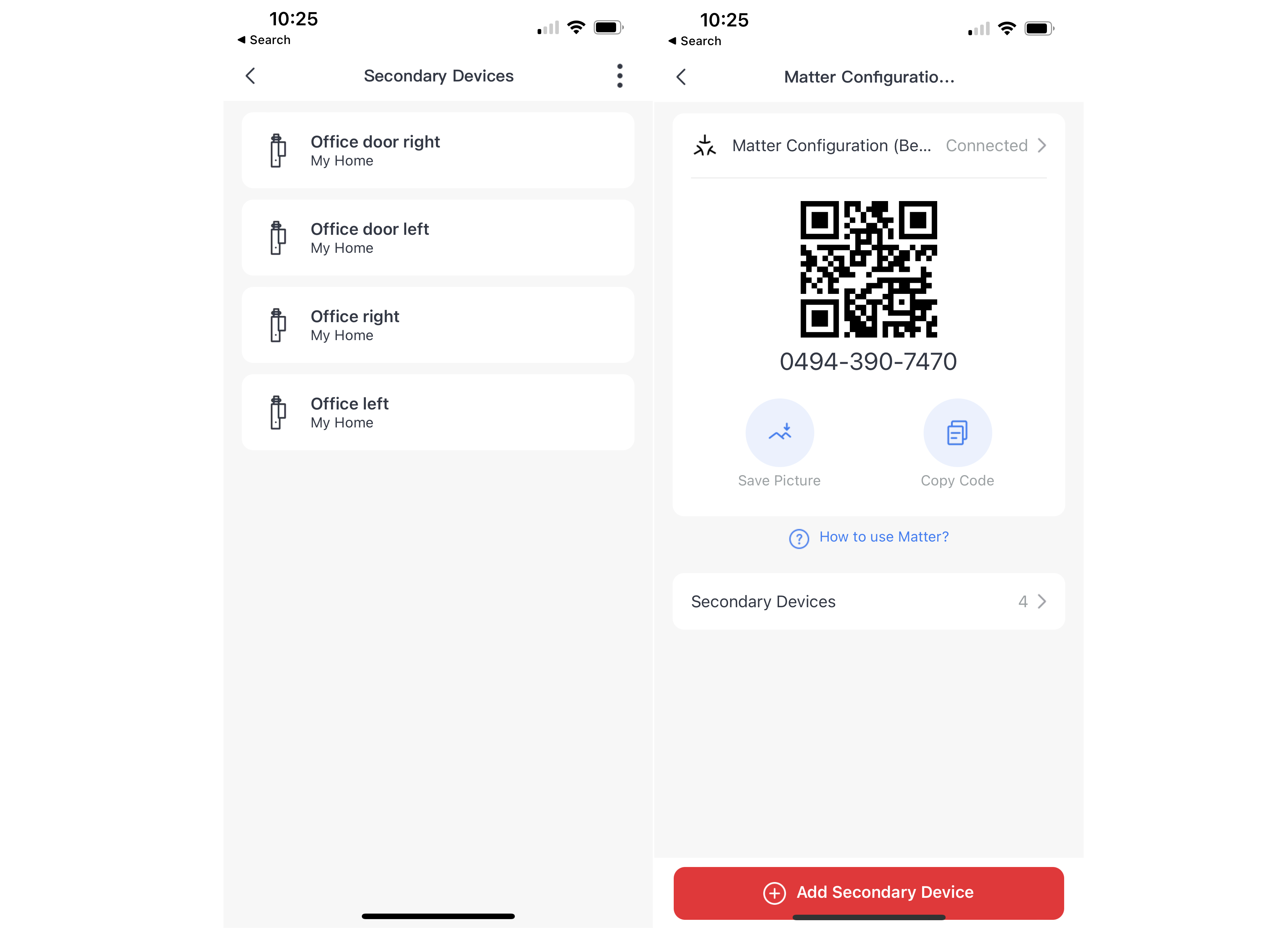
I paired my Hub 2 with Apple HomeKit, which soon brought in my four Blind Tilt controllers as devices. Control via the Home app is similar to the control in the SwitchBot app: a tap opens or closes the blinds, plus there’s a slider to select the exact level of tilt I want.
Of course, this also means that SwitchBot devices can be included in automations, such as opening the blinds automatically when I unlock my Ultion Nuki smart lock.
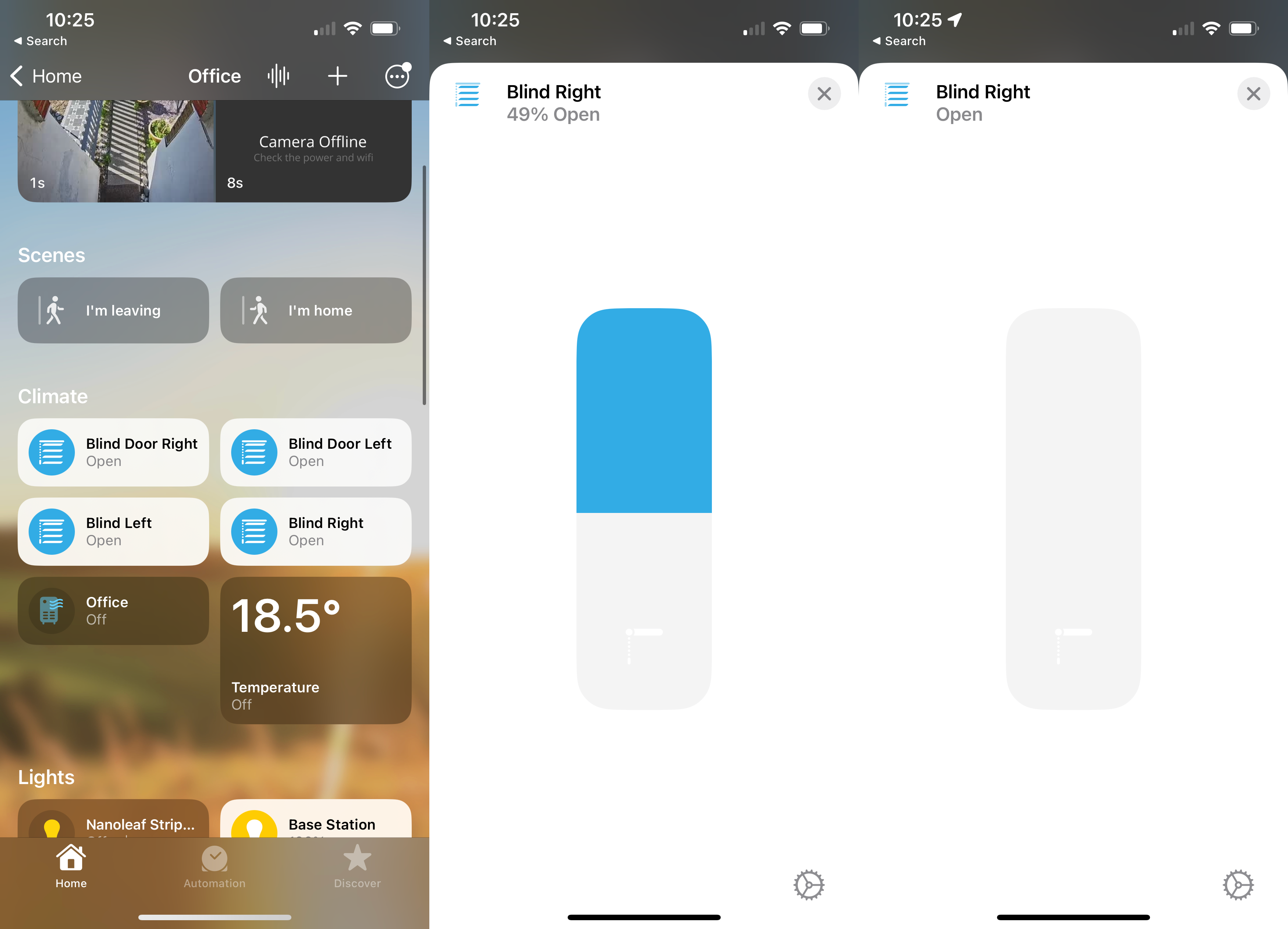
I was using an early beta version of the hub’s firmware, so the temperature and humidity sensors could be used to trigger routines in Apple Home, but the app doesn’t show the temperature and humidity readings from them. This will come when the SwitchBot Hub gets official Matter certification.
Once the Hub is paired with one smart home system, it can be connected to a secondary one, too. I connected mine to SmartThings, although this didn’t do much: the Hub connected, but my blinds weren’t pulled through.
Inside the SwitchBot app, there are a few differences, too. As the Hub 2 has On and Off buttons, these can be programmed to trigger a Routine. For example, I have the Off button close my blinds and the On button open them.
Routines can also be triggered by readings from the Hub, which include the temperature and humidity readings, plus its own light sensor. The main difference is that the automations in the SwitchBot Hub can apply to any SwitchBot device, not just the Matter-compatible ones.
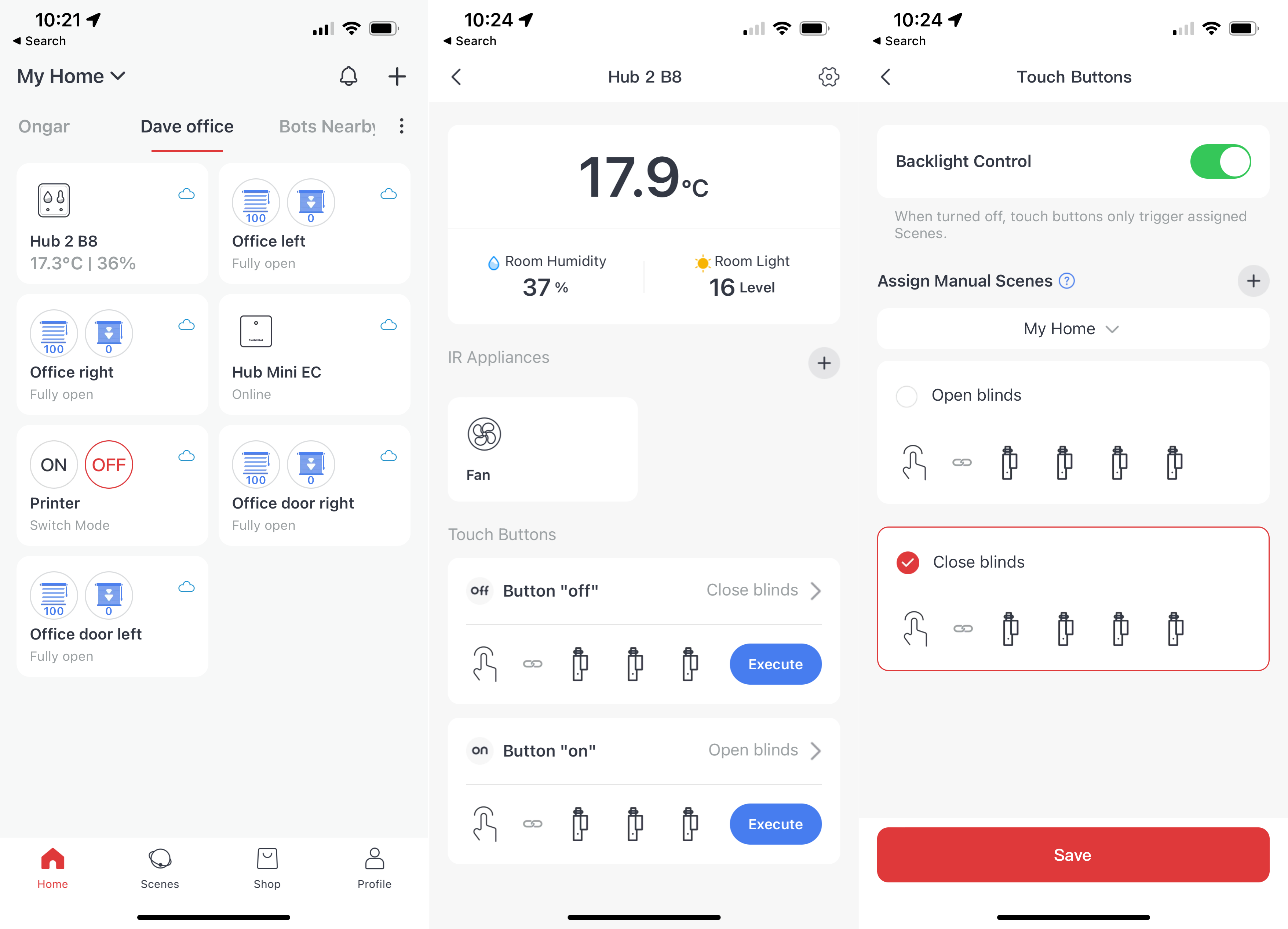
By default, the On and Off buttons also turn toggle the screen’s backlight, although this can be disabled, so that the screen stays on and the controls merely trigger a routine.
Performance
- Quick to respond via Matter
- Stable connection
When I first tried the SwitchBot Hub, the early firmware meant that it would lose connection to my Wi-Fi network, and had to be reset. A few firmware updates later, and this is no longer a problem, and in the last couple of weeks I’ve not had the Hub 2 drop its connection.
Matter is a fast way of controlling devices. Using the Apple Home app, it takes a few seconds from making a request until my blinds start to adjust. This is because of the delay in Bluetooth, rather than an issue with Matter. Most importantly, my Blinds are faster to control this way than using a third party interface.
For example, I used to have a Flic button that triggered an Amazon Alexa Routine that triggered a SwitchBot scene. From hitting the button to the blinds responding could take up to 10 seconds.
It’s not just about speed, but about making it easier and faster to control devices, and Matter certainly does that. To come back to my old way of working, I use HomeKit for automation in my home office.
With the current set up, I had no way to trigger my blinds to open directly when I unlocked my Ultion Nuki smart lock. I found the ‘easiest’ way was to have my blinds open by triggering an Alexa Routine when I turned off my Ring Alarm, and then closing when the alarm when back on.
Now, I can do everything from HomeKit in a single Automation: the Nuki lock unlocks, then the blinds open. This is easier for me and keeps everything in one place.
Latest deals
Should you buy it?
You have Matter devices: If you have the Curtain or Blinds products and a Matter-compliant controller, such as HomeKit or Google Home, this is a great upgrade.
You don’t have Matter devices: If you have SwitchBot products that won’t work with Matter, then this probably isn’t worth buying.
Final Thoughts
Providing direct control of the Hub to Matter controllers, the SwitchBot Hub 2 makes SwitchBot’s devices faster to respond and compatible with a wider range of smart home systems. Currently, the list of supported third-party systems is a little limited, but HomeKit support through Matter is a big step forward and, in the future, wider system support will be available.
Is the Hub 2 worth buying? Today, it is if you’ve got compatible devices that you want to use Matter with (the Curtain and Blind products), and you particularly want everything in HomeKit. It’s also a good upgrade if you want the temperature and humidity sensors, plus the physical controls for triggering scenes.
If you’ve mostly got devices that aren’t currently Matter compliant, then there’s little reason to upgrade at this stage. However, Matter is clearly the future and when in full flow it will make SwitchBot’s products even more flexible.
How we test
Unlike other sites, we test every smart home product we review thoroughly over an extended period of time. We use industry standard tests to compare features properly. We’ll always tell you what we find. We never, ever, accept money to review a product.
Find out more about how we test in our ethics policy.
We test how each product integrates with other smart home systems including Amazon Alexa, Google Assistant, Apple HomeKit, IFTTT and Samsung SmartThings
We use each smart home product in a real world setting, integrating it into our home.
You might like…
FAQs
Currently only the SwitchBot Blind Tilt and the Curtain products are, but additional products will get an update.
If you want to use the SwitchBot app, all existing products are supported.
Sustainability
TrustedReviews holds the fact that global warming is not a myth as a core value and will continuously endeavour to help protect our planet from harm in its business practice
As part of this mission, whenever we review a product, we send the company a series of questions to help us gauge and make transparent the impact the device has on the environment
We currently haven’t received answers to the questions on this product, but we will update this page the moment we do. You can see a detailed breakdown of the questions we ask and why in our sustainability info page.

Verdict
A step towards the future of the smart home, the SwitchBot Hub 2 brings Matter support to the company’s Blind Tilt and Curtain products today, with other devices getting upgrades in the future. Currently, Matter support is available through Google Home and HomeKit, which makes this a better upgrade for users of either of those systems today; in the future, a wider range of systems will be supported. For those that don’t have SwitchBot Matter devices, there’s not so much reason to upgrade, although new buyers can still use the Hub 2’s temperature, humidity and light sensors, and physical controls, while laying the foundations for future Matter upgrades.
Pros
- Brings Matter to some SwitchBot devices
- Useful temperature and humidity sensors
- Physical controls
Cons
- Limited Matter support currently
Availability
- UKRRP: £80.99
- USARRP: $76.99
-
Matter supportBrings Matter support to existing SwitchBot devices: Curtain and Blind Tilt today, other products in the future. -
ConnectionConnects to home network via Wi-Fi and SwitchBot products via Bluetooth.
Introduction
The Matter standard is all well and good for new devices, making it easier to connect and control them, but what about older devices? That’s where products, such as the SwitchBot Hub 2, come in.
Built to add Matter to SwitchBot’s Blind Tilt and Curtain products, this Hub also acts as a temperature sensor, smart controller and humidity sensor.
Design and features
- Combines the old hub and meter into one
- Works with Wi-Fi and Matter
- Matter only supports Blind Tilt and Curtain products
Externally, the SwitchBot Hub 2 is a little larger than its predecessor. Part of the reason for this is that this model acts as two products: a hub and the SwitchBot Meter, thanks to its indoor temperature sensor and humidity sensor. For the latter, the Meter has a large LCD screen to show the current temperature and relative humidity.
Rather than hiding this hub away, then, it should be placed on a table, standing upright thanks to its flip-out stand.
Once connected to power via its USB lead, the SwitchBot Hub 2 can be added to the SwitchBot Hub. At this point, it acts like the previous model: any SwitchBot device, including the SwitchBot Lock and SwitchBot Bot.
These devices connect to the Hub via Bluetooth, and then the Hub provides Cloud access, including control via Alexa and Google Assistant, as well as out-of-home control.
As with the previous Hub, the Hub 2 also has a built-in IR transmitter. Once programmed, the Hub can control various devices, from TVs to fans and air conditioning units. It’s a handy way to make some devices smart.
So far, so normal, but this device is also Matter enabled. Once turned on, the app generates a QR code, which can be scanned by a Matter-compliant controller. Currently, that’s Google Home and HomeKit; Amazon Alexa doesn’t currently support the correct device types for SwitchBot, although I’d imagine that this will change over time.
Once Matter has been turned on and the Hub added to a controller, I could select which devices I wanted to pair with Matter. Currently, only the SwitchBot Curtain and SwitchBot Blind Tilt devices are compatible, although SwitchBot is working on upgrading its other devices, including the Lock and Bot.
I paired my Hub 2 with Apple HomeKit, which soon brought in my four Blind Tilt controllers as devices. Control via the Home app is similar to the control in the SwitchBot app: a tap opens or closes the blinds, plus there’s a slider to select the exact level of tilt I want.
Of course, this also means that SwitchBot devices can be included in automations, such as opening the blinds automatically when I unlock my Ultion Nuki smart lock.
I was using an early beta version of the hub’s firmware, so the temperature and humidity sensors could be used to trigger routines in Apple Home, but the app doesn’t show the temperature and humidity readings from them. This will come when the SwitchBot Hub gets official Matter certification.
Once the Hub is paired with one smart home system, it can be connected to a secondary one, too. I connected mine to SmartThings, although this didn’t do much: the Hub connected, but my blinds weren’t pulled through.
Inside the SwitchBot app, there are a few differences, too. As the Hub 2 has On and Off buttons, these can be programmed to trigger a Routine. For example, I have the Off button close my blinds and the On button open them.
Routines can also be triggered by readings from the Hub, which include the temperature and humidity readings, plus its own light sensor. The main difference is that the automations in the SwitchBot Hub can apply to any SwitchBot device, not just the Matter-compatible ones.
By default, the On and Off buttons also turn toggle the screen’s backlight, although this can be disabled, so that the screen stays on and the controls merely trigger a routine.
Performance
- Quick to respond via Matter
- Stable connection
When I first tried the SwitchBot Hub, the early firmware meant that it would lose connection to my Wi-Fi network, and had to be reset. A few firmware updates later, and this is no longer a problem, and in the last couple of weeks I’ve not had the Hub 2 drop its connection.
Matter is a fast way of controlling devices. Using the Apple Home app, it takes a few seconds from making a request until my blinds start to adjust. This is because of the delay in Bluetooth, rather than an issue with Matter. Most importantly, my Blinds are faster to control this way than using a third party interface.
For example, I used to have a Flic button that triggered an Amazon Alexa Routine that triggered a SwitchBot scene. From hitting the button to the blinds responding could take up to 10 seconds.
It’s not just about speed, but about making it easier and faster to control devices, and Matter certainly does that. To come back to my old way of working, I use HomeKit for automation in my home office.
With the current set up, I had no way to trigger my blinds to open directly when I unlocked my Ultion Nuki smart lock. I found the ‘easiest’ way was to have my blinds open by triggering an Alexa Routine when I turned off my Ring Alarm, and then closing when the alarm when back on.
Now, I can do everything from HomeKit in a single Automation: the Nuki lock unlocks, then the blinds open. This is easier for me and keeps everything in one place.
Latest deals
Should you buy it?
You have Matter devices: If you have the Curtain or Blinds products and a Matter-compliant controller, such as HomeKit or Google Home, this is a great upgrade.
You don’t have Matter devices: If you have SwitchBot products that won’t work with Matter, then this probably isn’t worth buying.
Final Thoughts
Providing direct control of the Hub to Matter controllers, the SwitchBot Hub 2 makes SwitchBot’s devices faster to respond and compatible with a wider range of smart home systems. Currently, the list of supported third-party systems is a little limited, but HomeKit support through Matter is a big step forward and, in the future, wider system support will be available.
Is the Hub 2 worth buying? Today, it is if you’ve got compatible devices that you want to use Matter with (the Curtain and Blind products), and you particularly want everything in HomeKit. It’s also a good upgrade if you want the temperature and humidity sensors, plus the physical controls for triggering scenes.
If you’ve mostly got devices that aren’t currently Matter compliant, then there’s little reason to upgrade at this stage. However, Matter is clearly the future and when in full flow it will make SwitchBot’s products even more flexible.
How we test
Unlike other sites, we test every smart home product we review thoroughly over an extended period of time. We use industry standard tests to compare features properly. We’ll always tell you what we find. We never, ever, accept money to review a product.
Find out more about how we test in our ethics policy.
We test how each product integrates with other smart home systems including Amazon Alexa, Google Assistant, Apple HomeKit, IFTTT and Samsung SmartThings
We use each smart home product in a real world setting, integrating it into our home.
You might like…
FAQs
Currently only the SwitchBot Blind Tilt and the Curtain products are, but additional products will get an update.
If you want to use the SwitchBot app, all existing products are supported.
Sustainability
TrustedReviews holds the fact that global warming is not a myth as a core value and will continuously endeavour to help protect our planet from harm in its business practice
As part of this mission, whenever we review a product, we send the company a series of questions to help us gauge and make transparent the impact the device has on the environment
We currently haven’t received answers to the questions on this product, but we will update this page the moment we do. You can see a detailed breakdown of the questions we ask and why in our sustainability info page.



