





Verdict
The Razer BlackWidow V4 Pro might wear the clothing of a gaming keyboard, but its plentiful features make it much more substantial than that moniker suggests. Its nifty and customisable Command Dial, heaps of macro keys and surprisingly ergonomic design make it just as suited to creative office work as gaming. It’s a touch on the pricey side, but that’s what you get for the Razer stamp of quality.
Pros
- Customisable Command Dial
- Immensely comfortable wrist rest
- Brilliant RGB backlighting
Cons
- A little pricey
- Semi-mandatory accompanying app
Availability
- UKRRP: £229.99
- USARRP: $228.99
- EuropeRRP: €269.99
- CanadaRRP: CA$319.99
- AustraliaRRP: AU$399.95
Key Features
-
Choice of switchesRazer’s own silent Yellow or clicky Green -
Command DialAdjust various app parameters without using the mouse -
Wrist restBespoke leatherette cushion
Introduction
For a feature-rich gaming keyboard with heaps of RGB flair and surprising ergonomic support, the Razer BlackWidow V4 Pro looks to have bags of potential, making it a strong candidate for one of the best gaming keyboards.
It doesn’t step far beyond its predecessor and doesn’t offer much you can’t find elsewhere, but it’s a reliable all-rounder, with the Razer stamp of quality to go with it. Throw in the versatile Command Dial that can be customised to adjust various parameters on the fly, and it doubles as a useful productivity keyboard fit for music production or Excel-ing.
At £229/€269.99/$229, it’s a great pick if you want a gaming keyboard, but don’t only want a gaming keyboard.
Design
- Fabulous wrist rest
- Strong, metal build
- Strange macro key positioning
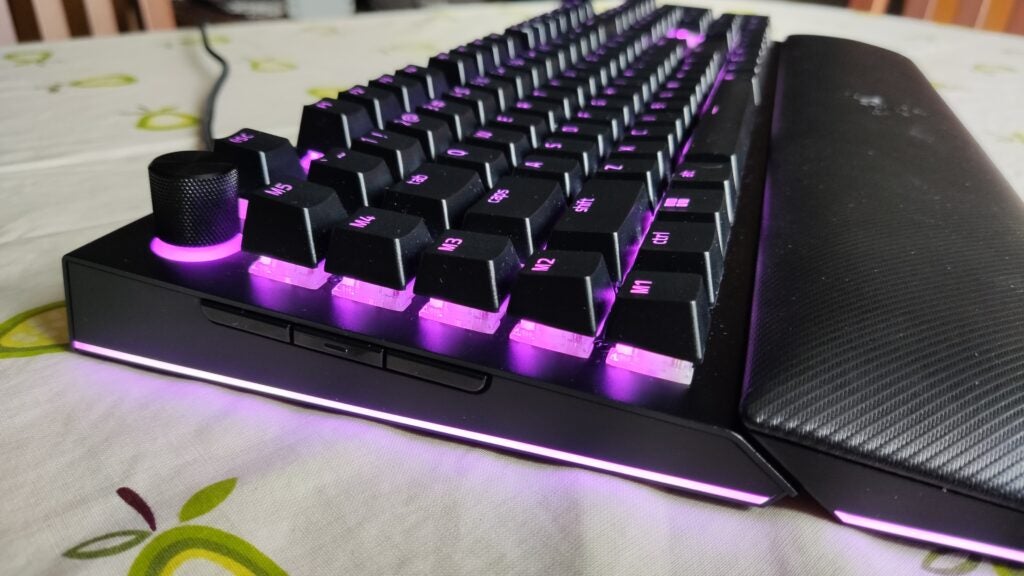
Not the usual high point of a Razer keyboard, the BlackWidow V4 Pro’s wrist rest might be its standout feature. A leatherette cushion that attaches with a strong magnet on the front, it’s bespoke to the keyboard – unlike the generic, one-size-fits-all wrist rest that could be paired with the BlackWidow V3. It fits snuggly, attaches firmly and makes the BlackWidow V4 Pro one of the comfiest gaming keyboards I’ve used.
That’s especially handy because the wrist rest feels all but necessary. With the keys sitting fairly high off the keyboard’s face, the BlackWidow V4 Pro is by no means uncomfortable to use but is noticeably different from the flatter designs of most other gaming keyboards. The wrist rest evens out that height difference, aligning with other designs.
There are five macro keys down the left-hand side and three more assignable macro buttons tucked around the side. It’s a generous supply, and I’ve found the side-mounted buttons particularly useful for loading an app or quickly screenshotting at the press of a button. The other five macro keys are a touch more finicky. Their position on the hard left of the keyboard was unintuitive to my fingers (rather than along the top as is standard), and it’s taken some time for muscle memory to catch up.
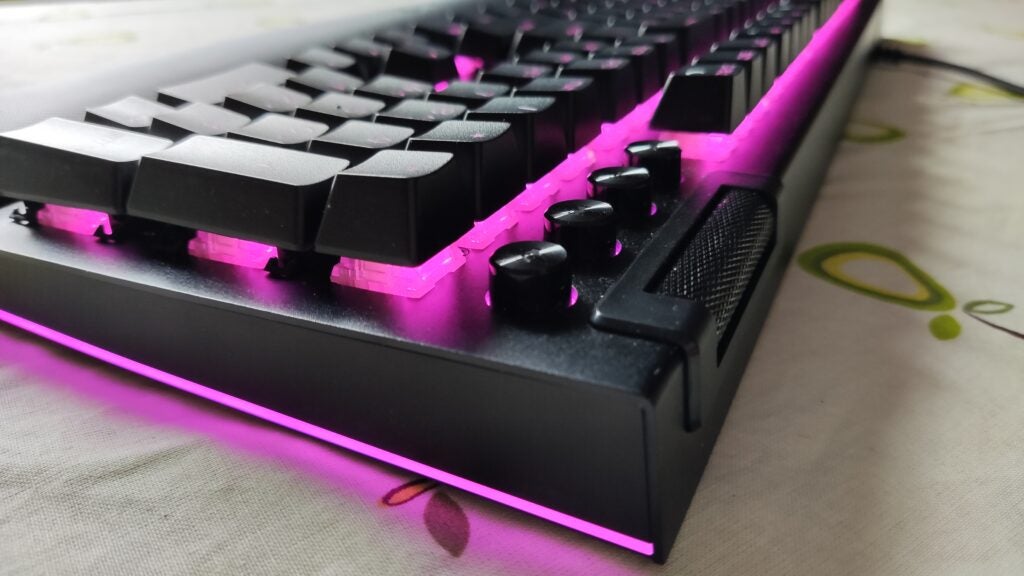
On the opposite end sits a large volume roller. Not the most obviously useful hardware feature by any means, but after a few weeks of conveniently adjusting the volume with a quick roll rather than stretching your hands between function keys, you’ll be swung.
The four media buttons that sit under it are a nice touch, but difficult to read – their black labels blending in with the almost identically black surface. After a few weeks of use, I’ve learned the order of mute, pause, rewind and skip forward buttons, but be prepared for a few accidental stops and starts after you first hunk it on your desk.
The BlackWidow V4 Pro follows standard keyboard fare in terms of raw dimensions. It’s a hefty and strong full-size keyboard with a metal faceplate. The weight alone stops it from sliding across your desk, though it sports several rubber feet and two flip stands on the bottom for extra support.
Performance
- Tactile key switches
- Genuinely useful Command Dial
- No wireless connectivity
Sitting under the keycaps, you have a choice of Razer’s own clicky Green or silent Yellow switches. I found the Greens to be light and tactile, with a fast actuation and little springiness. This makes them a great fit for typical office typing or the kind of frenetic keyboard hammering that comes with competitive multiplayer games.
This keyboard offers no customisation – keys aren’t hot-swappable, and the actuation can’t be adjusted – but you wouldn’t expect it from Razer. The unwritten promise of the brand is to do the hard work for you, and produce a keyboard that fits the needs of the vast majority of people straight out of the box. To that end, the BlackWidow V4 Pro succeeds.
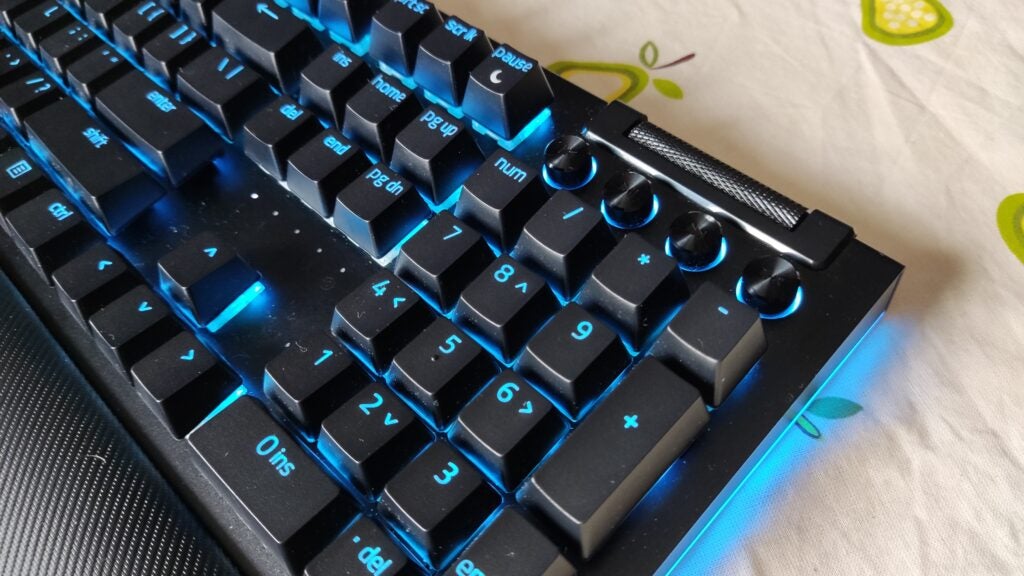
The Command Dial – that small, circular knob in the top left – is another shortcut key used to adjust various parameters. It’s set up with eight modes that can change the zoom level on a page, adjust brightness of the keyboard’s RGB lighting, swap between opened apps, and switch tabs in a browser. It can adjust the position of playback, or scroll horizontally along a project – making it especially handy when working in music production packages or, less swanky, very large Excel spreadsheets.
You’re able to rotate between these modes with a single press of the dial, which usefully lights up in a set colour to show what mode you’re in, as well as set up 100 other modes in an accompanying app. For the arty, it offers a lot of handy utilities, such as changing brush size in Photoshop, but it’s virtually useless when it comes to gaming. If nothing else, it’s another reminder that despite its branding, the BlackWidow V4 Pro is more than a gaming keyboard.
Fans of its predecessor, however, might be disappointed by the omission of wireless connectivity. The BlackWidow V4 Pro is a purely wired, USB keyboard. That’s by no means unusual among gaming keyboards though (even at the higher end of the price spectrum).
The noticeable quality of the included cables – braided cables that won’t get tangled with the nest of other wires behind your desk – is a welcome addition. On the back is an extra USB passthrough port that can be connected to a mouse or headset, saving you from having to ferry cables around the edge of your desk. It’s a minor feature, and I’ve found it most useful for charging my other wireless devices.
Software and Lighting
- Razer Synapse app necessary for some features
- As RGB as you’d like
If you want to get the most out of the BlackWidow V4 Pro’s customization features, you’ll have to download the Razer Synapse app. It’s needed to access and alter the Command Dial’s custom modes, as well as make other adjustments to the keyboard’s remappable inputs. It’s not greedy on memory, but it does have to be open and running in the background of your computer.
It’s not needed to get the most out of the keyboard’s RGB capabilities. Each key is backlit and the lighting patterns vary from the extreme to the subtle. Each key is housed in a transparent keycap for maximum glare, and the rim light that runs the entire perimeter of the keyboard, including the wrist rest, is a lovely touch. The BlackWidow V4 Pro might not only be a gaming keyboard, but it sure does wear the clothes of one.
Latest deals
Should you buy it?
You want an all-round keyboard for gaming and beyond
The Razer BlackWidow V4 Pro will serve you well if you’re looking for a feature-rich, reliable gaming keyboard that’s also great for productivity tasks.
You want more from a gaming keyboard (or less)
Give it a skip if you’re not interested in the swanky productivity tools and ergonomics, or want greater hardware customization.
Final Thoughts
The BlackWidow V4 Pro looks the part for a Razer gaming keyboard, with its generous RGB backlighting and sturdy construction, but it really shines for its productivity features.
The price may be nothing to shout about, sitting in the upper end of the market, and, if you want more customisability, consider the Asus ROG Azoth or Razer Huntsman V2 Analog.
Nevertheless, its feature-set and tactile keys make this a fantastic all-rounder – the kind of keyboard you can buy knowing you’ll enjoy it for years to come.
How we test
We use every keyboard we test for at least a week. During that time, we’ll check it for ease of use and put it through its paces by playing a variety of different genres, including FPS, strategy and MOBAs.
We also check each keyboard’s software to see how easy it is to customise and set up.
Spent at least a week testing
Tested the performance on a variety of games
Compared the build quality with similar priced keyboards.
FAQs
No, it’s a wholly wired keyboard that connects through USB.
Yes, it attaches magnetically and can be removed.

Verdict
The Razer BlackWidow V4 Pro might wear the clothing of a gaming keyboard, but its plentiful features make it much more substantial than that moniker suggests. Its nifty and customisable Command Dial, heaps of macro keys and surprisingly ergonomic design make it just as suited to creative office work as gaming. It’s a touch on the pricey side, but that’s what you get for the Razer stamp of quality.
Pros
- Customisable Command Dial
- Immensely comfortable wrist rest
- Brilliant RGB backlighting
Cons
- A little pricey
- Semi-mandatory accompanying app
Availability
- UKRRP: £229.99
- USARRP: $228.99
- EuropeRRP: €269.99
- CanadaRRP: CA$319.99
- AustraliaRRP: AU$399.95
Key Features
-
Choice of switchesRazer’s own silent Yellow or clicky Green -
Command DialAdjust various app parameters without using the mouse -
Wrist restBespoke leatherette cushion
Introduction
For a feature-rich gaming keyboard with heaps of RGB flair and surprising ergonomic support, the Razer BlackWidow V4 Pro looks to have bags of potential, making it a strong candidate for one of the best gaming keyboards.
It doesn’t step far beyond its predecessor and doesn’t offer much you can’t find elsewhere, but it’s a reliable all-rounder, with the Razer stamp of quality to go with it. Throw in the versatile Command Dial that can be customised to adjust various parameters on the fly, and it doubles as a useful productivity keyboard fit for music production or Excel-ing.
At £229/€269.99/$229, it’s a great pick if you want a gaming keyboard, but don’t only want a gaming keyboard.
Design
- Fabulous wrist rest
- Strong, metal build
- Strange macro key positioning
Not the usual high point of a Razer keyboard, the BlackWidow V4 Pro’s wrist rest might be its standout feature. A leatherette cushion that attaches with a strong magnet on the front, it’s bespoke to the keyboard – unlike the generic, one-size-fits-all wrist rest that could be paired with the BlackWidow V3. It fits snuggly, attaches firmly and makes the BlackWidow V4 Pro one of the comfiest gaming keyboards I’ve used.
That’s especially handy because the wrist rest feels all but necessary. With the keys sitting fairly high off the keyboard’s face, the BlackWidow V4 Pro is by no means uncomfortable to use but is noticeably different from the flatter designs of most other gaming keyboards. The wrist rest evens out that height difference, aligning with other designs.
There are five macro keys down the left-hand side and three more assignable macro buttons tucked around the side. It’s a generous supply, and I’ve found the side-mounted buttons particularly useful for loading an app or quickly screenshotting at the press of a button. The other five macro keys are a touch more finicky. Their position on the hard left of the keyboard was unintuitive to my fingers (rather than along the top as is standard), and it’s taken some time for muscle memory to catch up.
On the opposite end sits a large volume roller. Not the most obviously useful hardware feature by any means, but after a few weeks of conveniently adjusting the volume with a quick roll rather than stretching your hands between function keys, you’ll be swung.
The four media buttons that sit under it are a nice touch, but difficult to read – their black labels blending in with the almost identically black surface. After a few weeks of use, I’ve learned the order of mute, pause, rewind and skip forward buttons, but be prepared for a few accidental stops and starts after you first hunk it on your desk.
The BlackWidow V4 Pro follows standard keyboard fare in terms of raw dimensions. It’s a hefty and strong full-size keyboard with a metal faceplate. The weight alone stops it from sliding across your desk, though it sports several rubber feet and two flip stands on the bottom for extra support.
Performance
- Tactile key switches
- Genuinely useful Command Dial
- No wireless connectivity
Sitting under the keycaps, you have a choice of Razer’s own clicky Green or silent Yellow switches. I found the Greens to be light and tactile, with a fast actuation and little springiness. This makes them a great fit for typical office typing or the kind of frenetic keyboard hammering that comes with competitive multiplayer games.
This keyboard offers no customisation – keys aren’t hot-swappable, and the actuation can’t be adjusted – but you wouldn’t expect it from Razer. The unwritten promise of the brand is to do the hard work for you, and produce a keyboard that fits the needs of the vast majority of people straight out of the box. To that end, the BlackWidow V4 Pro succeeds.
The Command Dial – that small, circular knob in the top left – is another shortcut key used to adjust various parameters. It’s set up with eight modes that can change the zoom level on a page, adjust brightness of the keyboard’s RGB lighting, swap between opened apps, and switch tabs in a browser. It can adjust the position of playback, or scroll horizontally along a project – making it especially handy when working in music production packages or, less swanky, very large Excel spreadsheets.
You’re able to rotate between these modes with a single press of the dial, which usefully lights up in a set colour to show what mode you’re in, as well as set up 100 other modes in an accompanying app. For the arty, it offers a lot of handy utilities, such as changing brush size in Photoshop, but it’s virtually useless when it comes to gaming. If nothing else, it’s another reminder that despite its branding, the BlackWidow V4 Pro is more than a gaming keyboard.
Fans of its predecessor, however, might be disappointed by the omission of wireless connectivity. The BlackWidow V4 Pro is a purely wired, USB keyboard. That’s by no means unusual among gaming keyboards though (even at the higher end of the price spectrum).
The noticeable quality of the included cables – braided cables that won’t get tangled with the nest of other wires behind your desk – is a welcome addition. On the back is an extra USB passthrough port that can be connected to a mouse or headset, saving you from having to ferry cables around the edge of your desk. It’s a minor feature, and I’ve found it most useful for charging my other wireless devices.
Software and Lighting
- Razer Synapse app necessary for some features
- As RGB as you’d like
If you want to get the most out of the BlackWidow V4 Pro’s customization features, you’ll have to download the Razer Synapse app. It’s needed to access and alter the Command Dial’s custom modes, as well as make other adjustments to the keyboard’s remappable inputs. It’s not greedy on memory, but it does have to be open and running in the background of your computer.
It’s not needed to get the most out of the keyboard’s RGB capabilities. Each key is backlit and the lighting patterns vary from the extreme to the subtle. Each key is housed in a transparent keycap for maximum glare, and the rim light that runs the entire perimeter of the keyboard, including the wrist rest, is a lovely touch. The BlackWidow V4 Pro might not only be a gaming keyboard, but it sure does wear the clothes of one.
Latest deals
Should you buy it?
You want an all-round keyboard for gaming and beyond
The Razer BlackWidow V4 Pro will serve you well if you’re looking for a feature-rich, reliable gaming keyboard that’s also great for productivity tasks.
You want more from a gaming keyboard (or less)
Give it a skip if you’re not interested in the swanky productivity tools and ergonomics, or want greater hardware customization.
Final Thoughts
The BlackWidow V4 Pro looks the part for a Razer gaming keyboard, with its generous RGB backlighting and sturdy construction, but it really shines for its productivity features.
The price may be nothing to shout about, sitting in the upper end of the market, and, if you want more customisability, consider the Asus ROG Azoth or Razer Huntsman V2 Analog.
Nevertheless, its feature-set and tactile keys make this a fantastic all-rounder – the kind of keyboard you can buy knowing you’ll enjoy it for years to come.
How we test
We use every keyboard we test for at least a week. During that time, we’ll check it for ease of use and put it through its paces by playing a variety of different genres, including FPS, strategy and MOBAs.
We also check each keyboard’s software to see how easy it is to customise and set up.
Spent at least a week testing
Tested the performance on a variety of games
Compared the build quality with similar priced keyboards.
FAQs
No, it’s a wholly wired keyboard that connects through USB.
Yes, it attaches magnetically and can be removed.



