





Verdict
While it may not be cheap, the LG UltraGear 27GR95QE-B is a tremendously good gaming monitor with excellent motion handling thanks to a high refresh rate and super-quick G2G response time
Pros
- Impressive OLED image quality
- Excellent motion handling
- Great HDR performance
- Supports DTX HeadphonesX
Cons
- Matte finish is not to everyone’s taste
- Whole-screen brightness is no match for Mini LED or VA rivals
- Pricey for a 240Hz 27-inch gamer
-
Features a 240Hz, 2560 x 1440, OLED displayA perfect combination of speed, size, and picture quality that makes for a highly versatile monitor -
DTS HeadphoneX 3D audio passthroughThis LG may lack built-in speakers, but the DTS HeadphoneX output through the audio jack is impressive if you have a good pair of wired headphones. -
Octagon LightingThe RGB lighting system adds some visual spice to proceedings when gaming in the dark.
Introduction
While 240Hz, 27-inch IPS and VA gaming monitors are as common as muck, one’s with an OLED panel are most decidedly not.
Asus has one in its ROG lineup, Corsair launched a Xeneon model late last year, and LG has the 27GR95QE-B in its UltraGear range. AOC, meanwhile, has just announced a new 240Hz OLED model in its AGON Pro range that will go on sale soon.
Given the obvious benefits of OLED displays, such as superb motion handling and excellent HDR capabilities thanks to an infinite contrast ratio, you could be forgiven for asking why there aren’t more. Price is the reason. The Asus and LG monitors will set you back around $1000/£1000, which is a lot for a 27-inch 1440p 240Hz gaming monitor, no matter how jaw-droppingly good the picture quality.
And, of course, there are the perennial OLED issues of longevity, or lack thereof, due to burn-in and the fact that in SDR mode, OLED monitors are just not as consistently bright in a whole-screen context as their IPS and VA rivals.
Design and Features
- Stylish and very well made
- Rear LED light show
- Lacks a Type-C port
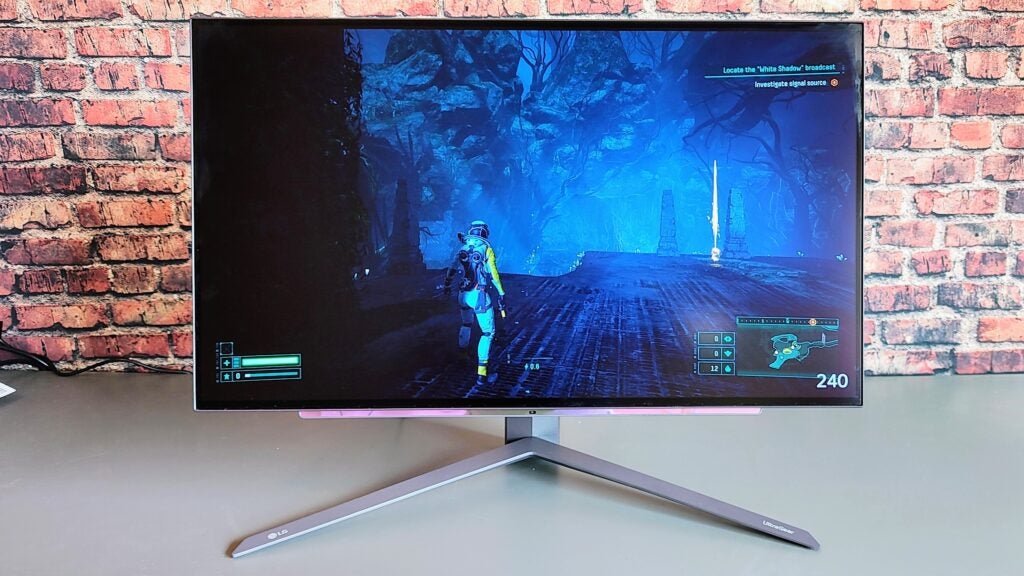
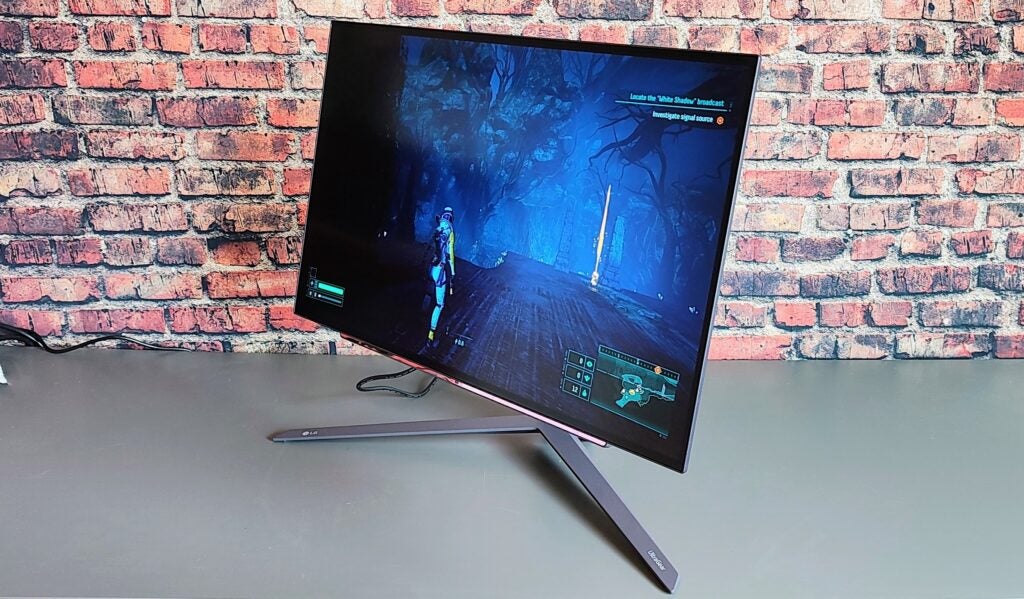
The LG UltraGear 27GR95QE is a stylish and very gamer-orientated design that looks and feels every inch like a premium product. The panel itself is only 5mm thick, while the box at the back that contains all the electronics and ports is also impressively slender, though that is in part to LG opting for a laptop-style external rather than a built-in power supply.
The bezels surrounding the OLED panel may not be the narrowest I’ve ever seen, but they only measure 8mm at the sides and 10mm at the bottom, so I’m not complaining. All up weight is 7.35Kg with the stand accounting for 2.3kg of that.
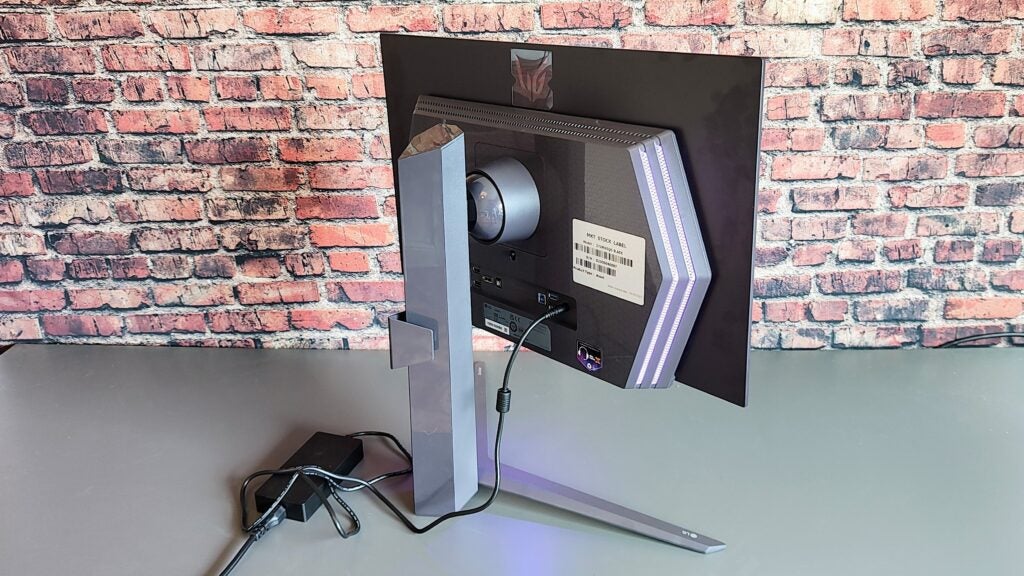
On the rear, you’ll find three video inputs, two HDMI 2.1 and one DisplayPort 1.4, a USB-B upstream and two USB-A 3.2 Gen 1 downstream data ports for connecting peripherals. That’s a decent selection for a gaming monitor, though, as always, I’d like to see a full-spec USB-C port.
The LG 27GR95 doesn’t have built-in speakers, but you get a 3.5mm audio jack and a TOSLINK optical digital audio output.
The 3.5mm audio jack supports DTS: HeadphoneX virtual 3D audio passthrough for your headphones and has three modes: Sports, Entertainment, and Game. Plugging in my trusty Sennheiser headphones, I was impressed by the level of directionality in the Game setting.
The back of the LG UltraGear 27GR95QE also features what LG calls the Octagon Lighting system: this consists of two rows of LEDs on either side of the main monitor housing, and a single bright LED below the centre of the display. You can only set the lights to show a static colour or cycle through a selection of colours, so it’s not as clever or immersive as Philip’s Ambiglow system.
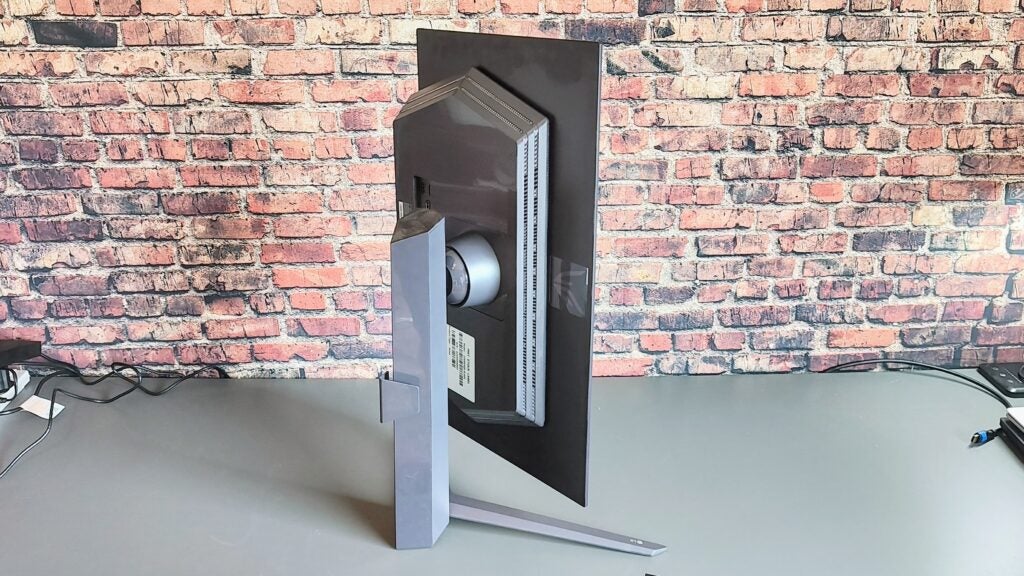
Not all 27-inch monitors have a full 90° pivot, but the LG does, albeit only in an anticlockwise direction. The side-to-side swivel is a little limited at just 10° each way, but the -15° / +5° tilt and 110mm of height adjustability are as good as any of the competition.
The stand is relatively compact and is attached to the monitor via a quick-release bracket that conceals a 100 x 100m VESA mount. LG also bundles a plastic clip-in cable tidy to keep your cables close to the stand pillar.
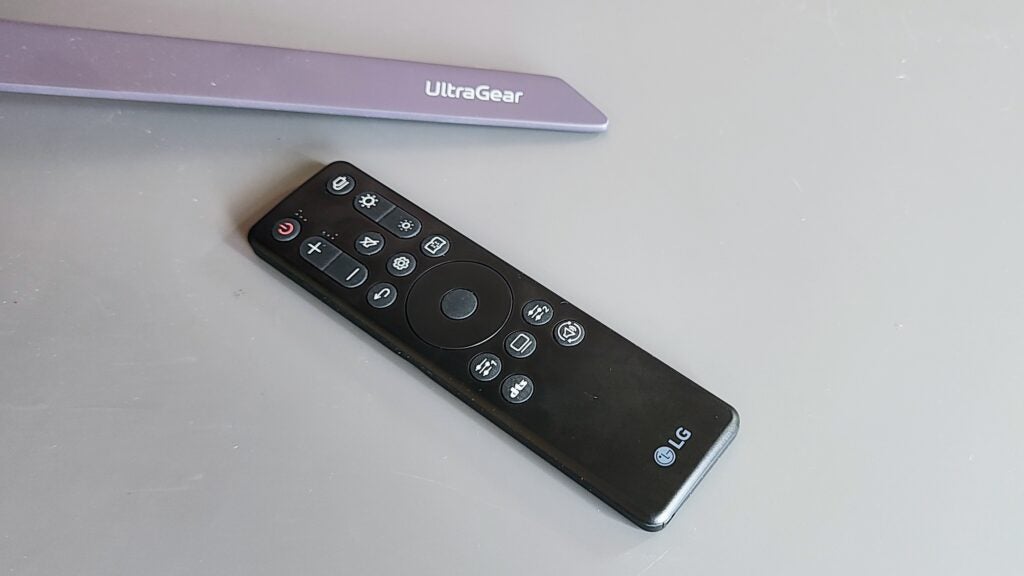
The small and stubby toggle under the centre of the display to access the OSD is best left alone because it’s quite difficult and aggravating to use. Better to use the excellent remote control that LG bundles, which allows you to access the entire menu system at the touch of a button and has some useful shortcuts, like one that cycles through the DTS HeadphonesX audio settings.
Image Quality
- Excellent motion handling
- The matte finish keeps reflections at bay
- HDR content looks good
The LG UltraGear 27GR95QE has all the benefits you’d expect of a monitor with a high-quality OLED panel from one of the world’s premier manufacturers. The picture quality is very, very good. Thanks to the absolute blacks that only OLED panels can produce, the LG has an infinitely high contrast ratio, making both SDR and HDR content look stunning.
Measuring the colour gamut coverage in the Vivid profile, the LG produced 99.7% sRGB, 94.3% DCI-P3 and 87% Adobe RGB which is a good, rather than exceptional, showing. There is an sRGB colour mode that, when engaged, resulted in a Delta E colour accuracy of 1.74 which again is good, with any number below 3 being acceptable, below 2 being professional-grade accurate and below 1 being perfect.
If you want to improve the colour accuracy further, the 27GR95QE works with LG’s Calibration Studio software though you will need one of the listed colourimeters to use.
The LG UltraGear 27GR95QE has a slightly matte anti-glare finish to the screen. Whether this is a good or bad thing depends greatly on personal taste. Matte finishes do a better job of keeping reflections at bay, but full-gloss finishes look just that little sharper and more immersive. I prefer a gloss finish on my OLED panels, but that’s an entirely subjective opinion.
Brightness is, as ever, a moveable feast on OLED displays. In SDR mode, peak brightness registered at 404 nits from a 5% screen swatch against a black background. Expand the measurement area to the whole screen, and the brightness drops to around 160 nits over a sustained period. The highest level I recorded in HDR mode was 652 nits, again from a 5% swatch rather than the total screen area.
The LG UltraGear 27GR95QE lacks a VESA TrueBlack stamp of approval, carrying just a basic HDR10 tick. Certification aside, the LG has the colour and brightness to do full justice to HDR content.
Motion handling is superb, as expected from a screen with a 0.03ms GtG response time and a 240Hz refresh rate. There was no ghosting to be seen in any test scenario, and thanks to official support for both Nvidia’s G-Sync and AMD’s FreeSync Premium, there’s no screen tearing.
For the hardcore gaming fraternity, LG has installed a frame counter, a selection of cross-hairs, and a black stabiliser that makes it easier to see what’s lurking in the darkness and what it calls Dynamic Action Sync, which reduces input lag. I’d be lying if I said I noticed the difference this made, but it’s on by default in the various gaming modes.
With a view to long-term usage, LG bundles the 27GR95QE with several systems designed to prevent burn-in, which can all be accessed from a dedicated menu activated from the remote. These include Screen Move, which shunts the entire display around by a few pixels, the self-explanatory Screen Saver and the more invasive Image and Pixel Cleaning, which take 10 minutes and one minute to run, respectively.
While some manufacturers set these sorts of features to run automatically if the user does not initiate them within a given timeframe, LG depends on the gumption of its customers to run them.
Latest deals
Should you buy it?
You want an OLED gaming monitor:
The latest OLED monitors may be expensive, but their motion handling and picture quality are superb, making them ideal for anyone who wants a monitor that will do full justice to HDR media content and the most visually stunning games.
You don’t want to spend a lot:
You need deep pockets to justify spending £1000/$1000 on a 27-inch 1440p 240Hz gaming monitor when you can pick up a 32-inch unit with the same resolution and refresh rate but built around a VA panel for less than half the price.
Final Thoughts
The rather high price aside (unless you must have the best HDR performance, something like the much cheaper HP Omen 27c may be a more sensible purchase), there’s nothing to dislike about the LG UltraGear 27GR95QE. As a multi-purpose monitor, it ticks all the boxes thanks to its high-quality OLED display, which looks great when playing the best AAA games or while watching high-quality HDR videos.
The LG is also a well-made and stylish monitor that looks and feels like a £1000/$1000 item. I like the remote control: It’s the best I’ve come across with a PC monitor and makes accessing LG’s very clearly organised on-screen menu extremely straightforward. If I had to pick one fault, the rear lighting system lacks the reactive features of the Philips alternative, but that’s hardly a core competency of the gaming monitor. If you want to check out more options, have a look at our Best Gaming Monitor round-up.
How we test
We use every monitor we test for at least a week. During that time, we’ll check it for ease of use and put it through its paces by using it for both everyday tasks and more specialist, colour-sensitive work.
We also check its colours and image quality with a colourimeter to test its coverage and the display’s technical quality.
We use it as our main monitor for a full week for work and play
For gaming monitors we play a selection of Tripe-A and eSports titles
We used a colourimeter to get benchmark results.
FAQs
Very much so. The motion-handling capabilities of the latest OLED monitors are top-notch, and they can render games in HDR.
Trusted Reviews test data

Verdict
While it may not be cheap, the LG UltraGear 27GR95QE-B is a tremendously good gaming monitor with excellent motion handling thanks to a high refresh rate and super-quick G2G response time
Pros
- Impressive OLED image quality
- Excellent motion handling
- Great HDR performance
- Supports DTX HeadphonesX
Cons
- Matte finish is not to everyone’s taste
- Whole-screen brightness is no match for Mini LED or VA rivals
- Pricey for a 240Hz 27-inch gamer
-
Features a 240Hz, 2560 x 1440, OLED displayA perfect combination of speed, size, and picture quality that makes for a highly versatile monitor -
DTS HeadphoneX 3D audio passthroughThis LG may lack built-in speakers, but the DTS HeadphoneX output through the audio jack is impressive if you have a good pair of wired headphones. -
Octagon LightingThe RGB lighting system adds some visual spice to proceedings when gaming in the dark.
Introduction
While 240Hz, 27-inch IPS and VA gaming monitors are as common as muck, one’s with an OLED panel are most decidedly not.
Asus has one in its ROG lineup, Corsair launched a Xeneon model late last year, and LG has the 27GR95QE-B in its UltraGear range. AOC, meanwhile, has just announced a new 240Hz OLED model in its AGON Pro range that will go on sale soon.
Given the obvious benefits of OLED displays, such as superb motion handling and excellent HDR capabilities thanks to an infinite contrast ratio, you could be forgiven for asking why there aren’t more. Price is the reason. The Asus and LG monitors will set you back around $1000/£1000, which is a lot for a 27-inch 1440p 240Hz gaming monitor, no matter how jaw-droppingly good the picture quality.
And, of course, there are the perennial OLED issues of longevity, or lack thereof, due to burn-in and the fact that in SDR mode, OLED monitors are just not as consistently bright in a whole-screen context as their IPS and VA rivals.
Design and Features
- Stylish and very well made
- Rear LED light show
- Lacks a Type-C port
The LG UltraGear 27GR95QE is a stylish and very gamer-orientated design that looks and feels every inch like a premium product. The panel itself is only 5mm thick, while the box at the back that contains all the electronics and ports is also impressively slender, though that is in part to LG opting for a laptop-style external rather than a built-in power supply.
The bezels surrounding the OLED panel may not be the narrowest I’ve ever seen, but they only measure 8mm at the sides and 10mm at the bottom, so I’m not complaining. All up weight is 7.35Kg with the stand accounting for 2.3kg of that.
On the rear, you’ll find three video inputs, two HDMI 2.1 and one DisplayPort 1.4, a USB-B upstream and two USB-A 3.2 Gen 1 downstream data ports for connecting peripherals. That’s a decent selection for a gaming monitor, though, as always, I’d like to see a full-spec USB-C port.
The LG 27GR95 doesn’t have built-in speakers, but you get a 3.5mm audio jack and a TOSLINK optical digital audio output.
The 3.5mm audio jack supports DTS: HeadphoneX virtual 3D audio passthrough for your headphones and has three modes: Sports, Entertainment, and Game. Plugging in my trusty Sennheiser headphones, I was impressed by the level of directionality in the Game setting.
The back of the LG UltraGear 27GR95QE also features what LG calls the Octagon Lighting system: this consists of two rows of LEDs on either side of the main monitor housing, and a single bright LED below the centre of the display. You can only set the lights to show a static colour or cycle through a selection of colours, so it’s not as clever or immersive as Philip’s Ambiglow system.
Not all 27-inch monitors have a full 90° pivot, but the LG does, albeit only in an anticlockwise direction. The side-to-side swivel is a little limited at just 10° each way, but the -15° / +5° tilt and 110mm of height adjustability are as good as any of the competition.
The stand is relatively compact and is attached to the monitor via a quick-release bracket that conceals a 100 x 100m VESA mount. LG also bundles a plastic clip-in cable tidy to keep your cables close to the stand pillar.
The small and stubby toggle under the centre of the display to access the OSD is best left alone because it’s quite difficult and aggravating to use. Better to use the excellent remote control that LG bundles, which allows you to access the entire menu system at the touch of a button and has some useful shortcuts, like one that cycles through the DTS HeadphonesX audio settings.
Image Quality
- Excellent motion handling
- The matte finish keeps reflections at bay
- HDR content looks good
The LG UltraGear 27GR95QE has all the benefits you’d expect of a monitor with a high-quality OLED panel from one of the world’s premier manufacturers. The picture quality is very, very good. Thanks to the absolute blacks that only OLED panels can produce, the LG has an infinitely high contrast ratio, making both SDR and HDR content look stunning.
Measuring the colour gamut coverage in the Vivid profile, the LG produced 99.7% sRGB, 94.3% DCI-P3 and 87% Adobe RGB which is a good, rather than exceptional, showing. There is an sRGB colour mode that, when engaged, resulted in a Delta E colour accuracy of 1.74 which again is good, with any number below 3 being acceptable, below 2 being professional-grade accurate and below 1 being perfect.
If you want to improve the colour accuracy further, the 27GR95QE works with LG’s Calibration Studio software though you will need one of the listed colourimeters to use.
The LG UltraGear 27GR95QE has a slightly matte anti-glare finish to the screen. Whether this is a good or bad thing depends greatly on personal taste. Matte finishes do a better job of keeping reflections at bay, but full-gloss finishes look just that little sharper and more immersive. I prefer a gloss finish on my OLED panels, but that’s an entirely subjective opinion.
Brightness is, as ever, a moveable feast on OLED displays. In SDR mode, peak brightness registered at 404 nits from a 5% screen swatch against a black background. Expand the measurement area to the whole screen, and the brightness drops to around 160 nits over a sustained period. The highest level I recorded in HDR mode was 652 nits, again from a 5% swatch rather than the total screen area.
The LG UltraGear 27GR95QE lacks a VESA TrueBlack stamp of approval, carrying just a basic HDR10 tick. Certification aside, the LG has the colour and brightness to do full justice to HDR content.
Motion handling is superb, as expected from a screen with a 0.03ms GtG response time and a 240Hz refresh rate. There was no ghosting to be seen in any test scenario, and thanks to official support for both Nvidia’s G-Sync and AMD’s FreeSync Premium, there’s no screen tearing.
For the hardcore gaming fraternity, LG has installed a frame counter, a selection of cross-hairs, and a black stabiliser that makes it easier to see what’s lurking in the darkness and what it calls Dynamic Action Sync, which reduces input lag. I’d be lying if I said I noticed the difference this made, but it’s on by default in the various gaming modes.
With a view to long-term usage, LG bundles the 27GR95QE with several systems designed to prevent burn-in, which can all be accessed from a dedicated menu activated from the remote. These include Screen Move, which shunts the entire display around by a few pixels, the self-explanatory Screen Saver and the more invasive Image and Pixel Cleaning, which take 10 minutes and one minute to run, respectively.
While some manufacturers set these sorts of features to run automatically if the user does not initiate them within a given timeframe, LG depends on the gumption of its customers to run them.
Latest deals
Should you buy it?
You want an OLED gaming monitor:
The latest OLED monitors may be expensive, but their motion handling and picture quality are superb, making them ideal for anyone who wants a monitor that will do full justice to HDR media content and the most visually stunning games.
You don’t want to spend a lot:
You need deep pockets to justify spending £1000/$1000 on a 27-inch 1440p 240Hz gaming monitor when you can pick up a 32-inch unit with the same resolution and refresh rate but built around a VA panel for less than half the price.
Final Thoughts
The rather high price aside (unless you must have the best HDR performance, something like the much cheaper HP Omen 27c may be a more sensible purchase), there’s nothing to dislike about the LG UltraGear 27GR95QE. As a multi-purpose monitor, it ticks all the boxes thanks to its high-quality OLED display, which looks great when playing the best AAA games or while watching high-quality HDR videos.
The LG is also a well-made and stylish monitor that looks and feels like a £1000/$1000 item. I like the remote control: It’s the best I’ve come across with a PC monitor and makes accessing LG’s very clearly organised on-screen menu extremely straightforward. If I had to pick one fault, the rear lighting system lacks the reactive features of the Philips alternative, but that’s hardly a core competency of the gaming monitor. If you want to check out more options, have a look at our Best Gaming Monitor round-up.
How we test
We use every monitor we test for at least a week. During that time, we’ll check it for ease of use and put it through its paces by using it for both everyday tasks and more specialist, colour-sensitive work.
We also check its colours and image quality with a colourimeter to test its coverage and the display’s technical quality.
We use it as our main monitor for a full week for work and play
For gaming monitors we play a selection of Tripe-A and eSports titles
We used a colourimeter to get benchmark results.
FAQs
Very much so. The motion-handling capabilities of the latest OLED monitors are top-notch, and they can render games in HDR.



