





Verdict
While it’s better than nothing, you shouldn’t use Google to store your passwords.
Pros
- Already built into Android and Chrome
- (Arguably) better than nothing
Cons
- Very limited security options
- Inconsistent availability of new password management features
- Google has stated that “physically-local” security isn’t a priority
-
SecurityPasswords are encrypted using AES-256, Google stores a key in your account. As of June 2022, Google is offering some users on-device encryption, associated with your Google account password
Introduction
Google has a password management solution, and that’s still about the best you can say for it, despite gradual updates.
Google Password Manager exists primarily as a web vault that can be synced to local storage on your Android phone and Chrome browsers, providing basic autofill and autosave functionality for web passwords, but it’s not strongly secure, particularly against local attack vectors like curious family members.
Note that since 2021, the open source Chromium browser can no longer sync passwords with your Google account and requires no authentication to expose them to anyone with access to the browser – none of the security improvements mentioned here apply to this browser.
Google now supports the Passkey system for account sign-ins, a secret encrypted authentication key pair that allows you to securely and passwordlessly log in to your Google account. But this isn’t currently tied into access to your password database, making it a great example of Google’s apparent reluctance to share features between its different development teams and projects.
Pricing
Google Password Manager is included in all Google and Android accounts for free. Although it’s better than nothing and Google has gradually rolled out useful improvements to its service, it still lacks the features of a paid-for password manager like Bitwarden and LastPass.
You should actively disable password saving when switching to another password management solution. Google makes it easy to export and then delete all of your passwords via passwords.google.com.
Features
- Google using encryption since 2020
- Google doesn’t specialise in password security
- Chromium isn’t protected
On-device encryption means that strong encryption (usually 265-bit AES) is used to make passwords saved on your computer or phone indecipherable without the correct master password. Although it was once notorious for storing user passwords in plain text, Google Password Manager has actually been encrypting Chrome passwords since 2020, using an internal master key to ensure they’re secure when at rest on your devices. However, this doesn’t stop someone with physical access from just opening your browser to take a look at them.
Following a June 2022 update, Google has begun rolling out on-device encryption to some Android users, but they’re not very well secured. I was still able to access my passwords via Chrome under Android 13 using just my phone PIN or a low-security biometric measure – something I confirmed by using a phone with an outdated fingerprint scanner that’s locked out of high-security applications such as banking apps or any other password manager.
Once you’ve accessed your passwords via Chrome, you can add a password manager shortcut to your home screen and even check the security of your stored passwords via a check-up feature that looks at password strength.
The main change for users who opt into on-device encryption is that they’ll have to enter their Google password (or respond to a passwordless login challenge on their associated device) whenever they want to access their passwords. This certainly applies when I want to look at a password entry in my online vault, but in my latest test as of August 2023, I still didn’t have to do anything special to view them in Chrome’s stored passwords, even though I hadn’t re-authenticated my Google account recently using that browser.
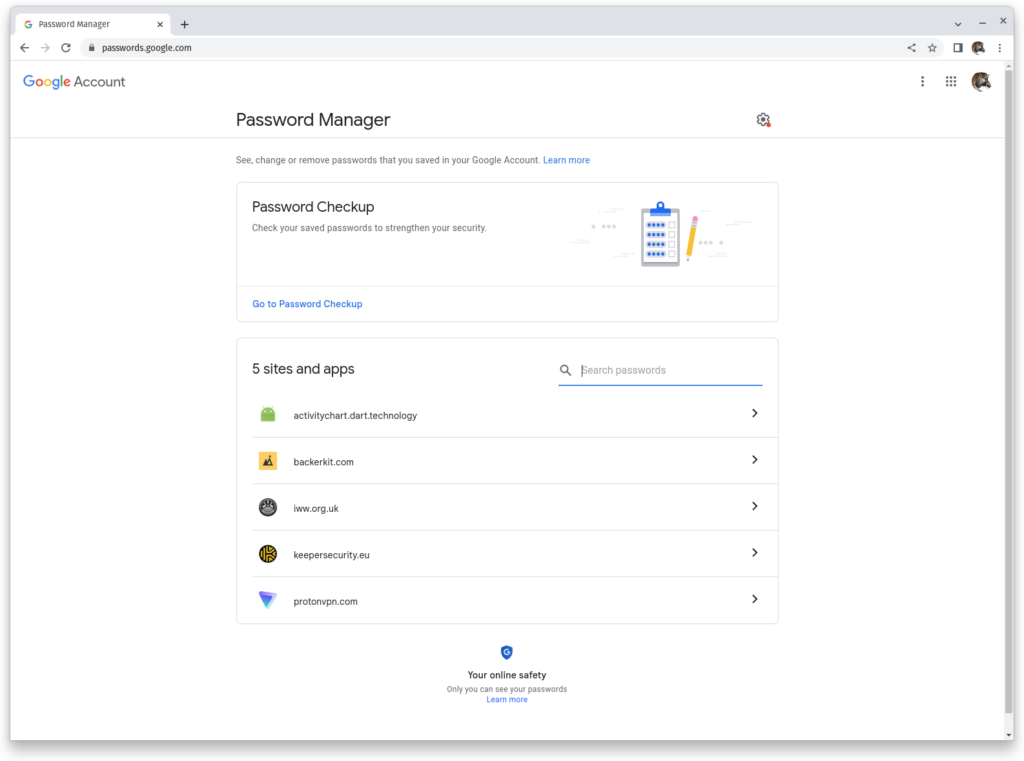
It’s obviously very welcome that Google is trying to develop its password manager into something more functional, but development has been painfully slow and security is dangerously patchy. The notes feature that Chrome beta users saw in 2022 has now been rolled out to everyone, and the recent-ish password checkup and mobile password manager shortcut features are genuinely helpful, but password sharing has yet to appear. Nor have expanded authentication options for desktop access to your password library.
Because Google doesn’t specialise in password security, it doesn’t do a very thorough job. The Chrome Security FAQ makes it clear that it regards issues that require physical access or a compromised PC to exploit as “physically-local attacks” beyond its remit. As a result, it’s shown little interest in fixing continuing long-standing issues with Chrome (and Chromium) browser passwords being held in memory in clear text.
Admittedly, this requires very specific access to a system to exploit, but password handling in memory is a challenge that more serious password managers have tackled with varying degrees of success and explicitly documented.
Google’s approach isn’t a good look when compared to the in-memory password protection and purging measures of rivals such as KeePass and Bitwarden. It isn’t currently clear how this vulnerability interacts with the new on-device encryption system, or whether it will continue to be regarded as low priority.
Right now, between different Android versions, region and device locked roll-outs, and the withdrawal of the sync API from Chromium, it’s hard for any individual user to tell if and when they’ll get access to new password security features.
Latest deals
Should you buy it?
If you’re looking for convenience: It’s certainly convenient to save and sync passwords across your Google browsers and devices. It’s better than not using any kind of password management at all, but worse than most alternatives.
If you require sophisticated and customisable security: Please use a different password manager. They have better features and security measures. Check out our Best Password Manager guide for more options.
Final Thoughts
A lot of people use Google’s built-in service to store their passwords, so any improvements to Google Password Manager are hugely important and I’m delighted to see them.
But as someone who cares about security, you should use a dedicated password manager such as Bitwarden, 1Password, NordPass, Protonpass or Dashlane. Check out our Best Password Manager guide for even more options.
How we test
We test each password manager ourselves on a variety of computer and mobile operating systems. We carry out comparative feature analysis against industry standards and rival products, and test security and convenience settings such as default logout behaviour and offline access.
We used for at least a week.
Tested all of the available features.
FAQs
It’s just about acceptable to use now it has encryption, but you’ll find far better security features from almost all of the alternative password management options.
When logged into your Google account on Chrome, go to the following website: https://passwords.google.com/

Verdict
While it’s better than nothing, you shouldn’t use Google to store your passwords.
Pros
- Already built into Android and Chrome
- (Arguably) better than nothing
Cons
- Very limited security options
- Inconsistent availability of new password management features
- Google has stated that “physically-local” security isn’t a priority
-
SecurityPasswords are encrypted using AES-256, Google stores a key in your account. As of June 2022, Google is offering some users on-device encryption, associated with your Google account password
Introduction
Google has a password management solution, and that’s still about the best you can say for it, despite gradual updates.
Google Password Manager exists primarily as a web vault that can be synced to local storage on your Android phone and Chrome browsers, providing basic autofill and autosave functionality for web passwords, but it’s not strongly secure, particularly against local attack vectors like curious family members.
Note that since 2021, the open source Chromium browser can no longer sync passwords with your Google account and requires no authentication to expose them to anyone with access to the browser – none of the security improvements mentioned here apply to this browser.
Google now supports the Passkey system for account sign-ins, a secret encrypted authentication key pair that allows you to securely and passwordlessly log in to your Google account. But this isn’t currently tied into access to your password database, making it a great example of Google’s apparent reluctance to share features between its different development teams and projects.
Pricing
Google Password Manager is included in all Google and Android accounts for free. Although it’s better than nothing and Google has gradually rolled out useful improvements to its service, it still lacks the features of a paid-for password manager like Bitwarden and LastPass.
You should actively disable password saving when switching to another password management solution. Google makes it easy to export and then delete all of your passwords via passwords.google.com.
Features
- Google using encryption since 2020
- Google doesn’t specialise in password security
- Chromium isn’t protected
On-device encryption means that strong encryption (usually 265-bit AES) is used to make passwords saved on your computer or phone indecipherable without the correct master password. Although it was once notorious for storing user passwords in plain text, Google Password Manager has actually been encrypting Chrome passwords since 2020, using an internal master key to ensure they’re secure when at rest on your devices. However, this doesn’t stop someone with physical access from just opening your browser to take a look at them.
Following a June 2022 update, Google has begun rolling out on-device encryption to some Android users, but they’re not very well secured. I was still able to access my passwords via Chrome under Android 13 using just my phone PIN or a low-security biometric measure – something I confirmed by using a phone with an outdated fingerprint scanner that’s locked out of high-security applications such as banking apps or any other password manager.
Once you’ve accessed your passwords via Chrome, you can add a password manager shortcut to your home screen and even check the security of your stored passwords via a check-up feature that looks at password strength.
The main change for users who opt into on-device encryption is that they’ll have to enter their Google password (or respond to a passwordless login challenge on their associated device) whenever they want to access their passwords. This certainly applies when I want to look at a password entry in my online vault, but in my latest test as of August 2023, I still didn’t have to do anything special to view them in Chrome’s stored passwords, even though I hadn’t re-authenticated my Google account recently using that browser.
It’s obviously very welcome that Google is trying to develop its password manager into something more functional, but development has been painfully slow and security is dangerously patchy. The notes feature that Chrome beta users saw in 2022 has now been rolled out to everyone, and the recent-ish password checkup and mobile password manager shortcut features are genuinely helpful, but password sharing has yet to appear. Nor have expanded authentication options for desktop access to your password library.
Because Google doesn’t specialise in password security, it doesn’t do a very thorough job. The Chrome Security FAQ makes it clear that it regards issues that require physical access or a compromised PC to exploit as “physically-local attacks” beyond its remit. As a result, it’s shown little interest in fixing continuing long-standing issues with Chrome (and Chromium) browser passwords being held in memory in clear text.
Admittedly, this requires very specific access to a system to exploit, but password handling in memory is a challenge that more serious password managers have tackled with varying degrees of success and explicitly documented.
Google’s approach isn’t a good look when compared to the in-memory password protection and purging measures of rivals such as KeePass and Bitwarden. It isn’t currently clear how this vulnerability interacts with the new on-device encryption system, or whether it will continue to be regarded as low priority.
Right now, between different Android versions, region and device locked roll-outs, and the withdrawal of the sync API from Chromium, it’s hard for any individual user to tell if and when they’ll get access to new password security features.
Latest deals
Should you buy it?
If you’re looking for convenience: It’s certainly convenient to save and sync passwords across your Google browsers and devices. It’s better than not using any kind of password management at all, but worse than most alternatives.
If you require sophisticated and customisable security: Please use a different password manager. They have better features and security measures. Check out our Best Password Manager guide for more options.
Final Thoughts
A lot of people use Google’s built-in service to store their passwords, so any improvements to Google Password Manager are hugely important and I’m delighted to see them.
But as someone who cares about security, you should use a dedicated password manager such as Bitwarden, 1Password, NordPass, Protonpass or Dashlane. Check out our Best Password Manager guide for even more options.
How we test
We test each password manager ourselves on a variety of computer and mobile operating systems. We carry out comparative feature analysis against industry standards and rival products, and test security and convenience settings such as default logout behaviour and offline access.
We used for at least a week.
Tested all of the available features.
FAQs
It’s just about acceptable to use now it has encryption, but you’ll find far better security features from almost all of the alternative password management options.
When logged into your Google account on Chrome, go to the following website: https://passwords.google.com/



