





Verdict
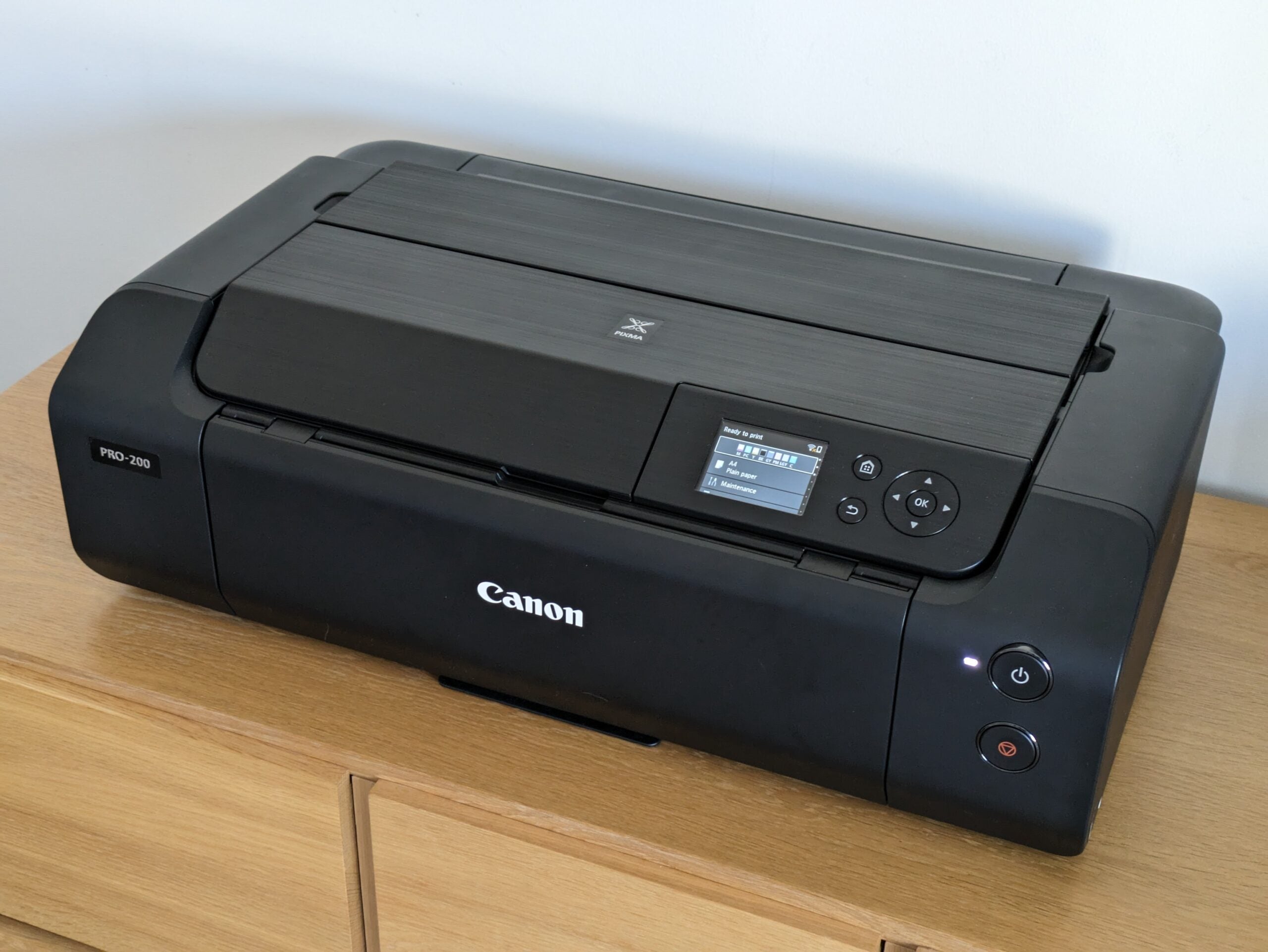
If you want peerless photo quality, Canon’s PIXMA Pro-200 has it in spades. From portraits, through group shots, action photos and landscapes, it delivers stunning results without taking too long over it. However, it’s quite an investment.
Pros
- Exceptional photo prints up to A3+
- Eight-ink print engine for less grain in colour photos
- Grey inks for neutral black and white prints
Cons
- Expensive to run
- Not great for plain paper
Availability
- UKRRP: £430
- USARRP: $549
- EuropeRRP: €514
- CanadaRRP: CA$752
- Australiaunavailable
-
A high-end photo printerThe PIXMA Pro-200 supports big paper sizes and uses eight inks to print exceptional photos -
Very tightly focusedThis printer is very specialised: it isn’t really intended for plain paper prints or everyday use
Introduction
Forgive the printer pun, but the Canon PIXMA Pro-200 is absolutely laser-focused on creating the best possible photos. Although it’s a single-function printer with no scanner attached, it’s still huge, with its two massive paper trays designed to handle heavy, big photo paper up to A3+ size. It’ll grudgingly accept plain paper, but it’s built to deliver better-than-lab quality prints on coated matte and glossy paper. If you’re after an exceptionally good photo printer, this could be it.
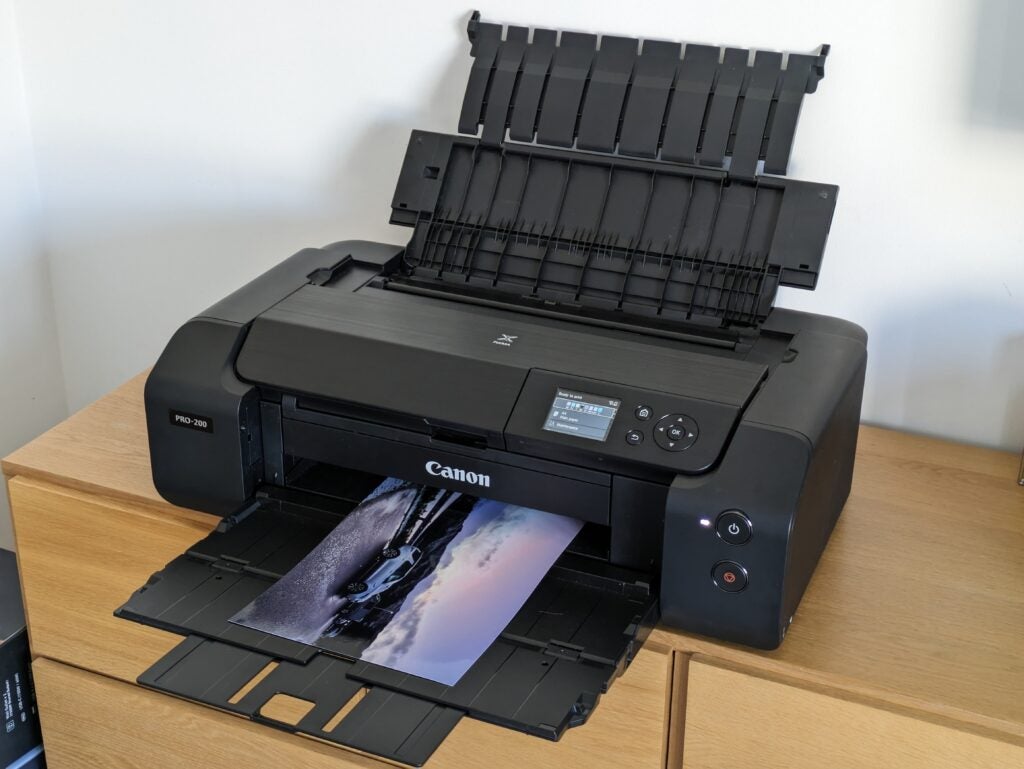
The first thing you’re likely to notice about the PIXMA Pro-200 is that it’s huge. It’s much bigger than a typical A4 printer, and it even looks massive placed next to Epson’s EcoTank ET-18100, which also prints on paper up to A3+. Open the Canon’s sturdy paper trays and it’s even bigger – particularly if you extend them to their maximum size to cope with A3+ paper.
Design and features
- Nicely sculpted, but absolutely huge
- Eight inks provide superior colour and mono prints
- Very high running costs
You’ll need a lot of desk space if you’re using the Canon PIXMA Pro-200 to its fullest. Despite this, this is quite a nicely designed and made product. Its black plastics have a subtly textured horizontal pattern, and all of its trays and compartments feel more sturdy than the norm. Towards the right on the top side, there’s a medium-sized colour screen, navigated by simple directions and OK buttons. To the left is the big hatch you’ll need to lift to fit its ink tanks.
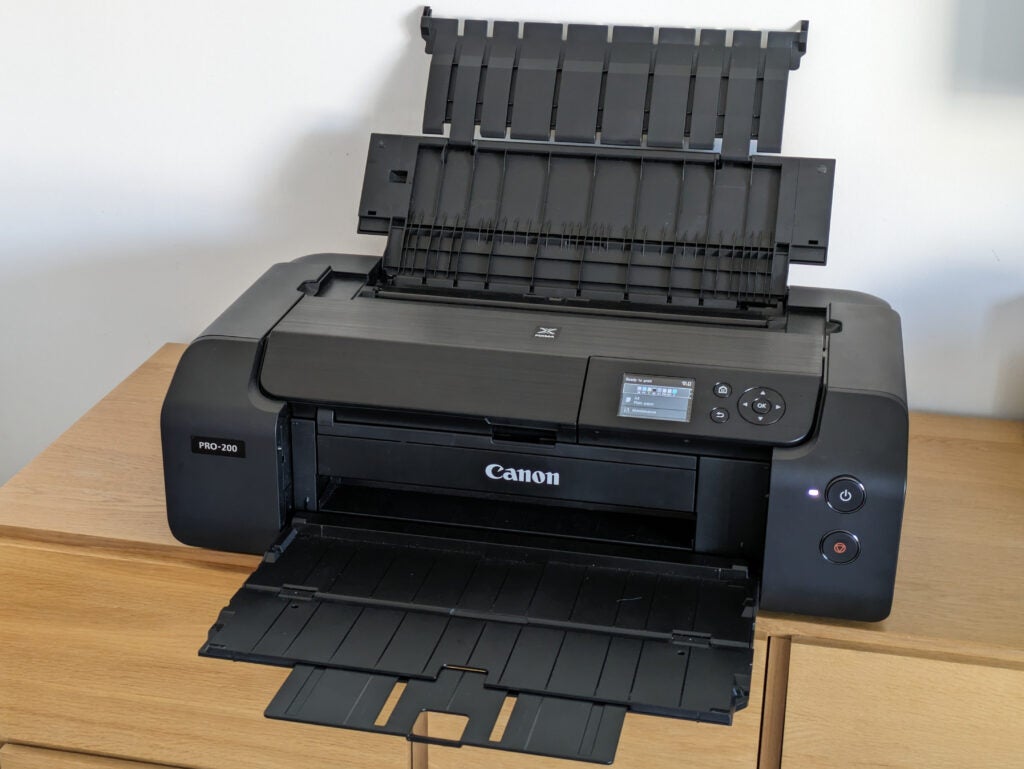
While most printers create images with black, cyan, magenta and yellow inks, the PIXMA Pro-200 uses eight colours, contained in eight tanks. Its grey and light grey inks let it create black and white photos without using any colour, meaning they should have a supremely neutral tone. They’re also used in colour prints for extra control over shading.
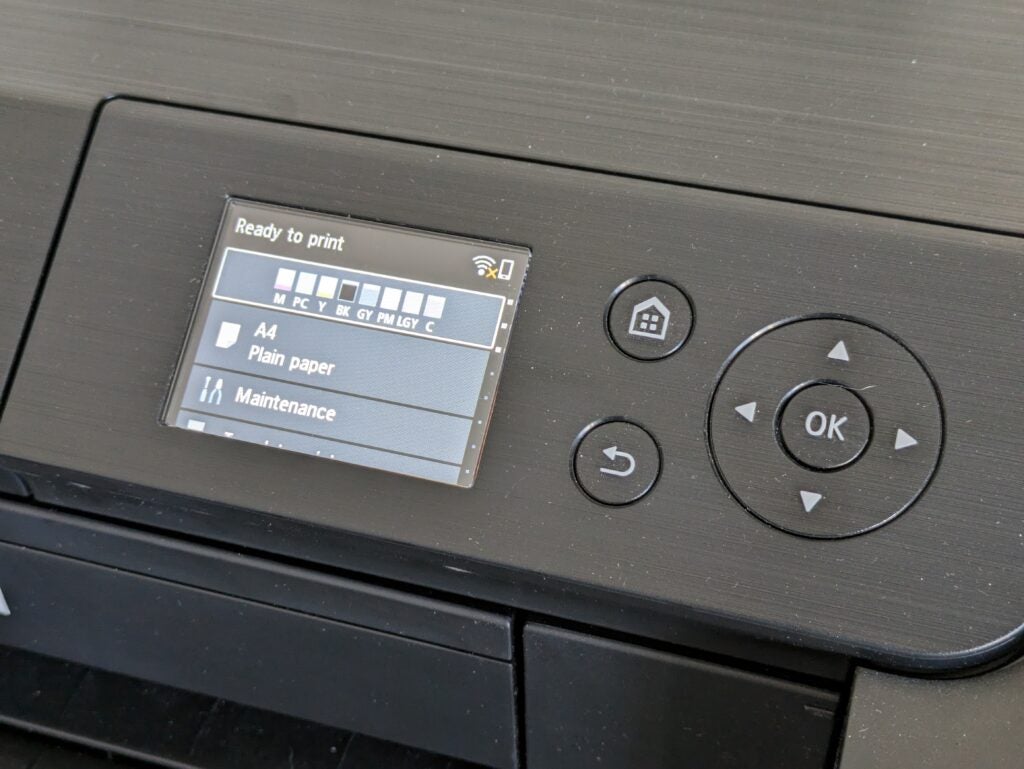
This printer has extra, lighter shades of cyan and magenta ink. Again, these are useful for fine control over lighter shades and help avoid the appearance of grain you might get using standard magenta or cyan.
Eight is a lot of cartridges, and it would help greatly if Canon had thought to add a system to prevent you from putting them in the wrong slots. As it is, you’ll need to concentrate when fitting them, particularly given that six of them are two different shades of the same colour. The other issue with using this many inks is that you’ll need to keep more spares on hand if you want to make sure you never run out of ink.
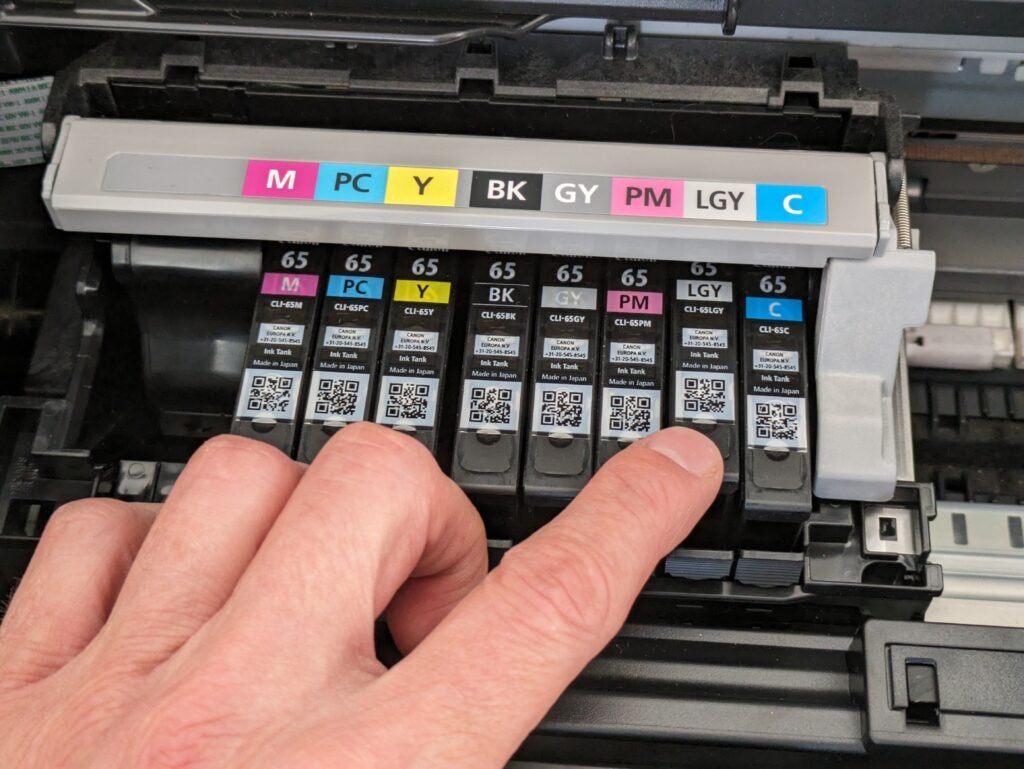
Canon only sells ink cartridges for this printer in a single capacity, and it doesn’t specify how many plain paper pages each one will print. Each of the eight cartridges has a different yield, but on average Canon’s figures suggest you’ll get 550 10x15cm photos, or 75 A3+ prints from a set. With each cartridge costing about £16, you’ll pay 23p per postcard and £1.73 for a single A3+ print.
Factor in Canon’s best quality photo paper and you’ll pay nearer 50p per postcard, or a mighty £3.50 for an A3+ print. That’s a lot, clearly, but it’s worth comparing it to lab printing costs. You can get 10x15cm prints online at around 10p each, but few services even go up to A3 sizes, and those that do will charge you around £7 per print.
The PIXMA Pro-200 is comparatively good value for large prints, then, but for all prints it offers the advantage that you can experiment with different finishes, and go back to improve prints that haven’t quite turned out as you expected. If you’re a pro photographer or even a keen amateur, that could be an invaluable way to perfect your shots. It’s also a lot quicker than waiting for prints to arrive in the post.
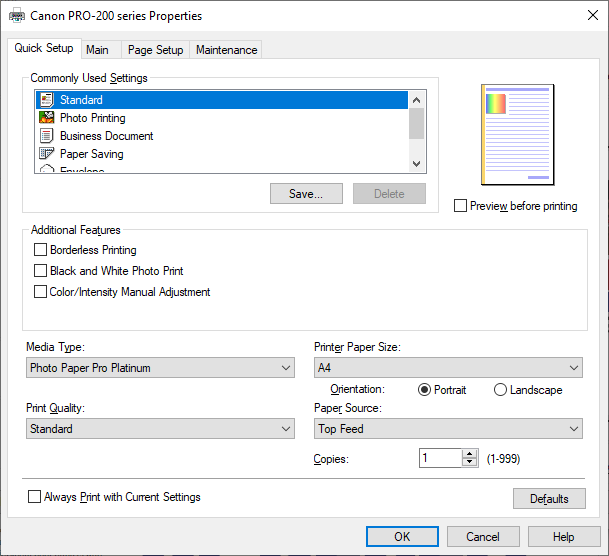
While some photo printers are happy to turn their hand to plain paper printing, the Canon PIXMA Pro-200 is absolutely not. It’s a sign of its intent that its PC print driver defaults to high-quality coated photo paper. You can select plain paper, and the results are OK, but this isn’t the printer for you if you’ll regularly print office documents.
Print speed and quality
- A4 photo prints in less than four minutes
- Exceptional photo quality
- Slow on plain paper
Canon was good enough to provide me with spare inks and a variety of its own photo paper, so I happily went to work testing the PIXMA Pro-200 on a selection of my favourite landscape, portrait and family photos. It was quickly obvious that this printer delivers on its promise of brilliant photo quality – it’s among the best I’ve tested.
The PIXMA Pro-200 excels at reproducing fine details. This was most evident in the fine lines and strands of hair in close-up portraits, but also showed throughout my sample prints, for example in the crease of fabrics, or in fine brushwork on a role-player’s costume. It’s particularly good in mid and dark tones, but arguably less so in very pale regions such as clouds or pale shades washed out by sunlight.
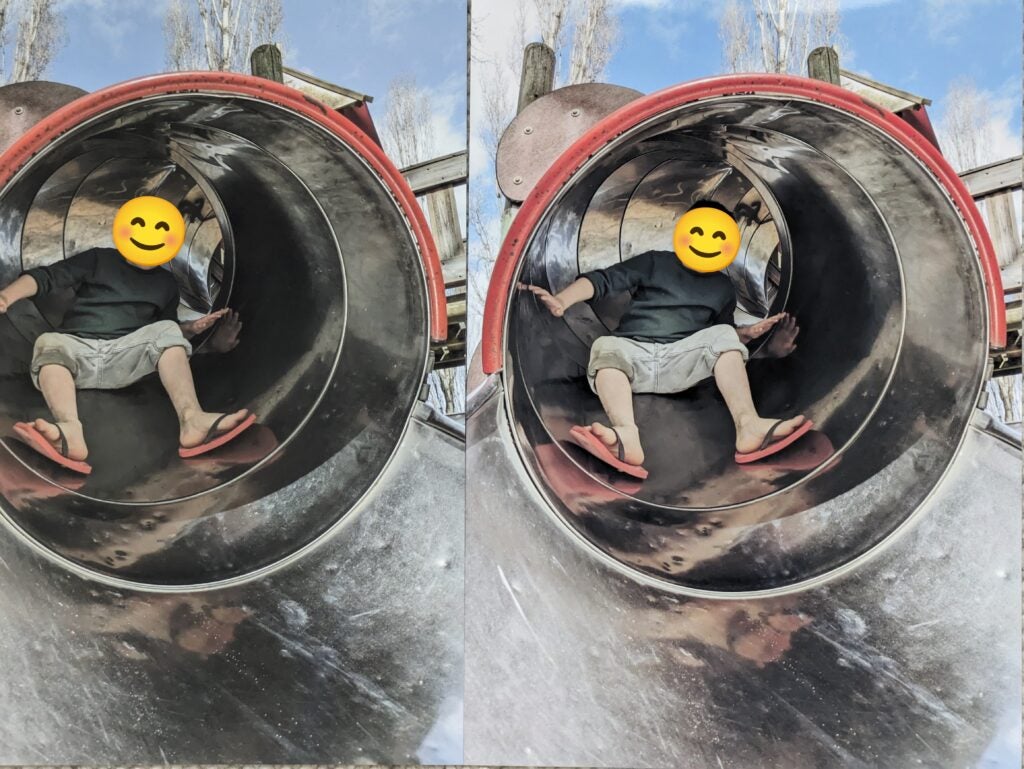
This printer seems to revel in complex and highly contrasting subjects, turning a high-dynamic range (HDR) holiday snap of my son into a mini-masterpiece. There wasn’t a single area where the printer failed to reproduce the detail of the original shot. Below I’ve compared this print from the Pro-200 (left) and the Epson ET-18100. In fairness, I should point out that the latter uses only six inks.
I tried the Canon PIXMA Pro-200 on a few black-and-white shots. Despite having black, grey and light grey inks, it defaults to using a small amount of colour ink alongside them – you can force it to black-only in the driver. I genuinely struggled to tell the difference between the two settings – it’s subtle, even if you use a magnifying glass. My impression was that default prints were almost imperceptibly more detailed than black-only ones, at the cost of a very slight move away from being truly neutral in tone.
In my testing, I found only one photo where I felt the Pro-200’s print wasn’t quite as satisfying as it could have been. Its rendition of a silver car by a loch at dawn reproduced the warmth of the sky but lost some of the coolness around the car, and slightly underexposed shaded vegetation on the banks. It’s a subjective difference, though – my partner preferred this print to the Epson ET-18100’s rendition.
This printer won’t keep you waiting too long for your photos, even on big A3+ paper. At the highest possible setting, it finished off each borderless 10x15cm print in less than a minute. Borderless A4 prints were done in three and a half minutes, while I timed a colour A3+ print at six minutes and 49 seconds. I noticed that black-only mode was appreciably slower but unfortunately wasn’t able to time by how much before I had to return the printer to Canon.
I conducted our usual plain paper tests for completeness. The PIXMA Pro-200 needed 37 seconds to turn out the first page of black text, or nearly a minute for colour. It could manage only 2.4 pages per minute (ppm) on our standard text test, rising to just 3.7 ppm over 20 pages. Twenty colour pages took more than six minutes, a rate of 3.2 ppm. Plain paper print quality was reasonable, with fairly dark text and decent graphics, but you’d get better from a cheap, office-focused inkjet.
Latest deals
Should you buy it?
You want the best possible photos
The PIXMA Pro-200 is a device that puts quality photo printing at the forefront. If you want great results, and especially if you are a photographer, this is the printer for you.
You need a photo printer that can double up for everyday or office use
This isn’t your average printer for casual home and office use. It excels in high-quality photo printing. You can find better value for your needs if that isn’t what you require.
Final Thoughts
This really is an exceptional photo printer, producing prints that are comfortably good enough for aspiring photographers to display or sell. They’re better than the quality you’d get from a typical lab, with the advantage that they’re much quicker, and that you get the chance to experiment and refine them until they’re exactly what you want.
This isn’t the cheapest way to get decent postcard-sized photos – online services are far cheaper, as are refillable alternatives like the Epson EcoTank ET-18100. That said, it should still save you money and improve your results if you often print on A3 or A3+ paper.
If you’re after something different from a photo printer, such as a lower price, check out our best photo printers guide. Or, if you don’t require the perks of a photo printer, there’s out best printers list too.
How we test
Every printer we review goes through a series of uniform checks designed to gauge key things including print quality, speed and cost.
We’ll also compare the features with other printers at the same price point to see if you’re getting good value for your money.
Measured the time it takes to print with various paper
Compared print quality with other printers
Tested printing with monochrome and coloured ink
FAQs
No, it’s a single-function printer, optimised for great photos.
It’ll take up to A3+ paper, which measures 329x483mm (13×19″). You can also set custom paper sizes up to a huge 323x990mm.
Trusted Reviews test data

Verdict
If you want peerless photo quality, Canon’s PIXMA Pro-200 has it in spades. From portraits, through group shots, action photos and landscapes, it delivers stunning results without taking too long over it. However, it’s quite an investment.
Pros
- Exceptional photo prints up to A3+
- Eight-ink print engine for less grain in colour photos
- Grey inks for neutral black and white prints
Cons
- Expensive to run
- Not great for plain paper
Availability
- UKRRP: £430
- USARRP: $549
- EuropeRRP: €514
- CanadaRRP: CA$752
- Australiaunavailable
-
A high-end photo printerThe PIXMA Pro-200 supports big paper sizes and uses eight inks to print exceptional photos -
Very tightly focusedThis printer is very specialised: it isn’t really intended for plain paper prints or everyday use
Introduction
Forgive the printer pun, but the Canon PIXMA Pro-200 is absolutely laser-focused on creating the best possible photos. Although it’s a single-function printer with no scanner attached, it’s still huge, with its two massive paper trays designed to handle heavy, big photo paper up to A3+ size. It’ll grudgingly accept plain paper, but it’s built to deliver better-than-lab quality prints on coated matte and glossy paper. If you’re after an exceptionally good photo printer, this could be it.
The first thing you’re likely to notice about the PIXMA Pro-200 is that it’s huge. It’s much bigger than a typical A4 printer, and it even looks massive placed next to Epson’s EcoTank ET-18100, which also prints on paper up to A3+. Open the Canon’s sturdy paper trays and it’s even bigger – particularly if you extend them to their maximum size to cope with A3+ paper.
Design and features
- Nicely sculpted, but absolutely huge
- Eight inks provide superior colour and mono prints
- Very high running costs
You’ll need a lot of desk space if you’re using the Canon PIXMA Pro-200 to its fullest. Despite this, this is quite a nicely designed and made product. Its black plastics have a subtly textured horizontal pattern, and all of its trays and compartments feel more sturdy than the norm. Towards the right on the top side, there’s a medium-sized colour screen, navigated by simple directions and OK buttons. To the left is the big hatch you’ll need to lift to fit its ink tanks.
While most printers create images with black, cyan, magenta and yellow inks, the PIXMA Pro-200 uses eight colours, contained in eight tanks. Its grey and light grey inks let it create black and white photos without using any colour, meaning they should have a supremely neutral tone. They’re also used in colour prints for extra control over shading.
This printer has extra, lighter shades of cyan and magenta ink. Again, these are useful for fine control over lighter shades and help avoid the appearance of grain you might get using standard magenta or cyan.
Eight is a lot of cartridges, and it would help greatly if Canon had thought to add a system to prevent you from putting them in the wrong slots. As it is, you’ll need to concentrate when fitting them, particularly given that six of them are two different shades of the same colour. The other issue with using this many inks is that you’ll need to keep more spares on hand if you want to make sure you never run out of ink.
Canon only sells ink cartridges for this printer in a single capacity, and it doesn’t specify how many plain paper pages each one will print. Each of the eight cartridges has a different yield, but on average Canon’s figures suggest you’ll get 550 10x15cm photos, or 75 A3+ prints from a set. With each cartridge costing about £16, you’ll pay 23p per postcard and £1.73 for a single A3+ print.
Factor in Canon’s best quality photo paper and you’ll pay nearer 50p per postcard, or a mighty £3.50 for an A3+ print. That’s a lot, clearly, but it’s worth comparing it to lab printing costs. You can get 10x15cm prints online at around 10p each, but few services even go up to A3 sizes, and those that do will charge you around £7 per print.
The PIXMA Pro-200 is comparatively good value for large prints, then, but for all prints it offers the advantage that you can experiment with different finishes, and go back to improve prints that haven’t quite turned out as you expected. If you’re a pro photographer or even a keen amateur, that could be an invaluable way to perfect your shots. It’s also a lot quicker than waiting for prints to arrive in the post.
While some photo printers are happy to turn their hand to plain paper printing, the Canon PIXMA Pro-200 is absolutely not. It’s a sign of its intent that its PC print driver defaults to high-quality coated photo paper. You can select plain paper, and the results are OK, but this isn’t the printer for you if you’ll regularly print office documents.
Print speed and quality
- A4 photo prints in less than four minutes
- Exceptional photo quality
- Slow on plain paper
Canon was good enough to provide me with spare inks and a variety of its own photo paper, so I happily went to work testing the PIXMA Pro-200 on a selection of my favourite landscape, portrait and family photos. It was quickly obvious that this printer delivers on its promise of brilliant photo quality – it’s among the best I’ve tested.
The PIXMA Pro-200 excels at reproducing fine details. This was most evident in the fine lines and strands of hair in close-up portraits, but also showed throughout my sample prints, for example in the crease of fabrics, or in fine brushwork on a role-player’s costume. It’s particularly good in mid and dark tones, but arguably less so in very pale regions such as clouds or pale shades washed out by sunlight.
This printer seems to revel in complex and highly contrasting subjects, turning a high-dynamic range (HDR) holiday snap of my son into a mini-masterpiece. There wasn’t a single area where the printer failed to reproduce the detail of the original shot. Below I’ve compared this print from the Pro-200 (left) and the Epson ET-18100. In fairness, I should point out that the latter uses only six inks.
I tried the Canon PIXMA Pro-200 on a few black-and-white shots. Despite having black, grey and light grey inks, it defaults to using a small amount of colour ink alongside them – you can force it to black-only in the driver. I genuinely struggled to tell the difference between the two settings – it’s subtle, even if you use a magnifying glass. My impression was that default prints were almost imperceptibly more detailed than black-only ones, at the cost of a very slight move away from being truly neutral in tone.
In my testing, I found only one photo where I felt the Pro-200’s print wasn’t quite as satisfying as it could have been. Its rendition of a silver car by a loch at dawn reproduced the warmth of the sky but lost some of the coolness around the car, and slightly underexposed shaded vegetation on the banks. It’s a subjective difference, though – my partner preferred this print to the Epson ET-18100’s rendition.
This printer won’t keep you waiting too long for your photos, even on big A3+ paper. At the highest possible setting, it finished off each borderless 10x15cm print in less than a minute. Borderless A4 prints were done in three and a half minutes, while I timed a colour A3+ print at six minutes and 49 seconds. I noticed that black-only mode was appreciably slower but unfortunately wasn’t able to time by how much before I had to return the printer to Canon.
I conducted our usual plain paper tests for completeness. The PIXMA Pro-200 needed 37 seconds to turn out the first page of black text, or nearly a minute for colour. It could manage only 2.4 pages per minute (ppm) on our standard text test, rising to just 3.7 ppm over 20 pages. Twenty colour pages took more than six minutes, a rate of 3.2 ppm. Plain paper print quality was reasonable, with fairly dark text and decent graphics, but you’d get better from a cheap, office-focused inkjet.
Latest deals
Should you buy it?
You want the best possible photos
The PIXMA Pro-200 is a device that puts quality photo printing at the forefront. If you want great results, and especially if you are a photographer, this is the printer for you.
You need a photo printer that can double up for everyday or office use
This isn’t your average printer for casual home and office use. It excels in high-quality photo printing. You can find better value for your needs if that isn’t what you require.
Final Thoughts
This really is an exceptional photo printer, producing prints that are comfortably good enough for aspiring photographers to display or sell. They’re better than the quality you’d get from a typical lab, with the advantage that they’re much quicker, and that you get the chance to experiment and refine them until they’re exactly what you want.
This isn’t the cheapest way to get decent postcard-sized photos – online services are far cheaper, as are refillable alternatives like the Epson EcoTank ET-18100. That said, it should still save you money and improve your results if you often print on A3 or A3+ paper.
If you’re after something different from a photo printer, such as a lower price, check out our best photo printers guide. Or, if you don’t require the perks of a photo printer, there’s out best printers list too.
How we test
Every printer we review goes through a series of uniform checks designed to gauge key things including print quality, speed and cost.
We’ll also compare the features with other printers at the same price point to see if you’re getting good value for your money.
Measured the time it takes to print with various paper
Compared print quality with other printers
Tested printing with monochrome and coloured ink
FAQs
No, it’s a single-function printer, optimised for great photos.
It’ll take up to A3+ paper, which measures 329x483mm (13×19″). You can also set custom paper sizes up to a huge 323x990mm.



