





Verdict
With decent hardware, a tough case and excellent parental controls, the Amazon Fire HD 8 Kids is the top tablet for young children.
Pros
- Based on one of the best budget tablets
- Incredibly tough protective case
- Great kid-friendly software and services
Cons
- Screen could be more vibrant
- Limited performance
- Can’t push content from Amazon Prime Music or Video without installing app
Amazon Fire HD 8 Kids tablet drops down to £69.99
Amazon has chopped a mega 53% off both the Fire HD 8 Kids and Fire HD 8 Kids Pro tablets, making them available for just £69.99 each.
- Amazon
- Save 53%
- Now £69.99
Key Features
-
Solid, shock-proof caseWith all that reinforcement and padding, you shouldn’t need the no-quibble 2-year guarantee -
8-inch HD screenThe larger size and 1280 x 800 resolution gives you a crisper, brighter image than the cheaper Fire 7. -
Amazon Kids software and Kids+ subscriptionThe software and subscription keep the kids busy with content, while putting parents in control.
Introduction
Parents will know that children are obsessed with tablets, but nobody wants to let their toddler get their mucky and clumsy hands all over an expensive iPad.
The Amazon Fire HD 8 Kids (2022) is a great remedy for this issue, with an affordable price point and a robust build designed for reckless younglings aged between 6 and 12. The model reviewed here even comes bundled with a thick bumper case, and a subscription to Amazon Kid’s services.
Those with slightly older children, aged 6 to 12, also have the option of the Amazon Fire HD 8 Kids Pro (2022). This is essentially the exact same tablet, but with a slimmer, more grown-up bumper case and tweaked software.
So is the Amazon Fire HD 8 Kids (2022) worth a buy for your little ones? Here are my thoughts.
Design
- Thick protective case
- Useful handle that doubles as a stand
- Single USB Type-C port for connectivity and charging
The most distinctive feature of the Fire HD 8 Kids has to be the chunky case. It adds around 2cm to the height of the tablet in portrait mode and roughly 4cm to the width, while the case is over an inch thick (or 2.7cm) around the edges and the corners.
The Fire HD 8 is already one of the toughest tablets around, but with the case on it’s a challenge to harm it. A good, direct shock to a small area of the screen would probably do it, but otherwise falls to hard kitchen floors, down the stairs and onto concrete are unlikely to leave a mark. Basically, your average child would have to put some serious effort in to really smash it up, though with no water or dust-resistance, you might want to keep an eye on it if taken in the bathroom or used outdoors.
Even if your offspring did dish out enough punishment, Amazon provides a two-year worry free guarantee. If the Fire HD 8 Kids actually breaks, you can return the tablet and Amazon will replace it free.
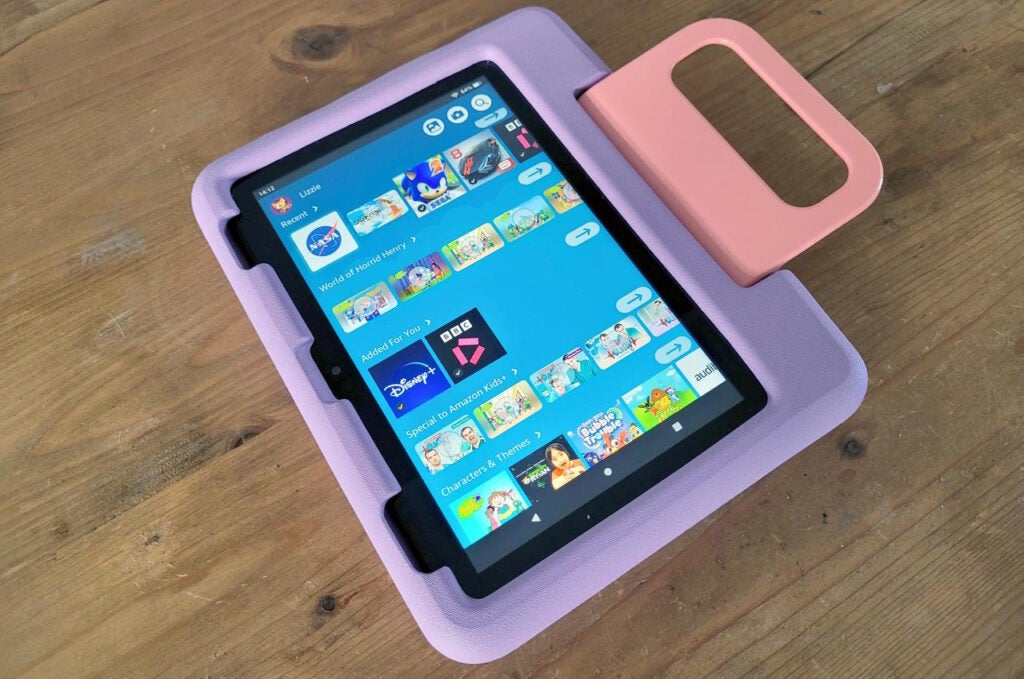
One of the longer sides of the tablet houses a thick plastic handle on a very solid hinge, which folds out for carrying purposes or to act as a stand. It’s very stiff and will only hold the tablet at two angles, but it means you can plonk the Fire HD 8 Kids on a flat surface if its user wants to chill out and watch CBeebies.
The one downside of the case is that the cut-outs for the ports and buttons on the tablet can be tough for adult-sized fingers to get into. I can just about prod the power button and the volume buttons on the top of the tablet, but it’s pretty tight, while the USB Type-C port and headphone socket have similar issues. Still, all but the chunkiest plugs went in and out without any difficulties and, unless you’re planning to let the kids loose with your Grado or Beyerdynamic Hi-Fi headphones, you’re probably going to be alright.
Screen
- 1280 x 800 HD resolution
- Decent brightness levels but dull, flat colours
- Too reflective for use in bright sunlight
By the standards of an iPad or Samsung Galaxy Tab S tablet, the screen on the Fire HD 8 Kids isn’t great. The resolution is limited to an HD (not Full HD) 1280 x 800, meaning video and photos won’t look as crisp and you can see the pixel structure from around a foot away.
What’s more, while the screen goes fairly bright (I measured the max brightness at 472 nits) there’s not a lot of contrast and colours look flat and a little dull.
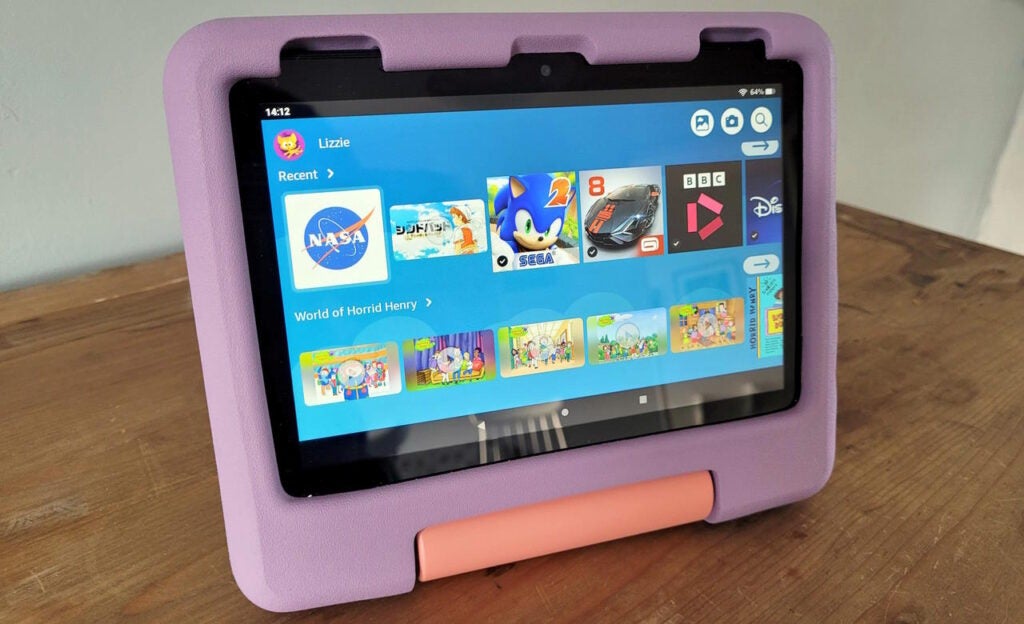
But, hey, are your kids all that critical about this kind of thing? Are they going to grump about inaccurate colours or do they just want something that makes their apps, games, cartoons, YouTube videos and movies look good enough to watch?
If the latter, the display on the Fire HD 8 Kids will be fine provided they’re not trying to watch outdoors in bright sunlight or sit with their back to a sunlit window, at which point there’s not enough brightness to punch through reflections on the screen. To be honest, I watched some Netflix shows during testing, and it didn’t irk me all that much, either. It’s a darn sight better than the dull, lower-res screen on the cheaper Fire 7 as well.
One thing you might find more aggravating is the sound. It’s okay at lower volumes, if a bit tinny, but gets thinner and harsher as you push the volume up. Some kid-safe headphones might be a good idea, both for their enjoyment and for your sanity.
Software and performance
- Easy to use, child-friendly interface
- Parental dashboard with excellent controls
- Mediocre performance from six-core CPU
The Fire HD 8 Kids runs the same Fire OS software as the standard Fire HD 8 tablet, but with an overlaid software experience designed specifically for younger kids. Instead of the normal homescreen with apps, they see a topbar with big square buttons for some basic apps and content categories, then several rows of super-sized icons covering recent and featured apps as well as content Amazon believes they might enjoy. It’s an approach that makes a wide range of apps, games and videos accessible, while also creating a kind of walled garden that’s under parental control.
A lot of this stuff comes free with the Amazon Kids+ subscription, which is free for the first year and £3.99 per month after that, and it includes a wide range of family-friendly movies, TV shows, music, games and apps. Parents will love the educational apps and content, while kids will be happy to see familiar faces like Hello Kitty, Horrid Henry, CBeebies plus big names from Disney and the Cartoon Network. In fact, Amazon Kids+ is arguably worth it just for the range of apps, games and books.
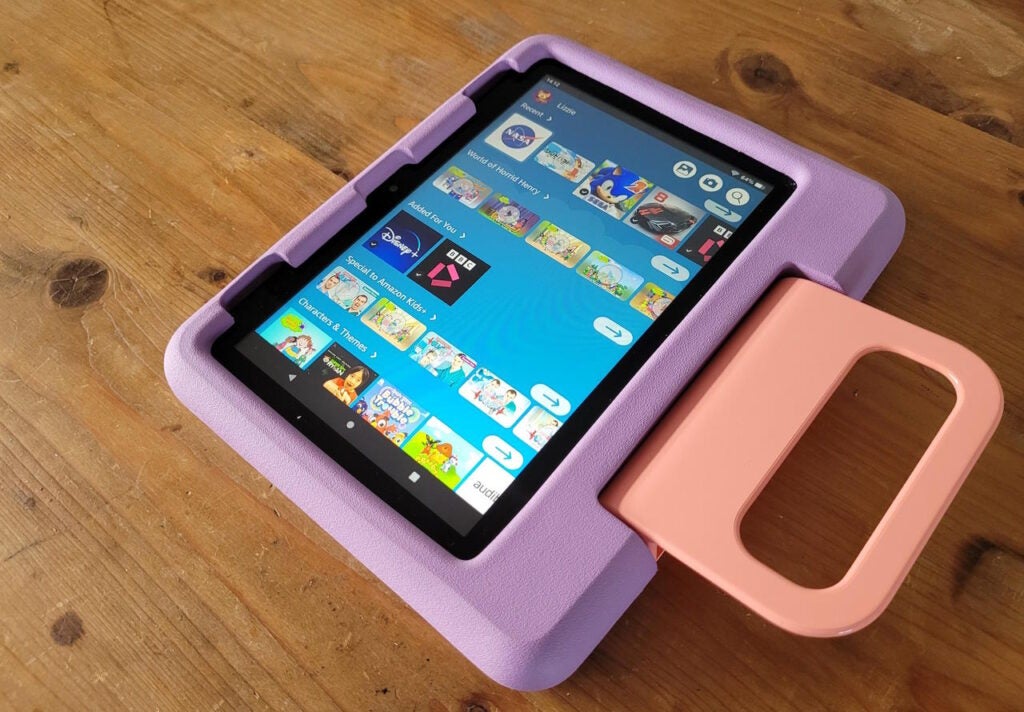
You can add any Amazon content you own to your child’s profile – videos, Kindle books, Audible books or music – but you can’t add content from your Amazon Prime Video or Music subscription, which is a bit annoying if there’s something you think your child would like but isn’t on Amazon’s existing lists. However, you can search for specific Kids+ content and add it through the parental dashboard, so you can add things that way, if they’re available through Kids+.
You’re also free to install any streaming apps that you already subscribe to. As far as the stuff native to Amazon Kids goes, it’s all gated to the appropriate age, but you’ll have to set up profiles and parental controls on other apps like iPlayer, Netflix or Disney+.
There’s no browser as such running within the Kids experience; there are web links that open within a restricted browser instance and make it nigh-impossible to go elsewhere.
As the parent you get a robust set of parental controls for apps and games, so you can define age restrictions and decide whether you want kids to be able to download apps or add-on content without your consent.
The answer to that is probably no, in which case your kids either have no facility to add apps, games, books and DLC, or have to ask you first. The same goes for any paid-for content not included with Amazon Kids. Pick the approval required option, and you’ll get a prompt via email to request your say so through the browser-based parent’s dashboard. It’s quick, hassle-free and safe.
As far as performance goes, the Amazon Fire 8 Kids isn’t what you’d call a speed demon. The Fire HD 8 now has an upgraded six-core MediaTek MT8169A ARM CPU and 2GB of RAM, but you wouldn’t want to run Call of Duty: Mobile or Genshin Impact on this thing. Luckily, most child-friendly games aren’t as demanding, and the likes of Sonic Dash 2: Sonic Boom and Cut the Rope ran perfectly well. There’s even enough welly to run the more intensive Asphalt 8, though you will spot the odd jerk in the frame rate here and there.
Weirdly, I couldn’t persuade Geekbench 5 to run a full cycle for either of the Fire HD 8 Kids tablets, even though I managed it on a standard Fire HD 8 tablet, where it scored 178 (single-core) and 851 (multi). Given that even basic 8-inch tablets like the Nokia T10 can hit 305 and 1243 respectively, it only confirms that you’re getting the spec you paid for; nothing less and nothing more.
Battery life
- Ten to thirteen hours of battery life
- Around five hours to reach full charge
The Amazon Fire HD 8 is one of the best small-screen tablets around for battery life, and the Fire HD 8 Kids is no different.
Left to stream video for an hour at maximum brightness, the battery went down by 10%, and you can cut this to 7% by reducing the brightness to roughly two-thirds. In other words, you’re definitely looking at around 10 to 13 hours of useful battery life, and possibly more.
Games will hit the CPU and GPU harder, but you’re not going to have to charge the tablet every day if you stick to sensible levels of use.
Latest deals
Should you buy it?
You want a tablet for young children:
With its beefy, damage-resistant case and excellent software, this is one tablet you won’t worry about leaving with kids aged 3 to 7. It’s well stocked with stuff to educate and entertain them, and the screen, performance and battery life are fit for purpose.
You want a high-end tablet:
It’s more expensive than the standard Fire HD 8, so you’re paying extra for the software, content and case. It’s also slow and the screen isn’t all that great. Even the cheapest iPad is a better tablet, though it’s going to cost you a lot more, especially with such a tough case.
Final Thoughts
It’s not cool, it’s not fast and the screen could be brighter, but as a tablet for younger kids the Amazon Fire HD 8 Kids is pretty much in a class of its own. True, buying an iPad would give you access to a wider range of apps and games and Apple’s own curated experience and parental controls, but it’s going to cost you a lot more and it won’t be anywhere near as robust.
The Fire HD 8 kids gives your offspring easy access to content that will keep them entertained – and even learning – while giving you peace of mind that they won’t break it and that they won’t come across anything you wouldn’t want them to. For an extra £50, that’s a bargain.
How we test
Unlike other sites, we thoroughly test every tablet that we review. We use industry standard tests in order to compare features properly. We’ll always tell you what we find. We never, ever accept money to review a product.
Screen tested using a colorimeter
Benchmarked with standard industry tools
FAQs
The only differences between the tablets are the case and software. The Kids tablet is aimed at young children, while the Pro model targets those aged between 6 and 12.
Yes you can. Although a child will require a parent’s permission in order to download the app.
Trusted Reviews test data
Jargon buster
GPU
The graphics processing unit is designed to render graphics, which is particularly important for gaming, creating 3D models and editing video.

Verdict
With decent hardware, a tough case and excellent parental controls, the Amazon Fire HD 8 Kids is the top tablet for young children.
Pros
- Based on one of the best budget tablets
- Incredibly tough protective case
- Great kid-friendly software and services
Cons
- Screen could be more vibrant
- Limited performance
- Can’t push content from Amazon Prime Music or Video without installing app
Amazon Fire HD 8 Kids tablet drops down to £69.99
Amazon has chopped a mega 53% off both the Fire HD 8 Kids and Fire HD 8 Kids Pro tablets, making them available for just £69.99 each.
- Amazon
- Save 53%
- Now £69.99
Key Features
-
Solid, shock-proof caseWith all that reinforcement and padding, you shouldn’t need the no-quibble 2-year guarantee -
8-inch HD screenThe larger size and 1280 x 800 resolution gives you a crisper, brighter image than the cheaper Fire 7. -
Amazon Kids software and Kids+ subscriptionThe software and subscription keep the kids busy with content, while putting parents in control.
Introduction
Parents will know that children are obsessed with tablets, but nobody wants to let their toddler get their mucky and clumsy hands all over an expensive iPad.
The Amazon Fire HD 8 Kids (2022) is a great remedy for this issue, with an affordable price point and a robust build designed for reckless younglings aged between 6 and 12. The model reviewed here even comes bundled with a thick bumper case, and a subscription to Amazon Kid’s services.
Those with slightly older children, aged 6 to 12, also have the option of the Amazon Fire HD 8 Kids Pro (2022). This is essentially the exact same tablet, but with a slimmer, more grown-up bumper case and tweaked software.
So is the Amazon Fire HD 8 Kids (2022) worth a buy for your little ones? Here are my thoughts.
Design
- Thick protective case
- Useful handle that doubles as a stand
- Single USB Type-C port for connectivity and charging
The most distinctive feature of the Fire HD 8 Kids has to be the chunky case. It adds around 2cm to the height of the tablet in portrait mode and roughly 4cm to the width, while the case is over an inch thick (or 2.7cm) around the edges and the corners.
The Fire HD 8 is already one of the toughest tablets around, but with the case on it’s a challenge to harm it. A good, direct shock to a small area of the screen would probably do it, but otherwise falls to hard kitchen floors, down the stairs and onto concrete are unlikely to leave a mark. Basically, your average child would have to put some serious effort in to really smash it up, though with no water or dust-resistance, you might want to keep an eye on it if taken in the bathroom or used outdoors.
Even if your offspring did dish out enough punishment, Amazon provides a two-year worry free guarantee. If the Fire HD 8 Kids actually breaks, you can return the tablet and Amazon will replace it free.
One of the longer sides of the tablet houses a thick plastic handle on a very solid hinge, which folds out for carrying purposes or to act as a stand. It’s very stiff and will only hold the tablet at two angles, but it means you can plonk the Fire HD 8 Kids on a flat surface if its user wants to chill out and watch CBeebies.
The one downside of the case is that the cut-outs for the ports and buttons on the tablet can be tough for adult-sized fingers to get into. I can just about prod the power button and the volume buttons on the top of the tablet, but it’s pretty tight, while the USB Type-C port and headphone socket have similar issues. Still, all but the chunkiest plugs went in and out without any difficulties and, unless you’re planning to let the kids loose with your Grado or Beyerdynamic Hi-Fi headphones, you’re probably going to be alright.
Screen
- 1280 x 800 HD resolution
- Decent brightness levels but dull, flat colours
- Too reflective for use in bright sunlight
By the standards of an iPad or Samsung Galaxy Tab S tablet, the screen on the Fire HD 8 Kids isn’t great. The resolution is limited to an HD (not Full HD) 1280 x 800, meaning video and photos won’t look as crisp and you can see the pixel structure from around a foot away.
What’s more, while the screen goes fairly bright (I measured the max brightness at 472 nits) there’s not a lot of contrast and colours look flat and a little dull.
But, hey, are your kids all that critical about this kind of thing? Are they going to grump about inaccurate colours or do they just want something that makes their apps, games, cartoons, YouTube videos and movies look good enough to watch?
If the latter, the display on the Fire HD 8 Kids will be fine provided they’re not trying to watch outdoors in bright sunlight or sit with their back to a sunlit window, at which point there’s not enough brightness to punch through reflections on the screen. To be honest, I watched some Netflix shows during testing, and it didn’t irk me all that much, either. It’s a darn sight better than the dull, lower-res screen on the cheaper Fire 7 as well.
One thing you might find more aggravating is the sound. It’s okay at lower volumes, if a bit tinny, but gets thinner and harsher as you push the volume up. Some kid-safe headphones might be a good idea, both for their enjoyment and for your sanity.
Software and performance
- Easy to use, child-friendly interface
- Parental dashboard with excellent controls
- Mediocre performance from six-core CPU
The Fire HD 8 Kids runs the same Fire OS software as the standard Fire HD 8 tablet, but with an overlaid software experience designed specifically for younger kids. Instead of the normal homescreen with apps, they see a topbar with big square buttons for some basic apps and content categories, then several rows of super-sized icons covering recent and featured apps as well as content Amazon believes they might enjoy. It’s an approach that makes a wide range of apps, games and videos accessible, while also creating a kind of walled garden that’s under parental control.
A lot of this stuff comes free with the Amazon Kids+ subscription, which is free for the first year and £3.99 per month after that, and it includes a wide range of family-friendly movies, TV shows, music, games and apps. Parents will love the educational apps and content, while kids will be happy to see familiar faces like Hello Kitty, Horrid Henry, CBeebies plus big names from Disney and the Cartoon Network. In fact, Amazon Kids+ is arguably worth it just for the range of apps, games and books.
You can add any Amazon content you own to your child’s profile – videos, Kindle books, Audible books or music – but you can’t add content from your Amazon Prime Video or Music subscription, which is a bit annoying if there’s something you think your child would like but isn’t on Amazon’s existing lists. However, you can search for specific Kids+ content and add it through the parental dashboard, so you can add things that way, if they’re available through Kids+.
You’re also free to install any streaming apps that you already subscribe to. As far as the stuff native to Amazon Kids goes, it’s all gated to the appropriate age, but you’ll have to set up profiles and parental controls on other apps like iPlayer, Netflix or Disney+.
There’s no browser as such running within the Kids experience; there are web links that open within a restricted browser instance and make it nigh-impossible to go elsewhere.
As the parent you get a robust set of parental controls for apps and games, so you can define age restrictions and decide whether you want kids to be able to download apps or add-on content without your consent.
The answer to that is probably no, in which case your kids either have no facility to add apps, games, books and DLC, or have to ask you first. The same goes for any paid-for content not included with Amazon Kids. Pick the approval required option, and you’ll get a prompt via email to request your say so through the browser-based parent’s dashboard. It’s quick, hassle-free and safe.
As far as performance goes, the Amazon Fire 8 Kids isn’t what you’d call a speed demon. The Fire HD 8 now has an upgraded six-core MediaTek MT8169A ARM CPU and 2GB of RAM, but you wouldn’t want to run Call of Duty: Mobile or Genshin Impact on this thing. Luckily, most child-friendly games aren’t as demanding, and the likes of Sonic Dash 2: Sonic Boom and Cut the Rope ran perfectly well. There’s even enough welly to run the more intensive Asphalt 8, though you will spot the odd jerk in the frame rate here and there.
Weirdly, I couldn’t persuade Geekbench 5 to run a full cycle for either of the Fire HD 8 Kids tablets, even though I managed it on a standard Fire HD 8 tablet, where it scored 178 (single-core) and 851 (multi). Given that even basic 8-inch tablets like the Nokia T10 can hit 305 and 1243 respectively, it only confirms that you’re getting the spec you paid for; nothing less and nothing more.
Battery life
- Ten to thirteen hours of battery life
- Around five hours to reach full charge
The Amazon Fire HD 8 is one of the best small-screen tablets around for battery life, and the Fire HD 8 Kids is no different.
Left to stream video for an hour at maximum brightness, the battery went down by 10%, and you can cut this to 7% by reducing the brightness to roughly two-thirds. In other words, you’re definitely looking at around 10 to 13 hours of useful battery life, and possibly more.
Games will hit the CPU and GPU harder, but you’re not going to have to charge the tablet every day if you stick to sensible levels of use.
Latest deals
Should you buy it?
You want a tablet for young children:
With its beefy, damage-resistant case and excellent software, this is one tablet you won’t worry about leaving with kids aged 3 to 7. It’s well stocked with stuff to educate and entertain them, and the screen, performance and battery life are fit for purpose.
You want a high-end tablet:
It’s more expensive than the standard Fire HD 8, so you’re paying extra for the software, content and case. It’s also slow and the screen isn’t all that great. Even the cheapest iPad is a better tablet, though it’s going to cost you a lot more, especially with such a tough case.
Final Thoughts
It’s not cool, it’s not fast and the screen could be brighter, but as a tablet for younger kids the Amazon Fire HD 8 Kids is pretty much in a class of its own. True, buying an iPad would give you access to a wider range of apps and games and Apple’s own curated experience and parental controls, but it’s going to cost you a lot more and it won’t be anywhere near as robust.
The Fire HD 8 kids gives your offspring easy access to content that will keep them entertained – and even learning – while giving you peace of mind that they won’t break it and that they won’t come across anything you wouldn’t want them to. For an extra £50, that’s a bargain.
How we test
Unlike other sites, we thoroughly test every tablet that we review. We use industry standard tests in order to compare features properly. We’ll always tell you what we find. We never, ever accept money to review a product.
Screen tested using a colorimeter
Benchmarked with standard industry tools
FAQs
The only differences between the tablets are the case and software. The Kids tablet is aimed at young children, while the Pro model targets those aged between 6 and 12.
Yes you can. Although a child will require a parent’s permission in order to download the app.
Trusted Reviews test data
Jargon buster
GPU
The graphics processing unit is designed to render graphics, which is particularly important for gaming, creating 3D models and editing video.



