





Verdict
The Keychron Q5 Pro is an excellent mechanical keyboard. It’s incredibly well built, alongside offering convenient wireless connectivity and responsive linear switches. It also offers a good range of customisation, as well as software, too. However, it is quite expensive.
Pros
- Smart looks
- Responsive typing experience
- Lots of customisation
Cons
- Quite expensive
- Lacking in the gaming department
-
K Pro Red switches:This pre-built Keychron Q5 Pro features Keychron’s own K Pro Red switches for a snappy, linear typing feel. -
Hotswappable:This is also a hotswappable keyboard, meaning you can change the switches inside at will. -
Full QMK/VIA support:The Q5 Pro also has versatile software and customisation support with both QMK firmware flashing and VIA available.
Introduction
The Keychron Q5 Pro makes for another intriguing keyboard in the brand’s Q-series formula – a big, hefty keyboard with good looks, and a lot of features packed in inside.
They’re a brand that has wowed me in the past with their previous Keychron Q1 Pro, a keyboard I’ve proudly used for the last few months with no issues, and the Q5 Pro looks to be another side to the same coin in terms of providing a versatile, modern mechanical keyboard for reasonable money, in the current market.
I’ve been testing the Q5 Pro for the last few weeks to see if it lives up to the hype, and to see if it’s truly one of the best mechanical keyboards we’ve tested.
Design
- Sturdy aluminium chassis
- Functional key layout
- Thoughtful additions with keycaps and volume knob
The Q5 Pro immediately looks and feels like a Keychron product with a machined aluminium case that makes it one of the sturdiest and heaviest keyboards around. A total mass of 2.16kg for this fully-assembled variant backs that up, and the Q5 Pro exudes quite the premium feel.
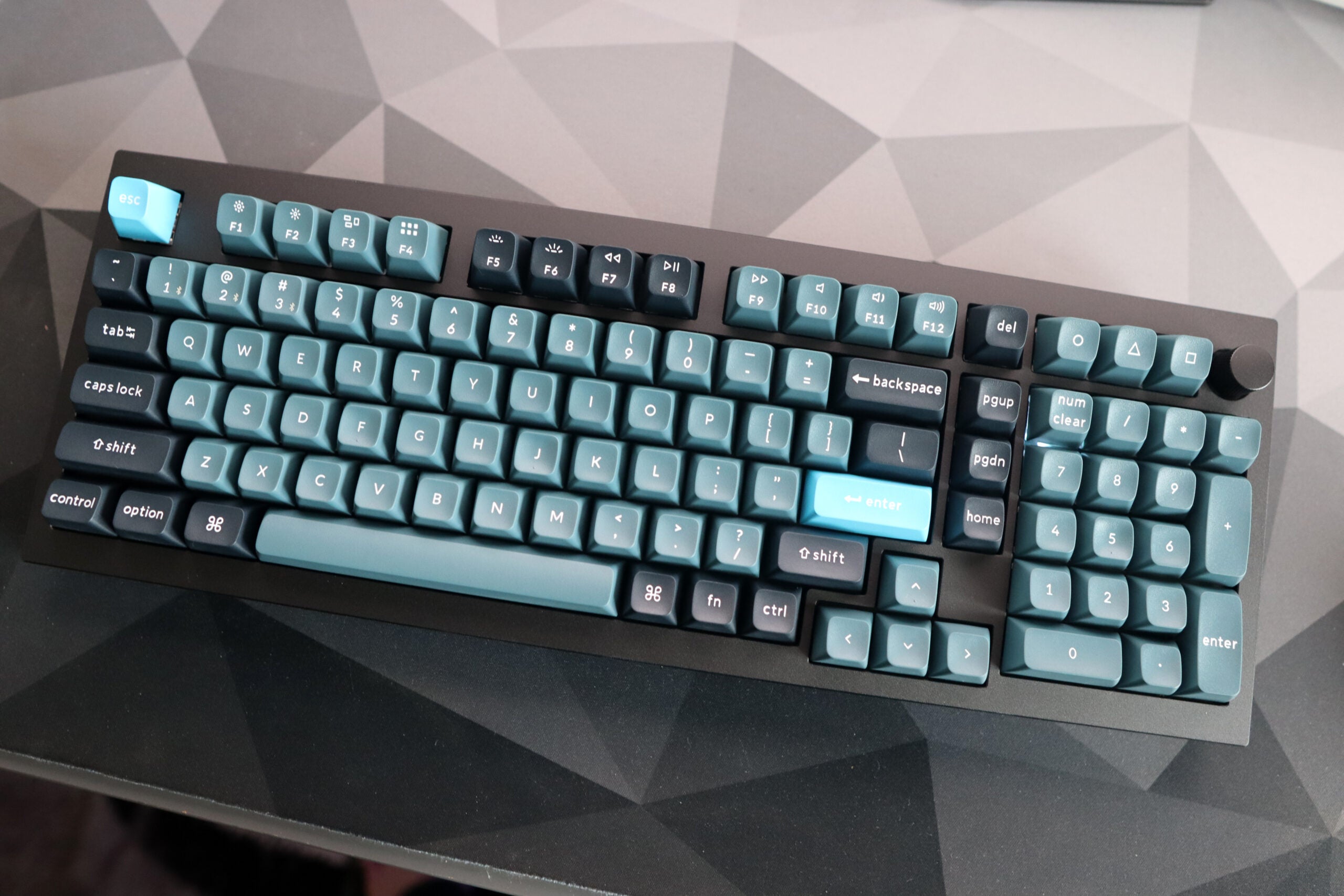
It also features a functional layout, offering a 96% style option which provides a full complement of keys with a number pad, navigation cluster and arrow keys in a slightly smaller form factor than the usual standard 100% layout. This gives you a little more desk space to play around with without sacrificing anything in the form of functionality. It’s a layout that has gained more appeal as the enthusiast space has grown, being previously limited to a few niche models from longstanding manufacturers and before that, a range of Cherry keyboards which explains its colloquial title as the ‘1800’ layout. My keyboard came in an ANSI layout with a single height Enter key, although I should stress there is an ISO option for a more standard UK-style key arrangement.
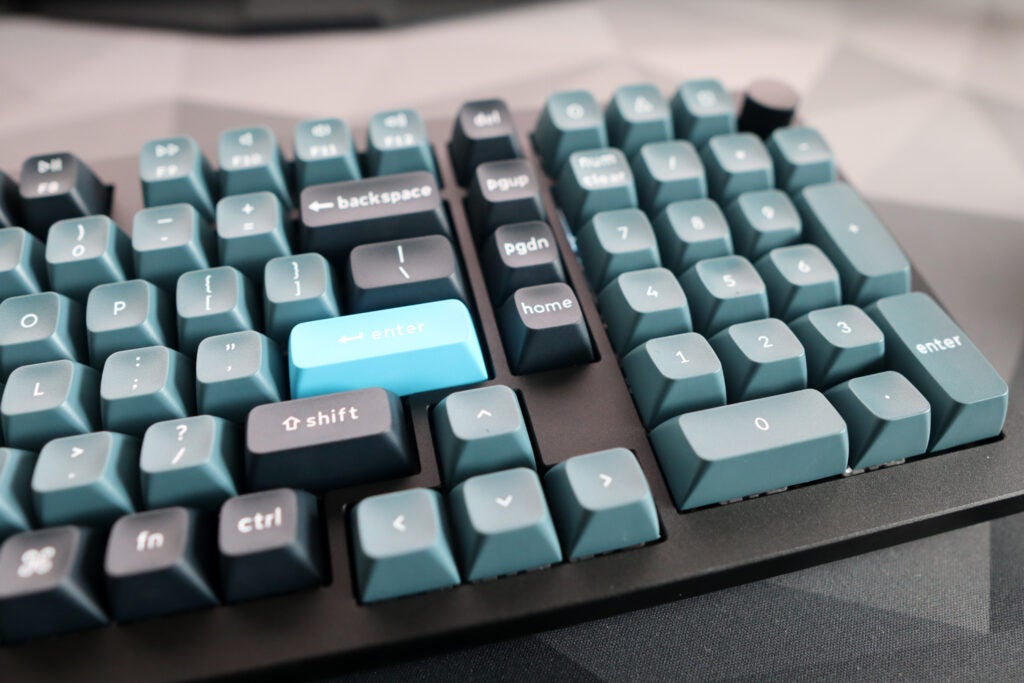
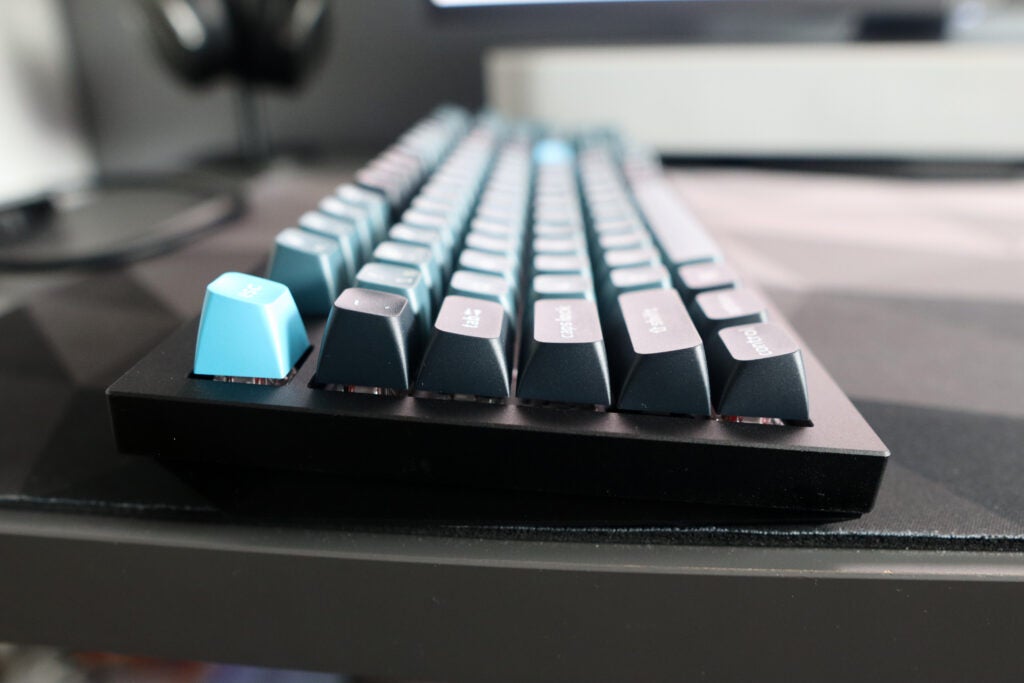
This Q5 Pro also comes with the volume knob in the top right corner, which feels nice and tactile, alongside three other function keys marked with PlayStation-style shape legends. Elsewhere, its two-tone black and grey keycaps look excellent, alongside the accented Esc and Enter key in blue. They’re made of double-shot PBT plastic, which is durable and looks fantastic, while the spherical KSA profile is reasonably comfortable to use, if a little tall at first.
I should say at this juncture that the Q5 Pro, as with Keychron’s other keyboards, is available in other colours and with other first-party keycap sets if you want to change the profile of these to something a little more conventional. Otherwise, you can choose from a wide range of third-party options from a range of other manufacturers that will play nicely with the Q5 Pro.
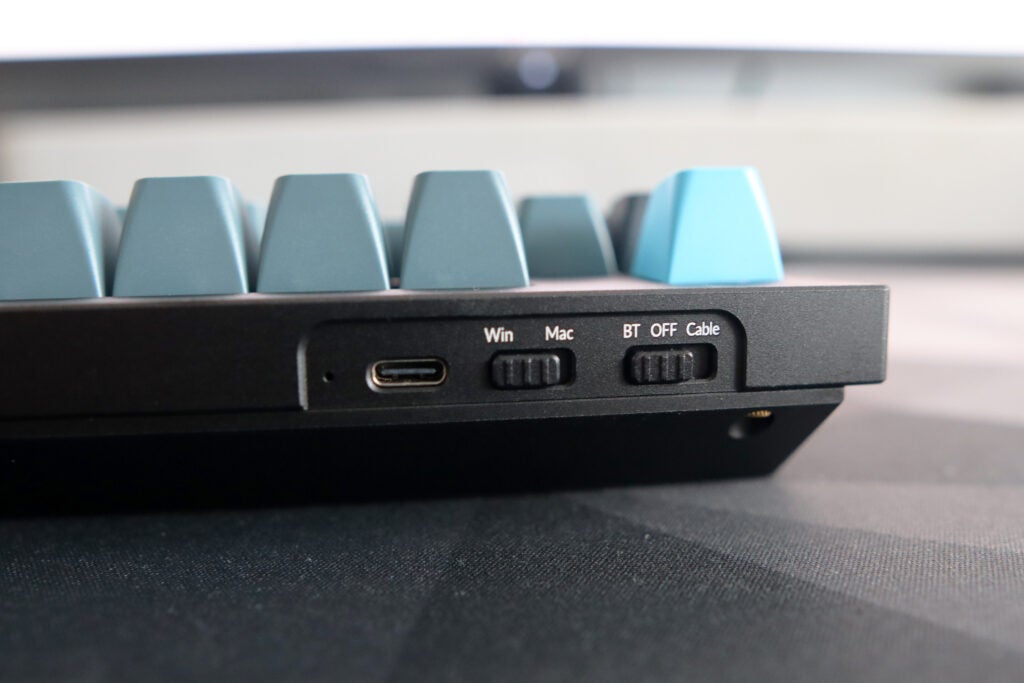
Around the back, the interface is kept as simple and convenient as other Pro Keychron boards, with a toggle switch between Bluetooth and cable operation, as well as between Windows or Mac functions, as well as a USB-C port for wired use. It’s easy to use and works a treat.
Performance
- Responsive K-Pro Red switches
- Hotswappable with compatible switches for extra customisation
- Solid connectivity and battery life
Inside, my sample of the Q5 Pro came with Keychron’s K Pro Red switches, a light and linear option that felt responsive for my gaming testing in Counter Strike 2 and COD Warzone. They’re a reasonable switch for general productivity workloads, and felt reasonably smooth and consistent. I’d prefer tactile switches over linears, and to be fair to Keychron, they offer the Q5 Pro with both Brown and Blue switch options for a soft tactile or a clicker option.
The Q5 Pro is also gasket-mounted, meaning it offers quite a bouncy experience under finger. This increases the overall responsiveness under finger compared to a more rigid experience on a keyboard with an integrated metal plate running through it. Elsewhere, the Q5 Pro’s acoustics are also excellent, thanks to its layers of foam inside reducing any chance of case ping or unwanted noise. It sounds smooth, although isn’t quite as good as a fully custom option.
You also have the option to swap the switches inside the Q5 Pro out if you so choose, given this keyboard is also hotswappable. Doing so is easy, as you take the keycap off with the bundled keycap puller, and then pull the switch out with the switch puller that’s also contained inside the box. In terms of switches you can put in, the PCB inside the Q5 Pro is compatible with either 3 or 5 pin on the underside, giving you a lot of choice. When swapping them in, just make sure to line the pins up and push down until the switch clicks into place.
Connectivity over Bluetooth is easy too, with the Q5 Pro pairing to up to three devices. Pairing is simple with the key combination of Fn and either 1, 2 or 3, depending on the chosen channel. Using it over a cable is as easy as switching the toggle on the Q5 Pro’s rear to cable, plugging a USB-C option in, and it simply works.
For wireless operation, the Q5 Pro features a 4000mAh battery inside, which Keychron says offers upwards of 300 hours with RGB off and up to 100 hours with it on, albeit on its lowest setting. They’re some good figures, especially if you don’t mind the lack of colourful lighting, and the Q5 Pro offers upwards of a few weeks’ before needing to be charged back up.
Software and Lighting
- VIA software is powerful
- Plenty of presets and added functions
- Vibrant RGB lighting
For its software, the Q5 Pro follows in the footsteps of other Keychron keyboards, and features full support for VIA and QMK firmware. Out of the two, VIA is my preferred option, given the GUI it offers, and it’s a remarkably powerful piece of software. VIA allows you to remap functions with ease, as well as program keys on four separate function layers and macros, as well as offering a range of lighting presets to choose from. It’s lightweight and easy to use, too.
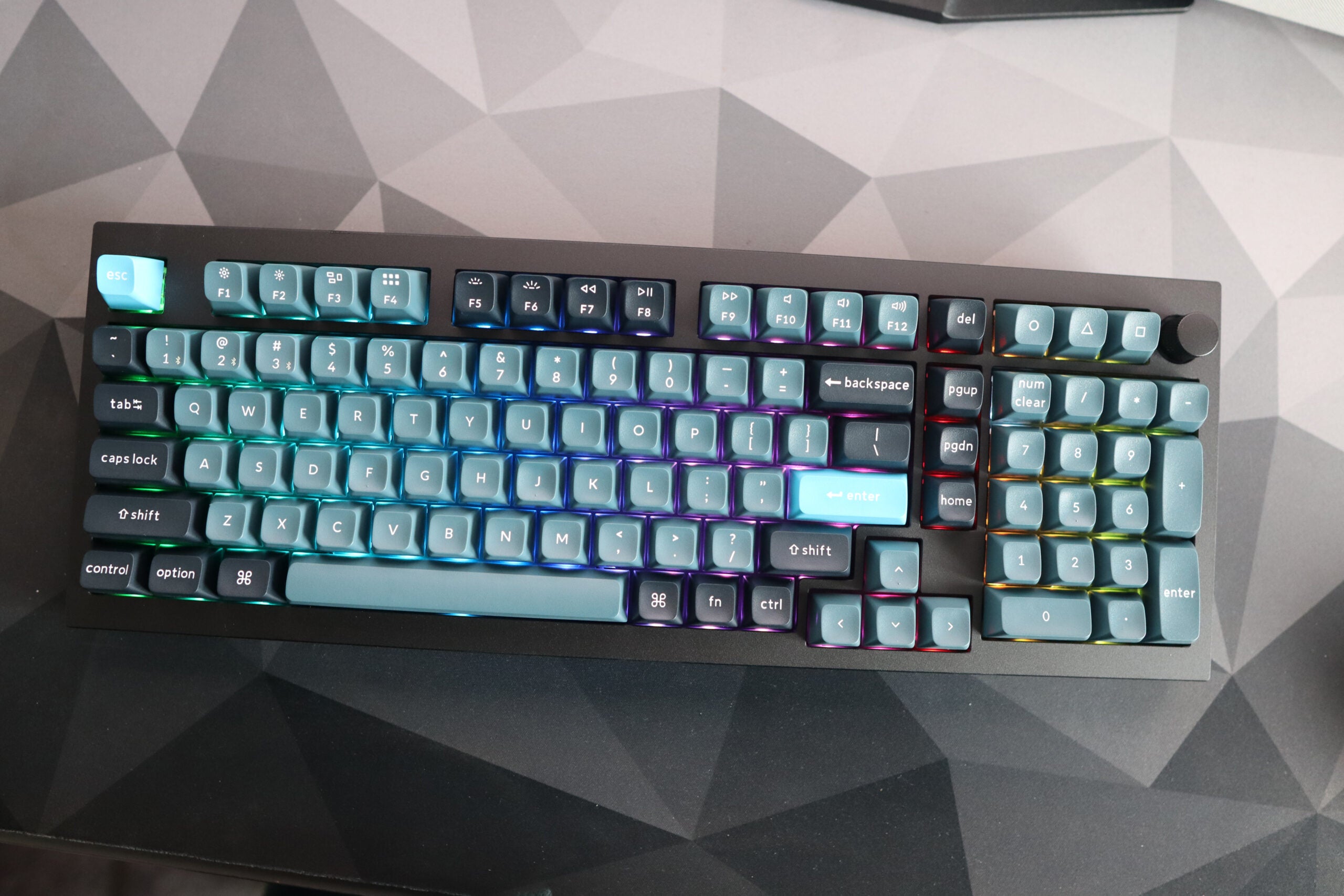
The Q5 Pro’s lighting is vibrant across the RGB spectrum, although it is subdued by the solid keycaps, and works as more of an underglow. With keycaps that allow light to shine through fully however, it’s likely to be a lot more vibrant, although as a backlight, it is still more than functional if a little hard to notice on lower brightness levels.
Latest deals
Should you buy it?
You want a responsive typing experience
The K Pro Red switches inside the Keychron Q5 Pro provide a snappy and responsive typing experience, although, with its hot-swappable PCB, you can also change them out at will.
You want gaming flair
While the Keychron Q5 Pro is a great all-around mechanical keyboard, it lacks the gaming flair in terms of design and features that similarly-priced wireless options elsewhere offer, such as a low-latency wireless connection over a USB-A receiver.
Final Thoughts
Keychron’s Q5 Pro is a fantastic mechanical keyboard, and continues Keychron’s fantastic reputation for offering a versatile and responsive mechanical keyboard. Its machined aluminium frame is one of the sturdiest available at its price point, while it offers a snappy typing experience with the bundled linear switches inside and convenient Bluetooth connectivity.
Its enthusiast-level features also impress with the likes of gasket mounting, a hot-swappable PCB and the powers of VIA making it a lot more than just a pretty face. The latter makes it a better choice for generalists than the likes of the Lofree Block 98, which lacks any form of first-party software for programming keys. From a personal perspective, the Q5 Pro also looks better than Lofree’s option, with a smarter overall aesthetic.
Against the likes of the Asus ROG Strix Scope II 96 Wireless, the Q5 Pro is more an enthusiast-grade option, lacking its speedy wireless connectivity over a USB receiver, but offering more in the way of thoughtful touches such as gasket mounting and better software. It is also a little more expensive at £185/$210, but it’s a price worth paying if you want a great all-rounder with a bigger form factor. For more options, check out our list of the best mechanical keyboards.
How we test
We use every keyboard we test for at least a week. During that time, we’ll check it for ease of use and put it through its paces by playing a variety of different genres, including FPS, strategy and MOBAs.
We also check each keyboard’s software to see how easy it is to customise and set up.
Spent at least a week testing
Tested the performance on a variety of games
Compared the build quality with similar priced keyboards.
FAQs
The Keychron Q5 Pro has full VIA and QMK support, offering versatile and convenient programming of keys and lighting effects.

Verdict
The Keychron Q5 Pro is an excellent mechanical keyboard. It’s incredibly well built, alongside offering convenient wireless connectivity and responsive linear switches. It also offers a good range of customisation, as well as software, too. However, it is quite expensive.
Pros
- Smart looks
- Responsive typing experience
- Lots of customisation
Cons
- Quite expensive
- Lacking in the gaming department
-
K Pro Red switches:This pre-built Keychron Q5 Pro features Keychron’s own K Pro Red switches for a snappy, linear typing feel. -
Hotswappable:This is also a hotswappable keyboard, meaning you can change the switches inside at will. -
Full QMK/VIA support:The Q5 Pro also has versatile software and customisation support with both QMK firmware flashing and VIA available.
Introduction
The Keychron Q5 Pro makes for another intriguing keyboard in the brand’s Q-series formula – a big, hefty keyboard with good looks, and a lot of features packed in inside.
They’re a brand that has wowed me in the past with their previous Keychron Q1 Pro, a keyboard I’ve proudly used for the last few months with no issues, and the Q5 Pro looks to be another side to the same coin in terms of providing a versatile, modern mechanical keyboard for reasonable money, in the current market.
I’ve been testing the Q5 Pro for the last few weeks to see if it lives up to the hype, and to see if it’s truly one of the best mechanical keyboards we’ve tested.
Design
- Sturdy aluminium chassis
- Functional key layout
- Thoughtful additions with keycaps and volume knob
The Q5 Pro immediately looks and feels like a Keychron product with a machined aluminium case that makes it one of the sturdiest and heaviest keyboards around. A total mass of 2.16kg for this fully-assembled variant backs that up, and the Q5 Pro exudes quite the premium feel.
It also features a functional layout, offering a 96% style option which provides a full complement of keys with a number pad, navigation cluster and arrow keys in a slightly smaller form factor than the usual standard 100% layout. This gives you a little more desk space to play around with without sacrificing anything in the form of functionality. It’s a layout that has gained more appeal as the enthusiast space has grown, being previously limited to a few niche models from longstanding manufacturers and before that, a range of Cherry keyboards which explains its colloquial title as the ‘1800’ layout. My keyboard came in an ANSI layout with a single height Enter key, although I should stress there is an ISO option for a more standard UK-style key arrangement.
This Q5 Pro also comes with the volume knob in the top right corner, which feels nice and tactile, alongside three other function keys marked with PlayStation-style shape legends. Elsewhere, its two-tone black and grey keycaps look excellent, alongside the accented Esc and Enter key in blue. They’re made of double-shot PBT plastic, which is durable and looks fantastic, while the spherical KSA profile is reasonably comfortable to use, if a little tall at first.
I should say at this juncture that the Q5 Pro, as with Keychron’s other keyboards, is available in other colours and with other first-party keycap sets if you want to change the profile of these to something a little more conventional. Otherwise, you can choose from a wide range of third-party options from a range of other manufacturers that will play nicely with the Q5 Pro.
Around the back, the interface is kept as simple and convenient as other Pro Keychron boards, with a toggle switch between Bluetooth and cable operation, as well as between Windows or Mac functions, as well as a USB-C port for wired use. It’s easy to use and works a treat.
Performance
- Responsive K-Pro Red switches
- Hotswappable with compatible switches for extra customisation
- Solid connectivity and battery life
Inside, my sample of the Q5 Pro came with Keychron’s K Pro Red switches, a light and linear option that felt responsive for my gaming testing in Counter Strike 2 and COD Warzone. They’re a reasonable switch for general productivity workloads, and felt reasonably smooth and consistent. I’d prefer tactile switches over linears, and to be fair to Keychron, they offer the Q5 Pro with both Brown and Blue switch options for a soft tactile or a clicker option.
The Q5 Pro is also gasket-mounted, meaning it offers quite a bouncy experience under finger. This increases the overall responsiveness under finger compared to a more rigid experience on a keyboard with an integrated metal plate running through it. Elsewhere, the Q5 Pro’s acoustics are also excellent, thanks to its layers of foam inside reducing any chance of case ping or unwanted noise. It sounds smooth, although isn’t quite as good as a fully custom option.
You also have the option to swap the switches inside the Q5 Pro out if you so choose, given this keyboard is also hotswappable. Doing so is easy, as you take the keycap off with the bundled keycap puller, and then pull the switch out with the switch puller that’s also contained inside the box. In terms of switches you can put in, the PCB inside the Q5 Pro is compatible with either 3 or 5 pin on the underside, giving you a lot of choice. When swapping them in, just make sure to line the pins up and push down until the switch clicks into place.
Connectivity over Bluetooth is easy too, with the Q5 Pro pairing to up to three devices. Pairing is simple with the key combination of Fn and either 1, 2 or 3, depending on the chosen channel. Using it over a cable is as easy as switching the toggle on the Q5 Pro’s rear to cable, plugging a USB-C option in, and it simply works.
For wireless operation, the Q5 Pro features a 4000mAh battery inside, which Keychron says offers upwards of 300 hours with RGB off and up to 100 hours with it on, albeit on its lowest setting. They’re some good figures, especially if you don’t mind the lack of colourful lighting, and the Q5 Pro offers upwards of a few weeks’ before needing to be charged back up.
Software and Lighting
- VIA software is powerful
- Plenty of presets and added functions
- Vibrant RGB lighting
For its software, the Q5 Pro follows in the footsteps of other Keychron keyboards, and features full support for VIA and QMK firmware. Out of the two, VIA is my preferred option, given the GUI it offers, and it’s a remarkably powerful piece of software. VIA allows you to remap functions with ease, as well as program keys on four separate function layers and macros, as well as offering a range of lighting presets to choose from. It’s lightweight and easy to use, too.
The Q5 Pro’s lighting is vibrant across the RGB spectrum, although it is subdued by the solid keycaps, and works as more of an underglow. With keycaps that allow light to shine through fully however, it’s likely to be a lot more vibrant, although as a backlight, it is still more than functional if a little hard to notice on lower brightness levels.
Latest deals
Should you buy it?
You want a responsive typing experience
The K Pro Red switches inside the Keychron Q5 Pro provide a snappy and responsive typing experience, although, with its hot-swappable PCB, you can also change them out at will.
You want gaming flair
While the Keychron Q5 Pro is a great all-around mechanical keyboard, it lacks the gaming flair in terms of design and features that similarly-priced wireless options elsewhere offer, such as a low-latency wireless connection over a USB-A receiver.
Final Thoughts
Keychron’s Q5 Pro is a fantastic mechanical keyboard, and continues Keychron’s fantastic reputation for offering a versatile and responsive mechanical keyboard. Its machined aluminium frame is one of the sturdiest available at its price point, while it offers a snappy typing experience with the bundled linear switches inside and convenient Bluetooth connectivity.
Its enthusiast-level features also impress with the likes of gasket mounting, a hot-swappable PCB and the powers of VIA making it a lot more than just a pretty face. The latter makes it a better choice for generalists than the likes of the Lofree Block 98, which lacks any form of first-party software for programming keys. From a personal perspective, the Q5 Pro also looks better than Lofree’s option, with a smarter overall aesthetic.
Against the likes of the Asus ROG Strix Scope II 96 Wireless, the Q5 Pro is more an enthusiast-grade option, lacking its speedy wireless connectivity over a USB receiver, but offering more in the way of thoughtful touches such as gasket mounting and better software. It is also a little more expensive at £185/$210, but it’s a price worth paying if you want a great all-rounder with a bigger form factor. For more options, check out our list of the best mechanical keyboards.
How we test
We use every keyboard we test for at least a week. During that time, we’ll check it for ease of use and put it through its paces by playing a variety of different genres, including FPS, strategy and MOBAs.
We also check each keyboard’s software to see how easy it is to customise and set up.
Spent at least a week testing
Tested the performance on a variety of games
Compared the build quality with similar priced keyboards.
FAQs
The Keychron Q5 Pro has full VIA and QMK support, offering versatile and convenient programming of keys and lighting effects.



