





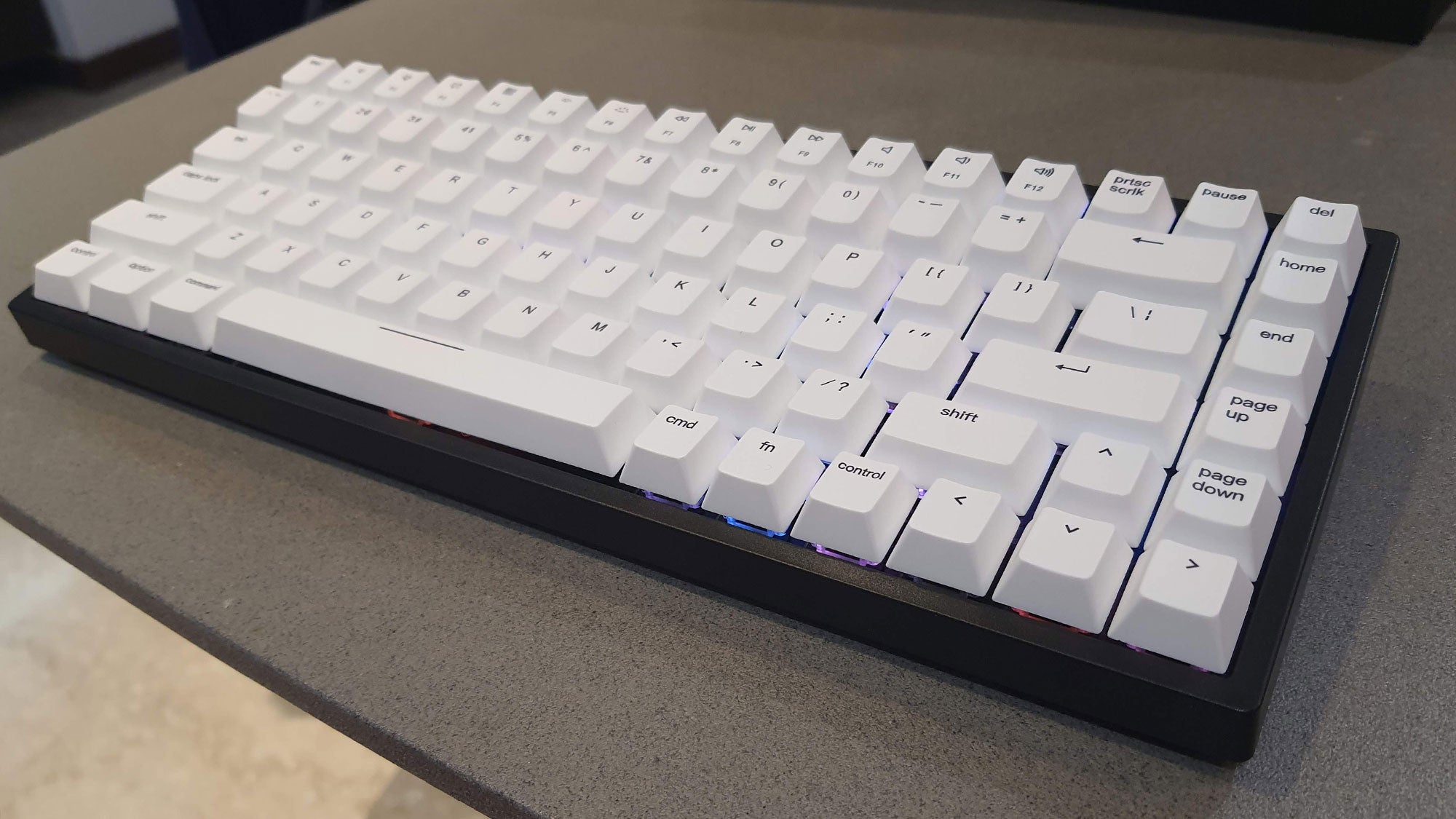
The Vissles V84 is an appealing compact 75% layout keyboard. Highlights of the design include its dual-mode Bluetooth & USB-C wired connectivity, its high-quality build with excellent deck rigidity, hot swappable switch PCB design, and up to 180 hours battery life (RGB lighting off). But the lack of a clear capslock indicator and mediocre configuration software hold this ‘board back from greatness.
Pros
- Compact size and minimal design
- Build quality is very good
- Hot swappable PCB for keyswitch changes
- Lengthy battery life when wireless
Cons
- RGB isn’t very bright at maximum
- No function or Windows key lock
- Capslock indicator hard to see depending on RGB lighting mode
- Software worked like an alpha / beta test
Availability
- UKRRP: £99.99
- USARRP: $99
-
Dual connectivity:You can connect the keyboard to your PC via either Bluetooth 5.1 wireless or a USB-C wired connection -
Compact design:75% layout with 84 keys provides more mousing area on your desk -
Customisable RGB lighting:RGB lighting looks pleasant and can be genuinely useful in dim environments.
Introduction
Compact keyboards for PCs return, after being elbowed aside by hulking full-sized devices for several decades.
The days of desk dominating keyboards look numbered when most people can easily do away with the number pad on their daily driver and banks of extra media keys are now typically redundant as they’re assigned to the primary function of the function key row.
Vissles prices its V84 keyboard at a fair $109 to $119, depending on key switch choice. But is it good enough to secure a place on our best gaming keyboard or best mechanical keyboard lists?
Design
- Rigid and sturdy build with 84 keys
- White PBT keycaps have greater translucency
- Small, compact design with omission of number pad
The Vissles V84 is compact and feels rather tanky with its combination of rigidity and weight of 825g. There are a pair of detachable magnetic feet in the box, which raises the back end by about 8mm. While we are talking dimensions, this 75% keyboard measures 316mm wide x 126mm deep x 39mm in height (without the detachable magnetic feet).
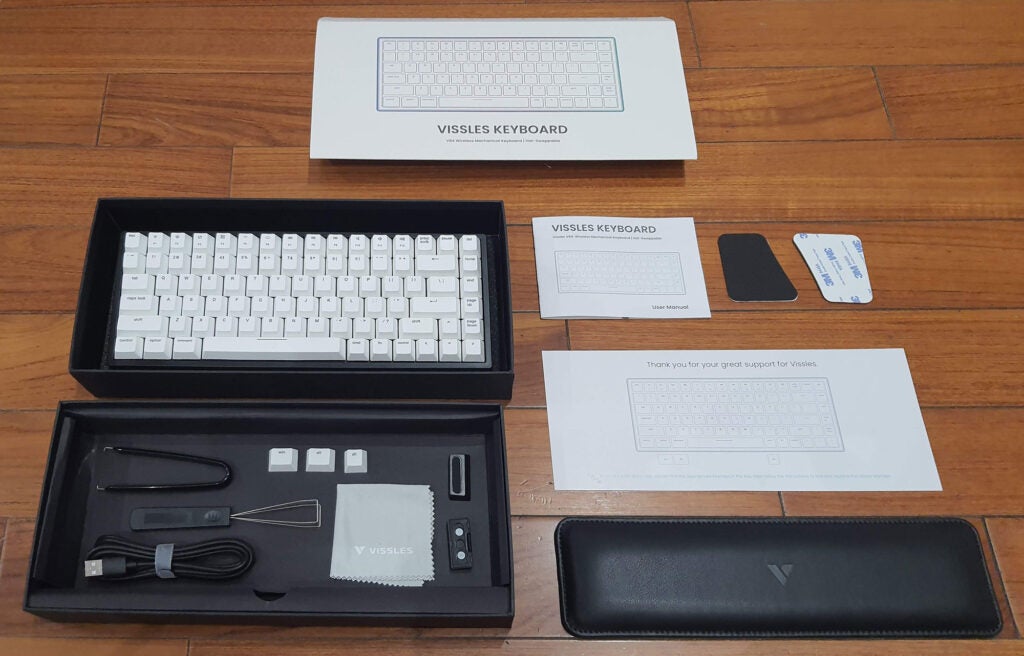
Depending on your mechanical keyswitch choice, the Vissles V84 is said to be good for those indulging in activities ranging from office work to gaming. Experienced PC users will have their own keyswitch feel preferences, but Vissles offers; VSII 56g linear switches, Outemu Red 60g linear switches, Outemu Blue 60g audible and tactile switches, and Outemu Brown 60g tactile feel switches. All switches actuate at approx 2mm depth and bottom out at 4mm.
I was pleased that most of the setup work I wanted to do with this keyboard fresh from the box was possible by poking a few key combinations. A quickstart guide card is included in the box to take you through what Vissles reckons are the most common things users will want to configure; like switching between wired and wireless modes, adjusting the RGB backlighting, macro recording and using the media keys on Mac and PC.
Sadly, I hit a speed bump rather quickly as this keyboard ships in ‘Mac Mode’, which meant that it kind of worked on PC, but certain keys don’t work as expected straight from the box, particularly the media keys. Sorting this issue out required a look through the printed manual, where the key combo to switch to Windows / Android mode was revealed (Fn + A).
Performance
- Can swap both keycaps and switches
- Flexibility offered by wired and wireless modes
- Quoted 180-hour battery life
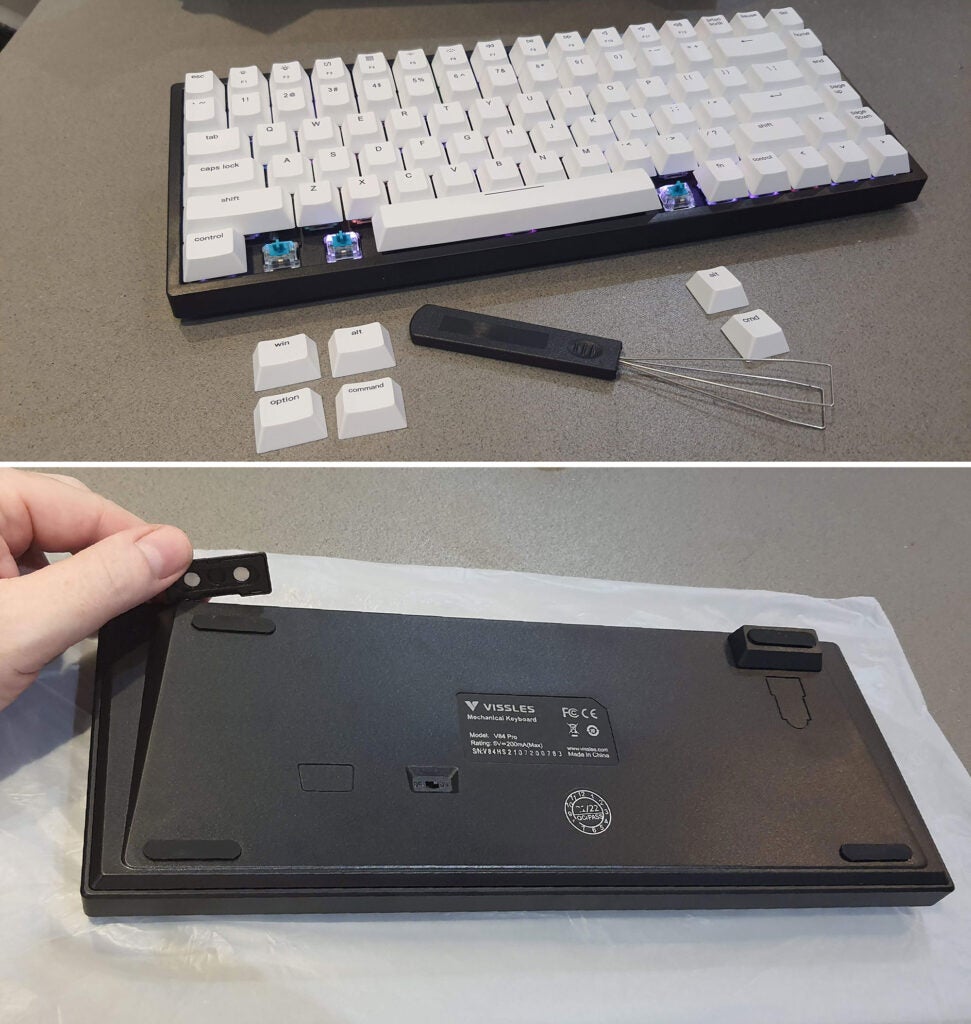
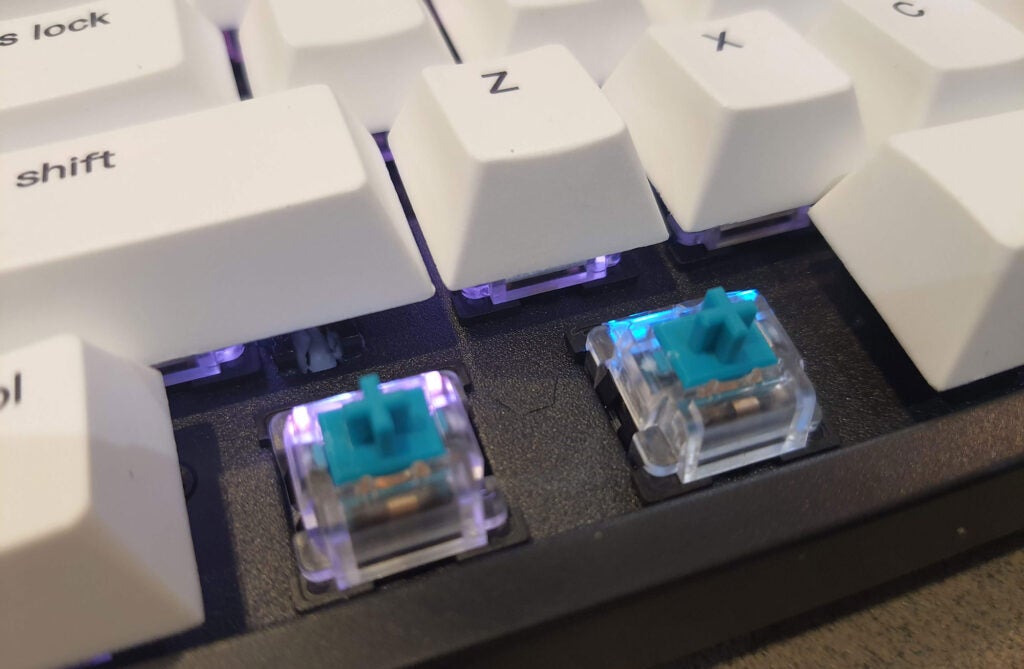
One of the headlining features of this Vissles V64 keyboard is that it features a hot-swappable PCB design. As well as customizing the keycaps being easy with the supplied key-puller, there is a supplied switch-puller to swap the underlying keyswitches. Users are open and tacitly encouraged to mix and match keyswitches for different feels across the board.
In my test sample, Vissles had installed its own RGB backlit VSII linear (non click, non-tactile) switches throughout. If you’d prefer certain keys to provide tactile feedback, you can easily remove the keycap, then the switch, and plug in a new one for some clicky tactile fun.
With the hot-swap friendly build and supplied tools this task is as near to trivial and foolproof as it can be. It is worth pointing out that the VSII equipped keyboard uses the best quality PBT keycaps, but the Outemu keyswitch options have ABS keycaps, which will likely wear out or go shiny quicker. For a guide, I type a lot and will start to wear through the inscriptions on ABS keycaps (vowels first) within a year or so.
The option to make use of either wireless or wired connectivity is an appealing one. Using wired mode is very simple and all you have to make sure is that the switch on the bottom of the keyboard is turned to ‘off’. Then you plug in the provided USB-C cable to the back of the keyboard, and the Type-A connector to a spare port at the back of your computer.
I tested wireless mode on my Windows laptop which has built-in Bluetooth. The keyboard offers Bluetooth v5.1 connectivity, quite a modern version of the wireless standard. After flicking the baseplate switch to the ‘on’ position, opening up the laptop Bluetooth control panel, then pressing a keyboard combo as provided on the quickstart card, the Vissles V84 was quickly discovered and added to the list of paired and trusted devices for next time.
I had no issues using the PC with this detached wireless keyboard, and the media keys and so on continued to work as expected. With Bluetooth, you can also use this keyboard with Android and iOS smart device. Vissles says the V84 keyboard can pair and switch between five active devices.
If you are using the Vissles V84 as a wireless keyboard, its built-in 3,750mAh battery is quoted as being good for 180 hours of use. If you have max brightness, RGB lighting effects on the battery life can be reduced to as low as 19 hours. When the battery has just 20% capacity remaining, the backlight of the Fn key will flicker in white. When charging via the supplied USB-C cable, there’s a red light on the left of the space bar. Plugging into a PC and using the keyboard in wired mode also charges it.
Software and lighting
There’s a keyboard combo to cycle through 19 multicolour effects, and another to cycle through nine monochrome effects. Using the Function key with the cursor keys adjusts cycling speed (left and right) and brightness (up and down).
The maximum brightness was rather dim, and not easy to see in a well-lit room or in a location with decent daylight coverage.
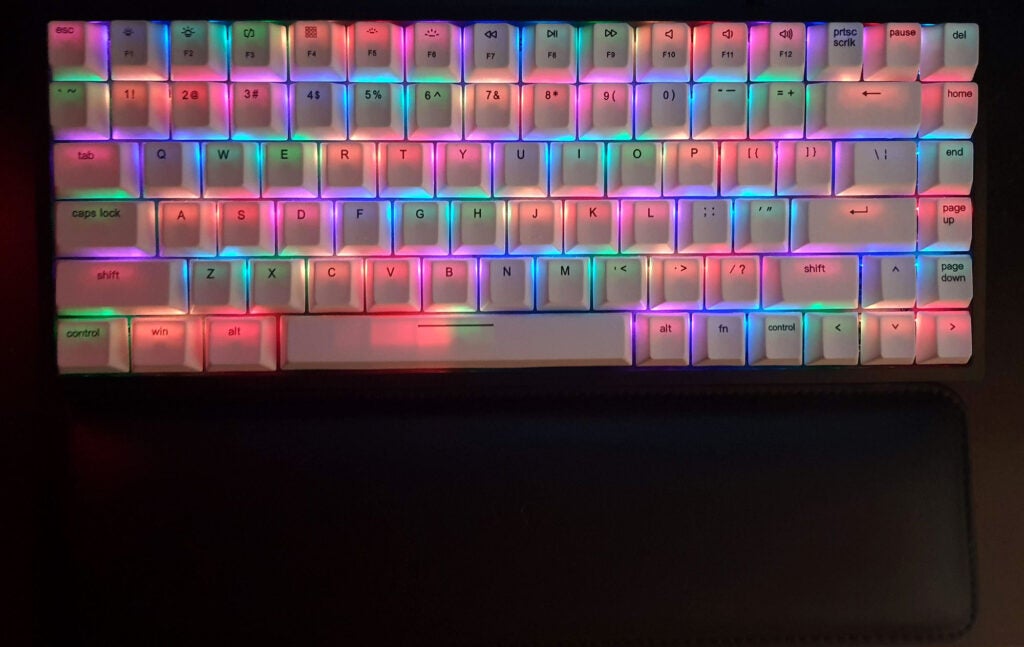
The lighting modes will be familiar to anyone who has previously owned an RGB keyboard. With settings labelled glittering, breath, scrolling, explode, pulsating etc. I selected a static red light to match my InWin 301 tower and case fan lighting.
If you want more granular configuration options (lighting, macros and so on) Vissles offers bespoke software, but it’s only available on Windows only.
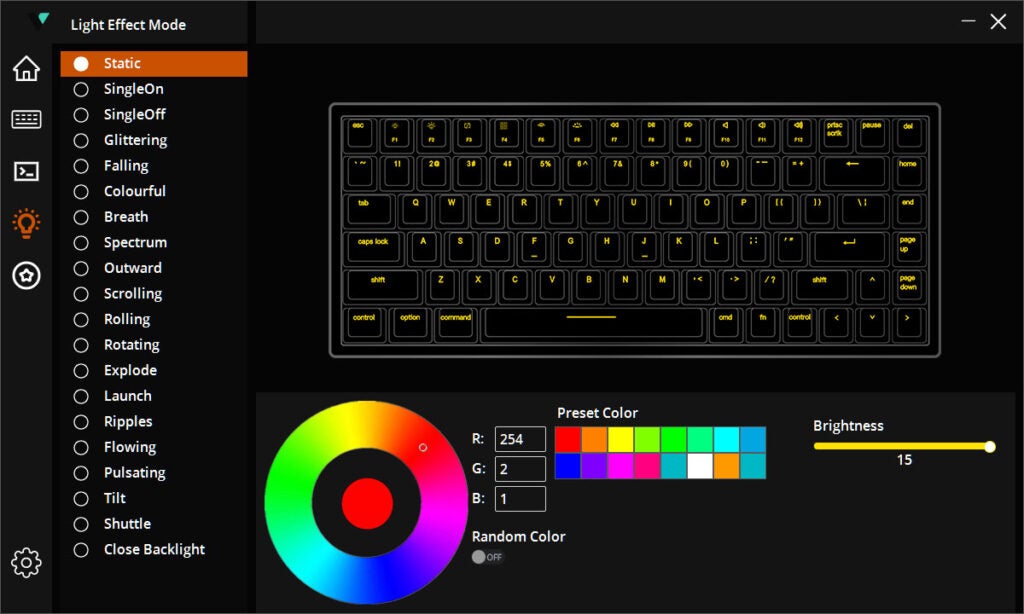
The ‘Vissles 84-Keys’ software was a let down compared to the hardware. The version I tried didn’t offer much beyond what can be done via key combinations. I checked the firmware upgrade option and the software froze, with no status or progress bar.
Left for over an hour, nothing seemed to get updated. Restarting the software prompted me that a firmware update was available, so I tried again, only to face the endless wait again. The next time I closed and reopened the software, I dismissed the alert regarding an available firmware update. Thankfully, I didn’t suffer from any firmware related errors. I’d guess that the firmware update on the Vissles servers had been moved, and the frozen app wasn’t actually downloading or applying anything.
Latest deals
Should you buy it?
You want a well-made and handsome compact mechanical keyboard:
The build quality of the Vissles V84 is excellent, while the small size frees up a lot of space on your desk. The ability to swap key switches is also very useful.
You want plenty of software customization options:
It’s disappointing that the ‘Vissles 84-Keys’ software is only available on Windows, and it also feels half baked compared to offerings from the likes of Razer.
Final Thoughts
The Vissles V84 is worth considering if you’re on the lookout for a well-built and customisable compact mechanical RGB keyboard. The ability to swap both keycaps and switches will no doubt be useful to those who like to tinker, too.
But the poor accompanying software doesn’t feel quite ready for launch in its current state, and I feel the maximum RGB lighting could have been a little brighter.
How we test
We use every keyboard we test for at least a week. During that time, we’ll check it for ease of use and put it through its paces by playing a variety of different genres, including FPS, strategy and and MOBAs.
We also check each keyboard’s software to see how easy it is to customise and set up.
Spent at least a week testing
Tested the performance on a variety of games
Compared the build quality with similar priced keyboards.
FAQs
It measures 316mm wide x 126mm deep x 39mm in height (without the detachable magnetic feet).
A lot of stuff including the keyboard, magnetic detachable feet, a wrist rest with optional non-slip feet, Mac and PC control keys, a key-puller, a switch puller, a USB Type-A to C cable, a cleaning cloth, a quick start guide, and a multilingual manual (eight pages English section).
No, the Vissles V84 lighting will need to be configured separately.
Battery life is highly variable depending whether you need the need to turn on the RGB LED lighting. Without lighting Vissles quotes a lengthy 180 hours of usage, but with all the lights on this can fall to 19 hours.
Sustainability
Trusted Reviews’ holds the fact that global warming is not a myth as a core value and will continuously endeavour to help protect our planet from harm in its business practices.
As part of this mission, whenever we review a product we send the company a series of questions to help us gauge and make transparent the impact the device has on the environment.
We currently haven’t received answers to the questions on this product, but will update this page the moment we do. You can see a detailed breakdown of the questions we ask and why in our sustainability info page.
Jargon buster
RGB
RGB stands for Red Green Blue, and essentially means a device is capable of producing colourful lighting, rather than just a white light. It’s often found on gaming peripherals such as mice and keyboards.

The Vissles V84 is an appealing compact 75% layout keyboard. Highlights of the design include its dual-mode Bluetooth & USB-C wired connectivity, its high-quality build with excellent deck rigidity, hot swappable switch PCB design, and up to 180 hours battery life (RGB lighting off). But the lack of a clear capslock indicator and mediocre configuration software hold this ‘board back from greatness.
Pros
- Compact size and minimal design
- Build quality is very good
- Hot swappable PCB for keyswitch changes
- Lengthy battery life when wireless
Cons
- RGB isn’t very bright at maximum
- No function or Windows key lock
- Capslock indicator hard to see depending on RGB lighting mode
- Software worked like an alpha / beta test
Availability
- UKRRP: £99.99
- USARRP: $99
-
Dual connectivity:You can connect the keyboard to your PC via either Bluetooth 5.1 wireless or a USB-C wired connection -
Compact design:75% layout with 84 keys provides more mousing area on your desk -
Customisable RGB lighting:RGB lighting looks pleasant and can be genuinely useful in dim environments.
Introduction
Compact keyboards for PCs return, after being elbowed aside by hulking full-sized devices for several decades.
The days of desk dominating keyboards look numbered when most people can easily do away with the number pad on their daily driver and banks of extra media keys are now typically redundant as they’re assigned to the primary function of the function key row.
Vissles prices its V84 keyboard at a fair $109 to $119, depending on key switch choice. But is it good enough to secure a place on our best gaming keyboard or best mechanical keyboard lists?
Design
- Rigid and sturdy build with 84 keys
- White PBT keycaps have greater translucency
- Small, compact design with omission of number pad
The Vissles V84 is compact and feels rather tanky with its combination of rigidity and weight of 825g. There are a pair of detachable magnetic feet in the box, which raises the back end by about 8mm. While we are talking dimensions, this 75% keyboard measures 316mm wide x 126mm deep x 39mm in height (without the detachable magnetic feet).
Depending on your mechanical keyswitch choice, the Vissles V84 is said to be good for those indulging in activities ranging from office work to gaming. Experienced PC users will have their own keyswitch feel preferences, but Vissles offers; VSII 56g linear switches, Outemu Red 60g linear switches, Outemu Blue 60g audible and tactile switches, and Outemu Brown 60g tactile feel switches. All switches actuate at approx 2mm depth and bottom out at 4mm.
I was pleased that most of the setup work I wanted to do with this keyboard fresh from the box was possible by poking a few key combinations. A quickstart guide card is included in the box to take you through what Vissles reckons are the most common things users will want to configure; like switching between wired and wireless modes, adjusting the RGB backlighting, macro recording and using the media keys on Mac and PC.
Sadly, I hit a speed bump rather quickly as this keyboard ships in ‘Mac Mode’, which meant that it kind of worked on PC, but certain keys don’t work as expected straight from the box, particularly the media keys. Sorting this issue out required a look through the printed manual, where the key combo to switch to Windows / Android mode was revealed (Fn + A).
Performance
- Can swap both keycaps and switches
- Flexibility offered by wired and wireless modes
- Quoted 180-hour battery life
One of the headlining features of this Vissles V64 keyboard is that it features a hot-swappable PCB design. As well as customizing the keycaps being easy with the supplied key-puller, there is a supplied switch-puller to swap the underlying keyswitches. Users are open and tacitly encouraged to mix and match keyswitches for different feels across the board.
In my test sample, Vissles had installed its own RGB backlit VSII linear (non click, non-tactile) switches throughout. If you’d prefer certain keys to provide tactile feedback, you can easily remove the keycap, then the switch, and plug in a new one for some clicky tactile fun.
With the hot-swap friendly build and supplied tools this task is as near to trivial and foolproof as it can be. It is worth pointing out that the VSII equipped keyboard uses the best quality PBT keycaps, but the Outemu keyswitch options have ABS keycaps, which will likely wear out or go shiny quicker. For a guide, I type a lot and will start to wear through the inscriptions on ABS keycaps (vowels first) within a year or so.
The option to make use of either wireless or wired connectivity is an appealing one. Using wired mode is very simple and all you have to make sure is that the switch on the bottom of the keyboard is turned to ‘off’. Then you plug in the provided USB-C cable to the back of the keyboard, and the Type-A connector to a spare port at the back of your computer.
I tested wireless mode on my Windows laptop which has built-in Bluetooth. The keyboard offers Bluetooth v5.1 connectivity, quite a modern version of the wireless standard. After flicking the baseplate switch to the ‘on’ position, opening up the laptop Bluetooth control panel, then pressing a keyboard combo as provided on the quickstart card, the Vissles V84 was quickly discovered and added to the list of paired and trusted devices for next time.
I had no issues using the PC with this detached wireless keyboard, and the media keys and so on continued to work as expected. With Bluetooth, you can also use this keyboard with Android and iOS smart device. Vissles says the V84 keyboard can pair and switch between five active devices.
If you are using the Vissles V84 as a wireless keyboard, its built-in 3,750mAh battery is quoted as being good for 180 hours of use. If you have max brightness, RGB lighting effects on the battery life can be reduced to as low as 19 hours. When the battery has just 20% capacity remaining, the backlight of the Fn key will flicker in white. When charging via the supplied USB-C cable, there’s a red light on the left of the space bar. Plugging into a PC and using the keyboard in wired mode also charges it.
Software and lighting
There’s a keyboard combo to cycle through 19 multicolour effects, and another to cycle through nine monochrome effects. Using the Function key with the cursor keys adjusts cycling speed (left and right) and brightness (up and down).
The maximum brightness was rather dim, and not easy to see in a well-lit room or in a location with decent daylight coverage.
The lighting modes will be familiar to anyone who has previously owned an RGB keyboard. With settings labelled glittering, breath, scrolling, explode, pulsating etc. I selected a static red light to match my InWin 301 tower and case fan lighting.
If you want more granular configuration options (lighting, macros and so on) Vissles offers bespoke software, but it’s only available on Windows only.
The ‘Vissles 84-Keys’ software was a let down compared to the hardware. The version I tried didn’t offer much beyond what can be done via key combinations. I checked the firmware upgrade option and the software froze, with no status or progress bar.
Left for over an hour, nothing seemed to get updated. Restarting the software prompted me that a firmware update was available, so I tried again, only to face the endless wait again. The next time I closed and reopened the software, I dismissed the alert regarding an available firmware update. Thankfully, I didn’t suffer from any firmware related errors. I’d guess that the firmware update on the Vissles servers had been moved, and the frozen app wasn’t actually downloading or applying anything.
Latest deals
Should you buy it?
You want a well-made and handsome compact mechanical keyboard:
The build quality of the Vissles V84 is excellent, while the small size frees up a lot of space on your desk. The ability to swap key switches is also very useful.
You want plenty of software customization options:
It’s disappointing that the ‘Vissles 84-Keys’ software is only available on Windows, and it also feels half baked compared to offerings from the likes of Razer.
Final Thoughts
The Vissles V84 is worth considering if you’re on the lookout for a well-built and customisable compact mechanical RGB keyboard. The ability to swap both keycaps and switches will no doubt be useful to those who like to tinker, too.
But the poor accompanying software doesn’t feel quite ready for launch in its current state, and I feel the maximum RGB lighting could have been a little brighter.
How we test
We use every keyboard we test for at least a week. During that time, we’ll check it for ease of use and put it through its paces by playing a variety of different genres, including FPS, strategy and and MOBAs.
We also check each keyboard’s software to see how easy it is to customise and set up.
Spent at least a week testing
Tested the performance on a variety of games
Compared the build quality with similar priced keyboards.
FAQs
It measures 316mm wide x 126mm deep x 39mm in height (without the detachable magnetic feet).
A lot of stuff including the keyboard, magnetic detachable feet, a wrist rest with optional non-slip feet, Mac and PC control keys, a key-puller, a switch puller, a USB Type-A to C cable, a cleaning cloth, a quick start guide, and a multilingual manual (eight pages English section).
No, the Vissles V84 lighting will need to be configured separately.
Battery life is highly variable depending whether you need the need to turn on the RGB LED lighting. Without lighting Vissles quotes a lengthy 180 hours of usage, but with all the lights on this can fall to 19 hours.
Sustainability
Trusted Reviews’ holds the fact that global warming is not a myth as a core value and will continuously endeavour to help protect our planet from harm in its business practices.
As part of this mission, whenever we review a product we send the company a series of questions to help us gauge and make transparent the impact the device has on the environment.
We currently haven’t received answers to the questions on this product, but will update this page the moment we do. You can see a detailed breakdown of the questions we ask and why in our sustainability info page.
Jargon buster
RGB
RGB stands for Red Green Blue, and essentially means a device is capable of producing colourful lighting, rather than just a white light. It’s often found on gaming peripherals such as mice and keyboards.



