





Verdict
The Razer Kishi V2 Pro offers a decent alternative to the BackBone One, with a similar design and bonus controls. However, it feels somewhat expensive, and its audio haptics aren’t a complete success.
Pros
- Compact and light
- Solid gaming performance
- Bonus trigger controls
Cons
- Overpriced
- HyperSense haptics not entirely successful
- Doesn’t feel as premium as BackBone One
-
Compatibility with all USB-C phonesYou can connect the Razer Kishi V2 Pro to all Android phones via USB-C. -
No charging requiredThe Razer Kishi V2 Pro doesn’t require any power, though it does have a USB-C port for passthrough phone charging. -
Custom UIThe Nexus app offers a window onto all of your installed games and streaming services.
Introduction
Last year we reviewed the Razer Edge, a gaming handheld that was made up of an 8-inch Android tablet and a detachable Kishi controller. That detachable Kishi controller is now being offered separately as the Razer Kishi V2 Pro.
Stood along, without Razer’s custom 144Hz display, it very closely resembles the BackBone One. That is, it’s a set of not-quite-full-sized console controls that clamp around your Android phone of choice, hooking up directly via a USB-C port.
At £130, however, the Razer Kishi V2 Pro is £30 more expensive than the BackBone, and a full £50 more than the GameSir G8 Galileo. Those are arguably the two best mobile game controllers on the market right now.
From a certain perspective, the Razer Kishi V2 Pro bridges the gap between those two accomplished competitors, offering the compact form factor of the BackBone and the extra controls of the GameSir. But is that enough?
Design
- Compact, lightweight design
- Very similar to BackBone One
- Extra trigger controls
The first thing I thought of when I fished the Razer Kishi V2 Pro out of the box was the BackBone One. Partly because BackBone’s controller has become my own unofficial measuring stick for mobile game controllers, but also because the Razer Kishi V2 Pro simply looks a lot like the BackBone One.
Its footprint is extremely similar, though it actually weighs about 10 grams less. Perhaps related to this, the Razer Kishi V2 Pro feels a little cheaper than the BackBone in the hand. I think it comes down to a combination of that lighter body, the texture of the plastic, and the clickier, less-dampened nature of the buttons.
Whatever the subtle difference in feel, the Razer Kishi V2 Pro clamps onto your Android phone the exact same way. You have the two sides of a classic console controller with a spring-loaded bridge linking the two. Prize these halves apart and slot your phone in landscape-wise, making sure to align the USB-C port with the connector on the right-hand section.
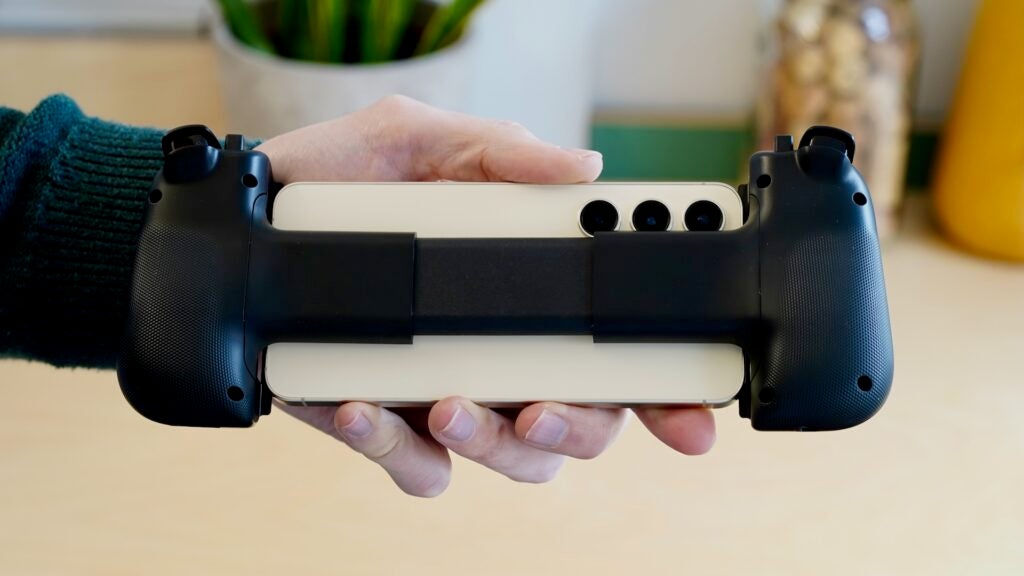
One other interesting practical note is the lower positioning of the USB-C connector on the Kishi V2 Pro. This means that smaller phones in particular – such as the Galaxy S24 I used extensively during my test – can feel oddly low-slung when connected up.
Like BackBone, Razer has included a couple of sets of rubber grips to fit a range of smartphone sizes. They’re less impressive, however, with less surface contact area and flimsy physical plugs rather than the BackBone’s sharp magnetised snap-on system.
Of course, GameSir arguably tops both of these with its one-size-fits-most system, which includes a tiltable USB-C connection. But we do need to remember that Razer and BackBone are both shooting for portability here.
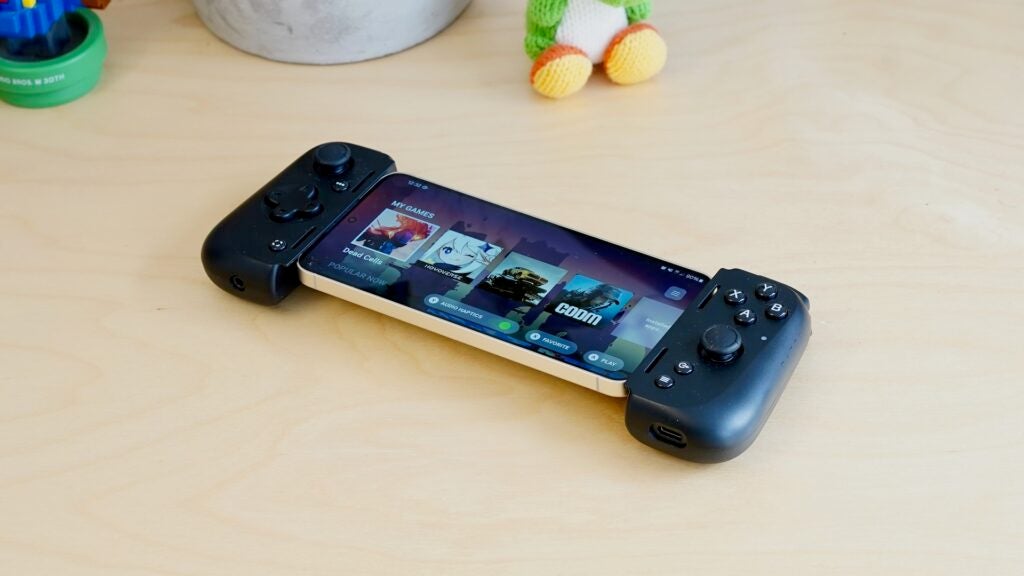
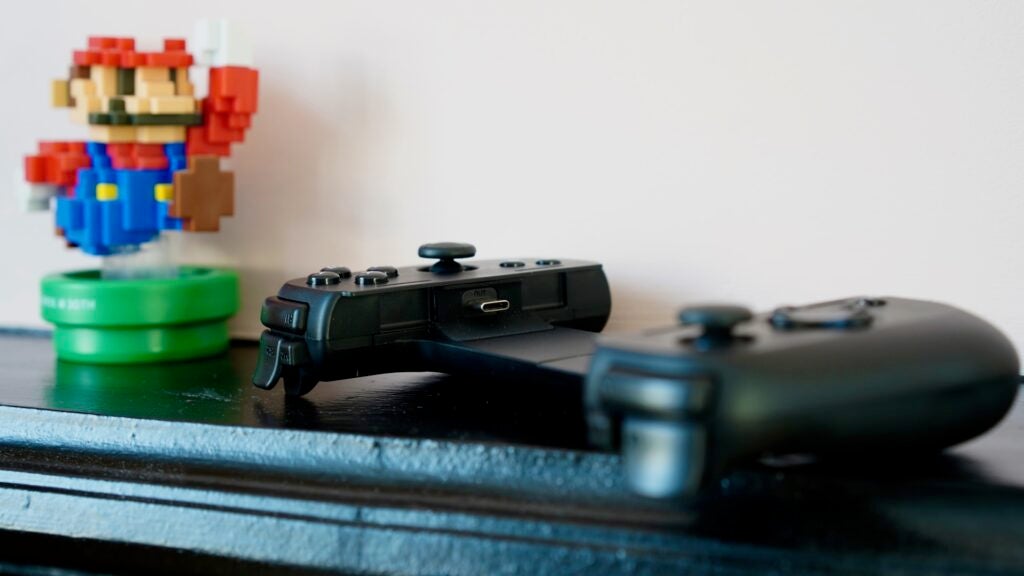
There’s a full set of console controls here, including a pair of analogue sticks and analogue triggers. Unlike most of its rivals, though, Razer included a pair of extra digital trigger buttons on the top edge. These M1 and M2 keys are quite smartly implemented, standing slightly higher than their neighbours so you can easily differentiate them by feel.
Such extra controls are the kind console makers reserve for their expensive Pro controllers, so their inclusion here is not to be sniffed at, especially given the inherently mappable nature of mobile gaming controls.
You get your obligatory set of four navigation keys, including a dedicated screenshot button and one that’ll launch the free Razer Nexus app.
On the bottom edge of the controller, right where they are on the BackBone One, can be found a 3.5mm headphone port (on the left half) and a USB-C port (on the right) for passthrough charging. We don’t always see these provisions, especially the headphone jack.
Performance and Gaming experience
- Precise, clicky controls
- Novel but not entirely successful audio haptics
- Decent Android compatibility but no official iPhone 15 support
As we noted in our Razer Edge review, The Razer Kishi V2 Pro handles games well. Its buttons are extremely clicky, but can’t be faulted for their responsiveness.
That clickiness extends to the D-pad, and I find myself preferring the softer, more dampened style of the BackBone One equivalent. The important point, though, is that the Razer’s D-pad passes the Dead Cells test for precision and dependability.
The analogue triggers handled Wreckfest’s physics-driven console racing well, enabling me to feather the throttle through gentle corners, while the two analogue sticks proved nice and accurate.
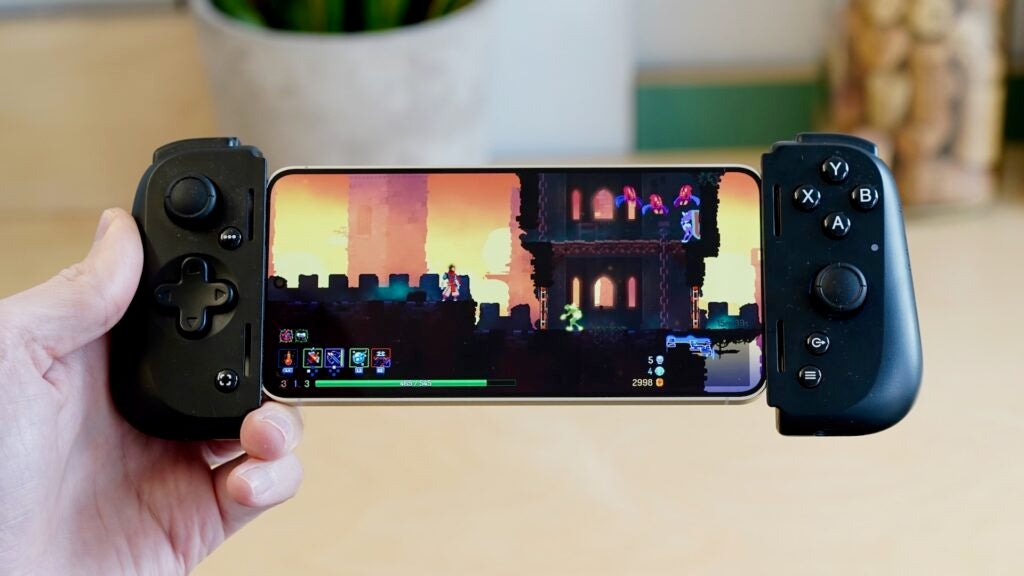
Aside from those extra physical controls, the biggest unique feature here is support for haptic feedback. Activated on a game-by-game basis within the Nexus app, this ‘HyperSense’ haptics system uses the game’s audio to produce rumble.
It’s an interesting idea. However, I found the extensive rumble to be distracting and even downright annoying. Because it takes audio as its cue, I found that the rumble would often kick in at weird times, and far too frequently at that.
Phone compatibility is a mixed bag. The Kishi V2 Pro doesn’t yet support the iPhone 15 range, which is a bit annoying, given that the Razer Nexus app supports the dedicated Lightning version of the Kishi V2, and that the phone physically slots into the controller quite snugly. Razer promises compatibility is coming “in a future firmware update”.
However, if you’re in the Android world, things are pretty good. As already mentioned, the Kishi V2 Pro works well with the Galaxy S24, but I also checked the fit with the Galaxy S24 Plus and the Redmi Note 13 Pro. Crucially, it also passed the Pixel 8 test, with its huge, weirdly positioned camera visor.
Again, Razer’s rubber buffer system is more prosaic than Backbone’s, but it does make it quite accommodating, if not quite as locked-in.
Software
- Nexus app provides access to all your games
- Magazine-like UI for game and streaming recommendations
- Virtual Controller covers games with no controller support
Razer supplies the free Nexus app to manage the Kishi V2 Pro’s various features, and it serves the purpose reasonably well for the most part.
Setting it to boot up whenever you connect your phone works well, as does the navigation button that opens and closes the app.
The app itself isn’t as slick as the BackBone app, but it remains a pleasant console-like UI that enables you to browse through your installed games and preview other games and streaming services. The individual app listings are somewhat drab and simply link through to the Google Play Store, but they serve the purpose with minimal fuss.
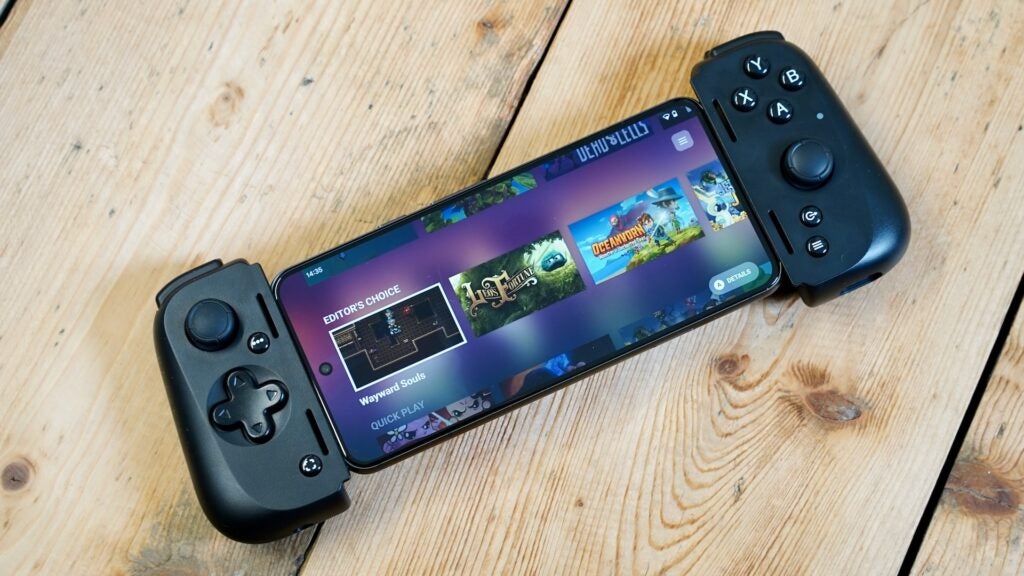
The main UI feels very snappy and reliable, with a smooth frame rate and little preview videos when you hover over a particular game. All in all, it’s much more polished and fine-tuned for physical control operation than the GameSir app.
I appreciated the intuitive system for activating virtual controller support when games don’t support a physical USB-C. It’s presented as a little Y-button toggle when scrolling through your installed games.
This means that games like Genshin Impact and CoD Mobile can still be played with the controller. The actual mapping system could stand to be tidied up a little, however.
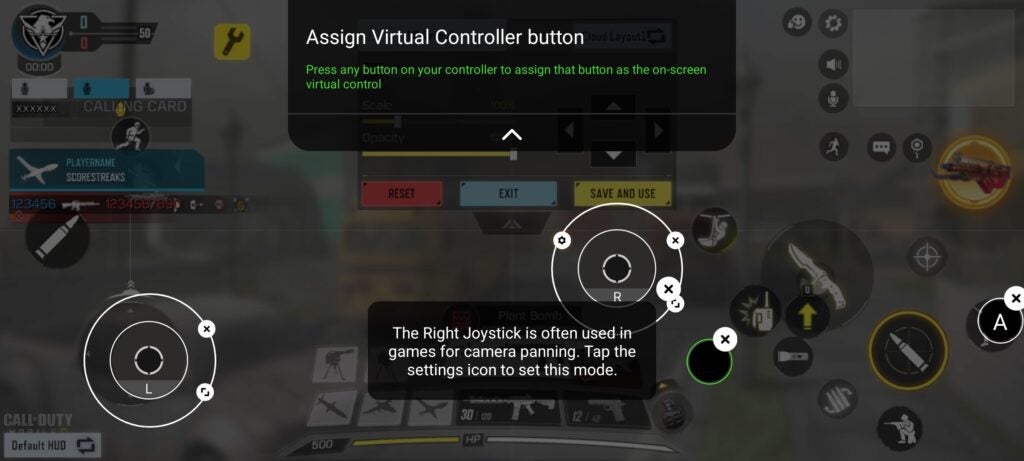
You’ll need to tap a distracting icon at the top centre of the screen, which manifests as a particularly egregious landscape display notch. Then you’ll need to tap to drag various button icons over the respective on-screen controls. Bringing the physical buttons in one by one feels a little laborious and opaque here.
Still, it works, and I was soon running and gunning in CoD Mobile using ‘proper’ physical controls.
Latest deals
Should you buy it?
You want portability and pro control options
The Razer Kishi V2 Pro is compact and light, yet it features bonus pro controls.
You’re on a budget
At £130, the Razer Kishi V2 Pro is one of the most expensive mobile game controllers of its kind.
Final Thoughts
The Razer Kishi V2 Pro takes aim squarely at the imperious BackBone One, with a similarly compact and tidy mobile controller design and additional physical controls.
However, neither its hardware nor its software feels quite as premium, which wouldn’t be too much of an issue but for a much higher asking price. Meanwhile, though I appreciate the novel audio-based haptic feedback option, the results aren’t especially satisfying.
If you can find it on offer, or you insist on a combination of portability and additional physical controls, it remains a more than solid pick. Ultimately, though, the Razer Kishi V2 Pro finds itself flanked by two outstanding alternatives in the BackBone One and the GameSir G8 Galileo.
How we test
We test all our devices thoroughly over an extended period of time. We use industry-standard tests to compare features properly. We’ll always tell you what we find. We never, ever, accept money to review a product.
Find out more about how we test in our ethics policy.
Was tested for at least two weeks before the review.
Played multiple games with the controller.
Used with a Samsung Galaxy S24, Galaxy S24 Plus, Pixel 8, and Redmi Note 13 5G.
FAQs
It depends on the phone, but removing the rubber adapters should allow you to use a lot of covers.
No, but Razer promises compatibility in a future firmware update.
The Razer Kishi V2 Pro controller has a USB-C port, enabling you to charge your phone as you play.

Verdict
The Razer Kishi V2 Pro offers a decent alternative to the BackBone One, with a similar design and bonus controls. However, it feels somewhat expensive, and its audio haptics aren’t a complete success.
Pros
- Compact and light
- Solid gaming performance
- Bonus trigger controls
Cons
- Overpriced
- HyperSense haptics not entirely successful
- Doesn’t feel as premium as BackBone One
-
Compatibility with all USB-C phonesYou can connect the Razer Kishi V2 Pro to all Android phones via USB-C. -
No charging requiredThe Razer Kishi V2 Pro doesn’t require any power, though it does have a USB-C port for passthrough phone charging. -
Custom UIThe Nexus app offers a window onto all of your installed games and streaming services.
Introduction
Last year we reviewed the Razer Edge, a gaming handheld that was made up of an 8-inch Android tablet and a detachable Kishi controller. That detachable Kishi controller is now being offered separately as the Razer Kishi V2 Pro.
Stood along, without Razer’s custom 144Hz display, it very closely resembles the BackBone One. That is, it’s a set of not-quite-full-sized console controls that clamp around your Android phone of choice, hooking up directly via a USB-C port.
At £130, however, the Razer Kishi V2 Pro is £30 more expensive than the BackBone, and a full £50 more than the GameSir G8 Galileo. Those are arguably the two best mobile game controllers on the market right now.
From a certain perspective, the Razer Kishi V2 Pro bridges the gap between those two accomplished competitors, offering the compact form factor of the BackBone and the extra controls of the GameSir. But is that enough?
Design
- Compact, lightweight design
- Very similar to BackBone One
- Extra trigger controls
The first thing I thought of when I fished the Razer Kishi V2 Pro out of the box was the BackBone One. Partly because BackBone’s controller has become my own unofficial measuring stick for mobile game controllers, but also because the Razer Kishi V2 Pro simply looks a lot like the BackBone One.
Its footprint is extremely similar, though it actually weighs about 10 grams less. Perhaps related to this, the Razer Kishi V2 Pro feels a little cheaper than the BackBone in the hand. I think it comes down to a combination of that lighter body, the texture of the plastic, and the clickier, less-dampened nature of the buttons.
Whatever the subtle difference in feel, the Razer Kishi V2 Pro clamps onto your Android phone the exact same way. You have the two sides of a classic console controller with a spring-loaded bridge linking the two. Prize these halves apart and slot your phone in landscape-wise, making sure to align the USB-C port with the connector on the right-hand section.
One other interesting practical note is the lower positioning of the USB-C connector on the Kishi V2 Pro. This means that smaller phones in particular – such as the Galaxy S24 I used extensively during my test – can feel oddly low-slung when connected up.
Like BackBone, Razer has included a couple of sets of rubber grips to fit a range of smartphone sizes. They’re less impressive, however, with less surface contact area and flimsy physical plugs rather than the BackBone’s sharp magnetised snap-on system.
Of course, GameSir arguably tops both of these with its one-size-fits-most system, which includes a tiltable USB-C connection. But we do need to remember that Razer and BackBone are both shooting for portability here.
There’s a full set of console controls here, including a pair of analogue sticks and analogue triggers. Unlike most of its rivals, though, Razer included a pair of extra digital trigger buttons on the top edge. These M1 and M2 keys are quite smartly implemented, standing slightly higher than their neighbours so you can easily differentiate them by feel.
Such extra controls are the kind console makers reserve for their expensive Pro controllers, so their inclusion here is not to be sniffed at, especially given the inherently mappable nature of mobile gaming controls.
You get your obligatory set of four navigation keys, including a dedicated screenshot button and one that’ll launch the free Razer Nexus app.
On the bottom edge of the controller, right where they are on the BackBone One, can be found a 3.5mm headphone port (on the left half) and a USB-C port (on the right) for passthrough charging. We don’t always see these provisions, especially the headphone jack.
Performance and Gaming experience
- Precise, clicky controls
- Novel but not entirely successful audio haptics
- Decent Android compatibility but no official iPhone 15 support
As we noted in our Razer Edge review, The Razer Kishi V2 Pro handles games well. Its buttons are extremely clicky, but can’t be faulted for their responsiveness.
That clickiness extends to the D-pad, and I find myself preferring the softer, more dampened style of the BackBone One equivalent. The important point, though, is that the Razer’s D-pad passes the Dead Cells test for precision and dependability.
The analogue triggers handled Wreckfest’s physics-driven console racing well, enabling me to feather the throttle through gentle corners, while the two analogue sticks proved nice and accurate.
Aside from those extra physical controls, the biggest unique feature here is support for haptic feedback. Activated on a game-by-game basis within the Nexus app, this ‘HyperSense’ haptics system uses the game’s audio to produce rumble.
It’s an interesting idea. However, I found the extensive rumble to be distracting and even downright annoying. Because it takes audio as its cue, I found that the rumble would often kick in at weird times, and far too frequently at that.
Phone compatibility is a mixed bag. The Kishi V2 Pro doesn’t yet support the iPhone 15 range, which is a bit annoying, given that the Razer Nexus app supports the dedicated Lightning version of the Kishi V2, and that the phone physically slots into the controller quite snugly. Razer promises compatibility is coming “in a future firmware update”.
However, if you’re in the Android world, things are pretty good. As already mentioned, the Kishi V2 Pro works well with the Galaxy S24, but I also checked the fit with the Galaxy S24 Plus and the Redmi Note 13 Pro. Crucially, it also passed the Pixel 8 test, with its huge, weirdly positioned camera visor.
Again, Razer’s rubber buffer system is more prosaic than Backbone’s, but it does make it quite accommodating, if not quite as locked-in.
Software
- Nexus app provides access to all your games
- Magazine-like UI for game and streaming recommendations
- Virtual Controller covers games with no controller support
Razer supplies the free Nexus app to manage the Kishi V2 Pro’s various features, and it serves the purpose reasonably well for the most part.
Setting it to boot up whenever you connect your phone works well, as does the navigation button that opens and closes the app.
The app itself isn’t as slick as the BackBone app, but it remains a pleasant console-like UI that enables you to browse through your installed games and preview other games and streaming services. The individual app listings are somewhat drab and simply link through to the Google Play Store, but they serve the purpose with minimal fuss.
The main UI feels very snappy and reliable, with a smooth frame rate and little preview videos when you hover over a particular game. All in all, it’s much more polished and fine-tuned for physical control operation than the GameSir app.
I appreciated the intuitive system for activating virtual controller support when games don’t support a physical USB-C. It’s presented as a little Y-button toggle when scrolling through your installed games.
This means that games like Genshin Impact and CoD Mobile can still be played with the controller. The actual mapping system could stand to be tidied up a little, however.
You’ll need to tap a distracting icon at the top centre of the screen, which manifests as a particularly egregious landscape display notch. Then you’ll need to tap to drag various button icons over the respective on-screen controls. Bringing the physical buttons in one by one feels a little laborious and opaque here.
Still, it works, and I was soon running and gunning in CoD Mobile using ‘proper’ physical controls.
Latest deals
Should you buy it?
You want portability and pro control options
The Razer Kishi V2 Pro is compact and light, yet it features bonus pro controls.
You’re on a budget
At £130, the Razer Kishi V2 Pro is one of the most expensive mobile game controllers of its kind.
Final Thoughts
The Razer Kishi V2 Pro takes aim squarely at the imperious BackBone One, with a similarly compact and tidy mobile controller design and additional physical controls.
However, neither its hardware nor its software feels quite as premium, which wouldn’t be too much of an issue but for a much higher asking price. Meanwhile, though I appreciate the novel audio-based haptic feedback option, the results aren’t especially satisfying.
If you can find it on offer, or you insist on a combination of portability and additional physical controls, it remains a more than solid pick. Ultimately, though, the Razer Kishi V2 Pro finds itself flanked by two outstanding alternatives in the BackBone One and the GameSir G8 Galileo.
How we test
We test all our devices thoroughly over an extended period of time. We use industry-standard tests to compare features properly. We’ll always tell you what we find. We never, ever, accept money to review a product.
Find out more about how we test in our ethics policy.
Was tested for at least two weeks before the review.
Played multiple games with the controller.
Used with a Samsung Galaxy S24, Galaxy S24 Plus, Pixel 8, and Redmi Note 13 5G.
FAQs
It depends on the phone, but removing the rubber adapters should allow you to use a lot of covers.
No, but Razer promises compatibility in a future firmware update.
The Razer Kishi V2 Pro controller has a USB-C port, enabling you to charge your phone as you play.



