
• Washington DC |
  • New York |
  • Toronto |
  • Distribution: (800) 510 9863
Friday, December 5, 2025
  • Login
No Result
View All Result
NEWSLETTER
New Edge Times
  • World
  • U.S.
  • Politics
  • Business
  • Science
  • Tech
  • Youth
  • Entertainment
    • All
    • Arts
    • Gaming
    • Movie
    • Music
    Video: The 10 Best Books of 2025

    Video: The 10 Best Books of 2025

    FROM ITALY TO HOLLYWOOD, VERONICA VITALE’S SURVIVOR VOICE GAINS GROUND IN THE GRAMMYS® CONVERSATION

    FROM ITALY TO HOLLYWOOD, VERONICA VITALE’S SURVIVOR VOICE GAINS GROUND IN THE GRAMMYS® CONVERSATION

    Video: 3 Cozy Books We Love

    Video: 3 Cozy Books We Love

    Video: ‘Wicked: For Good’ Tells a Story Through Color

    Video: ‘Wicked: For Good’ Tells a Story Through Color

    SURREY AUTHOR MAKES NATIONAL WAVES WITH NIGHTMARISH FICTION

    SURREY AUTHOR MAKES NATIONAL WAVES WITH NIGHTMARISH FICTION

    Darrell Hudson Expands Bigbarrell Empire with New Ventures, Emphasizing Community and Innovation

    Darrell Hudson Expands Bigbarrell Empire with New Ventures, Emphasizing Community and Innovation

    Video: ‘Wicked: For Good’ | Anatomy of a Scene

    Video: ‘Wicked: For Good’ | Anatomy of a Scene

    “JAYSOEAZY Strips It Back: ‘Give Me A Blunt’ EP Drops Friday with Raw Acoustic Edge”

    “JAYSOEAZY Strips It Back: ‘Give Me A Blunt’ EP Drops Friday with Raw Acoustic Edge”

    • Gaming
    • Movie
    • Music
    • Arts
  • Sports
  • Lifestyle
    • All
    • Fashion
    • Food
    • Health
    • Travel
    17 Three-Ingredient Appetizers, So You Can Enjoy the Party, Too

    17 Three-Ingredient Appetizers, So You Can Enjoy the Party, Too

    The Most Popular Recipes of 2025

    The Most Popular Recipes of 2025

    Video: Best Clothing Stores in the Country

    Video: Best Clothing Stores in the Country

    These 7 Cookies Will Be the Life of Every Party

    These 7 Cookies Will Be the Life of Every Party

    How Should I Store Sweet Potatoes?

    How Should I Store Sweet Potatoes?

    Our Best Recipes for Thanksgiving Leftovers

    Our Best Recipes for Thanksgiving Leftovers

    From Molecules to Mathematics: Exploring Physics-Inspired Approaches to Ultra-Fast Protein Modelling

    From Molecules to Mathematics: Exploring Physics-Inspired Approaches to Ultra-Fast Protein Modelling

    Need Vegan Thanksgiving Dishes? These Will Wow Everyone.

    Need Vegan Thanksgiving Dishes? These Will Wow Everyone.

    • Fashion
    • Food
    • Health
    • Travel
  • Reviews
  • Trending
  • World
  • U.S.
  • Politics
  • Business
  • Science
  • Tech
  • Youth
  • Entertainment
    • All
    • Arts
    • Gaming
    • Movie
    • Music
    Video: The 10 Best Books of 2025

    Video: The 10 Best Books of 2025

    FROM ITALY TO HOLLYWOOD, VERONICA VITALE’S SURVIVOR VOICE GAINS GROUND IN THE GRAMMYS® CONVERSATION

    FROM ITALY TO HOLLYWOOD, VERONICA VITALE’S SURVIVOR VOICE GAINS GROUND IN THE GRAMMYS® CONVERSATION

    Video: 3 Cozy Books We Love

    Video: 3 Cozy Books We Love

    Video: ‘Wicked: For Good’ Tells a Story Through Color

    Video: ‘Wicked: For Good’ Tells a Story Through Color

    SURREY AUTHOR MAKES NATIONAL WAVES WITH NIGHTMARISH FICTION

    SURREY AUTHOR MAKES NATIONAL WAVES WITH NIGHTMARISH FICTION

    Darrell Hudson Expands Bigbarrell Empire with New Ventures, Emphasizing Community and Innovation

    Darrell Hudson Expands Bigbarrell Empire with New Ventures, Emphasizing Community and Innovation

    Video: ‘Wicked: For Good’ | Anatomy of a Scene

    Video: ‘Wicked: For Good’ | Anatomy of a Scene

    “JAYSOEAZY Strips It Back: ‘Give Me A Blunt’ EP Drops Friday with Raw Acoustic Edge”

    “JAYSOEAZY Strips It Back: ‘Give Me A Blunt’ EP Drops Friday with Raw Acoustic Edge”

    • Gaming
    • Movie
    • Music
    • Arts
  • Sports
  • Lifestyle
    • All
    • Fashion
    • Food
    • Health
    • Travel
    17 Three-Ingredient Appetizers, So You Can Enjoy the Party, Too

    17 Three-Ingredient Appetizers, So You Can Enjoy the Party, Too

    The Most Popular Recipes of 2025

    The Most Popular Recipes of 2025

    Video: Best Clothing Stores in the Country

    Video: Best Clothing Stores in the Country

    These 7 Cookies Will Be the Life of Every Party

    These 7 Cookies Will Be the Life of Every Party

    How Should I Store Sweet Potatoes?

    How Should I Store Sweet Potatoes?

    Our Best Recipes for Thanksgiving Leftovers

    Our Best Recipes for Thanksgiving Leftovers

    From Molecules to Mathematics: Exploring Physics-Inspired Approaches to Ultra-Fast Protein Modelling

    From Molecules to Mathematics: Exploring Physics-Inspired Approaches to Ultra-Fast Protein Modelling

    Need Vegan Thanksgiving Dishes? These Will Wow Everyone.

    Need Vegan Thanksgiving Dishes? These Will Wow Everyone.

    • Fashion
    • Food
    • Health
    • Travel
  • Reviews
  • Trending
No Result
View All Result
New Edge Times
No Result
View All Result
Home Reviews

Keychron V1 Max

by New Edge Times Report
March 4, 2024
in Reviews
Keychron V1 Max
Share on FacebookShare on Twitter

Verdict

While the flexible plastic chassis and spotty RGB flair leave a lot to be desired, the raw typing experience of the Keychron V1 Max is mighty impressive at this price point. So long as you’re not blighted by a wonky spacebar, it’s a great deal.

Pros

  • Stellar typing experience (typically)
  • USB-C and USB-A receivers
  • Great battery life

Cons

  • Customisation requires coding knowledge
  • RGB lighting isn’t great
  • Space bar issues aren’t uncommon

  • Heavily customizableWith coding knowledge and the included screwdriver, the Keychron V1 Max can be heavily tailored.

  • Classy looksTri-colour keys and a dark body help the Keychron V1 Max look sleek and sophisticated.

  • Fully wirelessBluetooth 5.1 and 2.4GHz support mean the Keychron V1 Max can suit any situation or platform.

Introduction

Keychron has a knack for making quality keyboards at a fraction of the price of the competition. The Keychron V1 Max is another great example of that.

At under £100 (when you can find one in stock) there’s a lot to love. This highly customisable and compact 75% mechanical keyboard does it all. You might have to break out the code to tinker with its default settings, but it’s good to go right out of the box.

No gimmicks and a lack of cheap thrills help make it an easy, simple sell if you know you don’t want or need what Razer, Logitech, Corsair, and the others might be looking to push.

Design

  • Subdued, professional looks
  • Semi-portable design
  • Built to be disassembled

The chassis of the Keychron V1 Max comes in a single flavour: Carbon Black. It’s a matte plastic shell that resists fingerprints. Dust is a whole other story, but mine is still sitting pretty after a couple weeks of use.

No matter your choice of switch at the point of purchase, the colours of the included keycaps won’t change. Most are grey, the edge keys are black, and ESC and Return/Enter are a sort of vibrant orange. It’s a nice contrasting look, the sort to keep it interesting. Not your cup of tea? The keys can be swapped out easily, as can the switches.

The main shtick of the Keychron V1 Max is its customisability. You can save £20 by supplying your own switches and keycaps. If you’re new to the world of DIY mechanical keyboards, though, you’ll want to grab the complete package and swap things out as you go.
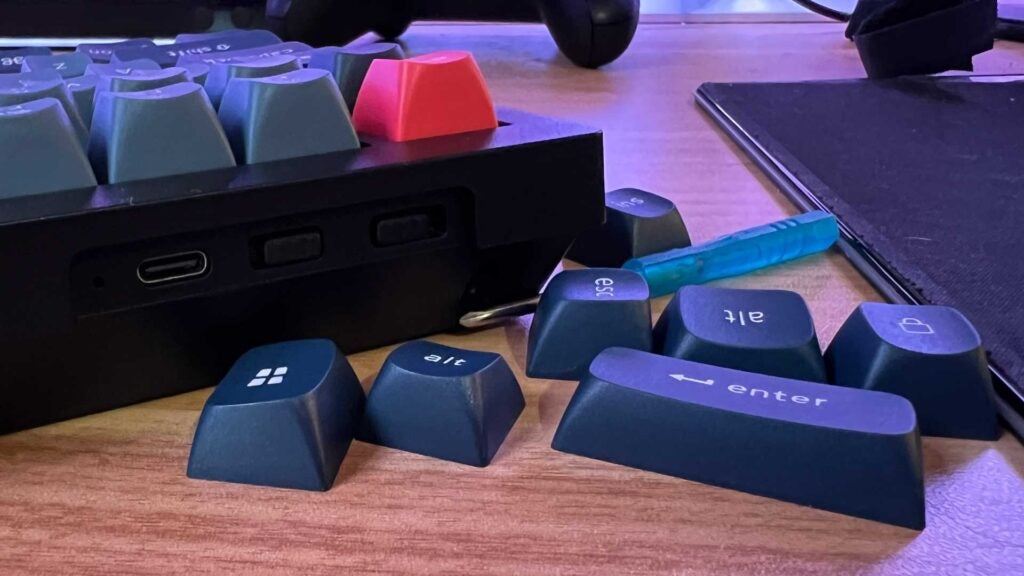
A collection of keycaps that come with the Keychron V1 Max.
Image Credit (Trusted Reviews)

Being a wireless keyboard, you’ll spot plenty of ports and switches on the back for flicking between different connectivity modes and platforms. There’s a USB-C port on the left for wired use and charging, as well as two cubbies for the USB-C and USB-A 2.4GHz receivers. Yes, you get two.

Underneath are simple rubber feet and two-stage legs at the back for simple angle adjustment. You can sometimes see the recessed gold screws at the front peeking out from underneath, which can detract from the uniformity of the board, but it’s not a major issue. It’s a good, clean look.

In the packaging department, Keychron has found its footing with relatively slim and simple slide-up cardboard boxes. Inside is a thin foam cushioning the keyboard in one compartment, and the accessories in another. It’s not fully recyclable unlike the paper approach Corsair has taken, but at least the keyboard isn’t tucked away in a plastic sleeve. Some of the extras are in little bags, however.

Performance

  • Solid experience across work and play
  • Brilliant wireless connectivity options
  • Great battery life

Typing on the Keychron V1 Max is a dream. My unit came equipped with my preferred Gateron Jupiter Browns, needing just a little bit more force to push than the linear Reds. Having a subtle stop before a deep plunge mainly helps with stability, reducing the chance of accidental actuation while my fingers rest on the keys mid-sentence.

Once you get up to speed, they help create a tactile experience with little risk of fatigue over a long period. They actuate just before they bottom out, too, so you don’t need to type with any real force. It’s as if the Brown switches recognise your intent and adjust accordingly. Need something faster? Get the Banana switches.
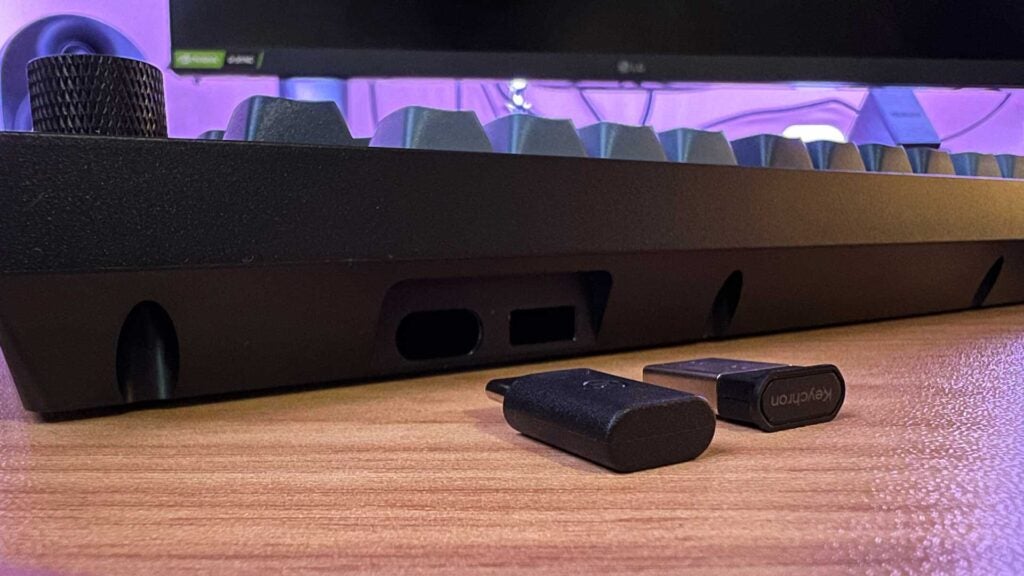
The rear of the Keychron V1 Max showing its twin USB cubbies.

Coming pre-lubed and dampened with foam, the Keychron V1 Max is as quiet as you make it. Slow strokes can be near silent. Speed up, however, and you’ll notice a soft clack with each actuation. If you’re particularly speedy, you’ll get the full tactile experience. At no point is there that metallic ping as they come back up. They’re sublime.

But the Keychron V1 Max isn’t without its problems. The spacebar is prone to registering twice. The issue persisted across Windows and iPad OS – cabled, wireless, or over Bluetooth. It’s happened well over a dozen times in this review alone: a nightmare not only for me, but for my editor as well.

Looking online, I’m not alone in my plight. Keychron appears to sooner suggest swapping out the switch than sending the board in for replacement. With it happening right out of the box to not only myself, I’m included to think the issue is further down the production pipeline.
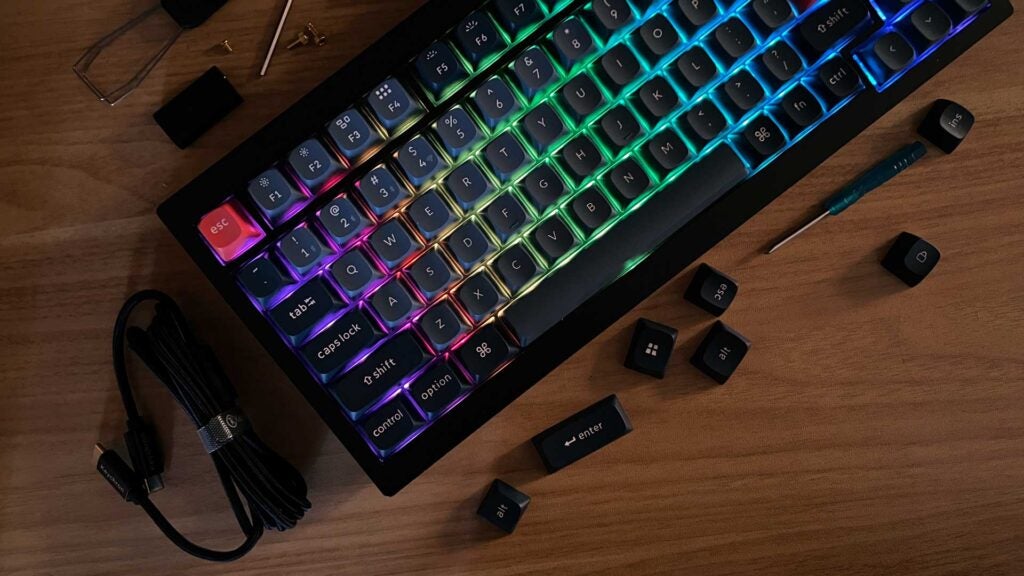
A dark shot of the Keychron V1 Max showing off its RGB lighting and included accessories.

Not everyone will have this issue. If you don’t mind a risky purchase and a potential returns situation, you stand to get a great keyboard for the price. If not, it’s a major disappointment for a deck with so much potential. There’s also some inconsistencies with the printing of the legend on wordy keys like Enter and Backspace if you’re irked by that sort of thing. Other than that, it’s brilliant.

After weeks of sporadic use, I haven’t managed to drain the 4000mAh battery with medium brightness. Keychron advertises up to 100 hours with lighting enabled. Efficient standby times are clearly working well here. Turn the backlight off, which you honestly should, and you’ll get close to triple that. The five-hour charge time sounds like a lot, but plug it in overnight and you’ll get potentially months of cable-free usage. That’s the benefit of a chunkier chassis.

Software and Lighting

  • No software support
  • Non-default settings require advanced knowledge
  • South-facing RGB can be disappointing

Featuring full RGB lighting, the south-facing LEDs on the Keychron V1 Max give off a subtle performance. The double-shot OSA PBT keycaps, while great for longevity, don’t allow light to pass through, which will affect the type of look you can achieve.

When sat at the desk, colour just about peeks out from the small gaps between the keycaps and the deck. Setting it to a solid colour can achieve an air of professionalism, but a full rainbow effect just looks odd.

Configuration is done via a web app that’s not massively intuitive. An understanding of .JSON files is required to make the most of it, but it’s plenty good enough out of the box.

Latest deals

Should you buy it?

You want a cheap mechanical keyboard you can personalise

At a fraction of the price of some of the big-brand mechanical keyboards, having the option to tweak and fix the Keychron V1 Max in virtually every way makes it a keeper.

You crave vibrant RGB lighting

The south-facing RGB layout won’t be for everyone. Even at max brightness, it can’t hold a candle to many others when it comes to flashy visuals. It might as well not even be there.

Final Thoughts

So long as you’re not blighted by a finicky spacebar, the Keychron V1 Max is a great keyboard for the price, just as long as you can make use of every aspect of its design. By comparison, the Vissles V84 comes in at £10 more. You get a wrist rest and slightly better build quality with that one, but not as many options at the checkout. Both are quite hard to find in stock, however. 

If you don’t need all of its advanced capabilities, and have no intention of going deep down the rabbit hole that is custom keyboards, the HyperX Alloy Origins 65 might be an easier purchase. If lighting is key, check out the Roccat Magma or the Roccat Vulcan II. Otherwise, have a look at our Best Keyboard guide for even more options.

How we test

We use every keyboard we test for at least a week. During that time, we’ll check it for ease of use and put it through its paces across games and typical PC use.

We also check each keyboard’s software to see how easy it is to customise and set up.

Used over the course of a week across work and play on multiple devices and used to write this review.

Tested and compared against various other keyboards in and around its price range and feature bracket.

FAQs

Can the switches on the Keychron V1 Max be replaced?

Yes, you can easily pull out the switches to replace them with your own. The lighting solution is designed to still perform as intended even with Cherry switches, for example.

How many devices can be connected to the Keychron V1 Max via Bluetooth?

You can switch between three paired Bluetooth devices using the FN+ 1/2/3 button combination.

‹

UK RRP

Size (Dimensions)

Weight

Release Date

First Reviewed Date

Ports

Connectivity

Switch Type

Number of Macro Keys

Cable Length

Battery Length

Keychron V1 Max

£94

148.7 x 328.5 x 21.5 MM

780 G

2023

05/02/2024

1

Bluetooth 5.1, 2.4Ghz, Wired

Mechanical

0

1.8 Meter

110 hrs

›

Verdict

While the flexible plastic chassis and spotty RGB flair leave a lot to be desired, the raw typing experience of the Keychron V1 Max is mighty impressive at this price point. So long as you’re not blighted by a wonky spacebar, it’s a great deal.

Pros

  • Stellar typing experience (typically)
  • USB-C and USB-A receivers
  • Great battery life

Cons

  • Customisation requires coding knowledge
  • RGB lighting isn’t great
  • Space bar issues aren’t uncommon

  • Heavily customizableWith coding knowledge and the included screwdriver, the Keychron V1 Max can be heavily tailored.

  • Classy looksTri-colour keys and a dark body help the Keychron V1 Max look sleek and sophisticated.

  • Fully wirelessBluetooth 5.1 and 2.4GHz support mean the Keychron V1 Max can suit any situation or platform.

Introduction

Keychron has a knack for making quality keyboards at a fraction of the price of the competition. The Keychron V1 Max is another great example of that.

At under £100 (when you can find one in stock) there’s a lot to love. This highly customisable and compact 75% mechanical keyboard does it all. You might have to break out the code to tinker with its default settings, but it’s good to go right out of the box.

No gimmicks and a lack of cheap thrills help make it an easy, simple sell if you know you don’t want or need what Razer, Logitech, Corsair, and the others might be looking to push.

Design

  • Subdued, professional looks
  • Semi-portable design
  • Built to be disassembled

The chassis of the Keychron V1 Max comes in a single flavour: Carbon Black. It’s a matte plastic shell that resists fingerprints. Dust is a whole other story, but mine is still sitting pretty after a couple weeks of use.

No matter your choice of switch at the point of purchase, the colours of the included keycaps won’t change. Most are grey, the edge keys are black, and ESC and Return/Enter are a sort of vibrant orange. It’s a nice contrasting look, the sort to keep it interesting. Not your cup of tea? The keys can be swapped out easily, as can the switches.

The main shtick of the Keychron V1 Max is its customisability. You can save £20 by supplying your own switches and keycaps. If you’re new to the world of DIY mechanical keyboards, though, you’ll want to grab the complete package and swap things out as you go.

A collection of keycaps that come with the Keychron V1 Max.
Image Credit (Trusted Reviews)

Being a wireless keyboard, you’ll spot plenty of ports and switches on the back for flicking between different connectivity modes and platforms. There’s a USB-C port on the left for wired use and charging, as well as two cubbies for the USB-C and USB-A 2.4GHz receivers. Yes, you get two.

Underneath are simple rubber feet and two-stage legs at the back for simple angle adjustment. You can sometimes see the recessed gold screws at the front peeking out from underneath, which can detract from the uniformity of the board, but it’s not a major issue. It’s a good, clean look.

In the packaging department, Keychron has found its footing with relatively slim and simple slide-up cardboard boxes. Inside is a thin foam cushioning the keyboard in one compartment, and the accessories in another. It’s not fully recyclable unlike the paper approach Corsair has taken, but at least the keyboard isn’t tucked away in a plastic sleeve. Some of the extras are in little bags, however.

Performance

  • Solid experience across work and play
  • Brilliant wireless connectivity options
  • Great battery life

Typing on the Keychron V1 Max is a dream. My unit came equipped with my preferred Gateron Jupiter Browns, needing just a little bit more force to push than the linear Reds. Having a subtle stop before a deep plunge mainly helps with stability, reducing the chance of accidental actuation while my fingers rest on the keys mid-sentence.

Once you get up to speed, they help create a tactile experience with little risk of fatigue over a long period. They actuate just before they bottom out, too, so you don’t need to type with any real force. It’s as if the Brown switches recognise your intent and adjust accordingly. Need something faster? Get the Banana switches.

The rear of the Keychron V1 Max showing its twin USB cubbies.

Coming pre-lubed and dampened with foam, the Keychron V1 Max is as quiet as you make it. Slow strokes can be near silent. Speed up, however, and you’ll notice a soft clack with each actuation. If you’re particularly speedy, you’ll get the full tactile experience. At no point is there that metallic ping as they come back up. They’re sublime.

But the Keychron V1 Max isn’t without its problems. The spacebar is prone to registering twice. The issue persisted across Windows and iPad OS – cabled, wireless, or over Bluetooth. It’s happened well over a dozen times in this review alone: a nightmare not only for me, but for my editor as well.

Looking online, I’m not alone in my plight. Keychron appears to sooner suggest swapping out the switch than sending the board in for replacement. With it happening right out of the box to not only myself, I’m included to think the issue is further down the production pipeline.

A dark shot of the Keychron V1 Max showing off its RGB lighting and included accessories.

Not everyone will have this issue. If you don’t mind a risky purchase and a potential returns situation, you stand to get a great keyboard for the price. If not, it’s a major disappointment for a deck with so much potential. There’s also some inconsistencies with the printing of the legend on wordy keys like Enter and Backspace if you’re irked by that sort of thing. Other than that, it’s brilliant.

After weeks of sporadic use, I haven’t managed to drain the 4000mAh battery with medium brightness. Keychron advertises up to 100 hours with lighting enabled. Efficient standby times are clearly working well here. Turn the backlight off, which you honestly should, and you’ll get close to triple that. The five-hour charge time sounds like a lot, but plug it in overnight and you’ll get potentially months of cable-free usage. That’s the benefit of a chunkier chassis.

Software and Lighting

  • No software support
  • Non-default settings require advanced knowledge
  • South-facing RGB can be disappointing

Featuring full RGB lighting, the south-facing LEDs on the Keychron V1 Max give off a subtle performance. The double-shot OSA PBT keycaps, while great for longevity, don’t allow light to pass through, which will affect the type of look you can achieve.

When sat at the desk, colour just about peeks out from the small gaps between the keycaps and the deck. Setting it to a solid colour can achieve an air of professionalism, but a full rainbow effect just looks odd.

Configuration is done via a web app that’s not massively intuitive. An understanding of .JSON files is required to make the most of it, but it’s plenty good enough out of the box.

Latest deals

Should you buy it?

You want a cheap mechanical keyboard you can personalise

At a fraction of the price of some of the big-brand mechanical keyboards, having the option to tweak and fix the Keychron V1 Max in virtually every way makes it a keeper.

You crave vibrant RGB lighting

The south-facing RGB layout won’t be for everyone. Even at max brightness, it can’t hold a candle to many others when it comes to flashy visuals. It might as well not even be there.

Final Thoughts

So long as you’re not blighted by a finicky spacebar, the Keychron V1 Max is a great keyboard for the price, just as long as you can make use of every aspect of its design. By comparison, the Vissles V84 comes in at £10 more. You get a wrist rest and slightly better build quality with that one, but not as many options at the checkout. Both are quite hard to find in stock, however. 

If you don’t need all of its advanced capabilities, and have no intention of going deep down the rabbit hole that is custom keyboards, the HyperX Alloy Origins 65 might be an easier purchase. If lighting is key, check out the Roccat Magma or the Roccat Vulcan II. Otherwise, have a look at our Best Keyboard guide for even more options.

How we test

We use every keyboard we test for at least a week. During that time, we’ll check it for ease of use and put it through its paces across games and typical PC use.

We also check each keyboard’s software to see how easy it is to customise and set up.

Used over the course of a week across work and play on multiple devices and used to write this review.

Tested and compared against various other keyboards in and around its price range and feature bracket.

FAQs

Can the switches on the Keychron V1 Max be replaced?

Yes, you can easily pull out the switches to replace them with your own. The lighting solution is designed to still perform as intended even with Cherry switches, for example.

How many devices can be connected to the Keychron V1 Max via Bluetooth?

You can switch between three paired Bluetooth devices using the FN+ 1/2/3 button combination.

‹

UK RRP

Size (Dimensions)

Weight

Release Date

First Reviewed Date

Ports

Connectivity

Switch Type

Number of Macro Keys

Cable Length

Battery Length

Keychron V1 Max

£94

148.7 x 328.5 x 21.5 MM

780 G

2023

05/02/2024

1

Bluetooth 5.1, 2.4Ghz, Wired

Mechanical

0

1.8 Meter

110 hrs

›

Previous Post

Biden vs. Trump: The Looming Rematch Hits a ‘Kickoff’ Moment

Next Post

The intricate link between GTA 6 and Red Dead Redemption 3 unveiled?

Related Posts

Poco Pad X1 Review
Reviews

Poco Pad X1 Review

by New Edge Times Report
December 3, 2025
Trust USB-C Rechargeable AA Batteries Review
Reviews

Trust USB-C Rechargeable AA Batteries Review

by New Edge Times Report
December 3, 2025
XGODY N6 Pro Review
Reviews

XGODY N6 Pro Review

by New Edge Times Report
December 3, 2025
Leave Comment
New Edge Times

© 2025 New Edge Times or its affiliated companies. All rights reserved.

Navigate Site

  • About
  • Advertise
  • Terms & Conditions
  • Privacy Policy
  • Disclaimer
  • Contact

Follow Us

No Result
View All Result
  • World
  • U.S.
  • Politics
  • Business
  • Science
  • Tech
  • Youth
  • Entertainment
    • Gaming
    • Movie
    • Music
    • Arts
  • Sports
  • Lifestyle
    • Fashion
    • Food
    • Health
    • Travel
  • Reviews
  • Trending

© 2025 New Edge Times or its affiliated companies. All rights reserved.

Welcome Back!

Login to your account below

Forgotten Password?

Retrieve your password

Please enter your username or email address to reset your password.

Log In
