
• Washington DC |
  • New York |
  • Toronto |
  • Distribution: (800) 510 9863
Sunday, May 17, 2026
  • Login
No Result
View All Result
NEWSLETTER
New Edge Times
  • World
  • U.S.
  • Politics
  • Business
  • Science
  • Tech
  • Youth
  • Entertainment
    • All
    • Arts
    • Gaming
    • Movie
    • Music
    Video: ‘Faces of Death’ Confronts Our Viewing Habits

    Video: ‘Faces of Death’ Confronts Our Viewing Habits

    Video: ‘The Devil Wears Prada 2’ | Anatomy of a Scene

    Video: ‘The Devil Wears Prada 2’ | Anatomy of a Scene

    Ye Must Pay Musicians for Using Sample Without Permission

    Ye Must Pay Musicians for Using Sample Without Permission

    Claire Maurier, the Narcissistic Mother in ‘400 Blows,’ Dies at 97

    Claire Maurier, the Narcissistic Mother in ‘400 Blows,’ Dies at 97

    Man Who Stole Unreleased Beyoncé Music Is Sentenced to 5 Years

    Man Who Stole Unreleased Beyoncé Music Is Sentenced to 5 Years

    How Much Art Is Too Much? A Guide to the New York Fairs.

    How Much Art Is Too Much? A Guide to the New York Fairs.

    Kevin Hart Roast: Highlights From Tom Brady, the Rock, Katt Williams and More

    Kevin Hart Roast: Highlights From Tom Brady, the Rock, Katt Williams and More

    Video: Why Are So Many Celebrities Co-Producing On Broadway?

    Video: Why Are So Many Celebrities Co-Producing On Broadway?

    • Gaming
    • Movie
    • Music
    • Arts
  • Sports
  • Lifestyle
    • All
    • Fashion
    • Food
    • Health
    • Travel
    Ibiza before the rush: early island escape

    Ibiza before the rush: early island escape

    Our Summer Cooking List: 24 Fresh Recipes to Seize the Season

    Our Summer Cooking List: 24 Fresh Recipes to Seize the Season

    The Good List: 6 Things to Add Joy to Your Day

    The Good List: 6 Things to Add Joy to Your Day

    Tiny Love Stories: ‘Life Suddenly Made Sense’

    Tiny Love Stories: ‘Life Suddenly Made Sense’

    These Summery Chickpeas Are Coming for Your Potato Salad

    These Summery Chickpeas Are Coming for Your Potato Salad

    Video: How Worried Should We Be About Hantavirus?

    Video: How Worried Should We Be About Hantavirus?

    Cruise Ship Hit by Hantavirus Leaves Canary Islands and Sails Toward Netherlands

    Cruise Ship Hit by Hantavirus Leaves Canary Islands and Sails Toward Netherlands

    A Sheet-Pan Chicken for Peak Asparagus

    A Sheet-Pan Chicken for Peak Asparagus

    • Fashion
    • Food
    • Health
    • Travel
  • Reviews
  • Trending
  • World
  • U.S.
  • Politics
  • Business
  • Science
  • Tech
  • Youth
  • Entertainment
    • All
    • Arts
    • Gaming
    • Movie
    • Music
    Video: ‘Faces of Death’ Confronts Our Viewing Habits

    Video: ‘Faces of Death’ Confronts Our Viewing Habits

    Video: ‘The Devil Wears Prada 2’ | Anatomy of a Scene

    Video: ‘The Devil Wears Prada 2’ | Anatomy of a Scene

    Ye Must Pay Musicians for Using Sample Without Permission

    Ye Must Pay Musicians for Using Sample Without Permission

    Claire Maurier, the Narcissistic Mother in ‘400 Blows,’ Dies at 97

    Claire Maurier, the Narcissistic Mother in ‘400 Blows,’ Dies at 97

    Man Who Stole Unreleased Beyoncé Music Is Sentenced to 5 Years

    Man Who Stole Unreleased Beyoncé Music Is Sentenced to 5 Years

    How Much Art Is Too Much? A Guide to the New York Fairs.

    How Much Art Is Too Much? A Guide to the New York Fairs.

    Kevin Hart Roast: Highlights From Tom Brady, the Rock, Katt Williams and More

    Kevin Hart Roast: Highlights From Tom Brady, the Rock, Katt Williams and More

    Video: Why Are So Many Celebrities Co-Producing On Broadway?

    Video: Why Are So Many Celebrities Co-Producing On Broadway?

    • Gaming
    • Movie
    • Music
    • Arts
  • Sports
  • Lifestyle
    • All
    • Fashion
    • Food
    • Health
    • Travel
    Ibiza before the rush: early island escape

    Ibiza before the rush: early island escape

    Our Summer Cooking List: 24 Fresh Recipes to Seize the Season

    Our Summer Cooking List: 24 Fresh Recipes to Seize the Season

    The Good List: 6 Things to Add Joy to Your Day

    The Good List: 6 Things to Add Joy to Your Day

    Tiny Love Stories: ‘Life Suddenly Made Sense’

    Tiny Love Stories: ‘Life Suddenly Made Sense’

    These Summery Chickpeas Are Coming for Your Potato Salad

    These Summery Chickpeas Are Coming for Your Potato Salad

    Video: How Worried Should We Be About Hantavirus?

    Video: How Worried Should We Be About Hantavirus?

    Cruise Ship Hit by Hantavirus Leaves Canary Islands and Sails Toward Netherlands

    Cruise Ship Hit by Hantavirus Leaves Canary Islands and Sails Toward Netherlands

    A Sheet-Pan Chicken for Peak Asparagus

    A Sheet-Pan Chicken for Peak Asparagus

    • Fashion
    • Food
    • Health
    • Travel
  • Reviews
  • Trending
No Result
View All Result
New Edge Times
No Result
View All Result
Home Reviews

TCL Nxtpaper 14 Review: Initial Impressions

by New Edge Times Report
February 28, 2024
in Reviews
TCL Nxtpaper 14 Review: Initial Impressions
Share on FacebookShare on Twitter

First Impressions

The TCL Nxtpaper 14 looks like a rather unique mid-range Android tablet with the right compromises to hit that sub-$400 price point. It doesn’t have the fastest refresh rate or the best cameras, but the Nxtpaper 3.0 screen tech more than makes up for it.


  • Nxtpaper 3.0 technologyWith the press of a button, the Nxtpaper 14 changes from a full colour display to E Ink, complete with a matte finish on the display, DC dimming and blue light reduction.

  • Big-screen Android experienceMeasuring in at 14.3 inches and boasting a 2.4K resolution, the Nxtpaper 14 offers the big-screen experience at less than $400.

  • Dual selfie camerasWith a combination of 13MP + 5MP selfie cameras, you can decide between a wide and ultra-wide angle for video calls and selfies.

Introduction

Announced at MWC 2024, the TCL Nxtpaper 14 is framed as a sub-$400 alternative to the feature-packed $549 TCL Nxtpaper 14 Pro while maintaining the core Nxtpaper 3.0 experience.

That means the two share plenty of similarities, not only in overall design and dimensions but, of course, screen tech, with both taking advantage of TCL’s latest Nxtpaper 3.0 technology. It’s a unique bit of screen tech that the company claims is not only much better for your eyes with hardware-controlled blue light reduction and some pretty cool E Ink tricks.

That said, I’ve spent a bit of time using the TCL Nxtpaper 14 at MWC 2024 ahead of its rollout later this year, and while I’m not yet ready to deliver my final thoughts, here are my initial impressions of the rather unique tablet.

Design and screen

  • Large 14.3-inch Nxtpaper display
  • Dedicated mode switch button
  • Locked at 60Hz

The TCL Nxtpaper 14 is, as mentioned, the flagship Nxtpaper 14 Pro’s little brother, offering much of the same core experience with a slightly tweaked spec to hit a more affordable price point.

That said, it shouldn’t come as much surprise to learn that the Nxtpaper 14 looks a lot like the Nxtpaper 14 Pro, sporting the same 14.3-inch display in a rather slim aluminium chassis. It’s an absolutely huge screen, not far from Samsung’s behemoth Galaxy Tab S9 Ultra, but the size isn’t the key selling point here. It’s the screen tech. 
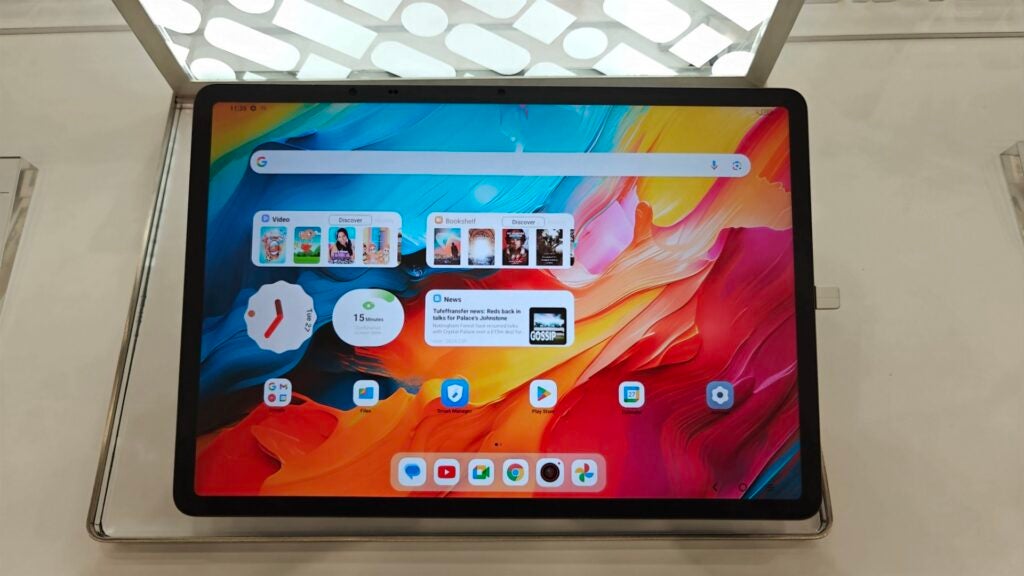
TCL Nxtpaper 14
Image Credit (Trusted Reviews)

That’s because, as the name suggests, the tablet uses TCL’s Nxtpaper technology – and the latest Nxtpaper 3.0 tech to be specific. For those unfamiliar with the concept, the screen tech is rather interesting. At a glance, it looks like your standard tablet screen with vivid colours. However, the matte effect on the screen not only makes the display feel like paper when touched but also hugely negates reflections compared to regular screens – which is very handy with a tablet.

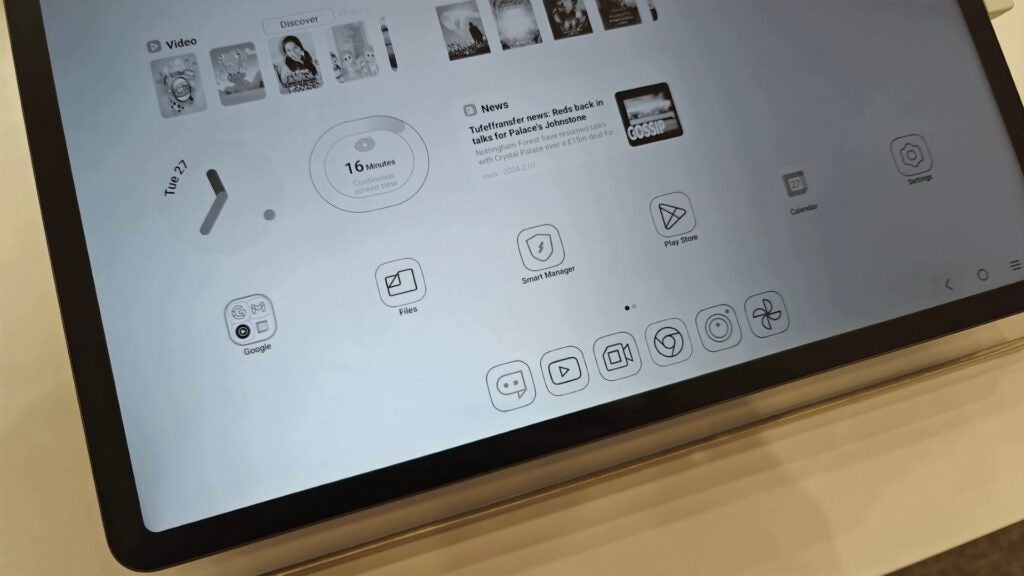
What’s more, the TCL Nxtpaper 14 has a dedicated button on its side that, when pressed for a second or two, changes the display from colour to e-ink mode with a very cool transition and a tweaked UI that makes use of the tech. It’s ideal for reading and the like, though unlike its Pro sibling, there’s no E Ink colour mode for animes and mangas, nor does it offer the smooth 144Hz refresh rate, instead locked at 60Hz.
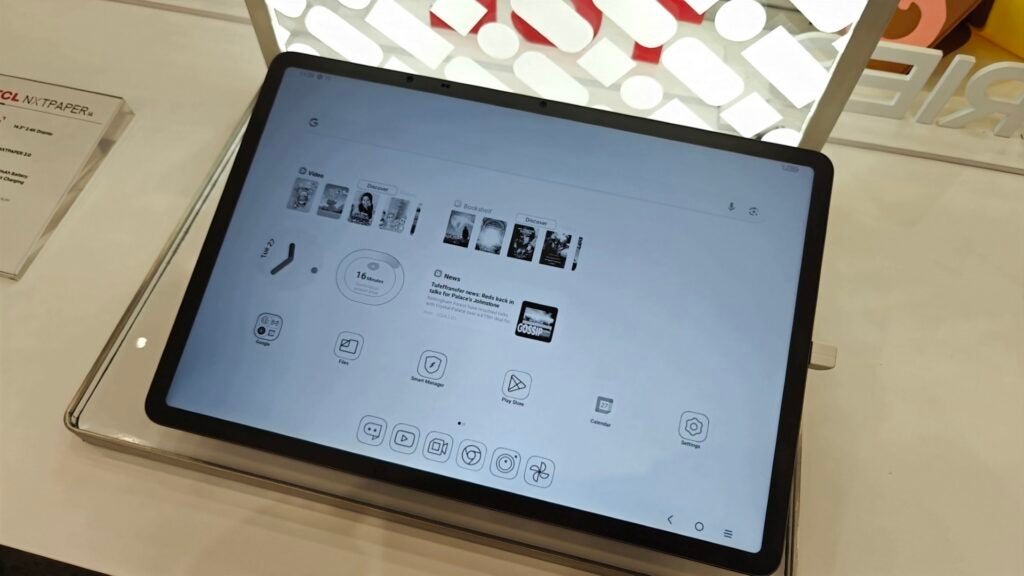
TCL Nxtpaper 14 E Ink mode
Image Credit (Trusted Reviews)

Still, if you’re a big reader or you spend a lot of time working on a tablet, the Nxtpaper screen tech should hugely appeal to you. 

It’s also a very high-res panel with a 2.4K resolution that made everything look crisp during my time with the tablet, even with such an expansive display, and as mentioned earlier, it supports both hardware-level blue light reduction and DC dimming to help reduce eye strain over longer periods of use. 

Screen tech aside, the Nxtpaper 14 looks and feels largely like your average big-screen tablet with an aluminium chassis, rounded corners and flat edges, with quad speakers on both short sides of the tablet. There’s a USB-C port for charging, and that’s about it. 
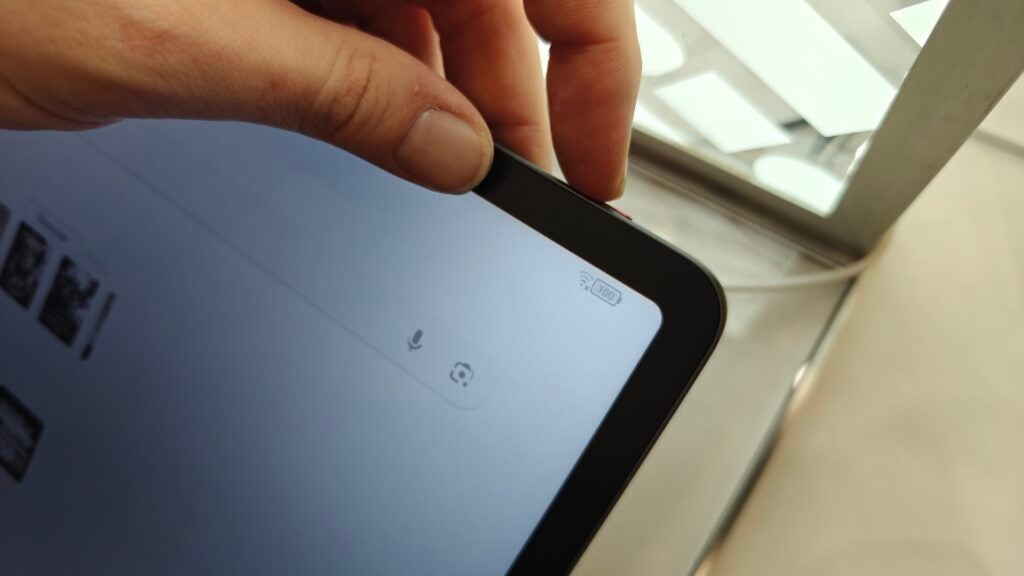
TCL Nxtpaper 14 mode switch button
Image Credit (Trusted Reviews)

There’s no word yet on accessories for the regular model, but it’s worth noting that the Nxtpaper 14 Pro comes bundled with a T-Pen stylus in the package. I think TCL would be missing a trick if that’s not also the case with the regular model, but let’s see.  

Specs and performance

  • Helio G99 chipset
  • 10,000mAh battery
  • Android 14

While the TCL Nxtpaper 14 may not look that different from the Pro model physically, there are big differences on the inside. While the Pro model sports the pretty powerful MediaTek Dimensity 8020, along with 12GB of RAM, the regular Nxtpaper 14 comes with the Helio G99 chipset, coupled with 8GB of RAM and a rather healthy 256GB of storage.

While that might not sound as immediately tempting, I will say that during my limited time with the tablet, it felt pretty rapid, with apps opening instantly and responsive swipes through the multitasking menu, though I’ll have to put it through a range of benchmark tests at the Trusted Reviews office to see exactly what it’s capable of. 
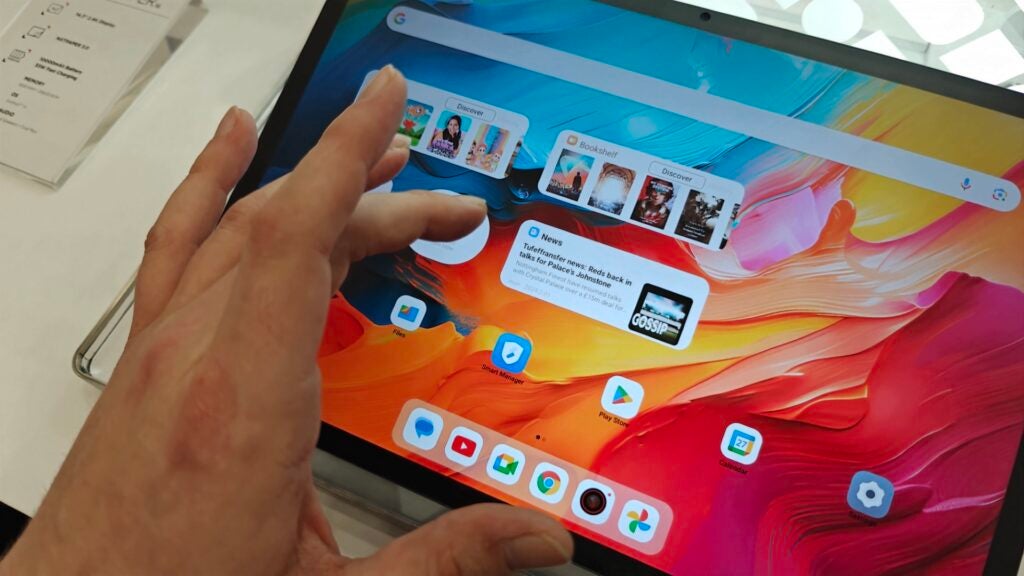
TCL Nxtpaper 14
Image Credit (Trusted Reviews)

Still, based on my limited time with the device, it feels like a tablet that’ll confidently handle your everyday tablet tasks, be that working in Google Docs, scrolling through websites or binging TikTok or Netflix, though content creators and pros may get more out of the upgraded chipset of its more expensive sibling.  

Also under the hood of the big-screen tablet is an equally big 10,000mAh battery powering the experience. It’s not as big as the 12,000mAh cell of the Pro model, meaning it’ll likely squeeze an extra couple of hours out of a charge, but it should still be a comfortable all-day device. There’s 33W fast charging too, though TCL hasn’t shared any specifics on charge times just yet.

There is a notable downgrade in the camera department too, with the regular Nxtpaper 14 sporting a standard combination of a 5MP rear camera and a dual 13MP + 5MP combo on the front, while the Nxtpaper 14 Pro gets an upgraded 50MP camera on the rear. 
TCL Nxtpaper 14
Image Credit (Trusted Reviews)

The software experience is refreshingly stock too, sporting close-to-stock Android 14 with many of the key UI features like Material You and not much in the way of bloatware. There’s also the unique E Ink mode that’s much more than just a black-and-white skin; it changes app icons and other functionality to better suit e-reading. 

There’s no word on long-term support, however I’d expect a tablet like this to at least get a couple of Android updates. I’ll investigate further and will update you all when I publish my full review.

Latest deals

Early Thoughts

The TCL Nxtpaper 14 looks like it could be a tempting tablet with all the right compromises to hit that sub-$400 price point, and with a range of features not offered by the competition, I’ve got a feeling this one could be extremely popular once it begins its wider rollout beyond Asia later this year.

‹

USA RRP

Manufacturer

Screen Size

Storage Capacity

Rear Camera

Front Camera

Video Recording

IP rating

Battery

Fast Charging

Operating System

Release Date

First Reviewed Date

Resolution

HDR

Refresh Rate

Ports

Chipset

RAM

Colours

Stated Power

TCL Nxtpaper 14

$400

TCL

14.3 inches

256GB

5MP

13MP + 5MP

Yes

Not Disclosed

10000 mAh

Yes

Android 14

2024

28/02/2024

2400 x 1600

Yes

60 Hz

USB-C

Helio G99

8GB

Grey

33 W

›

A ‘hands on review’ is our first impression of a product only – it is not a full test and verdict. Our writer must have spent some time with the product to describe an early sense of what it’s like to use. We call these ‘hands on reviews’ to make them visible in search. However these are always unscored and don’t give recommendations. Read more about our reviews policy.

First Impressions

The TCL Nxtpaper 14 looks like a rather unique mid-range Android tablet with the right compromises to hit that sub-$400 price point. It doesn’t have the fastest refresh rate or the best cameras, but the Nxtpaper 3.0 screen tech more than makes up for it.


  • Nxtpaper 3.0 technologyWith the press of a button, the Nxtpaper 14 changes from a full colour display to E Ink, complete with a matte finish on the display, DC dimming and blue light reduction.

  • Big-screen Android experienceMeasuring in at 14.3 inches and boasting a 2.4K resolution, the Nxtpaper 14 offers the big-screen experience at less than $400.

  • Dual selfie camerasWith a combination of 13MP + 5MP selfie cameras, you can decide between a wide and ultra-wide angle for video calls and selfies.

Introduction

Announced at MWC 2024, the TCL Nxtpaper 14 is framed as a sub-$400 alternative to the feature-packed $549 TCL Nxtpaper 14 Pro while maintaining the core Nxtpaper 3.0 experience.

That means the two share plenty of similarities, not only in overall design and dimensions but, of course, screen tech, with both taking advantage of TCL’s latest Nxtpaper 3.0 technology. It’s a unique bit of screen tech that the company claims is not only much better for your eyes with hardware-controlled blue light reduction and some pretty cool E Ink tricks.

That said, I’ve spent a bit of time using the TCL Nxtpaper 14 at MWC 2024 ahead of its rollout later this year, and while I’m not yet ready to deliver my final thoughts, here are my initial impressions of the rather unique tablet.

Design and screen

  • Large 14.3-inch Nxtpaper display
  • Dedicated mode switch button
  • Locked at 60Hz

The TCL Nxtpaper 14 is, as mentioned, the flagship Nxtpaper 14 Pro’s little brother, offering much of the same core experience with a slightly tweaked spec to hit a more affordable price point.

That said, it shouldn’t come as much surprise to learn that the Nxtpaper 14 looks a lot like the Nxtpaper 14 Pro, sporting the same 14.3-inch display in a rather slim aluminium chassis. It’s an absolutely huge screen, not far from Samsung’s behemoth Galaxy Tab S9 Ultra, but the size isn’t the key selling point here. It’s the screen tech. 

TCL Nxtpaper 14
Image Credit (Trusted Reviews)

That’s because, as the name suggests, the tablet uses TCL’s Nxtpaper technology – and the latest Nxtpaper 3.0 tech to be specific. For those unfamiliar with the concept, the screen tech is rather interesting. At a glance, it looks like your standard tablet screen with vivid colours. However, the matte effect on the screen not only makes the display feel like paper when touched but also hugely negates reflections compared to regular screens – which is very handy with a tablet.

What’s more, the TCL Nxtpaper 14 has a dedicated button on its side that, when pressed for a second or two, changes the display from colour to e-ink mode with a very cool transition and a tweaked UI that makes use of the tech. It’s ideal for reading and the like, though unlike its Pro sibling, there’s no E Ink colour mode for animes and mangas, nor does it offer the smooth 144Hz refresh rate, instead locked at 60Hz.

TCL Nxtpaper 14 E Ink mode
Image Credit (Trusted Reviews)

Still, if you’re a big reader or you spend a lot of time working on a tablet, the Nxtpaper screen tech should hugely appeal to you. 

It’s also a very high-res panel with a 2.4K resolution that made everything look crisp during my time with the tablet, even with such an expansive display, and as mentioned earlier, it supports both hardware-level blue light reduction and DC dimming to help reduce eye strain over longer periods of use. 

Screen tech aside, the Nxtpaper 14 looks and feels largely like your average big-screen tablet with an aluminium chassis, rounded corners and flat edges, with quad speakers on both short sides of the tablet. There’s a USB-C port for charging, and that’s about it. 

TCL Nxtpaper 14 mode switch button
Image Credit (Trusted Reviews)

There’s no word yet on accessories for the regular model, but it’s worth noting that the Nxtpaper 14 Pro comes bundled with a T-Pen stylus in the package. I think TCL would be missing a trick if that’s not also the case with the regular model, but let’s see.  

Specs and performance

  • Helio G99 chipset
  • 10,000mAh battery
  • Android 14

While the TCL Nxtpaper 14 may not look that different from the Pro model physically, there are big differences on the inside. While the Pro model sports the pretty powerful MediaTek Dimensity 8020, along with 12GB of RAM, the regular Nxtpaper 14 comes with the Helio G99 chipset, coupled with 8GB of RAM and a rather healthy 256GB of storage.

While that might not sound as immediately tempting, I will say that during my limited time with the tablet, it felt pretty rapid, with apps opening instantly and responsive swipes through the multitasking menu, though I’ll have to put it through a range of benchmark tests at the Trusted Reviews office to see exactly what it’s capable of. 

TCL Nxtpaper 14
Image Credit (Trusted Reviews)

Still, based on my limited time with the device, it feels like a tablet that’ll confidently handle your everyday tablet tasks, be that working in Google Docs, scrolling through websites or binging TikTok or Netflix, though content creators and pros may get more out of the upgraded chipset of its more expensive sibling.  

Also under the hood of the big-screen tablet is an equally big 10,000mAh battery powering the experience. It’s not as big as the 12,000mAh cell of the Pro model, meaning it’ll likely squeeze an extra couple of hours out of a charge, but it should still be a comfortable all-day device. There’s 33W fast charging too, though TCL hasn’t shared any specifics on charge times just yet.

There is a notable downgrade in the camera department too, with the regular Nxtpaper 14 sporting a standard combination of a 5MP rear camera and a dual 13MP + 5MP combo on the front, while the Nxtpaper 14 Pro gets an upgraded 50MP camera on the rear. 

TCL Nxtpaper 14
Image Credit (Trusted Reviews)

The software experience is refreshingly stock too, sporting close-to-stock Android 14 with many of the key UI features like Material You and not much in the way of bloatware. There’s also the unique E Ink mode that’s much more than just a black-and-white skin; it changes app icons and other functionality to better suit e-reading. 

There’s no word on long-term support, however I’d expect a tablet like this to at least get a couple of Android updates. I’ll investigate further and will update you all when I publish my full review.

Latest deals

Early Thoughts

The TCL Nxtpaper 14 looks like it could be a tempting tablet with all the right compromises to hit that sub-$400 price point, and with a range of features not offered by the competition, I’ve got a feeling this one could be extremely popular once it begins its wider rollout beyond Asia later this year.

‹

USA RRP

Manufacturer

Screen Size

Storage Capacity

Rear Camera

Front Camera

Video Recording

IP rating

Battery

Fast Charging

Operating System

Release Date

First Reviewed Date

Resolution

HDR

Refresh Rate

Ports

Chipset

RAM

Colours

Stated Power

TCL Nxtpaper 14

$400

TCL

14.3 inches

256GB

5MP

13MP + 5MP

Yes

Not Disclosed

10000 mAh

Yes

Android 14

2024

28/02/2024

2400 x 1600

Yes

60 Hz

USB-C

Helio G99

8GB

Grey

33 W

›

A ‘hands on review’ is our first impression of a product only – it is not a full test and verdict. Our writer must have spent some time with the product to describe an early sense of what it’s like to use. We call these ‘hands on reviews’ to make them visible in search. However these are always unscored and don’t give recommendations. Read more about our reviews policy.
Previous Post

Microsoft Word’s Subtle Typeface Change Affected Millions. Did You Notice?

Next Post

Biden Undergoes Annual Physical at Walter Reed

Related Posts

Hoover HF6 TurboSense Review
Reviews

Hoover HF6 TurboSense Review

by New Edge Times Report
May 4, 2026
JBL Charge 6 Review
Reviews

JBL Charge 6 Review

by New Edge Times Report
May 1, 2026
Stihl ASA 20 Cordless Secateurs Review: Pruning made much easier
Reviews

Stihl ASA 20 Cordless Secateurs Review: Pruning made much easier

by New Edge Times Report
May 1, 2026
Leave Comment
New Edge Times

© 2025 New Edge Times or its affiliated companies. All rights reserved.

Navigate Site

  • About
  • Advertise
  • Terms & Conditions
  • Privacy Policy
  • Disclaimer
  • Contact

Follow Us

No Result
View All Result
  • World
  • U.S.
  • Politics
  • Business
  • Science
  • Tech
  • Youth
  • Entertainment
    • Gaming
    • Movie
    • Music
    • Arts
  • Sports
  • Lifestyle
    • Fashion
    • Food
    • Health
    • Travel
  • Reviews
  • Trending

© 2025 New Edge Times or its affiliated companies. All rights reserved.

Welcome Back!

Login to your account below

Forgotten Password?

Retrieve your password

Please enter your username or email address to reset your password.

Log In
