





Verdict
The Eufy Security Indoor Cam S350 pretty much has it all: dual cameras (wide-angle and telephoto), no monthly fees, people and pet detection, a motorised pan-and-tilt system that actually works without limitations, and excellent video quality up to 4K in resolution. Things fall down slightly when using both cameras simultaneously, which reduces overall image quality, but stick to recording with one lens and using the joint cameras for better monitoring and this is a brilliant choice.
Pros
- Excellent 4K image quality
- Clever automated tracking
- No monthly fees
Cons
- Dual view mode reduces image quality
-
TypeThis is an indoor security camera, powered by USB. -
ResolutionThe main camera shoots video at 4K, the secondary telephoto camera at 2K.
Introduction
Motorised pan-and-tilt cameras sound like a good idea, but most models are overly complicated and get the basics wrong.
Adding two cameras into the mix, the Eufy Security Indoor Cam S350 sounds like a recipe for disaster, but a neat app, subscription-free recording and some clever integrated features make this a smart indoor camera that can see everything.
Design and installation
- Dual-camera design
- Powered by USB-C
- Works with the HomeBase 3
If nothing else, the dual cameras of the Eufy Security Indoor Cam S350 give the camera a cute robot-like look that elevates this product from being just another indoor camera.
Fortunately, those dual cameras (one wide-angle and one 3x zoom telephoto) are actually useful and not just part of the design.
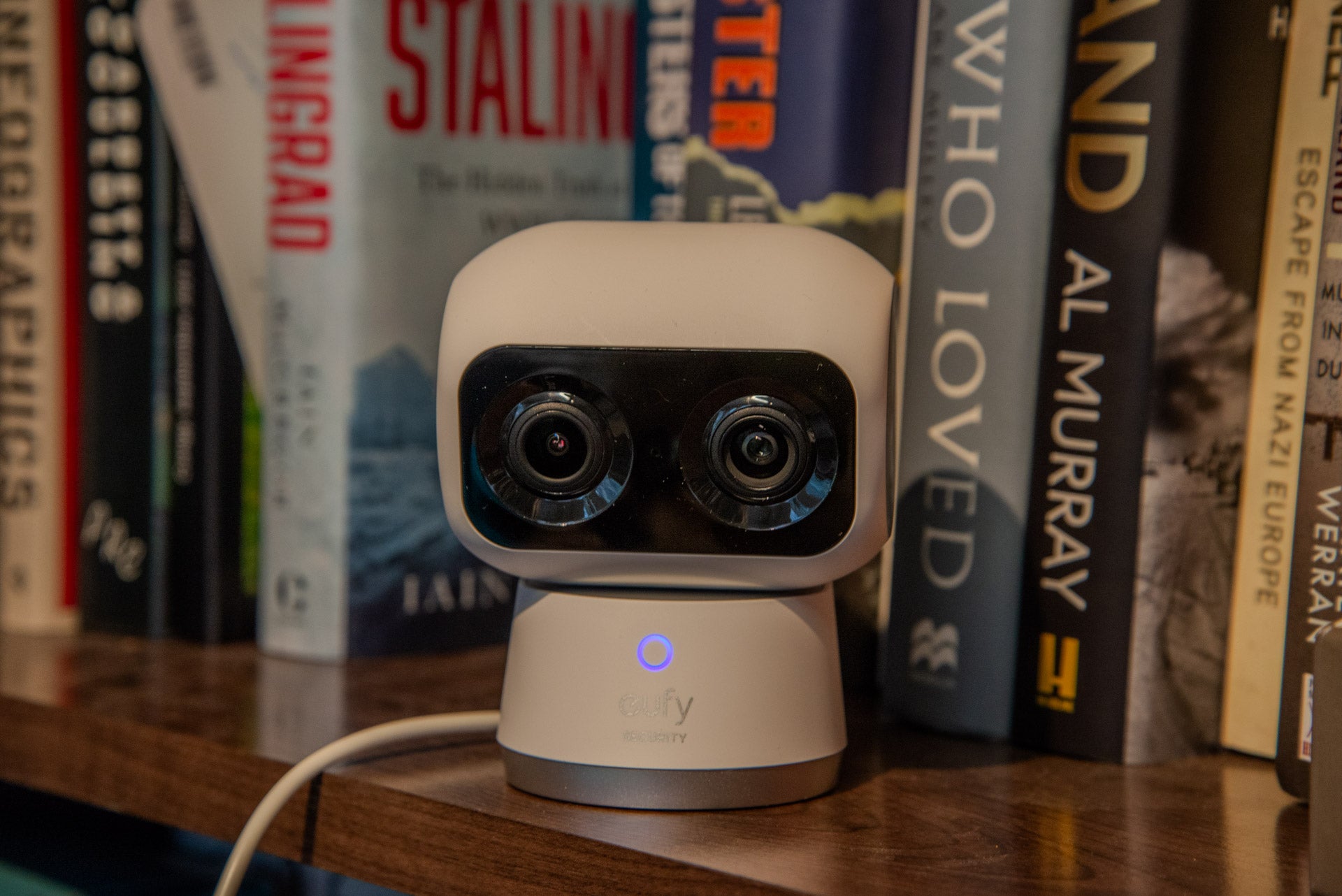
As this camera has a 360-degree pan (plus 75-degree tilt), it’s less important where you place it than a camera with a fixed lens, such as the Ring Indoor Cam (2nd Gen).
Here, the camera can be placed on a bookshelf (or the stand can be screwed to a wall), and then the Eufy app can be configured to set up where the camera is looking. Power is via the USB-C connection underneath.
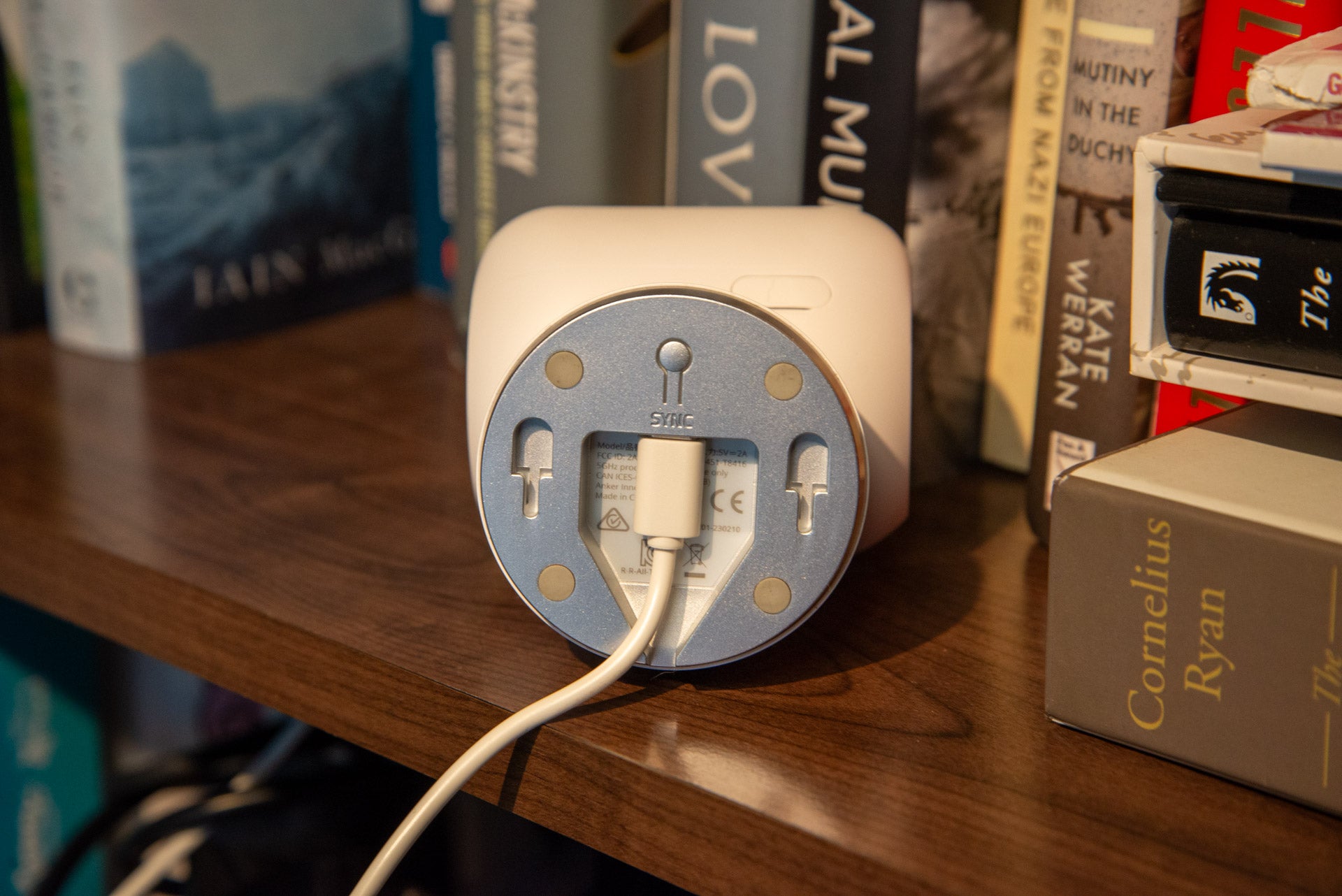
In its default configuration, the camera doesn’t have any onboard storage. To record clips, there are three options. If you don’t want to pay to store video, then there’s a microSD card slot at the rear, which takes cards up to 128GB in size (enough for months of recording in normal use); alternatively, the camera can be connected to a HomeBase 3 (provided it’s within Wi-Fi range).
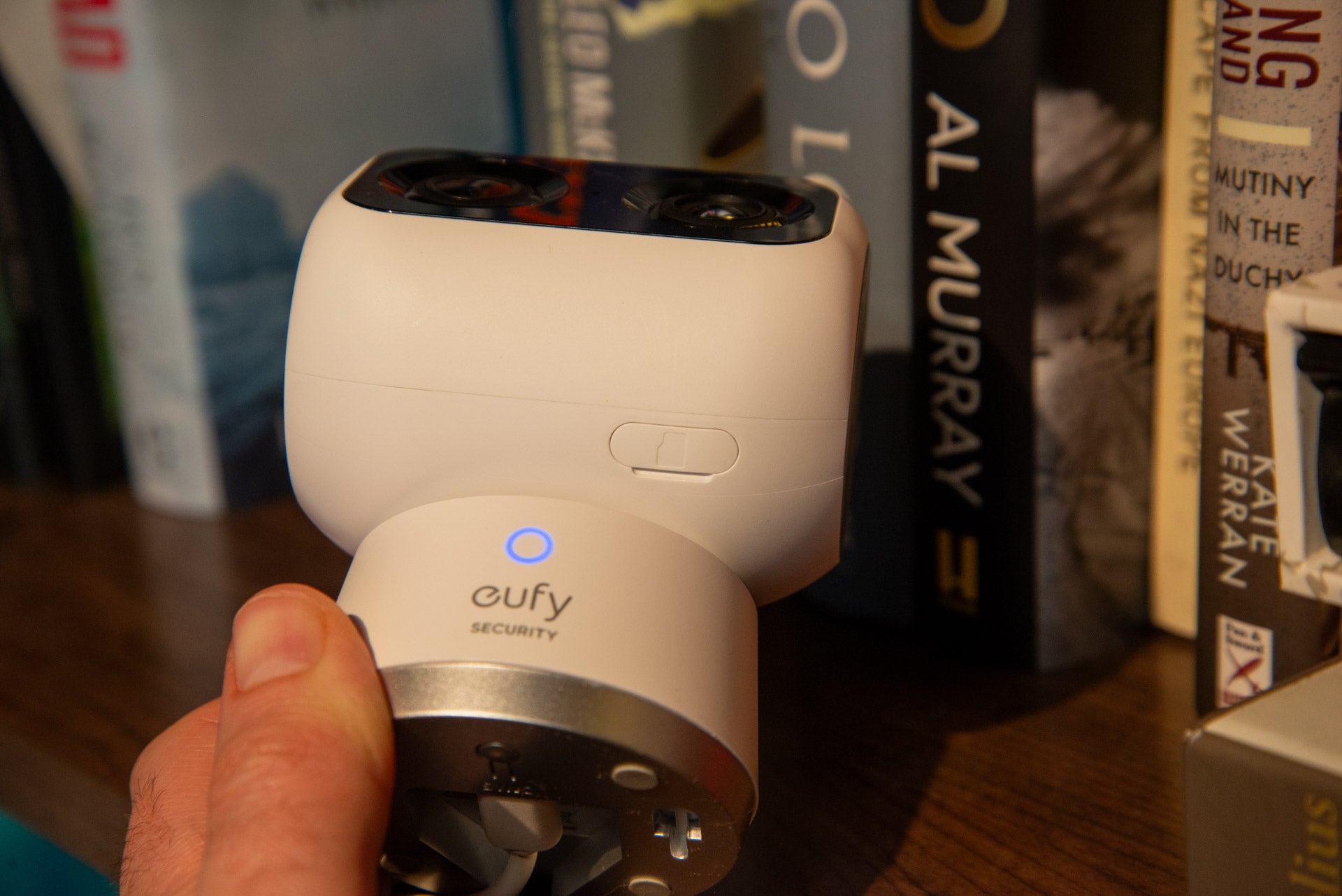
Home to the Eufy S330 EufyCam wireless cameras, the HomeBase 3 provides its own storage, plus some additional features such as facial recognition that is processed locally. Finally, there is a cloud service, charged at $2.99 a month.
Once plugged in, the Eufy Security app connects the camera to your Wi-Fi. Dual-band Wi-Fi 6 is onboard.
Features
- Single or dual-camera modes
- Remembers its ‘home’ position
- Clever AI tracking
The Eufy Security Indoor Cam S350 manages to overcome many of the pitfalls of other pan and tilt cameras. Of all the problems with these kinds of cameras, the biggest pitfall is not having a home position that the camera returns to.
Here, you can set a default location for the camera, which it returns to automatically after using live view or when motion tracking is turned on. This is an essential feature, as the S350 will move back to cover the area that you want, and there’s no chance that you’ll miss something important because you accidentally left the camera pointing down at the ground.
As well as the default position, additional positions can be selected and then jumped to using the live view option. It’s a neat way to move around a room quickly, say, looking at a door and then a window.
Additionally, the camera can be set to automatically pan around your saved positions, which is handy if you can spot everything you want from a fixed position.
This camera has two lenses and sensors. The primary camera is a 4K wide-angle camera, which can capture most of a room. There’s then a secondary 2K camera, which offers a 3x zoom and is there to capture close-up detail.
In its default configuration, jumping into the live view will default to the 4K camera, with a button used to switch to the 2K camera. With both cameras, the S350 can be remotely panned and tilted to focus on what you find important.
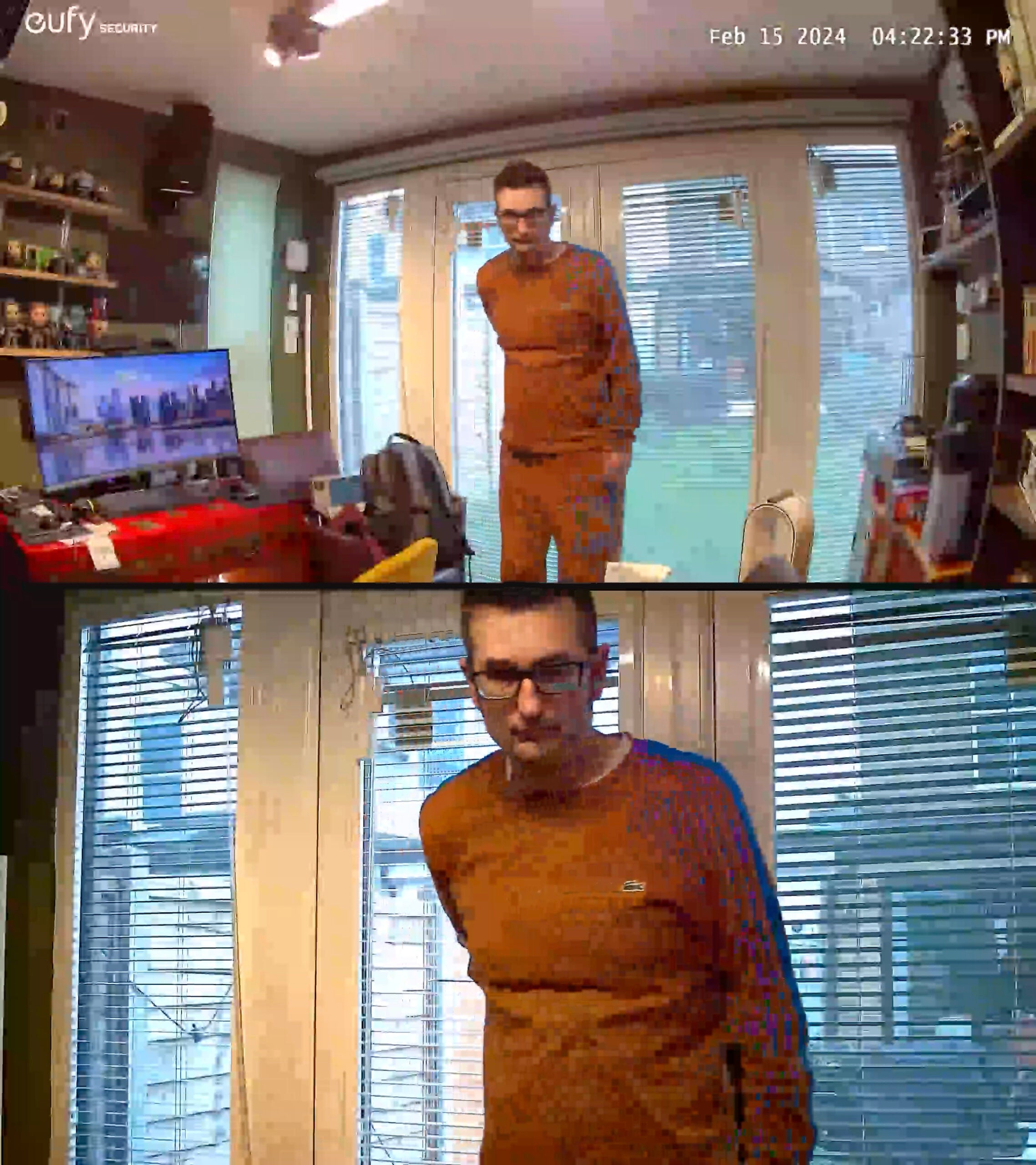
With the default option, the camera will record motion detection from its 4K camera only. If you want to see both video streams, you must turn on the option. This reduces the quality of both cameras to 2K, and stacks them both one above the other. Motion-triggered recordings are stored in the same format.
Ideally, I’d have liked the S350 to have recorded both streams at native resolution, with the playback screen letting me switch between feeds.
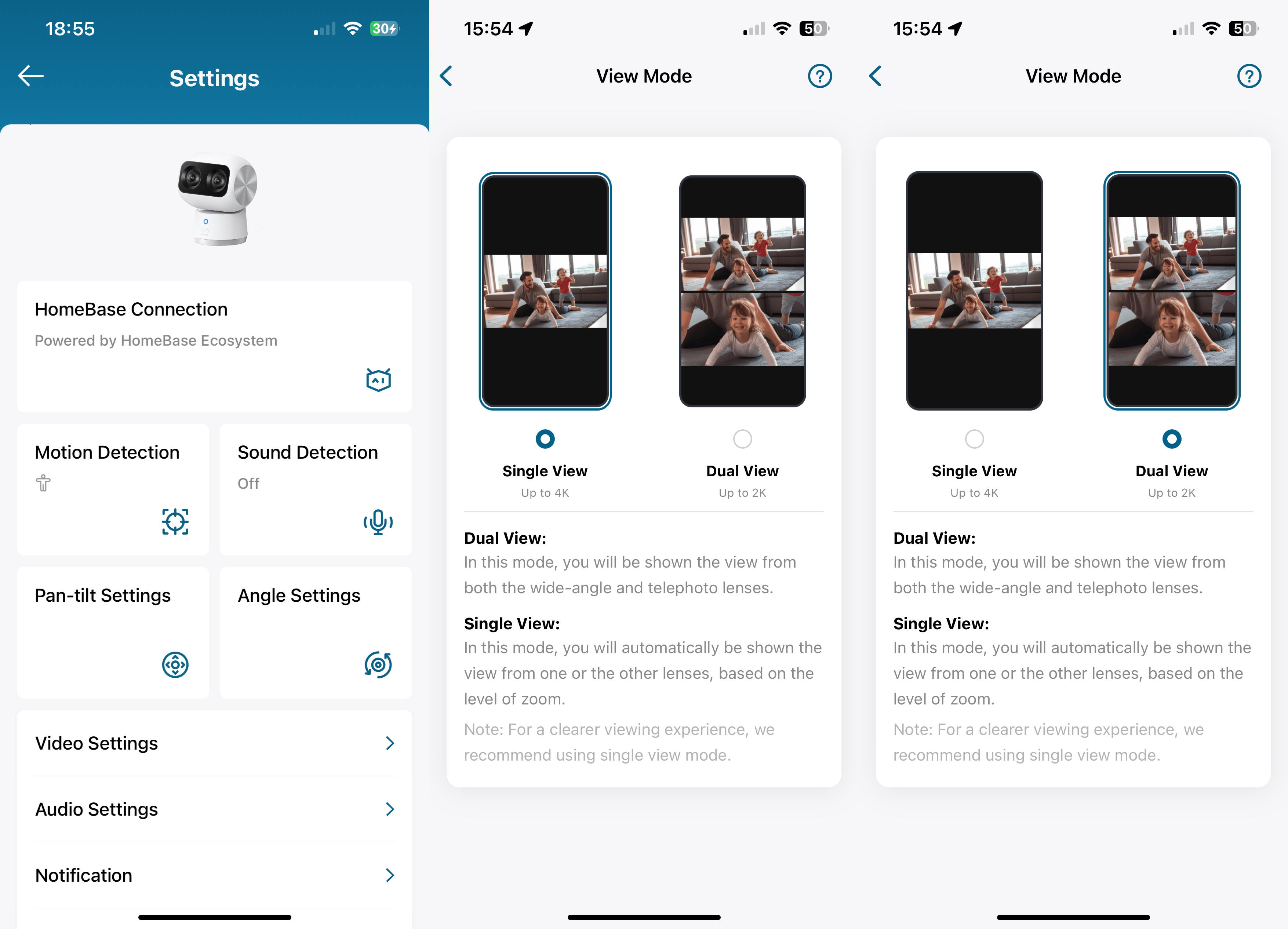
To cut down on the number of recordings and alerts you get, the Eufy Security Indoor Cam S350 has a few tricks. Motion sensitivity is one, alongside activity zones, so you can tell the camera to only bother with motion in certain areas.
Again, it’s another reason that a home position is important. Without a home position, the motion zone would move all of the time, and there’d be a good chance that something important would be missed.
More useful yet are the in-built human, pet and all other motion detection options. Select the type of motion that you want to bother with, and the camera will record those only. By switching to people-only detection, I dramatically cut down the number of alerts that I got.
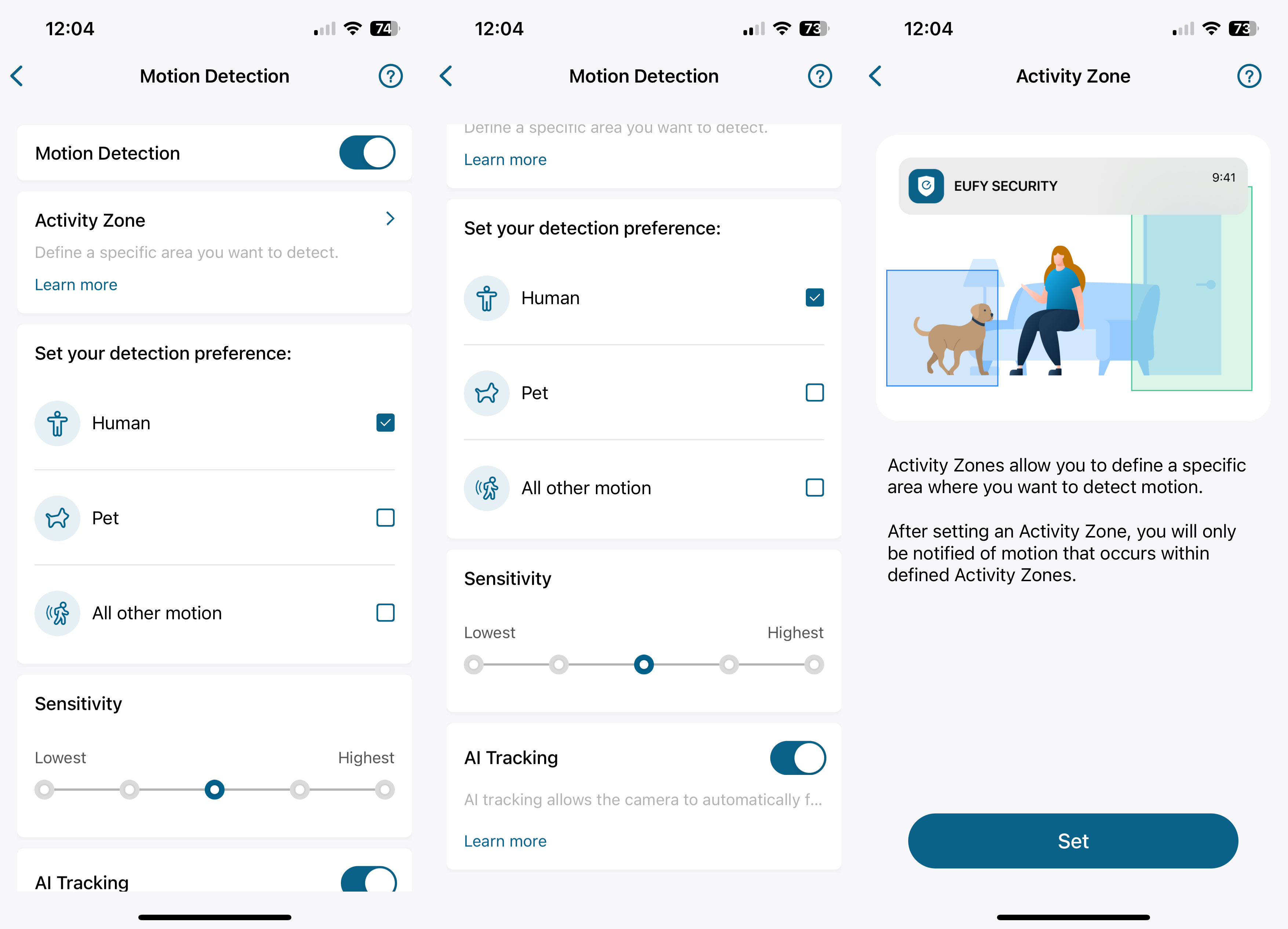
As well as detecting motion, the camera supports AI Tracking, following the subject that triggered the event. Walking into my office, for example, the camera unnervingly follows me around, with the S350 moving smoothly to keep up with motion.
According to the app, AI Tracking limits recordings to 2K, but downloading sample clips, I found that they were all in 4K.
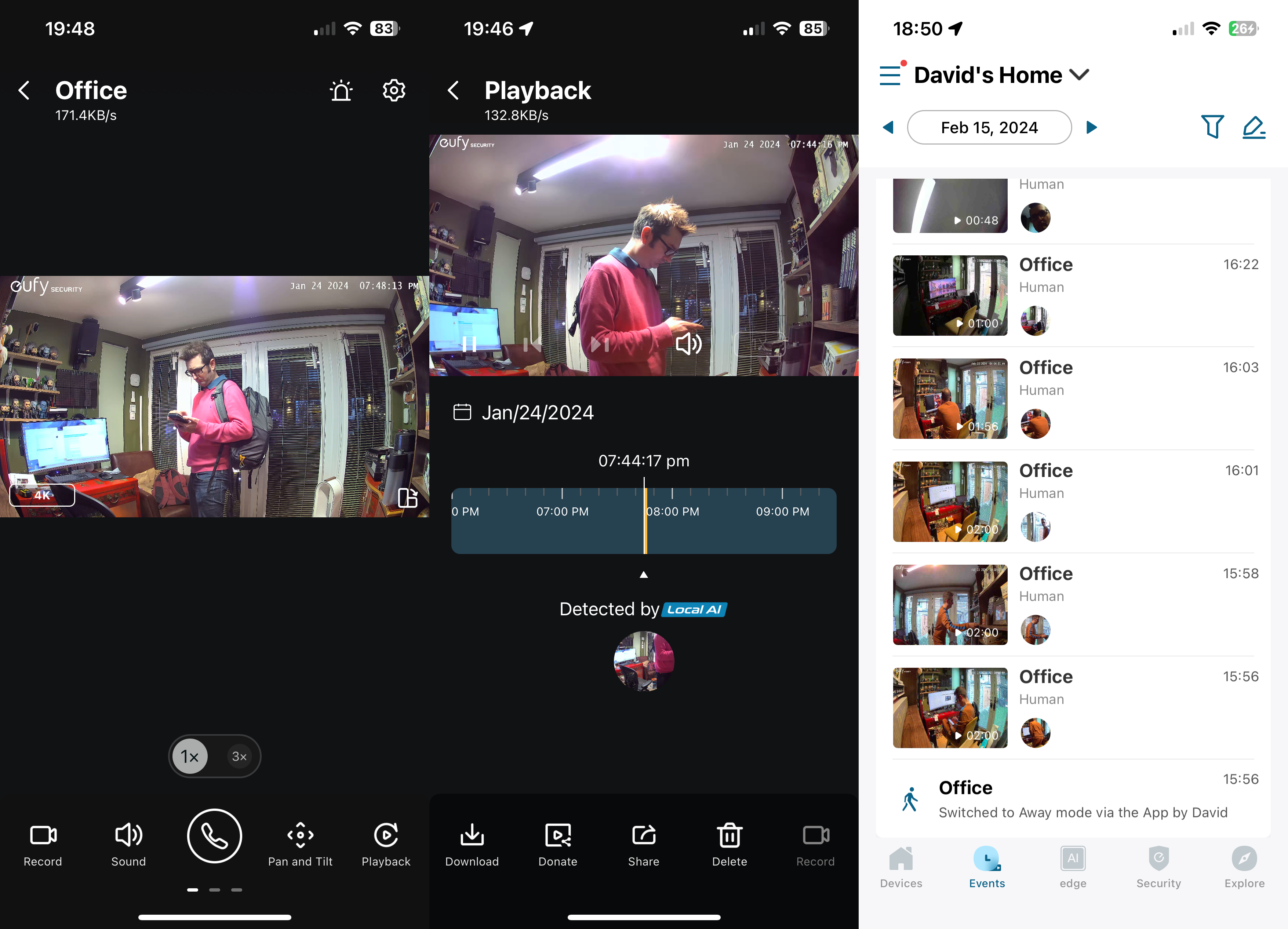
Finding recordings can be a chore using the timeline in the playback screen. Scrolling through manually is tricky, and the process isn’t as smooth as in Ring’s app. There is an event tab, which shows all events from all devices, which is easier to use. Filtering by just the S350, I could move day by day and see thumbnails of each event.
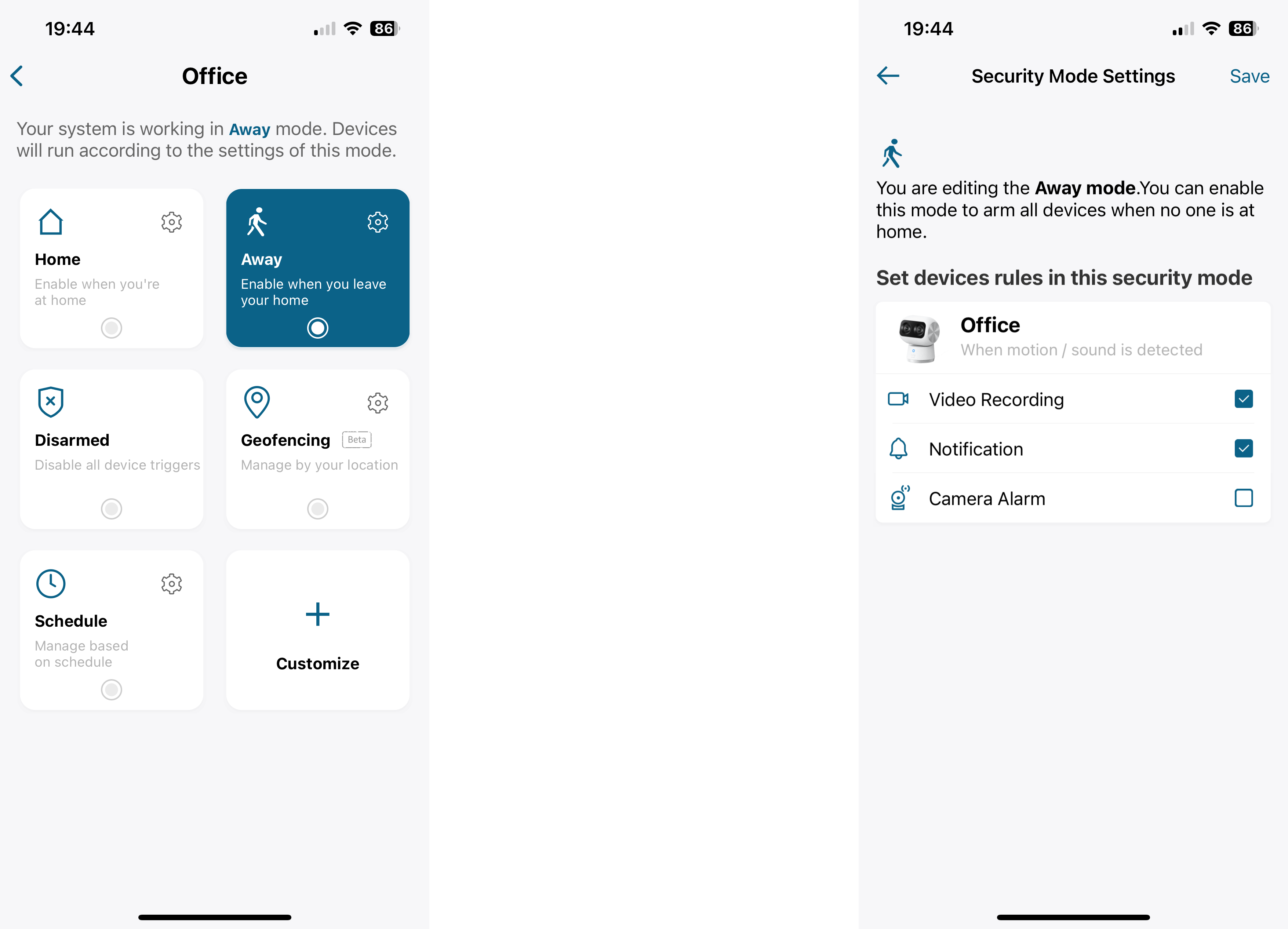
Modes help you choose when the camera is active or not and can be triggered automatically via a schedule or via geofencing. With the latter, multiple devices are supported, so you can have your camera disarm, for example, when one person returns home; the camera only arms when all people leave home.
Google Assistant and Amazon Alexa support are available, and the camera can have its live view streamed to a compatible smart display.
Performance
- Sharp video
- Excellent night vision
- Dual-mode reduces image quality
AI motion tracking is very good on this camera, ably tracking my movements smoothly; other pan-and-tilt cameras that I’ve reviewed have often had a jerky motion that struggles to keep up with movement.
As long as there’s a good source of light (daylight or bright enough ambient lighting), the Eufy Security Indoor Cam S350 is capable of shooting high-quality video. Using the 4K sensor, the image is exceptionally sharp and vibrant, and you can clearly see everything going on. There aren’t any security cameras that can do better.
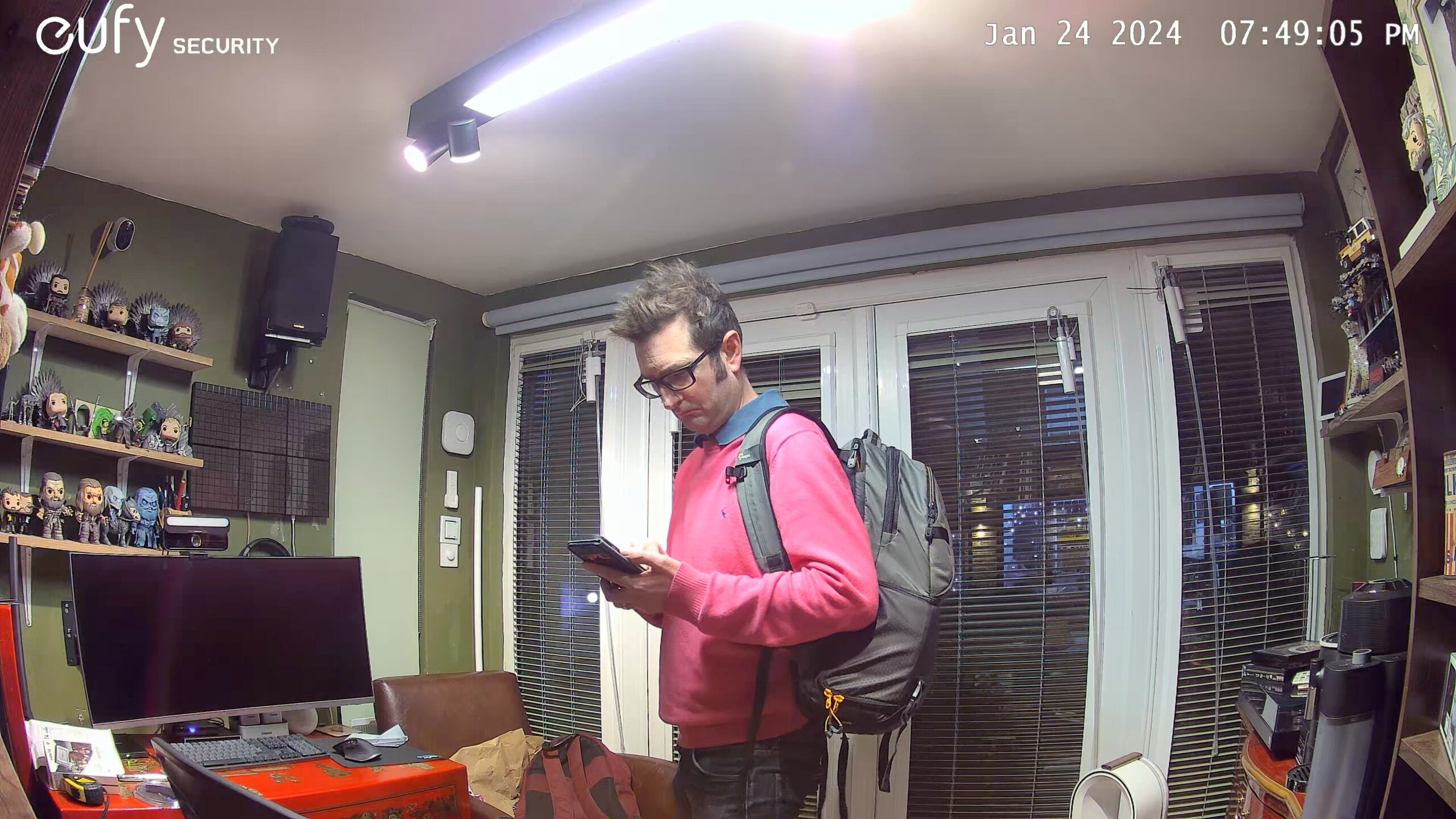
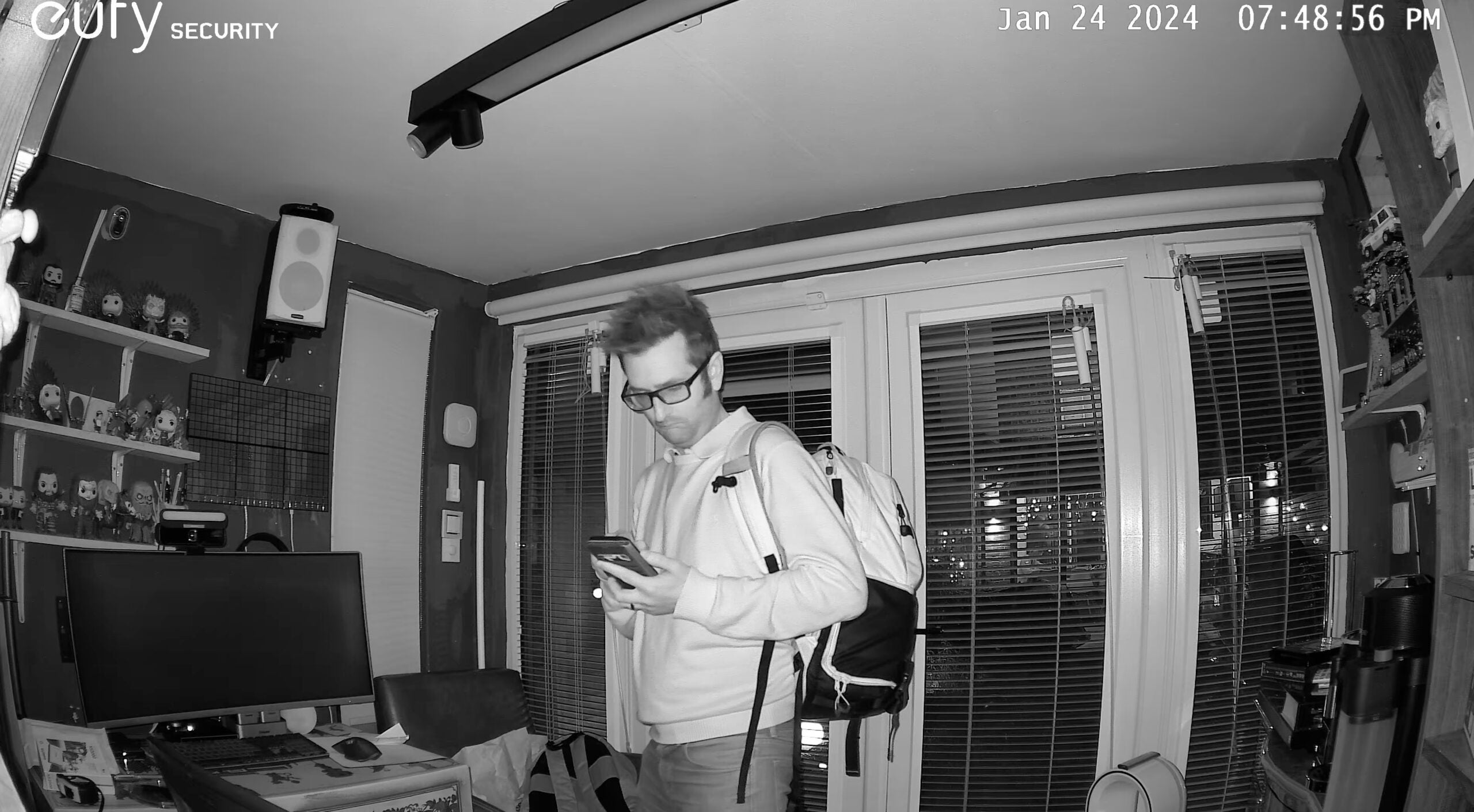
When ambient light drops, the camera switches to IR and shoots in black and white. This mode does make the image a touch softer (you can see that my face loses a little bit of detail), but the high resolution helps counter this effect. Again, image quality is as good as you could possibly expect.
Put the camera into its dual mode, and the two images are compressed into a single video file, which reduces quality. As you can see from the image below, the video gets artefacts, colour accuracy isn’t as good, and the picture just isn’t as sharp. I would not use this mode.
Latest deals
Should you buy it?
You want a security camera that does it all
With two lenses, pan-and-tilt and offline recording, this camera makes it easy to see what’s going on at home.
You want something more basic
If you’re on a tighter budget, a basic, fixed indoor camera will do the trick. Check out our Best Indoor Security Camera guide for more options.
Final Thoughts
The Eufy Security Indoor Cam S350 largely avoids the pitfalls that other motorised pan-and-tilt cameras have by returning to a home position to constantly cover the area you need to monitor. Activity zones and smart detection help keep the number of alerts down. At its best, the 4K footage from this camera is stunning, and not having to pay for cloud storage certainly has its benefits.
However, recording with both cameras at the same time drops the image quality a lot. So are the dual cameras worth it? For recording, no, but for remote monitoring, the cameras give flexibility and let you see more of what’s going on. If that appeals, then this is a top choice. If you want something simpler and more basic, my guide to the best indoor security cameras has more choice.
How we test
Unlike other sites, we test every security camera we review thoroughly over an extended period of time. We use industry standard tests to compare features properly. We’ll always tell you what we find. We never, ever, accept money to review a product.
Find out more about how we test in our ethics policy.
Used as our main security camera for the review period
We test compatibility with the main smart systems (HomeKit, Alexa, Google Assistant, SmartThings, IFTTT and more) to see how easy each camera is to automate.
We take samples during the day and night to see how clear each camera’s video is.
You might like…
FAQs
With this base station you get centralised storage for all Eufy cameras, plus facial recognition.
UK RRP
Manufacturer
Size (Dimensions)
Weight
ASIN
Release Date
First Reviewed Date
Model Number
Resolution
Voice Assistant
Battery Length
Smart assistants
App Control
Camera Type
Mounting option
View Field
Recording option
Two-way audio
Night vision
Light
Motion detection
Activity zones
Object detection
Audio detection
Power source

Verdict
The Eufy Security Indoor Cam S350 pretty much has it all: dual cameras (wide-angle and telephoto), no monthly fees, people and pet detection, a motorised pan-and-tilt system that actually works without limitations, and excellent video quality up to 4K in resolution. Things fall down slightly when using both cameras simultaneously, which reduces overall image quality, but stick to recording with one lens and using the joint cameras for better monitoring and this is a brilliant choice.
Pros
- Excellent 4K image quality
- Clever automated tracking
- No monthly fees
Cons
- Dual view mode reduces image quality
-
TypeThis is an indoor security camera, powered by USB. -
ResolutionThe main camera shoots video at 4K, the secondary telephoto camera at 2K.
Introduction
Motorised pan-and-tilt cameras sound like a good idea, but most models are overly complicated and get the basics wrong.
Adding two cameras into the mix, the Eufy Security Indoor Cam S350 sounds like a recipe for disaster, but a neat app, subscription-free recording and some clever integrated features make this a smart indoor camera that can see everything.
Design and installation
- Dual-camera design
- Powered by USB-C
- Works with the HomeBase 3
If nothing else, the dual cameras of the Eufy Security Indoor Cam S350 give the camera a cute robot-like look that elevates this product from being just another indoor camera.
Fortunately, those dual cameras (one wide-angle and one 3x zoom telephoto) are actually useful and not just part of the design.
As this camera has a 360-degree pan (plus 75-degree tilt), it’s less important where you place it than a camera with a fixed lens, such as the Ring Indoor Cam (2nd Gen).
Here, the camera can be placed on a bookshelf (or the stand can be screwed to a wall), and then the Eufy app can be configured to set up where the camera is looking. Power is via the USB-C connection underneath.
In its default configuration, the camera doesn’t have any onboard storage. To record clips, there are three options. If you don’t want to pay to store video, then there’s a microSD card slot at the rear, which takes cards up to 128GB in size (enough for months of recording in normal use); alternatively, the camera can be connected to a HomeBase 3 (provided it’s within Wi-Fi range).
Home to the Eufy S330 EufyCam wireless cameras, the HomeBase 3 provides its own storage, plus some additional features such as facial recognition that is processed locally. Finally, there is a cloud service, charged at $2.99 a month.
Once plugged in, the Eufy Security app connects the camera to your Wi-Fi. Dual-band Wi-Fi 6 is onboard.
Features
- Single or dual-camera modes
- Remembers its ‘home’ position
- Clever AI tracking
The Eufy Security Indoor Cam S350 manages to overcome many of the pitfalls of other pan and tilt cameras. Of all the problems with these kinds of cameras, the biggest pitfall is not having a home position that the camera returns to.
Here, you can set a default location for the camera, which it returns to automatically after using live view or when motion tracking is turned on. This is an essential feature, as the S350 will move back to cover the area that you want, and there’s no chance that you’ll miss something important because you accidentally left the camera pointing down at the ground.
As well as the default position, additional positions can be selected and then jumped to using the live view option. It’s a neat way to move around a room quickly, say, looking at a door and then a window.
Additionally, the camera can be set to automatically pan around your saved positions, which is handy if you can spot everything you want from a fixed position.
This camera has two lenses and sensors. The primary camera is a 4K wide-angle camera, which can capture most of a room. There’s then a secondary 2K camera, which offers a 3x zoom and is there to capture close-up detail.
In its default configuration, jumping into the live view will default to the 4K camera, with a button used to switch to the 2K camera. With both cameras, the S350 can be remotely panned and tilted to focus on what you find important.
With the default option, the camera will record motion detection from its 4K camera only. If you want to see both video streams, you must turn on the option. This reduces the quality of both cameras to 2K, and stacks them both one above the other. Motion-triggered recordings are stored in the same format.
Ideally, I’d have liked the S350 to have recorded both streams at native resolution, with the playback screen letting me switch between feeds.
To cut down on the number of recordings and alerts you get, the Eufy Security Indoor Cam S350 has a few tricks. Motion sensitivity is one, alongside activity zones, so you can tell the camera to only bother with motion in certain areas.
Again, it’s another reason that a home position is important. Without a home position, the motion zone would move all of the time, and there’d be a good chance that something important would be missed.
More useful yet are the in-built human, pet and all other motion detection options. Select the type of motion that you want to bother with, and the camera will record those only. By switching to people-only detection, I dramatically cut down the number of alerts that I got.
As well as detecting motion, the camera supports AI Tracking, following the subject that triggered the event. Walking into my office, for example, the camera unnervingly follows me around, with the S350 moving smoothly to keep up with motion.
According to the app, AI Tracking limits recordings to 2K, but downloading sample clips, I found that they were all in 4K.
Finding recordings can be a chore using the timeline in the playback screen. Scrolling through manually is tricky, and the process isn’t as smooth as in Ring’s app. There is an event tab, which shows all events from all devices, which is easier to use. Filtering by just the S350, I could move day by day and see thumbnails of each event.
Modes help you choose when the camera is active or not and can be triggered automatically via a schedule or via geofencing. With the latter, multiple devices are supported, so you can have your camera disarm, for example, when one person returns home; the camera only arms when all people leave home.
Google Assistant and Amazon Alexa support are available, and the camera can have its live view streamed to a compatible smart display.
Performance
- Sharp video
- Excellent night vision
- Dual-mode reduces image quality
AI motion tracking is very good on this camera, ably tracking my movements smoothly; other pan-and-tilt cameras that I’ve reviewed have often had a jerky motion that struggles to keep up with movement.
As long as there’s a good source of light (daylight or bright enough ambient lighting), the Eufy Security Indoor Cam S350 is capable of shooting high-quality video. Using the 4K sensor, the image is exceptionally sharp and vibrant, and you can clearly see everything going on. There aren’t any security cameras that can do better.
When ambient light drops, the camera switches to IR and shoots in black and white. This mode does make the image a touch softer (you can see that my face loses a little bit of detail), but the high resolution helps counter this effect. Again, image quality is as good as you could possibly expect.
Put the camera into its dual mode, and the two images are compressed into a single video file, which reduces quality. As you can see from the image below, the video gets artefacts, colour accuracy isn’t as good, and the picture just isn’t as sharp. I would not use this mode.
Latest deals
Should you buy it?
You want a security camera that does it all
With two lenses, pan-and-tilt and offline recording, this camera makes it easy to see what’s going on at home.
You want something more basic
If you’re on a tighter budget, a basic, fixed indoor camera will do the trick. Check out our Best Indoor Security Camera guide for more options.
Final Thoughts
The Eufy Security Indoor Cam S350 largely avoids the pitfalls that other motorised pan-and-tilt cameras have by returning to a home position to constantly cover the area you need to monitor. Activity zones and smart detection help keep the number of alerts down. At its best, the 4K footage from this camera is stunning, and not having to pay for cloud storage certainly has its benefits.
However, recording with both cameras at the same time drops the image quality a lot. So are the dual cameras worth it? For recording, no, but for remote monitoring, the cameras give flexibility and let you see more of what’s going on. If that appeals, then this is a top choice. If you want something simpler and more basic, my guide to the best indoor security cameras has more choice.
How we test
Unlike other sites, we test every security camera we review thoroughly over an extended period of time. We use industry standard tests to compare features properly. We’ll always tell you what we find. We never, ever, accept money to review a product.
Find out more about how we test in our ethics policy.
Used as our main security camera for the review period
We test compatibility with the main smart systems (HomeKit, Alexa, Google Assistant, SmartThings, IFTTT and more) to see how easy each camera is to automate.
We take samples during the day and night to see how clear each camera’s video is.
You might like…
FAQs
With this base station you get centralised storage for all Eufy cameras, plus facial recognition.
UK RRP
Manufacturer
Size (Dimensions)
Weight
ASIN
Release Date
First Reviewed Date
Model Number
Resolution
Voice Assistant
Battery Length
Smart assistants
App Control
Camera Type
Mounting option
View Field
Recording option
Two-way audio
Night vision
Light
Motion detection
Activity zones
Object detection
Audio detection
Power source



