
• Washington DC |
  • New York |
  • Toronto |
  • Distribution: (800) 510 9863
Sunday, May 17, 2026
  • Login
No Result
View All Result
NEWSLETTER
New Edge Times
  • World
  • U.S.
  • Politics
  • Business
  • Science
  • Tech
  • Youth
  • Entertainment
    • All
    • Arts
    • Gaming
    • Movie
    • Music
    Video: ‘Faces of Death’ Confronts Our Viewing Habits

    Video: ‘Faces of Death’ Confronts Our Viewing Habits

    Video: ‘The Devil Wears Prada 2’ | Anatomy of a Scene

    Video: ‘The Devil Wears Prada 2’ | Anatomy of a Scene

    Ye Must Pay Musicians for Using Sample Without Permission

    Ye Must Pay Musicians for Using Sample Without Permission

    Claire Maurier, the Narcissistic Mother in ‘400 Blows,’ Dies at 97

    Claire Maurier, the Narcissistic Mother in ‘400 Blows,’ Dies at 97

    Man Who Stole Unreleased Beyoncé Music Is Sentenced to 5 Years

    Man Who Stole Unreleased Beyoncé Music Is Sentenced to 5 Years

    How Much Art Is Too Much? A Guide to the New York Fairs.

    How Much Art Is Too Much? A Guide to the New York Fairs.

    Kevin Hart Roast: Highlights From Tom Brady, the Rock, Katt Williams and More

    Kevin Hart Roast: Highlights From Tom Brady, the Rock, Katt Williams and More

    Video: Why Are So Many Celebrities Co-Producing On Broadway?

    Video: Why Are So Many Celebrities Co-Producing On Broadway?

    • Gaming
    • Movie
    • Music
    • Arts
  • Sports
  • Lifestyle
    • All
    • Fashion
    • Food
    • Health
    • Travel
    Ibiza before the rush: early island escape

    Ibiza before the rush: early island escape

    Our Summer Cooking List: 24 Fresh Recipes to Seize the Season

    Our Summer Cooking List: 24 Fresh Recipes to Seize the Season

    The Good List: 6 Things to Add Joy to Your Day

    The Good List: 6 Things to Add Joy to Your Day

    Tiny Love Stories: ‘Life Suddenly Made Sense’

    Tiny Love Stories: ‘Life Suddenly Made Sense’

    These Summery Chickpeas Are Coming for Your Potato Salad

    These Summery Chickpeas Are Coming for Your Potato Salad

    Video: How Worried Should We Be About Hantavirus?

    Video: How Worried Should We Be About Hantavirus?

    Cruise Ship Hit by Hantavirus Leaves Canary Islands and Sails Toward Netherlands

    Cruise Ship Hit by Hantavirus Leaves Canary Islands and Sails Toward Netherlands

    A Sheet-Pan Chicken for Peak Asparagus

    A Sheet-Pan Chicken for Peak Asparagus

    • Fashion
    • Food
    • Health
    • Travel
  • Reviews
  • Trending
  • World
  • U.S.
  • Politics
  • Business
  • Science
  • Tech
  • Youth
  • Entertainment
    • All
    • Arts
    • Gaming
    • Movie
    • Music
    Video: ‘Faces of Death’ Confronts Our Viewing Habits

    Video: ‘Faces of Death’ Confronts Our Viewing Habits

    Video: ‘The Devil Wears Prada 2’ | Anatomy of a Scene

    Video: ‘The Devil Wears Prada 2’ | Anatomy of a Scene

    Ye Must Pay Musicians for Using Sample Without Permission

    Ye Must Pay Musicians for Using Sample Without Permission

    Claire Maurier, the Narcissistic Mother in ‘400 Blows,’ Dies at 97

    Claire Maurier, the Narcissistic Mother in ‘400 Blows,’ Dies at 97

    Man Who Stole Unreleased Beyoncé Music Is Sentenced to 5 Years

    Man Who Stole Unreleased Beyoncé Music Is Sentenced to 5 Years

    How Much Art Is Too Much? A Guide to the New York Fairs.

    How Much Art Is Too Much? A Guide to the New York Fairs.

    Kevin Hart Roast: Highlights From Tom Brady, the Rock, Katt Williams and More

    Kevin Hart Roast: Highlights From Tom Brady, the Rock, Katt Williams and More

    Video: Why Are So Many Celebrities Co-Producing On Broadway?

    Video: Why Are So Many Celebrities Co-Producing On Broadway?

    • Gaming
    • Movie
    • Music
    • Arts
  • Sports
  • Lifestyle
    • All
    • Fashion
    • Food
    • Health
    • Travel
    Ibiza before the rush: early island escape

    Ibiza before the rush: early island escape

    Our Summer Cooking List: 24 Fresh Recipes to Seize the Season

    Our Summer Cooking List: 24 Fresh Recipes to Seize the Season

    The Good List: 6 Things to Add Joy to Your Day

    The Good List: 6 Things to Add Joy to Your Day

    Tiny Love Stories: ‘Life Suddenly Made Sense’

    Tiny Love Stories: ‘Life Suddenly Made Sense’

    These Summery Chickpeas Are Coming for Your Potato Salad

    These Summery Chickpeas Are Coming for Your Potato Salad

    Video: How Worried Should We Be About Hantavirus?

    Video: How Worried Should We Be About Hantavirus?

    Cruise Ship Hit by Hantavirus Leaves Canary Islands and Sails Toward Netherlands

    Cruise Ship Hit by Hantavirus Leaves Canary Islands and Sails Toward Netherlands

    A Sheet-Pan Chicken for Peak Asparagus

    A Sheet-Pan Chicken for Peak Asparagus

    • Fashion
    • Food
    • Health
    • Travel
  • Reviews
  • Trending
No Result
View All Result
New Edge Times
No Result
View All Result
Home Reviews

Keychron Q1 Max

by New Edge Times Report
February 5, 2024
in Reviews
Keychron Q1 Max
Share on FacebookShare on Twitter

Verdict

The Keychron Q1 Max is a luxury keyboard entirely made of aluminium, offering welcome keycap curves, ludicrous customisation, and a supremely satisfying typing experience. It’s expensive, but it could very well last a lifetime. It’s a great way to reduce the friction of joining the wild world of custom keyboards.

Pros

  • Heavy aluminum shell
  • Wired, Bluetooth, and 2.4GHz wireless
  • Ultra-satisfying keystrokes

Cons

  • Lighting won’t be for everyone
  • Barebones version is still expensive

  • All-aluminium chassisThe entirely metal chassis means the Keychron Q1 Max comes in at just over 1.7kg. If quality means weight to you, it’s certainly one to consider.

  • Open-source and hot-swappableFully programmable through QMK/VIA and entirely hot-swappable with most popular mechanical switches, it’s easy to tailor the Keychron Q1 Max to your taste.

  • Ultra-satisfying keystrokesHeavy dampening efforts, long travel, and chunky keys go together to create a supremely tactile typing experience.

Introduction

The Keychron Q1 Max keyboard may be more than twice the price of the Keychron K4 that’s served me well, but its undeniable heft, tall and blocky keycaps, and luxuriously satisfying feel ensure that I can’t see myself tiring of it any time soon.

My faithful desktop companion now feels like a cheap toy in comparison. It isn’t. It’s much easier to travel with. But as someone who draws a line between weight and quality, the Keychron Q1 Max ticks all the right boxes.

Design

  • Retro-looking shell
  • 75% size with PGUP, PGDN, and Home
  • Tall, non-adjustable all-metal design

The Keychron Q1 Max follows the recent trend of retro-inspired keyboards. The majority of its keys are a sort of bone-white colour, with anything but the characters and numbers you predominantly press being a very 80s-looking soft grey. Did I mention it weighs a ton? Not literally, but the 1724g heft makes it far heavier than the average keyboard.

The keyboard chassis itself sticks to the colourway of the main cluster of keys, retaining that white (or potentially very light grey) shade across the small visible frame. This is a TKL (tenkeyless) board after all, so its footprint is conveniently compact.
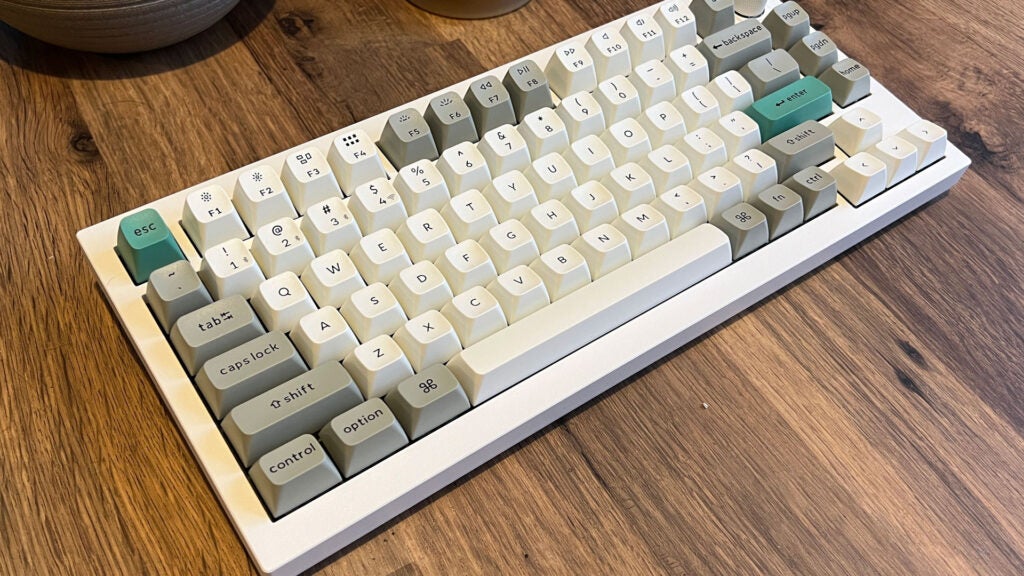
The Keychron Q1 Max keyboard.
Image Credit (Trusted Reviews)

There’s a Carbon Black version as well, but good luck getting your hands on that one. Both feature a small, tall, sturdy knob with plenty of grip. It works as a volume dial and mute button out of the box, but the code-savvy users can get creative with customisation.

Being an enthusiast board by design, the Keychron Q1 Max can be bought with or without the keys mentioned above. No matter the choice, you’ll still get wired use over USB-C, wireless over the included 2.4Ghz receiver, completely port-free use over a 90Hz Bluetooth 5.1 connection, and even a second switch dedicated to flicking it from PC mode to MacOS.

Either package comes with matching keys to go from one OS to another, too, so you won’t be left searching for the Windows key when all you can see is CMD.

Picking barebones over a complete set only saves around £20 – assuming you already have keys and switches on hand to pop straight in. It’s compatible with almost every 3-pin or 5-pin MX switch out there. Entirely hot-swappable, you can pluck out the included Gateron switches in favour of Panda, Kailh, or Cherry switches to name the most prominent of the lot.
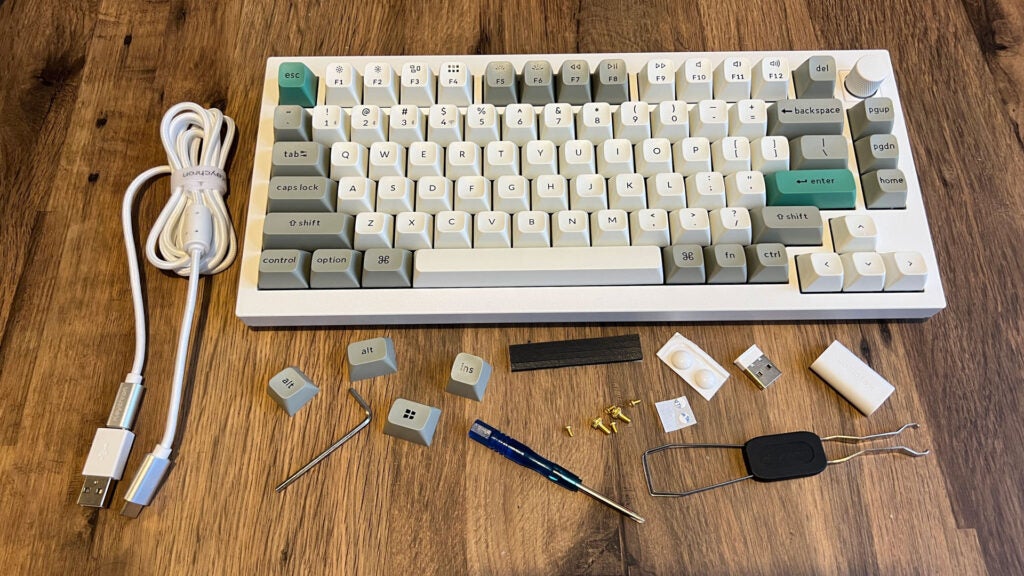
Keychron Q1 Max and its accessories.
Image Credit (Trusted Reviews)

It’s ready to accept whichever artisanal keycaps you might be inspired to seek out and collect after dumping this thick chunk of metal on your desk, or even change up the feel entirely if you decide the included Reds or Browns just aren’t for you.

In the box, which contains largely recyclable materials other than a simple plastic sleeve, is a bunch of included goods. Beyond the few Windows-focused keycaps for you to swap in, there’s a double-sided removal tool for the keycaps and switches, some spare screws, a USB-C 2.4GHz receiver (and a couple of USB adapters), a generously long and braided USB-C cable, and things like replacement rubber feet

Performance

  • 1000Hz polling wired or wireless
  • 90Hz Bluetooth
  • Responsive and tactile typing experience

There’s a lot going on inside the Keychron Q1 Max. With layers of built-in acoustic foam, the tactile typing experience is practically perfect for me, and much quieter than the Pro model that came before.

The high keycaps can take some getting used to, and each being heavily bevelled to lock you into that perfect press can lead to some issues gliding between each key if you’re used to smoother, slimmer keycaps. Persevere and you’ll come to find a reliable typing experience.

Out of the box, a fully assembled Keychron Q1 Max with the Gateron Jupiter Brown switches issues a supremely satisfying “thock” that’s by far the best I’ve experienced in recent memory.
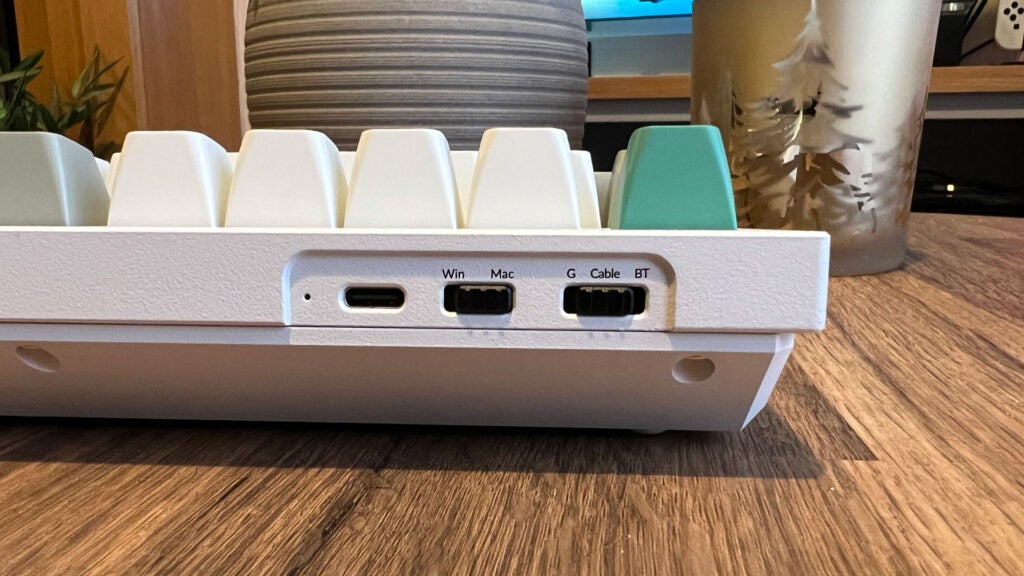
The switches used to toggle modes on the Keychron Q1 Max.
Image Credit (Trusted Reviews)

Keychron stresses that it’s suitable for gaming. And it is. But in the face of hyper-responsive optical switches of something like the Corsair K65 Pro Mini or the ultra-slim keycaps of the Razer DeathStalker V2 Pro, there are certainly better options out there if professional gaming is on your agenda.

2.4Ghz wireless is perfectly acceptable for most players nowadays. In fact, you’ll still benefit from the same 1000Hz polling rate if you do go wireless over wired. But the option to run wired is there.

Key travel and actuation isn’t excessive. You’ll struggle to accidentally push a key while resting your fingers. The overall size of the keys and their stay-in-your-lane contouring might put off anyone who doesn’t need the precise typing experience it offers, which could be detrimental to gameplay.
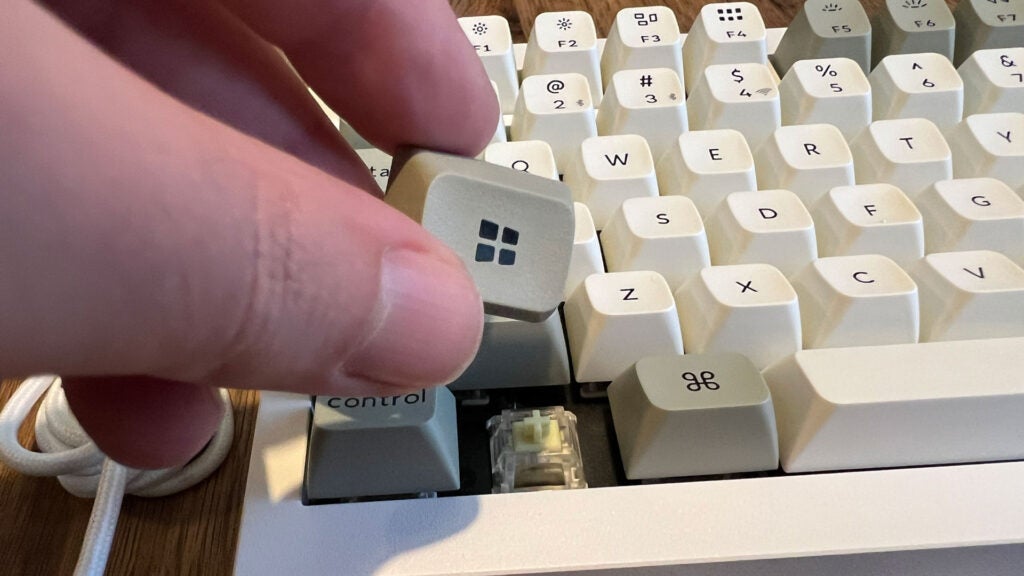
Switching MacOS keycaps out in favour of Windows on the Keychron Q1 Max.
Image Credit (Trusted Reviews)

Despite having two dedicated hardware switches for input type and platform, switching between any of the three Bluetooth devices you can pair with this board is still a cause for some friction if you’re not paying attention. Not only do you need to remember the specific key combination while in Bluetooth mode, but you then need to remember which profile you paired a specific device to.

There’s no real way of getting around the second issue without something like a screen seen in the Asus ROG Azoth, but it would have been nice to have a third switch for toggling between Bluetooth devices and a button to trigger pairing mode. Anything to reduce the friction for the average user, essentially.

Software and lighting

  • Full RGB lighting
  • No software required or available
  • Customisation means coding

Like it or loathe it, the Keychron Q1 Max doesn’t let light shine through the wear-resistant KSA PBT keycaps. They’re too solid. Instead, the RGB lighting simply illuminates the deck itself. You won’t struggle to see which buttons you’re pressing either way, but you won’t get per-key lighting.

Keychron notes that the underglow is south-facing to maximise not how it appears from afar, but so that it’s more easily enjoyed at your usual seated position. It works in practice, but the plastic beneath each key does break it apart somewhat if you look closely.
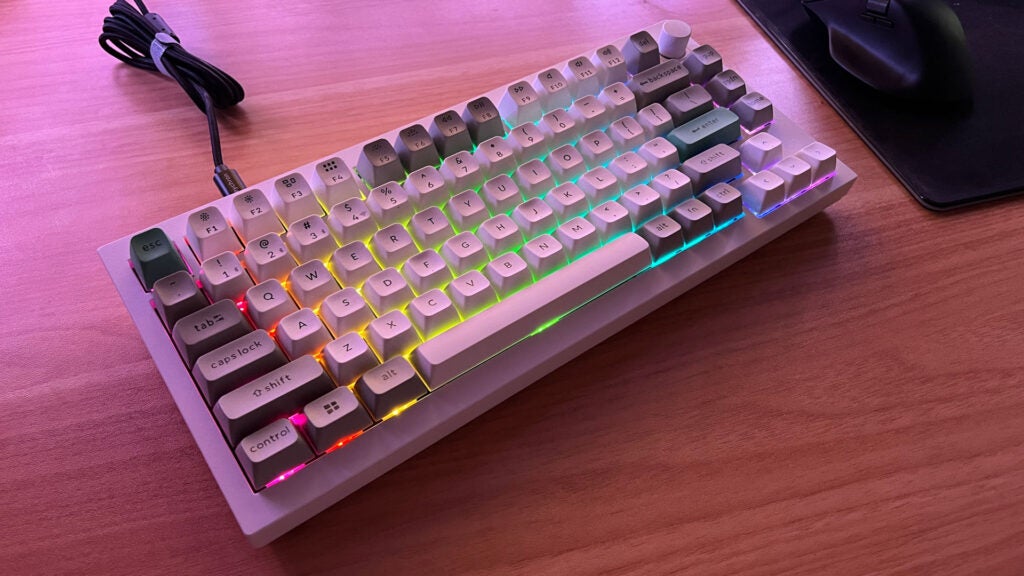
The RGB lighting effects of the Keychron Q1 Max.
Image Credit (Trusted Reviews)

When it comes to lightning effects, you’re stuck with presets unless you’re up for coding your own. If you prefer the plug n’ play appeal, however, you can just as easily make do with the on-board lighting profiles if you make a habit of remembering the specific keystrokes needed to cycle through them. All the usuals are there like wave, rainbow, breathing, cycle, and on-press.

As someone who isn’t all too fussed about taking the time to integrate custom lighting into my ever-changing desk space, it’s always great to have options available out of the box. If you do have the time to tinker – which Keychron rightfully presumes you do with this open-source offering – you can make it your own.

There’s no easy integration with existing APIs like Razer Chroma, and OpenRGB doesn’t appear to recognise it either. Making it tie into any complex setups you already have will be difficult, but it’s possible with the right know-how and persistence.

If you’re big on using the lighting, expect to get around 100 hours out of the 4000mAh battery regardless of which wireless solution you prefer. Without it, you’ll get just shy of double that.

Latest deals

Should you buy it?

You want a ‘board that simply feels fantastic

The Keychron Q1 Max is great out of the box, but can grow with your typing experience or customization interests and is built to last.

You’re a gamer with little need to type longform

Dedicated gaming keyboards can offer a tighter core experience at a slightly lower cost.

Final Thoughts

The Keychron Q1 Max is a keyboard that provides a luxury typing experience, works perfectly out of the box, and offers everything you need to truly make it your own if you’re ready to tinker.

It’s not the best gaming keyboard out there. But never claims to be. The adjustable actuation of the SteelSeries Apex Pro Mini Wireless is a good shout at this size and price range, with the Asus ROG Azoth offering a fun OLED gimmick. But if you work and play with the same board in equal measure, you’ll struggle to find one as satisfying and simple as the Keychron Q1 Max. Check out our Best Keyboard guide for more options.

How we test

We use every keyboard we test for at least a week. During that time, we’ll check it for ease of use, comfort and performance of the switches.

We also check each keyboard’s software to see how easy it is to customise and set up.

Used for numerous weeks for work and play.

Compared to various other keyboards in similar and distant price brackets.

FAQs

Will the Keychron Q1 Max work on Linux?

While it doesn’t directly support Linux with a dedicated mode switch or alternate keycaps, the Keychron Q1 Max is plug n’ play and therefore should work just fine on Linux.

Can the RGB effects of the Keychron Q1 Max be customised?

There’s no easy software solution offered by Keychron to tweak the included RGB profiles, but code-savvy users can perhaps edit the flash custom firmware to achieve this.

Can the angle of the Keychron Q1 Max be changed?

The Keychron Q1 Max doesn’t use retractable or adjustable feet at all. The only way to adjust the typing angle would be to change the switches and keys.

‹

UK RRP

USA RRP

Size (Dimensions)

Weight

Release Date

First Reviewed Date

Switch Type

Keychron Q1 Max

£204

$209

145 x 327.5 x 35.8 MM

1.724 KG

2023

12/01/2024

Mechanical

›

Verdict

The Keychron Q1 Max is a luxury keyboard entirely made of aluminium, offering welcome keycap curves, ludicrous customisation, and a supremely satisfying typing experience. It’s expensive, but it could very well last a lifetime. It’s a great way to reduce the friction of joining the wild world of custom keyboards.

Pros

  • Heavy aluminum shell
  • Wired, Bluetooth, and 2.4GHz wireless
  • Ultra-satisfying keystrokes

Cons

  • Lighting won’t be for everyone
  • Barebones version is still expensive

  • All-aluminium chassisThe entirely metal chassis means the Keychron Q1 Max comes in at just over 1.7kg. If quality means weight to you, it’s certainly one to consider.

  • Open-source and hot-swappableFully programmable through QMK/VIA and entirely hot-swappable with most popular mechanical switches, it’s easy to tailor the Keychron Q1 Max to your taste.

  • Ultra-satisfying keystrokesHeavy dampening efforts, long travel, and chunky keys go together to create a supremely tactile typing experience.

Introduction

The Keychron Q1 Max keyboard may be more than twice the price of the Keychron K4 that’s served me well, but its undeniable heft, tall and blocky keycaps, and luxuriously satisfying feel ensure that I can’t see myself tiring of it any time soon.

My faithful desktop companion now feels like a cheap toy in comparison. It isn’t. It’s much easier to travel with. But as someone who draws a line between weight and quality, the Keychron Q1 Max ticks all the right boxes.

Design

  • Retro-looking shell
  • 75% size with PGUP, PGDN, and Home
  • Tall, non-adjustable all-metal design

The Keychron Q1 Max follows the recent trend of retro-inspired keyboards. The majority of its keys are a sort of bone-white colour, with anything but the characters and numbers you predominantly press being a very 80s-looking soft grey. Did I mention it weighs a ton? Not literally, but the 1724g heft makes it far heavier than the average keyboard.

The keyboard chassis itself sticks to the colourway of the main cluster of keys, retaining that white (or potentially very light grey) shade across the small visible frame. This is a TKL (tenkeyless) board after all, so its footprint is conveniently compact.

The Keychron Q1 Max keyboard.
Image Credit (Trusted Reviews)

There’s a Carbon Black version as well, but good luck getting your hands on that one. Both feature a small, tall, sturdy knob with plenty of grip. It works as a volume dial and mute button out of the box, but the code-savvy users can get creative with customisation.

Being an enthusiast board by design, the Keychron Q1 Max can be bought with or without the keys mentioned above. No matter the choice, you’ll still get wired use over USB-C, wireless over the included 2.4Ghz receiver, completely port-free use over a 90Hz Bluetooth 5.1 connection, and even a second switch dedicated to flicking it from PC mode to MacOS.

Either package comes with matching keys to go from one OS to another, too, so you won’t be left searching for the Windows key when all you can see is CMD.

Picking barebones over a complete set only saves around £20 – assuming you already have keys and switches on hand to pop straight in. It’s compatible with almost every 3-pin or 5-pin MX switch out there. Entirely hot-swappable, you can pluck out the included Gateron switches in favour of Panda, Kailh, or Cherry switches to name the most prominent of the lot.

Keychron Q1 Max and its accessories.
Image Credit (Trusted Reviews)

It’s ready to accept whichever artisanal keycaps you might be inspired to seek out and collect after dumping this thick chunk of metal on your desk, or even change up the feel entirely if you decide the included Reds or Browns just aren’t for you.

In the box, which contains largely recyclable materials other than a simple plastic sleeve, is a bunch of included goods. Beyond the few Windows-focused keycaps for you to swap in, there’s a double-sided removal tool for the keycaps and switches, some spare screws, a USB-C 2.4GHz receiver (and a couple of USB adapters), a generously long and braided USB-C cable, and things like replacement rubber feet

Performance

  • 1000Hz polling wired or wireless
  • 90Hz Bluetooth
  • Responsive and tactile typing experience

There’s a lot going on inside the Keychron Q1 Max. With layers of built-in acoustic foam, the tactile typing experience is practically perfect for me, and much quieter than the Pro model that came before.

The high keycaps can take some getting used to, and each being heavily bevelled to lock you into that perfect press can lead to some issues gliding between each key if you’re used to smoother, slimmer keycaps. Persevere and you’ll come to find a reliable typing experience.

Out of the box, a fully assembled Keychron Q1 Max with the Gateron Jupiter Brown switches issues a supremely satisfying “thock” that’s by far the best I’ve experienced in recent memory.

The switches used to toggle modes on the Keychron Q1 Max.
Image Credit (Trusted Reviews)

Keychron stresses that it’s suitable for gaming. And it is. But in the face of hyper-responsive optical switches of something like the Corsair K65 Pro Mini or the ultra-slim keycaps of the Razer DeathStalker V2 Pro, there are certainly better options out there if professional gaming is on your agenda.

2.4Ghz wireless is perfectly acceptable for most players nowadays. In fact, you’ll still benefit from the same 1000Hz polling rate if you do go wireless over wired. But the option to run wired is there.

Key travel and actuation isn’t excessive. You’ll struggle to accidentally push a key while resting your fingers. The overall size of the keys and their stay-in-your-lane contouring might put off anyone who doesn’t need the precise typing experience it offers, which could be detrimental to gameplay.

Switching MacOS keycaps out in favour of Windows on the Keychron Q1 Max.
Image Credit (Trusted Reviews)

Despite having two dedicated hardware switches for input type and platform, switching between any of the three Bluetooth devices you can pair with this board is still a cause for some friction if you’re not paying attention. Not only do you need to remember the specific key combination while in Bluetooth mode, but you then need to remember which profile you paired a specific device to.

There’s no real way of getting around the second issue without something like a screen seen in the Asus ROG Azoth, but it would have been nice to have a third switch for toggling between Bluetooth devices and a button to trigger pairing mode. Anything to reduce the friction for the average user, essentially.

Software and lighting

  • Full RGB lighting
  • No software required or available
  • Customisation means coding

Like it or loathe it, the Keychron Q1 Max doesn’t let light shine through the wear-resistant KSA PBT keycaps. They’re too solid. Instead, the RGB lighting simply illuminates the deck itself. You won’t struggle to see which buttons you’re pressing either way, but you won’t get per-key lighting.

Keychron notes that the underglow is south-facing to maximise not how it appears from afar, but so that it’s more easily enjoyed at your usual seated position. It works in practice, but the plastic beneath each key does break it apart somewhat if you look closely.

The RGB lighting effects of the Keychron Q1 Max.
Image Credit (Trusted Reviews)

When it comes to lightning effects, you’re stuck with presets unless you’re up for coding your own. If you prefer the plug n’ play appeal, however, you can just as easily make do with the on-board lighting profiles if you make a habit of remembering the specific keystrokes needed to cycle through them. All the usuals are there like wave, rainbow, breathing, cycle, and on-press.

As someone who isn’t all too fussed about taking the time to integrate custom lighting into my ever-changing desk space, it’s always great to have options available out of the box. If you do have the time to tinker – which Keychron rightfully presumes you do with this open-source offering – you can make it your own.

There’s no easy integration with existing APIs like Razer Chroma, and OpenRGB doesn’t appear to recognise it either. Making it tie into any complex setups you already have will be difficult, but it’s possible with the right know-how and persistence.

If you’re big on using the lighting, expect to get around 100 hours out of the 4000mAh battery regardless of which wireless solution you prefer. Without it, you’ll get just shy of double that.

Latest deals

Should you buy it?

You want a ‘board that simply feels fantastic

The Keychron Q1 Max is great out of the box, but can grow with your typing experience or customization interests and is built to last.

You’re a gamer with little need to type longform

Dedicated gaming keyboards can offer a tighter core experience at a slightly lower cost.

Final Thoughts

The Keychron Q1 Max is a keyboard that provides a luxury typing experience, works perfectly out of the box, and offers everything you need to truly make it your own if you’re ready to tinker.

It’s not the best gaming keyboard out there. But never claims to be. The adjustable actuation of the SteelSeries Apex Pro Mini Wireless is a good shout at this size and price range, with the Asus ROG Azoth offering a fun OLED gimmick. But if you work and play with the same board in equal measure, you’ll struggle to find one as satisfying and simple as the Keychron Q1 Max. Check out our Best Keyboard guide for more options.

How we test

We use every keyboard we test for at least a week. During that time, we’ll check it for ease of use, comfort and performance of the switches.

We also check each keyboard’s software to see how easy it is to customise and set up.

Used for numerous weeks for work and play.

Compared to various other keyboards in similar and distant price brackets.

FAQs

Will the Keychron Q1 Max work on Linux?

While it doesn’t directly support Linux with a dedicated mode switch or alternate keycaps, the Keychron Q1 Max is plug n’ play and therefore should work just fine on Linux.

Can the RGB effects of the Keychron Q1 Max be customised?

There’s no easy software solution offered by Keychron to tweak the included RGB profiles, but code-savvy users can perhaps edit the flash custom firmware to achieve this.

Can the angle of the Keychron Q1 Max be changed?

The Keychron Q1 Max doesn’t use retractable or adjustable feet at all. The only way to adjust the typing angle would be to change the switches and keys.

‹

UK RRP

USA RRP

Size (Dimensions)

Weight

Release Date

First Reviewed Date

Switch Type

Keychron Q1 Max

£204

$209

145 x 327.5 x 35.8 MM

1.724 KG

2023

12/01/2024

Mechanical

›

Previous Post

Goodbye Mostly Mozart, Hello Festival Orchestra of Lincoln Center

Next Post

BGMI-owner Krafton India launches pre-registration for Garuda Saga, its debut Indian-themed game

Related Posts

Hoover HF6 TurboSense Review
Reviews

Hoover HF6 TurboSense Review

by New Edge Times Report
May 4, 2026
JBL Charge 6 Review
Reviews

JBL Charge 6 Review

by New Edge Times Report
May 1, 2026
Stihl ASA 20 Cordless Secateurs Review: Pruning made much easier
Reviews

Stihl ASA 20 Cordless Secateurs Review: Pruning made much easier

by New Edge Times Report
May 1, 2026
Leave Comment
New Edge Times

© 2025 New Edge Times or its affiliated companies. All rights reserved.

Navigate Site

  • About
  • Advertise
  • Terms & Conditions
  • Privacy Policy
  • Disclaimer
  • Contact

Follow Us

No Result
View All Result
  • World
  • U.S.
  • Politics
  • Business
  • Science
  • Tech
  • Youth
  • Entertainment
    • Gaming
    • Movie
    • Music
    • Arts
  • Sports
  • Lifestyle
    • Fashion
    • Food
    • Health
    • Travel
  • Reviews
  • Trending

© 2025 New Edge Times or its affiliated companies. All rights reserved.

Welcome Back!

Login to your account below

Forgotten Password?

Retrieve your password

Please enter your username or email address to reset your password.

Log In
