





Verdict
For £500, the Vivobook 15 has much to offer, including a good keyboard, impressive speakers and high-end build quality and design, but the display is poor even for a laptop at this price point.
Pros
- High-quality keyboard
- Good speaker system
- Strong value
Cons
- Subpar TN display
- No keyboard backlight
- Disappointing battery life
-
Basic TN panelTN offers little colour, inferior contrast and bad chromatic shift leading to very narrow viewing angles -
Solid designLooks and feels like it should cost much more than it does, despite plastic build -
Quality keyboard and speakersThe Vivobook 15 has an excellent keyboard and decent speakers
Introduction
The Asus Vivobook 15 is an effort to deliver a fully-functioning full-sized 15.6-inch laptop for under £500. Now at this price, you could be forgiven for thinking that you have to make do with a wretched lump of ugly tat, but the Vivobook 15 gives little way in terms of style and build quality to laptops costing considerably more.
For this sort of money, you don’t expect US MIL-STD-810H military-grade resistance to shock and particle ingress, a 6GHz Wi-Fi 6E radio, or a look that suggests considered and careful design rather than off-the-shelf white label blandness. But the Asus Vivobook 15 delivers all those things.
So, is there a fly in the ointment? According to Asus, the Vivobook is available with three types of display, all 15.6-inch, 1,920 x 1,080, and 60Hz, but in a crucial way, one of them is not like the other two. And that’s the one that came fitted to my review unit. Let’s dive in.
Design and Keyboard
- Looks like it should cost more
- The keyboard is solid and expansive
- No keyboard backlight
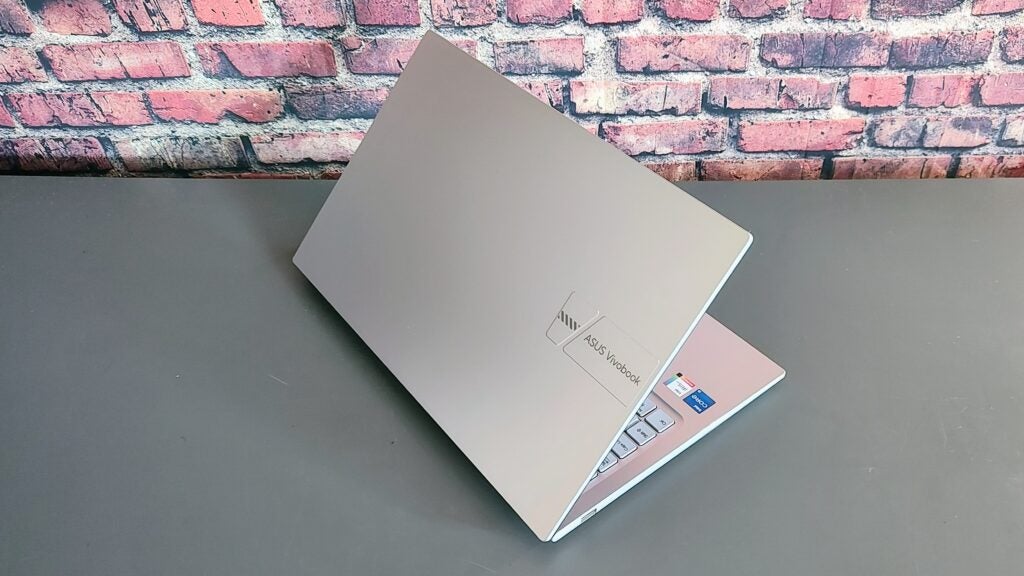
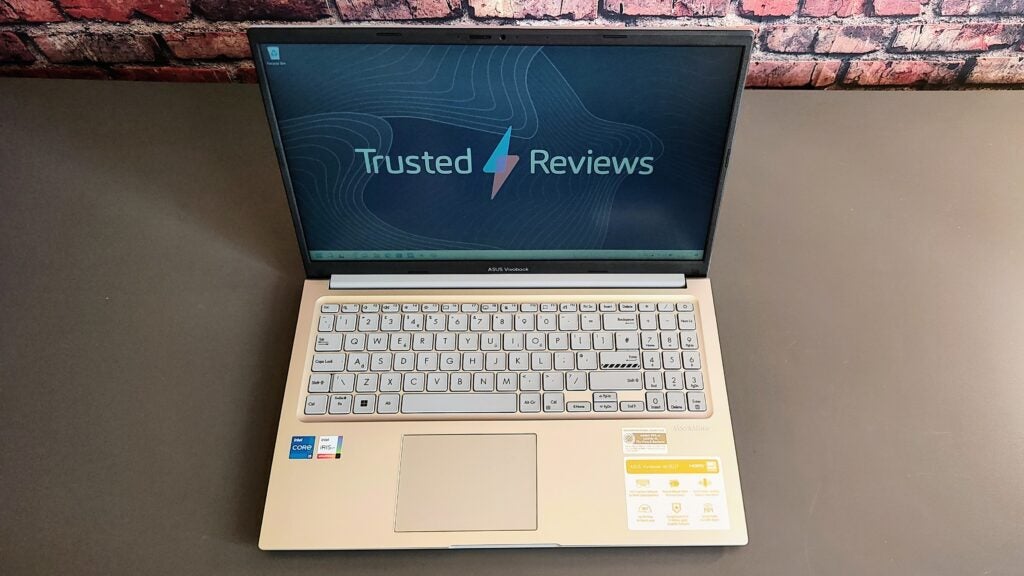
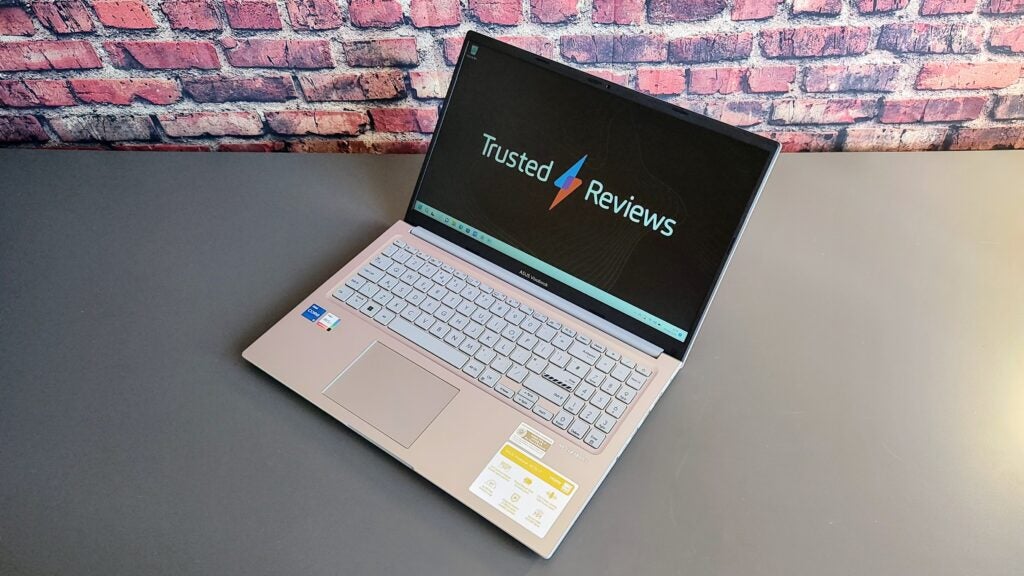
For a cheap laptop, the Vivobook 15 is really quite a looker. Sadly, the attractive blue and beige colourways that Asus offers in some markets are not UK-bound but the all-silver paint job gives it a modern and clean look. Perhaps more importantly, doesn’t show greasy fingerprints. The case is plastic but feels surprisingly solid and the lid doesn’t have too much flex in it. It looks and feels like it should cost much more than it does, and you can’t ask for much more at £500.
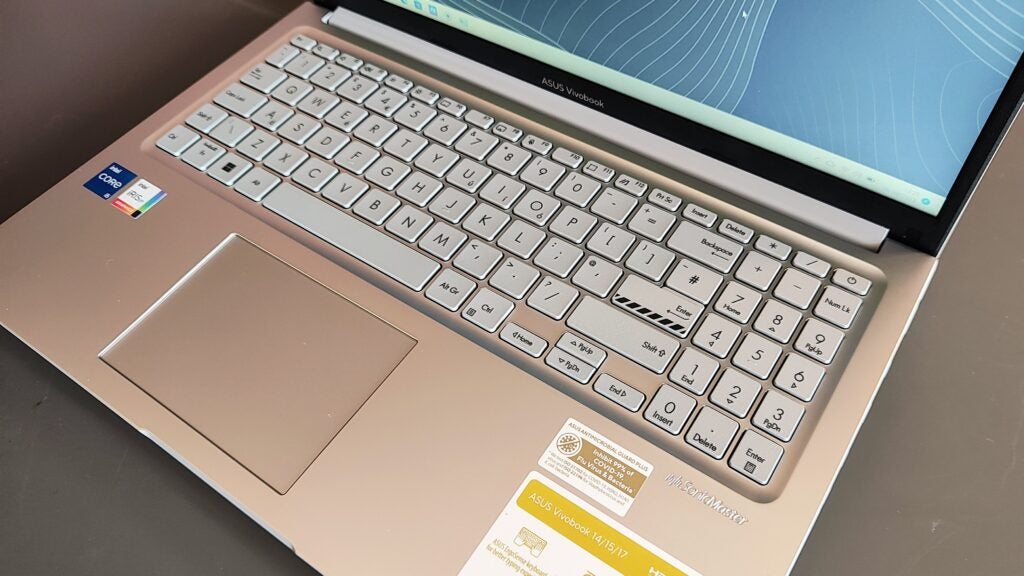
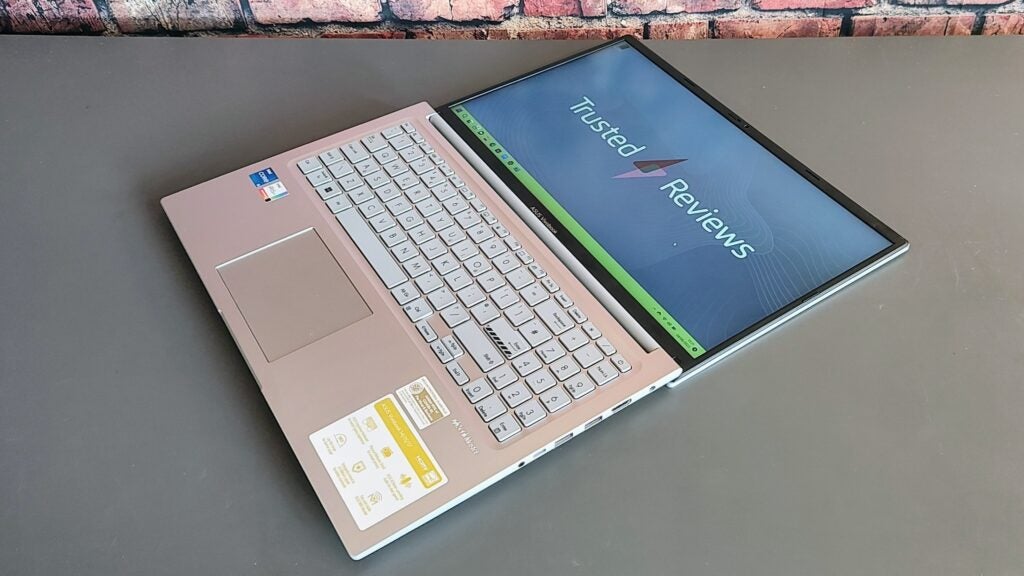
A design touch I like is the faux carbon fibre covering on the screen bezels. It looks snazzy and is pleasant to the touch. The bezels are slender, measuring 8mm at the sides, 12mm at the top and 16mm at the bottom. The display folds back all the way to 180°, and the hinge feels exceptionally robust. At 360 x 233 x 18mm and 1.7kg the Vivobook 15 is relatively light and compact for a full-sized laptop.
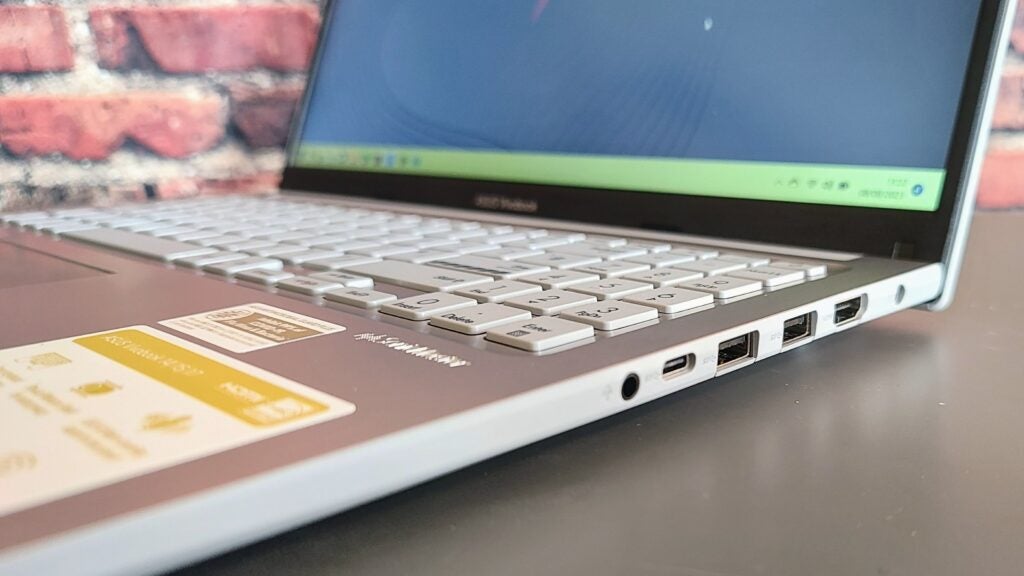
Asus hasn’t skimped on the I/O ports with two USB-A 3.2 Gen 1, one USB-A 2.0 and one Type-C 3.2 Gen 1 port. There’s also an HDMI 1.4 video output and a 3.5mm audio jack. The Type-C port doesn’t support DP Alt Mode video output or power input, so you are stuck with a 45W barrel-pin DC charger.
The physical layout of the ports is less than ideal, with everything other than the USB-A 2.0 port clustered together on the right side of the body.
The keyboard is undoubtedly one of the Vivobook’s strengths. First, it is impressively solid, and the keys themselves have a nicely weighted 1.4mm travel with a positive end-stop. The black-on-grey colour scheme makes it very legible. And there is a 75% width numeric keyboard.
The only slight negative points are the absence of a backlight – not a massive surprise at this price point – and the half-height arrow keys, but you learn to live with those.
The 105 x 75mm touchpad isn’t the biggest you’ll ever find on a 15.6-inch laptop, but it behaves impeccably, and the click-actions at the corner are perfectly damped.
Taking the base off the Vivobook 15 is a painless operation, and once inside, you can swap out the 2280 PCIe 4 SSD and replace the 8GB RAM card in the one free slot, the other 8GB being soldered to the motherboard. The wireless card is also easy to access, and surprisingly, the MediaTek card supports the 6GHz Wi-Fi 6E wavelength.
Asus makes no lofty claims about the environmental impact of the Vivobook 15, but the packaging is entirely cardboard with no plastic or styrofoam inserts, making it easier to recycle.
Display and Sound
- The display is colourless, and viewing angles are very narrow
- Colour gamut coverage is meagre
- Maximum brightness is good, but the contrast ratio is low
Asus’ product page for the Vivobook 15 lists three types of display for the X1504 Vivobook 15, and only two of them are described as IPS-Level. Checking the manufacturer code of the panel (BOE NT156FHM-N63) with a few wholesalers, I discovered that my machine has a TN rather than an IPS display.
Typical traits of TN panels include abysmal contrast ratios and severely limited viewing angles. And so it proved on the Asus Vivobook 15. Unless you look directly at the screen, square-on, you will notice a lot of chromatic shift. Angle the screen even a few degrees and the washout is laughable.
Colour gamuts are very narrow, with just 52.2% sRGB covered, along with 36.2% DCI-P3 and 36.2% Adobe RGB. With so little colour available, the Delta E accuracy score was never going to be good, and it wasn’t, registering at an excessive 6 against the sRGB profile in Vivid mode. In Standard mode, it is even worse at 7.1.
Peak brightness came out at 293nits, which is not too bad, but thanks to a very high black luminance of 0.97, the contrast ratio is a very low 300:1. Looking for a positive, at least the matte finish keeps reflections at bay.
The stereo speakers are not what I’d call loud, but the sound they make is enjoyable, with a helpful amount of slightly woolly bass and good definition across the entire soundscape. There’s absolutely no distortion in evidence, either.
The webcam is a basic 720p affair but was brighter and sharper than many others of a similar spec I’ve encountered on more expensive laptops. The images it creates are a little colourless, but even allowing for that, I’d still describe the performance as good. It even has a physical privacy shutter.
There’s no support for Windows Hell IR facial recognition, nor is there a fingerprint scanner.
Performance
- More than enough power for general everyday use
- Never gets loud or hot
- Minimal gaming capability
The Core i5-1235U processor inside the Vivobook 15 is a 10-core chip from the Alder Lake 12th generation and has 8 efficiency cores and 2 performance cores, and a TDP of 15W. It is combined with Intel’s integrated Xe graphics chip, 16GB of dual-channel DDR4 RAM and a PCIe 3 512GB SSD.
None of those facts suggests a high level of performance but should prove sufficient for day-to-day use, and the good news is that the Vivobook 15 can run everyday productivity and entrainment tasks without signs of strain or delay. Running a couple of dozen Chrome tabs and a video in VLC didn’t cause any problems, nor did editing some sizeable RAW image files in GIMP.
The benchmark results underlined that the U-series processors are intended for light workloads on the go, but they were not a million miles off the scores returned by the significantly more expensive LG Gram SuperSlim, which runs a P-series Raptor Lake processor.
With a 3DMark Time Spy score of just 1,181, gaming is limited to lightweight titles downloaded from the Microsoft Store, but that should come as no surprise.
Thanks to the low TDP of the processor, there were no issues with thermal throttling, and the fan seldom had to spin up to full speed. The noise wasn’t remotely intrusive even when the cooling system ran full-chat.
The SSD inside isn’t going to win any prizes for speed with average sequential read and write speeds of 3,044MB/s and 1,643MB/s, respectively but given that the motherboard interfaces are all PCIe 3 spec, that’s not an unduly poor showing for a budget laptop.
Software
- Anti-virus bloat comes preloaded
- MyAsus app is largely pointless on a cheap laptop
Asus bundles the usual bloat on the Vivobook 15, including McAfee security which will pester you for a subscription that you don’t need until you bite the bullet and uninstall it. A few Microsoft Store apps like Spotify and Instagram also come pre-loaded but removing them is the work of a moment.
The MyAsus app lets you modify the display colour settings, the sound profiles and how the AI noise-cancelling mics work. You can also adjust the fan profiles. Some of the user-adjustability is worth having on more expensive machines that are intended for more demanding use, but on an entry-level laptop like the Vivobook 15, they are a little pointless: Adjusting the colour profile from Standard to Vivid on a display this bad is like rearranging the deckchairs on the Titanic.
Battery Life
- 42Wh is not a lot for a 15.6-inch laptop
- 6 hours 45 in the PC Mark 10 Modern Office battery test
The Vivobook may have a low-power CPU, but it also has a small 42Wh battery, so the PCMark10 Modern Office benchmark only took a modest 6 hours 45 to drain a full charge. In less demanding use, you may be able to get close to the eight-hour mark but don’t depend on it.
Asus claims that the bundled 45W charger can charge a low battery to 60% capacity in as little as 49 minutes, which I found to be more or less accurate, but I’m still not sure that’s really fast enough to boast about.
Latest deals
Should you buy it?
You’re on a tight sub-£600 budget
The price is right, and it looks and feels like a laptop with a price sticker closer to £1,000 than £500. If you are after something for general PC duties, web browsing and basic productivity, it’s a good choice because those jobs don’t highlight the poor display.
You want a decent modern display
The lousy contrast, chromatic shift and general absence of colour make looking at anything colourful on the screen a depressing experience. You will never get the image quality of an OLED panel for £500, but you should expect better than this.
Final Thoughts
It’s all about the display. If you can find the Vivobook 15 with the IPS display option, even if the price is closer to £600, then it’s an immediate and unqualified recommendation because everything else is impressive for the money, from the keyboard to the speakers, to the Wi-Fi 6E modem and from the design and build to the user-upgrade options. But the simple fact is that the thing you use the most on a laptop is the screen, so it has to be up to snuff, and the TN panel on this Vivobook 15 simple is not.
The situation is not made any easier by Asus’ confusing product offering. All told, there are 5 versions of the Vivobook 15 X1504 available in the UK with either Core i5 or Core i7 processors and ranging in price from £459 (as tested but with the i5-1235U CPU and 8GB of RAM) to £800 for the Core i7 model. However, it’s nigh-on impossible to determine which is the TN or the IPS display.
Of course, low-rent displays and mediocre battery run times are not uncommon at the bottom end of the market. The Acer Aspire 5 runs on the same CPU as the Vivobook and suffers many of the same problems despite costing a couple of hundred quid more, while Microsoft’s Surface Laptop Go 2 doesn’t even offer a Full HD resolution. It’s all a bit of a shame because if the Vivobook had a half-decent display, I’d rate it as one of the finest budget laptops on the market.
How we test
Every laptop we review goes through a series of uniform checks designed to gauge key things, including build quality, performance, screen quality and battery life.
These include formal synthetic benchmarks and scripted tests, plus a series of real-world checks.
We used as our main laptop for at least a week.
Tested the performance via both benchmark tests and real-world use.
We tested the screen with a colorimeter and real-world use.
We tested the battery with a benchmark test and real-world use.
FAQs
That all depends on what display you choose. With an IPS display, the Vivobook is one of the best budget 15.6-inch laptops on the market, but the TN display is a poor alternative lacking colour, contrast and with narrow viewing angles. Make sure you choose the right one.
For a budget notebook, the Vivobook 15 is both stylish and well-made and should give you many years of reliable service. The Vivobook also has MIL-STD 810H US military-grade standard resistance to shock, vibration and particle ingress, and you can upgrade the SSD and the RAM after purchase.
Trusted Reviews test data
PCMark 10
Cinebench R23 multi core
Cinebench R23 single core
Geekbench 5 single core
Geekbench 5 multi core
Geekbench 6 single core
Geekbench 6 multi core
3DMark Time Spy
CrystalDiskMark Read speed
CrystalDiskMark Write Speed
Brightness (SDR)
Black level
Contrast ratio
sRGB
Adobe RGB
DCI-P3
PCMark Battery (office)
UK RRP
CPU
Manufacturer
Screen Size
Storage Capacity
Front Camera
Battery
Battery Hours
Size (Dimensions)
Weight
ASIN
Operating System
Release Date
First Reviewed Date
Model Number
Resolution
Refresh Rate
Ports
GPU
RAM
Connectivity
Colours
Display Technology
Screen Technology
Touch Screen
Convertible?

Verdict
For £500, the Vivobook 15 has much to offer, including a good keyboard, impressive speakers and high-end build quality and design, but the display is poor even for a laptop at this price point.
Pros
- High-quality keyboard
- Good speaker system
- Strong value
Cons
- Subpar TN display
- No keyboard backlight
- Disappointing battery life
-
Basic TN panelTN offers little colour, inferior contrast and bad chromatic shift leading to very narrow viewing angles -
Solid designLooks and feels like it should cost much more than it does, despite plastic build -
Quality keyboard and speakersThe Vivobook 15 has an excellent keyboard and decent speakers
Introduction
The Asus Vivobook 15 is an effort to deliver a fully-functioning full-sized 15.6-inch laptop for under £500. Now at this price, you could be forgiven for thinking that you have to make do with a wretched lump of ugly tat, but the Vivobook 15 gives little way in terms of style and build quality to laptops costing considerably more.
For this sort of money, you don’t expect US MIL-STD-810H military-grade resistance to shock and particle ingress, a 6GHz Wi-Fi 6E radio, or a look that suggests considered and careful design rather than off-the-shelf white label blandness. But the Asus Vivobook 15 delivers all those things.
So, is there a fly in the ointment? According to Asus, the Vivobook is available with three types of display, all 15.6-inch, 1,920 x 1,080, and 60Hz, but in a crucial way, one of them is not like the other two. And that’s the one that came fitted to my review unit. Let’s dive in.
Design and Keyboard
- Looks like it should cost more
- The keyboard is solid and expansive
- No keyboard backlight
For a cheap laptop, the Vivobook 15 is really quite a looker. Sadly, the attractive blue and beige colourways that Asus offers in some markets are not UK-bound but the all-silver paint job gives it a modern and clean look. Perhaps more importantly, doesn’t show greasy fingerprints. The case is plastic but feels surprisingly solid and the lid doesn’t have too much flex in it. It looks and feels like it should cost much more than it does, and you can’t ask for much more at £500.
A design touch I like is the faux carbon fibre covering on the screen bezels. It looks snazzy and is pleasant to the touch. The bezels are slender, measuring 8mm at the sides, 12mm at the top and 16mm at the bottom. The display folds back all the way to 180°, and the hinge feels exceptionally robust. At 360 x 233 x 18mm and 1.7kg the Vivobook 15 is relatively light and compact for a full-sized laptop.
Asus hasn’t skimped on the I/O ports with two USB-A 3.2 Gen 1, one USB-A 2.0 and one Type-C 3.2 Gen 1 port. There’s also an HDMI 1.4 video output and a 3.5mm audio jack. The Type-C port doesn’t support DP Alt Mode video output or power input, so you are stuck with a 45W barrel-pin DC charger.
The physical layout of the ports is less than ideal, with everything other than the USB-A 2.0 port clustered together on the right side of the body.
The keyboard is undoubtedly one of the Vivobook’s strengths. First, it is impressively solid, and the keys themselves have a nicely weighted 1.4mm travel with a positive end-stop. The black-on-grey colour scheme makes it very legible. And there is a 75% width numeric keyboard.
The only slight negative points are the absence of a backlight – not a massive surprise at this price point – and the half-height arrow keys, but you learn to live with those.
The 105 x 75mm touchpad isn’t the biggest you’ll ever find on a 15.6-inch laptop, but it behaves impeccably, and the click-actions at the corner are perfectly damped.
Taking the base off the Vivobook 15 is a painless operation, and once inside, you can swap out the 2280 PCIe 4 SSD and replace the 8GB RAM card in the one free slot, the other 8GB being soldered to the motherboard. The wireless card is also easy to access, and surprisingly, the MediaTek card supports the 6GHz Wi-Fi 6E wavelength.
Asus makes no lofty claims about the environmental impact of the Vivobook 15, but the packaging is entirely cardboard with no plastic or styrofoam inserts, making it easier to recycle.
Display and Sound
- The display is colourless, and viewing angles are very narrow
- Colour gamut coverage is meagre
- Maximum brightness is good, but the contrast ratio is low
Asus’ product page for the Vivobook 15 lists three types of display for the X1504 Vivobook 15, and only two of them are described as IPS-Level. Checking the manufacturer code of the panel (BOE NT156FHM-N63) with a few wholesalers, I discovered that my machine has a TN rather than an IPS display.
Typical traits of TN panels include abysmal contrast ratios and severely limited viewing angles. And so it proved on the Asus Vivobook 15. Unless you look directly at the screen, square-on, you will notice a lot of chromatic shift. Angle the screen even a few degrees and the washout is laughable.
Colour gamuts are very narrow, with just 52.2% sRGB covered, along with 36.2% DCI-P3 and 36.2% Adobe RGB. With so little colour available, the Delta E accuracy score was never going to be good, and it wasn’t, registering at an excessive 6 against the sRGB profile in Vivid mode. In Standard mode, it is even worse at 7.1.
Peak brightness came out at 293nits, which is not too bad, but thanks to a very high black luminance of 0.97, the contrast ratio is a very low 300:1. Looking for a positive, at least the matte finish keeps reflections at bay.
The stereo speakers are not what I’d call loud, but the sound they make is enjoyable, with a helpful amount of slightly woolly bass and good definition across the entire soundscape. There’s absolutely no distortion in evidence, either.
The webcam is a basic 720p affair but was brighter and sharper than many others of a similar spec I’ve encountered on more expensive laptops. The images it creates are a little colourless, but even allowing for that, I’d still describe the performance as good. It even has a physical privacy shutter.
There’s no support for Windows Hell IR facial recognition, nor is there a fingerprint scanner.
Performance
- More than enough power for general everyday use
- Never gets loud or hot
- Minimal gaming capability
The Core i5-1235U processor inside the Vivobook 15 is a 10-core chip from the Alder Lake 12th generation and has 8 efficiency cores and 2 performance cores, and a TDP of 15W. It is combined with Intel’s integrated Xe graphics chip, 16GB of dual-channel DDR4 RAM and a PCIe 3 512GB SSD.
None of those facts suggests a high level of performance but should prove sufficient for day-to-day use, and the good news is that the Vivobook 15 can run everyday productivity and entrainment tasks without signs of strain or delay. Running a couple of dozen Chrome tabs and a video in VLC didn’t cause any problems, nor did editing some sizeable RAW image files in GIMP.
The benchmark results underlined that the U-series processors are intended for light workloads on the go, but they were not a million miles off the scores returned by the significantly more expensive LG Gram SuperSlim, which runs a P-series Raptor Lake processor.
With a 3DMark Time Spy score of just 1,181, gaming is limited to lightweight titles downloaded from the Microsoft Store, but that should come as no surprise.
Thanks to the low TDP of the processor, there were no issues with thermal throttling, and the fan seldom had to spin up to full speed. The noise wasn’t remotely intrusive even when the cooling system ran full-chat.
The SSD inside isn’t going to win any prizes for speed with average sequential read and write speeds of 3,044MB/s and 1,643MB/s, respectively but given that the motherboard interfaces are all PCIe 3 spec, that’s not an unduly poor showing for a budget laptop.
Software
- Anti-virus bloat comes preloaded
- MyAsus app is largely pointless on a cheap laptop
Asus bundles the usual bloat on the Vivobook 15, including McAfee security which will pester you for a subscription that you don’t need until you bite the bullet and uninstall it. A few Microsoft Store apps like Spotify and Instagram also come pre-loaded but removing them is the work of a moment.
The MyAsus app lets you modify the display colour settings, the sound profiles and how the AI noise-cancelling mics work. You can also adjust the fan profiles. Some of the user-adjustability is worth having on more expensive machines that are intended for more demanding use, but on an entry-level laptop like the Vivobook 15, they are a little pointless: Adjusting the colour profile from Standard to Vivid on a display this bad is like rearranging the deckchairs on the Titanic.
Battery Life
- 42Wh is not a lot for a 15.6-inch laptop
- 6 hours 45 in the PC Mark 10 Modern Office battery test
The Vivobook may have a low-power CPU, but it also has a small 42Wh battery, so the PCMark10 Modern Office benchmark only took a modest 6 hours 45 to drain a full charge. In less demanding use, you may be able to get close to the eight-hour mark but don’t depend on it.
Asus claims that the bundled 45W charger can charge a low battery to 60% capacity in as little as 49 minutes, which I found to be more or less accurate, but I’m still not sure that’s really fast enough to boast about.
Latest deals
Should you buy it?
You’re on a tight sub-£600 budget
The price is right, and it looks and feels like a laptop with a price sticker closer to £1,000 than £500. If you are after something for general PC duties, web browsing and basic productivity, it’s a good choice because those jobs don’t highlight the poor display.
You want a decent modern display
The lousy contrast, chromatic shift and general absence of colour make looking at anything colourful on the screen a depressing experience. You will never get the image quality of an OLED panel for £500, but you should expect better than this.
Final Thoughts
It’s all about the display. If you can find the Vivobook 15 with the IPS display option, even if the price is closer to £600, then it’s an immediate and unqualified recommendation because everything else is impressive for the money, from the keyboard to the speakers, to the Wi-Fi 6E modem and from the design and build to the user-upgrade options. But the simple fact is that the thing you use the most on a laptop is the screen, so it has to be up to snuff, and the TN panel on this Vivobook 15 simple is not.
The situation is not made any easier by Asus’ confusing product offering. All told, there are 5 versions of the Vivobook 15 X1504 available in the UK with either Core i5 or Core i7 processors and ranging in price from £459 (as tested but with the i5-1235U CPU and 8GB of RAM) to £800 for the Core i7 model. However, it’s nigh-on impossible to determine which is the TN or the IPS display.
Of course, low-rent displays and mediocre battery run times are not uncommon at the bottom end of the market. The Acer Aspire 5 runs on the same CPU as the Vivobook and suffers many of the same problems despite costing a couple of hundred quid more, while Microsoft’s Surface Laptop Go 2 doesn’t even offer a Full HD resolution. It’s all a bit of a shame because if the Vivobook had a half-decent display, I’d rate it as one of the finest budget laptops on the market.
How we test
Every laptop we review goes through a series of uniform checks designed to gauge key things, including build quality, performance, screen quality and battery life.
These include formal synthetic benchmarks and scripted tests, plus a series of real-world checks.
We used as our main laptop for at least a week.
Tested the performance via both benchmark tests and real-world use.
We tested the screen with a colorimeter and real-world use.
We tested the battery with a benchmark test and real-world use.
FAQs
That all depends on what display you choose. With an IPS display, the Vivobook is one of the best budget 15.6-inch laptops on the market, but the TN display is a poor alternative lacking colour, contrast and with narrow viewing angles. Make sure you choose the right one.
For a budget notebook, the Vivobook 15 is both stylish and well-made and should give you many years of reliable service. The Vivobook also has MIL-STD 810H US military-grade standard resistance to shock, vibration and particle ingress, and you can upgrade the SSD and the RAM after purchase.
Trusted Reviews test data
PCMark 10
Cinebench R23 multi core
Cinebench R23 single core
Geekbench 5 single core
Geekbench 5 multi core
Geekbench 6 single core
Geekbench 6 multi core
3DMark Time Spy
CrystalDiskMark Read speed
CrystalDiskMark Write Speed
Brightness (SDR)
Black level
Contrast ratio
sRGB
Adobe RGB
DCI-P3
PCMark Battery (office)
UK RRP
CPU
Manufacturer
Screen Size
Storage Capacity
Front Camera
Battery
Battery Hours
Size (Dimensions)
Weight
ASIN
Operating System
Release Date
First Reviewed Date
Model Number
Resolution
Refresh Rate
Ports
GPU
RAM
Connectivity
Colours
Display Technology
Screen Technology
Touch Screen
Convertible?



