





Verdict
The Apple Mac Studio (2023) is a fantastic machine that offers far more power, ports and upgradability than the cheaper Mac Mini, while making the far pricier Mac Pro (2023) hard to recommend for the majority of professionals.
Pros
- Very good performance
- Smart port selecion and positioning
- Quiet
- Small size makes it easy to place into exisiting setup
Cons
- Very expensive to upgrade
- Parts not easily upgradable
-
Two chipset optionChoose between the M2 Max (from £2099/$2099) and M2 Ultra (£4199/$4199) -
Excellent port selectionSD card on the front, along with two USB-C ports. Plenty of rear points including HDMI and Ethernet -
Model reviewedM2 Ultra – 24-core CPU, 76-core GPU, 129GB memory: $6799/£6999
Introduction
The Mac Studio (2023) is Apple’s latest desktop machine, aimed at those who need plenty of performance but don’t want to plump for the MacBook Pro.
While its comparatively diminutive size might give the impression this is a basic machine, the Mac Studio does in fact have the potential to be one of Apple’s most powerful Macs.
It is a fantastic choice for professionals who need more performance and versatility than the Mac Mini or don’t require the portability of a MacBook Pro. In most ways, it’s a better overall product (for more people) than the Mac Pro (2023) that was unveiled at the same time.
What the Mac Studio (2023) isn’t though is a big reinvention of the original Mac Studio I reviewed last year. This is very much a spec bump, with a smattering of connectivity improvements thrown in for good measure.
Design
- A trio of ports on the front, including SD card
- Wide selection of ports on the back
- Considering the power, it’s a small machine
The Mac Studio 2023 is visually exactly the same as the version announced in 2022. That’s no bad thing, as the Studio is a slick machine that can easily be placed into existing setups without demanding anywhere near the space required for the far larger Mac Pro. I previously described the Mac Studio as looking like a couple of Mac Minis stacked on top of each other, and that analogy is very much still true,
Unlike the Mac Mini, the front of the Mac Studio features a few ports making it a lot more practical. The M2 Max version offers two USB-C ports (supporting speeds up to 10Gb/s), whereas the M2 Ultra swaps them for two Thunderbolt 4 ports.
Although it may seem like a simple addition, having a few easily accessible ports significantly enhances the everyday usability of the Mac Studio.
The most useful front port though is the SDXC card slot, letting you import footage and photos very easily without having to reach aimlessly around the back. The USB ports on the front are handy, but having an SD card slot always visible is a feature I never knew I would use so much.
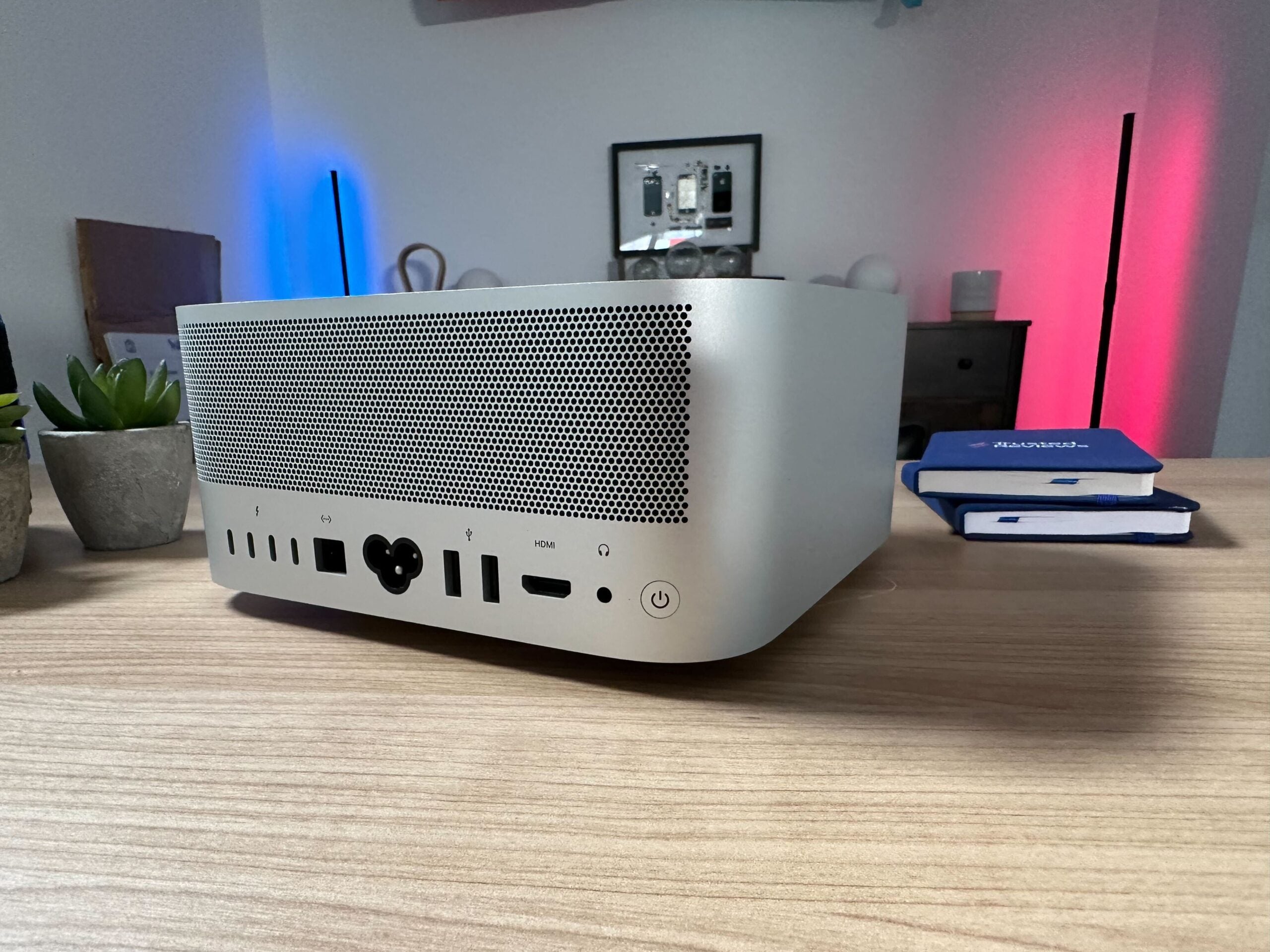
The back of the Mac Studio offers a generous selection of ports, including four Thunderbolt 4 ports, 10Gb Ethernet for high-speed wired connections, HDMI, a 3.5mm headphone jack, and two USB-A ports. The Thunderbolt 4 ports support speeds of up to 40Gb/s and are also compatible with DisplayPort.
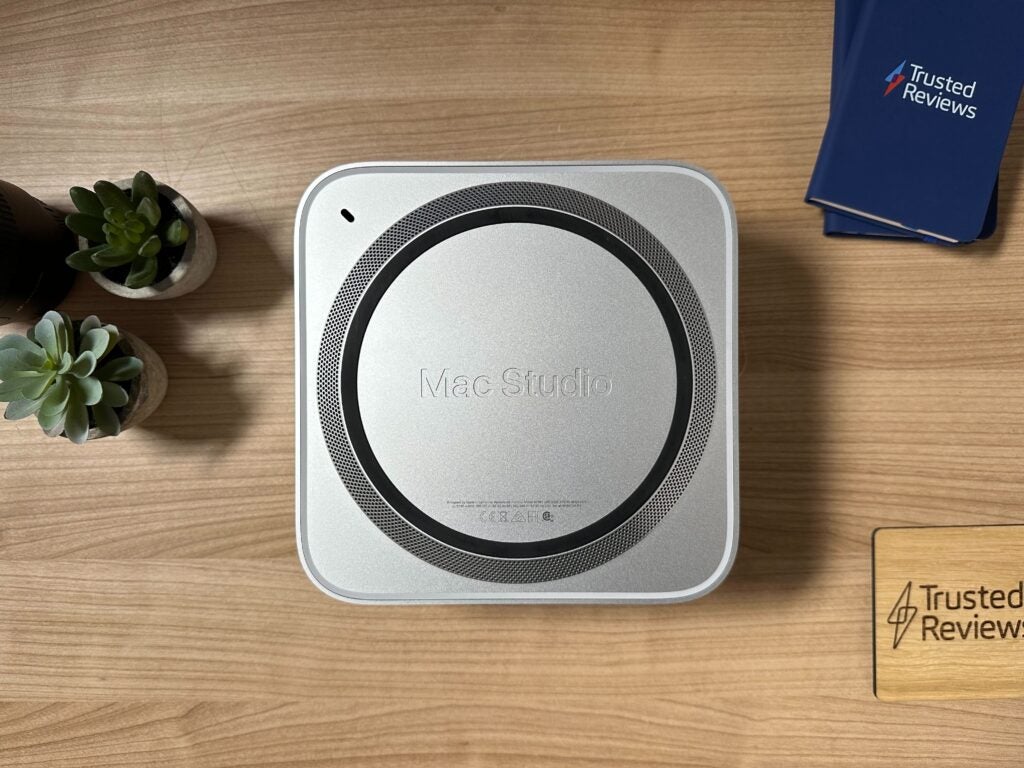
You will find an external speaker around the back and this is fine for alerts, basic video playback and podcasts.
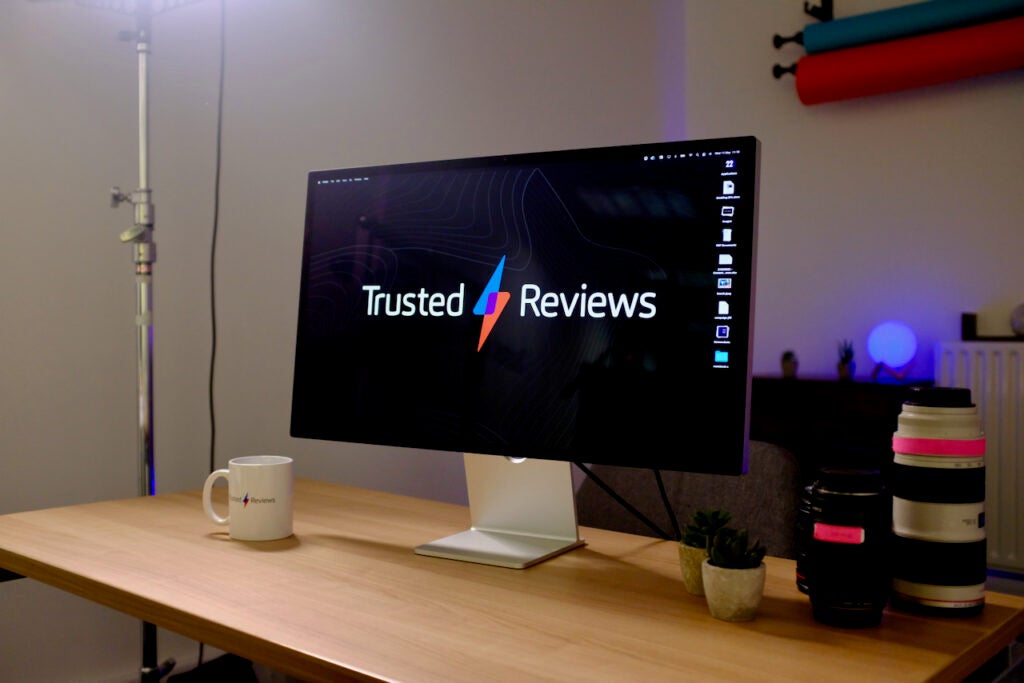
Similar to the Mac Mini, the Mac Studio does not come bundled with a monitor or any accessories. You’ll have to provide your own keyboard and mouse, along with a monitor. Monitors can be connected either via HDMI or USB-C, and Apple predictably would like you to pair the Mac Studio with either the Studio Display or the Pro Display XDR. You’ll find more affordable options, some with more features, in our round-up of the best monitors.
Performance
- M2 Max and M2 Ultra chip variant
- Up to 192GB memory and 8TG storage
- Up to 24-core CPU and 76-core GPU
The Apple Mac Studio comes in two main configurations – one with an M2 Max chip, and the other with the newer M2 Ultra. Considering the power and price difference between the two, the M2 Ultra could be seen as the ‘Pro’ model – even though both are supremely capable machines.
The base M2 Ultra has a 12-core CPU, 30-core GPU plus 32GB unified memory and a 512GB SSD. This retails for £2099/$1999. The base M2 Max ups the stakes considerably, doubling both the CPU core count to 24 and GPU count to 60. There’s also 64GB memory, and 1TB of SSD space. All that will set you back £4199/$3999.
If bought through Apple direct, there are a number of pricey customisable aspects. As with other M-series Macs, parts can’t be customised after purchase – the memory in part of the chipset, so upping this with a cheaper, third-party option isn’t possible – so choose wisely. The M2 Max model can be equipped with up to a 32-core GPU and 96GB memory, while the Ultra goes up to a 76-core GPU and 192GB memory. The internal SSD can also be bumped up to 8TB.
Aside from the 8TB max SSD, all other areas have improved, on paper at least, when compared to the Mac Studio from 2022. There’s also now support for up to eight 4K displays, six 6K displays or three 8K displays.
The final big upgrades come with connectivity. Bluetooth has been bumped up from 5 to 5.3, while Wi-Fi is now 6E – up from 6. Great if you have a router that supports it.
With all the specs and upgrades covered, let’s get down to how much of a performance boost this new model offers. For the purposes of this review, I was sent a Mac Studio with the following spec: Apple M2 Ultra chip with 24‑core CPU, 76‑core GPU, 128GB, 4TB SSD. This is a machine costing around £7000/$6799, meaning it’s for a specific type of user.
It’s an impressive performer no doubt, especially when the diminutive size is taken into account.
In the CPU-focussed Geekbench 5 test, our review Mac Studio scored 2079 and 28324 in the single-core and multi-core tests respectively. That’s a notable multi-core improvement over the Intel Core i9-13900K which had a slightly better single-core score (2181) but fell short in the multi-core with 16491.
Compared to the Razer Blade 16 – a £4500 laptop aimed at creatives and gamers with an Intel Core i9-13950HX – the Mac Studio scored higher in the PugetBench for Adobe Premiere Pro test with a score of 981 as opposed to a still very impressive 601.
Moving over to Cinebench R23, the 28880 score picked up by the Mac Studio was slightly higher than the 27528 from a machine running an AMD Ryzen 9 7900X. A machine powered by the Intel Core i9-13900K, however, beat the Mac Studio with a score of 38088.
You can also see how well the Mac Studio compares to a selection of other M-series Apple machines below – these tests really show how the Studio ups the performance in multi core tasks.
Performance is very good, but the Mac Studio (2023) also stays very cool and surprisingly quiet even under heavy loud. The machine’s fan spun up a little during multiple hours of benchmarking tests yet during real-world tests – including rendering and exporting large HDR 4K files in both Final Cut and Premiere Pro – it was silent most of the time.
Latest deals
Should you buy it?
You should buy this if you want fantastic desktop power: The Mac Studio (2023) performs fantastically well in synthetic tests and real-world use and is a great choice for professionals looking for a reliable desktop ma machine.
You shouldn’t buy if you need PCIe expansion: There aren’t many reasons to pump for the far pricier, far larger Mac Pro machine aside from its ability to support via PCIe expansion. If this is important, the Mac Studio isn’t the best choice.
Final Thoughts
The Apple Mac Studio (2023) is a fantastic machine that offers far more power, ports and upgradability than the cheaper Mac Mini, while making the far pricier Mac Pro (2023) hard to recommend for the majority of professionals.
Of course, some specific use cases will only be catered by the expandable PCIe slot Apple had added to its first cheese-grater M-series Pro machine but for most pro users the Mac Studio is the smarter, better buy.
The wealth of internal options available will suit those with varying needs and the compact nature of the Mac Studio means it can easily slot into existing workspaces or even on smaller desks. There really isn’t anything on the market quite like this, and it’s one of Apple’s most impressive computing products.
How we test
Every PC we review goes through a series of uniform checks designed to gauge key aspects including build quality, performance, and accessibility.
These include formal synthetic benchmarks and scripted tests, plus a series of real-world checks.
We used it as our main PC for 2 months
We tested the performance via both benchmark tests and real-world use.
FAQs
There’s a single Silver colour available, just like the original Mac Studio.
The only one included is a power cable.
Trusted Reviews test data
PCMark 10
Cinebench R23 multi core
Cinebench R23 single core
Geekbench 5 single core
Geekbench 5 multi core
Geekbench 6 single core
Geekbench 6 multi core
3DMark Time Spy
CrystalDiskMark Read speed
Brightness (SDR)
Black level
Contrast
White Visual Colour Temperature
sRGB
Adobe RGB
DCI-P3
Borderlands 3 frame rate (4K)
Borderlands 3 frame rate (Quad HD)
Borderlands 3 frame rate (Full HD)
Horizon Zero Dawn frame rate (4K)
Horizon Zero Dawn frame rate (Quad HD)
Horizon Zero Dawn frame rate (Full HD)
Dirt Rally (4K)
Dirt Rally (Quad HD)
Dirt Rally (Full HD)
UK RRP
USA RRP
EU RRP
CA RRP
AUD RRP
CPU
Manufacturer
Screen Size
Storage Capacity
Front Camera
Battery
Battery Hours
Size (Dimensions)
Weight
ASIN
Operating System
Release Date
First Reviewed Date
Resolution
HDR
Refresh Rate
Ports
GPU
RAM
Connectivity
Display Technology
Screen Technology
Touch Screen
Convertible?

Verdict
The Apple Mac Studio (2023) is a fantastic machine that offers far more power, ports and upgradability than the cheaper Mac Mini, while making the far pricier Mac Pro (2023) hard to recommend for the majority of professionals.
Pros
- Very good performance
- Smart port selecion and positioning
- Quiet
- Small size makes it easy to place into exisiting setup
Cons
- Very expensive to upgrade
- Parts not easily upgradable
-
Two chipset optionChoose between the M2 Max (from £2099/$2099) and M2 Ultra (£4199/$4199) -
Excellent port selectionSD card on the front, along with two USB-C ports. Plenty of rear points including HDMI and Ethernet -
Model reviewedM2 Ultra – 24-core CPU, 76-core GPU, 129GB memory: $6799/£6999
Introduction
The Mac Studio (2023) is Apple’s latest desktop machine, aimed at those who need plenty of performance but don’t want to plump for the MacBook Pro.
While its comparatively diminutive size might give the impression this is a basic machine, the Mac Studio does in fact have the potential to be one of Apple’s most powerful Macs.
It is a fantastic choice for professionals who need more performance and versatility than the Mac Mini or don’t require the portability of a MacBook Pro. In most ways, it’s a better overall product (for more people) than the Mac Pro (2023) that was unveiled at the same time.
What the Mac Studio (2023) isn’t though is a big reinvention of the original Mac Studio I reviewed last year. This is very much a spec bump, with a smattering of connectivity improvements thrown in for good measure.
Design
- A trio of ports on the front, including SD card
- Wide selection of ports on the back
- Considering the power, it’s a small machine
The Mac Studio 2023 is visually exactly the same as the version announced in 2022. That’s no bad thing, as the Studio is a slick machine that can easily be placed into existing setups without demanding anywhere near the space required for the far larger Mac Pro. I previously described the Mac Studio as looking like a couple of Mac Minis stacked on top of each other, and that analogy is very much still true,
Unlike the Mac Mini, the front of the Mac Studio features a few ports making it a lot more practical. The M2 Max version offers two USB-C ports (supporting speeds up to 10Gb/s), whereas the M2 Ultra swaps them for two Thunderbolt 4 ports.
Although it may seem like a simple addition, having a few easily accessible ports significantly enhances the everyday usability of the Mac Studio.
The most useful front port though is the SDXC card slot, letting you import footage and photos very easily without having to reach aimlessly around the back. The USB ports on the front are handy, but having an SD card slot always visible is a feature I never knew I would use so much.
The back of the Mac Studio offers a generous selection of ports, including four Thunderbolt 4 ports, 10Gb Ethernet for high-speed wired connections, HDMI, a 3.5mm headphone jack, and two USB-A ports. The Thunderbolt 4 ports support speeds of up to 40Gb/s and are also compatible with DisplayPort.
You will find an external speaker around the back and this is fine for alerts, basic video playback and podcasts.
Similar to the Mac Mini, the Mac Studio does not come bundled with a monitor or any accessories. You’ll have to provide your own keyboard and mouse, along with a monitor. Monitors can be connected either via HDMI or USB-C, and Apple predictably would like you to pair the Mac Studio with either the Studio Display or the Pro Display XDR. You’ll find more affordable options, some with more features, in our round-up of the best monitors.
Performance
- M2 Max and M2 Ultra chip variant
- Up to 192GB memory and 8TG storage
- Up to 24-core CPU and 76-core GPU
The Apple Mac Studio comes in two main configurations – one with an M2 Max chip, and the other with the newer M2 Ultra. Considering the power and price difference between the two, the M2 Ultra could be seen as the ‘Pro’ model – even though both are supremely capable machines.
The base M2 Ultra has a 12-core CPU, 30-core GPU plus 32GB unified memory and a 512GB SSD. This retails for £2099/$1999. The base M2 Max ups the stakes considerably, doubling both the CPU core count to 24 and GPU count to 60. There’s also 64GB memory, and 1TB of SSD space. All that will set you back £4199/$3999.
If bought through Apple direct, there are a number of pricey customisable aspects. As with other M-series Macs, parts can’t be customised after purchase – the memory in part of the chipset, so upping this with a cheaper, third-party option isn’t possible – so choose wisely. The M2 Max model can be equipped with up to a 32-core GPU and 96GB memory, while the Ultra goes up to a 76-core GPU and 192GB memory. The internal SSD can also be bumped up to 8TB.
Aside from the 8TB max SSD, all other areas have improved, on paper at least, when compared to the Mac Studio from 2022. There’s also now support for up to eight 4K displays, six 6K displays or three 8K displays.
The final big upgrades come with connectivity. Bluetooth has been bumped up from 5 to 5.3, while Wi-Fi is now 6E – up from 6. Great if you have a router that supports it.
With all the specs and upgrades covered, let’s get down to how much of a performance boost this new model offers. For the purposes of this review, I was sent a Mac Studio with the following spec: Apple M2 Ultra chip with 24‑core CPU, 76‑core GPU, 128GB, 4TB SSD. This is a machine costing around £7000/$6799, meaning it’s for a specific type of user.
It’s an impressive performer no doubt, especially when the diminutive size is taken into account.
In the CPU-focussed Geekbench 5 test, our review Mac Studio scored 2079 and 28324 in the single-core and multi-core tests respectively. That’s a notable multi-core improvement over the Intel Core i9-13900K which had a slightly better single-core score (2181) but fell short in the multi-core with 16491.
Compared to the Razer Blade 16 – a £4500 laptop aimed at creatives and gamers with an Intel Core i9-13950HX – the Mac Studio scored higher in the PugetBench for Adobe Premiere Pro test with a score of 981 as opposed to a still very impressive 601.
Moving over to Cinebench R23, the 28880 score picked up by the Mac Studio was slightly higher than the 27528 from a machine running an AMD Ryzen 9 7900X. A machine powered by the Intel Core i9-13900K, however, beat the Mac Studio with a score of 38088.
You can also see how well the Mac Studio compares to a selection of other M-series Apple machines below – these tests really show how the Studio ups the performance in multi core tasks.
Performance is very good, but the Mac Studio (2023) also stays very cool and surprisingly quiet even under heavy loud. The machine’s fan spun up a little during multiple hours of benchmarking tests yet during real-world tests – including rendering and exporting large HDR 4K files in both Final Cut and Premiere Pro – it was silent most of the time.
Latest deals
Should you buy it?
You should buy this if you want fantastic desktop power: The Mac Studio (2023) performs fantastically well in synthetic tests and real-world use and is a great choice for professionals looking for a reliable desktop ma machine.
You shouldn’t buy if you need PCIe expansion: There aren’t many reasons to pump for the far pricier, far larger Mac Pro machine aside from its ability to support via PCIe expansion. If this is important, the Mac Studio isn’t the best choice.
Final Thoughts
The Apple Mac Studio (2023) is a fantastic machine that offers far more power, ports and upgradability than the cheaper Mac Mini, while making the far pricier Mac Pro (2023) hard to recommend for the majority of professionals.
Of course, some specific use cases will only be catered by the expandable PCIe slot Apple had added to its first cheese-grater M-series Pro machine but for most pro users the Mac Studio is the smarter, better buy.
The wealth of internal options available will suit those with varying needs and the compact nature of the Mac Studio means it can easily slot into existing workspaces or even on smaller desks. There really isn’t anything on the market quite like this, and it’s one of Apple’s most impressive computing products.
How we test
Every PC we review goes through a series of uniform checks designed to gauge key aspects including build quality, performance, and accessibility.
These include formal synthetic benchmarks and scripted tests, plus a series of real-world checks.
We used it as our main PC for 2 months
We tested the performance via both benchmark tests and real-world use.
FAQs
There’s a single Silver colour available, just like the original Mac Studio.
The only one included is a power cable.
Trusted Reviews test data
PCMark 10
Cinebench R23 multi core
Cinebench R23 single core
Geekbench 5 single core
Geekbench 5 multi core
Geekbench 6 single core
Geekbench 6 multi core
3DMark Time Spy
CrystalDiskMark Read speed
Brightness (SDR)
Black level
Contrast
White Visual Colour Temperature
sRGB
Adobe RGB
DCI-P3
Borderlands 3 frame rate (4K)
Borderlands 3 frame rate (Quad HD)
Borderlands 3 frame rate (Full HD)
Horizon Zero Dawn frame rate (4K)
Horizon Zero Dawn frame rate (Quad HD)
Horizon Zero Dawn frame rate (Full HD)
Dirt Rally (4K)
Dirt Rally (Quad HD)
Dirt Rally (Full HD)
UK RRP
USA RRP
EU RRP
CA RRP
AUD RRP
CPU
Manufacturer
Screen Size
Storage Capacity
Front Camera
Battery
Battery Hours
Size (Dimensions)
Weight
ASIN
Operating System
Release Date
First Reviewed Date
Resolution
HDR
Refresh Rate
Ports
GPU
RAM
Connectivity
Display Technology
Screen Technology
Touch Screen
Convertible?



