





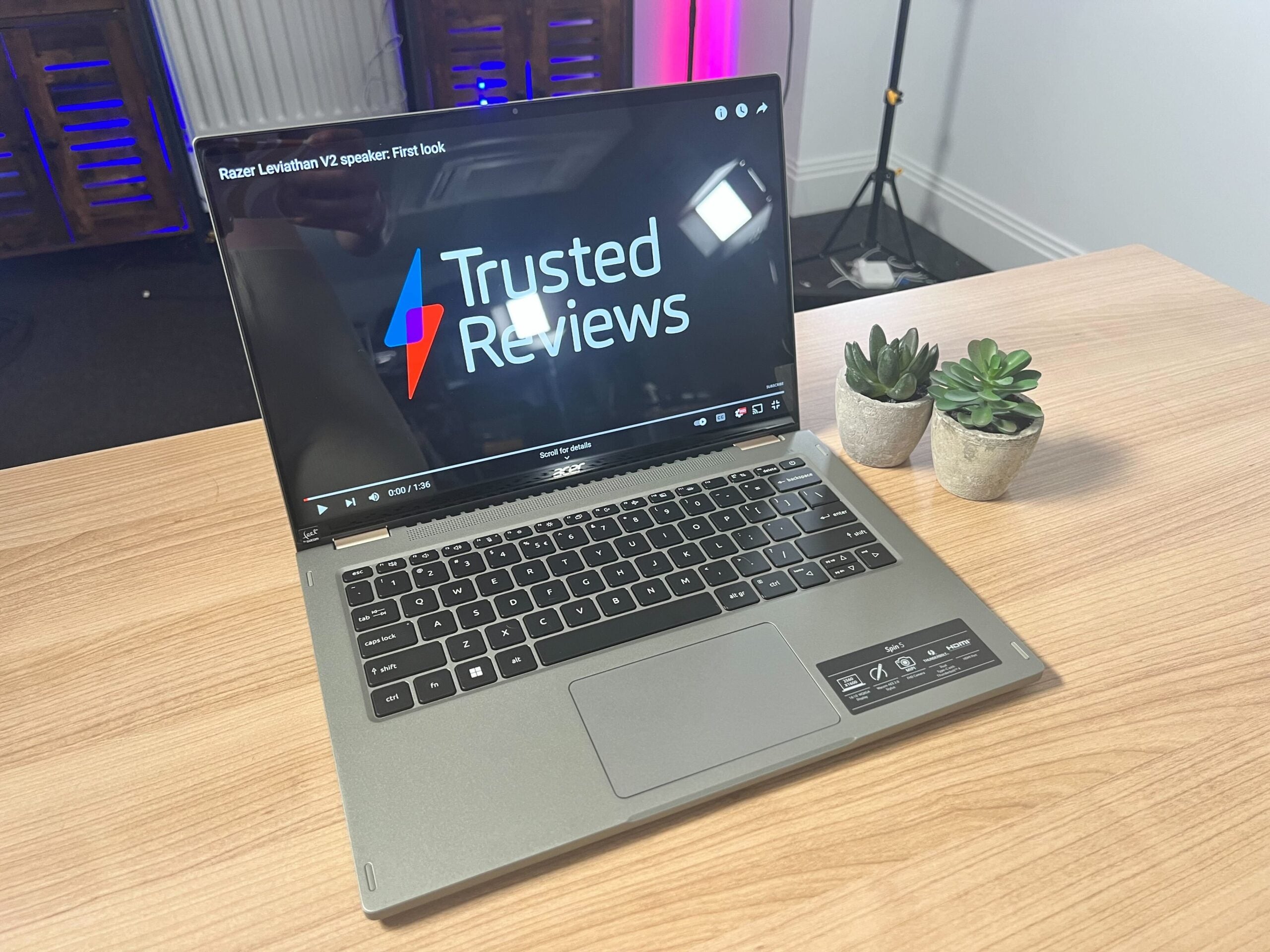
The Acer Spin 5 is the latest Spin laptop from Acer. Coming with a 14-inch screen that has a 360 hinge, it’s been designed for art enthusiasts. The unit we spent time with is pre-production, meaning that the final version that hits store shelves will likely look a little different, though I was pretty impressed with this early model based on my brief time with it.
-
Windows 11 ProRuns on Windows 11 Pro -
Wacom AED 2.0 StylusComes with a stylus that has 4,069 pressure levels for note-taking -
360 hinge design wiht touch screenCan rotate the screen 360 degrees to read or watch media
Introduction
The Acer Spin 5 is the newest laptop in the Spin series and has been designed for art enthusiasts. Packing a 12th-Gen Intel processor and Intel Iris Xe graphics, this seems to be a great choice for anyone looking for a productivity device.
The Acer Spin 5 has been announced alongside a range of new Chromebooks – including the Acer Chromebook Spin 514 and Spin 714 – and seems to be a good alternative for anyone after a portable laptop.
It’s important to note that the unit that we tested is pre-production, meaning that it won’t necessarily look or perform the same as the fully released product. As a result of that, any glitches or issues with the device do not directly reflect the final product, though we would expect that aesthetic choices, like the keyboard and colourways, to remain about the same.
Plus, since I only spent a day with the Acer Spin 5, I cannot comment on the battery life or performance of the device, though I will be covering the overall design and specs.
Pricing
The Acer Spin 5 will start at £1,399.99 and will be available from July. We will make sure to update this article once we know the pricing for Europe and America, as well as specific release dates.
Design and keyboard
- Chassis flexes in
- Good keyboard and trackpad
- Comes with a stylus included
The Acer Spin 5 weighs in at 1.3kg and I was able to comfortably lift it with one hand. While I didn’t spend enough time with the device to see how it fared as I travel between work and home, I believe that it will fit in most backpacks and won’t be too heavy to be used as an on-the-go device, which is ideal for anyone who is currently hybrid working.
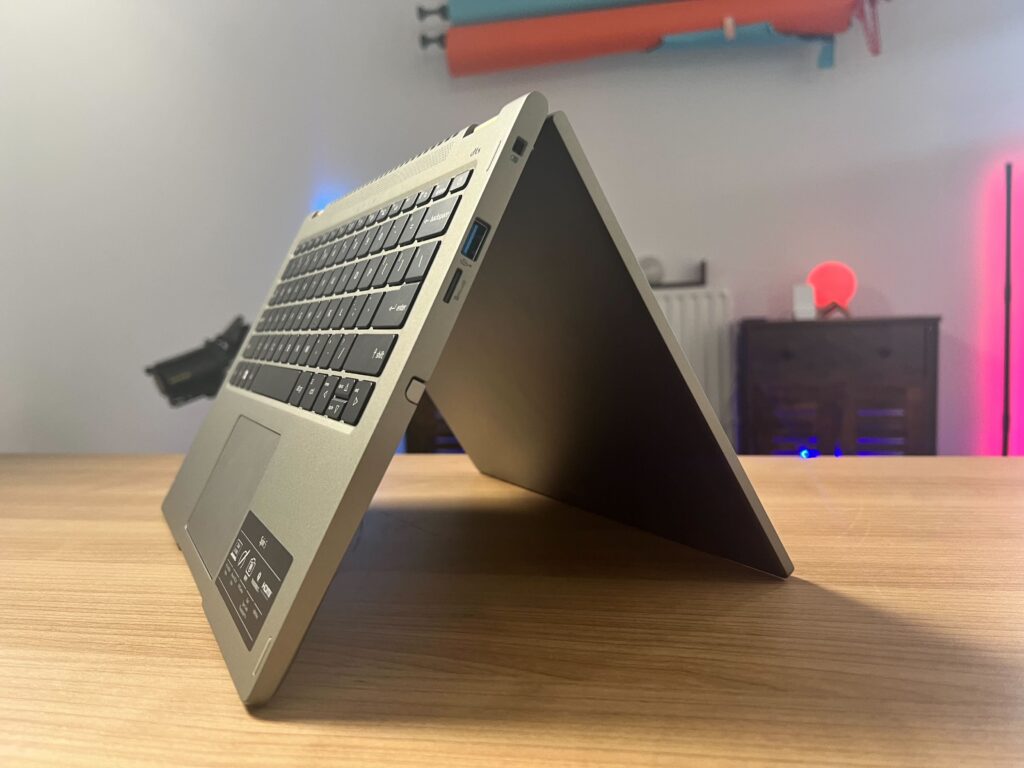
Despite the middling weight, the laptop does have a thick frame, which does date the overall design slightly. Since it houses so many ports – two USB-Cs, two USB 2.0s, HDMI, microSD and a 3.5mm audio jack – I understand why it has this form factor, but it doesn’t have the same sleek look as the Huawei MateBook 14s.
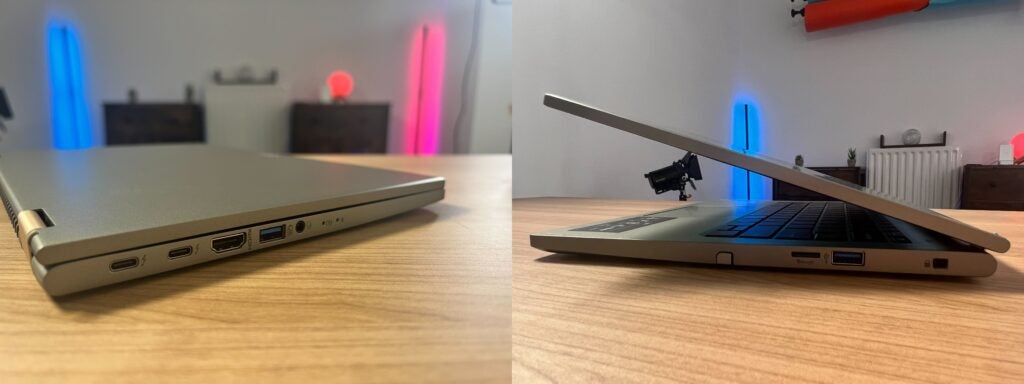
I really liked the keyboard on the Acer Spin 5. The responsiveness of the keys made typing a breeze, though when I typed towards the bottom or top of the keyboard I could feel the chassis flexing a fair bit. In fact, the gap between the touchpad and the keyboard flexed so much that it would actually register as the touchpad, despite being around an inch away. This issue may be fixed before the release of the laptop, but since it felt pretty flexible I would not recommend allowing younger children to use this device since I don’t think it could endure many knocks or falls without taking damage.
When closed, however, the laptop feels a lot more sturdy, and overall I would say that the outer frame of the laptop has a better build quality than the inside chassis.
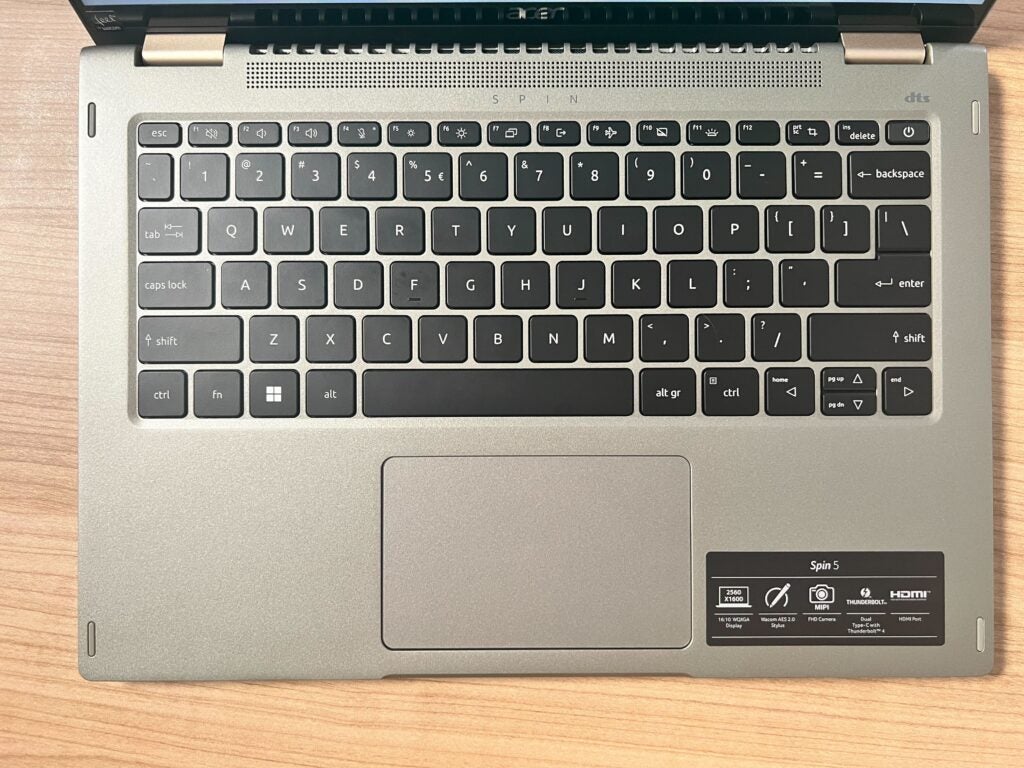
The touchpad worked well (despite the issues with the chassis) and I didn’t encounter any moments with it feeling slow or unresponsive. I also really liked the colour of this laptop. The sage green is a welcome change from silver or grey and gave the laptop a lot more personality, and I think it stands out considerably against other laptops, like the Dell XPS 13 OLED (2021) or Acer Chromebook 514.
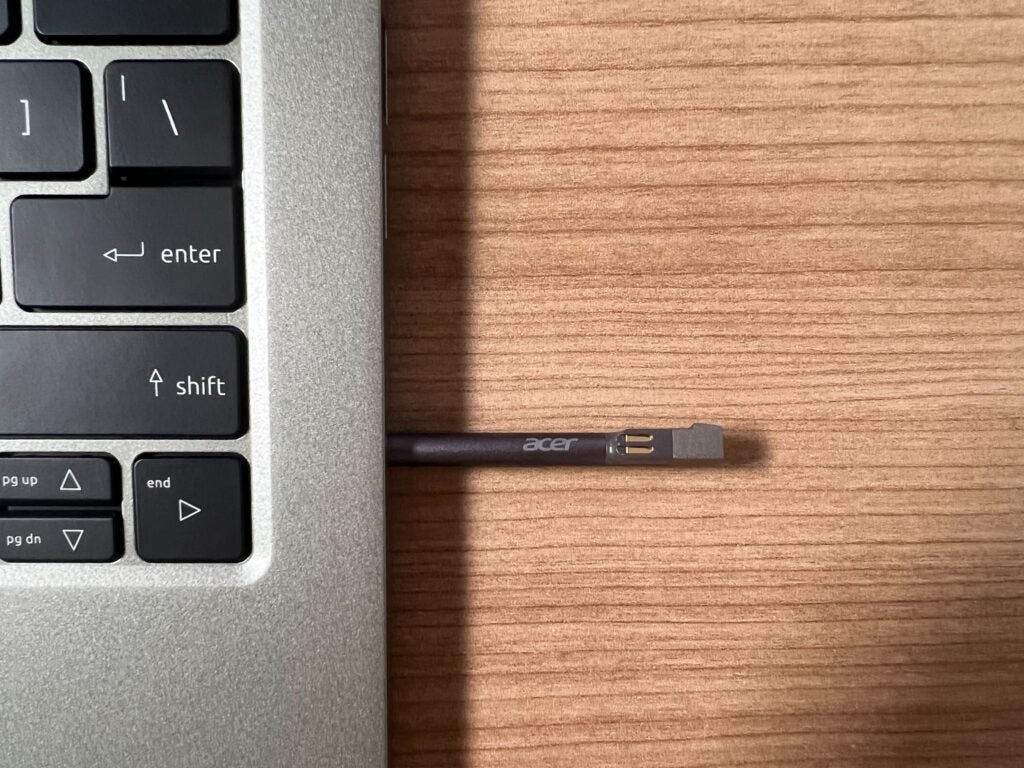
The included stylus lives on the right side of the laptop and can be easily pulled out and tucked away. While I wasn’t able to do any drawings, the stylus was responsive when I was writing notes or scrolling through articles and I really like how it can be housed inside the laptop since it is slightly small. Without that housing, I would be worried that the stylus could get lost in the bottom of my bag or in a drawer. The stylus itself has 4,096 pressure levels and a 266Hz report rate, which I believe was reflected in the speedy response time I saw during use.
Screen
- 14-inch screen
- 2560 x 1600 resolution
- Low blue light TUV certified display
- 360-degree hinge design
The 14-inch screen has a resolution of 2560 x 1600 and a 16:10 aspect ratio, which is ideal for productivity work. Acer claims that this is low blue light TUV certified, which makes it safer to use in low light. I can’t say I noticed this feature, though I never got to use the laptop in darker environments where it would be most noticeable.
Since I wasn’t able to watch a full movie, or use a colorimeter test accuracy and brightness levels I can’t make any definitive comments on the screen, but I thought that the videos I watched on YouTube looked crisp and the colours looked pretty vibrant when the screen was at top brightness. Acer has not yet shared the laptop’s nit count, but from my experience, the screen did seem a tad dark, and I found that I had to keep it on the highest brightness to really see all the details in a YouTube video. A nit is a measurement of brightness.
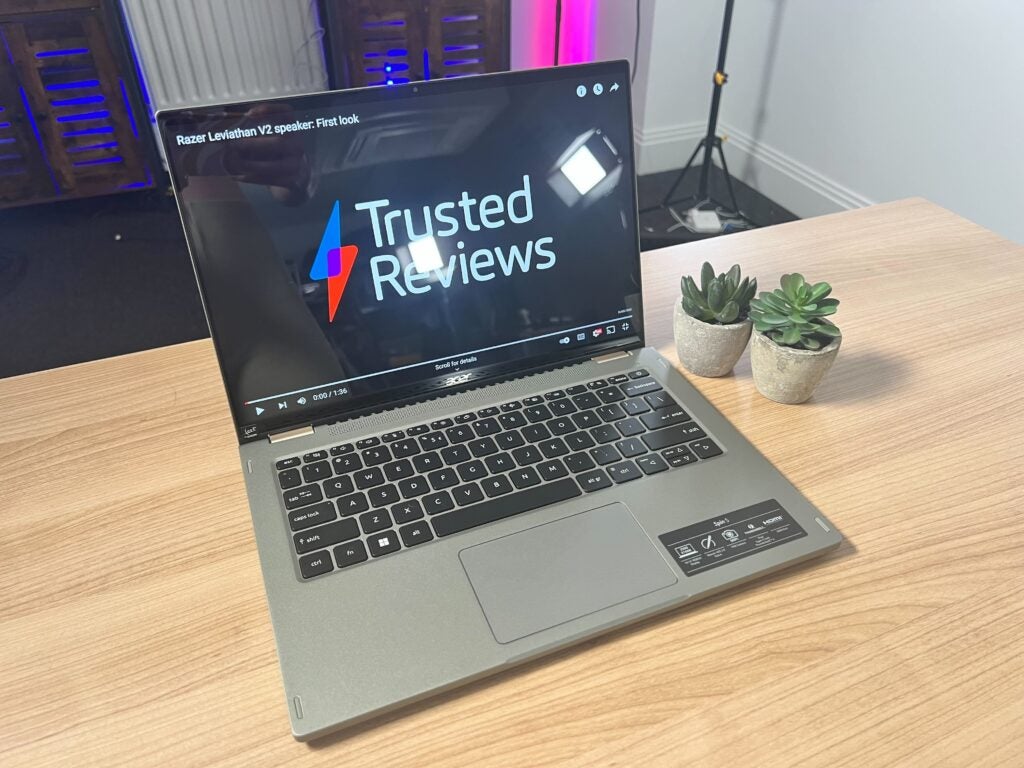
However, I really liked the screen for productivity tasks, as the 16:10 ratio meant I could work with multiple tabs open at once without the display feeling too busy. From my time testing it, I think the screen lends itself more to productivity and less intense creative work, especially for anyone who’s not too bothered about high-end features like OLED or Mini-OLED.
The screen can also be folded back 360-degrees, which I think is ideal for watching media, and I can imagine it would work well for some low-level content creation. As mentioned previously, the chassis is a little flimsy, but I think folding back the screen felt more secure. Interacting with the touchscreen was also great, I didn’t have any issues when I used my finger or the stylus, and I didn’t notice any screen tearing or juddering while scrolling through articles.
Performance
- 12th-Generation Intel processor
- Runs on Windows 11 Pro
- Intel Evo certified
Since this is an early hands-on, I can’t comment on the performance of the Acer Spin 5 but I can go through the specs.
The unit I tested came with a 12th-Generation Intel Core i7-1260P CPU and Intel Iris Xe graphics. It has 16GB RAM and it can be configured to up to 1TB of SSD storage. Considering the price point, I think that these are decent specs, though I don’t think you could play triple-A games or engage in intensive creative work, such as 3D rendering or 4K video editing, due to the integrated graphics unit. In my experience you need a dGPU do run these processes.
Acer did not make any comments about the battery, only that it is Intel Evo certified, which means that it should be able to last for nine hours or more while in real-world use. The Intel Evo certificate also points towards other performance benefits, such as waking up from sleep in one second, though I can’t say I got the full benefit of it during my testing.
First Impressions
I think out of the three laptops I spent time with – including the Chromebook Spin 514 and Spin 714 – the Acer Spin 5 came out on top. The screen was crisp and clear and the aspect ratio made it really easy to work on, plus the 360-degree hinge was great for watching media.
It would have been nice to spend more time with this laptop and see what is it really capable of, but I’m very happy to see an Alder Lake processor and an Intel Evo certification. This should ensure a speedy and smooth performance, especially during day-to-day use, which is why I think this is a great contender as a productivity laptop.
Acer Spin 5 specs
You can see a full breakdown of all of the laptop’s confirmed specifications and how they compare to Acer’s other new laptops in the tablet below.
Jargon buster
Nits
The brightness level of a display. 300 nits is regarded as the minimum target for high-end screens.

The Acer Spin 5 is the latest Spin laptop from Acer. Coming with a 14-inch screen that has a 360 hinge, it’s been designed for art enthusiasts. The unit we spent time with is pre-production, meaning that the final version that hits store shelves will likely look a little different, though I was pretty impressed with this early model based on my brief time with it.
-
Windows 11 ProRuns on Windows 11 Pro -
Wacom AED 2.0 StylusComes with a stylus that has 4,069 pressure levels for note-taking -
360 hinge design wiht touch screenCan rotate the screen 360 degrees to read or watch media
Introduction
The Acer Spin 5 is the newest laptop in the Spin series and has been designed for art enthusiasts. Packing a 12th-Gen Intel processor and Intel Iris Xe graphics, this seems to be a great choice for anyone looking for a productivity device.
The Acer Spin 5 has been announced alongside a range of new Chromebooks – including the Acer Chromebook Spin 514 and Spin 714 – and seems to be a good alternative for anyone after a portable laptop.
It’s important to note that the unit that we tested is pre-production, meaning that it won’t necessarily look or perform the same as the fully released product. As a result of that, any glitches or issues with the device do not directly reflect the final product, though we would expect that aesthetic choices, like the keyboard and colourways, to remain about the same.
Plus, since I only spent a day with the Acer Spin 5, I cannot comment on the battery life or performance of the device, though I will be covering the overall design and specs.
Pricing
The Acer Spin 5 will start at £1,399.99 and will be available from July. We will make sure to update this article once we know the pricing for Europe and America, as well as specific release dates.
Design and keyboard
- Chassis flexes in
- Good keyboard and trackpad
- Comes with a stylus included
The Acer Spin 5 weighs in at 1.3kg and I was able to comfortably lift it with one hand. While I didn’t spend enough time with the device to see how it fared as I travel between work and home, I believe that it will fit in most backpacks and won’t be too heavy to be used as an on-the-go device, which is ideal for anyone who is currently hybrid working.
Despite the middling weight, the laptop does have a thick frame, which does date the overall design slightly. Since it houses so many ports – two USB-Cs, two USB 2.0s, HDMI, microSD and a 3.5mm audio jack – I understand why it has this form factor, but it doesn’t have the same sleek look as the Huawei MateBook 14s.
I really liked the keyboard on the Acer Spin 5. The responsiveness of the keys made typing a breeze, though when I typed towards the bottom or top of the keyboard I could feel the chassis flexing a fair bit. In fact, the gap between the touchpad and the keyboard flexed so much that it would actually register as the touchpad, despite being around an inch away. This issue may be fixed before the release of the laptop, but since it felt pretty flexible I would not recommend allowing younger children to use this device since I don’t think it could endure many knocks or falls without taking damage.
When closed, however, the laptop feels a lot more sturdy, and overall I would say that the outer frame of the laptop has a better build quality than the inside chassis.
The touchpad worked well (despite the issues with the chassis) and I didn’t encounter any moments with it feeling slow or unresponsive. I also really liked the colour of this laptop. The sage green is a welcome change from silver or grey and gave the laptop a lot more personality, and I think it stands out considerably against other laptops, like the Dell XPS 13 OLED (2021) or Acer Chromebook 514.
The included stylus lives on the right side of the laptop and can be easily pulled out and tucked away. While I wasn’t able to do any drawings, the stylus was responsive when I was writing notes or scrolling through articles and I really like how it can be housed inside the laptop since it is slightly small. Without that housing, I would be worried that the stylus could get lost in the bottom of my bag or in a drawer. The stylus itself has 4,096 pressure levels and a 266Hz report rate, which I believe was reflected in the speedy response time I saw during use.
Screen
- 14-inch screen
- 2560 x 1600 resolution
- Low blue light TUV certified display
- 360-degree hinge design
The 14-inch screen has a resolution of 2560 x 1600 and a 16:10 aspect ratio, which is ideal for productivity work. Acer claims that this is low blue light TUV certified, which makes it safer to use in low light. I can’t say I noticed this feature, though I never got to use the laptop in darker environments where it would be most noticeable.
Since I wasn’t able to watch a full movie, or use a colorimeter test accuracy and brightness levels I can’t make any definitive comments on the screen, but I thought that the videos I watched on YouTube looked crisp and the colours looked pretty vibrant when the screen was at top brightness. Acer has not yet shared the laptop’s nit count, but from my experience, the screen did seem a tad dark, and I found that I had to keep it on the highest brightness to really see all the details in a YouTube video. A nit is a measurement of brightness.
However, I really liked the screen for productivity tasks, as the 16:10 ratio meant I could work with multiple tabs open at once without the display feeling too busy. From my time testing it, I think the screen lends itself more to productivity and less intense creative work, especially for anyone who’s not too bothered about high-end features like OLED or Mini-OLED.
The screen can also be folded back 360-degrees, which I think is ideal for watching media, and I can imagine it would work well for some low-level content creation. As mentioned previously, the chassis is a little flimsy, but I think folding back the screen felt more secure. Interacting with the touchscreen was also great, I didn’t have any issues when I used my finger or the stylus, and I didn’t notice any screen tearing or juddering while scrolling through articles.
Performance
- 12th-Generation Intel processor
- Runs on Windows 11 Pro
- Intel Evo certified
Since this is an early hands-on, I can’t comment on the performance of the Acer Spin 5 but I can go through the specs.
The unit I tested came with a 12th-Generation Intel Core i7-1260P CPU and Intel Iris Xe graphics. It has 16GB RAM and it can be configured to up to 1TB of SSD storage. Considering the price point, I think that these are decent specs, though I don’t think you could play triple-A games or engage in intensive creative work, such as 3D rendering or 4K video editing, due to the integrated graphics unit. In my experience you need a dGPU do run these processes.
Acer did not make any comments about the battery, only that it is Intel Evo certified, which means that it should be able to last for nine hours or more while in real-world use. The Intel Evo certificate also points towards other performance benefits, such as waking up from sleep in one second, though I can’t say I got the full benefit of it during my testing.
First Impressions
I think out of the three laptops I spent time with – including the Chromebook Spin 514 and Spin 714 – the Acer Spin 5 came out on top. The screen was crisp and clear and the aspect ratio made it really easy to work on, plus the 360-degree hinge was great for watching media.
It would have been nice to spend more time with this laptop and see what is it really capable of, but I’m very happy to see an Alder Lake processor and an Intel Evo certification. This should ensure a speedy and smooth performance, especially during day-to-day use, which is why I think this is a great contender as a productivity laptop.
Acer Spin 5 specs
You can see a full breakdown of all of the laptop’s confirmed specifications and how they compare to Acer’s other new laptops in the tablet below.
Jargon buster
Nits
The brightness level of a display. 300 nits is regarded as the minimum target for high-end screens.



