








Verdict
Fast and powerful, the Vodafone Ultra Hub has all of the ports you need to make the most of any broadband, providing a lightning-fast connection inside and 4G backup. With Wi-Fi 6E, this router can even run at wired Ethernet speeds if you have the right client. The interface and range of features are a little basic, but if you’re going for a Vodafone broadband connection, the Vodafone Ultra Hub is a step above what’s provided with most routers.
Pros
- Connects to all types of broadband
- Very fast
- 4G backup
- Great value
Cons
- Limited parental and device control
-
4G backupShips with a 4G backup dongle as backup in case your main broadband goes down. -
Ethernet portsRouter has two Gigabit Ethernet and one 2.5 Gigabit Ethernet ports; satellites each have one of each.
Introduction
It seems to be quite often the case that broadband providers’ own routers lag behind the market in terms of speed and specs. Not so with the Vodafone Ultra Hub, which brings Wi-Fi 6E to the masses alongside 4G backup.
It’s a router that’s fast but a little light on features. Still, if you have a Vodafone broadband account and want 4G backup in case of issues with the fixed line, then this setup packs in everything you need.
Design and features
- Separate router and mesh satellites
- 4G backup available
- Ethernet, DSL and SFP Wan options
If there’s one thing that can hold a router back, it’s not having the right connections to hook up to your broadband connection. That’s not a problem with the Vodafone Ultra Hub, which has a DSL port, 2.5 Gigabit Ethernet WAN port and a 10 Gigabit SFP module port, which can be used to upgrade the router in future.
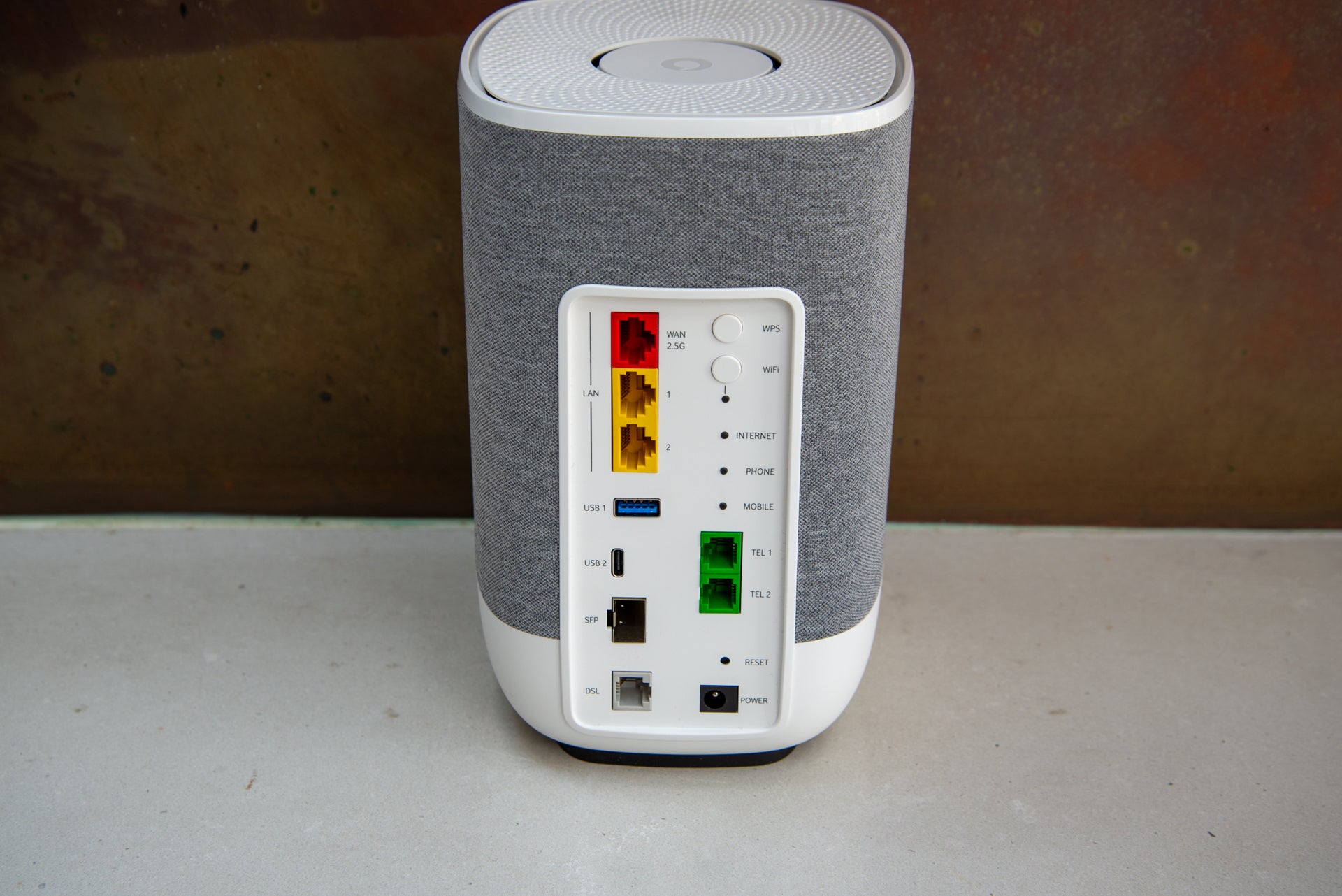
That’s pretty much everything taken care of. It’s a shame, then, that there are only otherwise two Gigabit Ethernet ports on the rear, as that’s a little limiting. Buy the Netgear Orbi RBKE963 system and you get a 10 Gigabit LAN port and four 2.5 Gigabit Ethernet ports.
In addition to the network ports, the Vodafone Ultra Hub has two telephone sockets for use with a digital landline. There’s also USB-A and USB-C ports for sharing devices. I guess that’s useful, although in years of reviewing and using wireless routers and mesh systems, I’ve never plugged anything into the USB port.
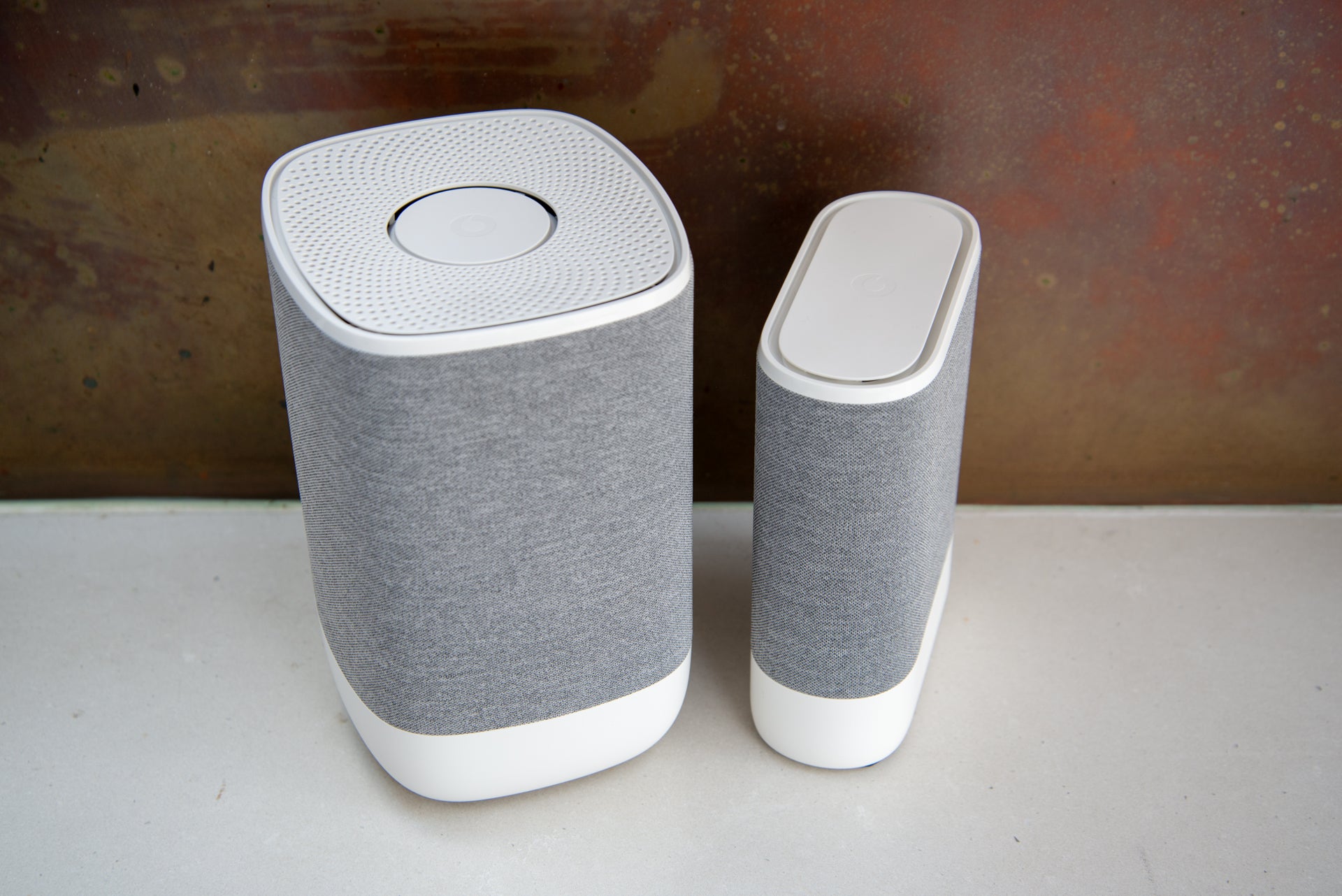
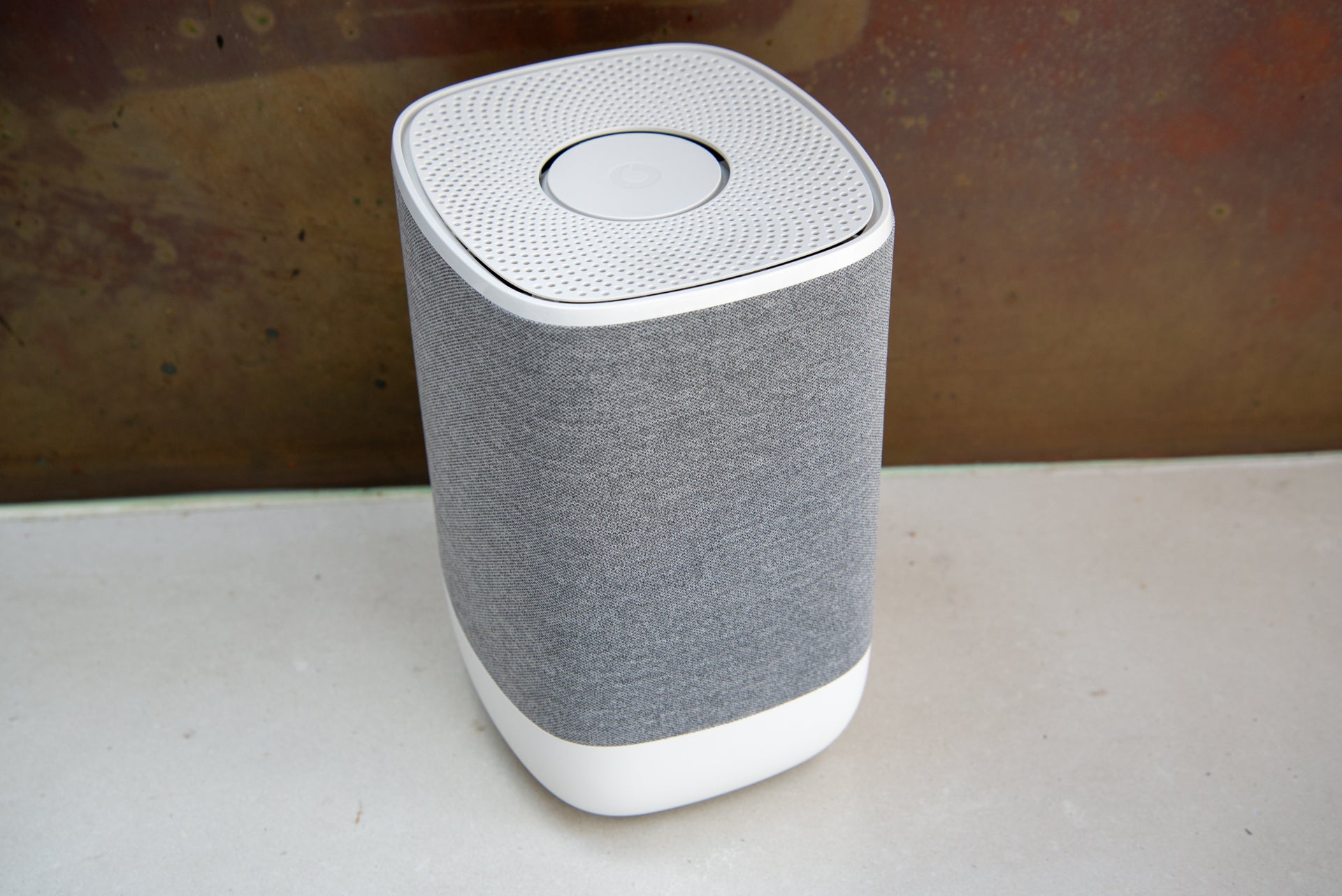
The main router is quite a large beast, looking more like a high-end speaker than a router. That’s all right, as I’d rather have a nice-looking router, particularly because routers have to be placed out in the open to get the best signal.
While the router may give enough covers in smaller homes, it can be extended with Super WiFi 6E Boosters. These smaller boxes have two LAN ports (one 2.5 Gigabit Ethernet and one Gigabit Ethernet), and should be placed halfway between the router and any problem areas.
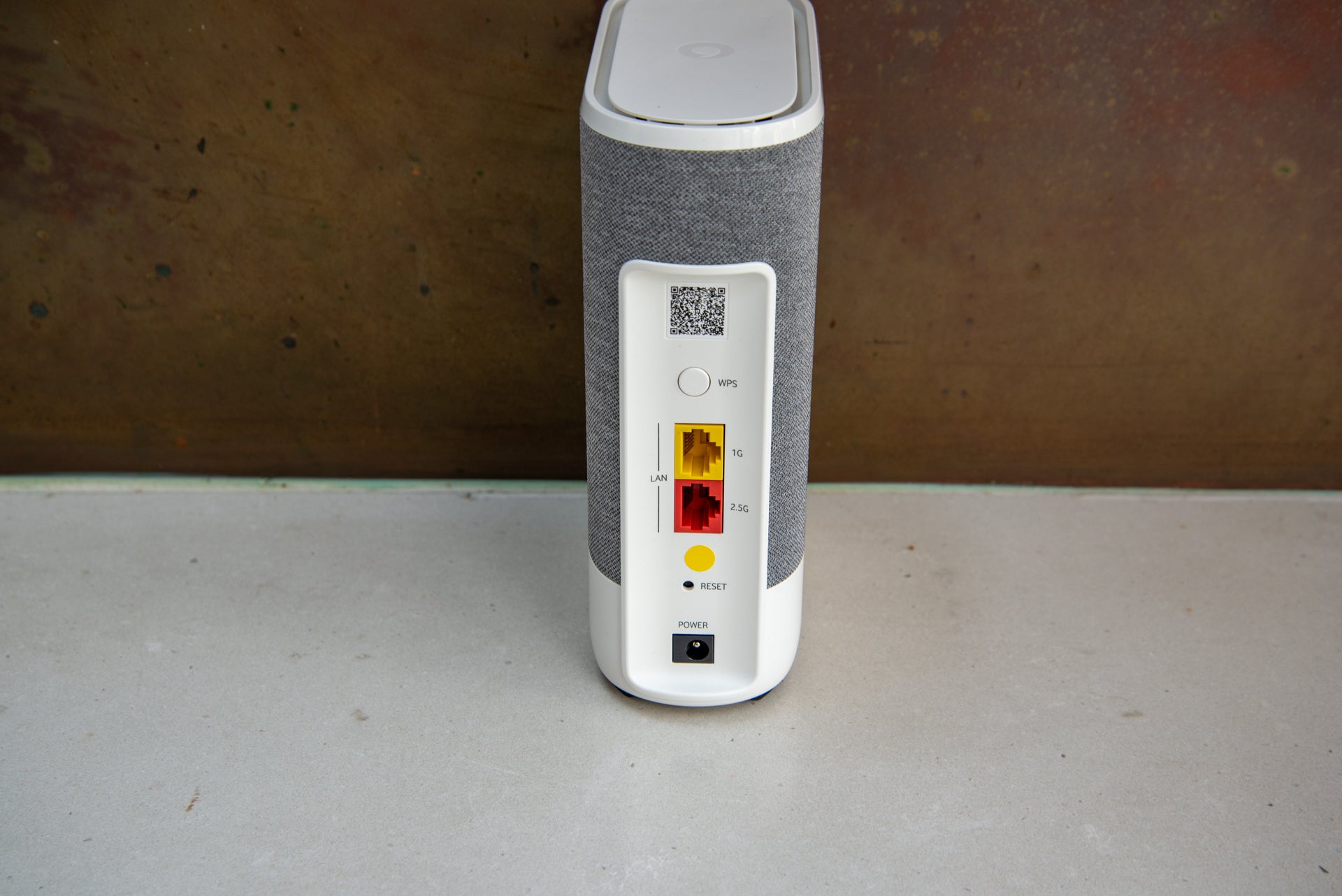
With Vodafone Pro II broadband connections, you get the router, 4G backup and one mesh satellite; additional satellites are available if required. I didn’t test the 4G backup system, as I don’t have Vodafone broadband.
The Vodafone Ultra Hub has a default network name and password running on WPA2/WPA3. It is possible to split the system into two networks using Compatibility Mode, one running WPA2 and the other WPA3. This is useful if you have older devices that struggle to connect to the network.
Configuration of the router is best done with the Vodafone Broadband app, although there is also a web interface. I did have some trouble getting devices to connect and had to split the networks, giving a WPA2 option. Then, I could connect with my phone. Compatibility Mode was also a useful option, as without this, my laptop would only connect on the 2.4GHz band.
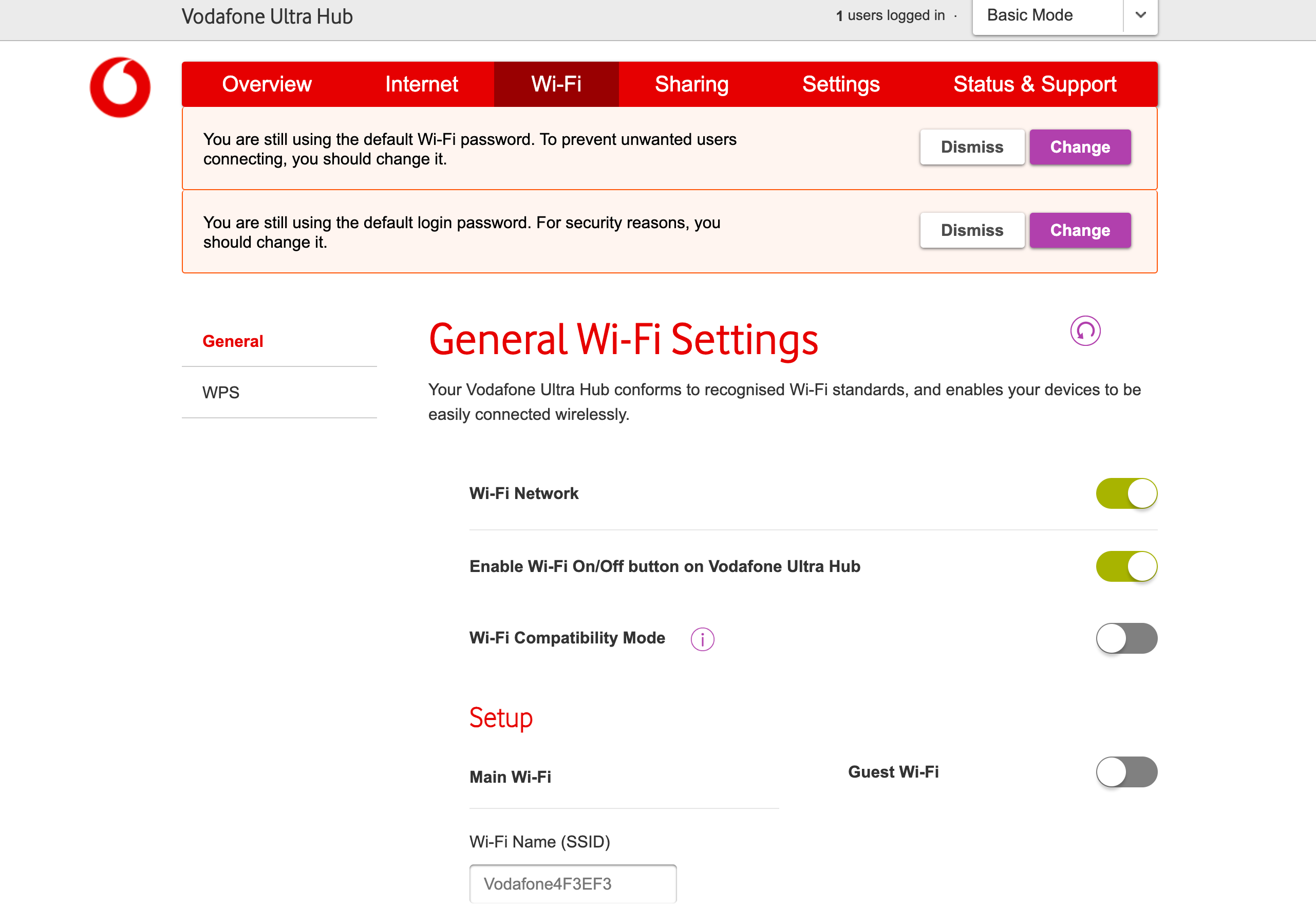
Neither the app nor the web interface provide much in the way of features. You can see what’s connected to the home network, change the Wi-Fi name and password, but there’s not much else available.
If you want parental controls or network-wide security, the Netgear Orbi RBKE963 or Eero Pro 6E are both better choices.
With the 4G dongle, the router can fail over to a cellular connection should the main connection fail. I wasn’t provided the 4G dongle for testing, so can’t say how fast it is or how quickly the router switches over to this connection. In my house, I can get around 35Mbit/s on a 4G Vodafone connection.
Performance
- Fast normally
- Wi-Fi 6E delivers wired speeds
I test all routers in the same way, to see the kind of throughput that they can deliver. I found the Vodafone Ultra Hub to be fast in my tests, once I’d turned on Compatibility Mode. Vodafone says that the 5GHz and 6GHz bands run at 4.8Gbit/s (4×4) and the 2.4GHz network (4×4) at a maximum of 1.2Gbpit/s.
Top speeds assume no interference from neighbouring networks, which is unlikely in most scenarios.
Running with the standard 2.4GHz and 5GHz tests, I got my 2×2 MacBook Air with a Wi-Fi 6 card connected to the 5GHz band. The Vodafone Ultra Hub had picked a high 5GHz channel (128), which usually helps avoid interference. With the Netgear Orbi system, the dedicated 5GHz backhaul usually uses higher numbers for stability, using the lower channels for clients.
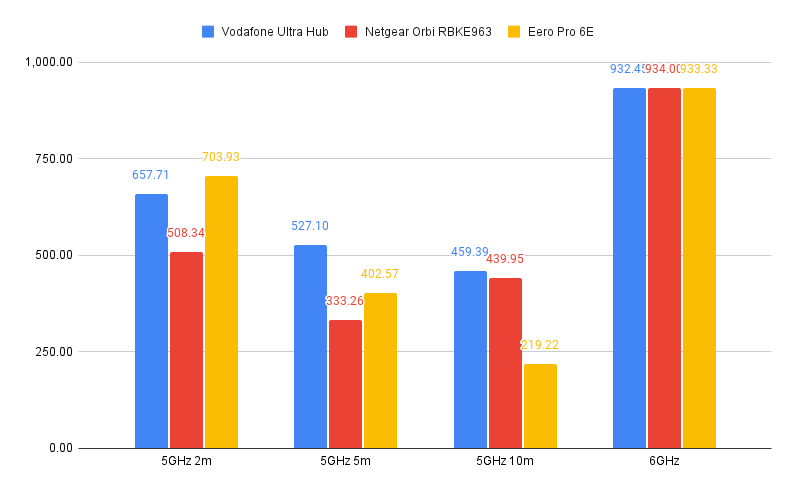
At close range, I found that I got average throughputs of 657.71Mbps, which is extremely fast. Moving to my first floor, speeds remained fast at 527.10Mbps. On the second floor of my house, with a mesh extender on the first floor, I saw speeds of 459.39Mbps. That puts the Vodafone Ultra Hub towards the top of the pile for speeds.
Switching to Wi-Fi 6E on the 6GHz band, I saw throughputs of 932.45Mbit/s, which is around Gigabit Ethernet speed and in line with other 6GHz devices that I’ve tested.
Latest deals
Should you buy it?
You have (or want) Vodafone broadband: Super-fast speeds and 4G backup make this a winner of an ISP router.
You want more features: Buy a rival system and you get a wider array of parental controls and device control
Final Thoughts
The Vodafone Ultra Hub isn’t really an option unless you’ve got Vodafone broadband. If you have, then it’s a step up from the previous router, delivering the fastest standard of Wi-Fi 6E. It’s a little light on features, such as parental controls, but that’s my only real complaint.
If you want fast Wi-Fi bundled with your broadband, this Vodafone Ultra Hub is a great choice. If you’re happy with your broadband provider, but want fast Wi-Fi, check out our guide to the best mesh systems.
How we test
Unlike other sites, we test every wireless router we review thoroughly over an extended period of time. We use industry standard tests to compare features properly. We’ll always tell you what we find. We never, ever, accept money to review a product.
Find out more about how we test in our ethics policy.
Used as our main wireless router for the review period
We throughput test all wireless devices using the same equipment in the same locations so that we have accurate comparisons
You might like…
FAQs
No, this system is designed for Vodafone broadband customers only.

Verdict
Fast and powerful, the Vodafone Ultra Hub has all of the ports you need to make the most of any broadband, providing a lightning-fast connection inside and 4G backup. With Wi-Fi 6E, this router can even run at wired Ethernet speeds if you have the right client. The interface and range of features are a little basic, but if you’re going for a Vodafone broadband connection, the Vodafone Ultra Hub is a step above what’s provided with most routers.
Pros
- Connects to all types of broadband
- Very fast
- 4G backup
- Great value
Cons
- Limited parental and device control
-
4G backupShips with a 4G backup dongle as backup in case your main broadband goes down. -
Ethernet portsRouter has two Gigabit Ethernet and one 2.5 Gigabit Ethernet ports; satellites each have one of each.
Introduction
It seems to be quite often the case that broadband providers’ own routers lag behind the market in terms of speed and specs. Not so with the Vodafone Ultra Hub, which brings Wi-Fi 6E to the masses alongside 4G backup.
It’s a router that’s fast but a little light on features. Still, if you have a Vodafone broadband account and want 4G backup in case of issues with the fixed line, then this setup packs in everything you need.
Design and features
- Separate router and mesh satellites
- 4G backup available
- Ethernet, DSL and SFP Wan options
If there’s one thing that can hold a router back, it’s not having the right connections to hook up to your broadband connection. That’s not a problem with the Vodafone Ultra Hub, which has a DSL port, 2.5 Gigabit Ethernet WAN port and a 10 Gigabit SFP module port, which can be used to upgrade the router in future.
That’s pretty much everything taken care of. It’s a shame, then, that there are only otherwise two Gigabit Ethernet ports on the rear, as that’s a little limiting. Buy the Netgear Orbi RBKE963 system and you get a 10 Gigabit LAN port and four 2.5 Gigabit Ethernet ports.
In addition to the network ports, the Vodafone Ultra Hub has two telephone sockets for use with a digital landline. There’s also USB-A and USB-C ports for sharing devices. I guess that’s useful, although in years of reviewing and using wireless routers and mesh systems, I’ve never plugged anything into the USB port.
The main router is quite a large beast, looking more like a high-end speaker than a router. That’s all right, as I’d rather have a nice-looking router, particularly because routers have to be placed out in the open to get the best signal.
While the router may give enough covers in smaller homes, it can be extended with Super WiFi 6E Boosters. These smaller boxes have two LAN ports (one 2.5 Gigabit Ethernet and one Gigabit Ethernet), and should be placed halfway between the router and any problem areas.
With Vodafone Pro II broadband connections, you get the router, 4G backup and one mesh satellite; additional satellites are available if required. I didn’t test the 4G backup system, as I don’t have Vodafone broadband.
The Vodafone Ultra Hub has a default network name and password running on WPA2/WPA3. It is possible to split the system into two networks using Compatibility Mode, one running WPA2 and the other WPA3. This is useful if you have older devices that struggle to connect to the network.
Configuration of the router is best done with the Vodafone Broadband app, although there is also a web interface. I did have some trouble getting devices to connect and had to split the networks, giving a WPA2 option. Then, I could connect with my phone. Compatibility Mode was also a useful option, as without this, my laptop would only connect on the 2.4GHz band.
Neither the app nor the web interface provide much in the way of features. You can see what’s connected to the home network, change the Wi-Fi name and password, but there’s not much else available.
If you want parental controls or network-wide security, the Netgear Orbi RBKE963 or Eero Pro 6E are both better choices.
With the 4G dongle, the router can fail over to a cellular connection should the main connection fail. I wasn’t provided the 4G dongle for testing, so can’t say how fast it is or how quickly the router switches over to this connection. In my house, I can get around 35Mbit/s on a 4G Vodafone connection.
Performance
- Fast normally
- Wi-Fi 6E delivers wired speeds
I test all routers in the same way, to see the kind of throughput that they can deliver. I found the Vodafone Ultra Hub to be fast in my tests, once I’d turned on Compatibility Mode. Vodafone says that the 5GHz and 6GHz bands run at 4.8Gbit/s (4×4) and the 2.4GHz network (4×4) at a maximum of 1.2Gbpit/s.
Top speeds assume no interference from neighbouring networks, which is unlikely in most scenarios.
Running with the standard 2.4GHz and 5GHz tests, I got my 2×2 MacBook Air with a Wi-Fi 6 card connected to the 5GHz band. The Vodafone Ultra Hub had picked a high 5GHz channel (128), which usually helps avoid interference. With the Netgear Orbi system, the dedicated 5GHz backhaul usually uses higher numbers for stability, using the lower channels for clients.
At close range, I found that I got average throughputs of 657.71Mbps, which is extremely fast. Moving to my first floor, speeds remained fast at 527.10Mbps. On the second floor of my house, with a mesh extender on the first floor, I saw speeds of 459.39Mbps. That puts the Vodafone Ultra Hub towards the top of the pile for speeds.
Switching to Wi-Fi 6E on the 6GHz band, I saw throughputs of 932.45Mbit/s, which is around Gigabit Ethernet speed and in line with other 6GHz devices that I’ve tested.
Latest deals
Should you buy it?
You have (or want) Vodafone broadband: Super-fast speeds and 4G backup make this a winner of an ISP router.
You want more features: Buy a rival system and you get a wider array of parental controls and device control
Final Thoughts
The Vodafone Ultra Hub isn’t really an option unless you’ve got Vodafone broadband. If you have, then it’s a step up from the previous router, delivering the fastest standard of Wi-Fi 6E. It’s a little light on features, such as parental controls, but that’s my only real complaint.
If you want fast Wi-Fi bundled with your broadband, this Vodafone Ultra Hub is a great choice. If you’re happy with your broadband provider, but want fast Wi-Fi, check out our guide to the best mesh systems.
How we test
Unlike other sites, we test every wireless router we review thoroughly over an extended period of time. We use industry standard tests to compare features properly. We’ll always tell you what we find. We never, ever, accept money to review a product.
Find out more about how we test in our ethics policy.
Used as our main wireless router for the review period
We throughput test all wireless devices using the same equipment in the same locations so that we have accurate comparisons
You might like…
FAQs
No, this system is designed for Vodafone broadband customers only.



