













Verdict
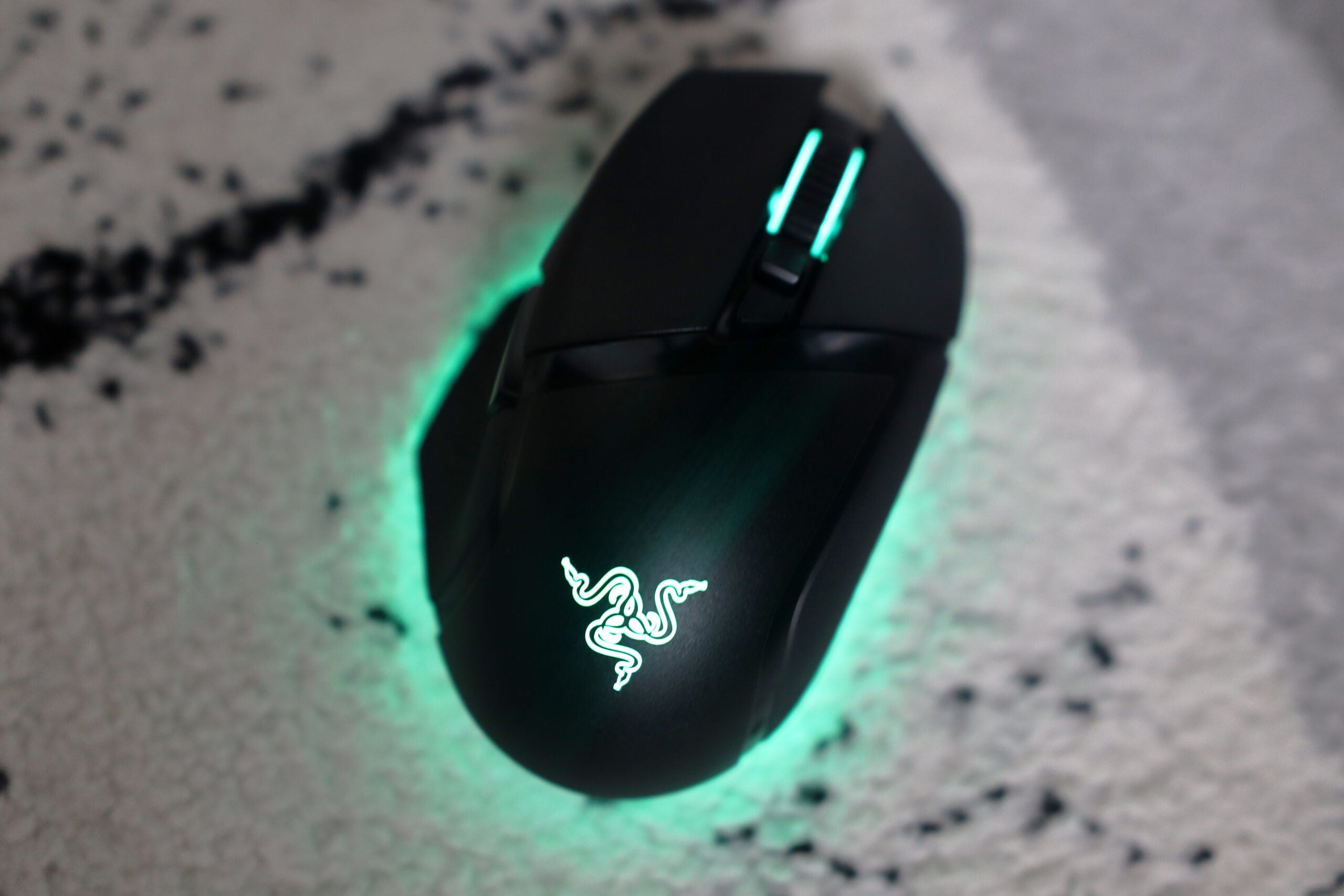
The Razer Basilisk V3 Pro is a seriously powerful wireless gaming mouse. It’s one that comes with the same ergonomic and especially comfortable design as the rest of the Basilisk line, but packs in a 30,000 DPI sensor to offer one of the most responsive gaming experiences I’ve ever tested. This is quite the expensive candidate though, which means it’s only worth picking up if you’re the most serious of gamers.
Pros
- Super comfortable to hold
- Ridiculously powerful and responsive
- Vibrant lighting
Cons
- Expensive
- Scroll wheel feels a tad cheap
Availability
- USARRP: $159.99
- EuropeRRP: €189.99
-
30,000 DPI Focus Pro Sensor:Comes with a responsive 30,000 DPI sensor, making it ideal for pro gamers. -
Bluetooth & HyperSpeed wireless connectivity:It can connect via both Bluetooth and Razer’s HyperSpeed wireless. -
13 Chroma lighting zones:Features loads of lighting zones to choose from that are also especially bright.
Introduction
If you asked me what my go-to wired gaming mouse would be, chances are I’d say Razer’s Basilisk V3.
Now though, the green side of the peripherals world is looking to cut the cord on a fan favourite and pack in a whole host of upgrades with the introduction of the new Basilisk V3 Pro.
As is typical with these wired-to-wireless upgrades, it comes at a high price, with the Basilisk V3 Pro retailing for $159.99/€189.99. But is it good enough to make our best gaming mouse list? Here are my thoughts.
Design
- Super-comfortable shape
- Tactile buttons
- Heavy, but usable
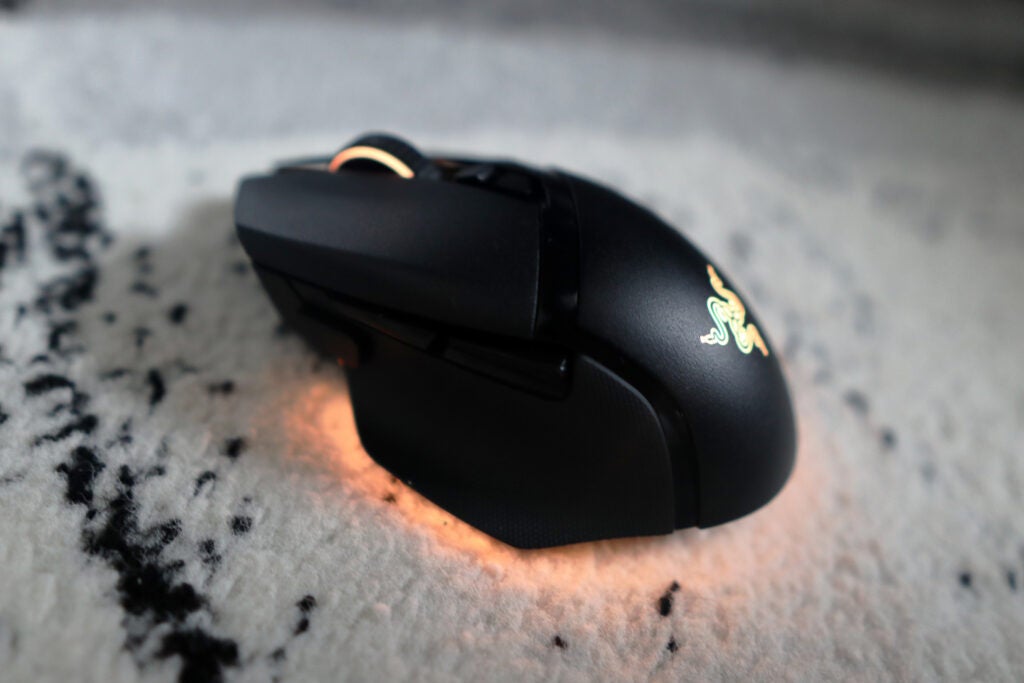
In hand, the Basilisk V3 Pro’s frame feels virtually identical to its wired brother. The appeal of this line of mice has always been its sculpted and contoured shape, which makes it one of the most comfortable gaming mice money can buy. There’s also oodles of rubberised padding around the sides of the Basilisk V3 Pro, which makes it even more comfortable.
The weight is nearly identical to the wired version, with a total mass of 112g giving the Basilisk V3 Pro a fair amount of heft. This is on par with other wireless mice I’ve tested recently, such as the MadCatz R.A.T. DWS. Heavier mice generally tend to feel a little less nimble than their lighter counterparts, but the Basilisk V3 Pro still felt snappy enough that I’d feel comfortable using it in games.
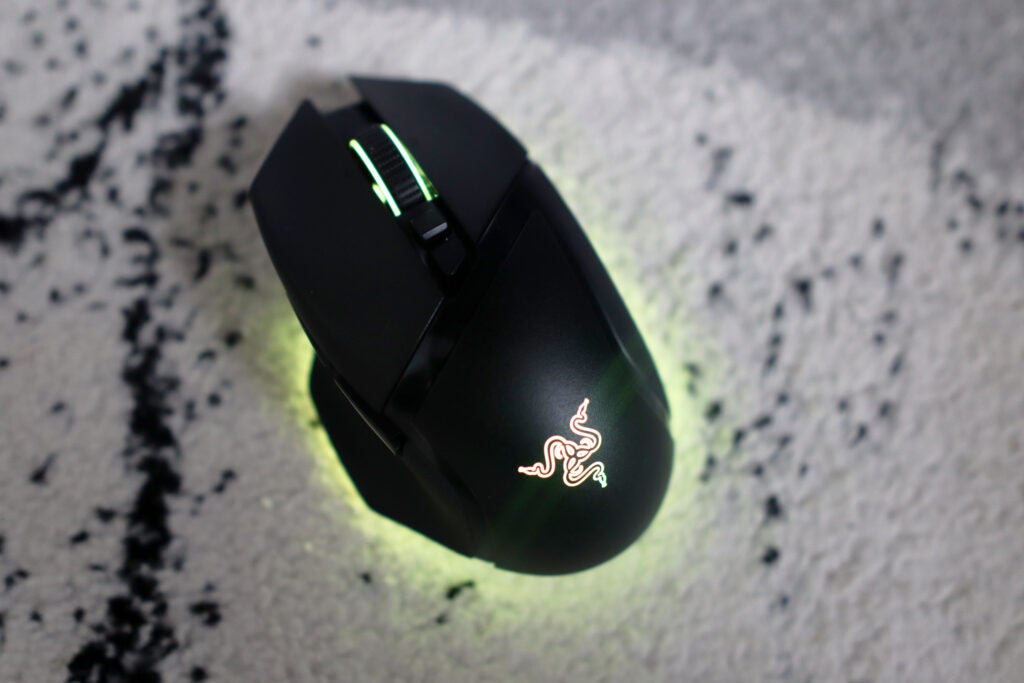
There are 11 programmable buttons, including the usual mouse buttons as well as a DPI clutch on the left-hand side for precise aiming, which will be of major importance in FPS titles. All the buttons feel tactile and pleasantly clicky, while the tilt scroll wheel felt a tad cheap, given it features the same noise and functionality as mice ten times cheaper. It provides a free scrolling option, like that found on Logitech’s G502 Lightspeed, although Logitech’s wheel is made of metal as opposed to plastic, and also has a ratchet scroll option.
The profile button lives on the underside, which is a bit fiddly, as well as the button for choosing the mode of connectivity. There’s a cutout on the bottom where you’ll find a plastic compartment for the USB receiver.
Razer calls this small plastic placeholder a puck, and it’s possible to swap the standard one out to one that serves a purpose – for an extra $19.99, Razer sells a puck that allows the Basilisk V3 Pro to be charged wirelessly. You can also pick up an additional dock to charge it on, which includes the puck in a bundle, but do note this is a costly upgrade.
Performance
- 30,000 DPI is ridiculously powerful
- Dual connectivity is convenient and latency free
- Addition of a DPI clutch is usable for FPS titles
Besides the move to wireless connectivity, the biggest upgrade can be found with the sensor. The Basilisk V3 Pro utilises Razer’s Focus Pro sensor (the same as in the Viper V2 Pro) and comes with a whopping 30,000 DPI’s worth of sensitivity, which will feel right at home in the hands of even the most professional of players.
In testing it with a slew of FPS titles such as CS:GO and Apex Legends, the Basilisk V3 Pro has to be one of the most responsive mice I’ve tested in a long while, although that high sensitivity did make it especially skittish for day-to-day work. If you’re not interested in gaming, you’re better off with something like the Logitech MX Master 3S.
The dual means of connectivity, with both Bluetooth and Razer’s HyperSpeed wireless technology, proved to be convenient, and setup with both was practically plug and play. On HyperSpeed especially, the Basilisk V3 Pro proved extremely responsive, with no noticeable latency.
The DPI clutch also proved to be a massive help as it allows for more precise aiming. As I’m someone that’s especially ham fisted and have always been shoddy at shooters, it was of major help in slowing down the jitter. This isn’t a removable clutch though, unlike on the old Basilisk V2.
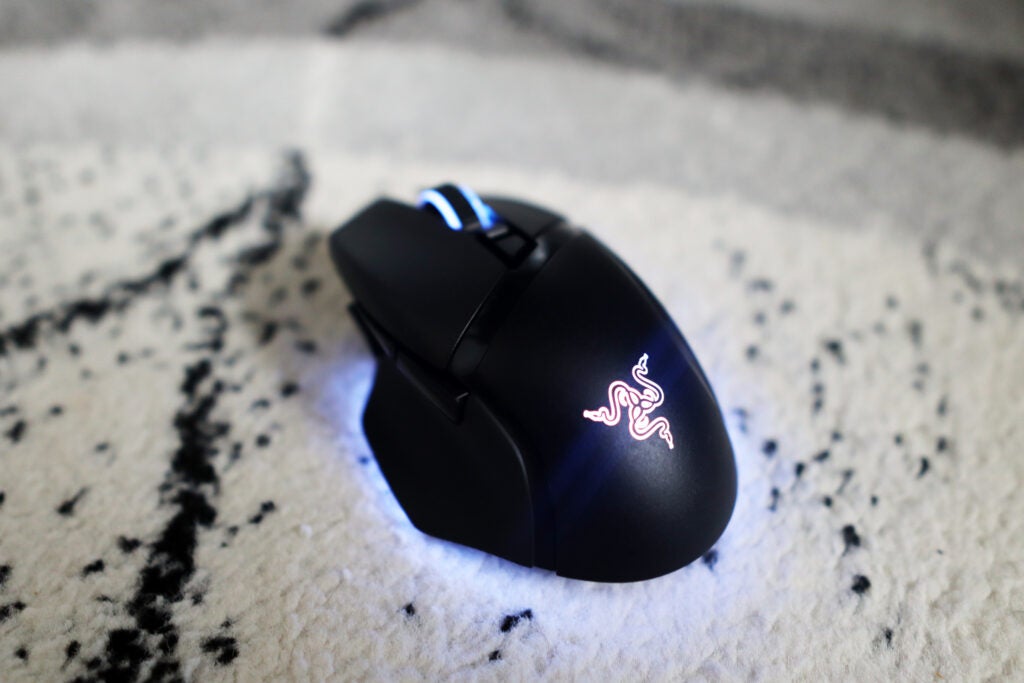
The scroll wheel is a tilt wheel, and also one that features Razer’s clever HyperScroll mode. There’s the option for a standard tactile scroll, or more of a free-wheeling choice, as well as the Smart Reel mode that automatically flits between the two. It’s a useful tool, although one I found to be a little too trigger happy, switching between the two modes a little too often for my liking.
Given this is a wireless mouse, battery life is also integral, and the Basilisk V3 Pro is up there with the very best. Razer reckons it’ll last for up to 90 hours with HyperSpeed and 100 hours with Bluetooth, although that is without any RGB on, so can be considered a best case scenario. In general, those numbers are promising, especially given some of the competition doesn’t even get close to half that figure.
Software and lighting
- Chroma lighting is especially vivid
- Synapse 3 provides loads of functonality
As the old saying goes, if it ain’t broke, don’t fix it, and that’s exactly what the Basilisk V3 Pro does in terms od software and lighting.
There are a total of 13 lighting zones available to fiddle with, split across two distinct sections: the Razer logo, and the underglow bar on the mouse’s underside. The underglow offers a 2000’s style neon effect that looks rather swanky. And as this is Razer’s Chroma lighting we’re talking about, it should come as no surprise to learn that it’s also vibrant RGB, too.
The Basilisk V3 Pro also works with Razer’s Synapse 3 software which provides as extensive functionality as usual with options to configure lighting, as well as fiddle with the 11 programmable buttons, and even calibrate the mouse to a specific surface, which is excellent.
Latest deals
Should you buy it?
You want a ridiculously powerful sensor: 30,000 DPI is more than enough for anyone, and the Basilisk V3 Pro is one of the most powerful mice money can buy.
You’re left-handed, or want an ambidextrous mouse: The only downside to the comfortable shape of the Basilisk V3 Pro is its exclusively right handed shape, so if you’re a leftie, you may want to find another option.
Final Thoughts
Gaming mice will always be in a battle to offer the most sensitivity they can, and the Basilisk V3 Pro is proof of how far we’re going. 30,000 DPI is more than enough for most people, and this is hands down one of the best gaming mice money can buy thanks to it. That also comes thanks to its ergonomic shape that’s remained for as long as the Basilisk has been in service.
But aiming to hit dizzying DPI heights has the consequence of driving up the price. At €189.99/$159.99, it’s got quite the high markup. If you can stretch to it, the Basilisk V3 Pro is definitely one to consider, although may only be best if you’re a gamer who craves the extra sensitivity.
And if you’re keen to have this super-sensitive DPI performance, but want it at a slightly more affordable price, the Razer Viper V2 Pro is also a worthwhile consideration.
How we test
Every mouse we test is used for at least a week. During that time, we’ll check for ease of use and put it through its paces by playing a range of genres, including FPS, MOBAs and strategy.
Used as a main mouse for at least a week.
Games tested: Apex Legends and CS:GO
FAQs
The main difference is that the Pro is a wireless mouse opposed to a wired one. The Pro model also has a more responsive sensor with a 30,000 DPI.
Yes, this is a very good mouse for FPS gaming thanks to its fantastic performance and DPI clutch.
Jargon buster
Bluetooth
Bluetooth – named after 10th-century Danish king Harald Bluetooth who united Denmark’s tribes into a single kingdom – is a method of wireless transmission that allows for the exchange of data between devices over short distances.
DPI
DPI stands for “Dots Per Inch” and measures the sensitivity of a mouse. A higher DPI figure will see the mouse cursor travel a greater distance from the same wrist movement, making it very useful for competitive gaming.

Verdict
The Razer Basilisk V3 Pro is a seriously powerful wireless gaming mouse. It’s one that comes with the same ergonomic and especially comfortable design as the rest of the Basilisk line, but packs in a 30,000 DPI sensor to offer one of the most responsive gaming experiences I’ve ever tested. This is quite the expensive candidate though, which means it’s only worth picking up if you’re the most serious of gamers.
Pros
- Super comfortable to hold
- Ridiculously powerful and responsive
- Vibrant lighting
Cons
- Expensive
- Scroll wheel feels a tad cheap
Availability
- USARRP: $159.99
- EuropeRRP: €189.99
-
30,000 DPI Focus Pro Sensor:Comes with a responsive 30,000 DPI sensor, making it ideal for pro gamers. -
Bluetooth & HyperSpeed wireless connectivity:It can connect via both Bluetooth and Razer’s HyperSpeed wireless. -
13 Chroma lighting zones:Features loads of lighting zones to choose from that are also especially bright.
Introduction
If you asked me what my go-to wired gaming mouse would be, chances are I’d say Razer’s Basilisk V3.
Now though, the green side of the peripherals world is looking to cut the cord on a fan favourite and pack in a whole host of upgrades with the introduction of the new Basilisk V3 Pro.
As is typical with these wired-to-wireless upgrades, it comes at a high price, with the Basilisk V3 Pro retailing for $159.99/€189.99. But is it good enough to make our best gaming mouse list? Here are my thoughts.
Design
- Super-comfortable shape
- Tactile buttons
- Heavy, but usable
In hand, the Basilisk V3 Pro’s frame feels virtually identical to its wired brother. The appeal of this line of mice has always been its sculpted and contoured shape, which makes it one of the most comfortable gaming mice money can buy. There’s also oodles of rubberised padding around the sides of the Basilisk V3 Pro, which makes it even more comfortable.
The weight is nearly identical to the wired version, with a total mass of 112g giving the Basilisk V3 Pro a fair amount of heft. This is on par with other wireless mice I’ve tested recently, such as the MadCatz R.A.T. DWS. Heavier mice generally tend to feel a little less nimble than their lighter counterparts, but the Basilisk V3 Pro still felt snappy enough that I’d feel comfortable using it in games.
There are 11 programmable buttons, including the usual mouse buttons as well as a DPI clutch on the left-hand side for precise aiming, which will be of major importance in FPS titles. All the buttons feel tactile and pleasantly clicky, while the tilt scroll wheel felt a tad cheap, given it features the same noise and functionality as mice ten times cheaper. It provides a free scrolling option, like that found on Logitech’s G502 Lightspeed, although Logitech’s wheel is made of metal as opposed to plastic, and also has a ratchet scroll option.
The profile button lives on the underside, which is a bit fiddly, as well as the button for choosing the mode of connectivity. There’s a cutout on the bottom where you’ll find a plastic compartment for the USB receiver.
Razer calls this small plastic placeholder a puck, and it’s possible to swap the standard one out to one that serves a purpose – for an extra $19.99, Razer sells a puck that allows the Basilisk V3 Pro to be charged wirelessly. You can also pick up an additional dock to charge it on, which includes the puck in a bundle, but do note this is a costly upgrade.
Performance
- 30,000 DPI is ridiculously powerful
- Dual connectivity is convenient and latency free
- Addition of a DPI clutch is usable for FPS titles
Besides the move to wireless connectivity, the biggest upgrade can be found with the sensor. The Basilisk V3 Pro utilises Razer’s Focus Pro sensor (the same as in the Viper V2 Pro) and comes with a whopping 30,000 DPI’s worth of sensitivity, which will feel right at home in the hands of even the most professional of players.
In testing it with a slew of FPS titles such as CS:GO and Apex Legends, the Basilisk V3 Pro has to be one of the most responsive mice I’ve tested in a long while, although that high sensitivity did make it especially skittish for day-to-day work. If you’re not interested in gaming, you’re better off with something like the Logitech MX Master 3S.
The dual means of connectivity, with both Bluetooth and Razer’s HyperSpeed wireless technology, proved to be convenient, and setup with both was practically plug and play. On HyperSpeed especially, the Basilisk V3 Pro proved extremely responsive, with no noticeable latency.
The DPI clutch also proved to be a massive help as it allows for more precise aiming. As I’m someone that’s especially ham fisted and have always been shoddy at shooters, it was of major help in slowing down the jitter. This isn’t a removable clutch though, unlike on the old Basilisk V2.
The scroll wheel is a tilt wheel, and also one that features Razer’s clever HyperScroll mode. There’s the option for a standard tactile scroll, or more of a free-wheeling choice, as well as the Smart Reel mode that automatically flits between the two. It’s a useful tool, although one I found to be a little too trigger happy, switching between the two modes a little too often for my liking.
Given this is a wireless mouse, battery life is also integral, and the Basilisk V3 Pro is up there with the very best. Razer reckons it’ll last for up to 90 hours with HyperSpeed and 100 hours with Bluetooth, although that is without any RGB on, so can be considered a best case scenario. In general, those numbers are promising, especially given some of the competition doesn’t even get close to half that figure.
Software and lighting
- Chroma lighting is especially vivid
- Synapse 3 provides loads of functonality
As the old saying goes, if it ain’t broke, don’t fix it, and that’s exactly what the Basilisk V3 Pro does in terms od software and lighting.
There are a total of 13 lighting zones available to fiddle with, split across two distinct sections: the Razer logo, and the underglow bar on the mouse’s underside. The underglow offers a 2000’s style neon effect that looks rather swanky. And as this is Razer’s Chroma lighting we’re talking about, it should come as no surprise to learn that it’s also vibrant RGB, too.
The Basilisk V3 Pro also works with Razer’s Synapse 3 software which provides as extensive functionality as usual with options to configure lighting, as well as fiddle with the 11 programmable buttons, and even calibrate the mouse to a specific surface, which is excellent.
Latest deals
Should you buy it?
You want a ridiculously powerful sensor: 30,000 DPI is more than enough for anyone, and the Basilisk V3 Pro is one of the most powerful mice money can buy.
You’re left-handed, or want an ambidextrous mouse: The only downside to the comfortable shape of the Basilisk V3 Pro is its exclusively right handed shape, so if you’re a leftie, you may want to find another option.
Final Thoughts
Gaming mice will always be in a battle to offer the most sensitivity they can, and the Basilisk V3 Pro is proof of how far we’re going. 30,000 DPI is more than enough for most people, and this is hands down one of the best gaming mice money can buy thanks to it. That also comes thanks to its ergonomic shape that’s remained for as long as the Basilisk has been in service.
But aiming to hit dizzying DPI heights has the consequence of driving up the price. At €189.99/$159.99, it’s got quite the high markup. If you can stretch to it, the Basilisk V3 Pro is definitely one to consider, although may only be best if you’re a gamer who craves the extra sensitivity.
And if you’re keen to have this super-sensitive DPI performance, but want it at a slightly more affordable price, the Razer Viper V2 Pro is also a worthwhile consideration.
How we test
Every mouse we test is used for at least a week. During that time, we’ll check for ease of use and put it through its paces by playing a range of genres, including FPS, MOBAs and strategy.
Used as a main mouse for at least a week.
Games tested: Apex Legends and CS:GO
FAQs
The main difference is that the Pro is a wireless mouse opposed to a wired one. The Pro model also has a more responsive sensor with a 30,000 DPI.
Yes, this is a very good mouse for FPS gaming thanks to its fantastic performance and DPI clutch.
Jargon buster
Bluetooth
Bluetooth – named after 10th-century Danish king Harald Bluetooth who united Denmark’s tribes into a single kingdom – is a method of wireless transmission that allows for the exchange of data between devices over short distances.
DPI
DPI stands for “Dots Per Inch” and measures the sensitivity of a mouse. A higher DPI figure will see the mouse cursor travel a greater distance from the same wrist movement, making it very useful for competitive gaming.



