












Verdict
NordPass is a great-looking password manager offering both free and paid-for tiers. The free tier is particularly competitive, but the paid version lacks a few features we’ve come to expect from a top-flight password manager.
Pros
- Polished interface
- Excellent free tier
- Early adopter of Passkey authentication
Cons
- Not as many features as some rivals
- Requires two sets of login credentials to access
- Higher renewal fees, list prices don’t include VAT
-
Security XChaCha20 encryption -
SharingPaying subscribers can grant full or limited password access to other NordPass users -
Standalone clientsWindows, Linux, macOS, Android, iOS
Introduction
Launched in 2019 by Nord Security, best known for NordVPN, NordPass has been adding features at a good pace.
It’s part of Nord’s more serious-minded expansion into the broader world of online security beyond VPNs, and stands up well as a modern, cross-platform password manager.
But is that enough for it to rank as one of the best password manager options? Here are my thoughts.
Pricing
Free NordPass users can store as many passwords as they like and access them from as many devices as they need to, but only one device can be logged in at a time. In addition, password sharing, file storage and emergency access features aren’t available to free users, and neither are various password strength and breach-checking assessment tools.
Family accounts cover six users and include additional management tools. Like other Nord Security products, NordPass’s listed prices don’t include VAT, which can be a little deceptive when shopping around. A two year individual Premium plan account costs £34.27, inc vat, and renews as a one-year subscription currently listed at a price of £28.68 ex VAT (£34.42 inc VAT). A two-year family account for six users costs £63.07 inc VAT, and thereafter renews annually at £57.48 ex VAT (£68.98 inc VAT).
Bundled subscriptions are also available, including a combination of NordPass, NordLocker encrypted online storage and Trusted award-winner, NordVPN. Business accounts with additional enterprise-friendly features are also available.
Features
- Desktop app needs internet and account login for password access
- Support for two-factor authentication
- Can’t match features of rival password managers
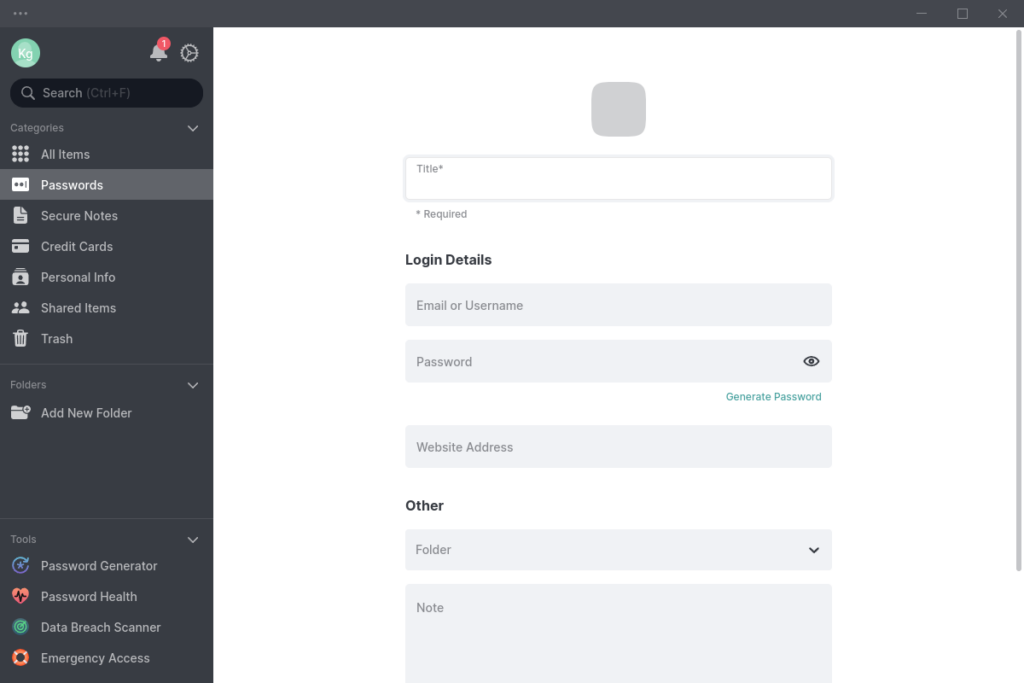
NordPass has standalone, cross-platform desktop and mobile clients, and they’re very nice-looking indeed. Everything feels very streamlined, easy to parse and uncluttered. The interface is also very consistent between the web vault and all the apps.
However, the Linux desktop version is only available as an official Snap image or a somewhat unstable third-party Flatpak. There’s no option of building from source or using other popular installation formats such as DEB or RPM. The lack of open source code is also a little disappointing given that other Nord apps are open source and the benefits that security contributions from the community have given open source password management rivals such as Bitwarden and KeePass.
You’ll need a separate Nord account login as well as a master password for your password collection, which effectively means that you’ll log in to two distinct services when adding NordPass to a new device, or after you’ve cleared your cached web sessions or switched IP address. Don’t use the same password for both.
I’d prefer the option of logging into NordPass as a stand-alone option, as the basic assumption of the password manager is that it means you only have to remember one, very strong, passphrase, not two. Fully closing the NordPass desktop app can also require web-based re-authentication.
Unlike most desktop password managers, the application can’t be unlocked if you’re not connected to the internet, although you do retain read access to any already-unlocked extensions or apps. This doesn’t apply to the mobile version, which can be unlocked to view cached passwords as needed.
As you’d expect, there’s robust two-factor authentication support, including TOTP (Time-Based One Time Password) authenticators, FIDO (Fast IDentity Online) compliant security keys such as Yubikey, and previously generated backup codes. This is a zero-knowledge account, so resetting your master password deletes all saved passwords; but you can and should generate a recovery code.
As well as passwords – with support for multiple URLs associated with each set of credentials – NordPass has categories that can store personal information, credit cards and notes. Paying users now get 3GB of secure file attachment storage for anything they need to keep safe, which was a key item on my feature wishlist. It keeps a 10-password history, but unlimited really would be better – you also lose your history if you share a password.
The service also now supports Passkeys – a new passwordless authentication system based on paired cryptographic keys, supported by a limited number of sites and services such as Adobe, Ebay and PayPal. Passkeys have to be stored using the NordPass browser extension. Apple and Google have indicated that third-party password managers such as NordPass should be able to manage and store passkeys on iOS and Android from late 2023, but this feature doesn’t yet exist.
Passkeys can’t be exported, edited or viewed by the user, but you can share them with other NordPass users and have multiple passkeys for a single account, where supported by the service you’re logging into. Only paying subscribers can grant full or limited password access to other NordPass users.
I like NordPass a lot, and development is active and ongoing, but it’s a little short on features compared to Trusted faves Bitwarden and 1Password. Notably, only NordPass Business users get access to an integrated TOTP authentication code generator. Including your 2FA code generation in your password manager is a thorny issue, as it arguably negates the entire point of using 2FA, particularly for individual users, but it’s obviously an in-demand feature.
Latest deals
Should you buy it?
If you’re looking for convenience: NordPass is easy to use, has a conspicuously streamlined interface on its clients and extensions, and new features are being regularly added. Its account login behaviour can be annoying, however.
How we test
We test each password manager ourselves on a variety of computer and mobile operating systems. We carry out comparative feature analysis against industry standards and rival products, and test security and convenience settings such as default logout behaviour and offline access.
We used for at least a week.
Tested all of the available features.
FAQs
NordPass does have a free tier, but you’ll need to pay a monthly fee for the extra premium features.
While you’ve the option of a free tier, your best value choice is to grab a two-year NordPass subscription for £34.27. This introductory price automatically renews at an annual price of £34.42. Watch out for VAT that you’re not shown until you reach the payment screen, too.

Verdict
NordPass is a great-looking password manager offering both free and paid-for tiers. The free tier is particularly competitive, but the paid version lacks a few features we’ve come to expect from a top-flight password manager.
Pros
- Polished interface
- Excellent free tier
- Early adopter of Passkey authentication
Cons
- Not as many features as some rivals
- Requires two sets of login credentials to access
- Higher renewal fees, list prices don’t include VAT
-
Security XChaCha20 encryption -
SharingPaying subscribers can grant full or limited password access to other NordPass users -
Standalone clientsWindows, Linux, macOS, Android, iOS
Introduction
Launched in 2019 by Nord Security, best known for NordVPN, NordPass has been adding features at a good pace.
It’s part of Nord’s more serious-minded expansion into the broader world of online security beyond VPNs, and stands up well as a modern, cross-platform password manager.
But is that enough for it to rank as one of the best password manager options? Here are my thoughts.
Pricing
Free NordPass users can store as many passwords as they like and access them from as many devices as they need to, but only one device can be logged in at a time. In addition, password sharing, file storage and emergency access features aren’t available to free users, and neither are various password strength and breach-checking assessment tools.
Family accounts cover six users and include additional management tools. Like other Nord Security products, NordPass’s listed prices don’t include VAT, which can be a little deceptive when shopping around. A two year individual Premium plan account costs £34.27, inc vat, and renews as a one-year subscription currently listed at a price of £28.68 ex VAT (£34.42 inc VAT). A two-year family account for six users costs £63.07 inc VAT, and thereafter renews annually at £57.48 ex VAT (£68.98 inc VAT).
Bundled subscriptions are also available, including a combination of NordPass, NordLocker encrypted online storage and Trusted award-winner, NordVPN. Business accounts with additional enterprise-friendly features are also available.
Features
- Desktop app needs internet and account login for password access
- Support for two-factor authentication
- Can’t match features of rival password managers
NordPass has standalone, cross-platform desktop and mobile clients, and they’re very nice-looking indeed. Everything feels very streamlined, easy to parse and uncluttered. The interface is also very consistent between the web vault and all the apps.
However, the Linux desktop version is only available as an official Snap image or a somewhat unstable third-party Flatpak. There’s no option of building from source or using other popular installation formats such as DEB or RPM. The lack of open source code is also a little disappointing given that other Nord apps are open source and the benefits that security contributions from the community have given open source password management rivals such as Bitwarden and KeePass.
You’ll need a separate Nord account login as well as a master password for your password collection, which effectively means that you’ll log in to two distinct services when adding NordPass to a new device, or after you’ve cleared your cached web sessions or switched IP address. Don’t use the same password for both.
I’d prefer the option of logging into NordPass as a stand-alone option, as the basic assumption of the password manager is that it means you only have to remember one, very strong, passphrase, not two. Fully closing the NordPass desktop app can also require web-based re-authentication.
Unlike most desktop password managers, the application can’t be unlocked if you’re not connected to the internet, although you do retain read access to any already-unlocked extensions or apps. This doesn’t apply to the mobile version, which can be unlocked to view cached passwords as needed.
As you’d expect, there’s robust two-factor authentication support, including TOTP (Time-Based One Time Password) authenticators, FIDO (Fast IDentity Online) compliant security keys such as Yubikey, and previously generated backup codes. This is a zero-knowledge account, so resetting your master password deletes all saved passwords; but you can and should generate a recovery code.
As well as passwords – with support for multiple URLs associated with each set of credentials – NordPass has categories that can store personal information, credit cards and notes. Paying users now get 3GB of secure file attachment storage for anything they need to keep safe, which was a key item on my feature wishlist. It keeps a 10-password history, but unlimited really would be better – you also lose your history if you share a password.
The service also now supports Passkeys – a new passwordless authentication system based on paired cryptographic keys, supported by a limited number of sites and services such as Adobe, Ebay and PayPal. Passkeys have to be stored using the NordPass browser extension. Apple and Google have indicated that third-party password managers such as NordPass should be able to manage and store passkeys on iOS and Android from late 2023, but this feature doesn’t yet exist.
Passkeys can’t be exported, edited or viewed by the user, but you can share them with other NordPass users and have multiple passkeys for a single account, where supported by the service you’re logging into. Only paying subscribers can grant full or limited password access to other NordPass users.
I like NordPass a lot, and development is active and ongoing, but it’s a little short on features compared to Trusted faves Bitwarden and 1Password. Notably, only NordPass Business users get access to an integrated TOTP authentication code generator. Including your 2FA code generation in your password manager is a thorny issue, as it arguably negates the entire point of using 2FA, particularly for individual users, but it’s obviously an in-demand feature.
Latest deals
Should you buy it?
If you’re looking for convenience: NordPass is easy to use, has a conspicuously streamlined interface on its clients and extensions, and new features are being regularly added. Its account login behaviour can be annoying, however.
How we test
We test each password manager ourselves on a variety of computer and mobile operating systems. We carry out comparative feature analysis against industry standards and rival products, and test security and convenience settings such as default logout behaviour and offline access.
We used for at least a week.
Tested all of the available features.
FAQs
NordPass does have a free tier, but you’ll need to pay a monthly fee for the extra premium features.
While you’ve the option of a free tier, your best value choice is to grab a two-year NordPass subscription for £34.27. This introductory price automatically renews at an annual price of £34.42. Watch out for VAT that you’re not shown until you reach the payment screen, too.



