








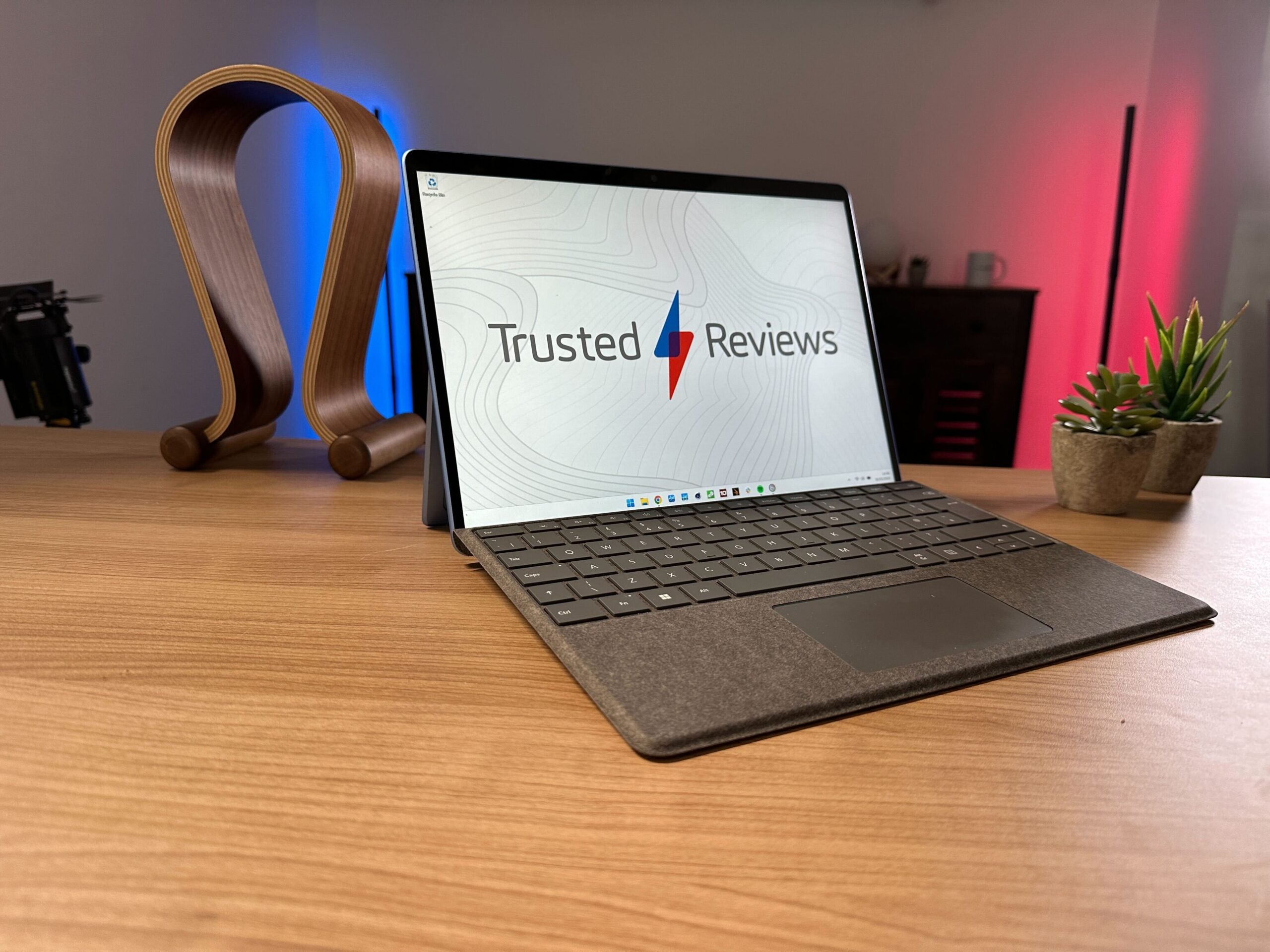
The Microsoft Surface Pro 9 is an iterative upgrade, failing to fix lingering shortcomings. Nevertheless, few devices offer this much performance in such a stunningly portable package. But, you’ll be paying a premium for the privilege.
Pros
- Bright and smooth PixelSense display
- Improved range of colour options
- Ultra-portable productivity
Cons
- Not great value for money
- Aggressive fans
- Expensive and flexible keyboard cover
Key Features
-
Ultra-portable:Starting at just 879g and 9.3mm, it’s a dream to carry around. -
13 inch PixelSense Flow display:A 3:2 aspect ratio, 2.8K resolution, and 120Hz make this a joyous screen. -
Long battery life:Easily manages a working day for productivity users.
Introduction
The main selling point of the Surface Pro line has always been its portability. The Microsoft Surface Pro 9 doesn’t deviate from this core mission, offering a sleek, luxury machine that’ll suit those on the move.
For a while, the Surface Pro range had few rivals. Few other tablets could be used as a fully functioning laptop-like machine with an operating system that allowed for real work to be done.
Over the intervening years though, the Huawei MateBook E (2022), Dell XPS 13 2-in-1 (2022) and, most fiercely, the iPad Pro teamed up its Magic Keyboard accessory. So, the Surface Pro 9 is far from the only 2-in-1 in town, even if its Windows rivals haven’t necessarily shone in their own right.
The design hasn’t changed much this year, but it’s seen the Surface Pro X concept merge into the flagship lineup with the Surface Pro 9 5G. The big Surface Pro update was a welcome one but, with Intel devices, you can only pack so much power into such a small package. Something has got to give and it’s often battery life, performance, or fan noise. The Surface Pro 9 will have to battle all three to justify its high cost, a starting cost that doesn’t include the essential Surface Pro Signature Keyboard (£159.99) – then, another £100 for the Slim Pen 2 bundle.
Design and Keyboard
- New Forest colour
- Same extremely portable combination as last year
- Frustrating keyboard
If you’re someone who hates lugging around weighty or sizable laptops and has longed for something that you’ll barely notice in a bag or can easily carry under your arm, it’s hard not to look lovingly at the Surface Pro 9. As a piece of hardware design, especially since the refresh last time out, few manufacturers compete with Microsoft for luxurious industrial build quality.
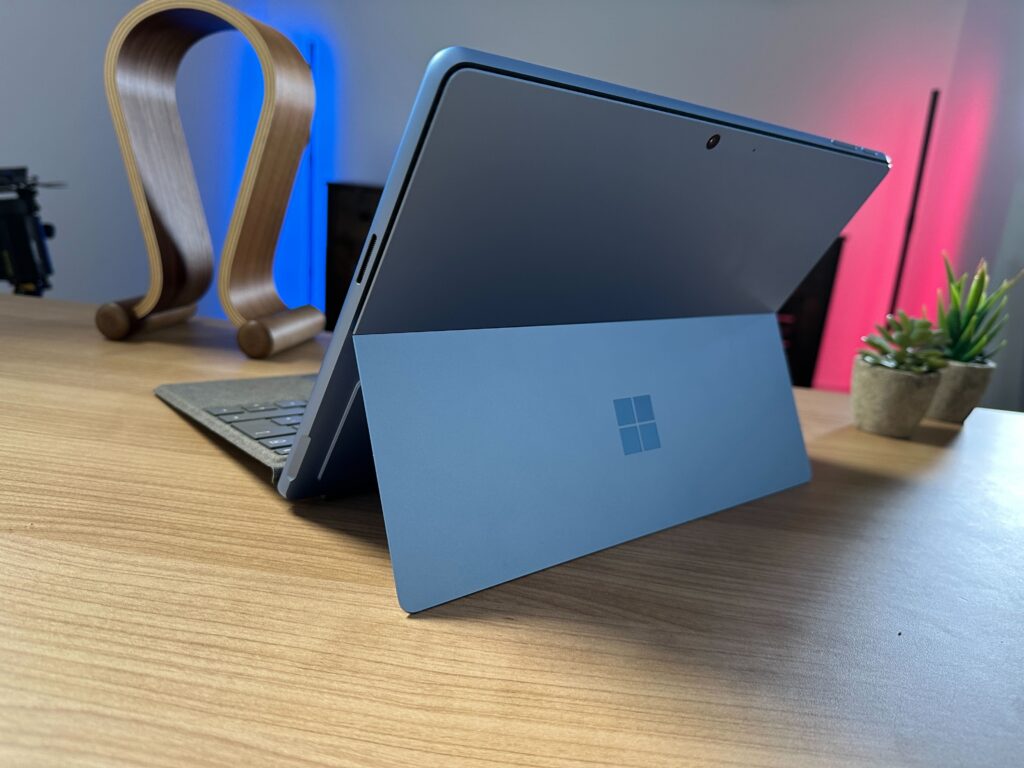
The colour options offered are Platinum, Graphite, Sapphire and, a new green shade, Forest. My review model is the blue Sapphire colour variant and it’s a pleasing pop, but I much prefer the understated options. Though, those with more vibrant tastes will likely be happier to see more than just black and greys to choose from now. You can, of course, match these up with keyboard hues of your choice too.
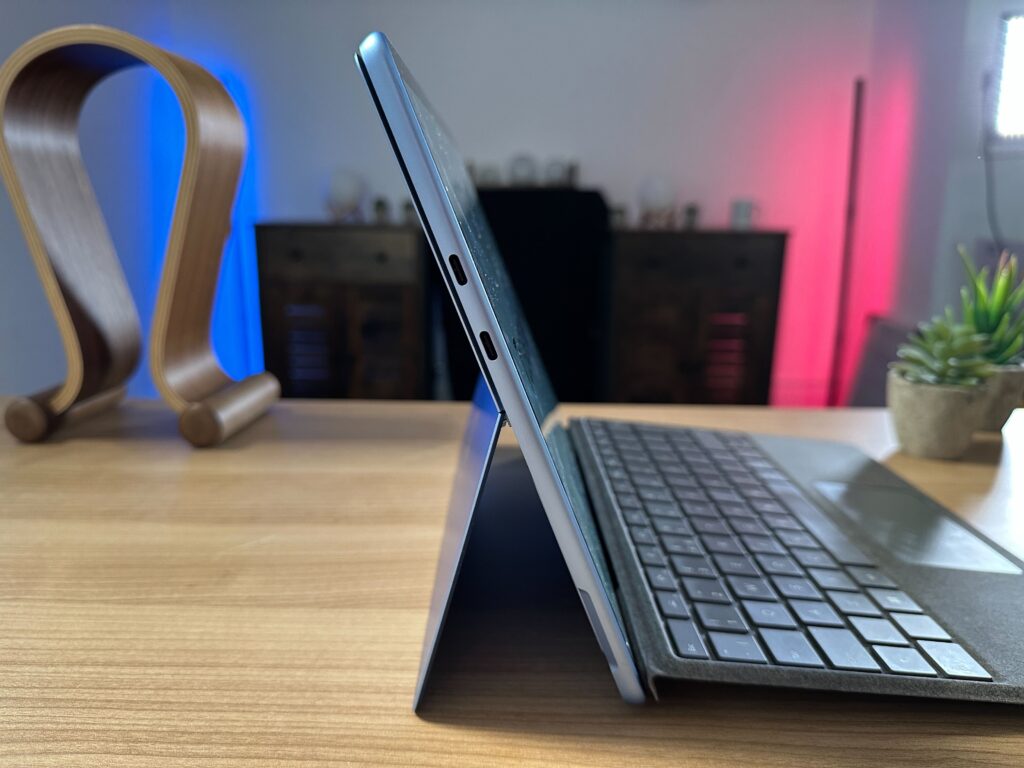
The compact package weighs just 879g on its own, and 1.18kg when paired with the Slim Pen 2 bundle. The full package is just 14.2mm thin. It’s a footprint that feels little more than a weighty paper notebook when carried by your side. Those who move from meeting to meeting regularly will love this form factor. The thin design does sacrifice having a wide range of ports though, with just two Thunderbolt ports and a Surface Connect making up the I/O. It’ll be the dongle life for those who need to use HDMI, SD cards and the like.
Prior to the Surface Pro 8 revamp, I was a massive fan of the keyboard cover that Microsoft sells alongside its tablet hybrid. Similarly, I loved the design of the Surface Pro X. But, crucially, not its accompanying cover. The design change has brought over the cover style from the concept device and, while the keys themselves still offer remarkable travel for such a thin and light accessory, the flex is an extremely noticeable distraction.
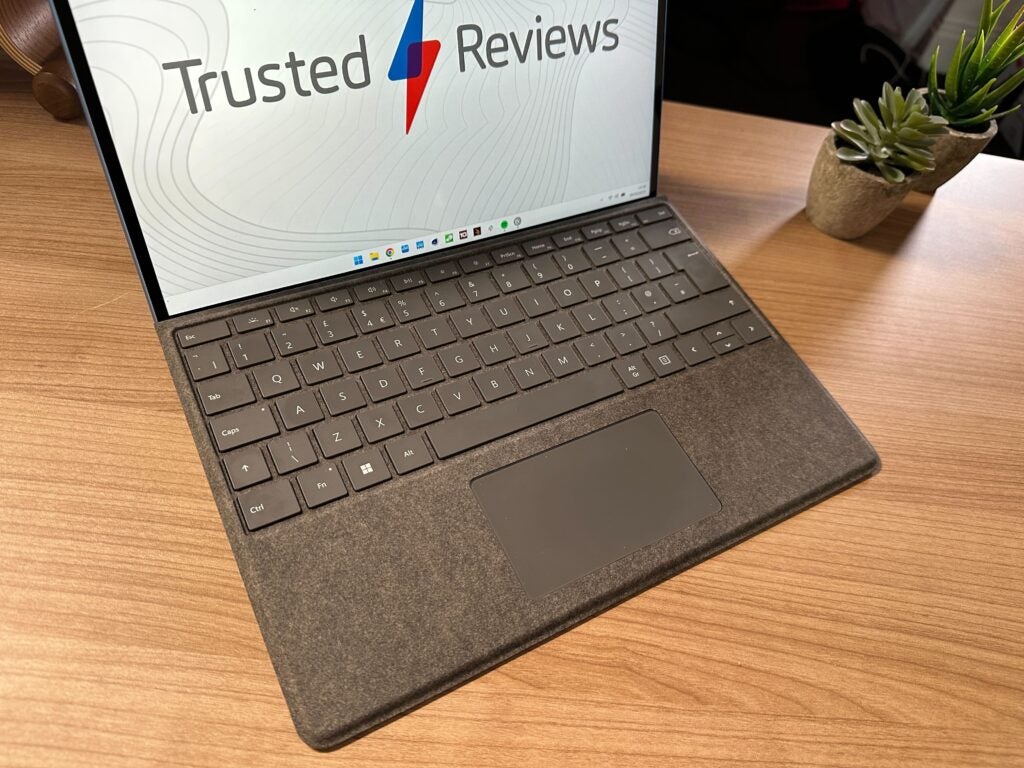
The cover moves down with every keypress, seemingly owing to the larger hidden compartment that houses the Slim Pen 2. It’s not a dealbreaker and it won’t cause you to miss keys, but the movement leads to a feeling of something being off. The trackpad is also comically small but still offers an accurate and satisfying click.
The Slim Pen 2 itself is impressively accurate and, compared with 360-degree hinge laptops that come with a stylus, the tablet and its stand make for a super sturdy canvas. The flat shape doesn’t look like it’d be all that comfortable to hold, but it is just that and gives a feeling to wielding a paintbrush more than a typical pen.
The onboard speakers offer a good range of detail, even if the highs can be harsh. There’s a smidgen of bass that stops the sound from coming across as superficial and, at higher volumes, it remains quite consistent. The webcam is a high point, with the front-facing 1080p camera offering a clearer image than most rivals. The colours do skew a bit warm though. There is a 10-megapixel camera on the rear… for some reason. Please don’t take this to a concert and hold it up. The microphones are solid too, so if you’re short of a mic or headphones come meeting time, the internal audio capabilities will suffice.
Display
- Bright 2880 x 1920 panel
- Smooth 120Hz refresh rate
- Reflective screen
The Surface Pro range has always offered accurate and pleasing displays, even when they haven’t hit the heights on specs like resolution and refresh rate. The Microsoft Surface Pro 9 nearly has the total package.
Along with a 2.8K resolution, there’s a 3:2 aspect ratio and 120Hz panel that makes browsing the web a delightful experience with smoother scrolling.
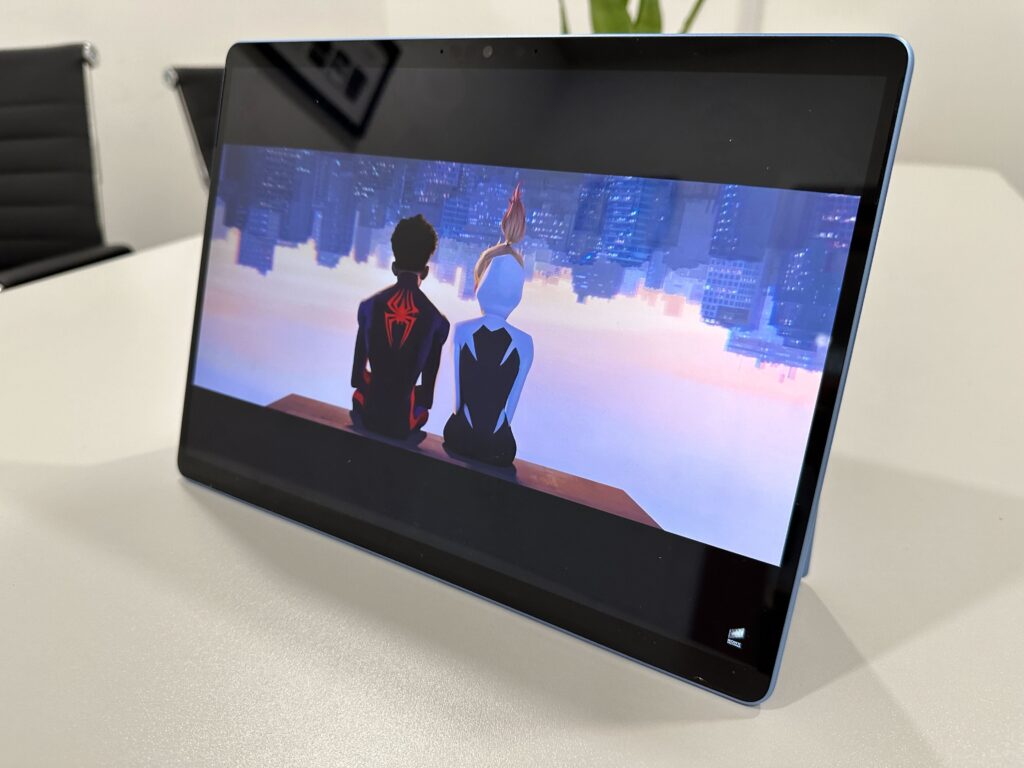
There’s no fancy Mini LED or OLED technology, but my benchmarking results showed a strong display, nonetheless. Brightness topped out at a good 443 nits, which is plenty usable outside or in awkward lighting. The main drawback is a glossy display that is extremely reflective and something you just have to live with.
The recorded 99% sRGB, 80% Adobe RGB and 85% DCI-P3 colour coverage results aren’t right up there with the best of them like a MacBook Pro, but they’re good enough for entry-level content creators.
All this adds up to a screen that’s a great all-rounder, top-notch for productivity and has big colour chops for taking in videos and images.
Performance
- Capable of hefty productivity tasking
- Fans can get surprisingly loud
- Not as powerful as rivals
The redesign of the Surface Pro was necessary to keep up with thinner and lighter options from rivals, but it doesn’t appear to have done wonders for the performance. Don’t get me wrong, the Microsoft Surface Pro 9 is an extremely capable productivity machine that, with my 12th Gen Intel Core i7 and 16GB RAM configuration, ate up upwards of 25 browser tabs before it blinked.
However, to keep performance steady, the Surface Pro 9 appears to be doing a lot of work. The rear of the tablet can get uncomfortably warm (thankfully it won’t be resting on your lap) and the fans can kick up surprisingly early. Though sometimes they don’t, it’s rather inconsistent. But, the fans always whirr up when going beyond 15 Google Chrome tabs.
Despite the best efforts of the fans, the performance was consistently below key rivals, including its Surface Laptop 5 clamshell sibling. The SSD speeds either feel just short of a competitor or well behind, coming in at 3475MB/s read and 2519MB/s write. The overall results make clear that you’re having to sacrifice performance power to get this sleek design, which may be a deal you’re willing to make but you won’t be getting the most bang for your buck.
Battery life
- Closing in on 10 hours of battery life
- Beats Dell XPS 13 2-in-1 by one hour
If you’re someone who is going to push the Microsoft Surface Pro 9 to its maximum, you’ll find that battery life rapidly falls lower than the 15.5 hours touted.
My benchmarking test came in just under 10 hours, which isn’t bad and it beats its closest hybrid rival, the Dell XPS 13 2-in-1. However, it falls well short of more functional competition like the Asus Zenbook S 13 OLED (2022), coming in at over 13 hours, and MacBook Air (2022), at 14 hours.
That doesn’t tell the whole story though, with the stress this machine appears to be under when you move up to more intense productivity work appearing to drain this battery much faster. In my testing, I found it to just reach a full working day, closer to 6-7 hours of screen-on time. That’ll still suit most but, if you like to be free from battery anxiety, the Surface Pro 9 won’t be your saviour unless light productivity is your day-to-day.
As is often the case with modern laptops, lax battery life is saved by speedy recharge times. Using the Surface Connect charger will speed you back up from nearly empty to 100% in under an hour.
Latest deals
Should you buy it?
You champion portability:
The Surface Pro 9 is made for those who crave supreme portability above all else. If that’s you, it’s plenty capable and you won’t be disappointed on the design front.
You want a proper laptop experience:
If you favour function over form, this hybrid is a tough sell. There’s a high price, a lack of ports and a performance that is topped by many rivals. Keyboard enthusiasts should avoid too, as the bouncing will grind your gears.
Final Thoughts
The Microsoft Surface Pro 9 is an iterative upgrade and, as such, doesn’t bring too many surprises. Like its predecessor, it’s wondrously stylish, aggressively portable and requires a good amount of sacrifice. If you love the look of this device then you’ll be willing to make these sacrifices, those being lower power, trigger-happy fans, a glossy display and a quirky keyboard.
The answer for many looking at top-quality productivity laptops will be to stick with the good ol’ clamshell. The likes of the MacBook Air (2022), Asus Zenbook S 13 OLED (2022) and more don’t require as much compromise.
How we test
Every laptop we review goes through a series of uniform checks designed to gauge key things including build quality, performance, screen quality and battery life.
These include formal synthetic benchmarks and scripted tests, plus a series of real-world checks, such as how well it runs popular apps.
Spent a week testing the laptop.
Tested the performance via both benchmark tests and real-world use.
We tested the battery with real-world use.
FAQs
The Surface Pro 9 does not come with a keyboard, and you must purchase it (and a Surface Slim Pen 2) separately.
The Microsoft Surface Pro 9 launched in October 2022.
Trusted Reviews test data
UK RRP
CPU
Manufacturer
Screen Size
Storage Capacity
Front Camera
Battery
Battery Hours
Size (Dimensions)
Weight
Operating System
Release Date
First Reviewed Date
Resolution
Refresh Rate
Ports
Audio (Power output)
RAM
Connectivity
Colours
Display Technology
Screen Technology
Touch Screen
Convertible?
Jargon buster
SSD
Known as Solid State Drive, this is a faster form of a memory than a standard hard drive. Results in faster loading times and more ambitious games.
GPU
The graphics processing unit is designed to render graphics, which is particularly important for gaming, creating 3D models and editing video.

The Microsoft Surface Pro 9 is an iterative upgrade, failing to fix lingering shortcomings. Nevertheless, few devices offer this much performance in such a stunningly portable package. But, you’ll be paying a premium for the privilege.
Pros
- Bright and smooth PixelSense display
- Improved range of colour options
- Ultra-portable productivity
Cons
- Not great value for money
- Aggressive fans
- Expensive and flexible keyboard cover
Key Features
-
Ultra-portable:Starting at just 879g and 9.3mm, it’s a dream to carry around. -
13 inch PixelSense Flow display:A 3:2 aspect ratio, 2.8K resolution, and 120Hz make this a joyous screen. -
Long battery life:Easily manages a working day for productivity users.
Introduction
The main selling point of the Surface Pro line has always been its portability. The Microsoft Surface Pro 9 doesn’t deviate from this core mission, offering a sleek, luxury machine that’ll suit those on the move.
For a while, the Surface Pro range had few rivals. Few other tablets could be used as a fully functioning laptop-like machine with an operating system that allowed for real work to be done.
Over the intervening years though, the Huawei MateBook E (2022), Dell XPS 13 2-in-1 (2022) and, most fiercely, the iPad Pro teamed up its Magic Keyboard accessory. So, the Surface Pro 9 is far from the only 2-in-1 in town, even if its Windows rivals haven’t necessarily shone in their own right.
The design hasn’t changed much this year, but it’s seen the Surface Pro X concept merge into the flagship lineup with the Surface Pro 9 5G. The big Surface Pro update was a welcome one but, with Intel devices, you can only pack so much power into such a small package. Something has got to give and it’s often battery life, performance, or fan noise. The Surface Pro 9 will have to battle all three to justify its high cost, a starting cost that doesn’t include the essential Surface Pro Signature Keyboard (£159.99) – then, another £100 for the Slim Pen 2 bundle.
Design and Keyboard
- New Forest colour
- Same extremely portable combination as last year
- Frustrating keyboard
If you’re someone who hates lugging around weighty or sizable laptops and has longed for something that you’ll barely notice in a bag or can easily carry under your arm, it’s hard not to look lovingly at the Surface Pro 9. As a piece of hardware design, especially since the refresh last time out, few manufacturers compete with Microsoft for luxurious industrial build quality.
The colour options offered are Platinum, Graphite, Sapphire and, a new green shade, Forest. My review model is the blue Sapphire colour variant and it’s a pleasing pop, but I much prefer the understated options. Though, those with more vibrant tastes will likely be happier to see more than just black and greys to choose from now. You can, of course, match these up with keyboard hues of your choice too.
The compact package weighs just 879g on its own, and 1.18kg when paired with the Slim Pen 2 bundle. The full package is just 14.2mm thin. It’s a footprint that feels little more than a weighty paper notebook when carried by your side. Those who move from meeting to meeting regularly will love this form factor. The thin design does sacrifice having a wide range of ports though, with just two Thunderbolt ports and a Surface Connect making up the I/O. It’ll be the dongle life for those who need to use HDMI, SD cards and the like.
Prior to the Surface Pro 8 revamp, I was a massive fan of the keyboard cover that Microsoft sells alongside its tablet hybrid. Similarly, I loved the design of the Surface Pro X. But, crucially, not its accompanying cover. The design change has brought over the cover style from the concept device and, while the keys themselves still offer remarkable travel for such a thin and light accessory, the flex is an extremely noticeable distraction.
The cover moves down with every keypress, seemingly owing to the larger hidden compartment that houses the Slim Pen 2. It’s not a dealbreaker and it won’t cause you to miss keys, but the movement leads to a feeling of something being off. The trackpad is also comically small but still offers an accurate and satisfying click.
The Slim Pen 2 itself is impressively accurate and, compared with 360-degree hinge laptops that come with a stylus, the tablet and its stand make for a super sturdy canvas. The flat shape doesn’t look like it’d be all that comfortable to hold, but it is just that and gives a feeling to wielding a paintbrush more than a typical pen.
The onboard speakers offer a good range of detail, even if the highs can be harsh. There’s a smidgen of bass that stops the sound from coming across as superficial and, at higher volumes, it remains quite consistent. The webcam is a high point, with the front-facing 1080p camera offering a clearer image than most rivals. The colours do skew a bit warm though. There is a 10-megapixel camera on the rear… for some reason. Please don’t take this to a concert and hold it up. The microphones are solid too, so if you’re short of a mic or headphones come meeting time, the internal audio capabilities will suffice.
Display
- Bright 2880 x 1920 panel
- Smooth 120Hz refresh rate
- Reflective screen
The Surface Pro range has always offered accurate and pleasing displays, even when they haven’t hit the heights on specs like resolution and refresh rate. The Microsoft Surface Pro 9 nearly has the total package.
Along with a 2.8K resolution, there’s a 3:2 aspect ratio and 120Hz panel that makes browsing the web a delightful experience with smoother scrolling.
There’s no fancy Mini LED or OLED technology, but my benchmarking results showed a strong display, nonetheless. Brightness topped out at a good 443 nits, which is plenty usable outside or in awkward lighting. The main drawback is a glossy display that is extremely reflective and something you just have to live with.
The recorded 99% sRGB, 80% Adobe RGB and 85% DCI-P3 colour coverage results aren’t right up there with the best of them like a MacBook Pro, but they’re good enough for entry-level content creators.
All this adds up to a screen that’s a great all-rounder, top-notch for productivity and has big colour chops for taking in videos and images.
Performance
- Capable of hefty productivity tasking
- Fans can get surprisingly loud
- Not as powerful as rivals
The redesign of the Surface Pro was necessary to keep up with thinner and lighter options from rivals, but it doesn’t appear to have done wonders for the performance. Don’t get me wrong, the Microsoft Surface Pro 9 is an extremely capable productivity machine that, with my 12th Gen Intel Core i7 and 16GB RAM configuration, ate up upwards of 25 browser tabs before it blinked.
However, to keep performance steady, the Surface Pro 9 appears to be doing a lot of work. The rear of the tablet can get uncomfortably warm (thankfully it won’t be resting on your lap) and the fans can kick up surprisingly early. Though sometimes they don’t, it’s rather inconsistent. But, the fans always whirr up when going beyond 15 Google Chrome tabs.
Despite the best efforts of the fans, the performance was consistently below key rivals, including its Surface Laptop 5 clamshell sibling. The SSD speeds either feel just short of a competitor or well behind, coming in at 3475MB/s read and 2519MB/s write. The overall results make clear that you’re having to sacrifice performance power to get this sleek design, which may be a deal you’re willing to make but you won’t be getting the most bang for your buck.
Battery life
- Closing in on 10 hours of battery life
- Beats Dell XPS 13 2-in-1 by one hour
If you’re someone who is going to push the Microsoft Surface Pro 9 to its maximum, you’ll find that battery life rapidly falls lower than the 15.5 hours touted.
My benchmarking test came in just under 10 hours, which isn’t bad and it beats its closest hybrid rival, the Dell XPS 13 2-in-1. However, it falls well short of more functional competition like the Asus Zenbook S 13 OLED (2022), coming in at over 13 hours, and MacBook Air (2022), at 14 hours.
That doesn’t tell the whole story though, with the stress this machine appears to be under when you move up to more intense productivity work appearing to drain this battery much faster. In my testing, I found it to just reach a full working day, closer to 6-7 hours of screen-on time. That’ll still suit most but, if you like to be free from battery anxiety, the Surface Pro 9 won’t be your saviour unless light productivity is your day-to-day.
As is often the case with modern laptops, lax battery life is saved by speedy recharge times. Using the Surface Connect charger will speed you back up from nearly empty to 100% in under an hour.
Latest deals
Should you buy it?
You champion portability:
The Surface Pro 9 is made for those who crave supreme portability above all else. If that’s you, it’s plenty capable and you won’t be disappointed on the design front.
You want a proper laptop experience:
If you favour function over form, this hybrid is a tough sell. There’s a high price, a lack of ports and a performance that is topped by many rivals. Keyboard enthusiasts should avoid too, as the bouncing will grind your gears.
Final Thoughts
The Microsoft Surface Pro 9 is an iterative upgrade and, as such, doesn’t bring too many surprises. Like its predecessor, it’s wondrously stylish, aggressively portable and requires a good amount of sacrifice. If you love the look of this device then you’ll be willing to make these sacrifices, those being lower power, trigger-happy fans, a glossy display and a quirky keyboard.
The answer for many looking at top-quality productivity laptops will be to stick with the good ol’ clamshell. The likes of the MacBook Air (2022), Asus Zenbook S 13 OLED (2022) and more don’t require as much compromise.
How we test
Every laptop we review goes through a series of uniform checks designed to gauge key things including build quality, performance, screen quality and battery life.
These include formal synthetic benchmarks and scripted tests, plus a series of real-world checks, such as how well it runs popular apps.
Spent a week testing the laptop.
Tested the performance via both benchmark tests and real-world use.
We tested the battery with real-world use.
FAQs
The Surface Pro 9 does not come with a keyboard, and you must purchase it (and a Surface Slim Pen 2) separately.
The Microsoft Surface Pro 9 launched in October 2022.
Trusted Reviews test data
UK RRP
CPU
Manufacturer
Screen Size
Storage Capacity
Front Camera
Battery
Battery Hours
Size (Dimensions)
Weight
Operating System
Release Date
First Reviewed Date
Resolution
Refresh Rate
Ports
Audio (Power output)
RAM
Connectivity
Colours
Display Technology
Screen Technology
Touch Screen
Convertible?
Jargon buster
SSD
Known as Solid State Drive, this is a faster form of a memory than a standard hard drive. Results in faster loading times and more ambitious games.
GPU
The graphics processing unit is designed to render graphics, which is particularly important for gaming, creating 3D models and editing video.



