









Verdict
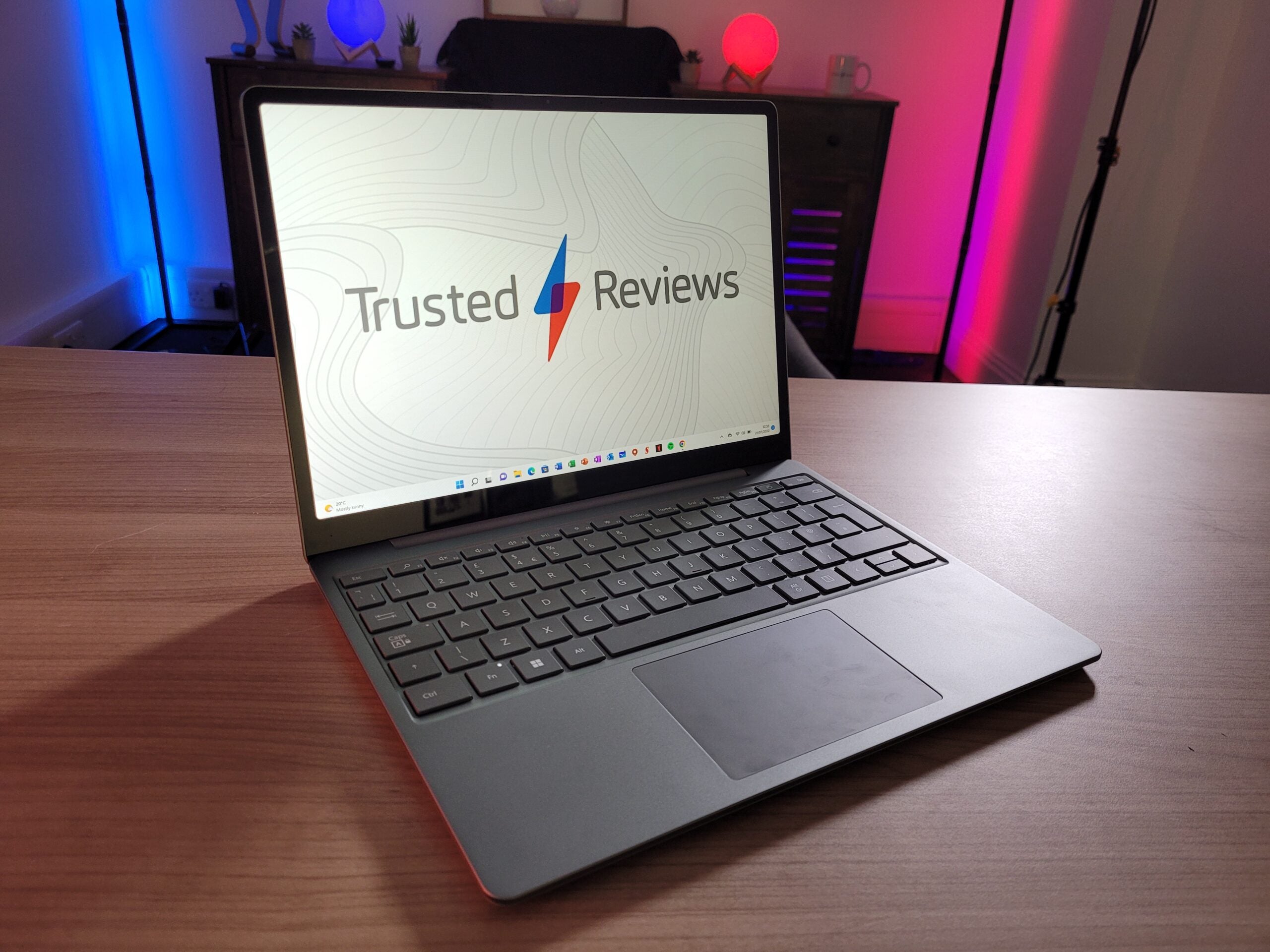
The Microsoft Surface Laptop Go 2 isn’t a big upgrade on its predecessor, but its dinky dimensions, improved performance and longer battery life ensure this remains one of the best value Windows laptops currently available. Just be aware that its 12-inch low-resolution display isn’t ideal for streaming video.
Pros
- Fantastic value for money
- Extremely portable design
- Smooth performance for basic tasks
- Better battery life than the original
Cons
- Low-resolution display
- Lack of keyboard backlight
- No fingerprint scanner on base configuration
Availability
- UKRRP: £529
- USARRP: $599.99
-
Ultra-portable design:Its compact 12-inch screen and lightweight build make this laptop very easy to carry in a bag. -
Touchscreen displayThe touchscreen makes it easy to scroll through social media or zoom up close to text or images. -
Fingerprint sensorA fingerprint sensor is available on all but the base configuration, allowing you to sign in my simply touching the power button.
Introduction
I was a huge fan of the original Surface Laptop Go. Its dinky size ensured it was incredibly portable, while the affordable price made it a genuine option for students and anyone on a budget.
Following the success of the 12-inch laptop, Microsoft has now launched a sequel: the Surface Laptop Go 2. But in typical Microsoft fashion, there aren’t many significant upgrades here, opting to retain the exact same clamshell design – just with a new Sage colour option.
Microsoft has at least fitted it with a new 11th Generation Intel Core processor to boost the performance and battery life, but this is otherwise the exact same laptop as before.
That said, Microsoft has scrapped the base configuration, so you can no longer purchase a model with 64GB of eMMC storage. But with the $599.99/£529 starting price undercutting the vast majority of Windows laptops, the Surface Laptop Go 2 still represents jaw-dropping value.
Design
- Small and lightweight design
- New Sage colour option
- Comfortable keyboard with no backlight
The Microsoft Surface Laptop Go 2 is adorably tiny. Its 12.4-inch touchscreen is notably more compact than a more conventional 13-inch laptop screen, so you’ll want to make sure you’re happy to downsize before making a purchase.
It has taken me a while to adjust to the small size having previously used a 16-inch laptop, and has been troublesome whenever I’ve wanted multiple apps and browser tabs displayed simultaneously. But otherwise, I think the 12.4-inch panel is perfectly fine for typing up essays, reading emails and scrolling through social media.
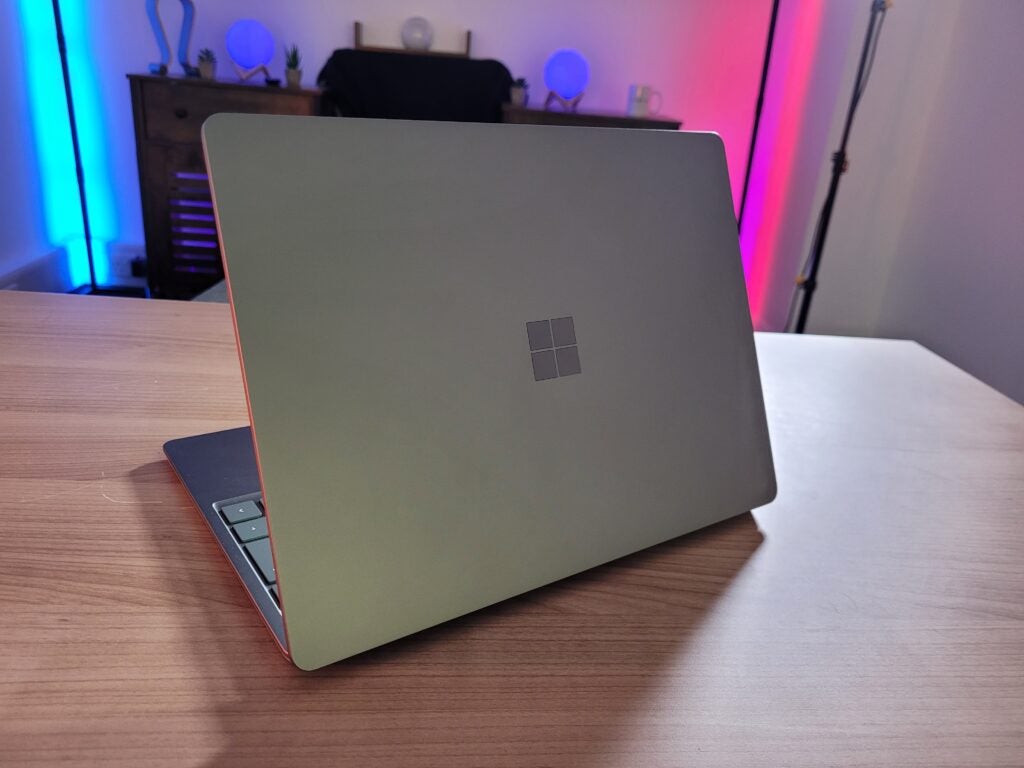
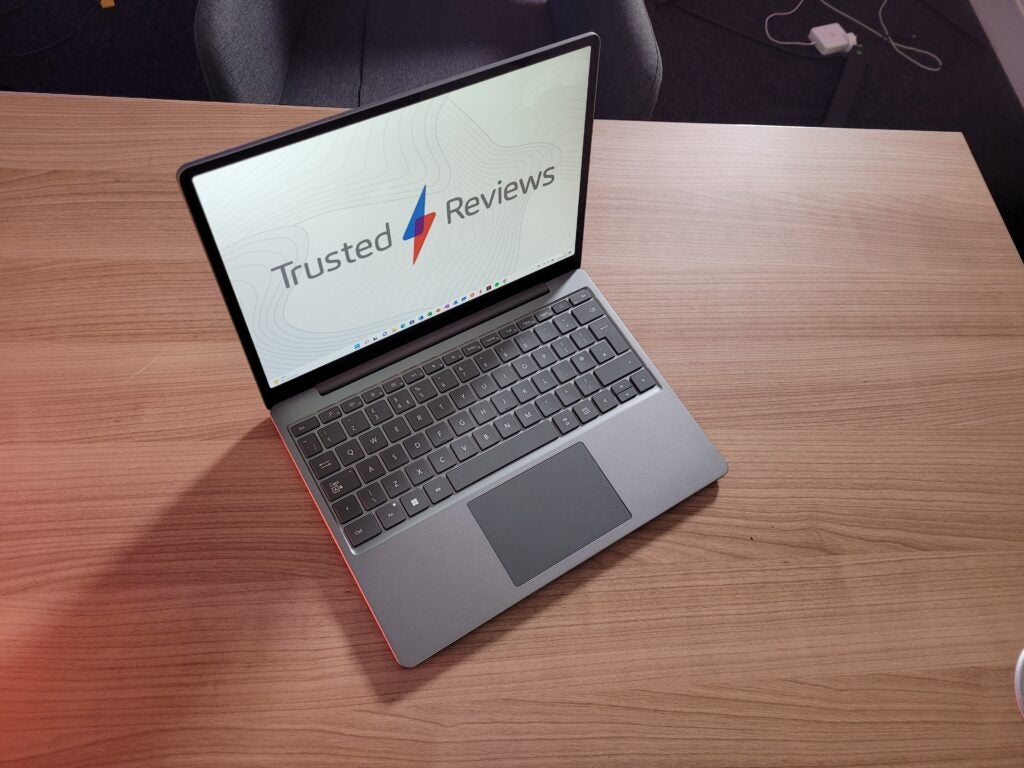
I’m quite fond of the new Sage colour option pictured in this review, expanding upon the other Platinum, Ice Blue and Sandstone options. They all help to give the Surface Laptop Go 2 more personality, which is refreshing after seeing countless bog-standard silver machines. Although I am disappointed to see you have to spend at least £629 for any colour other than Platinum.
Laptops can start to feel a little flimsy and cheap when they’re available around the $600/£500 mark, but the Surface Laptop Go 2 is an exception. The lid is made of aluminium, while the base uses an aluminium and polycarbonate composite resin. It all feels pleasingly sturdy, with only needlessly hard keyboard presses causing any noticeable flex.
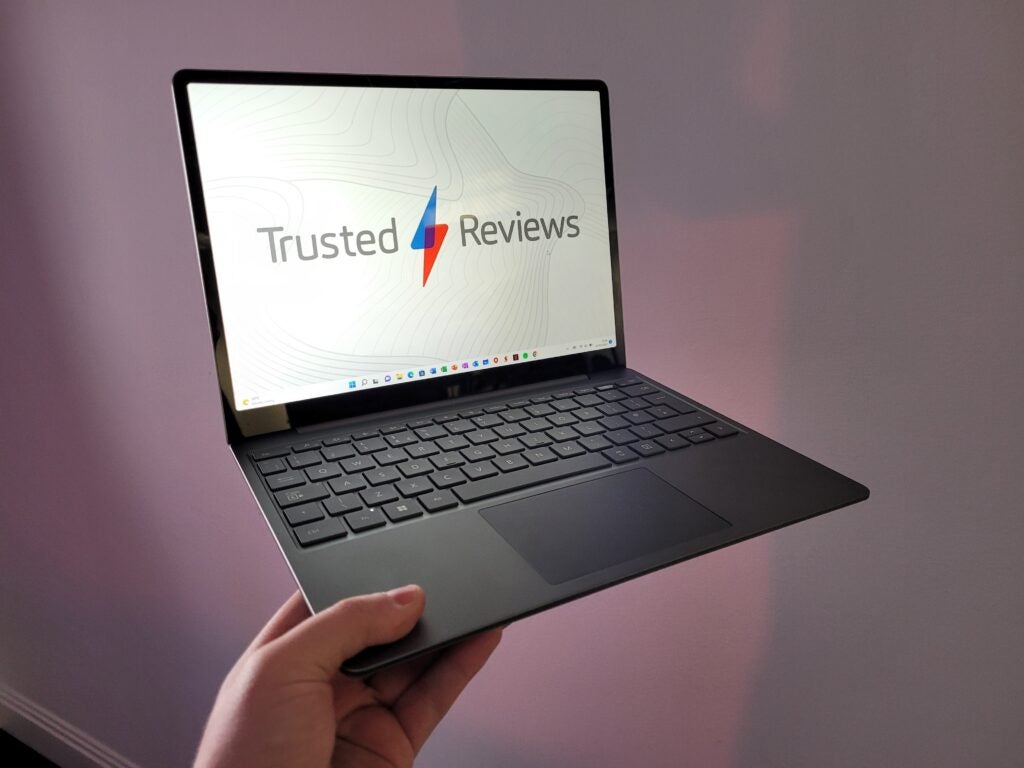
I can pick up the laptop in one hand and wave it around in the air without fear of my wrist snapping, weighing just 1127g which is lighter than both a MacBook Air and Dell XPS 13 OLED. It’s surprisingly chunky though, but not to the extent that it’s difficult to fit inside any bag.
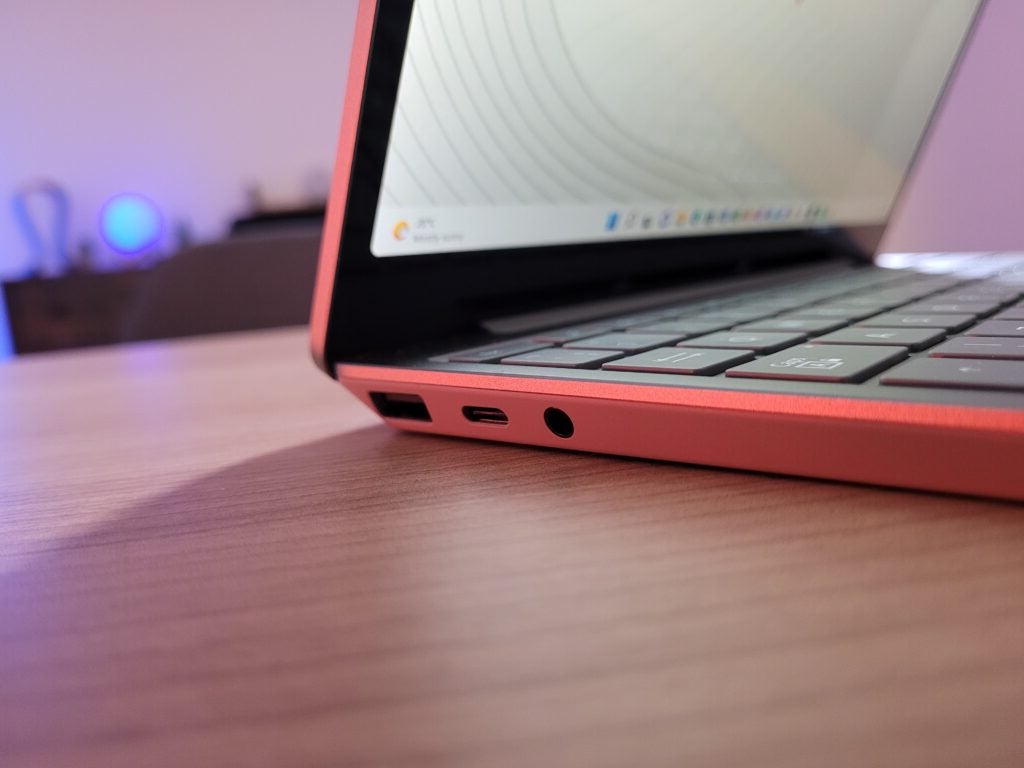
Port selection is fine, with a USB-C, USB-A and headphone jack lined across the left ridge, although I’m disappointed that Microsoft hasn’t added Thunderbolt support to speed up data transfers. There’s also a Surface Connect port on the right side to ensure compatibility with Microsoft’s proprietary magnetic charger. I’d personally prefer Microsoft to ditch this charging solution in favour of additional USB-C connections, but it’s not a major issue.
The Microsoft Surface Laptop Go 2 has a 720p webcam integrated into the top screen bezel. Video capture looks really grainy, but it’s still perfectly usable for casual video chats or conference calls. The laptop’s speakers are located underneath the keyboard, and can be cranked up to a high volume. Bass isn’t terribly good and you’ll notice some distortion at a high volume, but I still think the audio performance is good at this price.
I really like the laptop’s keyboard, with deep key presses for comfortable typing, and the spacebar seeing snappy, loud feedback. The keyboard is a little cramped compared to larger laptops, so you may need to retrain your muscle memory for prodding certain keys, but keys are spaced out just enough to avoid frequent typos.
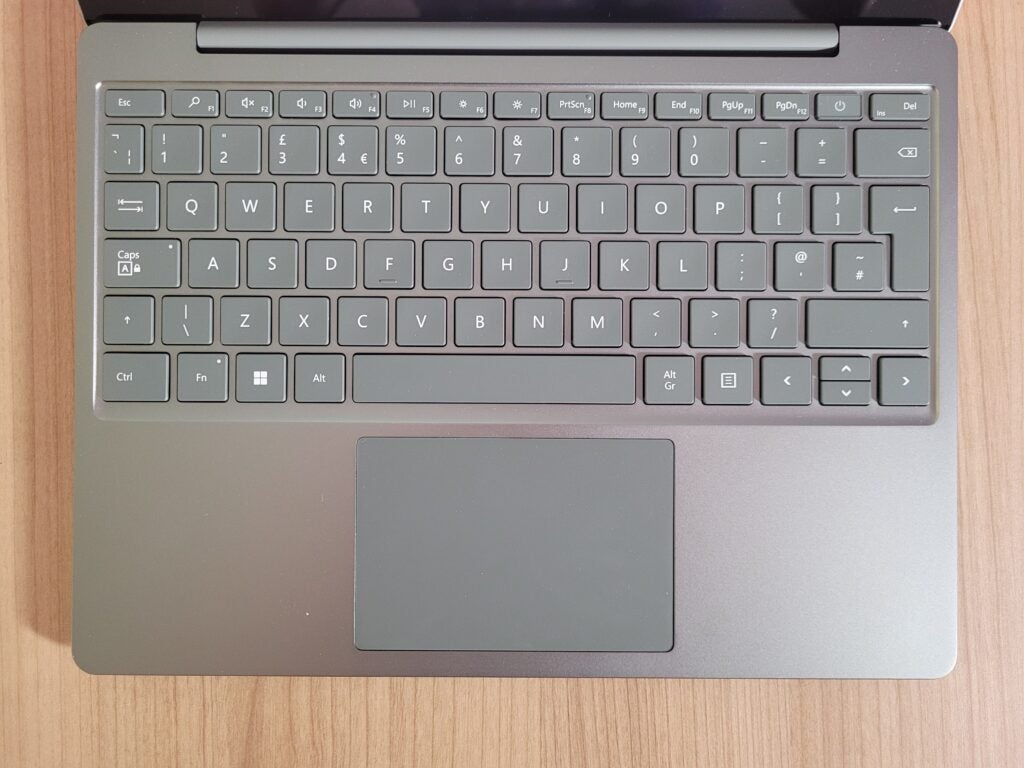
Microsoft has also once again refused to add a keyboard backlight, which may be problematic if you like to type up essays beyond sundown. And while I’m pleased to see the responsive fingerprint sensor return to the power key to enable speedier sign-ins, it’s a shame it’s not available on the base configuration.
Moving onto the trackpad, it feels smooth to the touch and super responsive. Microsoft has opted for the traditional physical trackpad here, so you can hear subtle and satisfying clicks when you press down – there’s no haptic feedback technology here like with the Surface Laptop Studio.
Screen
- Underwhelming screen resolution
- Good contrast and max brightness
- Addition of a touchscreen is welcome
The screen was the weakest aspect of the original Surface Laptop Go when it launched in 2020, and Microsoft hasn’t done anything to address the issue.
The 1536 x 1024 resolution means this laptop has one of the lowest pixel densities you’ll likely find, so images lack that sharp focus found on Full HD (and better) panels. The tall 3:2 aspect ratio also lends itself better to web pages and documents than video, making this a sub-standard companion for the likes of Netflix and Disney Plus.
That said, I’ve still had a good time watching Attenborough’s Our Planet on the Surface Laptop Go 2, so it’s still perfectly fine if you don’t mind crystal clear imagery.
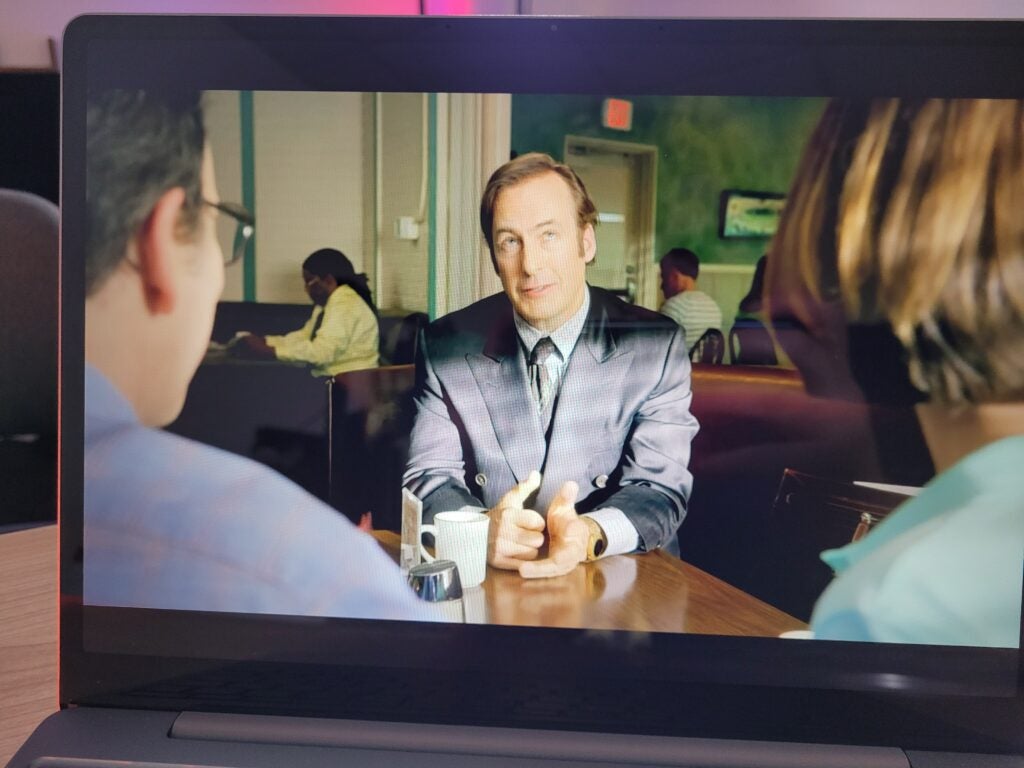
My colorimeter also showed it to have decent picture quality, with a 1095:1 contrast ensuring lighter colours still stand out well from dark backgrounds. The 395-nit max brightness will also help you to counteract bright environments, whether you’re in the office or working outdoors.
Even the sRGB colour coverage is great at 92.1% so it won’t suffer noticeable distortion when watching video and ogling photos. It’s not quite good enough for presenting colour accurately to a professional standard for serious photo and video editing, but the Surface Laptop Go 2 was never intended for such intense workloads.
Microsoft has also retained the touchscreen, allowing you to zoom into a picture by pinching the panel or scroll down a news feed via swiping. It, unfortunately, doesn’t support a stylus, so it won’t be compatible with Microsoft’s own Surface Pen.
Performance
- Improved speeds compared to original
- Not as fast as other modern Windows laptops
- Storage options now start at 128GB
The biggest upgrade for the Microsoft Surface Laptop Go 2 is undoubtedly the new processor, with Microsoft moving up a generation to the 11th Gen Intel Core i5-1135G7.
That’s notably still a generation behind all of the latest and greatest laptops on the market, with 12th Generation Intel chips now available. But I think it’s a fair compromise given the affordable price which undercuts the majority of Windows-powered competition.
I did notice a performance difference between the Surface Laptop Go 2 and other recent laptops I’ve reviewed, with webpages and applications taking a couple of seconds longer to load. Opting for the 4GB of RAM configuration may slow down those speeds even further since I’m using the 8GB model.
But Microsoft’s laptop still managed to provide a smooth performance with multiple apps and browser tabs open simultaneously. The Surface Laptop Go 2 is comfortably powerful enough for basic productivity tasks, and should only really falter if you want to edit video or play games.
| Surface Laptop Go 2 | Surface Laptop Go | Acer Swift 3 | |
| Processor | Intel Core i5-1135G7 | Intel Core i5-1035G1 | AMD Ryzen 5 5500U |
| Geekbench 5 Single/Multi core | 1364 / 3899 | 1205 / 3386 | 1119 / 5269 |
| PCMark 10 | 4380 | 3296 | 5262 |
The benchmark results that I collected back up my impressions, showing noticeably better results than the original Surface Laptop Go. However, it’s still trailing far behind the Acer Swift 3 in terms of performance power thanks to the inclusion of AMD’s Ryzen 5 5500U chip.
But there aren’t many Windows laptops that can offer such good performance at a price this low, so the Surface Laptop Go 2 still represents a bargain.
I’m a little disappointed by the SSD speeds though, with a read speed of 3435MB/s and a write speed of 1624MB/s. That latter result means the Laptop Go 2 may be a little sluggish when installing apps or large files onto the drive.
Microsoft has ditched the base storage option for the Surface Laptop Go 2, so you can’t go lower than a 128GB SSD. While this has meant the starting price has been increased to £529, I still think it’s a good move as the previous base 64GB option wasn’t spacious enough for most users.
Battery
- Lasted 9 hours and 11 minutes in our benchmark
- Slightly better stamina than its predecessor
A new chip doesn’t just mean faster performance, it can also result in superior battery life – and that’s exactly what’s happened with the Surface Laptop Go 2.
After turning the brightness down to 150 nits and using the PCMark 10 battery benchmark to simulate day-to-day applications, the Surface Laptop Go 2 managed to survive for 9 hours and 11 minutes.
For comparison, the original Surface Laptop Go lasted 8 hours and 44 minutes in the same test. That means you’re only getting a 30-minute boost, but I’m not complaining. However, it’s worth mentioning that rival laptops such as the Acer Swift 3 are capable of lasting even longer on a single charge.
Latest deals
Should you buy it?
You want a tiny 12-inch laptop:
Aside from the low price, the main appeal of this Windows laptop is its diminutive size. It’s easy to carry around and slot in a bag, yet remains just about big enough to carry out day-to-day tasks without issue.
You want a Full HD resolution:
My biggest concern with this laptop is the low screen resolution. By missing out on Full HD, photos and videos don’t look very sharp. Plus, the small screen and tall aspect ratio make it a sub-standard option for the likes of Netflix.
Final Thoughts
It’s a shame that Microsoft has only upgraded the processor for this sequel, but I loved the original so much that it isn’t a major issue.
The dinky size makes it a dream for frequent commuters, while the build quality makes it feel like a laptop that costs more than a grand. I wish Microsoft had at least improved the screen resolution though to make videos and photos look sharper.
Despite its shortcomings, I still believe the Surface Laptop Go 2 is one of the absolute best Windows laptops at its price point. If you’re looking for an ultra-portable laptop for under £600, then I’d struggle to name a better value option than the Surface Laptop Go 2.
How we test
Every laptop we review goes through a series of uniform checks designed to gauge key things including build quality, performance, screen quality and battery life.
These include formal synthetic benchmarks and scripted tests, plus a series of real world checks, such as how well it runs popular apps.
We used as our main laptop for at least a week.
Tested the performance via both benchmark tests and real-world use.
We tested the screen with a colorimeter and real-world use.
We tested the battery with a benchmark test and real-world use.
FAQs
No, the Surface Laptop Go 2 is lacking a backlit keyboard just like its predecessor.
The Surface Laptop Go 2 launched on 6th June 2022.
Trusted Reviews test data
UK RRP
USA RRP
EU RRP
CA RRP
AUD RRP
CPU
Manufacturer
Screen Size
Storage Capacity
Front Camera
Battery
Battery Hours
Size (Dimensions)
Weight
ASIN
Operating System
Release Date
First Reviewed Date
Resolution
Refresh Rate
Ports
GPU
RAM
Connectivity
Colours
Display Technology
Screen Technology
Touch Screen
Convertible?
Sustainability
Trusted Reviews’ holds the fact that global warming is not a myth as a core value and will continuously endeavour to help protect our planet from harm in its business practices.
As part of this mission, whenever we review a product we send the company a series of questions to help us gauge and make transparent the impact the device has on the environment.
We currently haven’t received answers to the questions on this product, but will update this page the moment we do. You can see a detailed breakdown of the questions we ask and why in our sustainability info page.
Jargon buster
USB-C
The modern USB connector you’ll find on most Android phones, new laptops, cameras and games consoles. It’s reversible and used for charging along with data-transfer.
Bluetooth
Bluetooth – named after 10th-century Danish king Harald Bluetooth who united Denmark’s tribes into a single kingdom – is a method of wireless transmission that allows for the exchange of data between devices over short distances.
GPU
The graphics processing unit is designed to render graphics, which is particularly important for gaming, creating 3D models and editing video.

Verdict
The Microsoft Surface Laptop Go 2 isn’t a big upgrade on its predecessor, but its dinky dimensions, improved performance and longer battery life ensure this remains one of the best value Windows laptops currently available. Just be aware that its 12-inch low-resolution display isn’t ideal for streaming video.
Pros
- Fantastic value for money
- Extremely portable design
- Smooth performance for basic tasks
- Better battery life than the original
Cons
- Low-resolution display
- Lack of keyboard backlight
- No fingerprint scanner on base configuration
Availability
- UKRRP: £529
- USARRP: $599.99
-
Ultra-portable design:Its compact 12-inch screen and lightweight build make this laptop very easy to carry in a bag. -
Touchscreen displayThe touchscreen makes it easy to scroll through social media or zoom up close to text or images. -
Fingerprint sensorA fingerprint sensor is available on all but the base configuration, allowing you to sign in my simply touching the power button.
Introduction
I was a huge fan of the original Surface Laptop Go. Its dinky size ensured it was incredibly portable, while the affordable price made it a genuine option for students and anyone on a budget.
Following the success of the 12-inch laptop, Microsoft has now launched a sequel: the Surface Laptop Go 2. But in typical Microsoft fashion, there aren’t many significant upgrades here, opting to retain the exact same clamshell design – just with a new Sage colour option.
Microsoft has at least fitted it with a new 11th Generation Intel Core processor to boost the performance and battery life, but this is otherwise the exact same laptop as before.
That said, Microsoft has scrapped the base configuration, so you can no longer purchase a model with 64GB of eMMC storage. But with the $599.99/£529 starting price undercutting the vast majority of Windows laptops, the Surface Laptop Go 2 still represents jaw-dropping value.
Design
- Small and lightweight design
- New Sage colour option
- Comfortable keyboard with no backlight
The Microsoft Surface Laptop Go 2 is adorably tiny. Its 12.4-inch touchscreen is notably more compact than a more conventional 13-inch laptop screen, so you’ll want to make sure you’re happy to downsize before making a purchase.
It has taken me a while to adjust to the small size having previously used a 16-inch laptop, and has been troublesome whenever I’ve wanted multiple apps and browser tabs displayed simultaneously. But otherwise, I think the 12.4-inch panel is perfectly fine for typing up essays, reading emails and scrolling through social media.
I’m quite fond of the new Sage colour option pictured in this review, expanding upon the other Platinum, Ice Blue and Sandstone options. They all help to give the Surface Laptop Go 2 more personality, which is refreshing after seeing countless bog-standard silver machines. Although I am disappointed to see you have to spend at least £629 for any colour other than Platinum.
Laptops can start to feel a little flimsy and cheap when they’re available around the $600/£500 mark, but the Surface Laptop Go 2 is an exception. The lid is made of aluminium, while the base uses an aluminium and polycarbonate composite resin. It all feels pleasingly sturdy, with only needlessly hard keyboard presses causing any noticeable flex.
I can pick up the laptop in one hand and wave it around in the air without fear of my wrist snapping, weighing just 1127g which is lighter than both a MacBook Air and Dell XPS 13 OLED. It’s surprisingly chunky though, but not to the extent that it’s difficult to fit inside any bag.
Port selection is fine, with a USB-C, USB-A and headphone jack lined across the left ridge, although I’m disappointed that Microsoft hasn’t added Thunderbolt support to speed up data transfers. There’s also a Surface Connect port on the right side to ensure compatibility with Microsoft’s proprietary magnetic charger. I’d personally prefer Microsoft to ditch this charging solution in favour of additional USB-C connections, but it’s not a major issue.
The Microsoft Surface Laptop Go 2 has a 720p webcam integrated into the top screen bezel. Video capture looks really grainy, but it’s still perfectly usable for casual video chats or conference calls. The laptop’s speakers are located underneath the keyboard, and can be cranked up to a high volume. Bass isn’t terribly good and you’ll notice some distortion at a high volume, but I still think the audio performance is good at this price.
I really like the laptop’s keyboard, with deep key presses for comfortable typing, and the spacebar seeing snappy, loud feedback. The keyboard is a little cramped compared to larger laptops, so you may need to retrain your muscle memory for prodding certain keys, but keys are spaced out just enough to avoid frequent typos.
Microsoft has also once again refused to add a keyboard backlight, which may be problematic if you like to type up essays beyond sundown. And while I’m pleased to see the responsive fingerprint sensor return to the power key to enable speedier sign-ins, it’s a shame it’s not available on the base configuration.
Moving onto the trackpad, it feels smooth to the touch and super responsive. Microsoft has opted for the traditional physical trackpad here, so you can hear subtle and satisfying clicks when you press down – there’s no haptic feedback technology here like with the Surface Laptop Studio.
Screen
- Underwhelming screen resolution
- Good contrast and max brightness
- Addition of a touchscreen is welcome
The screen was the weakest aspect of the original Surface Laptop Go when it launched in 2020, and Microsoft hasn’t done anything to address the issue.
The 1536 x 1024 resolution means this laptop has one of the lowest pixel densities you’ll likely find, so images lack that sharp focus found on Full HD (and better) panels. The tall 3:2 aspect ratio also lends itself better to web pages and documents than video, making this a sub-standard companion for the likes of Netflix and Disney Plus.
That said, I’ve still had a good time watching Attenborough’s Our Planet on the Surface Laptop Go 2, so it’s still perfectly fine if you don’t mind crystal clear imagery.
My colorimeter also showed it to have decent picture quality, with a 1095:1 contrast ensuring lighter colours still stand out well from dark backgrounds. The 395-nit max brightness will also help you to counteract bright environments, whether you’re in the office or working outdoors.
Even the sRGB colour coverage is great at 92.1% so it won’t suffer noticeable distortion when watching video and ogling photos. It’s not quite good enough for presenting colour accurately to a professional standard for serious photo and video editing, but the Surface Laptop Go 2 was never intended for such intense workloads.
Microsoft has also retained the touchscreen, allowing you to zoom into a picture by pinching the panel or scroll down a news feed via swiping. It, unfortunately, doesn’t support a stylus, so it won’t be compatible with Microsoft’s own Surface Pen.
Performance
- Improved speeds compared to original
- Not as fast as other modern Windows laptops
- Storage options now start at 128GB
The biggest upgrade for the Microsoft Surface Laptop Go 2 is undoubtedly the new processor, with Microsoft moving up a generation to the 11th Gen Intel Core i5-1135G7.
That’s notably still a generation behind all of the latest and greatest laptops on the market, with 12th Generation Intel chips now available. But I think it’s a fair compromise given the affordable price which undercuts the majority of Windows-powered competition.
I did notice a performance difference between the Surface Laptop Go 2 and other recent laptops I’ve reviewed, with webpages and applications taking a couple of seconds longer to load. Opting for the 4GB of RAM configuration may slow down those speeds even further since I’m using the 8GB model.
But Microsoft’s laptop still managed to provide a smooth performance with multiple apps and browser tabs open simultaneously. The Surface Laptop Go 2 is comfortably powerful enough for basic productivity tasks, and should only really falter if you want to edit video or play games.
| Surface Laptop Go 2 | Surface Laptop Go | Acer Swift 3 | |
| Processor | Intel Core i5-1135G7 | Intel Core i5-1035G1 | AMD Ryzen 5 5500U |
| Geekbench 5 Single/Multi core | 1364 / 3899 | 1205 / 3386 | 1119 / 5269 |
| PCMark 10 | 4380 | 3296 | 5262 |
The benchmark results that I collected back up my impressions, showing noticeably better results than the original Surface Laptop Go. However, it’s still trailing far behind the Acer Swift 3 in terms of performance power thanks to the inclusion of AMD’s Ryzen 5 5500U chip.
But there aren’t many Windows laptops that can offer such good performance at a price this low, so the Surface Laptop Go 2 still represents a bargain.
I’m a little disappointed by the SSD speeds though, with a read speed of 3435MB/s and a write speed of 1624MB/s. That latter result means the Laptop Go 2 may be a little sluggish when installing apps or large files onto the drive.
Microsoft has ditched the base storage option for the Surface Laptop Go 2, so you can’t go lower than a 128GB SSD. While this has meant the starting price has been increased to £529, I still think it’s a good move as the previous base 64GB option wasn’t spacious enough for most users.
Battery
- Lasted 9 hours and 11 minutes in our benchmark
- Slightly better stamina than its predecessor
A new chip doesn’t just mean faster performance, it can also result in superior battery life – and that’s exactly what’s happened with the Surface Laptop Go 2.
After turning the brightness down to 150 nits and using the PCMark 10 battery benchmark to simulate day-to-day applications, the Surface Laptop Go 2 managed to survive for 9 hours and 11 minutes.
For comparison, the original Surface Laptop Go lasted 8 hours and 44 minutes in the same test. That means you’re only getting a 30-minute boost, but I’m not complaining. However, it’s worth mentioning that rival laptops such as the Acer Swift 3 are capable of lasting even longer on a single charge.
Latest deals
Should you buy it?
You want a tiny 12-inch laptop:
Aside from the low price, the main appeal of this Windows laptop is its diminutive size. It’s easy to carry around and slot in a bag, yet remains just about big enough to carry out day-to-day tasks without issue.
You want a Full HD resolution:
My biggest concern with this laptop is the low screen resolution. By missing out on Full HD, photos and videos don’t look very sharp. Plus, the small screen and tall aspect ratio make it a sub-standard option for the likes of Netflix.
Final Thoughts
It’s a shame that Microsoft has only upgraded the processor for this sequel, but I loved the original so much that it isn’t a major issue.
The dinky size makes it a dream for frequent commuters, while the build quality makes it feel like a laptop that costs more than a grand. I wish Microsoft had at least improved the screen resolution though to make videos and photos look sharper.
Despite its shortcomings, I still believe the Surface Laptop Go 2 is one of the absolute best Windows laptops at its price point. If you’re looking for an ultra-portable laptop for under £600, then I’d struggle to name a better value option than the Surface Laptop Go 2.
How we test
Every laptop we review goes through a series of uniform checks designed to gauge key things including build quality, performance, screen quality and battery life.
These include formal synthetic benchmarks and scripted tests, plus a series of real world checks, such as how well it runs popular apps.
We used as our main laptop for at least a week.
Tested the performance via both benchmark tests and real-world use.
We tested the screen with a colorimeter and real-world use.
We tested the battery with a benchmark test and real-world use.
FAQs
No, the Surface Laptop Go 2 is lacking a backlit keyboard just like its predecessor.
The Surface Laptop Go 2 launched on 6th June 2022.
Trusted Reviews test data
UK RRP
USA RRP
EU RRP
CA RRP
AUD RRP
CPU
Manufacturer
Screen Size
Storage Capacity
Front Camera
Battery
Battery Hours
Size (Dimensions)
Weight
ASIN
Operating System
Release Date
First Reviewed Date
Resolution
Refresh Rate
Ports
GPU
RAM
Connectivity
Colours
Display Technology
Screen Technology
Touch Screen
Convertible?
Sustainability
Trusted Reviews’ holds the fact that global warming is not a myth as a core value and will continuously endeavour to help protect our planet from harm in its business practices.
As part of this mission, whenever we review a product we send the company a series of questions to help us gauge and make transparent the impact the device has on the environment.
We currently haven’t received answers to the questions on this product, but will update this page the moment we do. You can see a detailed breakdown of the questions we ask and why in our sustainability info page.
Jargon buster
USB-C
The modern USB connector you’ll find on most Android phones, new laptops, cameras and games consoles. It’s reversible and used for charging along with data-transfer.
Bluetooth
Bluetooth – named after 10th-century Danish king Harald Bluetooth who united Denmark’s tribes into a single kingdom – is a method of wireless transmission that allows for the exchange of data between devices over short distances.
GPU
The graphics processing unit is designed to render graphics, which is particularly important for gaming, creating 3D models and editing video.



