









Verdict
The Logitech Pebble Keys 2 K380s is a solid wireless keyboard for office use. It provides some noteworthy upgrades over its predecessor, like powerful software and better battery life. Alongside funky looks, there’s a good typing experience and great connectivity. It does feel a little cheap, though.
Pros
- Funky looks
- Comfortable and quiet typing experience
- Rather powerful software
Cons
- Smaller layout can feel a little cramped at times
- Cheaper feeling chassis
-
Scissor-actuated keysSnappy and quiet typing experience -
Wide connectivity optionsWorks on up to three devices over Bluetooth and the Logi Bolt receiver (not included) -
Up to 3-year battery lifeExcellent endurance, thanks to running off of a pair of AAA batteries
Introduction
As the classic eighties hit from Huey Lewis & The News goes, ‘It’s hip to be square’. Well, given their latest keyboard, the Pebble Keys 2 K380s, Logitech seems to think otherwise.
It’s a sea of circles and rounded edges in terms of design, alongside scissor-actuated keys, and some notable upgrades, with a keyboard that makes for an especially long-awaited follow-up to one of their most popular models.
Whether these upgrades and their wonderfully twee looks are enough for it to pass as one of the best keyboards out there today though, remains to be seen. I’ve been doing some testing to find out.
Design
- Funky, eye-catching looks
- Thoughtful function row
- Small and lightweight
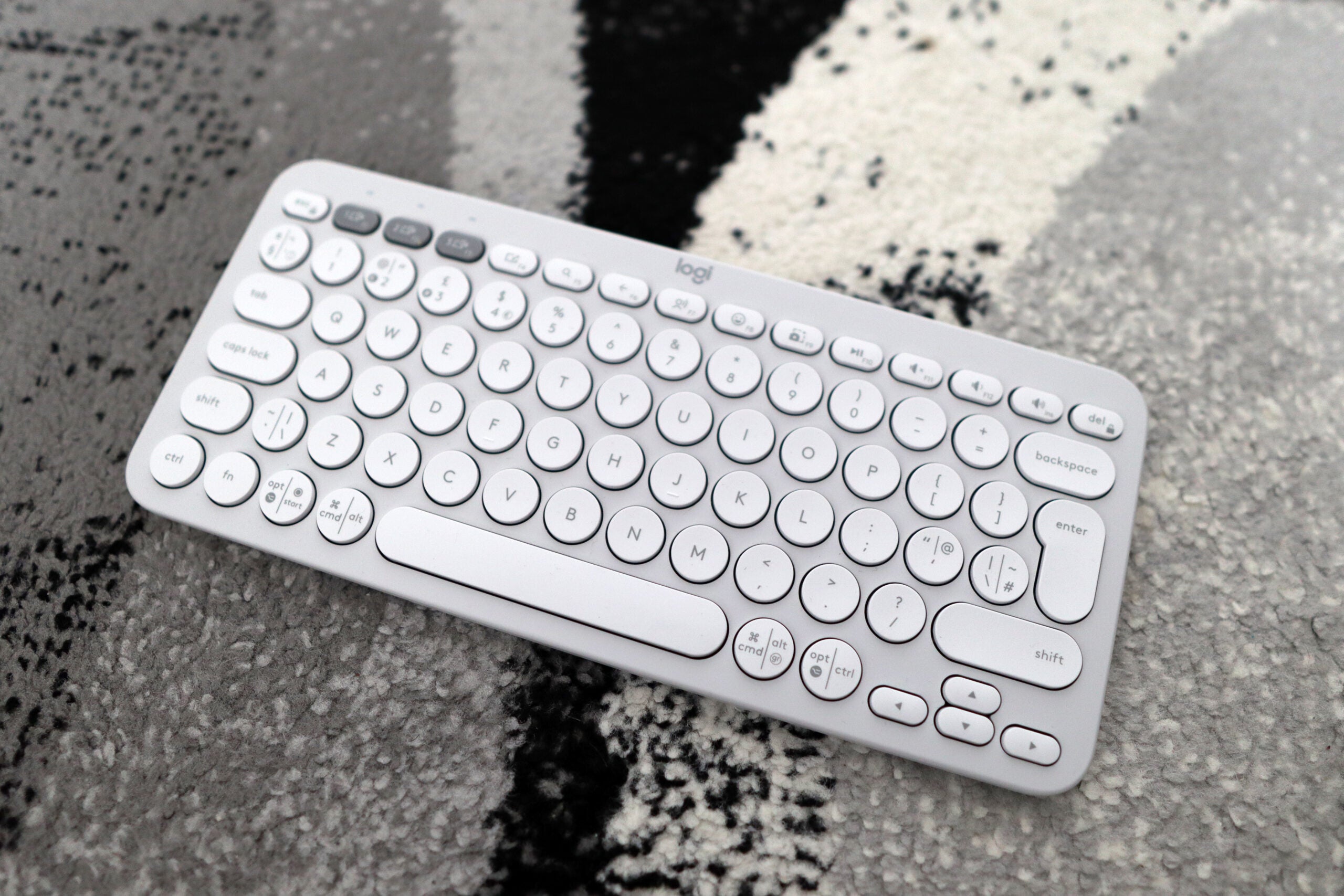
Compared to the more business-like looks of the MX line of peripherals, MX Keys S included, the Pebble Keys 2 K380s has a funkier look. It’s available in three eye-catching colours – black, white, and coral pink. The white I’ve got here is more off-white and that’s offset by the grey connectivity keys on the top row, and it looks excellent.
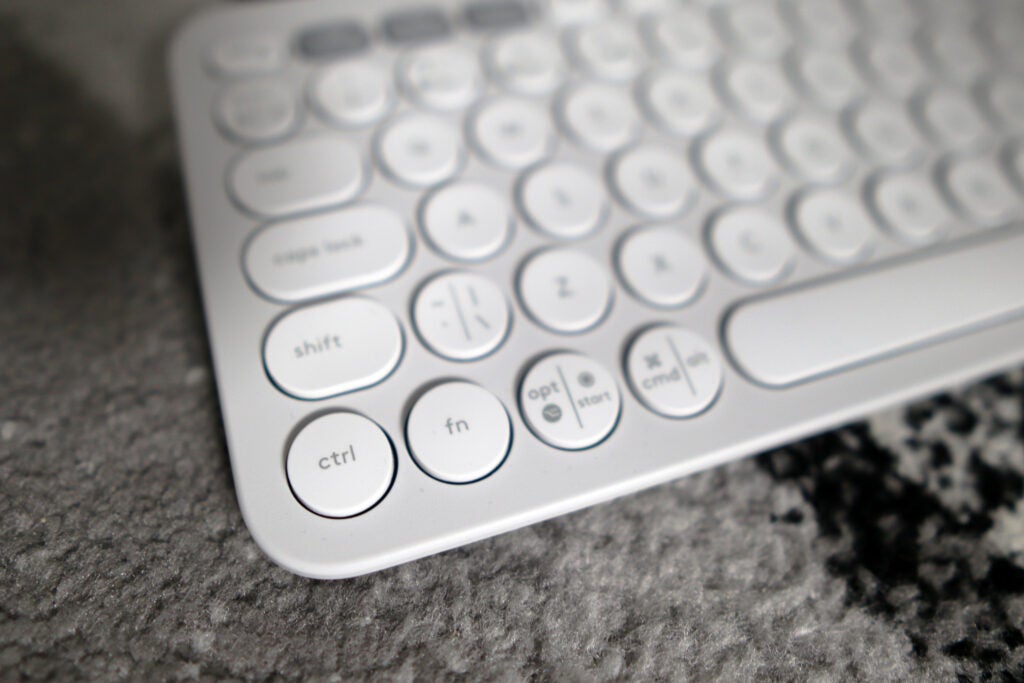
The Pebble Keys 2 K380s is all circles and rounded edges, a far cry from more conventional keyboards at the same price. It looks more interesting and stands out as a keyboard for aesthetics as it is for functionality. I like the design but I can see why people may want something a little more conventional. At 415g, this is a light keyboard and it feels a little cheap, with the plastic chassis featuring quite a bit of deck flex but it’s sturdy overall.
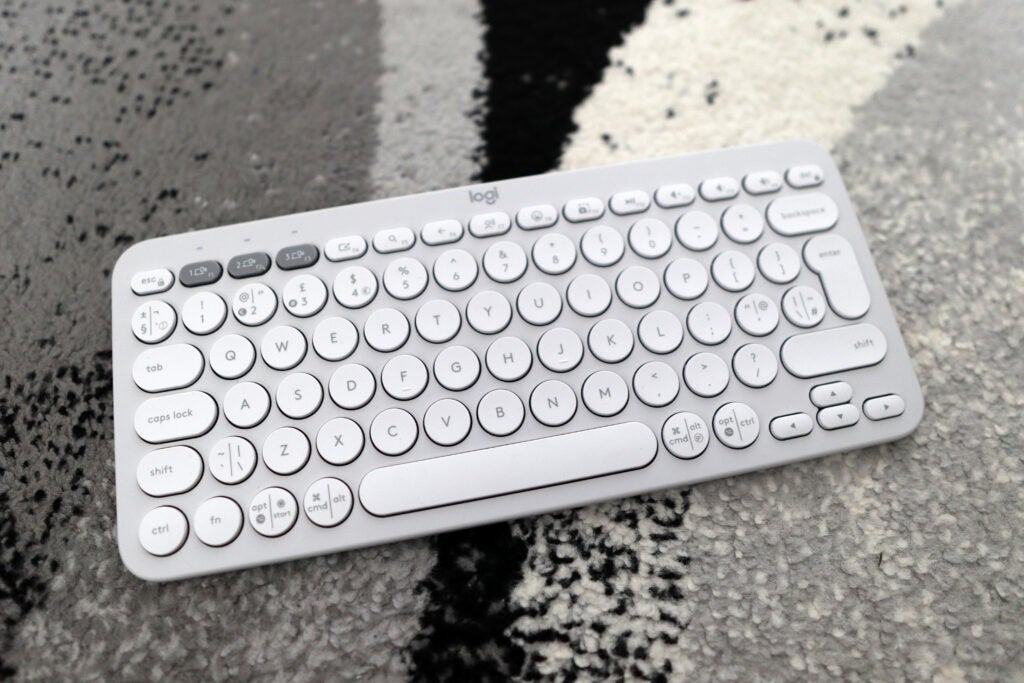
It sports a smaller 65% layout, offering the benefits of arrow keys and a dedicated function row alongside the standard alphanumeric keys. This feels more cramped on the Pebble Keys 2 K380s than it does on other 65% layout keyboards I’ve tested. It’s a dinky keyboard though, giving you a lot more desk space than a full-size option, without paying too much of a price in terms of lost functionality.
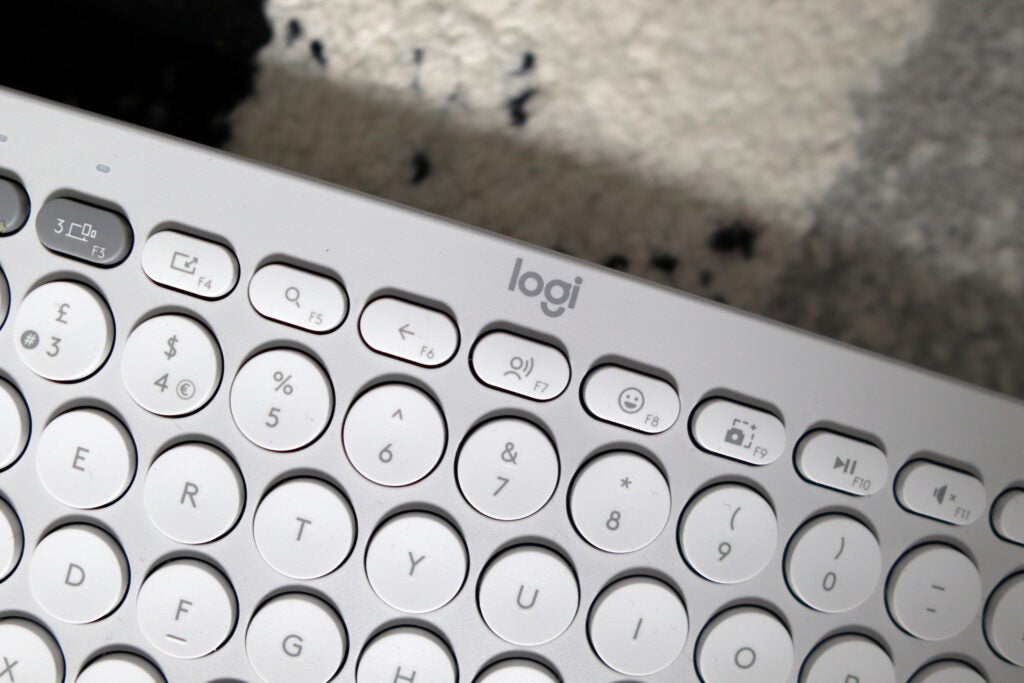
Much like the bigger and more expensive MX Keys S though, this new option brings with it some changes to the function row, with it now containing a dedicated emoji key (f8), a text-to-speech key (F7) and one for screen capture (F9) – a nice touch. For Mac users, that saves the finger gymnastics to bring up the snipping tool.
There aren’t any ports for charging around the back, as the Pebble Keys 2 K380s works on AAA batteries. There aren’t any retractable feet either. The only interface on offer is an on/off switch on the keyboard’s left-hand side and some small status LEDs to indicate which Bluetooth channel the keyboard is connected to.
The Logitech Pebble Keys 2 K380s is made of 45% recycled plastic. In terms of packaging, there’s no plastic involved, as the Pebble Keys 2 K380s comes in a cardboard box, and is wrapped in paper. The review sample I received came as the combo set, although I imagine it would be similar as the keyboard is on its own.
Performance
- Comfortable, quiet typing experience
- Instant switching between devices
- Excellent battery life
The Pebble Keys 2 K380s offers comfortable typing with its scissor-actuated keys that offer a decent experience with some solid tactility. It isn’t as tactile as any mechanical board out there but, for a set of scissor-actuated keys, I don’t have any cause for concern.
The fact the keycaps are circular, as opposed to square, takes some getting used to. You do have to be quite precise with your finger placement, as these keycaps are quite small, all in the name of looking good. It’s a quiet keyboard, meaning using it at home or in an office won’t cause any noise complaints.
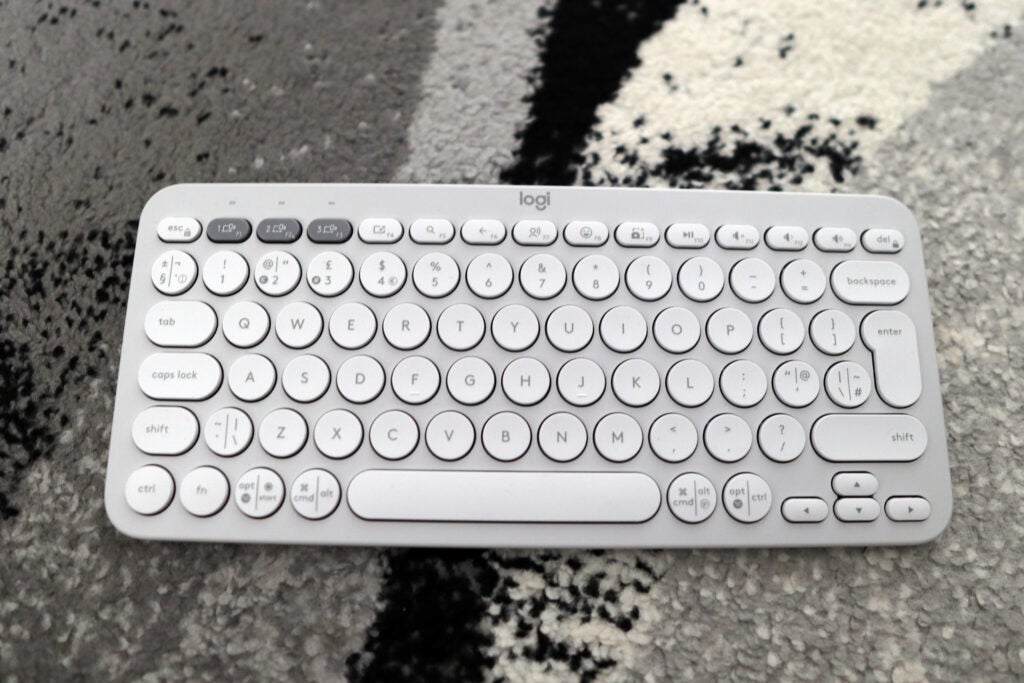
The Pebble Keys 2 K380s provides the convenience of near-instant switching between connected devices over Bluetooth. Pairing is as simple as holding down the relevant channel until the LED flashes, and pairing it to the relevant device. You can also connect it via the Logi Bolt USB receiver, but this isn’t included with the keyboard. However, if you buy the combo set that also includes the Pebble Mouse 2 M350s, you then get the receiver.
Being powered by a pair of AAA batteries means the battery life of the Pebble Keys 2 K380s is excellent. Logitech rates it to last for up to 36 months on a set, so you won’t have to worry about replacing them for years. It also marks a major upgrade over the previous model, with it offering up to fifty per cent longer on a single run of batteries.
Software and Lighting
- Backlighting is nowhere to be seen
- Logi Options+ is a powerful suite of software
There isn’t any RGB lighting to be seen on the Pebble Keys 2 K380s, apart from the LED lights above the individual connection buttons. It may have been pleasant to put some white backlighting beneath the keys, as Logitech has proven this to be effective in the past on some more expensive products. However, with the fact the Pebble Keys 2 K380s is more of an affordable ‘board, it isn’t much of a sore miss.
However, what isn’t there for lighting is made up for with a powerful software suite. As well as providing basic functionality to assign functions to the function row of keys and select between paired devices with the Easy Switch function, things also get a little bit more advanced when you delve into Smart Actions.
These have been present since the MX peripherals refresh earlier this year, and give you some especially clever real-world macros to play with. For instance, if you want to open some of your most used apps with one keypress, then you can. They’re easy to program and a real win for power users who want to save valuable seconds when working, or you can use any of the preset ones that Logitech provides inside Options+.
Latest deals
Should you buy it?
You want a quiet, comfortable typing experience
The scissor-actuated keys on the Pebble Keys 2 K380s offer a tactile and satisfying feel, while also being rather quiet.
You want a larger layout
The Pebble Keys 2 K380s offers a solid typing experience, but its smaller layout can feel a little cramped. If you want something bigger, you will want to look elsewhere.
Final Thoughts
Logitech’s Pebble Keys 2 K380s is a noteworthy upgrade over its predecessor, building on one of the brand’s most popular keyboards to offer an even better package. They have gone all-in on its circular and rounded design which looks good, although at the slight detriment of taking a little bit of getting used to when typing. Even then, though, it’s a comfortable typing experience that’s also quieter without the scissor-actuated keys feeling mushy.
It’s on the front of software where the biggest upgrades have been made. Options+ is an especially powerful suite and gives the Pebble Keys 2 K380s an edge over the competition, especially with the advance of Smart Actions. Combined with this, the fantastic convenience of practically instant switching over Bluetooth, as well as support for Logi Bolt, and 3 years’ worth of battery life make this a great keyboard for virtually anyone.
This isn’t a mechanical keyboard, though, but they can be a fair bit more expensive. but offer a more precise and fuller-feeling typing experience. Even in Logitech’s own canon, to get these funky looks, or ones that are arguably even funkier, and a mechanical keypress, you’ll be paying a lot more for the Logitech POP Keys.
Otherwise, it’s the Logitech MX Keys S again that warrants a comparison – the Pebble Keys 2 K380s doesn’t offer all of its features, but offers a good lot of them for much more reasonable money. For more choices, feel free to check out our list of the best keyboards.
How we test
We use every keyboard we test for at least a week. During that time, we’ll check it for ease of use, comfort and performance of the switches.
We also check each keyboard’s software to see how easy it is to customise and set up.
Spent at least a week testing
Compared the build quality with similar priced keyboards.
FAQs
The Pebble Keys 2 K380s works without software, although to get the most out of it, you will need to install Logitech’s Options+ software.
In terms of naming convention, Pebble Keys 2 is the new label for the range previously dubbed K380. The Pebble Keys 2 K380s is the successor to the Logitech K380. A key difference is that the new model offers up to 50 per cent more battery life.

Verdict
The Logitech Pebble Keys 2 K380s is a solid wireless keyboard for office use. It provides some noteworthy upgrades over its predecessor, like powerful software and better battery life. Alongside funky looks, there’s a good typing experience and great connectivity. It does feel a little cheap, though.
Pros
- Funky looks
- Comfortable and quiet typing experience
- Rather powerful software
Cons
- Smaller layout can feel a little cramped at times
- Cheaper feeling chassis
-
Scissor-actuated keysSnappy and quiet typing experience -
Wide connectivity optionsWorks on up to three devices over Bluetooth and the Logi Bolt receiver (not included) -
Up to 3-year battery lifeExcellent endurance, thanks to running off of a pair of AAA batteries
Introduction
As the classic eighties hit from Huey Lewis & The News goes, ‘It’s hip to be square’. Well, given their latest keyboard, the Pebble Keys 2 K380s, Logitech seems to think otherwise.
It’s a sea of circles and rounded edges in terms of design, alongside scissor-actuated keys, and some notable upgrades, with a keyboard that makes for an especially long-awaited follow-up to one of their most popular models.
Whether these upgrades and their wonderfully twee looks are enough for it to pass as one of the best keyboards out there today though, remains to be seen. I’ve been doing some testing to find out.
Design
- Funky, eye-catching looks
- Thoughtful function row
- Small and lightweight
Compared to the more business-like looks of the MX line of peripherals, MX Keys S included, the Pebble Keys 2 K380s has a funkier look. It’s available in three eye-catching colours – black, white, and coral pink. The white I’ve got here is more off-white and that’s offset by the grey connectivity keys on the top row, and it looks excellent.
The Pebble Keys 2 K380s is all circles and rounded edges, a far cry from more conventional keyboards at the same price. It looks more interesting and stands out as a keyboard for aesthetics as it is for functionality. I like the design but I can see why people may want something a little more conventional. At 415g, this is a light keyboard and it feels a little cheap, with the plastic chassis featuring quite a bit of deck flex but it’s sturdy overall.
It sports a smaller 65% layout, offering the benefits of arrow keys and a dedicated function row alongside the standard alphanumeric keys. This feels more cramped on the Pebble Keys 2 K380s than it does on other 65% layout keyboards I’ve tested. It’s a dinky keyboard though, giving you a lot more desk space than a full-size option, without paying too much of a price in terms of lost functionality.
Much like the bigger and more expensive MX Keys S though, this new option brings with it some changes to the function row, with it now containing a dedicated emoji key (f8), a text-to-speech key (F7) and one for screen capture (F9) – a nice touch. For Mac users, that saves the finger gymnastics to bring up the snipping tool.
There aren’t any ports for charging around the back, as the Pebble Keys 2 K380s works on AAA batteries. There aren’t any retractable feet either. The only interface on offer is an on/off switch on the keyboard’s left-hand side and some small status LEDs to indicate which Bluetooth channel the keyboard is connected to.
The Logitech Pebble Keys 2 K380s is made of 45% recycled plastic. In terms of packaging, there’s no plastic involved, as the Pebble Keys 2 K380s comes in a cardboard box, and is wrapped in paper. The review sample I received came as the combo set, although I imagine it would be similar as the keyboard is on its own.
Performance
- Comfortable, quiet typing experience
- Instant switching between devices
- Excellent battery life
The Pebble Keys 2 K380s offers comfortable typing with its scissor-actuated keys that offer a decent experience with some solid tactility. It isn’t as tactile as any mechanical board out there but, for a set of scissor-actuated keys, I don’t have any cause for concern.
The fact the keycaps are circular, as opposed to square, takes some getting used to. You do have to be quite precise with your finger placement, as these keycaps are quite small, all in the name of looking good. It’s a quiet keyboard, meaning using it at home or in an office won’t cause any noise complaints.
The Pebble Keys 2 K380s provides the convenience of near-instant switching between connected devices over Bluetooth. Pairing is as simple as holding down the relevant channel until the LED flashes, and pairing it to the relevant device. You can also connect it via the Logi Bolt USB receiver, but this isn’t included with the keyboard. However, if you buy the combo set that also includes the Pebble Mouse 2 M350s, you then get the receiver.
Being powered by a pair of AAA batteries means the battery life of the Pebble Keys 2 K380s is excellent. Logitech rates it to last for up to 36 months on a set, so you won’t have to worry about replacing them for years. It also marks a major upgrade over the previous model, with it offering up to fifty per cent longer on a single run of batteries.
Software and Lighting
- Backlighting is nowhere to be seen
- Logi Options+ is a powerful suite of software
There isn’t any RGB lighting to be seen on the Pebble Keys 2 K380s, apart from the LED lights above the individual connection buttons. It may have been pleasant to put some white backlighting beneath the keys, as Logitech has proven this to be effective in the past on some more expensive products. However, with the fact the Pebble Keys 2 K380s is more of an affordable ‘board, it isn’t much of a sore miss.
However, what isn’t there for lighting is made up for with a powerful software suite. As well as providing basic functionality to assign functions to the function row of keys and select between paired devices with the Easy Switch function, things also get a little bit more advanced when you delve into Smart Actions.
These have been present since the MX peripherals refresh earlier this year, and give you some especially clever real-world macros to play with. For instance, if you want to open some of your most used apps with one keypress, then you can. They’re easy to program and a real win for power users who want to save valuable seconds when working, or you can use any of the preset ones that Logitech provides inside Options+.
Latest deals
Should you buy it?
You want a quiet, comfortable typing experience
The scissor-actuated keys on the Pebble Keys 2 K380s offer a tactile and satisfying feel, while also being rather quiet.
You want a larger layout
The Pebble Keys 2 K380s offers a solid typing experience, but its smaller layout can feel a little cramped. If you want something bigger, you will want to look elsewhere.
Final Thoughts
Logitech’s Pebble Keys 2 K380s is a noteworthy upgrade over its predecessor, building on one of the brand’s most popular keyboards to offer an even better package. They have gone all-in on its circular and rounded design which looks good, although at the slight detriment of taking a little bit of getting used to when typing. Even then, though, it’s a comfortable typing experience that’s also quieter without the scissor-actuated keys feeling mushy.
It’s on the front of software where the biggest upgrades have been made. Options+ is an especially powerful suite and gives the Pebble Keys 2 K380s an edge over the competition, especially with the advance of Smart Actions. Combined with this, the fantastic convenience of practically instant switching over Bluetooth, as well as support for Logi Bolt, and 3 years’ worth of battery life make this a great keyboard for virtually anyone.
This isn’t a mechanical keyboard, though, but they can be a fair bit more expensive. but offer a more precise and fuller-feeling typing experience. Even in Logitech’s own canon, to get these funky looks, or ones that are arguably even funkier, and a mechanical keypress, you’ll be paying a lot more for the Logitech POP Keys.
Otherwise, it’s the Logitech MX Keys S again that warrants a comparison – the Pebble Keys 2 K380s doesn’t offer all of its features, but offers a good lot of them for much more reasonable money. For more choices, feel free to check out our list of the best keyboards.
How we test
We use every keyboard we test for at least a week. During that time, we’ll check it for ease of use, comfort and performance of the switches.
We also check each keyboard’s software to see how easy it is to customise and set up.
Spent at least a week testing
Compared the build quality with similar priced keyboards.
FAQs
The Pebble Keys 2 K380s works without software, although to get the most out of it, you will need to install Logitech’s Options+ software.
In terms of naming convention, Pebble Keys 2 is the new label for the range previously dubbed K380. The Pebble Keys 2 K380s is the successor to the Logitech K380. A key difference is that the new model offers up to 50 per cent more battery life.



