








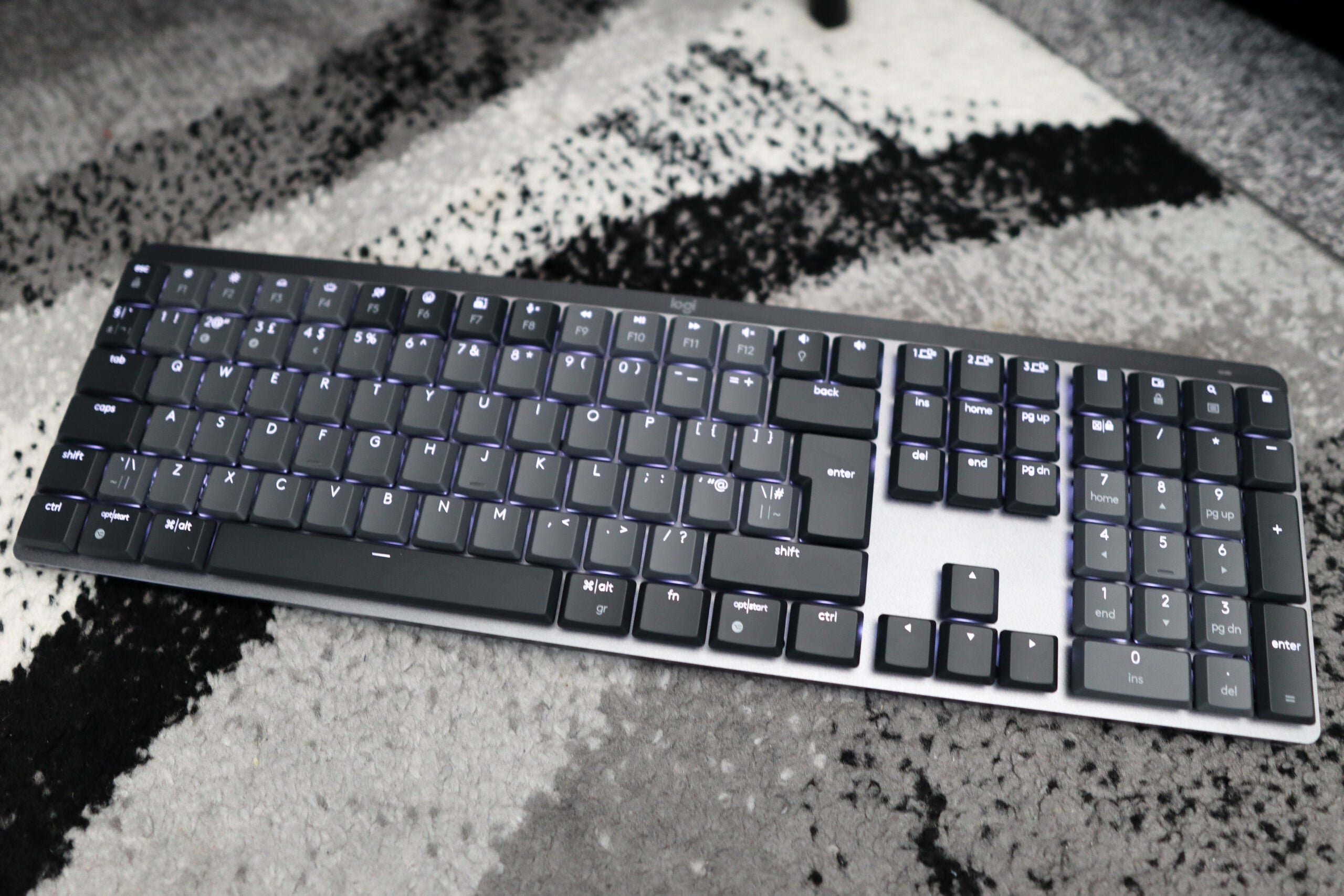
Verdict
The Logitech MX Mechanical is a great office-based mechanical keyboard for anyone looking to take their work setup to a new level. It’s well built, features great-feeling tactile switches and excellent battery life. Just watch out for the lack of software-based customisation, which may be a deal breaker for some, especially considering the high price.
Pros
- Great build quality
- Responsive, tactile switches
- Excellent battery life
Cons
- Expensive
- Lack of software-based customisation may not please some
Availability
- UKRRP: £169.99
- USARRP: $169.99
- EuropeRRP: €169.99
-
Low-profile Tactile Quiet switches:The MX Mechanical features some low profile Brown switches, which offer the benefit of a tactile keypress over a shorter travel -
Dual means of connectivity:This is also a wireless keyboard and can connect either via the bundled Logi Bolt receiver or over Bluetooth -
Windows/Mac connectivity:The MX Mechanical is also suitable for both Windows and Mac.
Introduction
The Logitech MX Keys has been one of the best office keyboards for the last couple of years, offering stellar functionality with a modern design. Now though, it looks like Logitech is attempting to go one better by bundling the same functionality with the powers of mechanical switches with the all-new Logitech MX Mechanical.
It’s priced at $169.99/£169.99/€169.99, which makes it relatively expensive in the world of mechanical keyboards. But it’s a $20 or so upgrade on the MX Keys, which in reality, isn’t too much of a price to pay for low-profile mechanical switches, which are still a fledgling part of the keyboard world in 2022.
Design
- Slim and sleek frame
- Doubleshot keycaps are a nice touch
- Two-tone grey colouring looks fantastic
The Logitech MX Mechanical looks rather good indeed, with its two-tone grey keycaps ensuring it will fit in well at home office setting.
Compared to the MX Mechanical Mini (the smaller sibling to the full-size offering we have here) there is a little bit of deck flex. Sure, it still feels sturdy and the low-carbon aluminum top plate it features helps structural rigidity, but the actual chassis of the MX Mechanical shows a little bit of give when pushed a tad.
A total height of 26.1mm, keycaps included, means this is a slim keyboard, which is in-keeping with that modern look that Logitech’s MX line of products has cultivated over the last few years. And the switches and keycaps only add an extra 6mm of total height over the standard, scissor-actuated MX Keys.
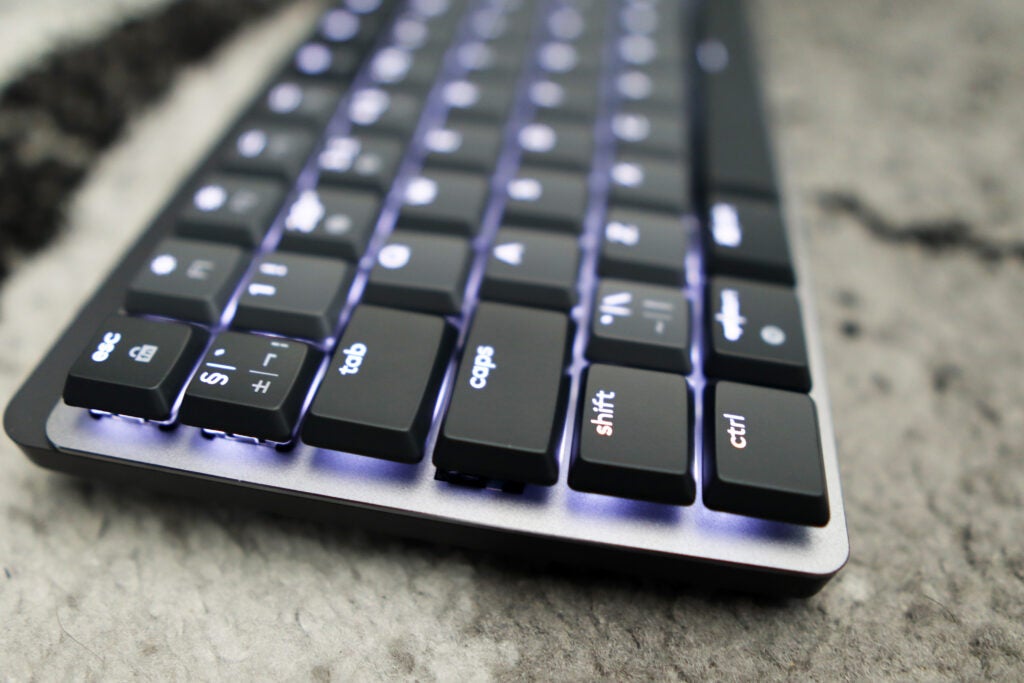
The MX Mechanical utilises double-shot low-profile keycaps that are smooth to the touch, and are made of ABS plastics. In general usage, they feel pretty good under finger, but lack any form of texturing, which some may prefer. For most people though, the ones here are sure to suffice. It’s worth mentioning that the important function keys on offer include both Windows and Mac functions on them, given that the MX Mechanical works with both macOS and Windows.
The interface round the back of the MX Mechanical is kept simple and functional, with just a USB-C port for charging and an on/off button. On the underside are two flip-up feet, which are pretty big, and feel sturdy themselves, being comprised of hard-wearing plastics. Do note, though, that these aren’t multi-stage feet, so you can only flip them up to get one steeper angle for typing, if that’s what you prefer.
Performance
- Tactile Quiet switches feel excellent
- Dual modes of connectivity are convenient and easy to use
- Battery life on offer is stellar
With the Logitech MX Mechanical, you get a choice of three different forms of low-profile switches. There’s the option for either Clicky, Linear, or Tactile Quiet, the latter of which I’ve got here. The Tactile Quiets are essentially a low-profile form of Brown switches, offering a shorter key travel with a soft textile bump around halfway down the keypress. They’re a great all-round switch, and worked well when typing up work, or even indulging in some light gaming.
With that shorter key travel, these low-profile switches will be ideal for anyone used to laptop switches, and wants to try out an equally slimline keyboard, just with a much more substantial keypress than either pure domes or scissor-actuated keys. I’ve always preferred full-size keyboards, but the appeal of low-profile switches is one that seems to be growing stronger, especially with the growing appetite for mechanical switches.
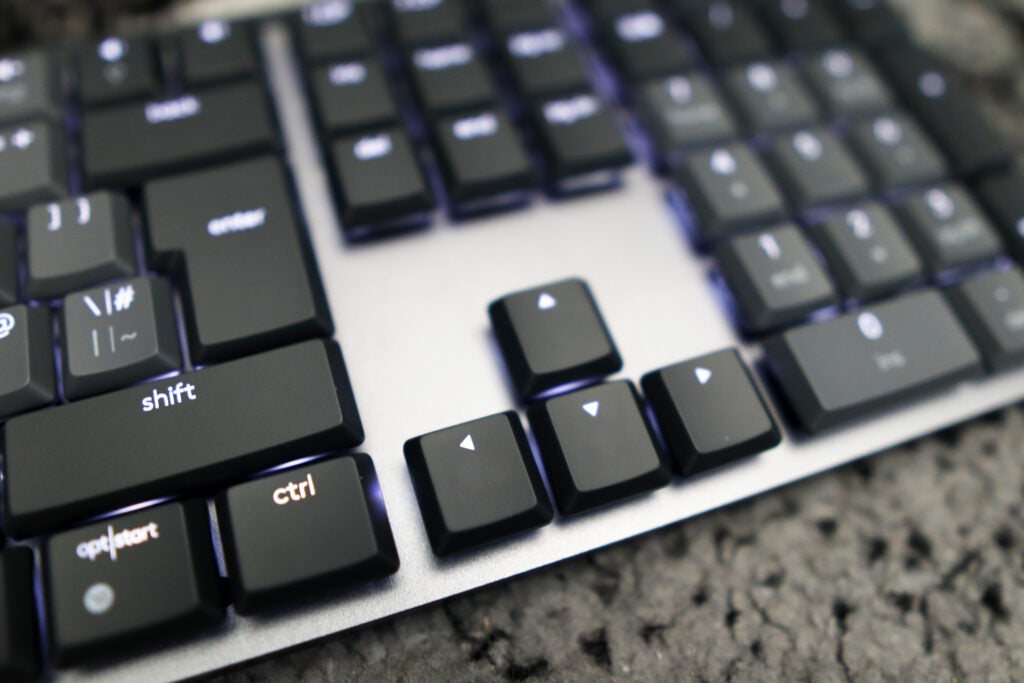
Alongside its decent switches, the MX Mechanical features a raft of creature comforts that were also present on the MX Keys. The ability to connect to three devices returns, with the same seamless switching as before, with it literally being at the touch of a button. Alongside this comes two modes of connectivity, with the MX Mechanical able to work with both Bluetooth and a USB wireless receiver.
That wireless receiver is as little different compared to others Logitech has used in the past. Their all-new Bolt receiver is said to offer a much more stable connection with little to no chance of interference, given it connects via Bluetooth Low Energy as opposed to the mote traditional 2.4Ghz standard. In addition, it also works with Linux and ChromeOS alongside Windows and MacOS, giving you a wider range of supported devices.
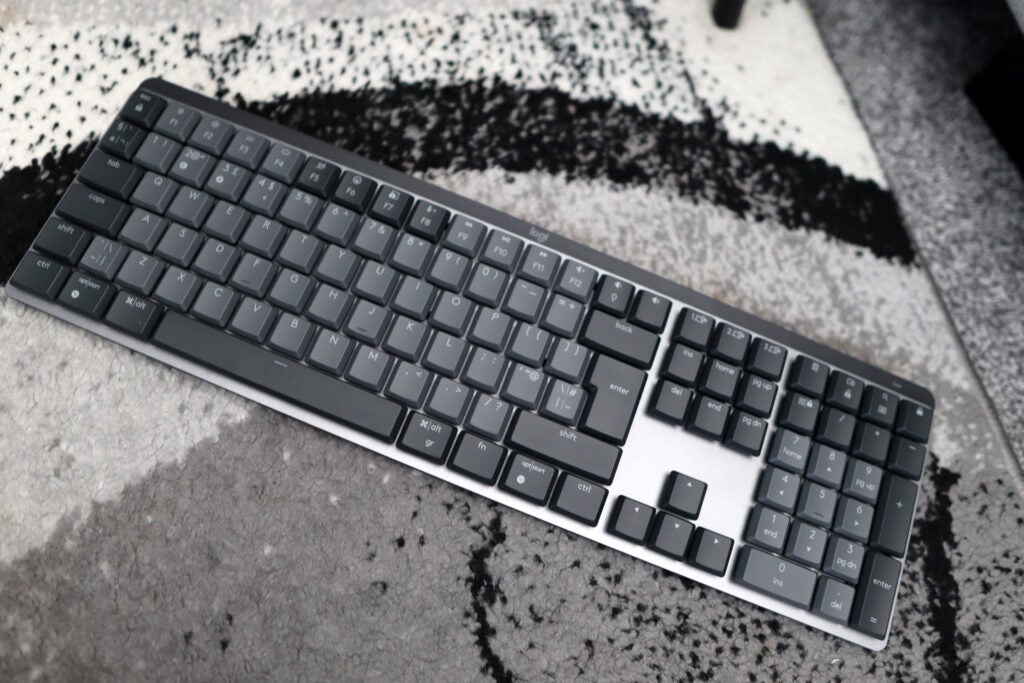
The MX Mechanical’s battery life is also impressive, with Logitech claiming you’ll be able to get up to 10 months out of it before having to charge it up, as long as you’ve got the white backlighting turned off. With it turned up to max brightness, however, you’ll be getting around two weeks or so. This proved true in testing, as during writing and fact-finding for this review, I haven’t had to charge the MX Mechanical once, with no real battery drain noticed.
Software and lighting
- White backlighting looks professional
- Software suite is basic
For lighting, the Logitech MX Mechanical once again keeps things simple and easy, with a plain white backlight helping to illuminate the keys and add a good contrast to the two-tone grey colouring of the keyboard itself.
There isn’t anything obtuse or fancy about the backlighting here, which may not please some, but for those who just want to get their head down and get some work done, the MX Mechanical’s white lighting should work a treat.
The same cannot necessarily be said for the software suite on offer for the MX Mechanical. While it utilises Logitech’s new and revamped Logi Options+ suite, there isn’t too much in the way of features, apart from remapping the F-key functions and adjusting backlighting. This seems a little light in comparison to other keyboards at this price, even if some of the upper echelons are wired gaming keyboards as opposed to wireless office-grade items.
Latest deals
Should you buy it?
You want a low-profile office keyboard with mechanical switches:
The MX Mechanical looks fantastic and is sure to sit perfectly in any modern office setup, so if you’re after something with forward-thinking looks, this is a great choice.
You need versatile software:
Logi Options+ doesn’t offer much in the way of functionality, so if it’s versatile and powerful software you’re after, you may wish to look elsewhere.
Final Thoughts
The Logitech MX Mechanical is arguably one of the best office-based mechanical keyboards money can buy right now. It looks excellent and thoroughly modern with a silver frame and two-tone grey keycaps, as well as being immensely sturdy too. There are also some responsive low-profile mechanical switches on offer here, which are a major upgrade on the original MX Keys’ scissor-actuated options. The battery life here is also excellent.
But at £169.99/€169.99/$169.99, it is rather expensive for an office peripheral. While you may be getting a lot for your money, this is really a keyboard reserved for those with a fair bit of money to throw down, as well as those who may not need oodles of software-based customisation.
How we test
We use every keyboard we test for at least a week. During that time, we’ll check it for ease of use, comfort and performance of the switches.
We also check each keyboard’s software to see how easy it is to customise and set up.
Spent at least a week testing
Compared the build quality with similar priced keyboards.
FAQs
The Logitech MX Mechanical features mechanical switches, which are renowned for delivering a great gaming performance. However, the Logitech has a high latency and there are no Macro keys or RGB lighting. At this high price, you can find keyboards with far more gaming features.
It comes down to preference. Compared to more conventional membrane offerings, mechanical keyboards provide more tangible key presses due to the firmer feedback, which can result in more comfortable and accurate typing. However, some mechanical switches can be substantially louder than their membrane counterparts.

Verdict
The Logitech MX Mechanical is a great office-based mechanical keyboard for anyone looking to take their work setup to a new level. It’s well built, features great-feeling tactile switches and excellent battery life. Just watch out for the lack of software-based customisation, which may be a deal breaker for some, especially considering the high price.
Pros
- Great build quality
- Responsive, tactile switches
- Excellent battery life
Cons
- Expensive
- Lack of software-based customisation may not please some
Availability
- UKRRP: £169.99
- USARRP: $169.99
- EuropeRRP: €169.99
-
Low-profile Tactile Quiet switches:The MX Mechanical features some low profile Brown switches, which offer the benefit of a tactile keypress over a shorter travel -
Dual means of connectivity:This is also a wireless keyboard and can connect either via the bundled Logi Bolt receiver or over Bluetooth -
Windows/Mac connectivity:The MX Mechanical is also suitable for both Windows and Mac.
Introduction
The Logitech MX Keys has been one of the best office keyboards for the last couple of years, offering stellar functionality with a modern design. Now though, it looks like Logitech is attempting to go one better by bundling the same functionality with the powers of mechanical switches with the all-new Logitech MX Mechanical.
It’s priced at $169.99/£169.99/€169.99, which makes it relatively expensive in the world of mechanical keyboards. But it’s a $20 or so upgrade on the MX Keys, which in reality, isn’t too much of a price to pay for low-profile mechanical switches, which are still a fledgling part of the keyboard world in 2022.
Design
- Slim and sleek frame
- Doubleshot keycaps are a nice touch
- Two-tone grey colouring looks fantastic
The Logitech MX Mechanical looks rather good indeed, with its two-tone grey keycaps ensuring it will fit in well at home office setting.
Compared to the MX Mechanical Mini (the smaller sibling to the full-size offering we have here) there is a little bit of deck flex. Sure, it still feels sturdy and the low-carbon aluminum top plate it features helps structural rigidity, but the actual chassis of the MX Mechanical shows a little bit of give when pushed a tad.
A total height of 26.1mm, keycaps included, means this is a slim keyboard, which is in-keeping with that modern look that Logitech’s MX line of products has cultivated over the last few years. And the switches and keycaps only add an extra 6mm of total height over the standard, scissor-actuated MX Keys.
The MX Mechanical utilises double-shot low-profile keycaps that are smooth to the touch, and are made of ABS plastics. In general usage, they feel pretty good under finger, but lack any form of texturing, which some may prefer. For most people though, the ones here are sure to suffice. It’s worth mentioning that the important function keys on offer include both Windows and Mac functions on them, given that the MX Mechanical works with both macOS and Windows.
The interface round the back of the MX Mechanical is kept simple and functional, with just a USB-C port for charging and an on/off button. On the underside are two flip-up feet, which are pretty big, and feel sturdy themselves, being comprised of hard-wearing plastics. Do note, though, that these aren’t multi-stage feet, so you can only flip them up to get one steeper angle for typing, if that’s what you prefer.
Performance
- Tactile Quiet switches feel excellent
- Dual modes of connectivity are convenient and easy to use
- Battery life on offer is stellar
With the Logitech MX Mechanical, you get a choice of three different forms of low-profile switches. There’s the option for either Clicky, Linear, or Tactile Quiet, the latter of which I’ve got here. The Tactile Quiets are essentially a low-profile form of Brown switches, offering a shorter key travel with a soft textile bump around halfway down the keypress. They’re a great all-round switch, and worked well when typing up work, or even indulging in some light gaming.
With that shorter key travel, these low-profile switches will be ideal for anyone used to laptop switches, and wants to try out an equally slimline keyboard, just with a much more substantial keypress than either pure domes or scissor-actuated keys. I’ve always preferred full-size keyboards, but the appeal of low-profile switches is one that seems to be growing stronger, especially with the growing appetite for mechanical switches.
Alongside its decent switches, the MX Mechanical features a raft of creature comforts that were also present on the MX Keys. The ability to connect to three devices returns, with the same seamless switching as before, with it literally being at the touch of a button. Alongside this comes two modes of connectivity, with the MX Mechanical able to work with both Bluetooth and a USB wireless receiver.
That wireless receiver is as little different compared to others Logitech has used in the past. Their all-new Bolt receiver is said to offer a much more stable connection with little to no chance of interference, given it connects via Bluetooth Low Energy as opposed to the mote traditional 2.4Ghz standard. In addition, it also works with Linux and ChromeOS alongside Windows and MacOS, giving you a wider range of supported devices.
The MX Mechanical’s battery life is also impressive, with Logitech claiming you’ll be able to get up to 10 months out of it before having to charge it up, as long as you’ve got the white backlighting turned off. With it turned up to max brightness, however, you’ll be getting around two weeks or so. This proved true in testing, as during writing and fact-finding for this review, I haven’t had to charge the MX Mechanical once, with no real battery drain noticed.
Software and lighting
- White backlighting looks professional
- Software suite is basic
For lighting, the Logitech MX Mechanical once again keeps things simple and easy, with a plain white backlight helping to illuminate the keys and add a good contrast to the two-tone grey colouring of the keyboard itself.
There isn’t anything obtuse or fancy about the backlighting here, which may not please some, but for those who just want to get their head down and get some work done, the MX Mechanical’s white lighting should work a treat.
The same cannot necessarily be said for the software suite on offer for the MX Mechanical. While it utilises Logitech’s new and revamped Logi Options+ suite, there isn’t too much in the way of features, apart from remapping the F-key functions and adjusting backlighting. This seems a little light in comparison to other keyboards at this price, even if some of the upper echelons are wired gaming keyboards as opposed to wireless office-grade items.
Latest deals
Should you buy it?
You want a low-profile office keyboard with mechanical switches:
The MX Mechanical looks fantastic and is sure to sit perfectly in any modern office setup, so if you’re after something with forward-thinking looks, this is a great choice.
You need versatile software:
Logi Options+ doesn’t offer much in the way of functionality, so if it’s versatile and powerful software you’re after, you may wish to look elsewhere.
Final Thoughts
The Logitech MX Mechanical is arguably one of the best office-based mechanical keyboards money can buy right now. It looks excellent and thoroughly modern with a silver frame and two-tone grey keycaps, as well as being immensely sturdy too. There are also some responsive low-profile mechanical switches on offer here, which are a major upgrade on the original MX Keys’ scissor-actuated options. The battery life here is also excellent.
But at £169.99/€169.99/$169.99, it is rather expensive for an office peripheral. While you may be getting a lot for your money, this is really a keyboard reserved for those with a fair bit of money to throw down, as well as those who may not need oodles of software-based customisation.
How we test
We use every keyboard we test for at least a week. During that time, we’ll check it for ease of use, comfort and performance of the switches.
We also check each keyboard’s software to see how easy it is to customise and set up.
Spent at least a week testing
Compared the build quality with similar priced keyboards.
FAQs
The Logitech MX Mechanical features mechanical switches, which are renowned for delivering a great gaming performance. However, the Logitech has a high latency and there are no Macro keys or RGB lighting. At this high price, you can find keyboards with far more gaming features.
It comes down to preference. Compared to more conventional membrane offerings, mechanical keyboards provide more tangible key presses due to the firmer feedback, which can result in more comfortable and accurate typing. However, some mechanical switches can be substantially louder than their membrane counterparts.



