









First Impressions
The Lenovo Legion Go is the next PC gaming handheld from a big technology brand. Along with smart additional features to entice PC players, its eye-catching selling points are its detachable controllers and large 8.8-inch QHD+ display.
-
Large screen8.8-inch QHD+ panel makes this a big-screen handheld -
Detachable controllersAble to detach controllers for added freedom, such a tabletop play -
Native PC gamingUp to an AMD Ryzen Z1 Extreme chip and 16GB RAM to power AAA games
Introduction
The Lenovo Legion Go is the latest PC gaming handheld to be revealed, following in the footsteps of the Steam Deck and Asus ROG Ally. Some may wince when they hear it’s another Windows handheld but, on the hardware side, this could be the most accomplished device in the category yet.
What makes the Legion Go stand out is its Nintendo Switch-like setup, with removable controllers, allowing for the flexibility of wireless play. It isn’t the first of its kind, with the OneXPlayer sporting this style, but it is striking to see this big brand take a different direction to its key rival, the Asus ROG Ally.
I’m here at IFA 2023 and I had the opportunity to go hands-on with the Lenovo Legion Go for thirty minutes. It’s worth noting the device I tested wasn’t a final version of the product so I was limited in the play testing I could do, so key impressions here will be on the overall user interface. The all-important performance testing will come in our full review. For now, check out our first impressions of the Lenovo Legion Go.
Design and Controls
- 854 grams and 41mm thickness
- Hall effect joysticks and a trackpad
- Six assignable grip buttons
My 30-minute session with the Lenovo Legion Go flew by, as I spent time tinkering with the different modes and taking the range of photos you can see in this hands-on article, but I got a good chance to get a feel for these controls, and I was mightily impressed. The D-Pad is the low point, feeling a tad cheap, but the rest of the controls are impressive in their variety and quality.
Left side of the Lenovo Legion Go
Right side of the Lenovo Legion Go
Detachable controllers of the Lenovo Legion Go
The hall effect joysticks aren’t the biggest but they move in a purposeful manner, with a smidgen of resistance to stop them feeling flimsy, and the face buttons might be my highlight. The face buttons offer plenty of crunchy travel that adds up to a satisfying press. The overriding theme, across the shoulder buttons, triggers and more too, is that this is a high quality device. Of course, at £699/$699/€799, it really should be.
Left detachable controller of the Lenovo Legion Go
Right detachable controller of the Lenovo Legion Go
Mouse wheel and assignable buttons of the right detachable controller of the Lenovo Legion Go
Assignable buttons of the right detachable controller of the Lenovo Legion Go
Lenovo Legion Go right detachable controller in FPS mode
But, it isn’t just the quality of the typical controls you’ll find with this kind of form factor that impresses. First, on the right controller, there’s a trackpad, similar to the Steam Deck but you’ll find only one here. Not only is this a useful option for PC games that benefit from this, but it helps with navigating Windows, a well-touted folly of the Asus ROG Ally.
Then, there six assignable grip buttons, with two on the back of each controller and a further two on the side of the right controller. But, that’s not all, there’s a mouse wheel on the rear of the right controller too. Why all the controls on the right detachable controller? It can become a joystick with ‘FPS mode’ by attaching magnetically to a base, and it absolutely feels like you’re wielding the mouse more accurately. There’s also dual USB-C ports, offering flexibility in terms of charging and attaching another accessory at the same time.
Lenovo Legion Go and carry case
Lenovo Legion Go and carry case
Side view of the Lenovo Legion Go tablet
Rear of the Lenovo Legion Go tablet with kickstand
Lenovo Legion Go
Legion Space on Lenovo Legion Go
The overall design of the Legion Go is unassuming, with its Shadow Black colourway, looking more like the Steam Deck than the bright white Asus ROG Ally, but it retains the weighty premium feel of its Asus rival. Though, it is even heavier than the 603g ROG Ally, coming in at 854g. It does reduce to 640g without the controllers attached. However, despite finding this weight a tad daunting I wasn’t phased by it when playing. But, the tabletop mode is on hand to give you a rest if this is something that might put you off.
Display
- 8.8-inch QHD+ IPS screen
- 144Hz refresh rate
- Up to 500 nits brightness
I didn’t get the opportunity to truly push the resolution and refresh rate of this display but my initial impressions are strong. The QHD+ panel noticeably adds extra detail on top of a FHD+ display like the ROG Ally. It’s still an IPS rather than something fancier like an OLED but colours looked appropriately accurate and rich, but they certainly don’t pop off the display.
Settings on the Lenovo Legion Go
Holding the Lenovo Legion Go
Lenovo Legion Go and carry case
Legion Go and detached controllers
I’m looking forward to placing this device alongside competing handhelds when we test it for review because, like with the weight, the positively mammoth 8.8-inch screen didn’t feel overly imposing during my playtime. The size is absolutely welcome, undeniably providing a more immersive experience compared with the 7-inch panel on the ROG Ally.
Specs and Performance
- Up to AMD Ryzen Z1 Extreme
- 16GB RAM and up to 1TB SSD
- Dual USB-C ports
- 65W charging, 49.2Whr battery
Most of my time playing with the Lenovo Legion Go included trialling it with Vampire Survivors and PowerWash Simulator, so far from extremely demanding and boundary pushing triple-A or highFPS performance games. And, as mentioned at the start of this hands-on, this isn’t a final product so the final model could differ from how this version performs. I can say there were no noticeable hiccups during my time.
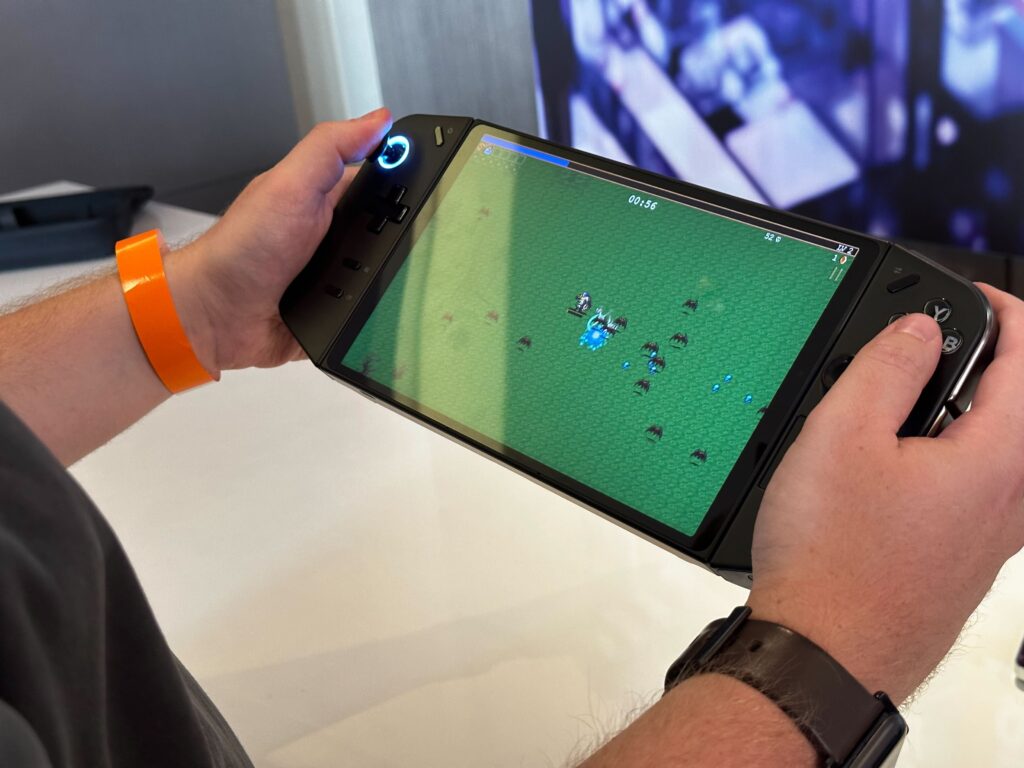
The Lenovo Legion Go is set to be available with up to an AMD Ryzen Z1 Extreme, 16GB RAM, up to 1TB SSD and up to 2TB of expandable storage. In the UK, only one model will be sold and its specs, intriguingly, align nigh-on exactly with the Asus ROG Ally but with the fancier QHD+ resolution. That’s a Z1 Extreme, 16GB RAM and 512GB SSD. It’ll be interesting to see if the Legion Go can hit the ground running right from the off and take full advantage of its specifications as well as how it handles wattage, as this is something that has been modified through software updates with the ROG Ally since its launch. Lenovo is touting both a Quiet Mode and the ability to go all-in by running at a full 25W TGP in Custom Mode when you so choose.
Games and Software
- Runs Windows 11 Home
- Legion Space onboard software
Your opinion of the Lenovo Legion Go may be immediately coloured by the fact that it’s a Windows gaming handheld. It just isn’t for some people, but I do think the right trackpad goes some way to helping with user interaction.
Legion Space loading on Lenovo Legion Go
Legion Space on Lenovo Legion Go
Quick settings on Lenovo Legion Go
Performance quick settings on Lenovo Legion Go
General settings on Lenovo Legion Go
Performance settings on Lenovo Legion Go
Holding the Lenovo Legion Go
The best method to avoid too much Windows time with this device is the Legion Space software, which brings together your locally installed games from various games stores for quick access. I dodged around the menus during my time and, at face value, it appears simple and easy to use but offers powerful options for those who like to tweak key performance settings.
Early Verdict
It’s hard to have anything negative to say about the Lenovo Legion Go after a short amount of hands-on time, and that’s because the proof will be in the performance and battery life pudding — something we won’t be able to test properly until our full review. For now, the specifications look strong and the battery life looks sizeable, but Lenovo is refraining from making specific claims about how long this device will last, and it’s got a big display to power.
My first impressions are that this could be the most accomplished and fully featured PC gaming handheld yet. The detachable controllers and kickstand offer flexibility in how you play, while smart choices in terms of ports and the buttons on offer make this a handheld made with PC gamers’ needs in mind. It’s also priced competitively, lining up with the Asus ROG Ally on cost despite offering a couple of boosted specifications. The Lenovo Legion Go has the potential to be the go-to PC gaming handheld.

First Impressions
The Lenovo Legion Go is the next PC gaming handheld from a big technology brand. Along with smart additional features to entice PC players, its eye-catching selling points are its detachable controllers and large 8.8-inch QHD+ display.
-
Large screen8.8-inch QHD+ panel makes this a big-screen handheld -
Detachable controllersAble to detach controllers for added freedom, such a tabletop play -
Native PC gamingUp to an AMD Ryzen Z1 Extreme chip and 16GB RAM to power AAA games
Introduction
The Lenovo Legion Go is the latest PC gaming handheld to be revealed, following in the footsteps of the Steam Deck and Asus ROG Ally. Some may wince when they hear it’s another Windows handheld but, on the hardware side, this could be the most accomplished device in the category yet.
What makes the Legion Go stand out is its Nintendo Switch-like setup, with removable controllers, allowing for the flexibility of wireless play. It isn’t the first of its kind, with the OneXPlayer sporting this style, but it is striking to see this big brand take a different direction to its key rival, the Asus ROG Ally.
I’m here at IFA 2023 and I had the opportunity to go hands-on with the Lenovo Legion Go for thirty minutes. It’s worth noting the device I tested wasn’t a final version of the product so I was limited in the play testing I could do, so key impressions here will be on the overall user interface. The all-important performance testing will come in our full review. For now, check out our first impressions of the Lenovo Legion Go.
Design and Controls
- 854 grams and 41mm thickness
- Hall effect joysticks and a trackpad
- Six assignable grip buttons
My 30-minute session with the Lenovo Legion Go flew by, as I spent time tinkering with the different modes and taking the range of photos you can see in this hands-on article, but I got a good chance to get a feel for these controls, and I was mightily impressed. The D-Pad is the low point, feeling a tad cheap, but the rest of the controls are impressive in their variety and quality.
Left side of the Lenovo Legion Go
Right side of the Lenovo Legion Go
Detachable controllers of the Lenovo Legion Go
The hall effect joysticks aren’t the biggest but they move in a purposeful manner, with a smidgen of resistance to stop them feeling flimsy, and the face buttons might be my highlight. The face buttons offer plenty of crunchy travel that adds up to a satisfying press. The overriding theme, across the shoulder buttons, triggers and more too, is that this is a high quality device. Of course, at £699/$699/€799, it really should be.
Left detachable controller of the Lenovo Legion Go
Right detachable controller of the Lenovo Legion Go
Mouse wheel and assignable buttons of the right detachable controller of the Lenovo Legion Go
Assignable buttons of the right detachable controller of the Lenovo Legion Go
Lenovo Legion Go right detachable controller in FPS mode
But, it isn’t just the quality of the typical controls you’ll find with this kind of form factor that impresses. First, on the right controller, there’s a trackpad, similar to the Steam Deck but you’ll find only one here. Not only is this a useful option for PC games that benefit from this, but it helps with navigating Windows, a well-touted folly of the Asus ROG Ally.
Then, there six assignable grip buttons, with two on the back of each controller and a further two on the side of the right controller. But, that’s not all, there’s a mouse wheel on the rear of the right controller too. Why all the controls on the right detachable controller? It can become a joystick with ‘FPS mode’ by attaching magnetically to a base, and it absolutely feels like you’re wielding the mouse more accurately. There’s also dual USB-C ports, offering flexibility in terms of charging and attaching another accessory at the same time.
Lenovo Legion Go and carry case
Lenovo Legion Go and carry case
Side view of the Lenovo Legion Go tablet
Rear of the Lenovo Legion Go tablet with kickstand
Lenovo Legion Go
Legion Space on Lenovo Legion Go
The overall design of the Legion Go is unassuming, with its Shadow Black colourway, looking more like the Steam Deck than the bright white Asus ROG Ally, but it retains the weighty premium feel of its Asus rival. Though, it is even heavier than the 603g ROG Ally, coming in at 854g. It does reduce to 640g without the controllers attached. However, despite finding this weight a tad daunting I wasn’t phased by it when playing. But, the tabletop mode is on hand to give you a rest if this is something that might put you off.
Display
- 8.8-inch QHD+ IPS screen
- 144Hz refresh rate
- Up to 500 nits brightness
I didn’t get the opportunity to truly push the resolution and refresh rate of this display but my initial impressions are strong. The QHD+ panel noticeably adds extra detail on top of a FHD+ display like the ROG Ally. It’s still an IPS rather than something fancier like an OLED but colours looked appropriately accurate and rich, but they certainly don’t pop off the display.
Settings on the Lenovo Legion Go
Holding the Lenovo Legion Go
Lenovo Legion Go and carry case
Legion Go and detached controllers
I’m looking forward to placing this device alongside competing handhelds when we test it for review because, like with the weight, the positively mammoth 8.8-inch screen didn’t feel overly imposing during my playtime. The size is absolutely welcome, undeniably providing a more immersive experience compared with the 7-inch panel on the ROG Ally.
Specs and Performance
- Up to AMD Ryzen Z1 Extreme
- 16GB RAM and up to 1TB SSD
- Dual USB-C ports
- 65W charging, 49.2Whr battery
Most of my time playing with the Lenovo Legion Go included trialling it with Vampire Survivors and PowerWash Simulator, so far from extremely demanding and boundary pushing triple-A or highFPS performance games. And, as mentioned at the start of this hands-on, this isn’t a final product so the final model could differ from how this version performs. I can say there were no noticeable hiccups during my time.
The Lenovo Legion Go is set to be available with up to an AMD Ryzen Z1 Extreme, 16GB RAM, up to 1TB SSD and up to 2TB of expandable storage. In the UK, only one model will be sold and its specs, intriguingly, align nigh-on exactly with the Asus ROG Ally but with the fancier QHD+ resolution. That’s a Z1 Extreme, 16GB RAM and 512GB SSD. It’ll be interesting to see if the Legion Go can hit the ground running right from the off and take full advantage of its specifications as well as how it handles wattage, as this is something that has been modified through software updates with the ROG Ally since its launch. Lenovo is touting both a Quiet Mode and the ability to go all-in by running at a full 25W TGP in Custom Mode when you so choose.
Games and Software
- Runs Windows 11 Home
- Legion Space onboard software
Your opinion of the Lenovo Legion Go may be immediately coloured by the fact that it’s a Windows gaming handheld. It just isn’t for some people, but I do think the right trackpad goes some way to helping with user interaction.
Legion Space loading on Lenovo Legion Go
Legion Space on Lenovo Legion Go
Quick settings on Lenovo Legion Go
Performance quick settings on Lenovo Legion Go
General settings on Lenovo Legion Go
Performance settings on Lenovo Legion Go
Holding the Lenovo Legion Go
The best method to avoid too much Windows time with this device is the Legion Space software, which brings together your locally installed games from various games stores for quick access. I dodged around the menus during my time and, at face value, it appears simple and easy to use but offers powerful options for those who like to tweak key performance settings.
Early Verdict
It’s hard to have anything negative to say about the Lenovo Legion Go after a short amount of hands-on time, and that’s because the proof will be in the performance and battery life pudding — something we won’t be able to test properly until our full review. For now, the specifications look strong and the battery life looks sizeable, but Lenovo is refraining from making specific claims about how long this device will last, and it’s got a big display to power.
My first impressions are that this could be the most accomplished and fully featured PC gaming handheld yet. The detachable controllers and kickstand offer flexibility in how you play, while smart choices in terms of ports and the buttons on offer make this a handheld made with PC gamers’ needs in mind. It’s also priced competitively, lining up with the Asus ROG Ally on cost despite offering a couple of boosted specifications. The Lenovo Legion Go has the potential to be the go-to PC gaming handheld.



