


• Washington DC |
  • New York |
  • Toronto |
  • Distribution: (800) 510 9863
Friday, January 30, 2026
  • Login
No Result
View All Result
NEWSLETTER
New Edge Times
  • World
  • U.S.
  • Politics
  • Business
  • Science
  • Tech
  • Youth
  • Entertainment
    • All
    • Arts
    • Gaming
    • Movie
    • Music
    Video: 2026 Oscar Nominees: Surprises and Snubs

    Video: 2026 Oscar Nominees: Surprises and Snubs

    Video: Photographing the Golden Globes Winners

    Video: Photographing the Golden Globes Winners

    Camden Harris: The Trusted Mind Behind Today’s Music Power Players

    Camden Harris: The Trusted Mind Behind Today’s Music Power Players

    Video: Read These 3 Books Before Watching the Movie

    Video: Read These 3 Books Before Watching the Movie

    Andrea Modellato: “How to Redefine Ethics in the Music Industry and Beyond”

    Andrea Modellato: “How to Redefine Ethics in the Music Industry and Beyond”

    Video: The Defining Culture Visuals of 2025

    Video: The Defining Culture Visuals of 2025

    Video: ‘Avatar: Fire and Ash’ | Anatomy of a Scene

    Video: ‘Avatar: Fire and Ash’ | Anatomy of a Scene

    Video: 250 Years of Jane Austen, in Objects

    Video: 250 Years of Jane Austen, in Objects

    • Gaming
    • Movie
    • Music
    • Arts
  • Sports
  • Lifestyle
    • All
    • Fashion
    • Food
    • Health
    • Travel
    24 Easy, Healthy Soups That Will Make You Feel Better

    24 Easy, Healthy Soups That Will Make You Feel Better

    To Improve How He Ate, Our Critic Looked at What He Drank

    To Improve How He Ate, Our Critic Looked at What He Drank

    15 Cozy Beef Stew Recipes Our Readers Love

    15 Cozy Beef Stew Recipes Our Readers Love

    To Tune Out Food Noise, Our Critic Listened to His Hunger

    To Tune Out Food Noise, Our Critic Listened to His Hunger

    We Have a New Way to Double or Halve Recipes. It Might Just Make You a Better Cook.

    We Have a New Way to Double or Halve Recipes. It Might Just Make You a Better Cook.

    To Eat Healthier, Our Critic Went to the Source: His Kitchen

    To Eat Healthier, Our Critic Went to the Source: His Kitchen

    7 Smart Cooking Tips for the Best Chicken Soup of Your Life

    7 Smart Cooking Tips for the Best Chicken Soup of Your Life

    Video: Photographing 52 Places to Go in 2026

    Video: Photographing 52 Places to Go in 2026

    • Fashion
    • Food
    • Health
    • Travel
  • Reviews
  • Trending
  • World
  • U.S.
  • Politics
  • Business
  • Science
  • Tech
  • Youth
  • Entertainment
    • All
    • Arts
    • Gaming
    • Movie
    • Music
    Video: 2026 Oscar Nominees: Surprises and Snubs

    Video: 2026 Oscar Nominees: Surprises and Snubs

    Video: Photographing the Golden Globes Winners

    Video: Photographing the Golden Globes Winners

    Camden Harris: The Trusted Mind Behind Today’s Music Power Players

    Camden Harris: The Trusted Mind Behind Today’s Music Power Players

    Video: Read These 3 Books Before Watching the Movie

    Video: Read These 3 Books Before Watching the Movie

    Andrea Modellato: “How to Redefine Ethics in the Music Industry and Beyond”

    Andrea Modellato: “How to Redefine Ethics in the Music Industry and Beyond”

    Video: The Defining Culture Visuals of 2025

    Video: The Defining Culture Visuals of 2025

    Video: ‘Avatar: Fire and Ash’ | Anatomy of a Scene

    Video: ‘Avatar: Fire and Ash’ | Anatomy of a Scene

    Video: 250 Years of Jane Austen, in Objects

    Video: 250 Years of Jane Austen, in Objects

    • Gaming
    • Movie
    • Music
    • Arts
  • Sports
  • Lifestyle
    • All
    • Fashion
    • Food
    • Health
    • Travel
    24 Easy, Healthy Soups That Will Make You Feel Better

    24 Easy, Healthy Soups That Will Make You Feel Better

    To Improve How He Ate, Our Critic Looked at What He Drank

    To Improve How He Ate, Our Critic Looked at What He Drank

    15 Cozy Beef Stew Recipes Our Readers Love

    15 Cozy Beef Stew Recipes Our Readers Love

    To Tune Out Food Noise, Our Critic Listened to His Hunger

    To Tune Out Food Noise, Our Critic Listened to His Hunger

    We Have a New Way to Double or Halve Recipes. It Might Just Make You a Better Cook.

    We Have a New Way to Double or Halve Recipes. It Might Just Make You a Better Cook.

    To Eat Healthier, Our Critic Went to the Source: His Kitchen

    To Eat Healthier, Our Critic Went to the Source: His Kitchen

    7 Smart Cooking Tips for the Best Chicken Soup of Your Life

    7 Smart Cooking Tips for the Best Chicken Soup of Your Life

    Video: Photographing 52 Places to Go in 2026

    Video: Photographing 52 Places to Go in 2026

    • Fashion
    • Food
    • Health
    • Travel
  • Reviews
  • Trending
No Result
View All Result
New Edge Times
No Result
View All Result
Home Reviews

Keeper Password Manager

by New Edge Times Report
September 15, 2022
in Reviews
Keeper Password Manager
Share on FacebookShare on Twitter

Verdict

Keeper is a business-first service that does everything a password manager needs to – but it’s neither as pretty nor as feature-packed as some rivals.

Pros

  • Can share passwords with anyone
  • In-app TOTP password generation

Cons

  • Extremely limited free account if your subscription expires
  • Tries to up-sell you on storage and breach protection

  • SecurityAES 256-bit encryption and PBKDF2

  • SharingGrant full or limited password or folder access to other Keeper users

  • Storage10GB for an additional £6.99 per year; five free file uploads are available for all paid accounts; 10GB shared storage is included in the family subscription

  • Stand-alone clientsWindows, Linux, macOS, Android, iOS

  • Browser extensionsChrome, Firefox, Safari, IE, Edge, Opera, Brave

Introduction

Keeper Password Manager is one of the more overtly business-orientated password management services around, but it has solid personal subscription tiers whose pricing compares well to the likes of LastPass and Dashlane.

But is it good enough to qualify for our Best Password Manager roundup? Here are my thoughts.

Pricing

A Keeper Personal account costs £30 per year, while a Family subscription includes five accounts and costs £72 per year. That may seem expensive, but the Family account includes 10GB of shared encrypted storage, which is normally priced at £6.99 per year.

Keeper provides a range of bolt-on services, including storage and breach monitoring. While other services provide some storage and monitoring to see if your credentials appear in breacher, these cost extra from Keeper. They’re also automatically added to your basket as suggested purchases when you check out on the site, so keep an eye out for that. Two- and three-year subscriptions are available, too.

Keeper Security also offers a wide range of accounts targeting different business needs, which are beyond the scope of this review. However, if your employer or your own business uses Keeper, it’s worth knowing that all users associated with a Keeper Business or Enterprise account get a free five-user Family account.

There is a free version, but it’s very limited. If you have an account or a trial and it ends, the free version is what you’re left with. It supports only a single mobile device, and while it will store an unlimited number of passwords and payment details, and handle TOTP (Time-based One Time Password) two-factor authentication, it won’t sync online to Keeper’s vault, or to otherwise back up your passwords. Needless to say, this is an extremely bad idea to use in the long term, although it’s incredibly useful if your subscription lapses by accident.

Features

  • Range of two-factor authentication methods
  • Dedicated forms to store wide range of information
  • Supports biometric sign-ins

Keeper Password Manager’s core subscription is well equipped, but some features are only available as paid-for extras. There’s a good range of browser extensions, mobile apps and desktop clients, all with a consistent interface that, while not as attractive as those of 1Password or NordPass, is clear and easy to use.

You can use a range of two-factor authentication methods to secure your connection to Keeper, including via text message, TOTP authenticator, RSA SecurID, Duo and KeeperDNA. It also supports in-app TOTP password generation for other services – something that’s increasingly become a must-have feature in top-flight password managers.

Keeper has dedicated forms to store a wide range of information beyond simple passwords, payment cards and addresses, from identity documents and driving licences to Wi-Fi passwords and software licence keys.

There’s a structured account recovery process if you forget your master password, involving a backup verification code plus a security question. These have to be configured before the account password is lost – you’re prompted to set them up when you start using Keeper. In case you didn’t, there’s also a more complex recovery method involving approved Vault Transfer recipients.
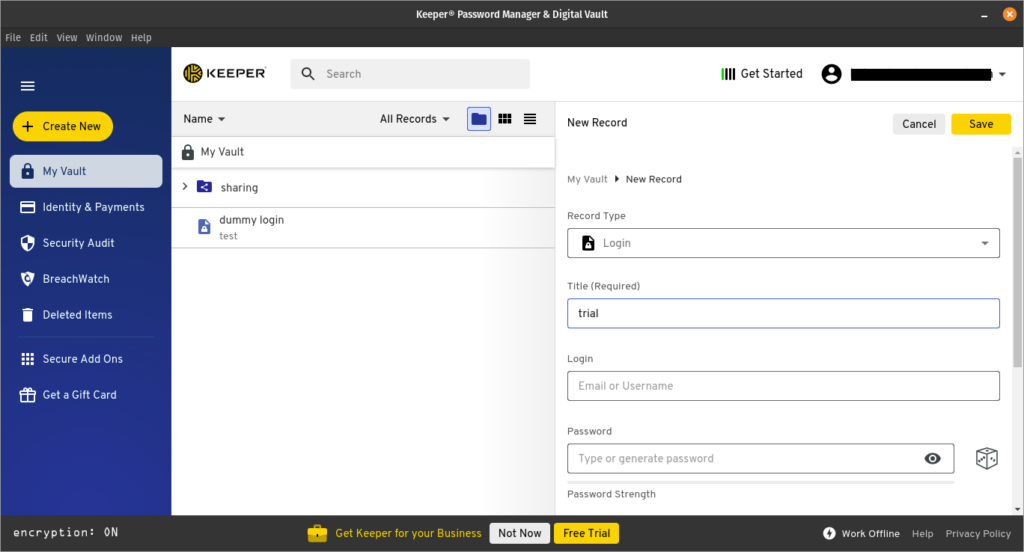
Keeper Password Manager desktop app

As well as transferring entire vaults to other Keeper users, you can grant full or limited password record or folder access to other Keeper users, with either view or edit access. Time-limited, one-time record sharing is also available, and doesn’t require the recipient to have a Keeper account.

In case of emergencies, you can designate up to five people who can be granted access to your Keeper account, after a designated wait period.

To help minimise the amount of password filling you have to do, Keeper can authenticate logins to your password vault using biometrics for the mobile app, Windows Hello, and its own Keeper Push service, which sends a login challenge to a linked mobile device.

Keeper has reasonably sensible vault-locking defaults, which can be further configured by the user. You’re logged out of your vault when you close your browser or app, and if you leave the desktop app open and idle for 60 minutes, it’s logged out.

Logging into the desktop app requires that you go through a step confirming your user name before entering your password, which is a little bit of extra friction that I’d like to see dispensed with.

Latest deals

Should you buy it?

If you’re looking for convenience

Keeper is easy to use, although I’d have preferred to see family users get a bit of storage and breach-checking at no extra cost.

If you require sophisticated and customisable security

It has plenty of features but isn’t as granular in its configuration options as Bitwarden or KeePass derived products.

Final Thoughts

I’d be entirely happy using Keeper Security for my day-to-day password management needs, but Bitwarden and the KeePass ecosystem are both significantly less expensive.

How we test

We test each password manager ourselves on a variety of computer and mobile operating systems. We carry out comparative feature analysis against industry standards and rival products, and test security and convenience settings such as default logout behaviour and offline access.

We used for at least a week.

Tested all of the available features.

FAQs

Is Keeper a safe password manager?

Yes, Keeper is perfectly safe to use and uses end-to-end encryption to ensure your data remains private.

How much does Keeper cost per month?

A Keeper Personal account costs £30 per year, while a Family subscription includes five accounts and costs £72 per year.

Verdict

Keeper is a business-first service that does everything a password manager needs to – but it’s neither as pretty nor as feature-packed as some rivals.

Pros

  • Can share passwords with anyone
  • In-app TOTP password generation

Cons

  • Extremely limited free account if your subscription expires
  • Tries to up-sell you on storage and breach protection

  • SecurityAES 256-bit encryption and PBKDF2

  • SharingGrant full or limited password or folder access to other Keeper users

  • Storage10GB for an additional £6.99 per year; five free file uploads are available for all paid accounts; 10GB shared storage is included in the family subscription

  • Stand-alone clientsWindows, Linux, macOS, Android, iOS

  • Browser extensionsChrome, Firefox, Safari, IE, Edge, Opera, Brave

Introduction

Keeper Password Manager is one of the more overtly business-orientated password management services around, but it has solid personal subscription tiers whose pricing compares well to the likes of LastPass and Dashlane.

But is it good enough to qualify for our Best Password Manager roundup? Here are my thoughts.

Pricing

A Keeper Personal account costs £30 per year, while a Family subscription includes five accounts and costs £72 per year. That may seem expensive, but the Family account includes 10GB of shared encrypted storage, which is normally priced at £6.99 per year.

Keeper provides a range of bolt-on services, including storage and breach monitoring. While other services provide some storage and monitoring to see if your credentials appear in breacher, these cost extra from Keeper. They’re also automatically added to your basket as suggested purchases when you check out on the site, so keep an eye out for that. Two- and three-year subscriptions are available, too.

Keeper Security also offers a wide range of accounts targeting different business needs, which are beyond the scope of this review. However, if your employer or your own business uses Keeper, it’s worth knowing that all users associated with a Keeper Business or Enterprise account get a free five-user Family account.

There is a free version, but it’s very limited. If you have an account or a trial and it ends, the free version is what you’re left with. It supports only a single mobile device, and while it will store an unlimited number of passwords and payment details, and handle TOTP (Time-based One Time Password) two-factor authentication, it won’t sync online to Keeper’s vault, or to otherwise back up your passwords. Needless to say, this is an extremely bad idea to use in the long term, although it’s incredibly useful if your subscription lapses by accident.

Features

  • Range of two-factor authentication methods
  • Dedicated forms to store wide range of information
  • Supports biometric sign-ins

Keeper Password Manager’s core subscription is well equipped, but some features are only available as paid-for extras. There’s a good range of browser extensions, mobile apps and desktop clients, all with a consistent interface that, while not as attractive as those of 1Password or NordPass, is clear and easy to use.

You can use a range of two-factor authentication methods to secure your connection to Keeper, including via text message, TOTP authenticator, RSA SecurID, Duo and KeeperDNA. It also supports in-app TOTP password generation for other services – something that’s increasingly become a must-have feature in top-flight password managers.

Keeper has dedicated forms to store a wide range of information beyond simple passwords, payment cards and addresses, from identity documents and driving licences to Wi-Fi passwords and software licence keys.

There’s a structured account recovery process if you forget your master password, involving a backup verification code plus a security question. These have to be configured before the account password is lost – you’re prompted to set them up when you start using Keeper. In case you didn’t, there’s also a more complex recovery method involving approved Vault Transfer recipients.

Keeper Password Manager desktop app

As well as transferring entire vaults to other Keeper users, you can grant full or limited password record or folder access to other Keeper users, with either view or edit access. Time-limited, one-time record sharing is also available, and doesn’t require the recipient to have a Keeper account.

In case of emergencies, you can designate up to five people who can be granted access to your Keeper account, after a designated wait period.

To help minimise the amount of password filling you have to do, Keeper can authenticate logins to your password vault using biometrics for the mobile app, Windows Hello, and its own Keeper Push service, which sends a login challenge to a linked mobile device.

Keeper has reasonably sensible vault-locking defaults, which can be further configured by the user. You’re logged out of your vault when you close your browser or app, and if you leave the desktop app open and idle for 60 minutes, it’s logged out.

Logging into the desktop app requires that you go through a step confirming your user name before entering your password, which is a little bit of extra friction that I’d like to see dispensed with.

Latest deals

Should you buy it?

If you’re looking for convenience

Keeper is easy to use, although I’d have preferred to see family users get a bit of storage and breach-checking at no extra cost.

If you require sophisticated and customisable security

It has plenty of features but isn’t as granular in its configuration options as Bitwarden or KeePass derived products.

Final Thoughts

I’d be entirely happy using Keeper Security for my day-to-day password management needs, but Bitwarden and the KeePass ecosystem are both significantly less expensive.

How we test

We test each password manager ourselves on a variety of computer and mobile operating systems. We carry out comparative feature analysis against industry standards and rival products, and test security and convenience settings such as default logout behaviour and offline access.

We used for at least a week.

Tested all of the available features.

FAQs

Is Keeper a safe password manager?

Yes, Keeper is perfectly safe to use and uses end-to-end encryption to ensure your data remains private.

How much does Keeper cost per month?

A Keeper Personal account costs £30 per year, while a Family subscription includes five accounts and costs £72 per year.

Previous Post

From Christopher John Rogers and Orior, a Vibrant Chair Collection

Next Post

Solidigm P41 Plus

Related Posts

Hisense M2 Pro
Reviews

Hisense M2 Pro

by New Edge Times Report
January 29, 2026
RedMagic 11 Air Review: A powerful, yet affordable, gaming phone
Reviews

RedMagic 11 Air Review: A powerful, yet affordable, gaming phone

by New Edge Times Report
January 29, 2026
Yaber L2 Plus Review
Reviews

Yaber L2 Plus Review

by New Edge Times Report
January 29, 2026
Leave Comment
New Edge Times

© 2025 New Edge Times or its affiliated companies. All rights reserved.

Navigate Site

  • About
  • Advertise
  • Terms & Conditions
  • Privacy Policy
  • Disclaimer
  • Contact

Follow Us

No Result
View All Result
  • World
  • U.S.
  • Politics
  • Business
  • Science
  • Tech
  • Youth
  • Entertainment
    • Gaming
    • Movie
    • Music
    • Arts
  • Sports
  • Lifestyle
    • Fashion
    • Food
    • Health
    • Travel
  • Reviews
  • Trending

© 2025 New Edge Times or its affiliated companies. All rights reserved.

Welcome Back!

Login to your account below

Forgotten Password?

Retrieve your password

Please enter your username or email address to reset your password.

Log In
