









Verdict
KeePass is an excellent free-to-use password manager, with lots and lots of customisation options and wide support for third-party apps. The interface may be a little too complicated for some, while the lack of integrated sharing may turn off users too. But this is still nevertheless one of the very best password manager options available.
Pros
- Entirely free and open source
- Highly customisable
- Wide range of third-party apps and extensions
- In-app TOTP password generation
Cons
- No integrated sharing
- More hands-on configuration than most rivals
-
SecurityAES-256, ChaCha20 (the latter for memory protection), third-party extensions allow the addition of other algorithms -
Stand-alone clientsWindows, Linux, macOS, BSD, Android (Play & F-Droid), iOS -
Browser extensionsChrome, Firefox, IE, Edge Chrome, Opera, Safari
Introduction
KeePass is free, open source software to the core, with no paid-for components or licenses whatsoever. It’s both an application and a standard, with multiple apps that can access KeePass database (KDBX) files and handle their associated encryption standard.
My own setup uses KeeWeb on Linux, the first-party KeePass 2 app for Windows, and AuthPass on Android – all accessing a shared database file that I keep on a secure cloud server that I control, with a hosted web app version of KeeWeb to provide an online vault. If you adopt the Keepass standard, you can customise everything from your encryption protocol, to your interface and browser plugin selection, to your second factors and passwordless logins.
It’s obviously the perfect choice for security enthusiasts, but it isn’t just for the hardcore, and the barrier for entry isn’t that high if you opt for the most user-friendly choices. It’s just that these aren’t always highlighted.
KeePass’s open source code provides another benefit: community bug and vulnerability hunting. Numerous vulnerabilities to KeePass’s application ecosystem have been promptly reported, proved and fixed by its user and developer community, making this a robustly secure choice, as long as you ensure that you’re keeping your clients up-to-date.
Features
- Official apps have an unfriendly interface
- Supports biometric unlock
KeePass and its cross-platform port, KeePassXC, have an unparalleled range of features, but can feel unfriendly to use. Some of their features require you to enter code strings in specific locations, and both have interfaces that feel like something out of the early 2000s.
If you want to get into using the KeePass ecosystem, I recommend using a friendlier app. Both KeeWeb and AuthPass support the KDBX database standard, and you can activate features such as one-time codes, browser plugins, attached files, and cloud storage support with a click or two. Although they have friendly interfaces, there’s still enough flexibility to add support for non-standard stuff, such as the Steam game client’s proprietary one-time codes.
Unlike most password managers, KeePass delivers full control over where and how your database is stored, so you don’t have to trust it to someone else’s computer – although popular cloud storage services are fully supported.
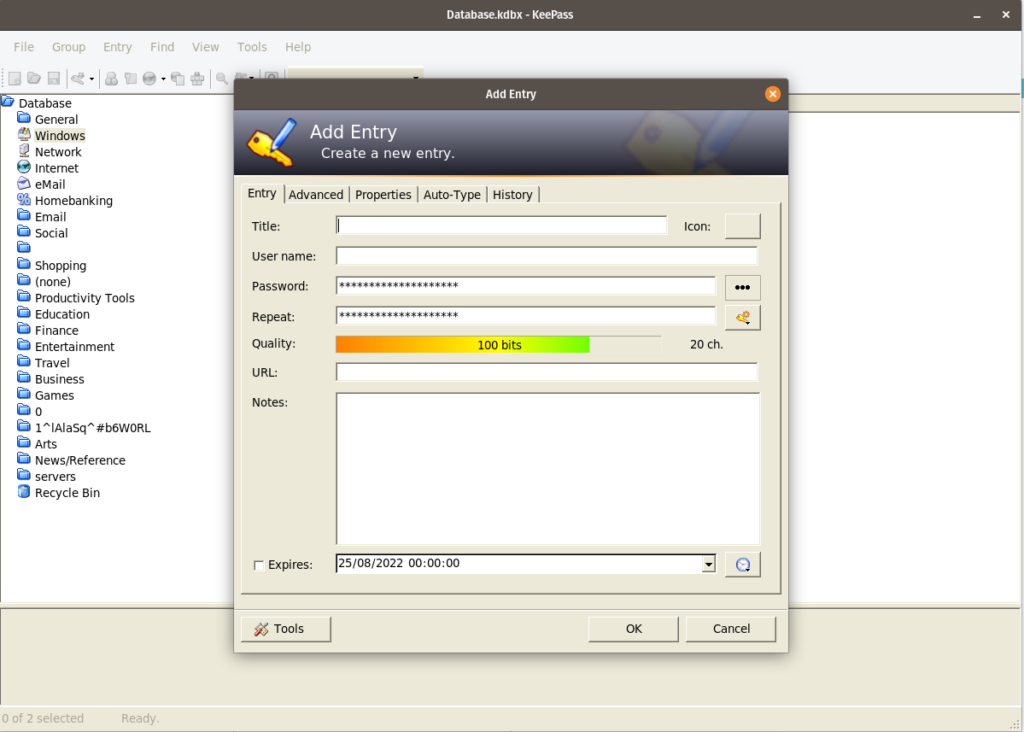
The main supported multi-factor authentication (actually multi-factor decryption) option is secure key files, and passwordless login is available through biometric unlock – depending on app and extension configuration – or a security key to be used instead of your master password. Other options are available through extensions. Previously configured biometric unlock also provides the only avenue to reset your master password if you forget it.
Both apps and browser extensions allow you to autofill and even autosave passwords for the web, but a killer feature of all KeePass derivatives is “autotype”, which virtually types in your passwords one character at a time, neatly supporting applications and websites that disable pasting, as well as keeping your password out of the clipboard.
Logout timers depend on exactly which app you’re using to access your KeePass database. The first-party KeePass 2 desktop application remains logged in indefinitely and requires user configuration, while most third-party implementations lock after 5 to 15 minutes of being inactive, or when they’re minimised.
One thing KeePass isn’t great at is sharing passwords. If you need to share an entire database, you can email the file to someone, or even put it online, sharing the keys with everyone who needs access over an encrypted messenger such as Signal. However, there’s no built-in secure messaging system to share individual password entries or groups.
Latest deals
Should you buy it?
If you require sophisticated and customisable security:
There’s almost nothing you can’t configure here, and if you find something you can’t, then you can always make your own custom data strings or add extensions.
If you’re looking for convenience:
While polished apps are available to take the effort out of many KeePass functions, you’ll always have to choose your storage location. You don’t need to be an expert to use a KeePass database effectively, but understanding files, networks and online storage is a plus.
Final Thoughts
Quality-of-life features have been massively improved as a result of recent app and extension developments, so you can find a perfect balance between customisability and ease of use.
The only real feature gap is password sharing and group folders – for that, you might want to consider a Bitwarden subscription instead. Check out our Best Password Manager guide for more options.
How we test
We test each password manager ourselves on a variety of computer and mobile operating systems. We carry out comparative feature analysis against industry standards and rival products, and test security and convenience settings such as default logout behaviour and offline access.,
We used for at least a week.
Tested all of the available features.
FAQs
Whether you store it on a USB stick, your hard disk or a cloud storage surface, it is possible for your password database to be pilfered. However, your passwords should still be safe since they’re encrypted. A recently discovered vulnerability that would allow master passwords to be sniffed out under very specific circumstances was rapidly fixed thanks to the Keepass community
Yes, KeePass is a free open source password manager.

Verdict
KeePass is an excellent free-to-use password manager, with lots and lots of customisation options and wide support for third-party apps. The interface may be a little too complicated for some, while the lack of integrated sharing may turn off users too. But this is still nevertheless one of the very best password manager options available.
Pros
- Entirely free and open source
- Highly customisable
- Wide range of third-party apps and extensions
- In-app TOTP password generation
Cons
- No integrated sharing
- More hands-on configuration than most rivals
-
SecurityAES-256, ChaCha20 (the latter for memory protection), third-party extensions allow the addition of other algorithms -
Stand-alone clientsWindows, Linux, macOS, BSD, Android (Play & F-Droid), iOS -
Browser extensionsChrome, Firefox, IE, Edge Chrome, Opera, Safari
Introduction
KeePass is free, open source software to the core, with no paid-for components or licenses whatsoever. It’s both an application and a standard, with multiple apps that can access KeePass database (KDBX) files and handle their associated encryption standard.
My own setup uses KeeWeb on Linux, the first-party KeePass 2 app for Windows, and AuthPass on Android – all accessing a shared database file that I keep on a secure cloud server that I control, with a hosted web app version of KeeWeb to provide an online vault. If you adopt the Keepass standard, you can customise everything from your encryption protocol, to your interface and browser plugin selection, to your second factors and passwordless logins.
It’s obviously the perfect choice for security enthusiasts, but it isn’t just for the hardcore, and the barrier for entry isn’t that high if you opt for the most user-friendly choices. It’s just that these aren’t always highlighted.
KeePass’s open source code provides another benefit: community bug and vulnerability hunting. Numerous vulnerabilities to KeePass’s application ecosystem have been promptly reported, proved and fixed by its user and developer community, making this a robustly secure choice, as long as you ensure that you’re keeping your clients up-to-date.
Features
- Official apps have an unfriendly interface
- Supports biometric unlock
KeePass and its cross-platform port, KeePassXC, have an unparalleled range of features, but can feel unfriendly to use. Some of their features require you to enter code strings in specific locations, and both have interfaces that feel like something out of the early 2000s.
If you want to get into using the KeePass ecosystem, I recommend using a friendlier app. Both KeeWeb and AuthPass support the KDBX database standard, and you can activate features such as one-time codes, browser plugins, attached files, and cloud storage support with a click or two. Although they have friendly interfaces, there’s still enough flexibility to add support for non-standard stuff, such as the Steam game client’s proprietary one-time codes.
Unlike most password managers, KeePass delivers full control over where and how your database is stored, so you don’t have to trust it to someone else’s computer – although popular cloud storage services are fully supported.
The main supported multi-factor authentication (actually multi-factor decryption) option is secure key files, and passwordless login is available through biometric unlock – depending on app and extension configuration – or a security key to be used instead of your master password. Other options are available through extensions. Previously configured biometric unlock also provides the only avenue to reset your master password if you forget it.
Both apps and browser extensions allow you to autofill and even autosave passwords for the web, but a killer feature of all KeePass derivatives is “autotype”, which virtually types in your passwords one character at a time, neatly supporting applications and websites that disable pasting, as well as keeping your password out of the clipboard.
Logout timers depend on exactly which app you’re using to access your KeePass database. The first-party KeePass 2 desktop application remains logged in indefinitely and requires user configuration, while most third-party implementations lock after 5 to 15 minutes of being inactive, or when they’re minimised.
One thing KeePass isn’t great at is sharing passwords. If you need to share an entire database, you can email the file to someone, or even put it online, sharing the keys with everyone who needs access over an encrypted messenger such as Signal. However, there’s no built-in secure messaging system to share individual password entries or groups.
Latest deals
Should you buy it?
If you require sophisticated and customisable security:
There’s almost nothing you can’t configure here, and if you find something you can’t, then you can always make your own custom data strings or add extensions.
If you’re looking for convenience:
While polished apps are available to take the effort out of many KeePass functions, you’ll always have to choose your storage location. You don’t need to be an expert to use a KeePass database effectively, but understanding files, networks and online storage is a plus.
Final Thoughts
Quality-of-life features have been massively improved as a result of recent app and extension developments, so you can find a perfect balance between customisability and ease of use.
The only real feature gap is password sharing and group folders – for that, you might want to consider a Bitwarden subscription instead. Check out our Best Password Manager guide for more options.
How we test
We test each password manager ourselves on a variety of computer and mobile operating systems. We carry out comparative feature analysis against industry standards and rival products, and test security and convenience settings such as default logout behaviour and offline access.,
We used for at least a week.
Tested all of the available features.
FAQs
Whether you store it on a USB stick, your hard disk or a cloud storage surface, it is possible for your password database to be pilfered. However, your passwords should still be safe since they’re encrypted. A recently discovered vulnerability that would allow master passwords to be sniffed out under very specific circumstances was rapidly fixed thanks to the Keepass community
Yes, KeePass is a free open source password manager.



