

• Washington DC |
  • New York |
  • Toronto |
  • Distribution: (800) 510 9863
Tuesday, February 3, 2026
  • Login
No Result
View All Result
NEWSLETTER
New Edge Times
  • World
  • U.S.
  • Politics
  • Business
  • Science
  • Tech
  • Youth
  • Entertainment
    • All
    • Arts
    • Gaming
    • Movie
    • Music
    Video: ‘Marty Supreme’ | Anatomy of a Scene

    Video: ‘Marty Supreme’ | Anatomy of a Scene

    A Closer Look at the Grammys’ Top Nominees

    A Closer Look at the Grammys’ Top Nominees

    Video: 2026 Oscar Nominees: Surprises and Snubs

    Video: 2026 Oscar Nominees: Surprises and Snubs

    Video: Photographing the Golden Globes Winners

    Video: Photographing the Golden Globes Winners

    Camden Harris: The Trusted Mind Behind Today’s Music Power Players

    Camden Harris: The Trusted Mind Behind Today’s Music Power Players

    Video: Read These 3 Books Before Watching the Movie

    Video: Read These 3 Books Before Watching the Movie

    Andrea Modellato: “How to Redefine Ethics in the Music Industry and Beyond”

    Andrea Modellato: “How to Redefine Ethics in the Music Industry and Beyond”

    Video: The Defining Culture Visuals of 2025

    Video: The Defining Culture Visuals of 2025

    • Gaming
    • Movie
    • Music
    • Arts
  • Sports
  • Lifestyle
    • All
    • Fashion
    • Food
    • Health
    • Travel
    Lakeside NYC Elevates Himalayan–Indian Fusion Dining with a Newari Focus in Jackson Heights

    Lakeside NYC Elevates Himalayan–Indian Fusion Dining with a Newari Focus in Jackson Heights

    24 Easy, Healthy Soups That Will Make You Feel Better

    24 Easy, Healthy Soups That Will Make You Feel Better

    To Improve How He Ate, Our Critic Looked at What He Drank

    To Improve How He Ate, Our Critic Looked at What He Drank

    15 Cozy Beef Stew Recipes Our Readers Love

    15 Cozy Beef Stew Recipes Our Readers Love

    To Tune Out Food Noise, Our Critic Listened to His Hunger

    To Tune Out Food Noise, Our Critic Listened to His Hunger

    We Have a New Way to Double or Halve Recipes. It Might Just Make You a Better Cook.

    We Have a New Way to Double or Halve Recipes. It Might Just Make You a Better Cook.

    To Eat Healthier, Our Critic Went to the Source: His Kitchen

    To Eat Healthier, Our Critic Went to the Source: His Kitchen

    7 Smart Cooking Tips for the Best Chicken Soup of Your Life

    7 Smart Cooking Tips for the Best Chicken Soup of Your Life

    • Fashion
    • Food
    • Health
    • Travel
  • Reviews
  • Trending
  • World
  • U.S.
  • Politics
  • Business
  • Science
  • Tech
  • Youth
  • Entertainment
    • All
    • Arts
    • Gaming
    • Movie
    • Music
    Video: ‘Marty Supreme’ | Anatomy of a Scene

    Video: ‘Marty Supreme’ | Anatomy of a Scene

    A Closer Look at the Grammys’ Top Nominees

    A Closer Look at the Grammys’ Top Nominees

    Video: 2026 Oscar Nominees: Surprises and Snubs

    Video: 2026 Oscar Nominees: Surprises and Snubs

    Video: Photographing the Golden Globes Winners

    Video: Photographing the Golden Globes Winners

    Camden Harris: The Trusted Mind Behind Today’s Music Power Players

    Camden Harris: The Trusted Mind Behind Today’s Music Power Players

    Video: Read These 3 Books Before Watching the Movie

    Video: Read These 3 Books Before Watching the Movie

    Andrea Modellato: “How to Redefine Ethics in the Music Industry and Beyond”

    Andrea Modellato: “How to Redefine Ethics in the Music Industry and Beyond”

    Video: The Defining Culture Visuals of 2025

    Video: The Defining Culture Visuals of 2025

    • Gaming
    • Movie
    • Music
    • Arts
  • Sports
  • Lifestyle
    • All
    • Fashion
    • Food
    • Health
    • Travel
    Lakeside NYC Elevates Himalayan–Indian Fusion Dining with a Newari Focus in Jackson Heights

    Lakeside NYC Elevates Himalayan–Indian Fusion Dining with a Newari Focus in Jackson Heights

    24 Easy, Healthy Soups That Will Make You Feel Better

    24 Easy, Healthy Soups That Will Make You Feel Better

    To Improve How He Ate, Our Critic Looked at What He Drank

    To Improve How He Ate, Our Critic Looked at What He Drank

    15 Cozy Beef Stew Recipes Our Readers Love

    15 Cozy Beef Stew Recipes Our Readers Love

    To Tune Out Food Noise, Our Critic Listened to His Hunger

    To Tune Out Food Noise, Our Critic Listened to His Hunger

    We Have a New Way to Double or Halve Recipes. It Might Just Make You a Better Cook.

    We Have a New Way to Double or Halve Recipes. It Might Just Make You a Better Cook.

    To Eat Healthier, Our Critic Went to the Source: His Kitchen

    To Eat Healthier, Our Critic Went to the Source: His Kitchen

    7 Smart Cooking Tips for the Best Chicken Soup of Your Life

    7 Smart Cooking Tips for the Best Chicken Soup of Your Life

    • Fashion
    • Food
    • Health
    • Travel
  • Reviews
  • Trending
No Result
View All Result
New Edge Times
No Result
View All Result
Home Reviews

HyperX SoloCast

by New Edge Times Report
July 7, 2023
in Reviews
HyperX SoloCast
Share on FacebookShare on Twitter

Verdict

The HyperX SoloCast is an admirable little performer, mainly when you factor in its low price-point. You won’t find many bells or whistles, but decent vocal performance in the right situations makes this a valid option for new or budget-sensitive streamers and creators.

Pros

  • Low cost
  • Tiny form factor
  • USB plug and play connection
  • Included stand

Cons

  • Sensitive to vibrations and knocks
  • Pickup pattern isn’t well focused
  • Struggles with plosives and peaking


  • Simple USB ConnectionA single (included) USB-C cable is all you need to get going on PC, Mac or even PS4 and PS5.

  • Touch Sensitive Mute ButtonJust tap the large, capacitive button on top of the SoloCast to mute your output with an onboard LED indicator too.

  • Tiny SizeJust 13cm long and under 6cm wide, this is one of the smallest streaming microphones around.

Introduction

The smallest microphone in the HyperX range with an equally small price tag to match, the HyperX SoloCast will be a tempting proposition for anyone looking to start their journey in streaming or content creation on a budget.

The HyperX range of gaming gear is a broad one, dabbling in everything from monitors to mousepads so it’s no surprise to see the HP-owned brand looking to jump into your streaming setup too. The SoloCast is HyperX’s entry-level option in a five mic lineup, less than a fifth of the price of the appropriately named premium option, the ProCast.

The streaming microphone market is a crowded place to set up stall however. Gamers are typically brand loyal and HyperX is yet to truly make its mark. A £49.99/$59.99 price point is eye-catching, but it will take more than that for the SoloCast to take centre stage.

Design

  • Tiny, even with the stand
  • Largely plastic build
  • Single USB-C connection

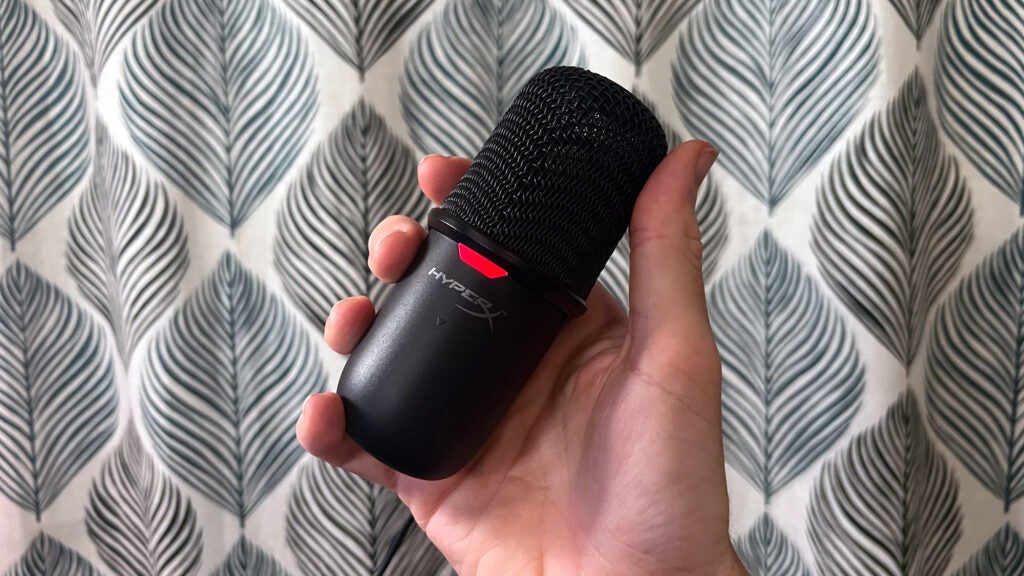
Compared to the rest of the line-up, HyperX has played it safe with the design of the SoloCast. It’s about as simple as microphones get; a stubby black pill with a USB-C connector on the back and an indicator LED on the front. The jazzy RGB lighting that makes the rest of the range stand out is notably absent here. This is a no-frills option where restraint in the name of cost saving is the order of the day.

The expectedly plastic shell feels thin, but a metal frame that wraps down from the all metal grille brings a weight and solidity that keeps the HyperX SoloCast from feeling toy-like. The matte texture on the plastic is a clever choice, as from across the desk you’d be forgiven for thinking it was all powder-coated metal – it also thankfully stops the HyperX SoloCast from becoming a fingerprint magnet.

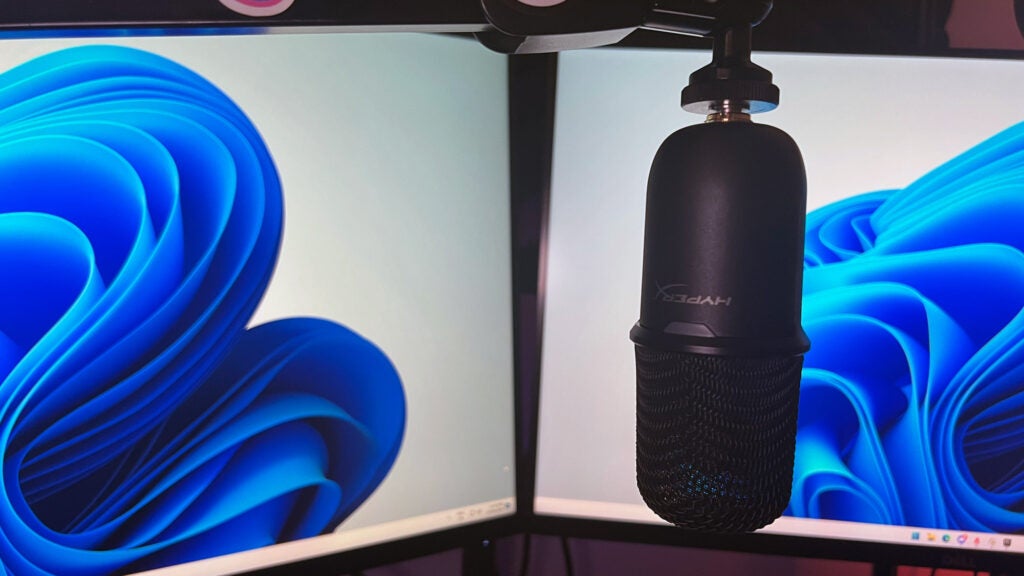
The microphone itself weighs just 258g, so will prove no match for even the cheapest of microphone arms. The SoloCast is compatible with most third-party stands thanks to a nifty built-in mount connector that includes both the standard 3/8-inch and 5/8-inch threads without the need for an additional adapter. It’s a great solution and one I’d like to see become the norm across the industry.
HyperX SoloCast - Off Stand
Image Credit (Trusted Reviews)

If the budget won’t stretch to a mic arm yet, the HyperX SoloCast comes with a desktop stand in the box. Again it’s almost entirely matte black plastic, though this time feels cheaper and flimsier than the microphone itself. I’m hesitant to complain too much however, because I’d rather see a chea- feeling stand than no included stand at all.

It’s a primitive solution as the SoloCast simply wedges into it rather than via any kind of shock mount, but it holds the mic steady in any position. There’s around 45 degrees of tilt back and forth, and two rotation points each way at 45 and 90 degree steps; they combine for a nice amount of flexibility when it comes to finding a position that works around monitors and other desktop clutter.

Performance

  • Clear but somewhat harsh vocals
  • Prone to roominess and reverb
  • Picks up a lot of background noise

With such a budget price point, expectations should be tempered when it comes to the kind of capture quality you’ll be able to get out of the HyperX SoloCast. At its best, I found it delivered decently clear vocals that sounded better than you’d expect for a £50/$60 mic. At its worst, the SoloCast’s shortcomings really began to stack up. 
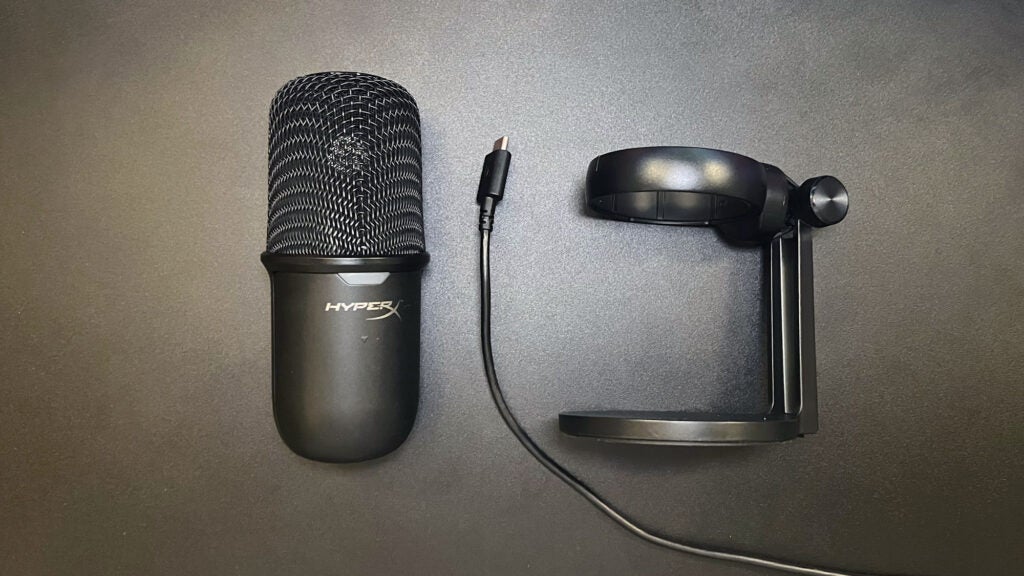
HyperX Solocast - Laying Flat
Image Credit (Trusted Reviews)

It doesn’t take much to get going with the HyperX SoloCast: just plug it in and you’re away. It is technically compatible with the HyperX Ngenuity app, but this only unlocks firmware updates and the ability to mute the mic, so it’s really not worth the download. It does claim to allow management of gain levels, but this is merely a reskin of the default Windows sound device volume so you’re not benefiting from anything new.

In an ideal environment, I managed to get sound out of the HyperX SoloCast that I was actually pretty happy with. Mounted on a mic arm and directly in front of some acoustic foam my voice was sharp and clear, albeit a little flat and lacking in punchy depth. Getting closer to the capsule grille did fill out the sound more, but introduced distortion and peaking even without major changes in volume. There’s no pop-filter integrated, included or even available as a standalone accessory, so there’s no defence against plosives and this became a problem even at a normal distance away.

When cradled in the included stand the SoloCast was still capable of a good baseline sound, but this was often spoiled by intruders. The microphone sits particularly low to the desk which introduced noticeable roominess and reverb as sound bounced off my desk and monitor and back into the mic. Knocks and bumps are also a major issue, as the SoloCast wedges tight against the stand with no protection from a shock-mount, meaning every little vibration gets sent straight to the capsule – not good.
HyperX Solocast - On Mic Arm
Image Credit (Trusted Reviews)

The cardioid polar pattern should help fight off-mic noise, but I found it still picked up unwanted sounds from all angles. Condenser microphones are always more susceptible to this, but the HyperX SoloCast struggled to focus on my voice in a way more expensive condenser options like the Rode X XCM-50 did. Keyboard and mouse clicking wanted to be a co-host of my stream, and even strumming my fingers gently on my mouse mat became a surprise guest.

It’s important to put these issues into perspective though. I’ll keep saying it: this is a £50 gaming microphone, and for that kind of money it is more than capable. I’m actively looking (and listening) for things that aren’t as good as they could be and comparing it with options three times the price, but at a base level the SoloCast will be fine for newcomers. This is a considerable upgrade from a headset or built-in laptop microphone, just don’t expect studio quality sound.

Features

  • Touch sensitive mute button
  • No onboard controls
  • No real-time monitoring

Unsurprisingly, the feature set of the HyperX SoloCast is sparse. When you’re looking for ways to save, luxury features like RGB lighting, onboard EQ controls or real-time monitoring are unlikely to make the cut.

There is one premium quality-of-life touch on the SoloCast though: a capacitive mute button on the top of the mic. It’s big enough to find without looking, but set back far enough from the edges to avoid accidental touches, and in testing I found it was responsive without generating double or mistaps. It also manages to avoid the pitfall a lot of onboard mute buttons fall into and not send a jolt of sound out when activating, which was a welcome surprise given how susceptible the SoloCast is to other bumps.
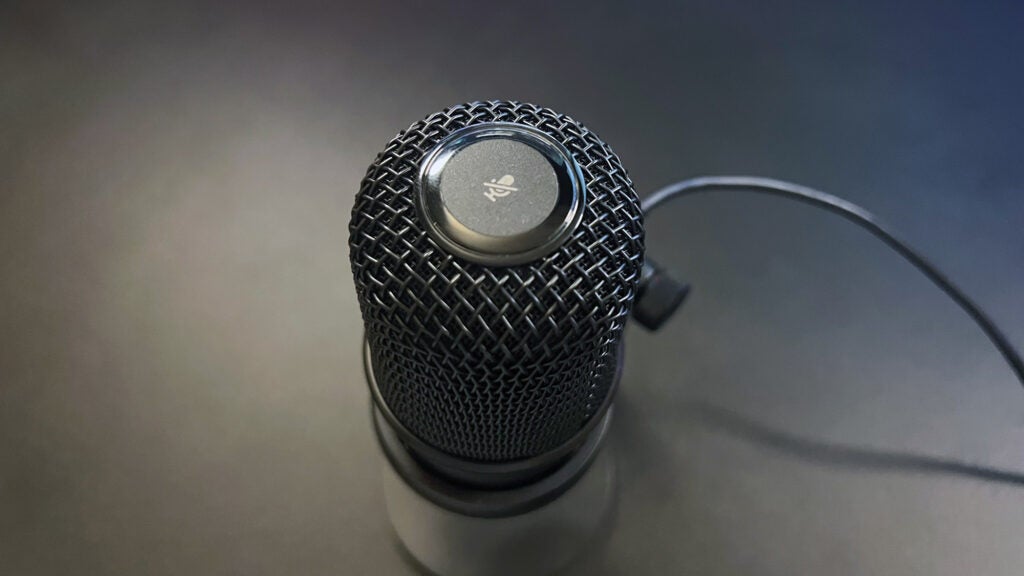
HyperX SoloCast - Close Up Mute Button
Image Credit (Trusted Reviews)

The red LED indicator light on the front of the microphone is lit when your mic is on and turns off entirely when muted. I’d have liked to have seen a colour change here rather than on or off, particularly given a red light is usually associated with muted audio, so it feels a little backwards. It’s better than no indicator at all though, and I got used to it pretty quickly.

Latest deals

Should you buy it?

Budget is a major factor:

It’s hard to argue with a £50 price point and the SoloCast is a step up from headset or laptop mic audio.

You’re looking for studio quality audio

Microphones are a case of getting what you pay for so it’s worth saving a little more if you’re chasing top quality sound.

Final Thoughts

How good the HyperX SoloCast is will be purely defined by which colour tinted glasses you look at it through. Objectively as a microphone, it’s capable of delivering clean and crisp vocals for streaming but only in controlled, optimal environments. In more realistic scenarios it suffers from a number of drawbacks and distractions that spoil the overall experience.

However, when you bear in mind the £49/$59.99 starting price, which can often be found even cheaper in sales, the HyperX SoloCast starts to look better and better. No, it’s not going to wow anyone and those weaknesses still exist no matter how much you’ve paid. But in budget-limited circumstances for new creators, or as an upgrade from a headset mic, it’s an option worth exploring.

How we test

During each microphone review, we conduct a series of recording tests that include sampling audio during ideal settings, with background noise applied and in an outdoor setting (where possible), to give you the best idea of how each device performs in real-world use.

Performance tested in a variety of conditions

Tested all available features

FAQs

Is HyperX SoloCast plug and play?

Yes, the SoloCast uses a single USB-A to USB-C cable.

How far should HyperX SoloCast be from your mouth?

Aim to keep your mouth 6-8 inches from the microphone.

Does the HyperX SoloCast need a shock mount?

The included stand features no shock protection so is prone to bumps. A universal shock mount may help.

‹

UK RRP

USA RRP

Manufacturer

Size (Dimensions)

Weight

ASIN

Release Date

First Reviewed Date

HyperX SoloCast

£49.99

$59.99

HyperX

6 x 6 x 14 CM

258 G

B08KFL3SFV

2020

16/06/2023

›

Verdict

The HyperX SoloCast is an admirable little performer, mainly when you factor in its low price-point. You won’t find many bells or whistles, but decent vocal performance in the right situations makes this a valid option for new or budget-sensitive streamers and creators.

Pros

  • Low cost
  • Tiny form factor
  • USB plug and play connection
  • Included stand

Cons

  • Sensitive to vibrations and knocks
  • Pickup pattern isn’t well focused
  • Struggles with plosives and peaking


  • Simple USB ConnectionA single (included) USB-C cable is all you need to get going on PC, Mac or even PS4 and PS5.

  • Touch Sensitive Mute ButtonJust tap the large, capacitive button on top of the SoloCast to mute your output with an onboard LED indicator too.

  • Tiny SizeJust 13cm long and under 6cm wide, this is one of the smallest streaming microphones around.

Introduction

The smallest microphone in the HyperX range with an equally small price tag to match, the HyperX SoloCast will be a tempting proposition for anyone looking to start their journey in streaming or content creation on a budget.

The HyperX range of gaming gear is a broad one, dabbling in everything from monitors to mousepads so it’s no surprise to see the HP-owned brand looking to jump into your streaming setup too. The SoloCast is HyperX’s entry-level option in a five mic lineup, less than a fifth of the price of the appropriately named premium option, the ProCast.

The streaming microphone market is a crowded place to set up stall however. Gamers are typically brand loyal and HyperX is yet to truly make its mark. A £49.99/$59.99 price point is eye-catching, but it will take more than that for the SoloCast to take centre stage.

Design

  • Tiny, even with the stand
  • Largely plastic build
  • Single USB-C connection

Compared to the rest of the line-up, HyperX has played it safe with the design of the SoloCast. It’s about as simple as microphones get; a stubby black pill with a USB-C connector on the back and an indicator LED on the front. The jazzy RGB lighting that makes the rest of the range stand out is notably absent here. This is a no-frills option where restraint in the name of cost saving is the order of the day.

The expectedly plastic shell feels thin, but a metal frame that wraps down from the all metal grille brings a weight and solidity that keeps the HyperX SoloCast from feeling toy-like. The matte texture on the plastic is a clever choice, as from across the desk you’d be forgiven for thinking it was all powder-coated metal – it also thankfully stops the HyperX SoloCast from becoming a fingerprint magnet.

The microphone itself weighs just 258g, so will prove no match for even the cheapest of microphone arms. The SoloCast is compatible with most third-party stands thanks to a nifty built-in mount connector that includes both the standard 3/8-inch and 5/8-inch threads without the need for an additional adapter. It’s a great solution and one I’d like to see become the norm across the industry.

HyperX SoloCast - Off Stand
Image Credit (Trusted Reviews)

If the budget won’t stretch to a mic arm yet, the HyperX SoloCast comes with a desktop stand in the box. Again it’s almost entirely matte black plastic, though this time feels cheaper and flimsier than the microphone itself. I’m hesitant to complain too much however, because I’d rather see a chea- feeling stand than no included stand at all.

It’s a primitive solution as the SoloCast simply wedges into it rather than via any kind of shock mount, but it holds the mic steady in any position. There’s around 45 degrees of tilt back and forth, and two rotation points each way at 45 and 90 degree steps; they combine for a nice amount of flexibility when it comes to finding a position that works around monitors and other desktop clutter.

Performance

  • Clear but somewhat harsh vocals
  • Prone to roominess and reverb
  • Picks up a lot of background noise

With such a budget price point, expectations should be tempered when it comes to the kind of capture quality you’ll be able to get out of the HyperX SoloCast. At its best, I found it delivered decently clear vocals that sounded better than you’d expect for a £50/$60 mic. At its worst, the SoloCast’s shortcomings really began to stack up. 

HyperX Solocast - Laying Flat
Image Credit (Trusted Reviews)

It doesn’t take much to get going with the HyperX SoloCast: just plug it in and you’re away. It is technically compatible with the HyperX Ngenuity app, but this only unlocks firmware updates and the ability to mute the mic, so it’s really not worth the download. It does claim to allow management of gain levels, but this is merely a reskin of the default Windows sound device volume so you’re not benefiting from anything new.

In an ideal environment, I managed to get sound out of the HyperX SoloCast that I was actually pretty happy with. Mounted on a mic arm and directly in front of some acoustic foam my voice was sharp and clear, albeit a little flat and lacking in punchy depth. Getting closer to the capsule grille did fill out the sound more, but introduced distortion and peaking even without major changes in volume. There’s no pop-filter integrated, included or even available as a standalone accessory, so there’s no defence against plosives and this became a problem even at a normal distance away.

When cradled in the included stand the SoloCast was still capable of a good baseline sound, but this was often spoiled by intruders. The microphone sits particularly low to the desk which introduced noticeable roominess and reverb as sound bounced off my desk and monitor and back into the mic. Knocks and bumps are also a major issue, as the SoloCast wedges tight against the stand with no protection from a shock-mount, meaning every little vibration gets sent straight to the capsule – not good.

HyperX Solocast - On Mic Arm
Image Credit (Trusted Reviews)

The cardioid polar pattern should help fight off-mic noise, but I found it still picked up unwanted sounds from all angles. Condenser microphones are always more susceptible to this, but the HyperX SoloCast struggled to focus on my voice in a way more expensive condenser options like the Rode X XCM-50 did. Keyboard and mouse clicking wanted to be a co-host of my stream, and even strumming my fingers gently on my mouse mat became a surprise guest.

It’s important to put these issues into perspective though. I’ll keep saying it: this is a £50 gaming microphone, and for that kind of money it is more than capable. I’m actively looking (and listening) for things that aren’t as good as they could be and comparing it with options three times the price, but at a base level the SoloCast will be fine for newcomers. This is a considerable upgrade from a headset or built-in laptop microphone, just don’t expect studio quality sound.

Features

  • Touch sensitive mute button
  • No onboard controls
  • No real-time monitoring

Unsurprisingly, the feature set of the HyperX SoloCast is sparse. When you’re looking for ways to save, luxury features like RGB lighting, onboard EQ controls or real-time monitoring are unlikely to make the cut.

There is one premium quality-of-life touch on the SoloCast though: a capacitive mute button on the top of the mic. It’s big enough to find without looking, but set back far enough from the edges to avoid accidental touches, and in testing I found it was responsive without generating double or mistaps. It also manages to avoid the pitfall a lot of onboard mute buttons fall into and not send a jolt of sound out when activating, which was a welcome surprise given how susceptible the SoloCast is to other bumps.

HyperX SoloCast - Close Up Mute Button
Image Credit (Trusted Reviews)

The red LED indicator light on the front of the microphone is lit when your mic is on and turns off entirely when muted. I’d have liked to have seen a colour change here rather than on or off, particularly given a red light is usually associated with muted audio, so it feels a little backwards. It’s better than no indicator at all though, and I got used to it pretty quickly.

Latest deals

Should you buy it?

Budget is a major factor:

It’s hard to argue with a £50 price point and the SoloCast is a step up from headset or laptop mic audio.

You’re looking for studio quality audio

Microphones are a case of getting what you pay for so it’s worth saving a little more if you’re chasing top quality sound.

Final Thoughts

How good the HyperX SoloCast is will be purely defined by which colour tinted glasses you look at it through. Objectively as a microphone, it’s capable of delivering clean and crisp vocals for streaming but only in controlled, optimal environments. In more realistic scenarios it suffers from a number of drawbacks and distractions that spoil the overall experience.

However, when you bear in mind the £49/$59.99 starting price, which can often be found even cheaper in sales, the HyperX SoloCast starts to look better and better. No, it’s not going to wow anyone and those weaknesses still exist no matter how much you’ve paid. But in budget-limited circumstances for new creators, or as an upgrade from a headset mic, it’s an option worth exploring.

How we test

During each microphone review, we conduct a series of recording tests that include sampling audio during ideal settings, with background noise applied and in an outdoor setting (where possible), to give you the best idea of how each device performs in real-world use.

Performance tested in a variety of conditions

Tested all available features

FAQs

Is HyperX SoloCast plug and play?

Yes, the SoloCast uses a single USB-A to USB-C cable.

How far should HyperX SoloCast be from your mouth?

Aim to keep your mouth 6-8 inches from the microphone.

Does the HyperX SoloCast need a shock mount?

The included stand features no shock protection so is prone to bumps. A universal shock mount may help.

‹

UK RRP

USA RRP

Manufacturer

Size (Dimensions)

Weight

ASIN

Release Date

First Reviewed Date

HyperX SoloCast

£49.99

$59.99

HyperX

6 x 6 x 14 CM

258 G

B08KFL3SFV

2020

16/06/2023

›

Previous Post

How to Use A.I. for Family Time

Next Post

‘Insidious: The Red Door’ Review: The Ghost of Jump Scares Past

Related Posts

Samsung Galaxy Book 6 Pro Review: As stylish as it is powerful
Reviews

Samsung Galaxy Book 6 Pro Review: As stylish as it is powerful

by New Edge Times Report
February 2, 2026
Dyson PencilVac Review
Reviews

Dyson PencilVac Review

by New Edge Times Report
February 2, 2026
Hifiman Audivina LE Review
Reviews

Hifiman Audivina LE Review

by New Edge Times Report
February 2, 2026
Leave Comment
New Edge Times

© 2025 New Edge Times or its affiliated companies. All rights reserved.

Navigate Site

  • About
  • Advertise
  • Terms & Conditions
  • Privacy Policy
  • Disclaimer
  • Contact

Follow Us

No Result
View All Result
  • World
  • U.S.
  • Politics
  • Business
  • Science
  • Tech
  • Youth
  • Entertainment
    • Gaming
    • Movie
    • Music
    • Arts
  • Sports
  • Lifestyle
    • Fashion
    • Food
    • Health
    • Travel
  • Reviews
  • Trending

© 2025 New Edge Times or its affiliated companies. All rights reserved.

Welcome Back!

Login to your account below

Forgotten Password?

Retrieve your password

Please enter your username or email address to reset your password.

Log In
