







Verdict
It was a little outdated when it launched, using the older Wi-Fi 5 standard, rather than Wi-Fi 6, but backwards compatibility with the older systems. Today, a Wi-Fi 6 system probably makes more sense for most people but smart speakers built-in, consistent speeds and a low-price make this a decent enough mesh system for those that value features and price over raw speeds.
Pros
- Consistent speeds
- Points are smart speakers
- Looks great
Cons
- Few Ethernet ports
- No Wi-Fi 6
Key Specifications
- Review Price: £239
- Gigabit Ethernet WAN port
- 4×4 5GHz, 2×2 2.4GHz (router), 2×2 5GHz, 2×2 2.4GHz (point)
- One Gigabit Ethernet port (router)
Introduction
Launched back in 2019, the Google Nest Wifi was an updated version of its last product, the Google Wifi, which was launched way back in 2016. It was something of a surprise, then, that Google didn’t opt to use the newer Wi-Fi 6 standard, picking Wi-Fi 5 overall.
Since this product has launched, the competition has become cheaper and better, with the likes of the Eero 6+ and the Google Nest Wifi Pro. That said, the low price of this system, combined with some clever features make it a decent budget mesh system.
Design and features
- Backwards compatible with older system
- Only two Ethernet ports per point
- Each point is also a smart speaker
Wireless mesh networks aren’t usually the most attractive looking bits of kit. With the Google Nest Wifi, however Google has made a real effort. Decked out in the customary smooth plastic seen on other Nest products, the Nest Wifi looks fantastic – and as such, you’ll be quite happy to have parts of it on display.
The system comprises two components. First, there’s a router (90.4 x 110 x 110mm) that connects directly to your broadband. This is an upgrade from the original Google Wifi, which plugged into your existing router. The switch makes things easier overall, and means you don’t have your old router to manage as well.
The router component has two Gigabit Ethernet ports. One is dedicated to your internet connection; the other is for wired devices. Realistically, most people will end up buying an Ethernet switch, since so few ports will prove too limiting. The router is available to buy on its own for £149, if you want.
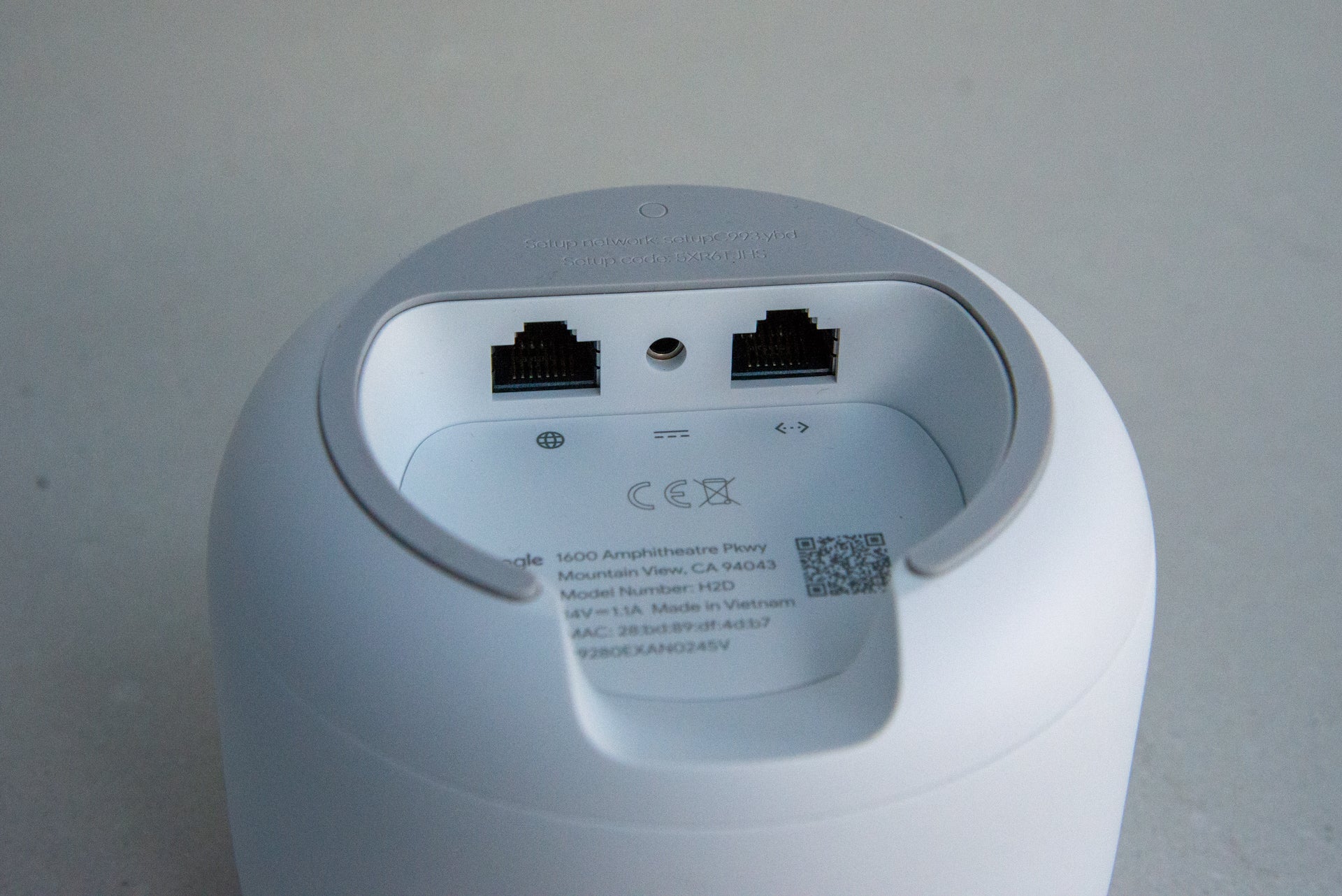
Next we come to the satellites, which are called “points” in Google’s terminology. Each point is a smaller-sized (87.2 x 102.2 x 102.2mm) puck. In the US, the point is available in three colours; in the UK it’s only currently available in white.
Nevertheless, it’s a device you’ll happily have on display – the point is also a Google Assistant-powered smart speaker (there’s a switch at the back to turn off the microphone if you don’t want Google listening in).
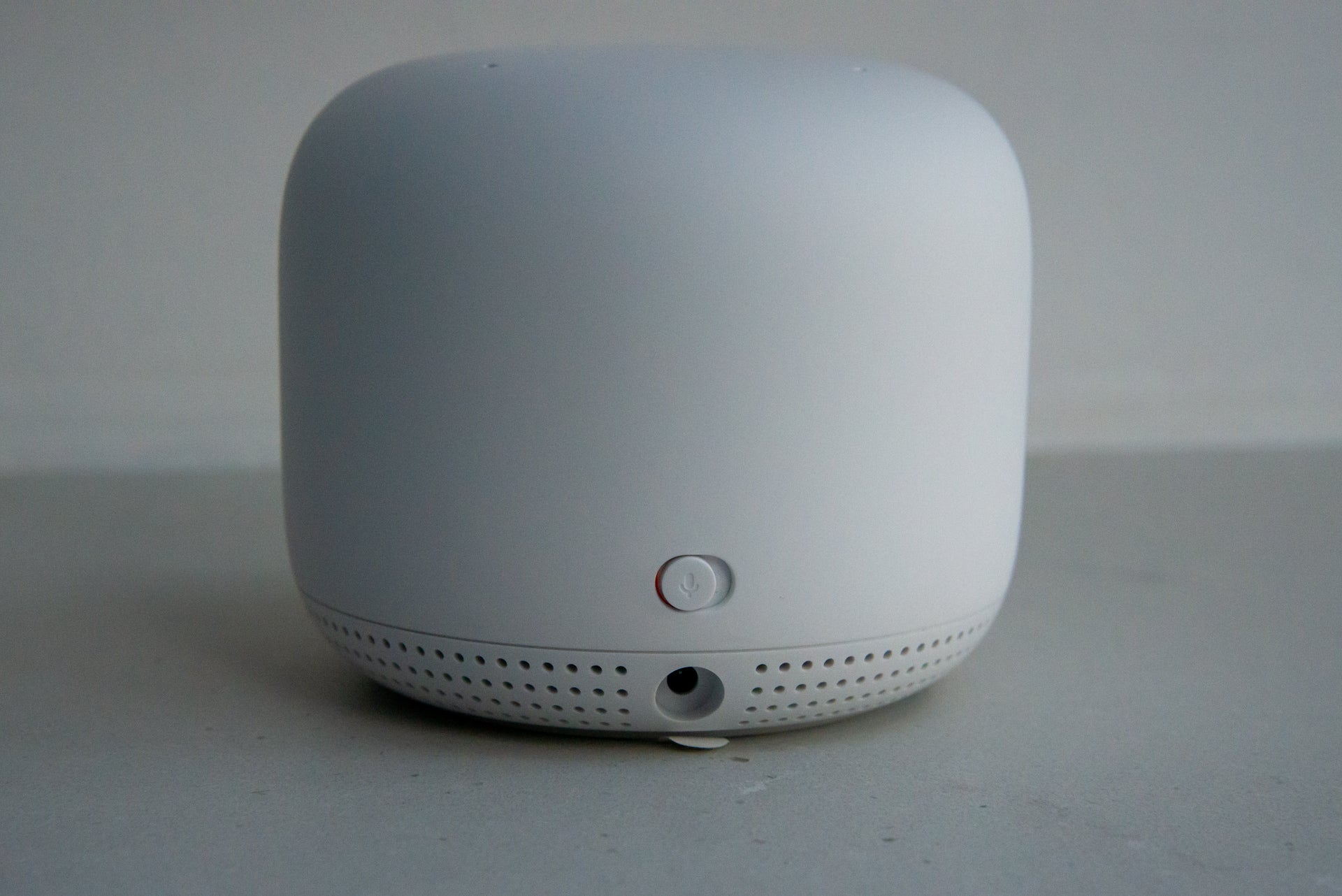
Strangely, the points don’t have any Ethernet ports; they connect to the mesh network using their wireless connection only. That’s frustrating since it limits options. In addition, it also means there’s no Ethernet backhaul option, which is helpful if you want to expand your network beyond normal Wi-Fi range – to an outbuilding, for example.
Points cost £129 each, although you’ll get a far better deal if you buy a kit comprising of a router and point, which Google says gives you the same coverage as the old Google Wifi three-satellite pack. You can also use your old Google Wifi access points in the network, since the system is backwards compatible. However, this system is not compatible with the new Google Nest Wifi Pro, so you can’t mix and match as you upgrade, or press an older satellite into use with the newer system.
Configuration and setup are through the Google Home app, not the old Google Wifi app. It takes just a few minutes to get a system up and running, after which you end up with a new Wifi icon in the Home app that takes you to your system’s configuration.
From here you can configure your network’s name and password, plus access more advanced controls, including setting up Groups. Groups let you bundle together devices under one profile – say, one for each member of the house. You can then manually pause and unpause the internet for each group – turning off the kids’ internet connection to get their attention, for instance.
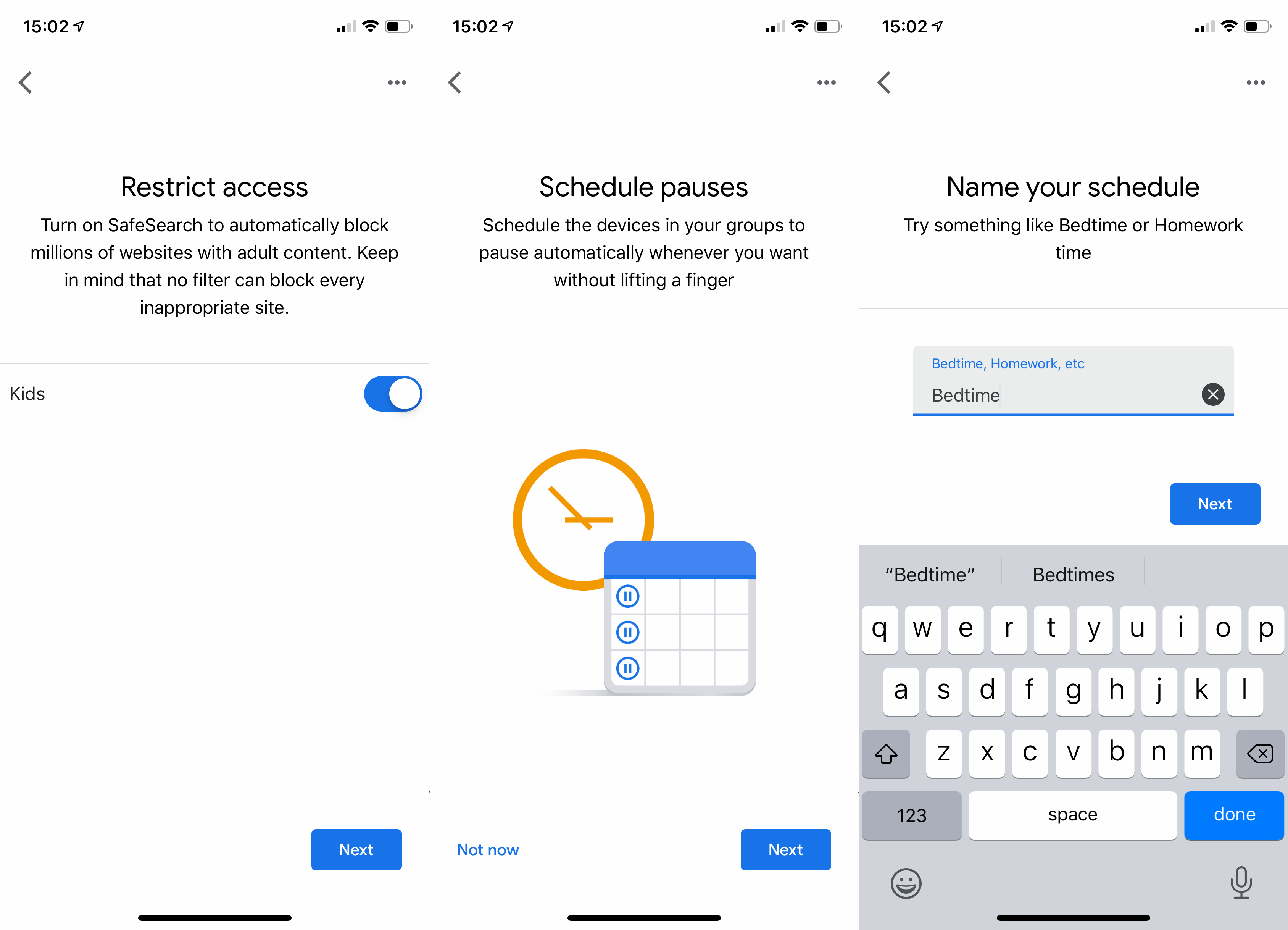
Each group can also have scheduled downtimes – locking out kids at bedtime, for example – and you can turn on filtering to block adult websites. Filtering is a simple on/off switch. Note that there aren’t more granular controls to cater for older children, of the type seen with the paid-for Circle Service on Netgear Orbi routers, or the similar options on Eero routers.
You can enable a device to get priority through the app, giving it dedicated use of the network. It’s a handy tool for a games console or gaming PC to ensure that it has the resources it needs.
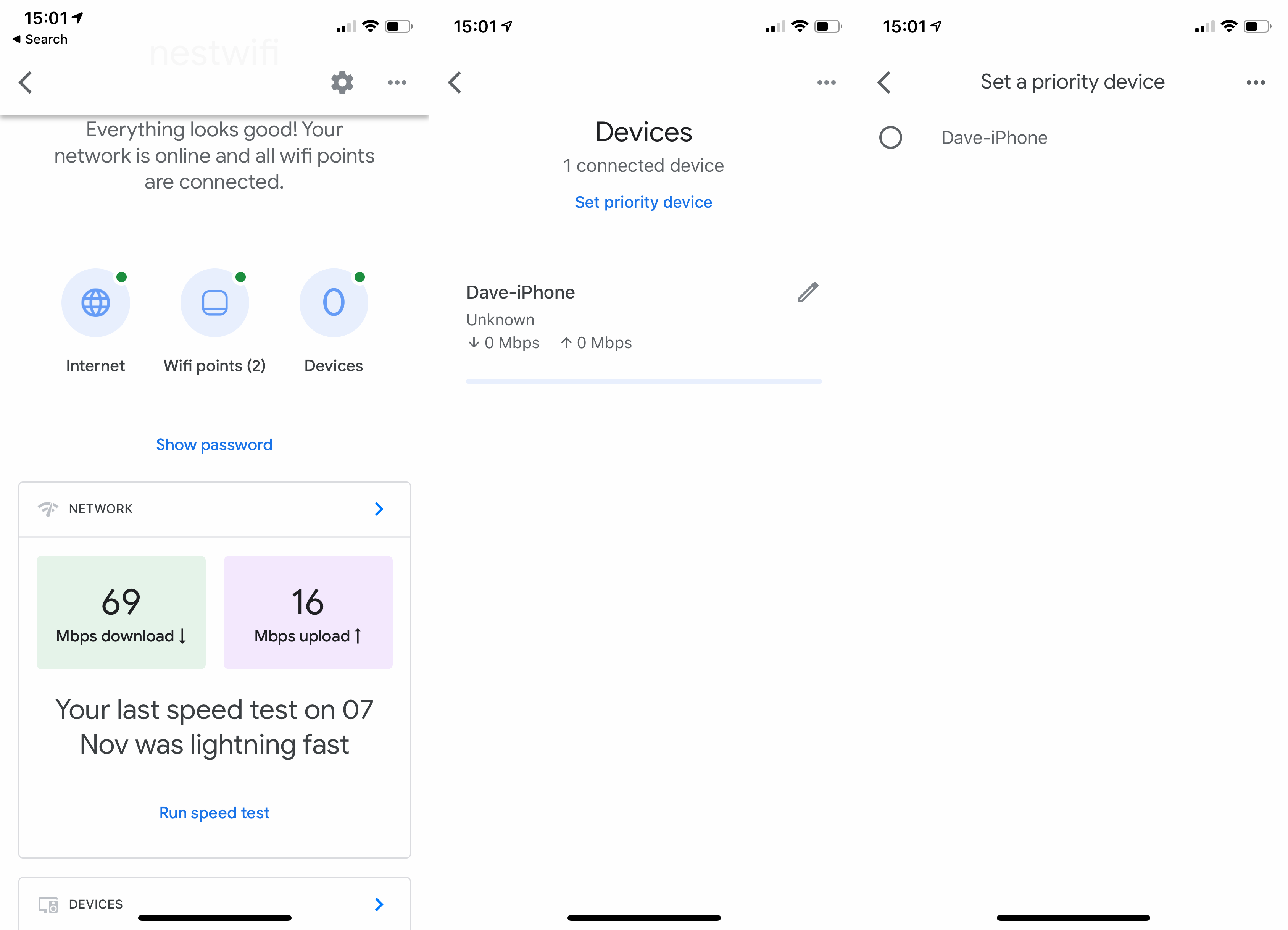
More advanced features include DNS settings, UPnP and port forwarding, now all available in the Google Home app (at launch, these features were in the Google Wifi app).
If you have any Google Nest Wifi points, they’re automatically added to your Google account to work with the Google Assistant. Each one is a full Google Assistant speaker: you can control smart devices, play music, ask for directions and so on. Note, too, that the points support Bluetooth, so you can use them to control some smart devices, such as Bluetooth-enabled Philips Hue bulbs.
Internally, each point includes a 360-degree 40mm driver, which is the same as in the Google Nest Mini. The result is a speaker that’s loud and clear enough for voice replies and radio, but weak when it comes to music playback. The Google Nest Wifi points are a good way of expanding voice control through your home, but you’ll hanker for something louder and more powerful if you want devices for music.
Neatly, each point supports the same touch controls as on the Nest Mini, too: the top is play/pause, the sides are volume up/down.
Performance
There’s no support for Wi-Fi 6 with this mesh system, with Google sticking with the older, cheaper Wi-Fi 5 (802.11ac) standard. The router and point use slightly different Wi-Fi chips. You get more powerful Wi-Fi via the router, which uses 802.11ac AC2200 MU-MIMO, with a 4×4 5GHz network and 2×2 2.4GHz network. The point uses 802.11ac AC1200 MU-MIMO with 2×2 5GHz and 2×2 2.4GHz networking.
This configuration means that some devices may benefit from faster speeds when connecting to the router. For example, a three-stream (3×3) MacBook Pro can use all three streams connecting to the router, but only two streams when connecting to a point.
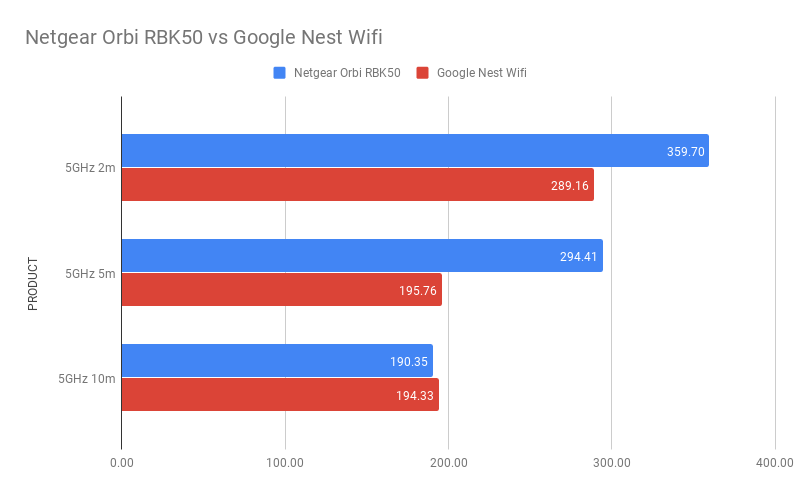
Google also hasn’t added a dedicated wireless channel for mesh communication, as with the Netgear Orbi system, saying that it doesn’t need to. Testing in my home, I found that close to the router, I achieved average throughputs of 289.16Mbps using the TamoSoft Throughput Tester. Moving to the first floor (5m), speeds dropped to 195.76Mbps, which is presumably due to the point having lower Wi-Fi specs. However, on the second floor (10m), speeds remained remarkably consistent at 194.33Mbps.
As you can see from the graph below, the Netgear Orbi RBK50 was faster in all tests bar the long-range test, showing that the Nest Wifi manages to present consistent speeds throughout your home.
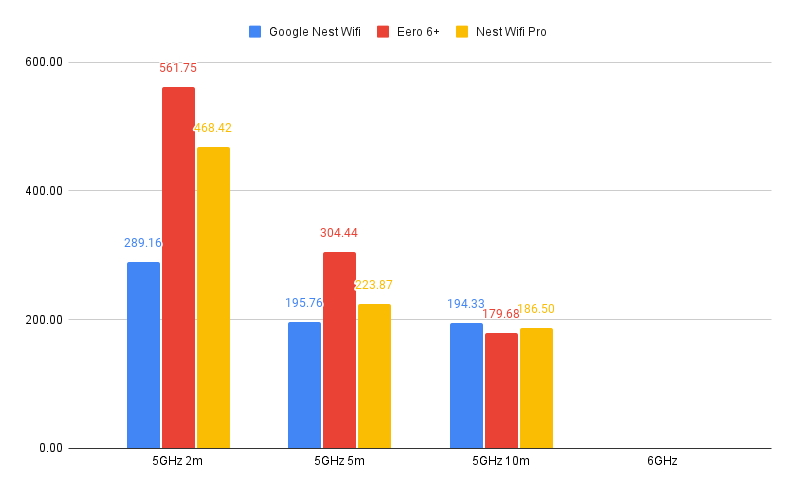
Compared to the newer range of products running Wi-Fi 6, and the Nest Wifi starts to fall behind, particularly close up. As you can see from the graph below the Eero 6+ is much faster generally, although it does slightly lag behind in my long-range test.
Final thoughts
Whether the Google Nest Wifi is right for you will depend on a few factors. If you already have Google Wifi, then you can buy the Nest Wifi router to get rid of your old home router. If you don’t have Google Wifi, then the choice is more difficult.
For those who will require a greater number of Ethernet ports or even Ethernet backhaul, I’d recommend the Netgear Orbi RBK752, while the Eero 6+ is a great low-cost rival with the added advantage that it has a better app and, via a subscription, proper filtering and security. Still, if you care more about features and price, the Google Nest Wifi can be picked up cheaply, and it offers stable speeds, which could be all that you need.
You might like…
Latest deals

Verdict
It was a little outdated when it launched, using the older Wi-Fi 5 standard, rather than Wi-Fi 6, but backwards compatibility with the older systems. Today, a Wi-Fi 6 system probably makes more sense for most people but smart speakers built-in, consistent speeds and a low-price make this a decent enough mesh system for those that value features and price over raw speeds.
Pros
- Consistent speeds
- Points are smart speakers
- Looks great
Cons
- Few Ethernet ports
- No Wi-Fi 6
Key Specifications
- Review Price: £239
- Gigabit Ethernet WAN port
- 4×4 5GHz, 2×2 2.4GHz (router), 2×2 5GHz, 2×2 2.4GHz (point)
- One Gigabit Ethernet port (router)
Introduction
Launched back in 2019, the Google Nest Wifi was an updated version of its last product, the Google Wifi, which was launched way back in 2016. It was something of a surprise, then, that Google didn’t opt to use the newer Wi-Fi 6 standard, picking Wi-Fi 5 overall.
Since this product has launched, the competition has become cheaper and better, with the likes of the Eero 6+ and the Google Nest Wifi Pro. That said, the low price of this system, combined with some clever features make it a decent budget mesh system.
Design and features
- Backwards compatible with older system
- Only two Ethernet ports per point
- Each point is also a smart speaker
Wireless mesh networks aren’t usually the most attractive looking bits of kit. With the Google Nest Wifi, however Google has made a real effort. Decked out in the customary smooth plastic seen on other Nest products, the Nest Wifi looks fantastic – and as such, you’ll be quite happy to have parts of it on display.
The system comprises two components. First, there’s a router (90.4 x 110 x 110mm) that connects directly to your broadband. This is an upgrade from the original Google Wifi, which plugged into your existing router. The switch makes things easier overall, and means you don’t have your old router to manage as well.
The router component has two Gigabit Ethernet ports. One is dedicated to your internet connection; the other is for wired devices. Realistically, most people will end up buying an Ethernet switch, since so few ports will prove too limiting. The router is available to buy on its own for £149, if you want.
Next we come to the satellites, which are called “points” in Google’s terminology. Each point is a smaller-sized (87.2 x 102.2 x 102.2mm) puck. In the US, the point is available in three colours; in the UK it’s only currently available in white.
Nevertheless, it’s a device you’ll happily have on display – the point is also a Google Assistant-powered smart speaker (there’s a switch at the back to turn off the microphone if you don’t want Google listening in).
Strangely, the points don’t have any Ethernet ports; they connect to the mesh network using their wireless connection only. That’s frustrating since it limits options. In addition, it also means there’s no Ethernet backhaul option, which is helpful if you want to expand your network beyond normal Wi-Fi range – to an outbuilding, for example.
Points cost £129 each, although you’ll get a far better deal if you buy a kit comprising of a router and point, which Google says gives you the same coverage as the old Google Wifi three-satellite pack. You can also use your old Google Wifi access points in the network, since the system is backwards compatible. However, this system is not compatible with the new Google Nest Wifi Pro, so you can’t mix and match as you upgrade, or press an older satellite into use with the newer system.
Configuration and setup are through the Google Home app, not the old Google Wifi app. It takes just a few minutes to get a system up and running, after which you end up with a new Wifi icon in the Home app that takes you to your system’s configuration.
From here you can configure your network’s name and password, plus access more advanced controls, including setting up Groups. Groups let you bundle together devices under one profile – say, one for each member of the house. You can then manually pause and unpause the internet for each group – turning off the kids’ internet connection to get their attention, for instance.
Each group can also have scheduled downtimes – locking out kids at bedtime, for example – and you can turn on filtering to block adult websites. Filtering is a simple on/off switch. Note that there aren’t more granular controls to cater for older children, of the type seen with the paid-for Circle Service on Netgear Orbi routers, or the similar options on Eero routers.
You can enable a device to get priority through the app, giving it dedicated use of the network. It’s a handy tool for a games console or gaming PC to ensure that it has the resources it needs.
More advanced features include DNS settings, UPnP and port forwarding, now all available in the Google Home app (at launch, these features were in the Google Wifi app).
If you have any Google Nest Wifi points, they’re automatically added to your Google account to work with the Google Assistant. Each one is a full Google Assistant speaker: you can control smart devices, play music, ask for directions and so on. Note, too, that the points support Bluetooth, so you can use them to control some smart devices, such as Bluetooth-enabled Philips Hue bulbs.
Internally, each point includes a 360-degree 40mm driver, which is the same as in the Google Nest Mini. The result is a speaker that’s loud and clear enough for voice replies and radio, but weak when it comes to music playback. The Google Nest Wifi points are a good way of expanding voice control through your home, but you’ll hanker for something louder and more powerful if you want devices for music.
Neatly, each point supports the same touch controls as on the Nest Mini, too: the top is play/pause, the sides are volume up/down.
Performance
There’s no support for Wi-Fi 6 with this mesh system, with Google sticking with the older, cheaper Wi-Fi 5 (802.11ac) standard. The router and point use slightly different Wi-Fi chips. You get more powerful Wi-Fi via the router, which uses 802.11ac AC2200 MU-MIMO, with a 4×4 5GHz network and 2×2 2.4GHz network. The point uses 802.11ac AC1200 MU-MIMO with 2×2 5GHz and 2×2 2.4GHz networking.
This configuration means that some devices may benefit from faster speeds when connecting to the router. For example, a three-stream (3×3) MacBook Pro can use all three streams connecting to the router, but only two streams when connecting to a point.
Google also hasn’t added a dedicated wireless channel for mesh communication, as with the Netgear Orbi system, saying that it doesn’t need to. Testing in my home, I found that close to the router, I achieved average throughputs of 289.16Mbps using the TamoSoft Throughput Tester. Moving to the first floor (5m), speeds dropped to 195.76Mbps, which is presumably due to the point having lower Wi-Fi specs. However, on the second floor (10m), speeds remained remarkably consistent at 194.33Mbps.
As you can see from the graph below, the Netgear Orbi RBK50 was faster in all tests bar the long-range test, showing that the Nest Wifi manages to present consistent speeds throughout your home.
Compared to the newer range of products running Wi-Fi 6, and the Nest Wifi starts to fall behind, particularly close up. As you can see from the graph below the Eero 6+ is much faster generally, although it does slightly lag behind in my long-range test.
Final thoughts
Whether the Google Nest Wifi is right for you will depend on a few factors. If you already have Google Wifi, then you can buy the Nest Wifi router to get rid of your old home router. If you don’t have Google Wifi, then the choice is more difficult.
For those who will require a greater number of Ethernet ports or even Ethernet backhaul, I’d recommend the Netgear Orbi RBK752, while the Eero 6+ is a great low-cost rival with the added advantage that it has a better app and, via a subscription, proper filtering and security. Still, if you care more about features and price, the Google Nest Wifi can be picked up cheaply, and it offers stable speeds, which could be all that you need.
You might like…
Latest deals



