









Verdict
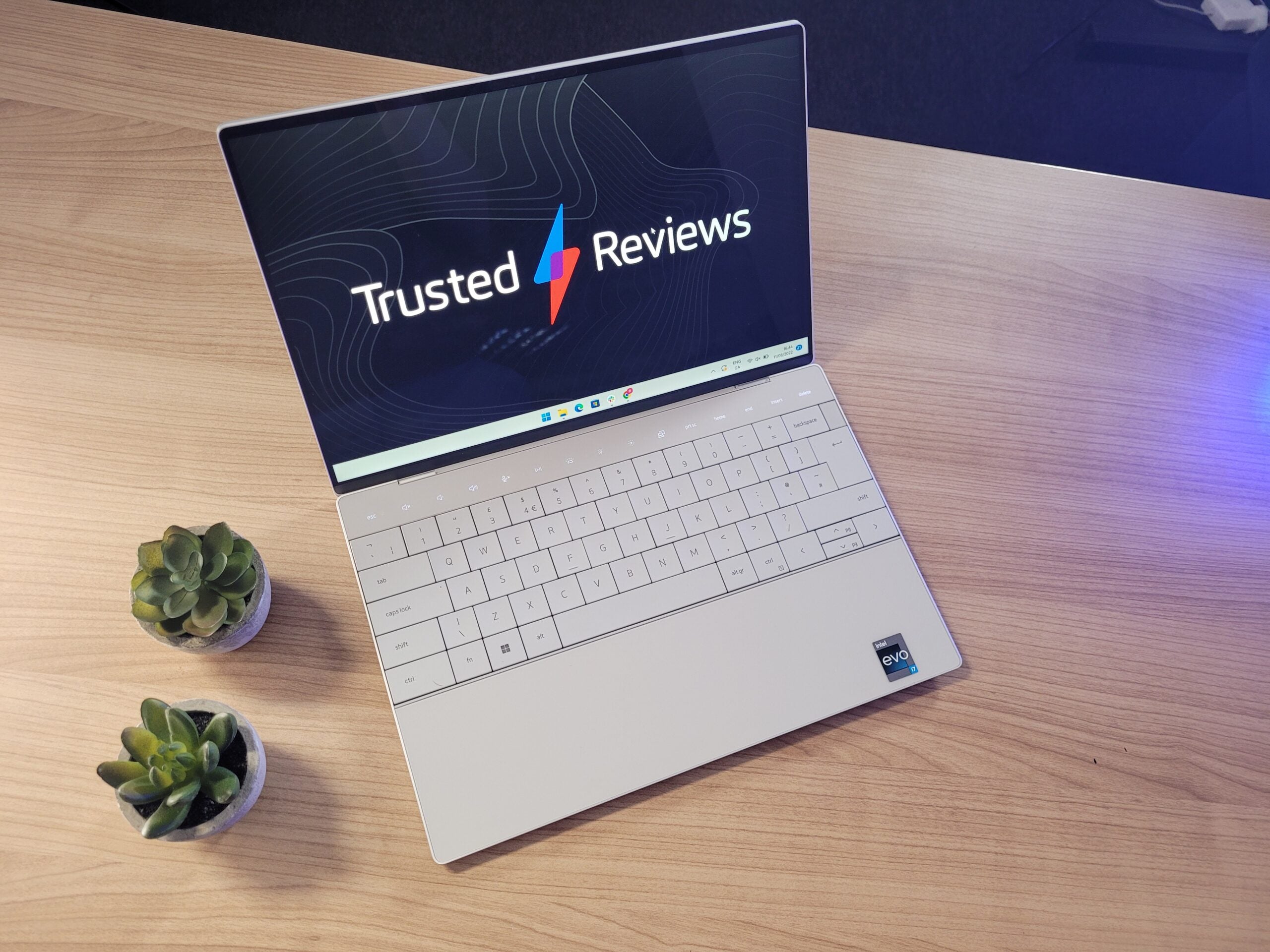
The Dell XPS 13 Plus is a fantastic-looking laptop, flaunting cutting-edge features such as the haptic feedback trackpad and touch panel. But Dell’s obsession with creating a super-skinny laptop has seen compromises to both the performance and battery life, making it difficult to justify the high price.
Pros
- Gorgeous, cutting-edge design
- Bright and vibrant display
- Haptic feedback trackpad feels great
- Light, portable and premium
Cons
- Battery life is poor
- Very expensive
- Not as fast as rival laptops
- Poor selection of ports
Availability
- UKRRP: £1907
- USARRP: $2099
-
Light and portable designExtremely thin, and the laptop weighs only 1.23kg for great portability -
Haptic feedback trackpadUses haptic feedback technology to simulate presses, and offers lots of customisation and gestures -
Optional OLED displayOffers the option of an OLED panel for improved contrast and vibrancy
Introduction
When it comes to the XPS range, Dell has become even more obsessed with good looks than Kim Kardashian and Cristiano Ronaldo combined.
Previously, Dell had slimmed down its XPS laptops and introduced the jaw-dropping edge-to-edge screen that obliterates the screen bezel.
And with the new Dell XPS 13 Plus in 2022, Dell has gone even further, adding a zero-lattice keyboard, borderless trackpad and a glow-up touch panel.
With the company carving out a reputation for being ahead of the curve for laptop design, the XPS 13 Plus really does feel like a laptop from the future. But with Dell making several compromises to achieve such beauty, is this a case of too much style over substance?
Here are my thoughts on whether this is one of the best laptop options you can currently buy.
Design
- Light and slender design
- Haptic feedback trackpad is great
- The touch bar has limited functionality
Despite numerous years of reviewing laptops, I’ve never before seen anything quite as striking as the Dell XPS 13 Plus. Dell has shunned all the conventional stylings of your default laptop, creating something that looks completely unique, and far more alluring than even Apple’s MacBook Air.
The keyboard draws the eye first. It stretches out across the entire width of the deck, with no spaces between each key. It looks great, but leaves an impression that it could encourage typos. In practice, I haven’t found that a major issue. The keys are chunky enough to prod easily when typing quickly, and while I’ve made a few typos tapping out this review, I don’t think the number is any more than would have occurred using a more traditional keyboard.
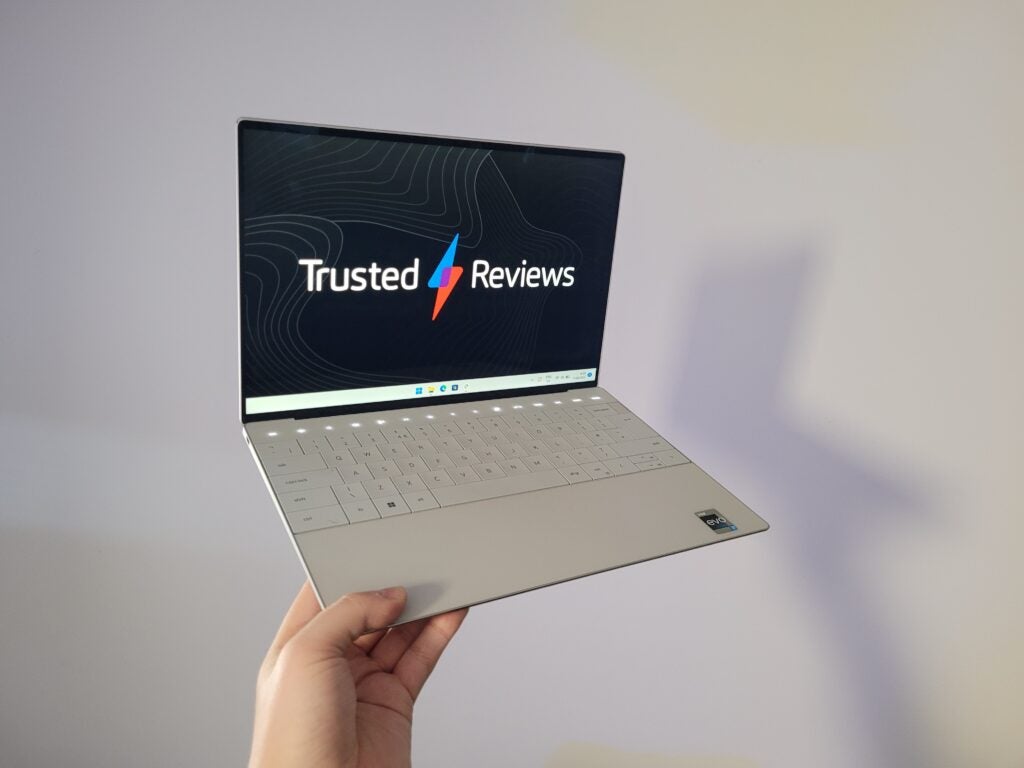
Key travel is a tad too shallow for my liking, but has a satisfying audible click when pressed down. A white backlight shines through the transparent lettering, and while isn’t very visible in a brightly lit room, it’s useful for when typing in the dark.
You’ll notice there’s no trackpad below the keyboard – or, at least, not a visible one. Instead of opting for a physical trackpad, Dell has instead positioned haptic feedback motors beneath a glass panel. It functions like a touchscreen, but with vibrations simulating the feel of a traditional trackpad. I wasn’t impressed with similar technology on the Surface Laptop Studio, but it feels far more natural here; it’s hard to believe the panel isn’t moving when you press down.
It’s possible to customise the settings of the trackpad, too, to make the vibrations more intense and the cursor speed faster. Dell even offers the option to set up gestures, so you can adjust volume by holding down three fingers, or swap between apps by using four digits. It’s all very clever and intuitive; the experience has converted me from a haptic feedback sceptic into a firm believer in the technology.
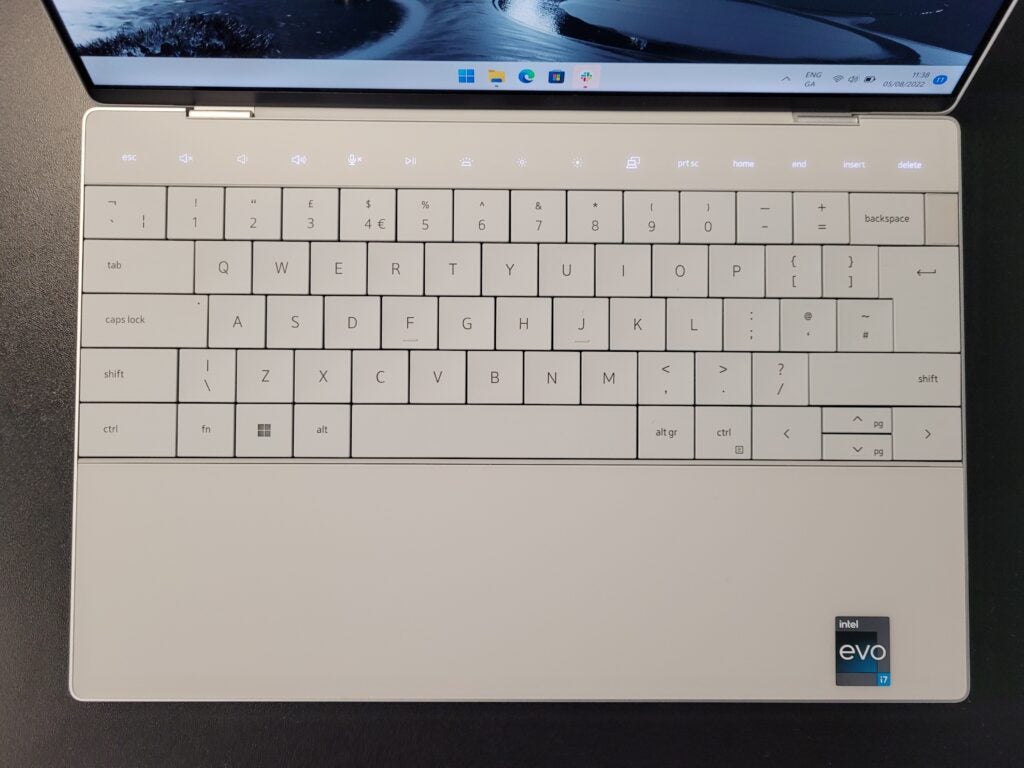
Above the keyboard, you’ll notice that a touch panel has replaced the more traditional row of Function keys. Glow-up icons provide shortcuts for the likes of volume tweaking, microphone muting and playback controls. Hold down on the Function key, and all of those icons will be replaced with inputs for the likes of F1, F2, F3 and so on. It’s a clever feature that feels futuristic – but it doesn’t offer any customisation or app-specific shortcuts such as Apple’s Touch Bar on the MacBook Pro. And, potentially, I can see those glow-up icons proving a distraction when working in the dark.
Another jaw-dropping aspect of this laptop is how slender it is – although Dell has opted for a tapered look, which is a little deceiving to the eye. In reality, the Dell XPS 13 Plus has a depth of 15.28mm tall, which is noticeably thicker than the 11.3mm MacBook Air M2. Nevertheless, I found the XPS incredibly easy to slip into a small bag, and it was lightweight, too, at just 1.23kg – which is marginally lighter than the MacBook Air.
The downside of such a skinny design is that it doesn’t leave much room for ports. You only get two USB-C connections (with Thunderbolt 4 support), with one of those likely to be taken up for recharging the laptop. There’s no USB-A port for old peripherals and USB sticks, and no headphone jack for those with wired headphones. It’s a classic example of Dell prioritising form over function, and it could well be a deal breaker for many.
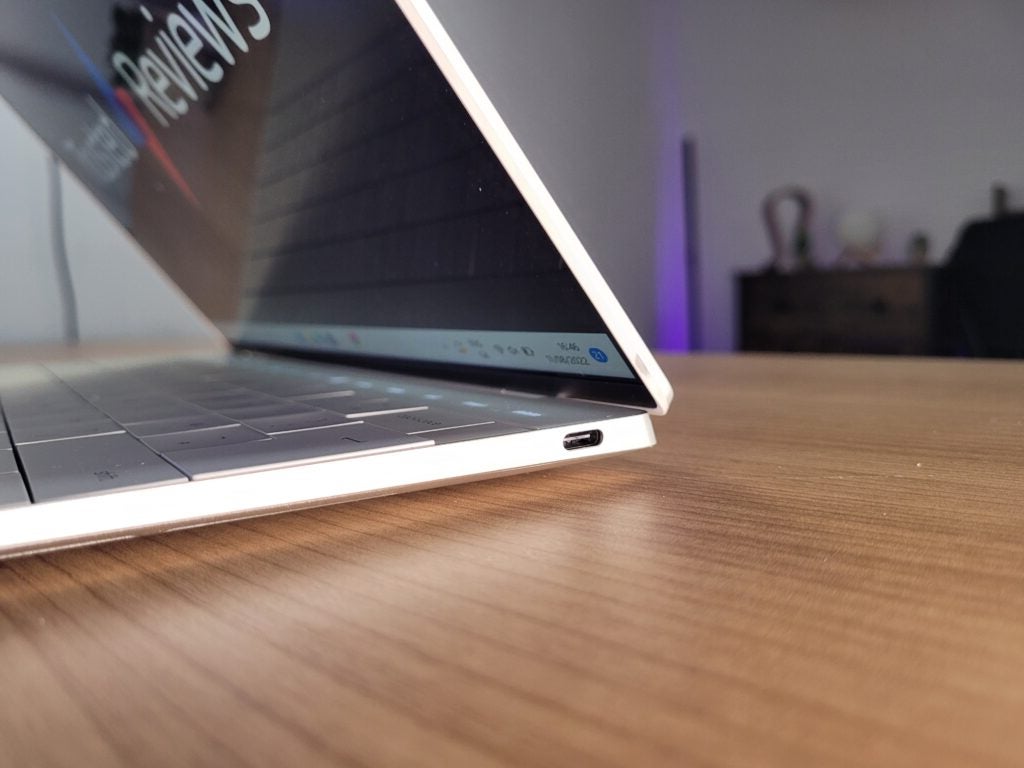
Still, Dell has certainly succeeded in making this a great-looking laptop, especially since it retains those near-invisible bezels around the screen. And it’s still managed to squeeze in a 720p webcam up top, which offers fantastic capture quality for a laptop. It even supports facial recognition for speedy sign-ins via Windows Hello – and if you don’t like the idea of a laptop analysing your face, you can use the fingerprint sensor instead.
Speakers sit underneath the laptop, but at an angle so they pump audio out of the sides of the laptop rather than directly at your desk. This ensures you don’t get muffled music when playing tunes through Spotify. Speaker quality is excellent, delivering booming bass, high volume and enough detail to enjoy movies without needing to bother with headphones.
The laptop’s general build quality is superb, too. The deck is made up of sheets of glass, while the lid is sturdy aluminium – this is a premium laptop if ever I’ve seen one. Personally, I’d have liked to have seen it arrive in more colour options – Platinum and Graphite are your only options right now – but the Dell is hardly lacking in the looks department.
Display
- Option of an LCD or OLED panel
- Superb brightness and contrast
- Can be configured with 4K resolution
Dell provides three options when it comes to the 13.4-inch screen: an LCD Full HD (1920 x 1800), OLED 3.5K (3456 x 2160) touchscreen, and an LCD 4K (3840 x 2400) touchscreen. I was sent the latter of the trio, although from judging the specs alone, I’d reckon the OLED model is the better option; the technology considerably boosts contrast and colour accuracy.
But for this review, I can only test the sample I have before me. It’s an impressive panel, with the high resolution ensuring a super-sharp image when watching video. It also offers slightly more screen space than the average 13-inch laptop, since Dell has been able to trim down the size of the bezel.
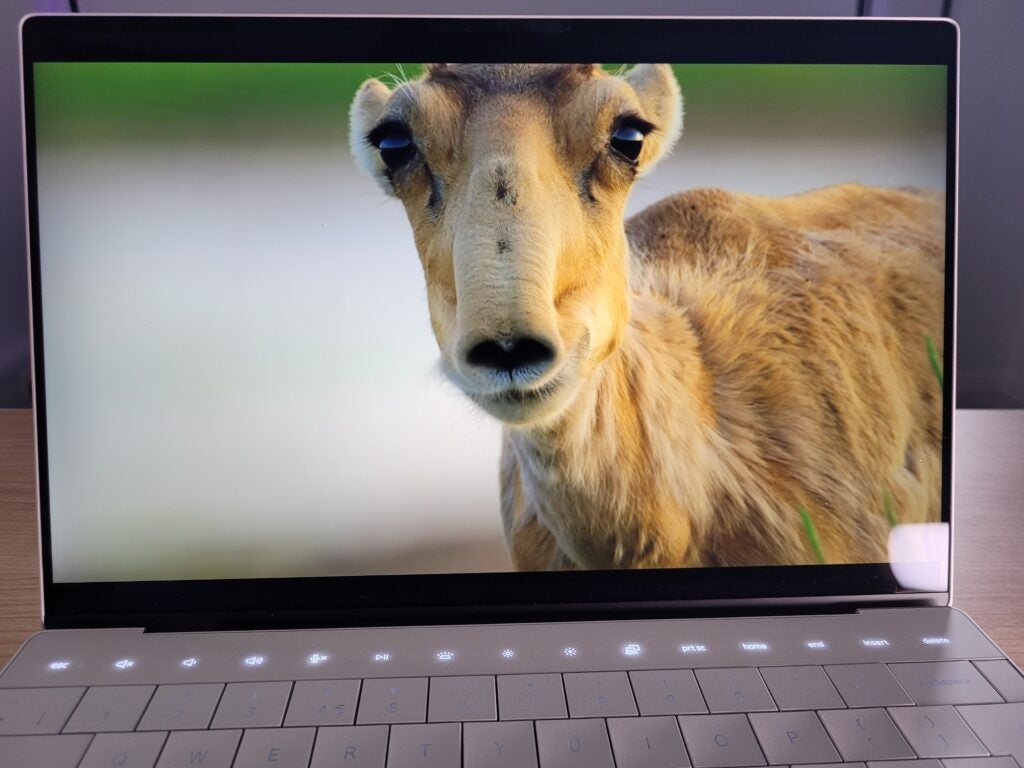
The XPS excelled in colorimeter tests, displaying a maximum brightness of 482 nits. This isn’t quite as bright as Dell’s quoted 500-nit figure, but still substantially brighter than the vast majority of laptops on the market. The result is bold and vibrant imagery, while also ensuring you can use this laptop outdoors without having to squint at the screen.
Contrast came in at a superb 2058:1, which means light and dark colours will stand out from one another for more impressive depth. I’ve only ever seen superior laptop screen contrast with OLED panels, although Dell does provide that option, too.
Colours look natural on the XPS screen, although it doesn’t have the widest of colour gamuts. By offering only 74% of Adobe RGB and 78% of DCI-P3, there are better options for those with colour-sensitive workloads such as video editing. But the XPS 13 Plus isn’t designed to be a workaholic in the same vein as the MacBook Pro. Instead, it’s a productivity laptop with a fashion degree.
Performance
- Features Intel’s 12th-Gen chip
- Rivals offer faster speeds
- Excellent SSD performance
Dell has once again partnered up with Intel for its XPS range, offering three different flavours of the latest 12th-Gen chips: Core i5-1240P, Core i7-1260P and Core i7-1280P. My review sample features the middle option, paired with a whopping 32GB of RAM (you can opt for more affordable 8GB and 16GB configurations instead).
As you’d expect, the productivity performance is fantastic, comfortably offering enough power to blaze through multiple workloads at once. I didn’t ever notice any slowdown during a work day, where I’ll have had numerous web browsers open, Spotify banging out tunes and YouTube providing me with a much-needed reason to procrastinate.
But while I personally found performance to be great, how does Dell stack up against its rivals? According to my benchmark results, it doesn’t fare well.
| Dell XPS 13 Plus | Asus Zenbook S 13 OLED | Samsung Galaxy Book Pro 360 2 | Apple MacBook Air M2 (2022) | |
| Processor | Intel Core i7-1260P | AMD Ryzen 7 6800U | Intel Core i7-1260P | Apple M2 |
| Geekbench Single / Multi | 1467 / 7155 | 1482 / 7509 | 1703 / 9178 | 1928 / 8698 |
| PCMark 10 | 5211 | 5823 | 5418 | N/A |
| 3DMark Time Spy | 1687 | 2270 | 1745 | N/A |
Both the Apple M2 and AMD’s latest chip deliver substantially faster multi-core speeds, making them more competent devices for heavy workloads and multi-tasking. Even the Samsung Galaxy Book Pro 360 2 saw better results, despite sharing the exact same processor as the Dell XPS 13 Plus.
I assume that Dell’s pursuit of a super-skinny design has resulted in throttling performance, with the fan failing to maximise performance. I’ve noticed that the bottom of the laptop can become noticeably warm, to such an extent that you’ll probably want to avoid resting the portable on your lap.
Is the throttled performance a major issue? I’d argue that it isn’t, since it’s still plenty powerful enough for your average day-to-day tasks, and can even handle the odd bit of Photoshopping. But if your workload is heavy on a regular basis, and you want the best value performance possible, you’d be better considering the likes of a MacBook Air or Huawei MateBook 16s instead.
The Dell arguably made up for its underwhelming CPU scores by delivering A-star results for its SSD. With read and write results of 6825 MB/s and 5151 MB/s respectively, it’s twice as fast as most laptops for loading and saving data on the physical drive. This means it’s delightfully snappy when loading up installed apps, or even booting up Windows.
There’s plenty of storage space on offer, too, with Dell providing 512GB, 1TB and 2TB options. I’d be very surprised if anyone needs any more storage than that.
Battery
- Small battery
- Lasted just 7hrs 42mins
The Dell XPS 13 Plus has seen a tug-of-war contest between style and substance over all of its features, from ports to performance. But the one area that suffers the most is battery life.
Dell includes a 55Wh battery in this laptop, which is relatively small. For comparison, the ZenBook 13 S OLED has a 67Wh battery; and while the MacBook Air’s battery is smaller at 52.6Wh, Apple seemingly makes up for that with the energy efficiency of the M2 chip.
Dell doesn’t have that luxury. When dialling down the brightness and running our standard PCMark 10 battery test, the XPS 13 Plus managed to last a dismal 7hrs 42mins.
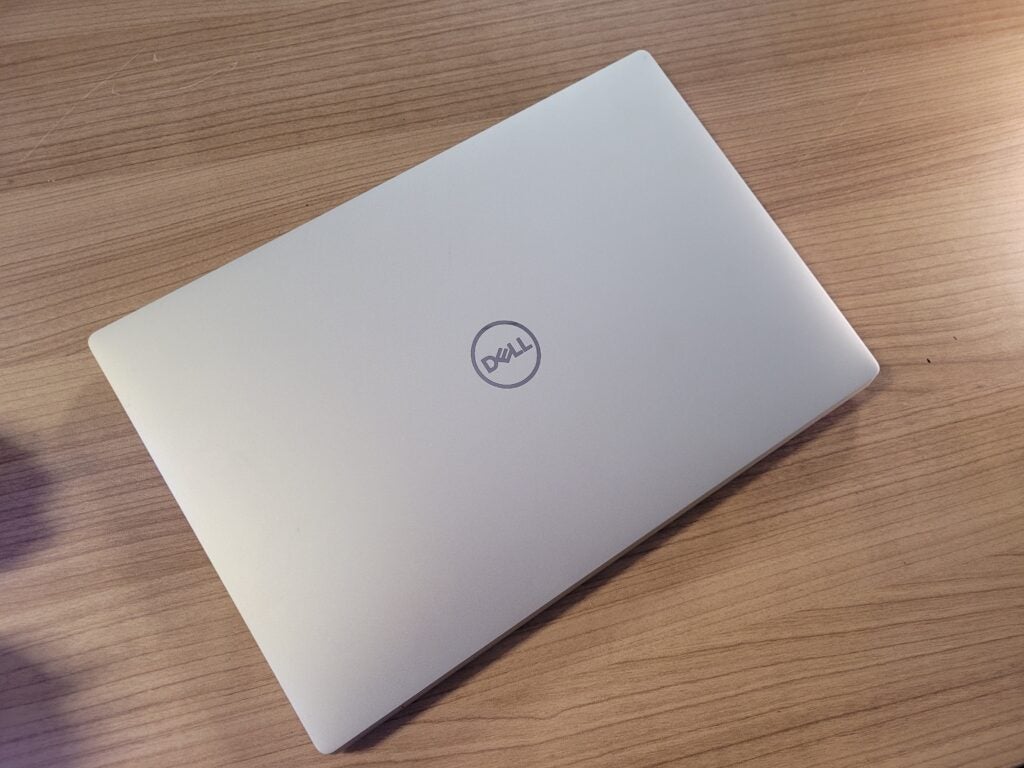
In the same test, the Asus Zenbook S 13 OLED managed over 13 hours, and for day-to-day use, the MacBook Air lasts around 14 hours. Even the Surface Laptop Go 2 delivers superior stamina, despite packing a smaller battery.
Sure, the Dell XPS 13 Plus may just about be able to endure the working day, but it would still be a huge risk to work out of reach of a power source. It’s easy to forgive a lot of the Dell’s shortcomings due to its boundary-pushing design, but the compromise you’ll have to make with regards to battery life is likely to be one step too far for many.
Latest deals
Should you buy it?
You want a stylish laptop with futuristic features: The Dell XPS 13 Plus feels like a laptop from the future, with a haptic feedback trackpad, touch panel and refreshing design. If you want a laptop to show off to your friends, this is your best option out there.
You want a long battery life: The biggest issue with the XPS 13 Plus is its short battery life. It lasted just shy of 8 hours in our test, which is far behind some of its rivals.
Final Thoughts
The Dell XPS 13 Plus is an expensive laptop. The base configuration retails for $1299/£1299, while upgrading to an OLED panel takes the cost up to $1399/£1699. For my review model (with 1TB storage, 32GB of RAM and a 4K LCD screen) you’re looking at an eye-watering $2099/£1907 – that’s excessive for a 13-inch productivity laptop.
Dell could argue that its cutting-edge design makes the XPS 13 Plus a unique option, and it certainly is a good-looking laptop. However, you also have to factor in the many compromises made in the areas of port selection, performance and battery life.
If you’re flush with cash and care more about form over function, then the Dell XPS 13 Plus is an excellent laptop worth considering. But you can get far better value elsewhere from the likes of the MacBook Air and Asus Zenbook S 13 OLED.
How we test
Every laptop we review goes through a series of uniform checks designed to gauge key things including build quality, performance, screen quality and battery life.
These include formal synthetic benchmarks and scripted tests, plus a series of real-world checks, such as how well it runs popular apps.
Spent a month testing the laptop.
Tested the performance via both benchmark tests and real-world use.
We tested the battery with real-world use.
FAQs
Prices start at $1299/£1299, increasing to as high as $2099/£1907 with the various configurations.
Yes, the Dell XPS 13 Plus does have a touchscreen, but only with the 3.5K and 4K options.
Dell has introduced a new design for the Plus model, including features such as a haptic feedback trackpad, a touch panel and the end-to-end keyboard.
Trusted Reviews test data
Jargon buster
Nits
The brightness level of a display. 300 nits is regarded as the minimum target for high-end screens.
OLED
Organic Light Emitting Diode is panel technology that allows each individual pixel to produce light rather than relying on a backlight. This enables the screen to accurately display blacks by turning off the pixel, resulting in improved contrast compared to conventional LCD panels.

Verdict
The Dell XPS 13 Plus is a fantastic-looking laptop, flaunting cutting-edge features such as the haptic feedback trackpad and touch panel. But Dell’s obsession with creating a super-skinny laptop has seen compromises to both the performance and battery life, making it difficult to justify the high price.
Pros
- Gorgeous, cutting-edge design
- Bright and vibrant display
- Haptic feedback trackpad feels great
- Light, portable and premium
Cons
- Battery life is poor
- Very expensive
- Not as fast as rival laptops
- Poor selection of ports
Availability
- UKRRP: £1907
- USARRP: $2099
-
Light and portable designExtremely thin, and the laptop weighs only 1.23kg for great portability -
Haptic feedback trackpadUses haptic feedback technology to simulate presses, and offers lots of customisation and gestures -
Optional OLED displayOffers the option of an OLED panel for improved contrast and vibrancy
Introduction
When it comes to the XPS range, Dell has become even more obsessed with good looks than Kim Kardashian and Cristiano Ronaldo combined.
Previously, Dell had slimmed down its XPS laptops and introduced the jaw-dropping edge-to-edge screen that obliterates the screen bezel.
And with the new Dell XPS 13 Plus in 2022, Dell has gone even further, adding a zero-lattice keyboard, borderless trackpad and a glow-up touch panel.
With the company carving out a reputation for being ahead of the curve for laptop design, the XPS 13 Plus really does feel like a laptop from the future. But with Dell making several compromises to achieve such beauty, is this a case of too much style over substance?
Here are my thoughts on whether this is one of the best laptop options you can currently buy.
Design
- Light and slender design
- Haptic feedback trackpad is great
- The touch bar has limited functionality
Despite numerous years of reviewing laptops, I’ve never before seen anything quite as striking as the Dell XPS 13 Plus. Dell has shunned all the conventional stylings of your default laptop, creating something that looks completely unique, and far more alluring than even Apple’s MacBook Air.
The keyboard draws the eye first. It stretches out across the entire width of the deck, with no spaces between each key. It looks great, but leaves an impression that it could encourage typos. In practice, I haven’t found that a major issue. The keys are chunky enough to prod easily when typing quickly, and while I’ve made a few typos tapping out this review, I don’t think the number is any more than would have occurred using a more traditional keyboard.
Key travel is a tad too shallow for my liking, but has a satisfying audible click when pressed down. A white backlight shines through the transparent lettering, and while isn’t very visible in a brightly lit room, it’s useful for when typing in the dark.
You’ll notice there’s no trackpad below the keyboard – or, at least, not a visible one. Instead of opting for a physical trackpad, Dell has instead positioned haptic feedback motors beneath a glass panel. It functions like a touchscreen, but with vibrations simulating the feel of a traditional trackpad. I wasn’t impressed with similar technology on the Surface Laptop Studio, but it feels far more natural here; it’s hard to believe the panel isn’t moving when you press down.
It’s possible to customise the settings of the trackpad, too, to make the vibrations more intense and the cursor speed faster. Dell even offers the option to set up gestures, so you can adjust volume by holding down three fingers, or swap between apps by using four digits. It’s all very clever and intuitive; the experience has converted me from a haptic feedback sceptic into a firm believer in the technology.
Above the keyboard, you’ll notice that a touch panel has replaced the more traditional row of Function keys. Glow-up icons provide shortcuts for the likes of volume tweaking, microphone muting and playback controls. Hold down on the Function key, and all of those icons will be replaced with inputs for the likes of F1, F2, F3 and so on. It’s a clever feature that feels futuristic – but it doesn’t offer any customisation or app-specific shortcuts such as Apple’s Touch Bar on the MacBook Pro. And, potentially, I can see those glow-up icons proving a distraction when working in the dark.
Another jaw-dropping aspect of this laptop is how slender it is – although Dell has opted for a tapered look, which is a little deceiving to the eye. In reality, the Dell XPS 13 Plus has a depth of 15.28mm tall, which is noticeably thicker than the 11.3mm MacBook Air M2. Nevertheless, I found the XPS incredibly easy to slip into a small bag, and it was lightweight, too, at just 1.23kg – which is marginally lighter than the MacBook Air.
The downside of such a skinny design is that it doesn’t leave much room for ports. You only get two USB-C connections (with Thunderbolt 4 support), with one of those likely to be taken up for recharging the laptop. There’s no USB-A port for old peripherals and USB sticks, and no headphone jack for those with wired headphones. It’s a classic example of Dell prioritising form over function, and it could well be a deal breaker for many.
Still, Dell has certainly succeeded in making this a great-looking laptop, especially since it retains those near-invisible bezels around the screen. And it’s still managed to squeeze in a 720p webcam up top, which offers fantastic capture quality for a laptop. It even supports facial recognition for speedy sign-ins via Windows Hello – and if you don’t like the idea of a laptop analysing your face, you can use the fingerprint sensor instead.
Speakers sit underneath the laptop, but at an angle so they pump audio out of the sides of the laptop rather than directly at your desk. This ensures you don’t get muffled music when playing tunes through Spotify. Speaker quality is excellent, delivering booming bass, high volume and enough detail to enjoy movies without needing to bother with headphones.
The laptop’s general build quality is superb, too. The deck is made up of sheets of glass, while the lid is sturdy aluminium – this is a premium laptop if ever I’ve seen one. Personally, I’d have liked to have seen it arrive in more colour options – Platinum and Graphite are your only options right now – but the Dell is hardly lacking in the looks department.
Display
- Option of an LCD or OLED panel
- Superb brightness and contrast
- Can be configured with 4K resolution
Dell provides three options when it comes to the 13.4-inch screen: an LCD Full HD (1920 x 1800), OLED 3.5K (3456 x 2160) touchscreen, and an LCD 4K (3840 x 2400) touchscreen. I was sent the latter of the trio, although from judging the specs alone, I’d reckon the OLED model is the better option; the technology considerably boosts contrast and colour accuracy.
But for this review, I can only test the sample I have before me. It’s an impressive panel, with the high resolution ensuring a super-sharp image when watching video. It also offers slightly more screen space than the average 13-inch laptop, since Dell has been able to trim down the size of the bezel.
The XPS excelled in colorimeter tests, displaying a maximum brightness of 482 nits. This isn’t quite as bright as Dell’s quoted 500-nit figure, but still substantially brighter than the vast majority of laptops on the market. The result is bold and vibrant imagery, while also ensuring you can use this laptop outdoors without having to squint at the screen.
Contrast came in at a superb 2058:1, which means light and dark colours will stand out from one another for more impressive depth. I’ve only ever seen superior laptop screen contrast with OLED panels, although Dell does provide that option, too.
Colours look natural on the XPS screen, although it doesn’t have the widest of colour gamuts. By offering only 74% of Adobe RGB and 78% of DCI-P3, there are better options for those with colour-sensitive workloads such as video editing. But the XPS 13 Plus isn’t designed to be a workaholic in the same vein as the MacBook Pro. Instead, it’s a productivity laptop with a fashion degree.
Performance
- Features Intel’s 12th-Gen chip
- Rivals offer faster speeds
- Excellent SSD performance
Dell has once again partnered up with Intel for its XPS range, offering three different flavours of the latest 12th-Gen chips: Core i5-1240P, Core i7-1260P and Core i7-1280P. My review sample features the middle option, paired with a whopping 32GB of RAM (you can opt for more affordable 8GB and 16GB configurations instead).
As you’d expect, the productivity performance is fantastic, comfortably offering enough power to blaze through multiple workloads at once. I didn’t ever notice any slowdown during a work day, where I’ll have had numerous web browsers open, Spotify banging out tunes and YouTube providing me with a much-needed reason to procrastinate.
But while I personally found performance to be great, how does Dell stack up against its rivals? According to my benchmark results, it doesn’t fare well.
| Dell XPS 13 Plus | Asus Zenbook S 13 OLED | Samsung Galaxy Book Pro 360 2 | Apple MacBook Air M2 (2022) | |
| Processor | Intel Core i7-1260P | AMD Ryzen 7 6800U | Intel Core i7-1260P | Apple M2 |
| Geekbench Single / Multi | 1467 / 7155 | 1482 / 7509 | 1703 / 9178 | 1928 / 8698 |
| PCMark 10 | 5211 | 5823 | 5418 | N/A |
| 3DMark Time Spy | 1687 | 2270 | 1745 | N/A |
Both the Apple M2 and AMD’s latest chip deliver substantially faster multi-core speeds, making them more competent devices for heavy workloads and multi-tasking. Even the Samsung Galaxy Book Pro 360 2 saw better results, despite sharing the exact same processor as the Dell XPS 13 Plus.
I assume that Dell’s pursuit of a super-skinny design has resulted in throttling performance, with the fan failing to maximise performance. I’ve noticed that the bottom of the laptop can become noticeably warm, to such an extent that you’ll probably want to avoid resting the portable on your lap.
Is the throttled performance a major issue? I’d argue that it isn’t, since it’s still plenty powerful enough for your average day-to-day tasks, and can even handle the odd bit of Photoshopping. But if your workload is heavy on a regular basis, and you want the best value performance possible, you’d be better considering the likes of a MacBook Air or Huawei MateBook 16s instead.
The Dell arguably made up for its underwhelming CPU scores by delivering A-star results for its SSD. With read and write results of 6825 MB/s and 5151 MB/s respectively, it’s twice as fast as most laptops for loading and saving data on the physical drive. This means it’s delightfully snappy when loading up installed apps, or even booting up Windows.
There’s plenty of storage space on offer, too, with Dell providing 512GB, 1TB and 2TB options. I’d be very surprised if anyone needs any more storage than that.
Battery
- Small battery
- Lasted just 7hrs 42mins
The Dell XPS 13 Plus has seen a tug-of-war contest between style and substance over all of its features, from ports to performance. But the one area that suffers the most is battery life.
Dell includes a 55Wh battery in this laptop, which is relatively small. For comparison, the ZenBook 13 S OLED has a 67Wh battery; and while the MacBook Air’s battery is smaller at 52.6Wh, Apple seemingly makes up for that with the energy efficiency of the M2 chip.
Dell doesn’t have that luxury. When dialling down the brightness and running our standard PCMark 10 battery test, the XPS 13 Plus managed to last a dismal 7hrs 42mins.
In the same test, the Asus Zenbook S 13 OLED managed over 13 hours, and for day-to-day use, the MacBook Air lasts around 14 hours. Even the Surface Laptop Go 2 delivers superior stamina, despite packing a smaller battery.
Sure, the Dell XPS 13 Plus may just about be able to endure the working day, but it would still be a huge risk to work out of reach of a power source. It’s easy to forgive a lot of the Dell’s shortcomings due to its boundary-pushing design, but the compromise you’ll have to make with regards to battery life is likely to be one step too far for many.
Latest deals
Should you buy it?
You want a stylish laptop with futuristic features: The Dell XPS 13 Plus feels like a laptop from the future, with a haptic feedback trackpad, touch panel and refreshing design. If you want a laptop to show off to your friends, this is your best option out there.
You want a long battery life: The biggest issue with the XPS 13 Plus is its short battery life. It lasted just shy of 8 hours in our test, which is far behind some of its rivals.
Final Thoughts
The Dell XPS 13 Plus is an expensive laptop. The base configuration retails for $1299/£1299, while upgrading to an OLED panel takes the cost up to $1399/£1699. For my review model (with 1TB storage, 32GB of RAM and a 4K LCD screen) you’re looking at an eye-watering $2099/£1907 – that’s excessive for a 13-inch productivity laptop.
Dell could argue that its cutting-edge design makes the XPS 13 Plus a unique option, and it certainly is a good-looking laptop. However, you also have to factor in the many compromises made in the areas of port selection, performance and battery life.
If you’re flush with cash and care more about form over function, then the Dell XPS 13 Plus is an excellent laptop worth considering. But you can get far better value elsewhere from the likes of the MacBook Air and Asus Zenbook S 13 OLED.
How we test
Every laptop we review goes through a series of uniform checks designed to gauge key things including build quality, performance, screen quality and battery life.
These include formal synthetic benchmarks and scripted tests, plus a series of real-world checks, such as how well it runs popular apps.
Spent a month testing the laptop.
Tested the performance via both benchmark tests and real-world use.
We tested the battery with real-world use.
FAQs
Prices start at $1299/£1299, increasing to as high as $2099/£1907 with the various configurations.
Yes, the Dell XPS 13 Plus does have a touchscreen, but only with the 3.5K and 4K options.
Dell has introduced a new design for the Plus model, including features such as a haptic feedback trackpad, a touch panel and the end-to-end keyboard.
Trusted Reviews test data
Jargon buster
Nits
The brightness level of a display. 300 nits is regarded as the minimum target for high-end screens.
OLED
Organic Light Emitting Diode is panel technology that allows each individual pixel to produce light rather than relying on a backlight. This enables the screen to accurately display blacks by turning off the pixel, resulting in improved contrast compared to conventional LCD panels.



