

• Washington DC |
  • New York |
  • Toronto |
  • Distribution: (800) 510 9863
Thursday, April 2, 2026
  • Login
No Result
View All Result
NEWSLETTER
New Edge Times
  • World
  • U.S.
  • Politics
  • Business
  • Science
  • Tech
  • Youth
  • Entertainment
    • All
    • Arts
    • Gaming
    • Movie
    • Music
    Josefina Aguilar, Who Depicted Mexican Life in Clay, Dies at 80

    Josefina Aguilar, Who Depicted Mexican Life in Clay, Dies at 80

    At ‘Baywatch’ Tryouts, Hoping to Be the Next Pam Anderson or Jason Momoa

    At ‘Baywatch’ Tryouts, Hoping to Be the Next Pam Anderson or Jason Momoa

    Video: Why Are We Obsessed With Antigone?

    Video: Why Are We Obsessed With Antigone?

    Video: Our Spring Book Recommendations

    Video: Our Spring Book Recommendations

    John Lithgow’s Career Spans 200 Roles — From ‘3rd Rock’ to Roald Dahl

    John Lithgow’s Career Spans 200 Roles — From ‘3rd Rock’ to Roald Dahl

    Video: Michael B. Jordan Wins Best Actor

    Video: Michael B. Jordan Wins Best Actor

    Hope Breaker: The First African American Bronx Hero in the Heartline Universe

    Hope Breaker: The First African American Bronx Hero in the Heartline Universe

    Video: A New Oscar for Best Casting

    Video: A New Oscar for Best Casting

    • Gaming
    • Movie
    • Music
    • Arts
  • Sports
  • Lifestyle
    • All
    • Fashion
    • Food
    • Health
    • Travel
    A Salmon and Potato Recipe That Only Feels Fancy

    A Salmon and Potato Recipe That Only Feels Fancy

    This Old-Fashioned Dish Deserves a Place on Your Easter Table

    This Old-Fashioned Dish Deserves a Place on Your Easter Table

    55 Silver Nathan Young – Turning Life Lessons Into Healthcare Leadership

    55 Silver Nathan Young – Turning Life Lessons Into Healthcare Leadership

    This Stunning Chocolate Dessert Is Simpler Than It Looks

    This Stunning Chocolate Dessert Is Simpler Than It Looks

    A Passover Chicken With California Cool

    A Passover Chicken With California Cool

    Melissa Clark Thinks This Is the Best Homemade Matzo

    Melissa Clark Thinks This Is the Best Homemade Matzo

    A Simple Trick Makes This Chicken Dinner Especially Delicious

    A Simple Trick Makes This Chicken Dinner Especially Delicious

    7 Ways to the Best Salmon of Your Life

    7 Ways to the Best Salmon of Your Life

    • Fashion
    • Food
    • Health
    • Travel
  • Reviews
  • Trending
  • World
  • U.S.
  • Politics
  • Business
  • Science
  • Tech
  • Youth
  • Entertainment
    • All
    • Arts
    • Gaming
    • Movie
    • Music
    Josefina Aguilar, Who Depicted Mexican Life in Clay, Dies at 80

    Josefina Aguilar, Who Depicted Mexican Life in Clay, Dies at 80

    At ‘Baywatch’ Tryouts, Hoping to Be the Next Pam Anderson or Jason Momoa

    At ‘Baywatch’ Tryouts, Hoping to Be the Next Pam Anderson or Jason Momoa

    Video: Why Are We Obsessed With Antigone?

    Video: Why Are We Obsessed With Antigone?

    Video: Our Spring Book Recommendations

    Video: Our Spring Book Recommendations

    John Lithgow’s Career Spans 200 Roles — From ‘3rd Rock’ to Roald Dahl

    John Lithgow’s Career Spans 200 Roles — From ‘3rd Rock’ to Roald Dahl

    Video: Michael B. Jordan Wins Best Actor

    Video: Michael B. Jordan Wins Best Actor

    Hope Breaker: The First African American Bronx Hero in the Heartline Universe

    Hope Breaker: The First African American Bronx Hero in the Heartline Universe

    Video: A New Oscar for Best Casting

    Video: A New Oscar for Best Casting

    • Gaming
    • Movie
    • Music
    • Arts
  • Sports
  • Lifestyle
    • All
    • Fashion
    • Food
    • Health
    • Travel
    A Salmon and Potato Recipe That Only Feels Fancy

    A Salmon and Potato Recipe That Only Feels Fancy

    This Old-Fashioned Dish Deserves a Place on Your Easter Table

    This Old-Fashioned Dish Deserves a Place on Your Easter Table

    55 Silver Nathan Young – Turning Life Lessons Into Healthcare Leadership

    55 Silver Nathan Young – Turning Life Lessons Into Healthcare Leadership

    This Stunning Chocolate Dessert Is Simpler Than It Looks

    This Stunning Chocolate Dessert Is Simpler Than It Looks

    A Passover Chicken With California Cool

    A Passover Chicken With California Cool

    Melissa Clark Thinks This Is the Best Homemade Matzo

    Melissa Clark Thinks This Is the Best Homemade Matzo

    A Simple Trick Makes This Chicken Dinner Especially Delicious

    A Simple Trick Makes This Chicken Dinner Especially Delicious

    7 Ways to the Best Salmon of Your Life

    7 Ways to the Best Salmon of Your Life

    • Fashion
    • Food
    • Health
    • Travel
  • Reviews
  • Trending
No Result
View All Result
New Edge Times
No Result
View All Result
Home Reviews

Dell P3221D

by New Edge Times Report
May 18, 2022
in Reviews
Dell P3221D
Share on FacebookShare on Twitter

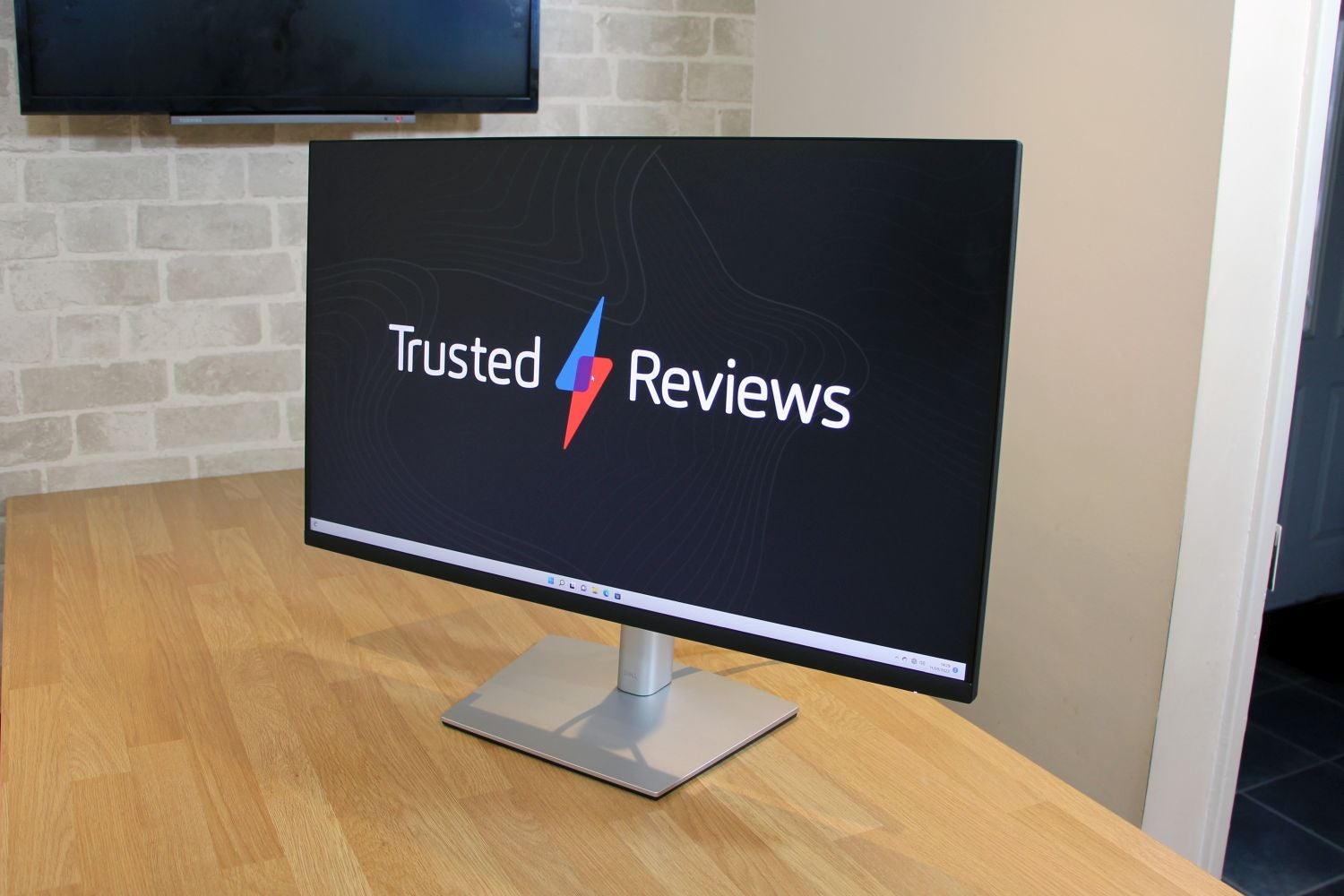
The Dell P3221D delivers solid image quality for everyday work tasks and creative situations, and comes with plenty of adjustment options and a good range of features. Rivals go further in some departments, but the Dell P3221D is a high-quality choice for all-round mainstream use.

Pros

  • Good mainstream image quality
  • Lots of adjustment options
  • Plenty of ports, including USB-C with power delivery

Cons

  • Can’t work beyond the sRGB colour gamut
  • Basic on-screen display
  • No card reader or wired internet

Availability

  • UKRRP: £415
  • USARRP: $519
  • EuropeRRP: €499

  • A large, absorbing displayThis 32in screen provides generous space to create an absorbing work environment at home or in the office

  • A good mid-range resolutionThe 2560 x 1440 resolution means you get a sharper and more expansive picture than the average 1080p display, without the extra demands of 4K screens

  • Plenty of practical featuresThe Dell P3221D offers lot of adjustment options and a good selection of ports, making it an adaptable screen for a number of everyday situations

Introduction

The Dell P3221D is the type of monitor that will appeal to many different people: it’s big, it promises good quality and a broad range of features, and it’s impressively versatile.

On paper, that makes the P3221D a great choice if you’d like a display for mainstream creative tasks and everyday workloads, and if your preference is for a panel that’s physically larger than the 24-inch and 27-inch displays frequently found on office desks.

However, there’s always the danger that a jack-of-all-trades can’t master any, and that might be the case with the Dell P3221D. And, with a price of £415 / $519 / €499, it will have to impress – you can find 32-inch IPS displays for a little less. Prices drop even further if you’re willing to buy a VA panel instead, and rivals offer specialist design at similar prices.

Design and Features

  • Lots of adjustment options and plenty of ports
  • A capable mainstream specification
  • Rivals offer more specialisms

The Dell P3221D’s core features are well suited to mainstream workloads. The 32-inch screen is large enough to feel spacious and absorbing, without becoming overwhelming. That diagonal is paired with a 2560 x 1440 native resolution, and it’s another good figure – large enough to offer more on-screen space than the average 1080p screen, so you’ll have more space in your apps and greater room to work in multiple windows.

Those figures combine for a density level of 92ppi, which is fine. It’s sharp enough that you won’t be distracted by individual pixels, and it matches the same crispness of a 24-inch panel at 1080p. You’ll only achieve sharper if you upgrade to a 4K screen, and that’s only necessary if you want more space or precision for creative tasks.
Dell P3221D 02

Not surprisingly, Dell uses an IPS panel for this monitor, which means the P3221D should deliver solid colour and contrast for a wide variety of everyday tasks. The reliance on 10-bit colour will also supply a broader and more nuanced colour gamut than the 8-bit technology used in cheaper screens.

The rest of the P3221D’s specification is pretty pedestrian, though: a 60Hz refresh rate and 8ms response time are fine for everyday workloads, but not good enough for anything beyond basic games; animators will want better figures in both of those departments, too. If you want to go further with games or creative work, you should look for refresh rates beyond 100Hz and response times of 5ms or better.
Dell P3221D 06

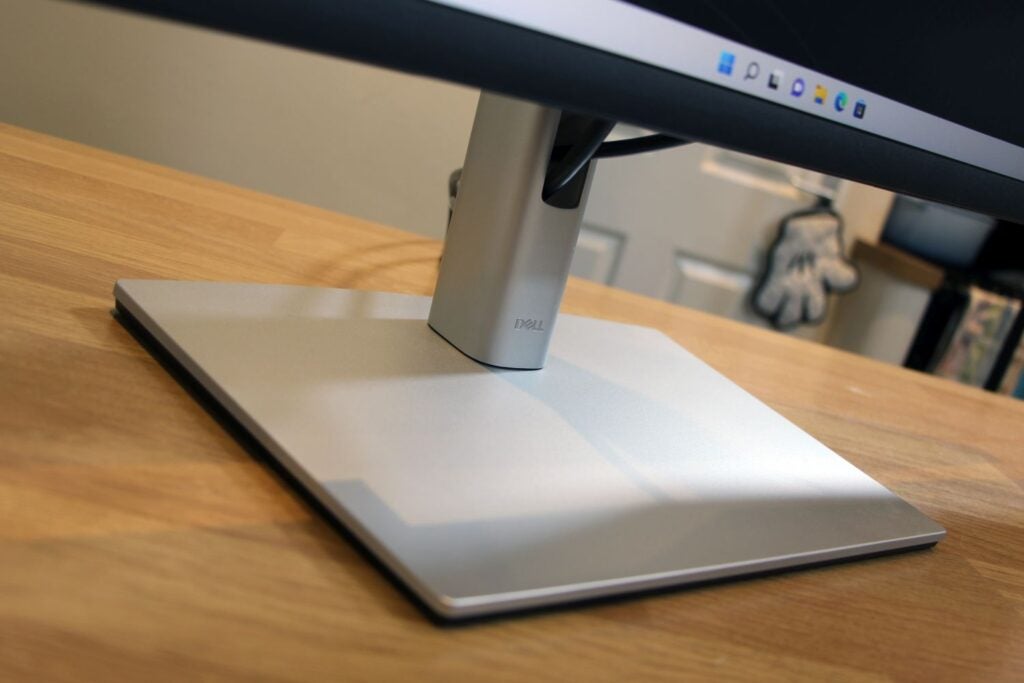
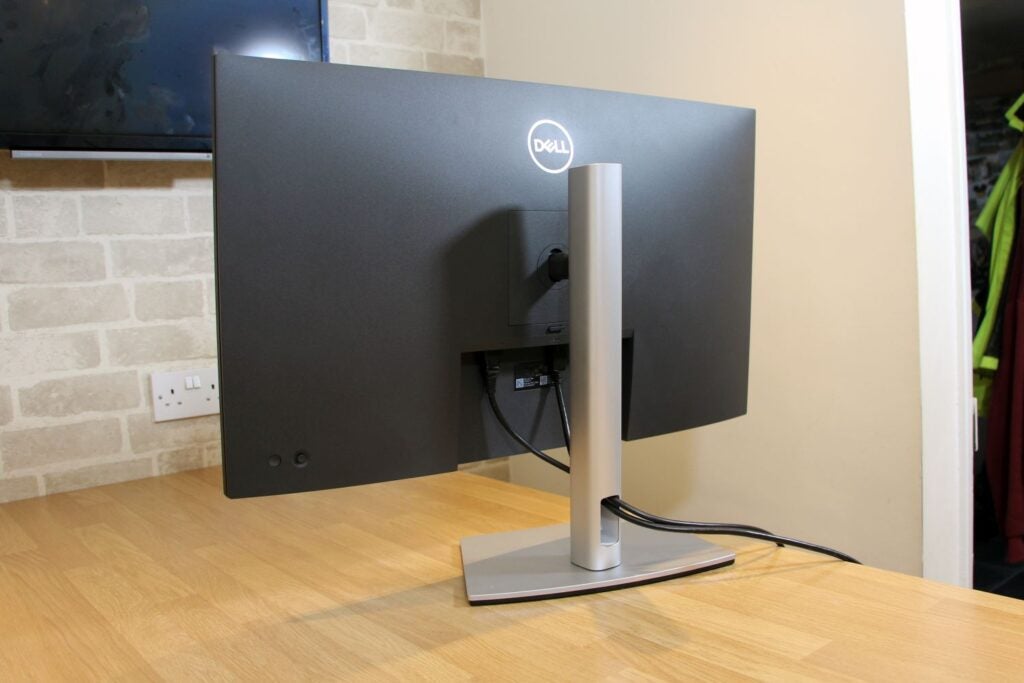
Instead, Dell has concentrated on practicality with the P3221D. The display offers an impressive 150mm of height adjustment, and it has plenty of tilt and swivel movement. It also swings round into portrait mode – something that isn’t a given on a 32-inch display. The Dell supports VESA mounting, and it has admirable build quality and smooth movement – although it does weigh 11.2kg, so it isn’t a lightweight. It looks smart, with an understated metal stand with a flat base and a large hole for cable-tidying.

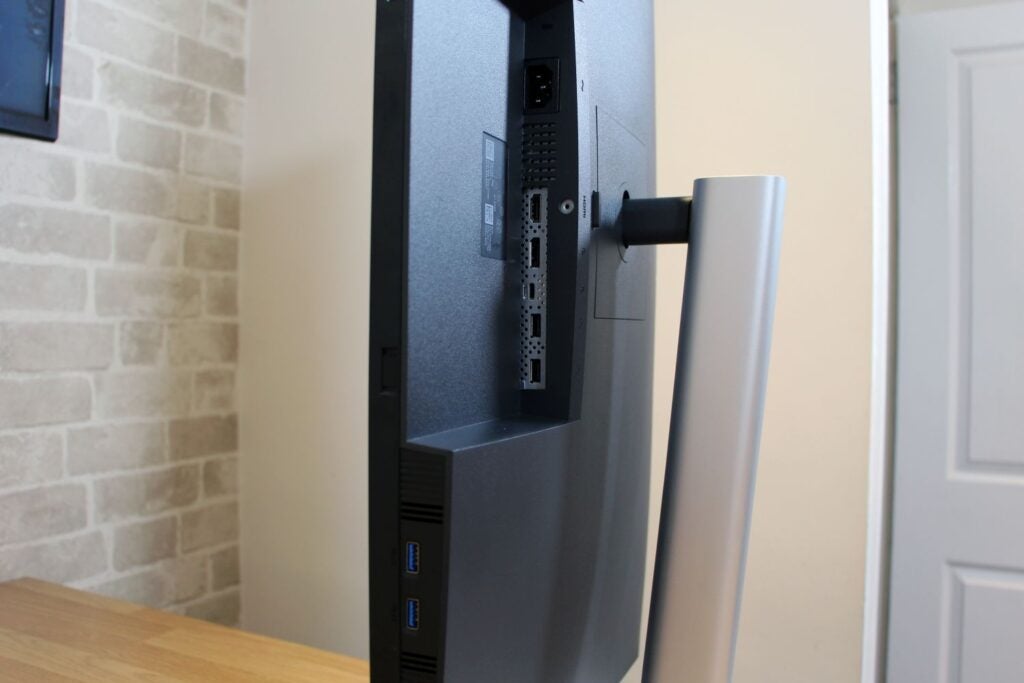
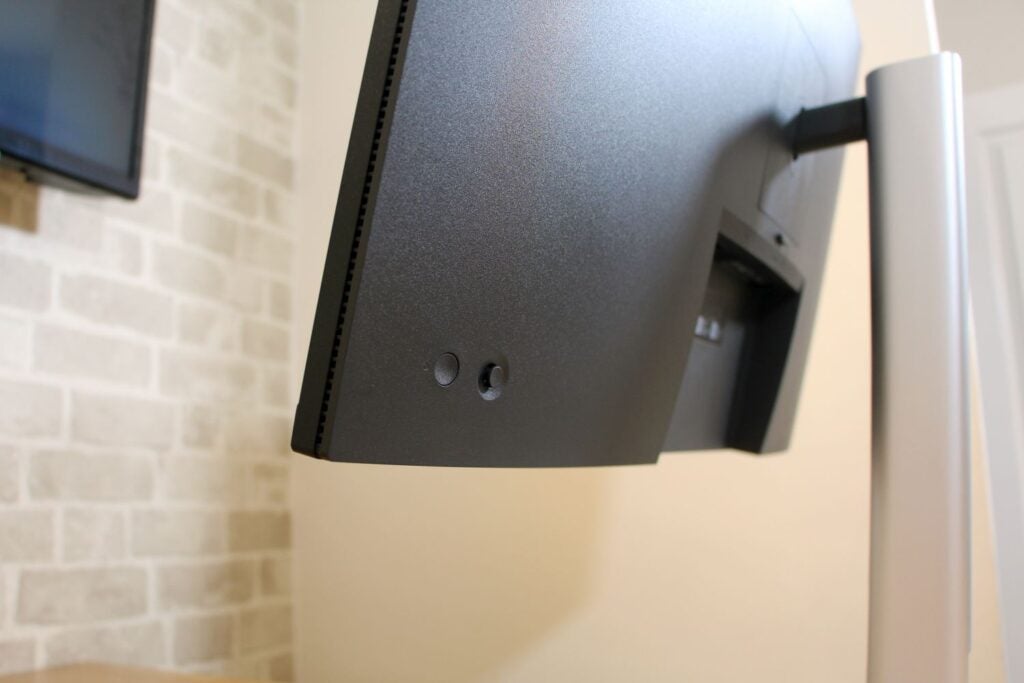
Dell delivers good connectivity with this screen, too. There are two USB 3.2 Gen 1 ports that face downwards on the screen’s bottom bezel, so they’re easily accessible, and around the rear there’s a USB 3.2 Gen 1 Type-C port that handles DisplayPort and delivers 65W of charging power. The screen also has two USB 2.0 ports for additional peripherals if you don’t need faster transfers. HDMI 2.0 and DisplayPort 1.2 connectors are included alongside an audio output, too.
Dell P3221D 07

The P3221D only has a handful of areas where it doesn’t live up to its practical design. There are no speakers, and people who work in creative fields would welcome a card reader. Dell’s own P3222DE includes a Gigabit Ethernet port, although that screen is often pricier than the P3221D. The Dell’s on-screen display is pretty basic: while it has every mainstream option you’ll need and is easily navigable with a joystick, pro screens will deliver a greater array of options for altering colours and settings.

Despite those minor shortcomings, the Dell P3221D’s features and size make it suitable for a wide variety of everyday tasks, and rivals only improve in specialist areas.  

The Huawei MateView, for instance, is a good alternative if you want something more stylish – it’s far better-looking than the Dell, and its 3840 x 2560 resolution is more crisp; but it doesn’t have the P3221D’s ports or adjustment options, and it costs £399 / €509.

The Asus ProArt PA279CV is smaller but worth consideration as a result of its higher resolution and more robust professional abilities. It will set you back £449 / $489 / €532, so its pricing hardly differs from the Dell. My third alternative is the LG UltraWide Ergo 34WN780-B, which has an infinitely adjustable ergonomic arm and a wider screen for a price of £489 / $569 / €449.

Image Quality

  • Rock-solid contrast and everyday colour accuracy
  • Can’t handle anything beyond the sRGB gamut
  • Doesn’t have the refresh rate or response time for gaming

Out of the box, the Dell’s bright point of 218 nits is ample for any office, and the black point of 0.19 nits is low enough to lend darker areas decent depth. The contrast ratio of 1147:1 is another good figure – easily high enough to render any colour with nuance and vibrancy.

That’s a solid start, and the impressive benchmarks continue elsewhere. The Delta E of 2.03 is good and just beyond the point where human eyes can detect any colour discrepancies, and the colour temperature of 6117K is okay, even if it’s further away from the 6500K ideal that I’d prefer. The gamma average of 2.12 is fine.
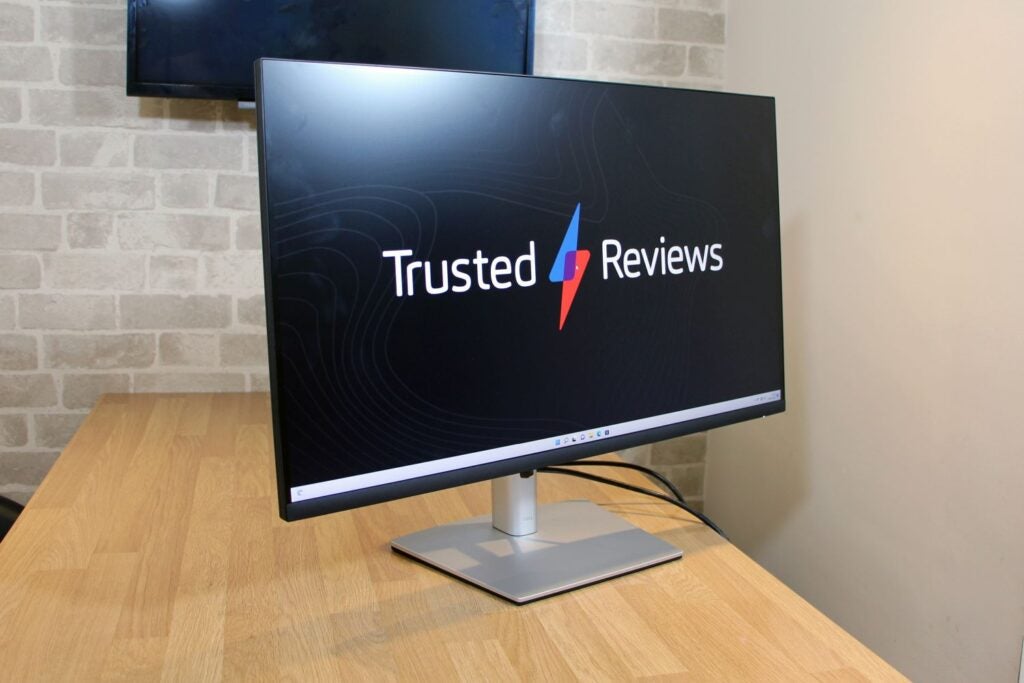
Dell P3221D 05

Ramp up the brightness to the maximum figure of 313 nits and the Dell’s quality remains consistent, and performance was constant at lower brightness levels as well.

Dell’s display does offer decent quality, but further testing reveals its limits. While the panel rendered an impressive 99.6% of the sRGB gamut, its Adobe RGB and DCI-P3 figures of 76.1% and 86.8% indicate that this monitor doesn’t have the breadth to work in either of those colour spaces.

The P3221D has some other issues. Its backlight lost 20% of its strength in the bottom-right corner – that isn’t enough of a drop to make a difference in day-to-day use, but that wayward uniformity and the lack of broader gamut ability stops the Dell from succeeding in more demanding creative situations. Dell’s display doesn’t have many extra screen modes, either, and the ones present aren’t worth using: the game and movie options just make the colours worse, and you don’t get modes specific to different work scenarios.
Dell P3221D 08

Some of the Dell’s rivals offer better quality, too. The Huawei MateView delivers deeper contrast and a brighter, broader range of colours, and the Asus ProArt is more accurate in the sRGB; but the arm-mounted LG suffered with poorer contrast and colours.

That’s not to say the Dell P3221D offers poor image quality, though: it delivers the accuracy and contrast to tackle any mainstream workload and everyday creative tasks, even if can go no further. Combine that with the Dell’s range of features and you have an impressively versatile panel.

The Huawei is more stylish, the ProArt produces better sRGB colours, and the LG has its ergonomic arm – but the Dell P3221D combines decent quality with lots of features. As such, it offers similar value to its rivals and is ideal if you need a conventional monitor for lots of everyday situations.

Latest deals

Should you buy it?

You’d like a capable monitor for lots of everyday situations The Dell’s good sRGB image quality and broad range of features make it a good choice if you want a conventional screen for plenty of different tasks.

You want a screen for high-end creative work or gaming The P3221D doesn’t offer the colour accuracy or breadth for tough creative workloads, and it isn’t fast or responsive enough for gaming.

Final Thoughts

There’s plenty to recommend the Dell P3221D. It offers decent image quality for mainstream creative tasks and workloads alongside a versatile range of features, and it doesn’t cost any more than its rivals. It’s a good everyday choice if you need quality and adaptability, even if specialist competition can offer more in some departments.

How we test

We use every monitor we test for at least a week. During that time, we’ll check it for ease of use and put it through its paces by using it for both everyday tasks and more specialist, colour-sensitive work.

We also check its colours and image quality with a colorimeter to test its coverage and the display’s quality.

We use as our main monitor for at least a week.

We used a colorimeter to get benchmark results.

Used our own expert judgement for image quality

FAQs

What warranty does the Dell P3221D include?

The Dell comes with a three-year warranty as standard.

What’s in the box?

Dell includes a DisplayPort cable, a USB-C cable and a USB 3.2 Gen 1 to Type-C cable.

Trusted Reviews test data

‹

Delta Colour accuracy (Delta E)

Brightness

Contrast

Black level

White Visual Colour Temperature

sRGB

Adobe RGB

DCI-P3

Dell P3221D

2.03

218 nits

1147:1

0.19 nits

6117 K

99.6 %

76.1 %

86.8 %

›

‹

UK RRP

USA RRP

EU RRP

Manufacturer

Screen Size

Front Camera

Size (Dimensions)

Weight

ASIN

Release Date

First Reviewed Date

Model Number

Model Variants

Resolution

Refresh Rate

Ports

Connectivity

Colours

Display Technology

Screen Technology

Syncing Technology

Dell P3221D

£415

$519

€499

Dell

32 inches

no

713 x 230 x 469 MM

11.2 KG

B08JQSMV4G

2021

09/05/2022

P3221D

P3221D

2560 x 1440

60 Hz

2 x USB 3.2 Gen 1, 1 x USB 3.2 Gen 1 Type-C, 2 x USB 2.0, 1 x audio

1 x HDMI 2.0, 1 x DisplayPort 1.2

Black

LED

IPS

None

›

Jargon buster

IPS panel

IPS stands for In-Plane Switching and offers consistent, accurate colours at wide viewing angles, as well as quick response time

Refresh Rate

The number of times the screen refreshes itself per second.

The Dell P3221D delivers solid image quality for everyday work tasks and creative situations, and comes with plenty of adjustment options and a good range of features. Rivals go further in some departments, but the Dell P3221D is a high-quality choice for all-round mainstream use.

Pros

  • Good mainstream image quality
  • Lots of adjustment options
  • Plenty of ports, including USB-C with power delivery

Cons

  • Can’t work beyond the sRGB colour gamut
  • Basic on-screen display
  • No card reader or wired internet

Availability

  • UKRRP: £415
  • USARRP: $519
  • EuropeRRP: €499

  • A large, absorbing displayThis 32in screen provides generous space to create an absorbing work environment at home or in the office

  • A good mid-range resolutionThe 2560 x 1440 resolution means you get a sharper and more expansive picture than the average 1080p display, without the extra demands of 4K screens

  • Plenty of practical featuresThe Dell P3221D offers lot of adjustment options and a good selection of ports, making it an adaptable screen for a number of everyday situations

Introduction

The Dell P3221D is the type of monitor that will appeal to many different people: it’s big, it promises good quality and a broad range of features, and it’s impressively versatile.

On paper, that makes the P3221D a great choice if you’d like a display for mainstream creative tasks and everyday workloads, and if your preference is for a panel that’s physically larger than the 24-inch and 27-inch displays frequently found on office desks.

However, there’s always the danger that a jack-of-all-trades can’t master any, and that might be the case with the Dell P3221D. And, with a price of £415 / $519 / €499, it will have to impress – you can find 32-inch IPS displays for a little less. Prices drop even further if you’re willing to buy a VA panel instead, and rivals offer specialist design at similar prices.

Design and Features

  • Lots of adjustment options and plenty of ports
  • A capable mainstream specification
  • Rivals offer more specialisms

The Dell P3221D’s core features are well suited to mainstream workloads. The 32-inch screen is large enough to feel spacious and absorbing, without becoming overwhelming. That diagonal is paired with a 2560 x 1440 native resolution, and it’s another good figure – large enough to offer more on-screen space than the average 1080p screen, so you’ll have more space in your apps and greater room to work in multiple windows.

Those figures combine for a density level of 92ppi, which is fine. It’s sharp enough that you won’t be distracted by individual pixels, and it matches the same crispness of a 24-inch panel at 1080p. You’ll only achieve sharper if you upgrade to a 4K screen, and that’s only necessary if you want more space or precision for creative tasks.

Dell P3221D 02

Not surprisingly, Dell uses an IPS panel for this monitor, which means the P3221D should deliver solid colour and contrast for a wide variety of everyday tasks. The reliance on 10-bit colour will also supply a broader and more nuanced colour gamut than the 8-bit technology used in cheaper screens.

The rest of the P3221D’s specification is pretty pedestrian, though: a 60Hz refresh rate and 8ms response time are fine for everyday workloads, but not good enough for anything beyond basic games; animators will want better figures in both of those departments, too. If you want to go further with games or creative work, you should look for refresh rates beyond 100Hz and response times of 5ms or better.

Dell P3221D 06

Instead, Dell has concentrated on practicality with the P3221D. The display offers an impressive 150mm of height adjustment, and it has plenty of tilt and swivel movement. It also swings round into portrait mode – something that isn’t a given on a 32-inch display. The Dell supports VESA mounting, and it has admirable build quality and smooth movement – although it does weigh 11.2kg, so it isn’t a lightweight. It looks smart, with an understated metal stand with a flat base and a large hole for cable-tidying.

Dell delivers good connectivity with this screen, too. There are two USB 3.2 Gen 1 ports that face downwards on the screen’s bottom bezel, so they’re easily accessible, and around the rear there’s a USB 3.2 Gen 1 Type-C port that handles DisplayPort and delivers 65W of charging power. The screen also has two USB 2.0 ports for additional peripherals if you don’t need faster transfers. HDMI 2.0 and DisplayPort 1.2 connectors are included alongside an audio output, too.

Dell P3221D 07

The P3221D only has a handful of areas where it doesn’t live up to its practical design. There are no speakers, and people who work in creative fields would welcome a card reader. Dell’s own P3222DE includes a Gigabit Ethernet port, although that screen is often pricier than the P3221D. The Dell’s on-screen display is pretty basic: while it has every mainstream option you’ll need and is easily navigable with a joystick, pro screens will deliver a greater array of options for altering colours and settings.

Despite those minor shortcomings, the Dell P3221D’s features and size make it suitable for a wide variety of everyday tasks, and rivals only improve in specialist areas.  

The Huawei MateView, for instance, is a good alternative if you want something more stylish – it’s far better-looking than the Dell, and its 3840 x 2560 resolution is more crisp; but it doesn’t have the P3221D’s ports or adjustment options, and it costs £399 / €509.

The Asus ProArt PA279CV is smaller but worth consideration as a result of its higher resolution and more robust professional abilities. It will set you back £449 / $489 / €532, so its pricing hardly differs from the Dell. My third alternative is the LG UltraWide Ergo 34WN780-B, which has an infinitely adjustable ergonomic arm and a wider screen for a price of £489 / $569 / €449.

Image Quality

  • Rock-solid contrast and everyday colour accuracy
  • Can’t handle anything beyond the sRGB gamut
  • Doesn’t have the refresh rate or response time for gaming

Out of the box, the Dell’s bright point of 218 nits is ample for any office, and the black point of 0.19 nits is low enough to lend darker areas decent depth. The contrast ratio of 1147:1 is another good figure – easily high enough to render any colour with nuance and vibrancy.

That’s a solid start, and the impressive benchmarks continue elsewhere. The Delta E of 2.03 is good and just beyond the point where human eyes can detect any colour discrepancies, and the colour temperature of 6117K is okay, even if it’s further away from the 6500K ideal that I’d prefer. The gamma average of 2.12 is fine.

Dell P3221D 05

Ramp up the brightness to the maximum figure of 313 nits and the Dell’s quality remains consistent, and performance was constant at lower brightness levels as well.

Dell’s display does offer decent quality, but further testing reveals its limits. While the panel rendered an impressive 99.6% of the sRGB gamut, its Adobe RGB and DCI-P3 figures of 76.1% and 86.8% indicate that this monitor doesn’t have the breadth to work in either of those colour spaces.

The P3221D has some other issues. Its backlight lost 20% of its strength in the bottom-right corner – that isn’t enough of a drop to make a difference in day-to-day use, but that wayward uniformity and the lack of broader gamut ability stops the Dell from succeeding in more demanding creative situations. Dell’s display doesn’t have many extra screen modes, either, and the ones present aren’t worth using: the game and movie options just make the colours worse, and you don’t get modes specific to different work scenarios.

Dell P3221D 08

Some of the Dell’s rivals offer better quality, too. The Huawei MateView delivers deeper contrast and a brighter, broader range of colours, and the Asus ProArt is more accurate in the sRGB; but the arm-mounted LG suffered with poorer contrast and colours.

That’s not to say the Dell P3221D offers poor image quality, though: it delivers the accuracy and contrast to tackle any mainstream workload and everyday creative tasks, even if can go no further. Combine that with the Dell’s range of features and you have an impressively versatile panel.

The Huawei is more stylish, the ProArt produces better sRGB colours, and the LG has its ergonomic arm – but the Dell P3221D combines decent quality with lots of features. As such, it offers similar value to its rivals and is ideal if you need a conventional monitor for lots of everyday situations.

Latest deals

Should you buy it?

You’d like a capable monitor for lots of everyday situations The Dell’s good sRGB image quality and broad range of features make it a good choice if you want a conventional screen for plenty of different tasks.

You want a screen for high-end creative work or gaming The P3221D doesn’t offer the colour accuracy or breadth for tough creative workloads, and it isn’t fast or responsive enough for gaming.

Final Thoughts

There’s plenty to recommend the Dell P3221D. It offers decent image quality for mainstream creative tasks and workloads alongside a versatile range of features, and it doesn’t cost any more than its rivals. It’s a good everyday choice if you need quality and adaptability, even if specialist competition can offer more in some departments.

How we test

We use every monitor we test for at least a week. During that time, we’ll check it for ease of use and put it through its paces by using it for both everyday tasks and more specialist, colour-sensitive work.

We also check its colours and image quality with a colorimeter to test its coverage and the display’s quality.

We use as our main monitor for at least a week.

We used a colorimeter to get benchmark results.

Used our own expert judgement for image quality

FAQs

What warranty does the Dell P3221D include?

The Dell comes with a three-year warranty as standard.

What’s in the box?

Dell includes a DisplayPort cable, a USB-C cable and a USB 3.2 Gen 1 to Type-C cable.

Trusted Reviews test data

‹

Delta Colour accuracy (Delta E)

Brightness

Contrast

Black level

White Visual Colour Temperature

sRGB

Adobe RGB

DCI-P3

Dell P3221D

2.03

218 nits

1147:1

0.19 nits

6117 K

99.6 %

76.1 %

86.8 %

›

‹

UK RRP

USA RRP

EU RRP

Manufacturer

Screen Size

Front Camera

Size (Dimensions)

Weight

ASIN

Release Date

First Reviewed Date

Model Number

Model Variants

Resolution

Refresh Rate

Ports

Connectivity

Colours

Display Technology

Screen Technology

Syncing Technology

Dell P3221D

£415

$519

€499

Dell

32 inches

no

713 x 230 x 469 MM

11.2 KG

B08JQSMV4G

2021

09/05/2022

P3221D

P3221D

2560 x 1440

60 Hz

2 x USB 3.2 Gen 1, 1 x USB 3.2 Gen 1 Type-C, 2 x USB 2.0, 1 x audio

1 x HDMI 2.0, 1 x DisplayPort 1.2

Black

LED

IPS

None

›

Jargon buster

IPS panel

IPS stands for In-Plane Switching and offers consistent, accurate colours at wide viewing angles, as well as quick response time

Refresh Rate

The number of times the screen refreshes itself per second.

Previous Post

Sony VPL-VW290ES

Next Post

Seniors more likely to develop long COVID than younger patients

Related Posts

I reviewed the MacBook Neo – it’ll change cheap laptops forever: It’ll change laptops forever
Reviews

I reviewed the MacBook Neo – it’ll change cheap laptops forever: It’ll change laptops forever

by New Edge Times Report
April 2, 2026
Vax LiftOut Reach Pet Corded Upright Vacuum Cleaner Review
Reviews

Vax LiftOut Reach Pet Corded Upright Vacuum Cleaner Review

by New Edge Times Report
April 1, 2026
Philips Evnia 27M2N5901A Review
Reviews

Philips Evnia 27M2N5901A Review

by New Edge Times Report
April 1, 2026
Leave Comment
New Edge Times

© 2025 New Edge Times or its affiliated companies. All rights reserved.

Navigate Site

  • About
  • Advertise
  • Terms & Conditions
  • Privacy Policy
  • Disclaimer
  • Contact

Follow Us

No Result
View All Result
  • World
  • U.S.
  • Politics
  • Business
  • Science
  • Tech
  • Youth
  • Entertainment
    • Gaming
    • Movie
    • Music
    • Arts
  • Sports
  • Lifestyle
    • Fashion
    • Food
    • Health
    • Travel
  • Reviews
  • Trending

© 2025 New Edge Times or its affiliated companies. All rights reserved.

Welcome Back!

Login to your account below

Forgotten Password?

Retrieve your password

Please enter your username or email address to reset your password.

Log In
