













Verdict
The Crucial T500 has seriously impressed. 2TB at this price point – for any M.2 SSD – is an absolute steal, but combine that with its remarkable random 4K performance, impressive load times, and solid real world transfer test speeds, and it easily picks apart some of the best PCIe 5.0 drives too. If you’re looking for the perfect gaming SSD or even a primary OS drive, this could be the one for you.
Pros
- Incredible performance for the price
- Strong random 4K results in testing
- Great for consoles and PCs alike
Cons
- Heatsink isn’t easily removable
-
PCIe 4.0 StandardThe T500 is a PCIe 4.0 drive. It might not be quite as fast as the latest PCIe 5.0 SSDs, but it’s only held back on sequential speeds, which aren’t everything. -
232-Layer Micron TLCCrucial’s taking advantage of the latest 232-layer TLC NAND flash tech from Micron. It’s the same storage found on pretty much all of the best PCIe 5.0 drives out there today. -
PS5 and PC CompatibleInitially designed for the PS5, the T500’s single-sided design and included heatsink ensures it won’t thermally throttle in your console. It’ll also still fit into your PC perfectly too.
Introduction
What happens when you put some of the latest and greatest SSD hardware available into a PCIe 4.0 drive that’s limited to a top speed of 8GB/s? Well, you end up with the Crucial T500 SSD.
The T500 is a drive specifically designed for use in the PS5. For those that don’t know, you can add a secondary drive to the PS5, to expand the internal storage, and give yourself a bit more breathing room when it comes to local gaming.
One of the upsides of that is the PS5 itself supports the PCIe 4.0 standard, and interestingly, the stock SSD the PS5 comes with is actually rather slow. Pop in an aftermarket PCIe 4.0 drive such as the Crucial T500, and you’re immediately getting faster load times and better performance as a result.
That’s not to say it’s PS5 only, as you can of course install it in a PC. And if I’m honest, that’s arguably a far better use of the tech inside this SSD, because overall performance is nothing short of impressive.
Specs
- Significantly improved compared to the P5 Plus
- Single-sided design alleviates heat
- PCIe 4.0 isn’t as much of a bottleneck
The Crucial T500 isn’t the brand’s first foray into a decent PS5 drive. In fact, the company had launched a previous drive in the form of the P5 Plus, however, the differences between the two are substantial.
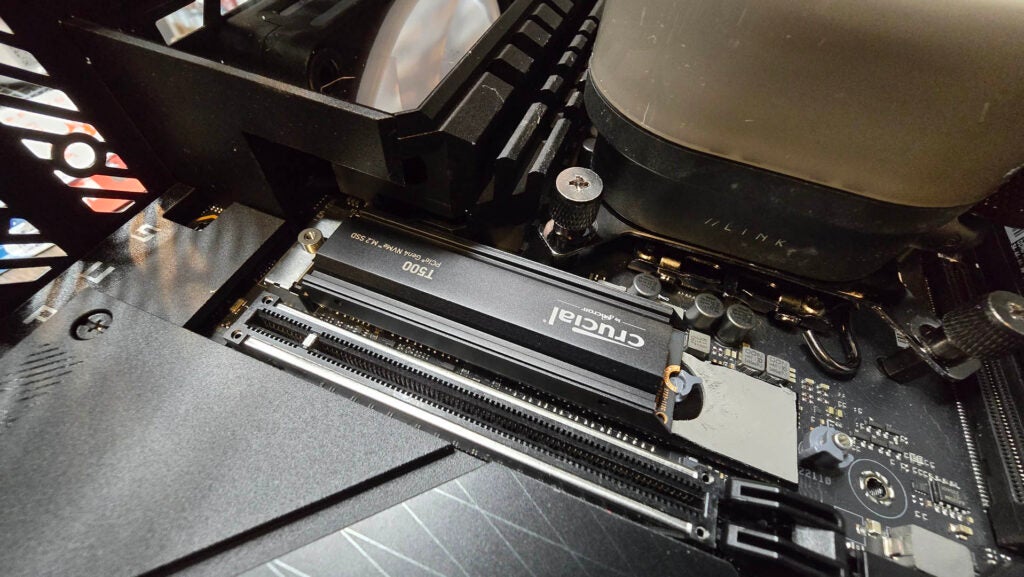
The P5 Plus features a proprietary controller, and 176-layer TLC 3D NAND from Micron, whereas the T500 utilises 232-layer TLC 3D NAND (again from Micron), and the Phison E25 controller instead.
It’s the former that’s the real game changer, as it provides far higher read and write bandwidths (up to 75% and 100% respectively), comes in a smaller package, and has far faster I/O latencies compared to its 176-layer predecessor.
Both drives feature LPDDR4 DRAM caches onboard, come with 1200 TBW endurance ratings, 5-year warranties, and sit on the PCIe 4.0 standard as well. But it’s when you get into the performance numbers that the T500 really does show off just why it’s so much better than its predecessor, although more on that later.
Comparisons aside, the T500 comes in three capacities 500GB, 1TB and 2TB (with the 2TB the drive we’re testing here), and is also available in heatsinked and non-heatsinked variants as well. It’s worth noting that without some significant prying, it’s quite the challenge to remove the heatsink from the T500, so although the price difference between a heatsink and non-heatsink variant is only $10, if you are thinking about popping this thing in a PC, I highly recommend you pick up the non-heatsink variant instead.
Test Setup
Over the last week I’ve been testing the Crucial T500 against a number of its rivals in a multitude of different testing scenarios, both synthetic and real-world, really pushing it to the limit to see just how it performs under load.
To make sure that all of our test results are consistent, I’ve used an identical test bed throughout, hands-on testing with each drive in a top-tier motherboard, combined with a premium CPU, with some of the best benchmarks we can find. Throughout my testing, I use the top-most PCIe 5.0 slot wherever possible to ensure there’s no bottlenecks for each drive and to better mimic how your own SSDs are installed on your machines at home too.
You can find the full test-bed spec list below:
- CPU: Intel Core i7-14700K
- Motherboard: ASUS ROG Maximus Z790 Dark Hero
- GPU: Gigabyte GeForce RTX 4080 16GB Aero OC
- RAM: 32GB (2x16GB) Corsair Dominator Titanium DDR5 @ 7200
- Cooler: Corsair iCUE Link H150i LCD Liquid CPU Cooler
- PSU: 1200W Corsair RMx Shift 80+ Gold PSU
- Case: Hyte Y70 Touch
For testing purposes I’m taking advantage of PC Mark’s QSD and Data Drive Benchmarks, along with a 120GB real-world file copy test (utilising Red Dead Redemption II as our target copy), along with Final Fantasy XIV load time benchmark, and of course, CrystalDiskMark 8 too – the latter of which helps us to identify those synthetic load speeds. It’s also worth noting that I’m running CrystalDiskMark in its stock configuration, so that means Sequentials are tested at a queue depth of 8 with 1 thread, and 4K is tested at a queue depth of 32 with 1 thread.
On top of all that, I’m also calculating the price-to-performance ratios. Simply put, these are the prices of the drive in USD, divided by performance and stats in certain areas, such as max sequential speed, max random 4K speed and the capacity as well (to give us a number of GB per $). This helps to provide insight on the value proposition each drive represents at the time of writing.
Performance
- Sequential speeds of 7.1 GB/s read and 6.2 GB/s write
- Gaming performance is excellent
- Fastest PCIe 4.0 drive we’ve tested
On first glance, the Crucial T500 looks like any other PCIe 4.0 drive. Dive into CrystalDiskMark 8’s sequential performance and you’ll happily see it puttering along with 7.1 GB/s read and 6.2 GB/s write, not exactly far off the 7400 and 7000 MB/s that Crucial advertises. Compare that to the P5 Plus at 6.5 GB/s and 5.1 GB/s respectively, and it doesn’t seem like a massive upgrade.
Compare that to Crucial’s own T700 drive, which clocks in 12.3 GB/s and 11.5 GB/s respectively, and again there’s nothing particularly to write home about. But here’s the thing, sequentials only tell half the story. Game data is rarely ever loaded or stored sequentially.
If you’re transferring photos or video footage, then sure, sequential storage is king, but if you’re pulling assets from all sorts of different file locations, then the true king of comparison here is actually Random 4K at a queue depth of 1. Sequentials may look great for marketing, but it’s those Random 4K numbers that’s really where it’s at, and here the T500 absolutely shines.
Let’s talk stats then. CrystalDiskMark 4K Q1 T1 read speed comes in at 94 MB/s, and write speed at 326 MB/s. Compare that to the P5 Plus? 62 and 188 MB/s. That’s a 51.6% improvement on read, and 73.4% on write speed.
But the real party trick comes when you compare it against things like the Gigabyte Aorus Gen5 12000 (our fastest PCIe 5.0 drive tested so far), where it clocks in a respectable 93 and 343 MB/s. The T500 beats it by 1MB/s on read, amazingly, and only loses to it by 17 MB/s on write speed. That’s a crazy feat. Combine that with the fact that the price difference between those two drives is $90 at retail and it’s even more impressive.
That 4K speed transfers over into the real world tests as well. In Final Fantasy XIV the T500 is again faster than the Aorus Gen5 12000, pipping it to the post by 7.23 seconds to 7.26 seconds. And in the real world file copy test, it manages the copy in just 44.13 seconds, versus the Arous Gen 5’s 37.40 seconds. That’s 18% slower on that last one for a drive that’s 37.5% cheaper.
Latest deals
Should you buy it?
If you want the best PCIe 4.0 SSD out there
Without a doubt, that E25 controller, 2TB capacity and 232-Layer TLC NAND combined has made the Crucial T500 one of the fastest PCIe 4.0 SSDs out there today. It’s versatile and will work both in PC and your PS5 with ease.
If you need to work with videos and photos as fast as possible
The T500 still lacks in the sequential domain. So if you’re working on large sequential file-sets, like photos or videos, you’re going to be much better off with something like the Crucial T700 or the Gigabyte Aorus Gen5 12000.
Final Thoughts
The Crucial T500 might just be one of the best SSDs out there right now. Although it’s designed for use in a Playstation 5 predominantly (you won’t be disappointed if you do pick it up for that), it’s equally as skilled in the PC domain. The T500’s random 4K and real-world performance is outstanding, and makes it an easy pick for those looking for top-tier performance without breaking the bank, or if you don’t own a PCIe 5.0 motherboard just yet.
There are PCIe 4.0 alternatives out there, but there are few that I’ve tested that keep up with the T500. If you do need a bit more sequential grunt however, something like the Gigabyte Aorus Gen5 12000, the T700 or the Seagate FireCuda 540 might be a better pick.
How we test
Each SSD we test utilises a mix of both synthetic and real-world benchmark tests. On top of that, we also use a number of price-to-performance metrics, and monitor temperature and power-draw to determine the long-term stability and cost-effectiveness of the drive.
Each SSD is tested in a bespoke test PC across a number of different scenarios
SSD temperatures and power draw are monitored throughout the process
FAQs
Yes, thanks to its low profile heatsink, and single-sided design (ensuring heat only goes into the heatsink), it’s perfect for expanding your PS5’s storage.
Yes, as long as you’ve got an M.2 slot it will work in any PC.
No, unlike some other heatsink drives, the T500 requires you to pry off and bend the heatsink to release the SSD inside. There’s no screws to remove sadly.

Verdict
The Crucial T500 has seriously impressed. 2TB at this price point – for any M.2 SSD – is an absolute steal, but combine that with its remarkable random 4K performance, impressive load times, and solid real world transfer test speeds, and it easily picks apart some of the best PCIe 5.0 drives too. If you’re looking for the perfect gaming SSD or even a primary OS drive, this could be the one for you.
Pros
- Incredible performance for the price
- Strong random 4K results in testing
- Great for consoles and PCs alike
Cons
- Heatsink isn’t easily removable
-
PCIe 4.0 StandardThe T500 is a PCIe 4.0 drive. It might not be quite as fast as the latest PCIe 5.0 SSDs, but it’s only held back on sequential speeds, which aren’t everything. -
232-Layer Micron TLCCrucial’s taking advantage of the latest 232-layer TLC NAND flash tech from Micron. It’s the same storage found on pretty much all of the best PCIe 5.0 drives out there today. -
PS5 and PC CompatibleInitially designed for the PS5, the T500’s single-sided design and included heatsink ensures it won’t thermally throttle in your console. It’ll also still fit into your PC perfectly too.
Introduction
What happens when you put some of the latest and greatest SSD hardware available into a PCIe 4.0 drive that’s limited to a top speed of 8GB/s? Well, you end up with the Crucial T500 SSD.
The T500 is a drive specifically designed for use in the PS5. For those that don’t know, you can add a secondary drive to the PS5, to expand the internal storage, and give yourself a bit more breathing room when it comes to local gaming.
One of the upsides of that is the PS5 itself supports the PCIe 4.0 standard, and interestingly, the stock SSD the PS5 comes with is actually rather slow. Pop in an aftermarket PCIe 4.0 drive such as the Crucial T500, and you’re immediately getting faster load times and better performance as a result.
That’s not to say it’s PS5 only, as you can of course install it in a PC. And if I’m honest, that’s arguably a far better use of the tech inside this SSD, because overall performance is nothing short of impressive.
Specs
- Significantly improved compared to the P5 Plus
- Single-sided design alleviates heat
- PCIe 4.0 isn’t as much of a bottleneck
The Crucial T500 isn’t the brand’s first foray into a decent PS5 drive. In fact, the company had launched a previous drive in the form of the P5 Plus, however, the differences between the two are substantial.
The P5 Plus features a proprietary controller, and 176-layer TLC 3D NAND from Micron, whereas the T500 utilises 232-layer TLC 3D NAND (again from Micron), and the Phison E25 controller instead.
It’s the former that’s the real game changer, as it provides far higher read and write bandwidths (up to 75% and 100% respectively), comes in a smaller package, and has far faster I/O latencies compared to its 176-layer predecessor.
Both drives feature LPDDR4 DRAM caches onboard, come with 1200 TBW endurance ratings, 5-year warranties, and sit on the PCIe 4.0 standard as well. But it’s when you get into the performance numbers that the T500 really does show off just why it’s so much better than its predecessor, although more on that later.
Comparisons aside, the T500 comes in three capacities 500GB, 1TB and 2TB (with the 2TB the drive we’re testing here), and is also available in heatsinked and non-heatsinked variants as well. It’s worth noting that without some significant prying, it’s quite the challenge to remove the heatsink from the T500, so although the price difference between a heatsink and non-heatsink variant is only $10, if you are thinking about popping this thing in a PC, I highly recommend you pick up the non-heatsink variant instead.
Test Setup
Over the last week I’ve been testing the Crucial T500 against a number of its rivals in a multitude of different testing scenarios, both synthetic and real-world, really pushing it to the limit to see just how it performs under load.
To make sure that all of our test results are consistent, I’ve used an identical test bed throughout, hands-on testing with each drive in a top-tier motherboard, combined with a premium CPU, with some of the best benchmarks we can find. Throughout my testing, I use the top-most PCIe 5.0 slot wherever possible to ensure there’s no bottlenecks for each drive and to better mimic how your own SSDs are installed on your machines at home too.
You can find the full test-bed spec list below:
- CPU: Intel Core i7-14700K
- Motherboard: ASUS ROG Maximus Z790 Dark Hero
- GPU: Gigabyte GeForce RTX 4080 16GB Aero OC
- RAM: 32GB (2x16GB) Corsair Dominator Titanium DDR5 @ 7200
- Cooler: Corsair iCUE Link H150i LCD Liquid CPU Cooler
- PSU: 1200W Corsair RMx Shift 80+ Gold PSU
- Case: Hyte Y70 Touch
For testing purposes I’m taking advantage of PC Mark’s QSD and Data Drive Benchmarks, along with a 120GB real-world file copy test (utilising Red Dead Redemption II as our target copy), along with Final Fantasy XIV load time benchmark, and of course, CrystalDiskMark 8 too – the latter of which helps us to identify those synthetic load speeds. It’s also worth noting that I’m running CrystalDiskMark in its stock configuration, so that means Sequentials are tested at a queue depth of 8 with 1 thread, and 4K is tested at a queue depth of 32 with 1 thread.
On top of all that, I’m also calculating the price-to-performance ratios. Simply put, these are the prices of the drive in USD, divided by performance and stats in certain areas, such as max sequential speed, max random 4K speed and the capacity as well (to give us a number of GB per $). This helps to provide insight on the value proposition each drive represents at the time of writing.
Performance
- Sequential speeds of 7.1 GB/s read and 6.2 GB/s write
- Gaming performance is excellent
- Fastest PCIe 4.0 drive we’ve tested
On first glance, the Crucial T500 looks like any other PCIe 4.0 drive. Dive into CrystalDiskMark 8’s sequential performance and you’ll happily see it puttering along with 7.1 GB/s read and 6.2 GB/s write, not exactly far off the 7400 and 7000 MB/s that Crucial advertises. Compare that to the P5 Plus at 6.5 GB/s and 5.1 GB/s respectively, and it doesn’t seem like a massive upgrade.
Compare that to Crucial’s own T700 drive, which clocks in 12.3 GB/s and 11.5 GB/s respectively, and again there’s nothing particularly to write home about. But here’s the thing, sequentials only tell half the story. Game data is rarely ever loaded or stored sequentially.
If you’re transferring photos or video footage, then sure, sequential storage is king, but if you’re pulling assets from all sorts of different file locations, then the true king of comparison here is actually Random 4K at a queue depth of 1. Sequentials may look great for marketing, but it’s those Random 4K numbers that’s really where it’s at, and here the T500 absolutely shines.
Let’s talk stats then. CrystalDiskMark 4K Q1 T1 read speed comes in at 94 MB/s, and write speed at 326 MB/s. Compare that to the P5 Plus? 62 and 188 MB/s. That’s a 51.6% improvement on read, and 73.4% on write speed.
But the real party trick comes when you compare it against things like the Gigabyte Aorus Gen5 12000 (our fastest PCIe 5.0 drive tested so far), where it clocks in a respectable 93 and 343 MB/s. The T500 beats it by 1MB/s on read, amazingly, and only loses to it by 17 MB/s on write speed. That’s a crazy feat. Combine that with the fact that the price difference between those two drives is $90 at retail and it’s even more impressive.
That 4K speed transfers over into the real world tests as well. In Final Fantasy XIV the T500 is again faster than the Aorus Gen5 12000, pipping it to the post by 7.23 seconds to 7.26 seconds. And in the real world file copy test, it manages the copy in just 44.13 seconds, versus the Arous Gen 5’s 37.40 seconds. That’s 18% slower on that last one for a drive that’s 37.5% cheaper.
Latest deals
Should you buy it?
If you want the best PCIe 4.0 SSD out there
Without a doubt, that E25 controller, 2TB capacity and 232-Layer TLC NAND combined has made the Crucial T500 one of the fastest PCIe 4.0 SSDs out there today. It’s versatile and will work both in PC and your PS5 with ease.
If you need to work with videos and photos as fast as possible
The T500 still lacks in the sequential domain. So if you’re working on large sequential file-sets, like photos or videos, you’re going to be much better off with something like the Crucial T700 or the Gigabyte Aorus Gen5 12000.
Final Thoughts
The Crucial T500 might just be one of the best SSDs out there right now. Although it’s designed for use in a Playstation 5 predominantly (you won’t be disappointed if you do pick it up for that), it’s equally as skilled in the PC domain. The T500’s random 4K and real-world performance is outstanding, and makes it an easy pick for those looking for top-tier performance without breaking the bank, or if you don’t own a PCIe 5.0 motherboard just yet.
There are PCIe 4.0 alternatives out there, but there are few that I’ve tested that keep up with the T500. If you do need a bit more sequential grunt however, something like the Gigabyte Aorus Gen5 12000, the T700 or the Seagate FireCuda 540 might be a better pick.
How we test
Each SSD we test utilises a mix of both synthetic and real-world benchmark tests. On top of that, we also use a number of price-to-performance metrics, and monitor temperature and power-draw to determine the long-term stability and cost-effectiveness of the drive.
Each SSD is tested in a bespoke test PC across a number of different scenarios
SSD temperatures and power draw are monitored throughout the process
FAQs
Yes, thanks to its low profile heatsink, and single-sided design (ensuring heat only goes into the heatsink), it’s perfect for expanding your PS5’s storage.
Yes, as long as you’ve got an M.2 slot it will work in any PC.
No, unlike some other heatsink drives, the T500 requires you to pry off and bend the heatsink to release the SSD inside. There’s no screws to remove sadly.



