













Verdict
Even with what looks like a steep price tag at first, the Corsair K65 Plus Wireless doesn’t overstep its boundaries. It offers a similar feature set to its rivals, but packs heaps of character while managing to undercut some of the best boards around. Backed by a reliable brand name and an impressive ecosystem, this keyboard can do it all. And it can do it quietly.
Pros
- Dampened keys are a joy
- Great look and feel
- Lots of character and brilliant battery
Cons
- Price is still a bit steep
- No dedicated media keys
-
Dampened mechanical keysA layer of foam softens the feel and sound of each keystroke. -
Control dialThe textured control dial can be used to control volume, brightness, and more. -
Fully wirelessConnected either via USB-C/A, 2.4Ghz, or Bluetooth, its compact size and connectivity options and dual-OS potential make it a viable travel partner.
Introduction
The world of compact keyboards continues to heat up. Starting the year strong with some full-sized offerings at the mid-range and low-end bracket, Corsair is back with the K65 Plus Wireless, a 75% version that offers a relatively unique and classy look with plenty of that signature Corsair style.
The Corsair K65 Plus Wireless is a compact wireless keyboard. That alone won’t help it stand out. The competition is fierce. Under the hood, though, it’s a luxury-looking option with swappable switches and even sound-dampening foam.
If you like your loud and clicky keyboards, its default configuration probably won’t suit you. But if it looks the part on your desk, you can make it work with generous customization efforts. It may not be as ultra-responsive as last year’s 8000Hz Corsair K65 Pro Mini on paper, but it’s easily enough for most.
Design
- Oodles of charm
- Half-height keys
- Classy metallic accents
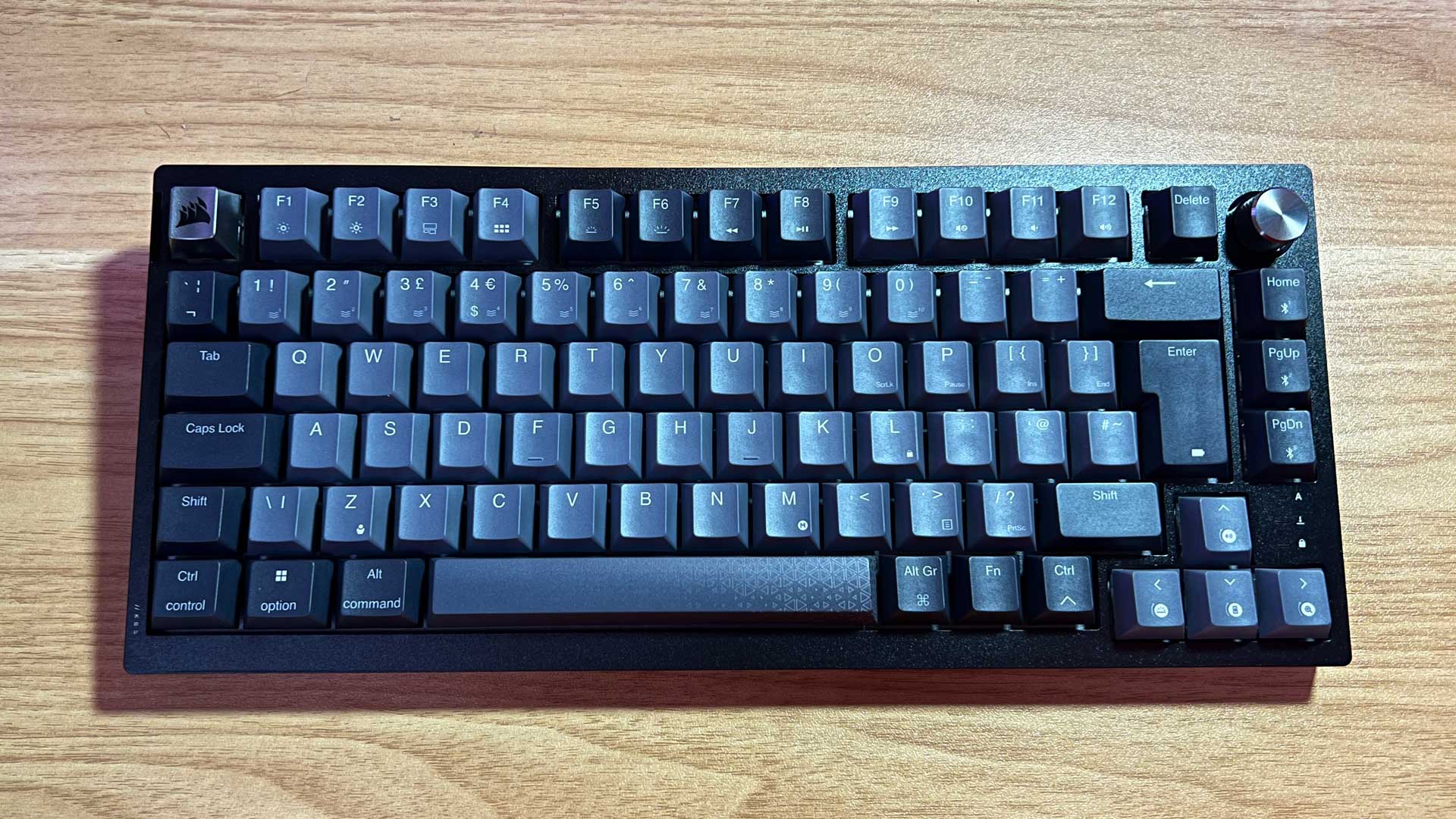
With a touch of lovely silver accented half-height keycaps and a volume dial along its largely black chassis depending on your configuration, the Corsair K65 Plus is out to appeal to a very specific type of setup.
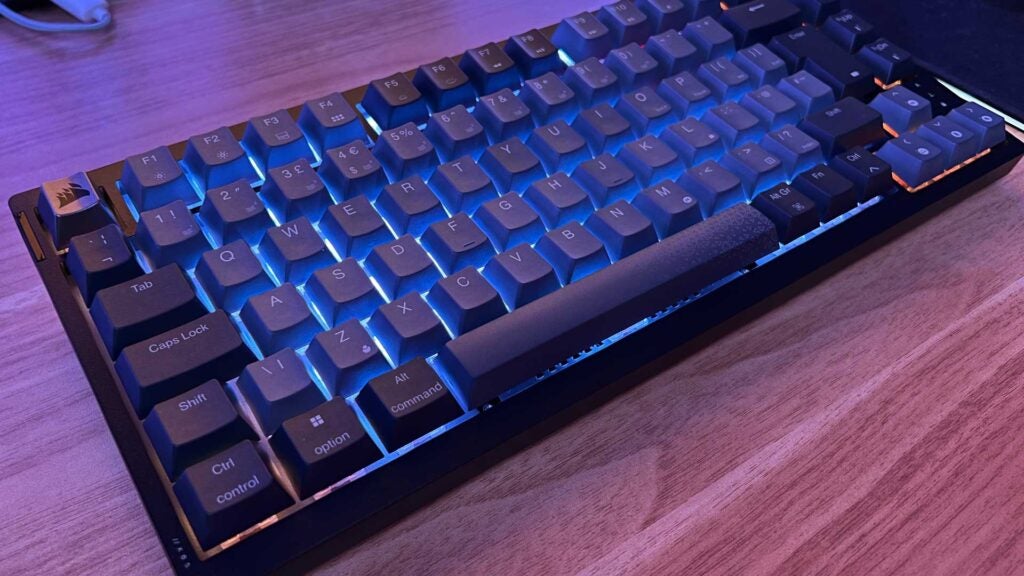
Beneath those dark grey keycaps is the expected array or RGB illumination, which can theoretically help its unique stylings settle into your current setup with a splash of colour.
There’s even a keyboard command to switch between Windows and MacOS. If you have to bounce between operating systems, at the office, for example, this could become a great travel companion.
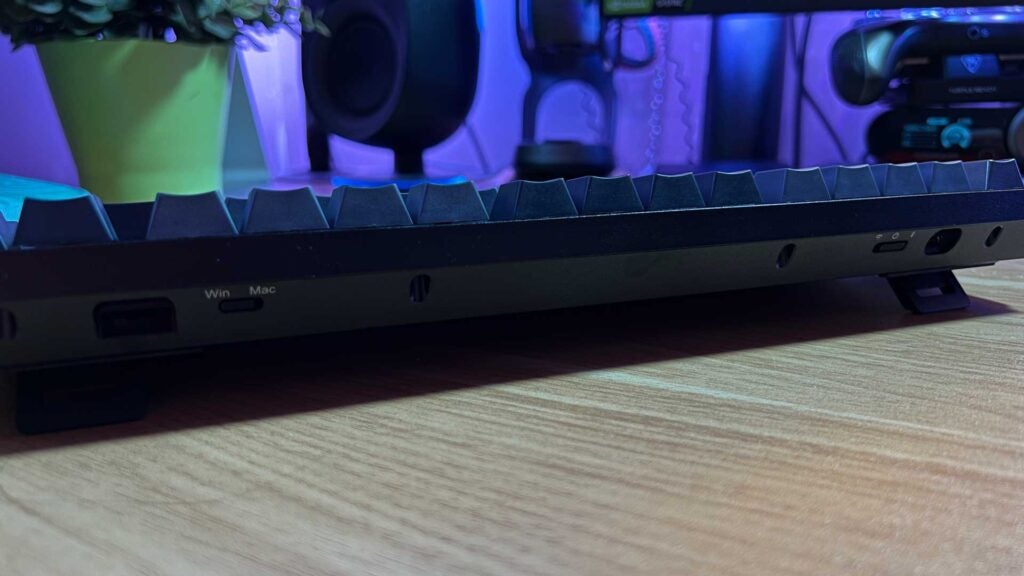
Switching between wired, Bluetooth, and low-latency 2.4Ghz is done with a toggle switch on the back left. On the opposite side is another switch for toggling between Windows and MacOS support (or even console), and a cubby hole for the tiny, reliable USB-A wireless receiver.
Together, it’s all startlingly similar to Keychron’s growing lineup of compact wireless offerings. What’s unique, however, is a satisfying microswitch on the left edge used to toggle the backlight.
The thoughtful implementation of the 75% layout keeps most of the sometimes optional keys intact. There’s a dedicated Function row, the arrow keys are as big as they should be, and the necessary three keys of the Home cluster stick around for good measure. Though you’re unlikely to find a battery solution, the two-stage feet might not offer the lift you demand.
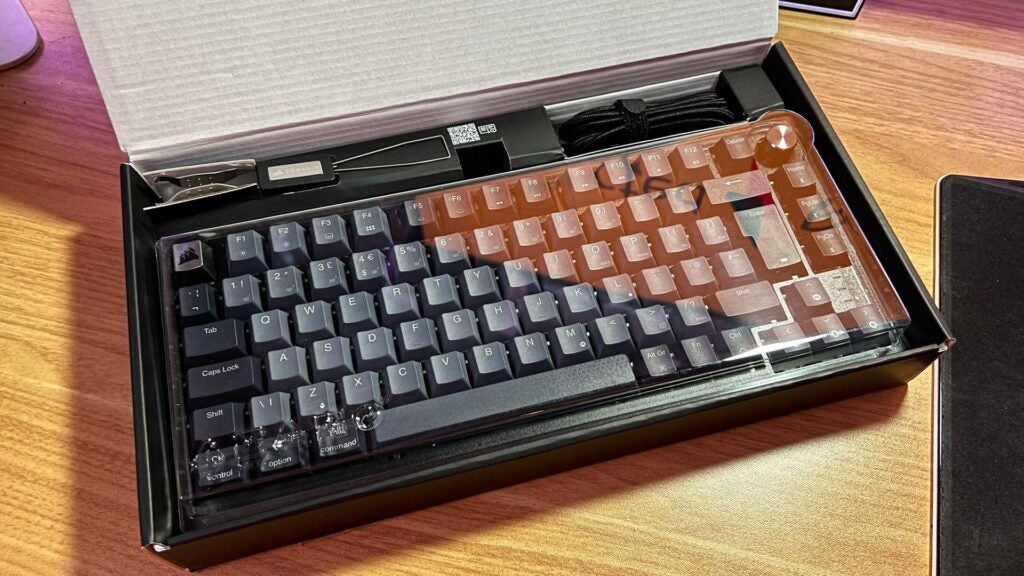
Corsair has been known to take an environmentally conscious approach to its packaging efforts as of late. Outside of using a moulded plastic cover to protect the top of the K65 Plus Wireless, it continues to do well. Every other part of the package is cardboard you can toss straight into the recycling.
With the Corsair K55 Core arriving in branded packaging paper just a few short weeks back, however, it’s a little sad to see plastic return presumably because it’s a more premium product.
You might see a model that swaps the silver ESC key and dial out for a gold option. The online instruction manual is also illustrated with a pure white version. These may be region-specific models, so it’s best to check what’s available in your area.
Performance
- Soft, quiet, and responsive
- Great build quality
- Portable and configurable
Though typically more audible in metal constructs with Brown switches, it’s interesting to see Corsair add sound-dampening foam to the K65 Plus. The included pre-lubricated Linear Red switches will certainly clack without it, and they’re very smooth because of it, but that toy-like hollowness that typically comes with Red switches is subdued by bouncing off this soft surface.
There’s still that slight tactile rattle as the keys wobble under your fingertips when typing at speed. Bottom out and the main keys have a lighter clack while the space bar has a low thud. Connecting via a wire or 2.4Ghz nets you the same 1000Hz polling rate. Switch to Bluetooth while not gaming and you’ll drop to 125Hz and save some juice in the process.
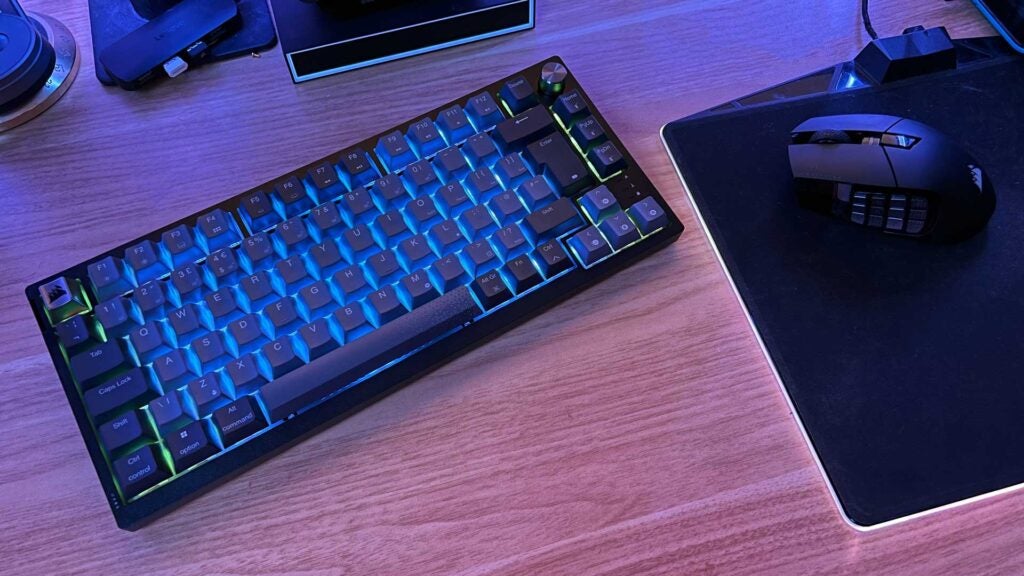
Despite being half-height keycaps, important aspects like travel and actuation distance feel fair at 4mm and 1.,9mm respectively. You can rest your fingers without worry, and you can easily slow down and touch-type your way through an assignment late and night without making too much noise. Every stroke is as smooth as can be. Slow things down and it’s practically silent.
Any louder switch you decide to swap in will be immediately quieter than in most other boards. I doubt Corsair expects many people to change over from the included switches – you’d sooner buy a barebones board from Ducky or Keychron in that case – but it offers a solid, brand-reliable base for those who might be tempted to take the plunge in the future. That’s great.
Being a wireless keyboard, battery life must be strong. At well over 200 hours with lighting turned off, there’s a very slim chance of draining the cell in a match. Keep the lighting low while you’re playing and you shouldn’t struggle to see it last for weeks at a time.
Charging takes a little while at 5-6 hours via USB-C. Just remember to stick the cable in once a week while you get some necessary chores out of the way and it’ll be a non-issue.
Software and Lighting
- Easy lighting manipulation
- Wonderful software suite
- Hardware-level profiles
RGB lighting here is handled on a per-key basis. You can use the Corsair iCUE app and eco-system to carefully unify your whole setup. Not in the mood for intricate tinkering? The Murals feature of the software suite is still a great way to bathe your space in engaging presets with very little effort.
Though the illumination won’t penetrate the keycaps themselves, it’s plenty bright enough to illuminate the legend when needed, seeping through the slim space between each key.
Lighting also appears diffused, making it soft and easy on both your eyes and your setup. Part of this looks to be caused by the textured metal of the deck beneath, with gives it an almost grainy look in person.
Though most won’t need to meddle with the default settings, the iCUE software can be used to toggle things like N-key rollover sensitivity, polling rate (if you want to save some extra energy), and key repeat intervals. Macros and lighting options can be assigned to four hardware profiles to kick in when your PC is off.
Latest deals
Should you buy it?
You want a unique-looking, versatile, and compact keyboard
The Corsair K65 Plus can go wherever and do whatever. And if you decide you want to spice up the feel in the future, you can swap out the switches and keycaps without issue.
You have limited space in your travel bag or want something softer
The black and gold look isn’t for everyone. It’s a dark keyboard. And if your work bag isn’t big, the large keycaps will take up unnecessary space.
Final Thoughts
With various low-latency connectivity options, a great battery, cross-platform compatibility, and sound-dampening foam, there’s little the Corsair K65 Plus isn’t suited to.
It’s a great keyboard to take between home and the office, or a wonderful starting point for a luxury gaming corner. And for those too scared to get into keyboard tinkering straight away, it offers a reliable base for testing the waters in the future.
With half-height keycaps, it’s even perfectly suited to riding in your travel bag. Not convinced? Opt for the truly low-profile Keychron V1 Max or the Roccat Vulcan II Mini Air. And if you want something considerably more heavy as a retro-inspired statement piece, you can’t go wrong with the all-metal, fully customizable Keychron Q1 Max. Just look at our list of the best wireless keyboards if that’s what you’re looking for.
How we test
We use every mouse we test for at least a week. During that time, we’ll check it for ease of use and put it through its paces by playing a variety of different genres, including FPS, strategy and MOBAs.
We also check each mouse’s software to see how easy it is to customise and set up.
Used as a main mouse for over a week
Tested performance on a variety of games
FAQs
Yes, you can use the included puller to remove the switches to clean or replace them with others types.
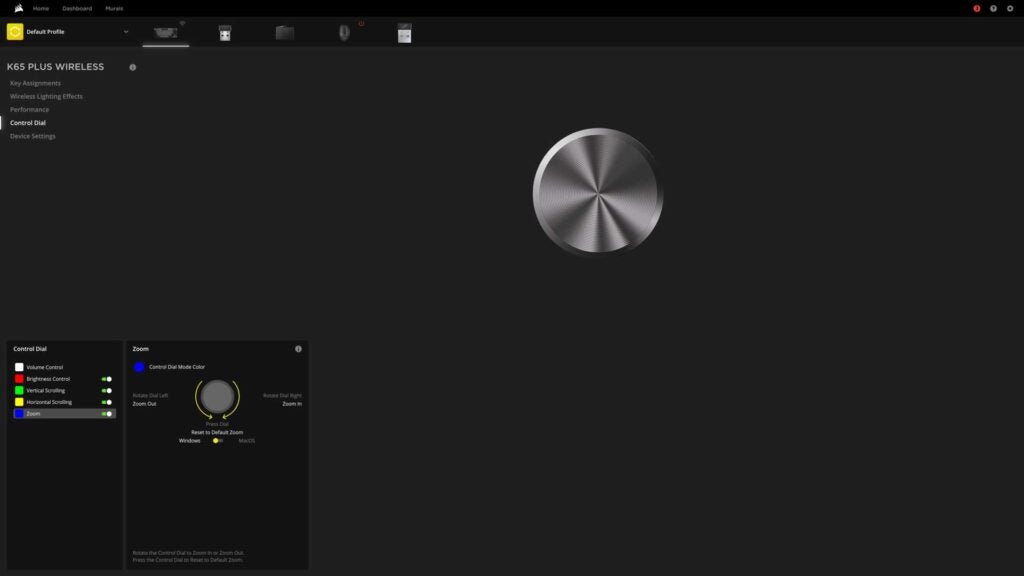
The dial can be changed from volume control to zoom, scroll, or brightness settings.
Not at all. You can switch from the allowed dial presets via keyboard shortcuts.

Verdict
Even with what looks like a steep price tag at first, the Corsair K65 Plus Wireless doesn’t overstep its boundaries. It offers a similar feature set to its rivals, but packs heaps of character while managing to undercut some of the best boards around. Backed by a reliable brand name and an impressive ecosystem, this keyboard can do it all. And it can do it quietly.
Pros
- Dampened keys are a joy
- Great look and feel
- Lots of character and brilliant battery
Cons
- Price is still a bit steep
- No dedicated media keys
-
Dampened mechanical keysA layer of foam softens the feel and sound of each keystroke. -
Control dialThe textured control dial can be used to control volume, brightness, and more. -
Fully wirelessConnected either via USB-C/A, 2.4Ghz, or Bluetooth, its compact size and connectivity options and dual-OS potential make it a viable travel partner.
Introduction
The world of compact keyboards continues to heat up. Starting the year strong with some full-sized offerings at the mid-range and low-end bracket, Corsair is back with the K65 Plus Wireless, a 75% version that offers a relatively unique and classy look with plenty of that signature Corsair style.
The Corsair K65 Plus Wireless is a compact wireless keyboard. That alone won’t help it stand out. The competition is fierce. Under the hood, though, it’s a luxury-looking option with swappable switches and even sound-dampening foam.
If you like your loud and clicky keyboards, its default configuration probably won’t suit you. But if it looks the part on your desk, you can make it work with generous customization efforts. It may not be as ultra-responsive as last year’s 8000Hz Corsair K65 Pro Mini on paper, but it’s easily enough for most.
Design
- Oodles of charm
- Half-height keys
- Classy metallic accents
With a touch of lovely silver accented half-height keycaps and a volume dial along its largely black chassis depending on your configuration, the Corsair K65 Plus is out to appeal to a very specific type of setup.
Beneath those dark grey keycaps is the expected array or RGB illumination, which can theoretically help its unique stylings settle into your current setup with a splash of colour.
There’s even a keyboard command to switch between Windows and MacOS. If you have to bounce between operating systems, at the office, for example, this could become a great travel companion.
Switching between wired, Bluetooth, and low-latency 2.4Ghz is done with a toggle switch on the back left. On the opposite side is another switch for toggling between Windows and MacOS support (or even console), and a cubby hole for the tiny, reliable USB-A wireless receiver.
Together, it’s all startlingly similar to Keychron’s growing lineup of compact wireless offerings. What’s unique, however, is a satisfying microswitch on the left edge used to toggle the backlight.
The thoughtful implementation of the 75% layout keeps most of the sometimes optional keys intact. There’s a dedicated Function row, the arrow keys are as big as they should be, and the necessary three keys of the Home cluster stick around for good measure. Though you’re unlikely to find a battery solution, the two-stage feet might not offer the lift you demand.
Corsair has been known to take an environmentally conscious approach to its packaging efforts as of late. Outside of using a moulded plastic cover to protect the top of the K65 Plus Wireless, it continues to do well. Every other part of the package is cardboard you can toss straight into the recycling.
With the Corsair K55 Core arriving in branded packaging paper just a few short weeks back, however, it’s a little sad to see plastic return presumably because it’s a more premium product.
You might see a model that swaps the silver ESC key and dial out for a gold option. The online instruction manual is also illustrated with a pure white version. These may be region-specific models, so it’s best to check what’s available in your area.
Performance
- Soft, quiet, and responsive
- Great build quality
- Portable and configurable
Though typically more audible in metal constructs with Brown switches, it’s interesting to see Corsair add sound-dampening foam to the K65 Plus. The included pre-lubricated Linear Red switches will certainly clack without it, and they’re very smooth because of it, but that toy-like hollowness that typically comes with Red switches is subdued by bouncing off this soft surface.
There’s still that slight tactile rattle as the keys wobble under your fingertips when typing at speed. Bottom out and the main keys have a lighter clack while the space bar has a low thud. Connecting via a wire or 2.4Ghz nets you the same 1000Hz polling rate. Switch to Bluetooth while not gaming and you’ll drop to 125Hz and save some juice in the process.
Despite being half-height keycaps, important aspects like travel and actuation distance feel fair at 4mm and 1.,9mm respectively. You can rest your fingers without worry, and you can easily slow down and touch-type your way through an assignment late and night without making too much noise. Every stroke is as smooth as can be. Slow things down and it’s practically silent.
Any louder switch you decide to swap in will be immediately quieter than in most other boards. I doubt Corsair expects many people to change over from the included switches – you’d sooner buy a barebones board from Ducky or Keychron in that case – but it offers a solid, brand-reliable base for those who might be tempted to take the plunge in the future. That’s great.
Being a wireless keyboard, battery life must be strong. At well over 200 hours with lighting turned off, there’s a very slim chance of draining the cell in a match. Keep the lighting low while you’re playing and you shouldn’t struggle to see it last for weeks at a time.
Charging takes a little while at 5-6 hours via USB-C. Just remember to stick the cable in once a week while you get some necessary chores out of the way and it’ll be a non-issue.
Software and Lighting
- Easy lighting manipulation
- Wonderful software suite
- Hardware-level profiles
RGB lighting here is handled on a per-key basis. You can use the Corsair iCUE app and eco-system to carefully unify your whole setup. Not in the mood for intricate tinkering? The Murals feature of the software suite is still a great way to bathe your space in engaging presets with very little effort.
Though the illumination won’t penetrate the keycaps themselves, it’s plenty bright enough to illuminate the legend when needed, seeping through the slim space between each key.
Lighting also appears diffused, making it soft and easy on both your eyes and your setup. Part of this looks to be caused by the textured metal of the deck beneath, with gives it an almost grainy look in person.
Though most won’t need to meddle with the default settings, the iCUE software can be used to toggle things like N-key rollover sensitivity, polling rate (if you want to save some extra energy), and key repeat intervals. Macros and lighting options can be assigned to four hardware profiles to kick in when your PC is off.
Latest deals
Should you buy it?
You want a unique-looking, versatile, and compact keyboard
The Corsair K65 Plus can go wherever and do whatever. And if you decide you want to spice up the feel in the future, you can swap out the switches and keycaps without issue.
You have limited space in your travel bag or want something softer
The black and gold look isn’t for everyone. It’s a dark keyboard. And if your work bag isn’t big, the large keycaps will take up unnecessary space.
Final Thoughts
With various low-latency connectivity options, a great battery, cross-platform compatibility, and sound-dampening foam, there’s little the Corsair K65 Plus isn’t suited to.
It’s a great keyboard to take between home and the office, or a wonderful starting point for a luxury gaming corner. And for those too scared to get into keyboard tinkering straight away, it offers a reliable base for testing the waters in the future.
With half-height keycaps, it’s even perfectly suited to riding in your travel bag. Not convinced? Opt for the truly low-profile Keychron V1 Max or the Roccat Vulcan II Mini Air. And if you want something considerably more heavy as a retro-inspired statement piece, you can’t go wrong with the all-metal, fully customizable Keychron Q1 Max. Just look at our list of the best wireless keyboards if that’s what you’re looking for.
How we test
We use every mouse we test for at least a week. During that time, we’ll check it for ease of use and put it through its paces by playing a variety of different genres, including FPS, strategy and MOBAs.
We also check each mouse’s software to see how easy it is to customise and set up.
Used as a main mouse for over a week
Tested performance on a variety of games
FAQs
Yes, you can use the included puller to remove the switches to clean or replace them with others types.
The dial can be changed from volume control to zoom, scroll, or brightness settings.
Not at all. You can switch from the allowed dial presets via keyboard shortcuts.



