







Verdict
Avast Free Antivirus is now called Avast One Essential, but it still supports Windows 7 and 8, so if you’re running an older version of Windows, Avast remains our go-to malware protection.
Pros
- Works on Windows 7 & 8.1
- Very accurate
- Ransomware defence
Cons
- No more effective than Microsoft Defender
-
Per-folder ransomware protectionSelect specific folders to be protected against unauthorised changes -
Gaming modeCeases notifications and CPU-intensive activity when a game or application runs at full screen -
Free VPN:5GB per week free VPN service
Introduction
Avast is a long-standing favourite in the world of free malware defence, and it’s just given its entire product range a refresh. This means that the software formerly known as Avast Free Antivirus is now Avast One Essential. Existing users will automatically be updated to the new branding and interface.
Like stablemate AVG, the brand also offers more feature-packed paid-for subscriptions, which I’ve reviewed, too; but the free version is what Avast is best known for.
Avast was set to be bought by NortonLifeLock, maker of Norton 360 (which also owns rival free-antivirus maker Avira) in spring 2022. However, this has been held up by a UK Competition and Markets Authority inquiry into the potential negative impact of this move on UK consumers.
It’s an important investigation, as the buy-out would mean that three major free antivirus brands – Avast, AVG and Avira – would all be owned by a single company with a core interest in paid-for antivirus. With the sun setting on Bitdefender’s free product and geopolitical concerns currently surrounding the Kaspersky brand, options are starting to look limited for anyone in need of free antivirus that isn’t built into their operating system.
But is Avast One Essential one of the best free antivirus options? Or are you better off with the likes of Microsoft Defender Antivirus instead?
Malware detection performance
- Achieved perfect detection score
- Uses same detection engine as AVG
These tests were carried out on Avast Free Antivirus, but are still valid for Avast One Essential since the core malware detection engine hasn’t changed.
Avast achieved perfect scores in AV-Test’s latest real-world exposure and reference file-scanning tests, with only one false positive. It blocked 99.7% of malicious content in AV Comparatives’ real-world protection tests – the same as Microsoft Defender, with a single false positive.
| Testing facility | AV-TEST | AV Comparatives | SE Labs |
| Real-World Threat Protection | 100% | 99.7% | 97% |
AVG and Avast use the same malware-detection engine, and usually perform identically in detection tests. However, since each was only compromised once in SE Labs’ tests, Avast had to neutralise one virus after infection, while AVG just blocked it. Neutralisation is a less favourable outcome, and the score weighting reflects this in Avast’s 97% protection rating.
Features
- Partially funded by adverts
- Includes malware scanning and real-time protection
Installation is smooth and simple, and you aren’t guilt-tripped about opting for the free version, although an initial scan will detect “advanced issues” that can be solved by getting a premium subscription, even on a freshly-installed PC.
The free version is partially funded by advertising, so you’ll be invited to install partner software such as Google Chrome, but this is easy to decline if you don’t want it. There are no longer prominent ads for the paid version of Avast scattered around the interface, although a number of features are still marked with a lock icon, indicating that they’re only available to premium users.
You’re also encouraged to create an Avast account, but you’re not required to use most of Avast’s features. The core malware protection features of Avast One Essential work without this: on-demand and scheduled malware scanning, real-time protection, ransomware protection, email and web protection, a simple firewall based solely on granting per-app access, a generous 5GB per week free tier on Avast’s VPN service, and a selection of privacy and system optimisation tools.
If you sign into an account, you get limited device management that allows you to track lost or stolen Android devices associated with the account, but there’s nothing you really need here. The VPN – Avast SecureLine – is particularly notable in this context, since 5GB a week with no obligation to create an account is one of the best deals I’ve ever seen – you can’t get this from the standalone VPN at time of review.
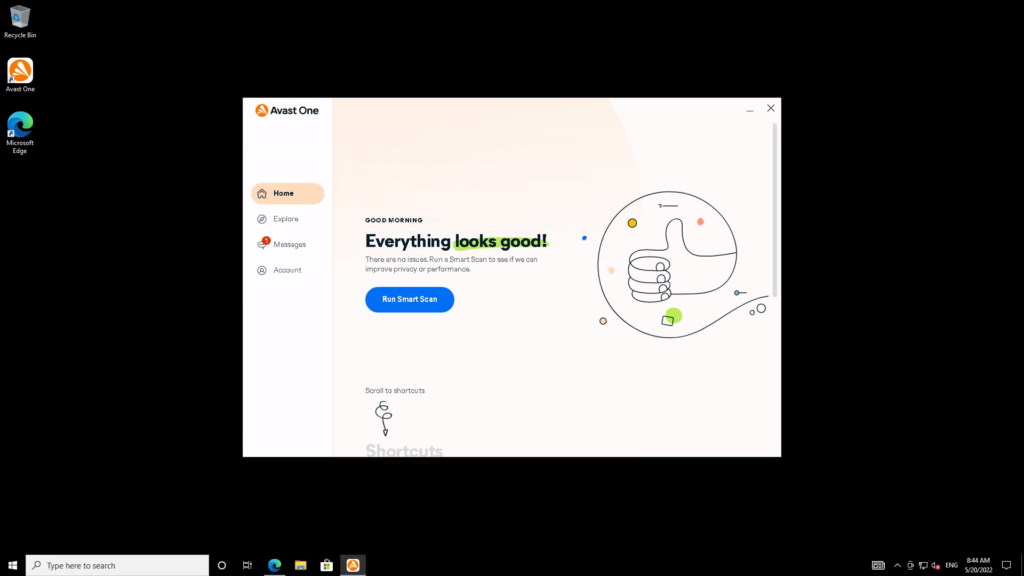
Although its features are fantastic for a free product, and it looks perfectly fine, I’m not entirely impressed by the new Avast One Essential interface. The biggest problem here is the homepage, which either displays alerts or news or, more helpfully, a Run Smart Scan button.
You’d be forgiven for not noticing the squiggly “Scroll to shortcuts” arrow at the bottom, which you have to click or scroll down to get access to a set a features that you might want to have at your fingertips. These include more scan choices, the VPN and system optimisation tools, for example. Although the arrow is later replaced by a frequently-used shortcut, a broader selection of these should really be front and centre on the Home tab.
Literally everything else is crammed into the Explore tab. This is good in that you don’t have to wonder where to find any given feature, but it can feel cluttered. In addition, the grey-on-white text isn’t particularly friendly to those working at the distance from the screen or with impaired vision.
Fortunately, you can still get an overview of Avast’s settings via a button in the Account tab, where you can configure behaviour, notifications, alert sounds and app exceptions and restrictions. If you want to enable silent mode, that can still be done either in Settings or the right-click menu on the notification area icon.
Best Offers
Should you buy it?
If you’re running an older Windows system:
Avast One Essential is the way to go if you want to defend your PC running on either Windows 7 or Windows 8.1.
If you have a modern PC:
Modern Windows 10 and 11 users should probably stick with Microsoft Defender, since Avast’s detection engine showed no improvements on Defender’s performance in recent tests. However, if you detest Defender for any reason, Avast One Essential has an unusually good set of features for a free antivirus suite.
Final Thoughts
Avast One Essential is a welcome refresh of one of the most reliable free antivirus toolkits around. However, it’s no more accurate than Microsoft Defender, so Windows 10 and 11 users should stick to that. But if you’re after effective antivirus for an older system then Avast is a solid choice, since Microsoft no longer supports Windows 7 and 8.1.
How we test
We use every antivirus suite ourselves, so we can check out their various features, from scanning options to integrated extras such as parental controls.
The results we use to assess malware detection performance come from reputable testing houses including AV-Test, AV Comparatives and SE Labs.
We download and use the software ourselves to test the included features
We use data from trusted and approved testing houses to determine the malware detection performance
FAQs
Yes, Avast can remove viruses and prevent malware from effecting your PC in the future.
Avast Free Antivirus uses adverts to make money, while also offering a premium tier with additional features.

Verdict
Avast Free Antivirus is now called Avast One Essential, but it still supports Windows 7 and 8, so if you’re running an older version of Windows, Avast remains our go-to malware protection.
Pros
- Works on Windows 7 & 8.1
- Very accurate
- Ransomware defence
Cons
- No more effective than Microsoft Defender
-
Per-folder ransomware protectionSelect specific folders to be protected against unauthorised changes -
Gaming modeCeases notifications and CPU-intensive activity when a game or application runs at full screen -
Free VPN:5GB per week free VPN service
Introduction
Avast is a long-standing favourite in the world of free malware defence, and it’s just given its entire product range a refresh. This means that the software formerly known as Avast Free Antivirus is now Avast One Essential. Existing users will automatically be updated to the new branding and interface.
Like stablemate AVG, the brand also offers more feature-packed paid-for subscriptions, which I’ve reviewed, too; but the free version is what Avast is best known for.
Avast was set to be bought by NortonLifeLock, maker of Norton 360 (which also owns rival free-antivirus maker Avira) in spring 2022. However, this has been held up by a UK Competition and Markets Authority inquiry into the potential negative impact of this move on UK consumers.
It’s an important investigation, as the buy-out would mean that three major free antivirus brands – Avast, AVG and Avira – would all be owned by a single company with a core interest in paid-for antivirus. With the sun setting on Bitdefender’s free product and geopolitical concerns currently surrounding the Kaspersky brand, options are starting to look limited for anyone in need of free antivirus that isn’t built into their operating system.
But is Avast One Essential one of the best free antivirus options? Or are you better off with the likes of Microsoft Defender Antivirus instead?
Malware detection performance
- Achieved perfect detection score
- Uses same detection engine as AVG
These tests were carried out on Avast Free Antivirus, but are still valid for Avast One Essential since the core malware detection engine hasn’t changed.
Avast achieved perfect scores in AV-Test’s latest real-world exposure and reference file-scanning tests, with only one false positive. It blocked 99.7% of malicious content in AV Comparatives’ real-world protection tests – the same as Microsoft Defender, with a single false positive.
| Testing facility | AV-TEST | AV Comparatives | SE Labs |
| Real-World Threat Protection | 100% | 99.7% | 97% |
AVG and Avast use the same malware-detection engine, and usually perform identically in detection tests. However, since each was only compromised once in SE Labs’ tests, Avast had to neutralise one virus after infection, while AVG just blocked it. Neutralisation is a less favourable outcome, and the score weighting reflects this in Avast’s 97% protection rating.
Features
- Partially funded by adverts
- Includes malware scanning and real-time protection
Installation is smooth and simple, and you aren’t guilt-tripped about opting for the free version, although an initial scan will detect “advanced issues” that can be solved by getting a premium subscription, even on a freshly-installed PC.
The free version is partially funded by advertising, so you’ll be invited to install partner software such as Google Chrome, but this is easy to decline if you don’t want it. There are no longer prominent ads for the paid version of Avast scattered around the interface, although a number of features are still marked with a lock icon, indicating that they’re only available to premium users.
You’re also encouraged to create an Avast account, but you’re not required to use most of Avast’s features. The core malware protection features of Avast One Essential work without this: on-demand and scheduled malware scanning, real-time protection, ransomware protection, email and web protection, a simple firewall based solely on granting per-app access, a generous 5GB per week free tier on Avast’s VPN service, and a selection of privacy and system optimisation tools.
If you sign into an account, you get limited device management that allows you to track lost or stolen Android devices associated with the account, but there’s nothing you really need here. The VPN – Avast SecureLine – is particularly notable in this context, since 5GB a week with no obligation to create an account is one of the best deals I’ve ever seen – you can’t get this from the standalone VPN at time of review.
Although its features are fantastic for a free product, and it looks perfectly fine, I’m not entirely impressed by the new Avast One Essential interface. The biggest problem here is the homepage, which either displays alerts or news or, more helpfully, a Run Smart Scan button.
You’d be forgiven for not noticing the squiggly “Scroll to shortcuts” arrow at the bottom, which you have to click or scroll down to get access to a set a features that you might want to have at your fingertips. These include more scan choices, the VPN and system optimisation tools, for example. Although the arrow is later replaced by a frequently-used shortcut, a broader selection of these should really be front and centre on the Home tab.
Literally everything else is crammed into the Explore tab. This is good in that you don’t have to wonder where to find any given feature, but it can feel cluttered. In addition, the grey-on-white text isn’t particularly friendly to those working at the distance from the screen or with impaired vision.
Fortunately, you can still get an overview of Avast’s settings via a button in the Account tab, where you can configure behaviour, notifications, alert sounds and app exceptions and restrictions. If you want to enable silent mode, that can still be done either in Settings or the right-click menu on the notification area icon.
Best Offers
Should you buy it?
If you’re running an older Windows system:
Avast One Essential is the way to go if you want to defend your PC running on either Windows 7 or Windows 8.1.
If you have a modern PC:
Modern Windows 10 and 11 users should probably stick with Microsoft Defender, since Avast’s detection engine showed no improvements on Defender’s performance in recent tests. However, if you detest Defender for any reason, Avast One Essential has an unusually good set of features for a free antivirus suite.
Final Thoughts
Avast One Essential is a welcome refresh of one of the most reliable free antivirus toolkits around. However, it’s no more accurate than Microsoft Defender, so Windows 10 and 11 users should stick to that. But if you’re after effective antivirus for an older system then Avast is a solid choice, since Microsoft no longer supports Windows 7 and 8.1.
How we test
We use every antivirus suite ourselves, so we can check out their various features, from scanning options to integrated extras such as parental controls.
The results we use to assess malware detection performance come from reputable testing houses including AV-Test, AV Comparatives and SE Labs.
We download and use the software ourselves to test the included features
We use data from trusted and approved testing houses to determine the malware detection performance
FAQs
Yes, Avast can remove viruses and prevent malware from effecting your PC in the future.
Avast Free Antivirus uses adverts to make money, while also offering a premium tier with additional features.



