













Verdict
The Asus Chromebook Plus CX34 is a fantastic Chromebook for the price, with a great port selection, solid performance and a good display, as well as outstanding battery life. Just watch out for its cheaper-feeling construction and finish.
Pros
- Great keyboard and port selection
- Nippy performance
- Solid endurance
Cons
- Cheap-feeling construction
- Basic speakers
-
Long-lasting battery:Its large 50Whr battery is good to last for between one and two days. -
Vast port selection:It also features a fair amount of connectivity options, including USB-A, USB-C and HDMI out. -
Nippy performance:The Chromebook Plus CX34 is powered by an 12th Gen Intel Core i3 processor which offers great relative performance, save for being a bit older than some other options.
Introduction
The introduction of the ‘Chromebook Plus‘ moniker may not seem like the most exciting thing in the world, but options such as this Asus Chromebook Plus CX34 have the potential to be something quite interesting for those in need of a more affordable laptop.
Priced at £429/$429, this mid-range model I’ve got here packs intriguing hardware, including an Intel Core i3-1215U processor, as well as 256GB of UFS storage and 8GB of RAM. Against the likes of the larger-screen Lenovo IdeaPad 5i Chromebook and the tablet-laptop-combo of the HP Chromebook x2 11 that have won plaudits themselves, Asus’ option is competitively priced and well-specced.
I’ve been testing it for the last couple of weeks to see if it can win out as one of the best Chromebooks – let’s take a closer look.
Design and Keyboard
- Somewhat cheap-feeling chassis
- Excellent keyboard and solid trackpad
- Great port selection
With its cheap-feeling plastic chassis, the Asus Chromebook Plus CX34 doesn’t make the best first impression. Its lid features a glossy and smooth-feeling plastic finish which initially didn’t instil me with much confidence. However, things soon changed when I opened the lid and actually took a closer look.
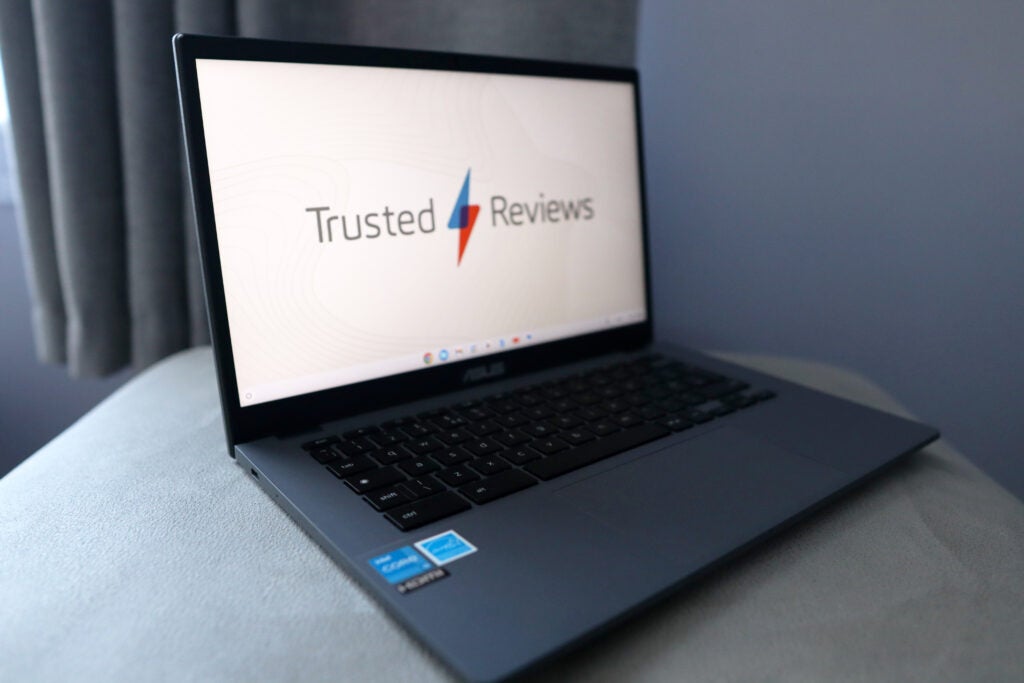
The Asus Chromebook Plus CX34 is a decently well-made laptop, especially when taking the price into account. It’s a good-looking option too, with thin bezels around its 14-inch display, as well as its slender chassis. The grey colourway on offer here also looks decent, although it is also available in white for more of a modern and almost ultrabook-type finish.
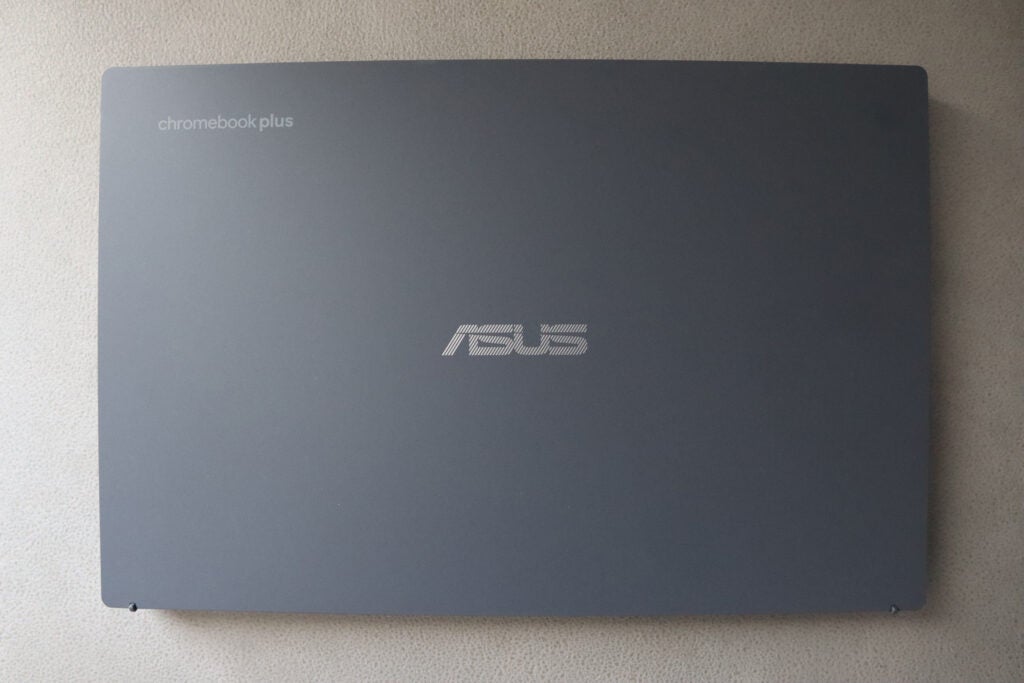
A weight of 1.4kg makes the Asus reasonably hefty for a laptop of its size, although it is easy to sling into a bag and thin enough to not take up too much space. Of course, it isn’t as portable as HP’s convertible option, but you get more of a conventional package here, which may suit some better than a tablet and folio keyboard cover.
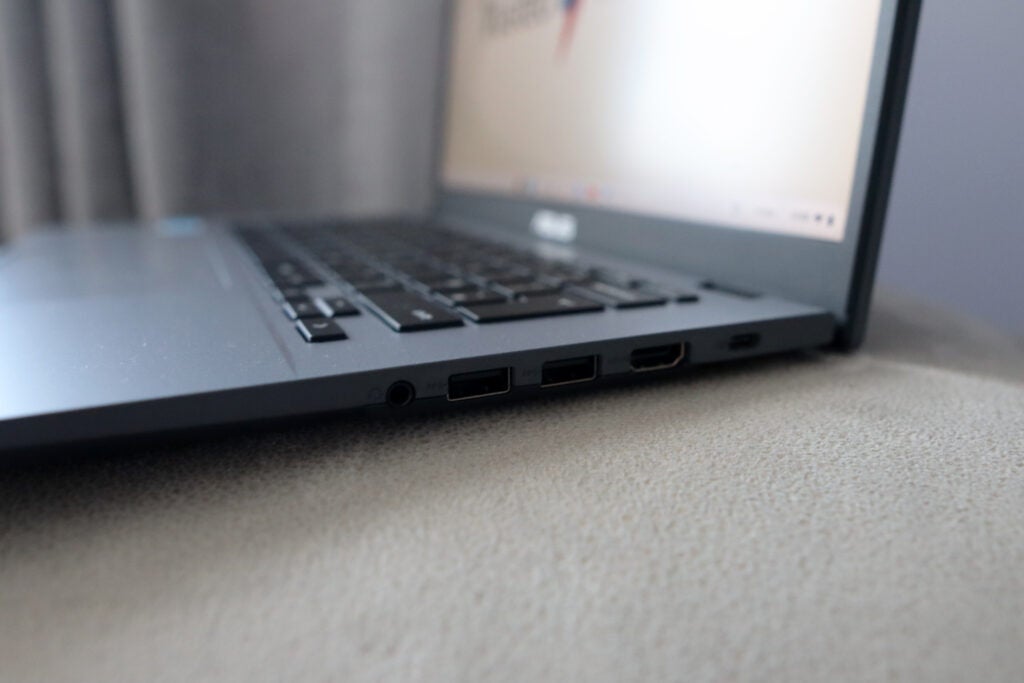
As for its port selection, it’s interesting to note that Asus has bundled pretty much all of them on the one side. The Chromebook Plus CX34’s left-hand side houses a singular USB-C to be used for charging, while the right-hand side features a pair of USB-A ports, an HDMI out, a headphone jack and a secondary USB-C. For a Chromebook of its price, it’s a great offering.
A Full HD webcam is also nestled in the top screen bezel. It features a privacy slider which can be used to block the camera’s sight and prevent any chance of third-party snoopers.
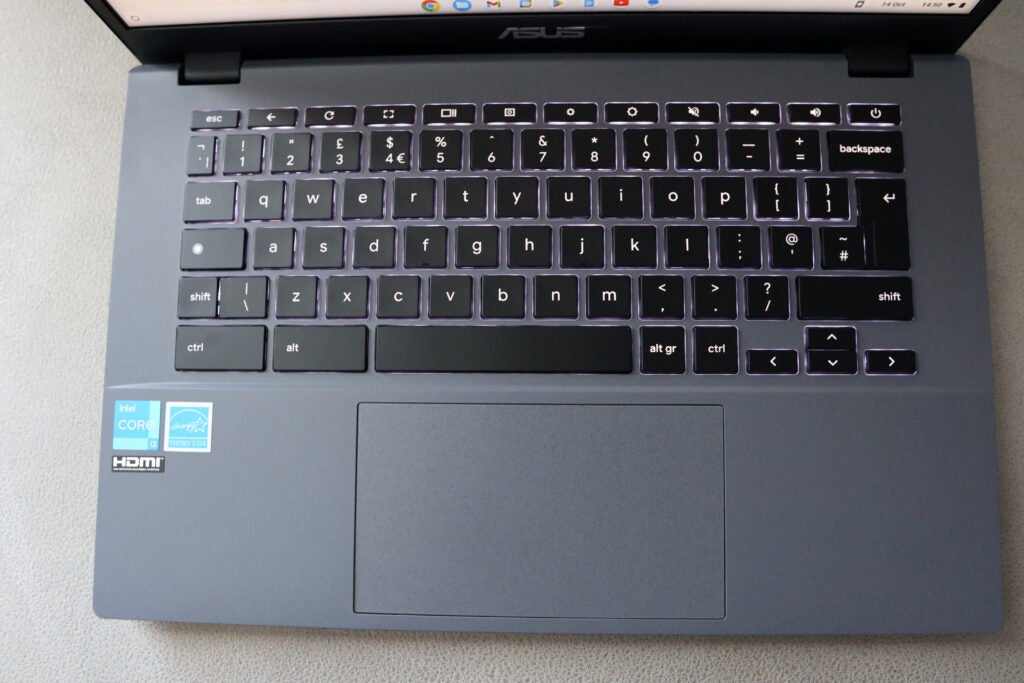
The Asus Chromebook Plus CX34’s keyboard is excellent. It’s tactile and offers good travel, and the more compact layout on offer makes more sense than a lot of other laptops I’ve tested. Its white backlighting is sharp and bright and illuminates the keys well. This is a bigger plus point than you may initially anticipate, as cheaper laptops tend to offer a meagre backlight that barely covers the keys. For a laptop of this size, the trackpad is also reasonably large and provides solid-feeling buttons, although they are a little stiff.
The packaging that this Chromebook comes in is pretty much all made from cardboard and paper, although the only piece of plastic present is on the end of the charging plug. It’s thoughtful packaging too, as when opened is slightly raised to make it easier to get the laptop out.
Display and Sound
- Good detail with okay brightness
- Punchy colours
- Speakers are quite thin-sounding
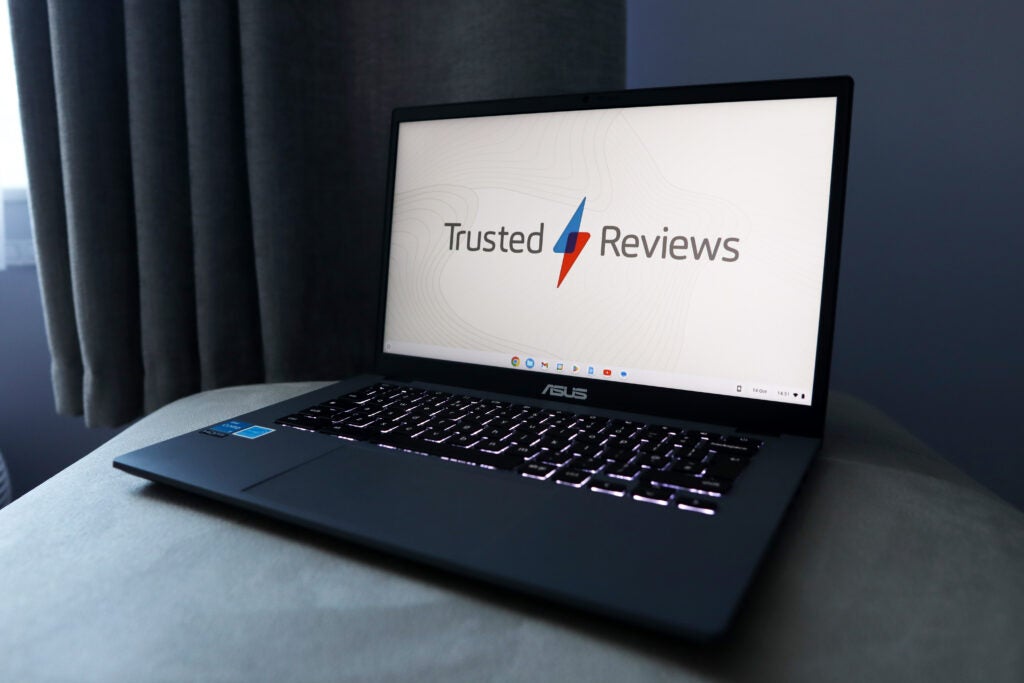
Asus hasn’t decided to spring any surprises in terms of the display. It has stuck with a tried-and-tested 14-inch Full HD IPS panel, which provides the benefit of both a decent resolution and screen size for the productivity workloads that this laptop is designed for.
In day-to-day use, the panel impressed with that combination offering solid detail. The 250 nits of brightness is okay (albeit dimmer than average) for indoor use, and the colours were relatively punchy, thanks to this being an IPS panel. Watching content on Disney+, Amazon Prime and YouTube casually after work suited it well.
The speakers on the Chromebook Plus CX34 offer a decent body and a lot of volume but are a little thin-sounding. The fact they are downwards firing means they’re best suited to being placed on a harder surface such as a desk. They may sound dulled or slightly muffled when on a soft surface, such as a bed.
Performance
- Great processor for day-to-day tasks
- Plenty of headroom for storage and RAM
- ChromeOS gets better with more supported apps
Under the hood, the Asus Chromebook Plus CX34 features solid specs, even if the processor is now two generations old. It’s an Intel Core i3-1215U chip, which features a total of six cores, split between two P-cores and four E-cores, helping to give this Chromebook some great all-round performance.
Both in day-to-day productivity tasks such as writing articles on Google Docs, as well as unwinding with videos after work, and in our synthetic benchmarks tests, the Chromebook Plus CX34 felt nippy and admirably dealt with a load of Chrome tabs being open.
8GB of DDR5 RAM provides some good headroom for some multitasking during my time with the Chromebook Plus CX34, while its 256GB of UFS storage gives a lot more in the way of capacity than similarly-priced choices from recent years. Older models even went as low as 32GB and 64GB, so it’s especially nice to see even bigger options on offer here. The addition of Wi-Fi 6 and Bluetooth 5.2 is also a nice touch, keeping this Chromebook well-supported with modern standards.
Previously, I’d also bemoaned about the lack of compatibility with ChromeOS, but with apps such as Steam and Photoshop making their way over, it makes the switch to a Chromebook a little more appealing. Of course, a Windows laptop will allow you to do a lot more with plenty more apps supported, but it’s nice to see ChromeOS making some headway.
Software
- Magic Eraser is incredible
- Offline File Sync proved helpful
- AI video calling features are convenient
The biggest change with the entire Chromebook Plus lineup, such as the Chromebook Plus CX34, is its noteworthy software touches. The biggest one of these is perhaps the introduction of Magic Eraser. It’s a feature previously exclusive to Pixel phones, which automatically erases things from photos. It works by identifying items in the background, putting a grey outline around them, and then clicking on them to remove them from the image virtually instantly. It’s an incredible piece of kit.
Offline File Sync is more of a handy quality-of-life feature than a life-altering addition, but it’s still useful nonetheless. It automatically downloads files from Google Drive as a background task so you can use them offline. I’ve had this enabled anyways for my own Drive account, and it’s a big help when I’m writing something on Docs and then the Wi-Fi at home goes down, so then I don’t lose the work I was in the middle of.
Enabling it on the Chromebook Plus CX34 is a bit of a faff, requiring you to go through the Advanced settings to turn it on. However, once enabled, it’s something you can simply forget about, and you’ll have all the files you want strewn up in front of you.
Google has also bundled in some convenient AI video calling features designed to improve the overall experience and your own visibility. They’re designed to offer one-click solutions to typical problems people experience when video calling, such as dodgy lighting or background noise. To combat this when you’re on a call, buttons come up at the bottom of the screen: ‘Improve Lighting’ and ‘Cancel Background Noise’. These do exactly as you’d expect, and make a reasonable attempt to improve the quality of your video call. Handily, the features work with Google Meet and Zoom, among others.
At long last, there’s also support for web-based Photoshop, which is a rather watered-down version of Adobe’s creative photo editing suite. It’s still a nice inclusion though, as you get the features that most people, myself included, will use. These include marquee tools and light adjustment, as well as Adobe’s new Contextual Task Bar which provides handy options on what step to do next. The clever AI Generative Fill and Generative Expand tools also make their way over to this browser-based version of Photoshop. These have made headlines recently, and in practice are hit-and-miss with the prompts you provide. It’s not something I can necessarily see myself using day to day.
Battery Life
- Lasted for 11 hours 43 minutes in the battery test
- Capable of lasting between one and two working days
The good times keep rolling for the Chromebook Plus CX34, with some fine endurance. In dialling the brightness down to half and running a video loop test, it lasted for eleven and three-quarters hours or so. This fits in well against the competition and beats Asus’ own claims of up to ten hours quite considerably.
That result was with the keyboard backlighting off, though. Turning that up, as well as the brightness, will cane the battery and make it last for less time. Nonetheless, you should be able to get between one and two days of casual use out of the Chromebook Plus CX34, even if a little bit of hypermiling is required.
Latest deals
Should you buy it?
You want great performance for the price
The Asus Chromebook Plus CX34 impresses with its solid performance for productivity workloads and good spec sheet, which matches Chromebooks that are a bit more expensive.
You want a sleeker-looking device
While the Asus Chromebook Plus CX34 offers a fair bit of power, its chassis feels cheaper than you may expect. If you want something that looks more stylish, check out our Best Chromebook guide.
Final Thoughts
The introduction of the Chromebook Plus range at first to me seemed like a bit of a gimmick. However, using the Asus Chromebook Plus CX34 proves they genuinely are appetising options for those wanting a great all-round Chromebook experience.
The Chromebook Plus CX34 offers a good port selection, with sensible placement, as well as an excellent keyboard with great white backlighting. Its trackpad is also of a decent size, while the display on offer is good enough for day-to-day workloads with reasonable brightness and detail. The battery life on offer is also excellent.
If you’re after a solid all-round conventional Chromebook for a reasonable price, this Asus Chromebook Plus CX34 is an excellent choice for the price. The Lenovo IdeaPad 5i Chromebook offers the same spec sheet, but just with a bigger screen for a lot more, while the likes of the Acer Chromebook Spin 514 (2022) bring 2-in-1 functionality. For more options, check out our Best Chromebook guide
How we test
Every laptop we review goes through a series of uniform checks designed to gauge key things including build quality, performance, screen quality and battery life.
These include formal synthetic benchmarks and scripted tests, plus a series of real-world checks, such as how well it runs popular apps.
We used as our main laptop for at least a week.
Tested the performance via both benchmark tests and real-world use.
We tested the battery with a benchmark test and real-world use.
FAQs
Chromebook Plus is a new range of Chromebooks that Google has introduced which are designed to meet new requirements, including minimum hardware requirements and support for apps such as Photoshop.
No, but the Chromebook Plus CX34 comes with a flip-down hinge so the laptop can lay flat.
Trusted Reviews test data

Verdict
The Asus Chromebook Plus CX34 is a fantastic Chromebook for the price, with a great port selection, solid performance and a good display, as well as outstanding battery life. Just watch out for its cheaper-feeling construction and finish.
Pros
- Great keyboard and port selection
- Nippy performance
- Solid endurance
Cons
- Cheap-feeling construction
- Basic speakers
-
Long-lasting battery:Its large 50Whr battery is good to last for between one and two days. -
Vast port selection:It also features a fair amount of connectivity options, including USB-A, USB-C and HDMI out. -
Nippy performance:The Chromebook Plus CX34 is powered by an 12th Gen Intel Core i3 processor which offers great relative performance, save for being a bit older than some other options.
Introduction
The introduction of the ‘Chromebook Plus‘ moniker may not seem like the most exciting thing in the world, but options such as this Asus Chromebook Plus CX34 have the potential to be something quite interesting for those in need of a more affordable laptop.
Priced at £429/$429, this mid-range model I’ve got here packs intriguing hardware, including an Intel Core i3-1215U processor, as well as 256GB of UFS storage and 8GB of RAM. Against the likes of the larger-screen Lenovo IdeaPad 5i Chromebook and the tablet-laptop-combo of the HP Chromebook x2 11 that have won plaudits themselves, Asus’ option is competitively priced and well-specced.
I’ve been testing it for the last couple of weeks to see if it can win out as one of the best Chromebooks – let’s take a closer look.
Design and Keyboard
- Somewhat cheap-feeling chassis
- Excellent keyboard and solid trackpad
- Great port selection
With its cheap-feeling plastic chassis, the Asus Chromebook Plus CX34 doesn’t make the best first impression. Its lid features a glossy and smooth-feeling plastic finish which initially didn’t instil me with much confidence. However, things soon changed when I opened the lid and actually took a closer look.
The Asus Chromebook Plus CX34 is a decently well-made laptop, especially when taking the price into account. It’s a good-looking option too, with thin bezels around its 14-inch display, as well as its slender chassis. The grey colourway on offer here also looks decent, although it is also available in white for more of a modern and almost ultrabook-type finish.
A weight of 1.4kg makes the Asus reasonably hefty for a laptop of its size, although it is easy to sling into a bag and thin enough to not take up too much space. Of course, it isn’t as portable as HP’s convertible option, but you get more of a conventional package here, which may suit some better than a tablet and folio keyboard cover.
As for its port selection, it’s interesting to note that Asus has bundled pretty much all of them on the one side. The Chromebook Plus CX34’s left-hand side houses a singular USB-C to be used for charging, while the right-hand side features a pair of USB-A ports, an HDMI out, a headphone jack and a secondary USB-C. For a Chromebook of its price, it’s a great offering.
A Full HD webcam is also nestled in the top screen bezel. It features a privacy slider which can be used to block the camera’s sight and prevent any chance of third-party snoopers.
The Asus Chromebook Plus CX34’s keyboard is excellent. It’s tactile and offers good travel, and the more compact layout on offer makes more sense than a lot of other laptops I’ve tested. Its white backlighting is sharp and bright and illuminates the keys well. This is a bigger plus point than you may initially anticipate, as cheaper laptops tend to offer a meagre backlight that barely covers the keys. For a laptop of this size, the trackpad is also reasonably large and provides solid-feeling buttons, although they are a little stiff.
The packaging that this Chromebook comes in is pretty much all made from cardboard and paper, although the only piece of plastic present is on the end of the charging plug. It’s thoughtful packaging too, as when opened is slightly raised to make it easier to get the laptop out.
Display and Sound
- Good detail with okay brightness
- Punchy colours
- Speakers are quite thin-sounding
Asus hasn’t decided to spring any surprises in terms of the display. It has stuck with a tried-and-tested 14-inch Full HD IPS panel, which provides the benefit of both a decent resolution and screen size for the productivity workloads that this laptop is designed for.
In day-to-day use, the panel impressed with that combination offering solid detail. The 250 nits of brightness is okay (albeit dimmer than average) for indoor use, and the colours were relatively punchy, thanks to this being an IPS panel. Watching content on Disney+, Amazon Prime and YouTube casually after work suited it well.
The speakers on the Chromebook Plus CX34 offer a decent body and a lot of volume but are a little thin-sounding. The fact they are downwards firing means they’re best suited to being placed on a harder surface such as a desk. They may sound dulled or slightly muffled when on a soft surface, such as a bed.
Performance
- Great processor for day-to-day tasks
- Plenty of headroom for storage and RAM
- ChromeOS gets better with more supported apps
Under the hood, the Asus Chromebook Plus CX34 features solid specs, even if the processor is now two generations old. It’s an Intel Core i3-1215U chip, which features a total of six cores, split between two P-cores and four E-cores, helping to give this Chromebook some great all-round performance.
Both in day-to-day productivity tasks such as writing articles on Google Docs, as well as unwinding with videos after work, and in our synthetic benchmarks tests, the Chromebook Plus CX34 felt nippy and admirably dealt with a load of Chrome tabs being open.
8GB of DDR5 RAM provides some good headroom for some multitasking during my time with the Chromebook Plus CX34, while its 256GB of UFS storage gives a lot more in the way of capacity than similarly-priced choices from recent years. Older models even went as low as 32GB and 64GB, so it’s especially nice to see even bigger options on offer here. The addition of Wi-Fi 6 and Bluetooth 5.2 is also a nice touch, keeping this Chromebook well-supported with modern standards.
Previously, I’d also bemoaned about the lack of compatibility with ChromeOS, but with apps such as Steam and Photoshop making their way over, it makes the switch to a Chromebook a little more appealing. Of course, a Windows laptop will allow you to do a lot more with plenty more apps supported, but it’s nice to see ChromeOS making some headway.
Software
- Magic Eraser is incredible
- Offline File Sync proved helpful
- AI video calling features are convenient
The biggest change with the entire Chromebook Plus lineup, such as the Chromebook Plus CX34, is its noteworthy software touches. The biggest one of these is perhaps the introduction of Magic Eraser. It’s a feature previously exclusive to Pixel phones, which automatically erases things from photos. It works by identifying items in the background, putting a grey outline around them, and then clicking on them to remove them from the image virtually instantly. It’s an incredible piece of kit.
Offline File Sync is more of a handy quality-of-life feature than a life-altering addition, but it’s still useful nonetheless. It automatically downloads files from Google Drive as a background task so you can use them offline. I’ve had this enabled anyways for my own Drive account, and it’s a big help when I’m writing something on Docs and then the Wi-Fi at home goes down, so then I don’t lose the work I was in the middle of.
Enabling it on the Chromebook Plus CX34 is a bit of a faff, requiring you to go through the Advanced settings to turn it on. However, once enabled, it’s something you can simply forget about, and you’ll have all the files you want strewn up in front of you.
Google has also bundled in some convenient AI video calling features designed to improve the overall experience and your own visibility. They’re designed to offer one-click solutions to typical problems people experience when video calling, such as dodgy lighting or background noise. To combat this when you’re on a call, buttons come up at the bottom of the screen: ‘Improve Lighting’ and ‘Cancel Background Noise’. These do exactly as you’d expect, and make a reasonable attempt to improve the quality of your video call. Handily, the features work with Google Meet and Zoom, among others.
At long last, there’s also support for web-based Photoshop, which is a rather watered-down version of Adobe’s creative photo editing suite. It’s still a nice inclusion though, as you get the features that most people, myself included, will use. These include marquee tools and light adjustment, as well as Adobe’s new Contextual Task Bar which provides handy options on what step to do next. The clever AI Generative Fill and Generative Expand tools also make their way over to this browser-based version of Photoshop. These have made headlines recently, and in practice are hit-and-miss with the prompts you provide. It’s not something I can necessarily see myself using day to day.
Battery Life
- Lasted for 11 hours 43 minutes in the battery test
- Capable of lasting between one and two working days
The good times keep rolling for the Chromebook Plus CX34, with some fine endurance. In dialling the brightness down to half and running a video loop test, it lasted for eleven and three-quarters hours or so. This fits in well against the competition and beats Asus’ own claims of up to ten hours quite considerably.
That result was with the keyboard backlighting off, though. Turning that up, as well as the brightness, will cane the battery and make it last for less time. Nonetheless, you should be able to get between one and two days of casual use out of the Chromebook Plus CX34, even if a little bit of hypermiling is required.
Latest deals
Should you buy it?
You want great performance for the price
The Asus Chromebook Plus CX34 impresses with its solid performance for productivity workloads and good spec sheet, which matches Chromebooks that are a bit more expensive.
You want a sleeker-looking device
While the Asus Chromebook Plus CX34 offers a fair bit of power, its chassis feels cheaper than you may expect. If you want something that looks more stylish, check out our Best Chromebook guide.
Final Thoughts
The introduction of the Chromebook Plus range at first to me seemed like a bit of a gimmick. However, using the Asus Chromebook Plus CX34 proves they genuinely are appetising options for those wanting a great all-round Chromebook experience.
The Chromebook Plus CX34 offers a good port selection, with sensible placement, as well as an excellent keyboard with great white backlighting. Its trackpad is also of a decent size, while the display on offer is good enough for day-to-day workloads with reasonable brightness and detail. The battery life on offer is also excellent.
If you’re after a solid all-round conventional Chromebook for a reasonable price, this Asus Chromebook Plus CX34 is an excellent choice for the price. The Lenovo IdeaPad 5i Chromebook offers the same spec sheet, but just with a bigger screen for a lot more, while the likes of the Acer Chromebook Spin 514 (2022) bring 2-in-1 functionality. For more options, check out our Best Chromebook guide
How we test
Every laptop we review goes through a series of uniform checks designed to gauge key things including build quality, performance, screen quality and battery life.
These include formal synthetic benchmarks and scripted tests, plus a series of real-world checks, such as how well it runs popular apps.
We used as our main laptop for at least a week.
Tested the performance via both benchmark tests and real-world use.
We tested the battery with a benchmark test and real-world use.
FAQs
Chromebook Plus is a new range of Chromebooks that Google has introduced which are designed to meet new requirements, including minimum hardware requirements and support for apps such as Photoshop.
No, but the Chromebook Plus CX34 comes with a flip-down hinge so the laptop can lay flat.



