
• Washington DC |
  • New York |
  • Toronto |
  • Distribution: (800) 510 9863
Monday, April 27, 2026
  • Login
No Result
View All Result
NEWSLETTER
New Edge Times
  • World
  • U.S.
  • Politics
  • Business
  • Science
  • Tech
  • Youth
  • Entertainment
    • All
    • Arts
    • Gaming
    • Movie
    • Music
    Video: Poetry Month Reading Recommendations

    Video: Poetry Month Reading Recommendations

    Saudis Withdraw Offer of Millions to Metropolitan Opera

    Saudis Withdraw Offer of Millions to Metropolitan Opera

    Joy Harmon, Car-Washing Temptress in ‘Cool Hand Luke,’ Dies at 87

    Joy Harmon, Car-Washing Temptress in ‘Cool Hand Luke,’ Dies at 87

    D4vd Murder Case: Celeste Rivas Hernandez’s Cause of Death Is Revealed

    D4vd Murder Case: Celeste Rivas Hernandez’s Cause of Death Is Revealed

    ‘Michael’ Review: A Jackson Biopic Leaves Too Much Unsaid

    ‘Michael’ Review: A Jackson Biopic Leaves Too Much Unsaid

    Video: Anne Hathaway and Michaela Coel in a Spooky, Tangled Thriller

    Video: Anne Hathaway and Michaela Coel in a Spooky, Tangled Thriller

    Video: Movie Review: You, Me & Tuscany

    Video: Movie Review: You, Me & Tuscany

    Josefina Aguilar, Who Depicted Mexican Life in Clay, Dies at 80

    Josefina Aguilar, Who Depicted Mexican Life in Clay, Dies at 80

    • Gaming
    • Movie
    • Music
    • Arts
  • Sports
  • Lifestyle
    • All
    • Fashion
    • Food
    • Health
    • Travel
    Help, My C.S.A. Sent Me a Boatload of Chard

    Help, My C.S.A. Sent Me a Boatload of Chard

    This Easy Fish Is a Gift to You and Your Guests

    This Easy Fish Is a Gift to You and Your Guests

    New Phishing Scam: Fake Invitations

    New Phishing Scam: Fake Invitations

    A Four-Ingredient Cookie That’s Tender and Crunchy

    A Four-Ingredient Cookie That’s Tender and Crunchy

    This Beef Patty Holds Many Secrets

    This Beef Patty Holds Many Secrets

    An expert talks: the best the best dental care for dog

    An expert talks: the best the best dental care for dog

    Video: Designer Fashion Hits the 2026 WNBA Draft

    Video: Designer Fashion Hits the 2026 WNBA Draft

    Video: The New Aesthetic of ‘Euphoria’

    Video: The New Aesthetic of ‘Euphoria’

    • Fashion
    • Food
    • Health
    • Travel
  • Reviews
  • Trending
  • World
  • U.S.
  • Politics
  • Business
  • Science
  • Tech
  • Youth
  • Entertainment
    • All
    • Arts
    • Gaming
    • Movie
    • Music
    Video: Poetry Month Reading Recommendations

    Video: Poetry Month Reading Recommendations

    Saudis Withdraw Offer of Millions to Metropolitan Opera

    Saudis Withdraw Offer of Millions to Metropolitan Opera

    Joy Harmon, Car-Washing Temptress in ‘Cool Hand Luke,’ Dies at 87

    Joy Harmon, Car-Washing Temptress in ‘Cool Hand Luke,’ Dies at 87

    D4vd Murder Case: Celeste Rivas Hernandez’s Cause of Death Is Revealed

    D4vd Murder Case: Celeste Rivas Hernandez’s Cause of Death Is Revealed

    ‘Michael’ Review: A Jackson Biopic Leaves Too Much Unsaid

    ‘Michael’ Review: A Jackson Biopic Leaves Too Much Unsaid

    Video: Anne Hathaway and Michaela Coel in a Spooky, Tangled Thriller

    Video: Anne Hathaway and Michaela Coel in a Spooky, Tangled Thriller

    Video: Movie Review: You, Me & Tuscany

    Video: Movie Review: You, Me & Tuscany

    Josefina Aguilar, Who Depicted Mexican Life in Clay, Dies at 80

    Josefina Aguilar, Who Depicted Mexican Life in Clay, Dies at 80

    • Gaming
    • Movie
    • Music
    • Arts
  • Sports
  • Lifestyle
    • All
    • Fashion
    • Food
    • Health
    • Travel
    Help, My C.S.A. Sent Me a Boatload of Chard

    Help, My C.S.A. Sent Me a Boatload of Chard

    This Easy Fish Is a Gift to You and Your Guests

    This Easy Fish Is a Gift to You and Your Guests

    New Phishing Scam: Fake Invitations

    New Phishing Scam: Fake Invitations

    A Four-Ingredient Cookie That’s Tender and Crunchy

    A Four-Ingredient Cookie That’s Tender and Crunchy

    This Beef Patty Holds Many Secrets

    This Beef Patty Holds Many Secrets

    An expert talks: the best the best dental care for dog

    An expert talks: the best the best dental care for dog

    Video: Designer Fashion Hits the 2026 WNBA Draft

    Video: Designer Fashion Hits the 2026 WNBA Draft

    Video: The New Aesthetic of ‘Euphoria’

    Video: The New Aesthetic of ‘Euphoria’

    • Fashion
    • Food
    • Health
    • Travel
  • Reviews
  • Trending
No Result
View All Result
New Edge Times
No Result
View All Result
Home Reviews

HP LaserJet Pro MFP 3102fdwe

by New Edge Times Report
October 27, 2023
in Reviews
HP LaserJet Pro MFP 3102fdwe
Share on FacebookShare on Twitter

Verdict

HP’s LaserJet Pro MFP 3102fdwe is a compact and rapid multifunction full of useful small office features. It delivers great prints, scans and copies, and is generally pretty easy to use. However, it’s not especially cheap for a mono MFP, and it doesn’t make up for it with low running costs. As with other HP printers denoted by an ‘e’, it will only work with an internet connection and HP’s own consumables. That makes it hard for us to recommend it.

Pros

  • Neat, compact and easy to use
  • Great print and copy quality, good scans
  • Fast performer

Cons

  • You have to sign up to HP+
  • Not especially cheap to run
  • Need an internet connection


  • A four-in-one wireless MFPThe MFP 3102fdwe can print, copy, and fax in grey, and scan in full colour

  • Supports a toner subscriptionToner subscriptions can reduce the hassle of keeping this printer in action

Introduction

HP’s LaserJet Pro MFP 3102fdwe is a reasonably well-specified laser multifunction peripheral (MFP), designed for small and home offices. It’s a mono device, so it can only print, copy or receive mono faxes, but its scanner operates in full colour.

This MFP supports both wired and wireless network connections. You can also use it to print from, or scan to, any USB drive inserted in a slot just in front of the colour touchscreen. It’s built to cope with regular use, with HP recommending a monthly print volume of up to 2,500 pages. It’s fast, with a 33 pages per minute (ppm) speed rating.

Like all current HP printers ending with an ‘e’, the 3102fdwe is an HP+ device. This means it must be registered on the HP+ service, that it won’t function unless it’s connected to the internet, and that you can only use it with genuine HP supplies. The printer comes with a pre-installed black cartridge, rated for around 1,000 pages.

Design and Features

  • Compact and smart
  • Mostly easy to use
  • HP+ limitations could be annoying

Mono laser MFPs aren’t known for their looks, but there’s not much wrong with the LaserJet Pro MFP 3102fdwe in this department. It’s fairly squat and made from tasteful white and dark grey plastics. At the front left of the top panel, a 6.9cm colour touchscreen offers direct control over copies and features such as USB prints and scans. It’s an easy screen to use, although with copies in particular it often feels as though operations take one or two more taps than ideal.
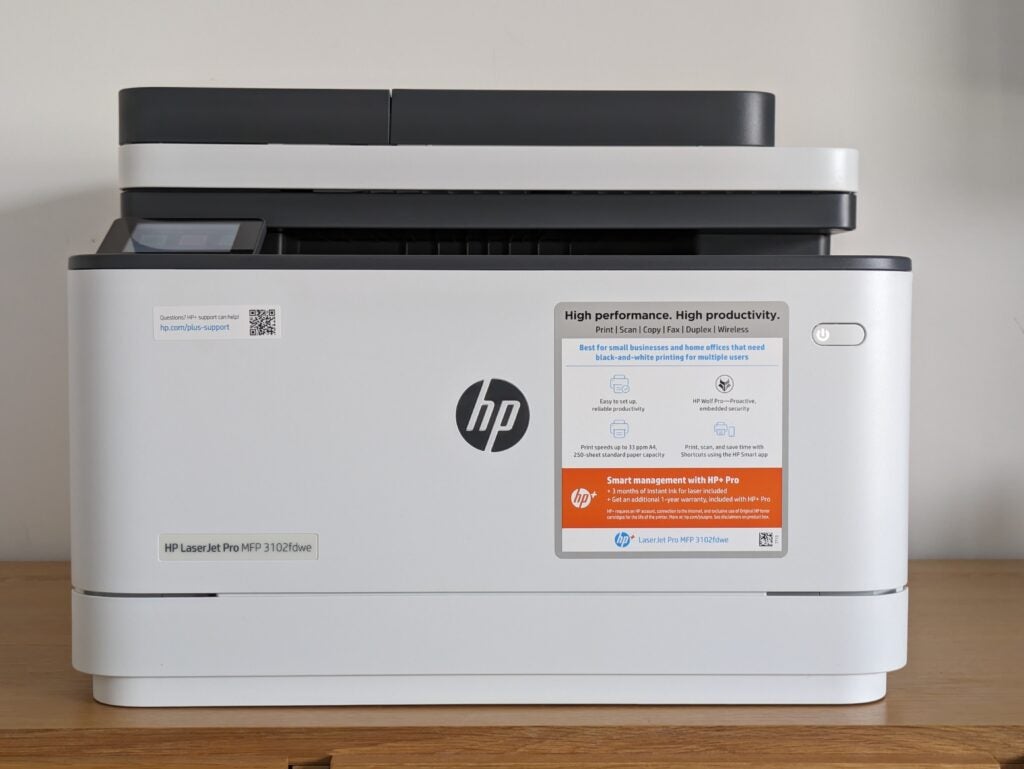
MFP photographed directly from the front
Image Credit (Trusted Reviews)

Squatting low above the printer’s 150-sheet paper output, the scanner is fitted with a 50-sheet automatic document feeder (ADF). This pulls through multi-page documents, letting you fax or copy them without shuffling paper around, but it’s a shame it doesn’t support duplex (double-sided) scanning. You can also lift the ADF to use the scan platen, which is flush with its plastic surround – this makes it much easier to retrieve originals after you’ve scanned them.
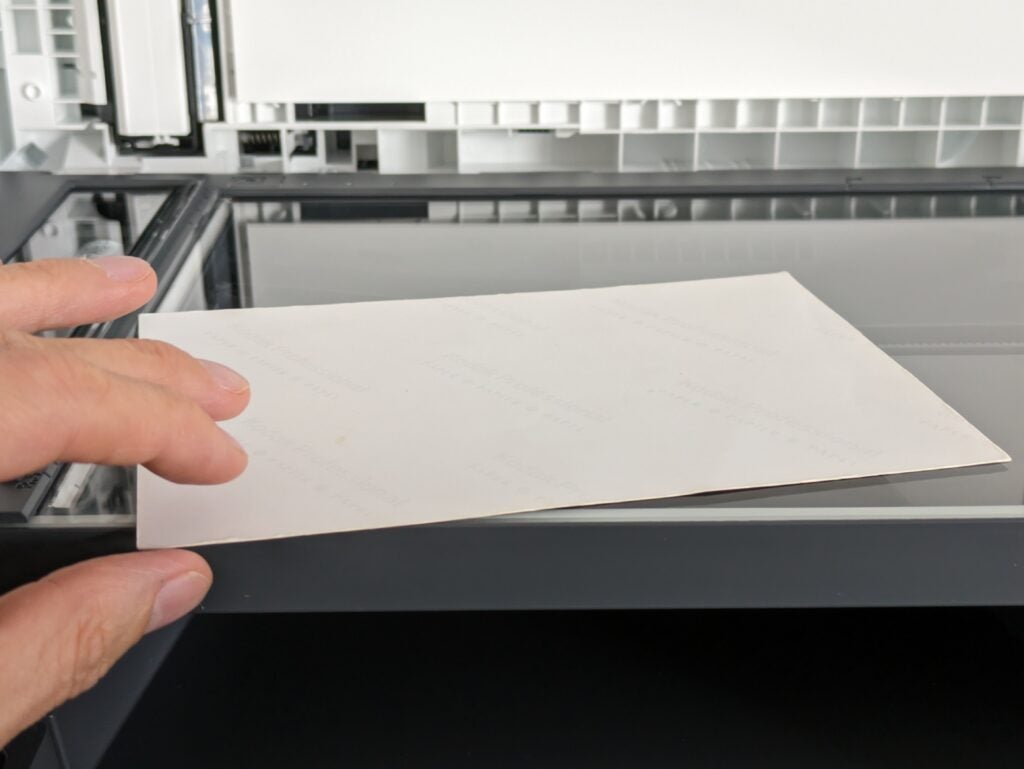
HP LaserJet Pro MFP 3102fdwe post-scan
Image Credit (Trusted Reviews)

In the printer’s base, there’s a fully enclosed 250-sheet paper cassette, but there’s no bypass or multipurpose feed. If you want to print headed paper or special media, you’ll need to load it in the cassette, which is a bit of an inconvenience.

This, and the lack of duplex scanning, are probably the only slight letdowns. The printer itself does offer a duplex, which is essential to saving paper and producing professional-looking reports and printouts.

Like most printer manufacturers, HP has stopped shipping drivers with its products, instead pointing customers at an online setup process. This seems more complex than necessary, with the freshly switched-on printer displaying a pairing code which you then need to enter online. With this done, you need to sign up for HP+ and agree to its terms before HP will let you set up your printer.
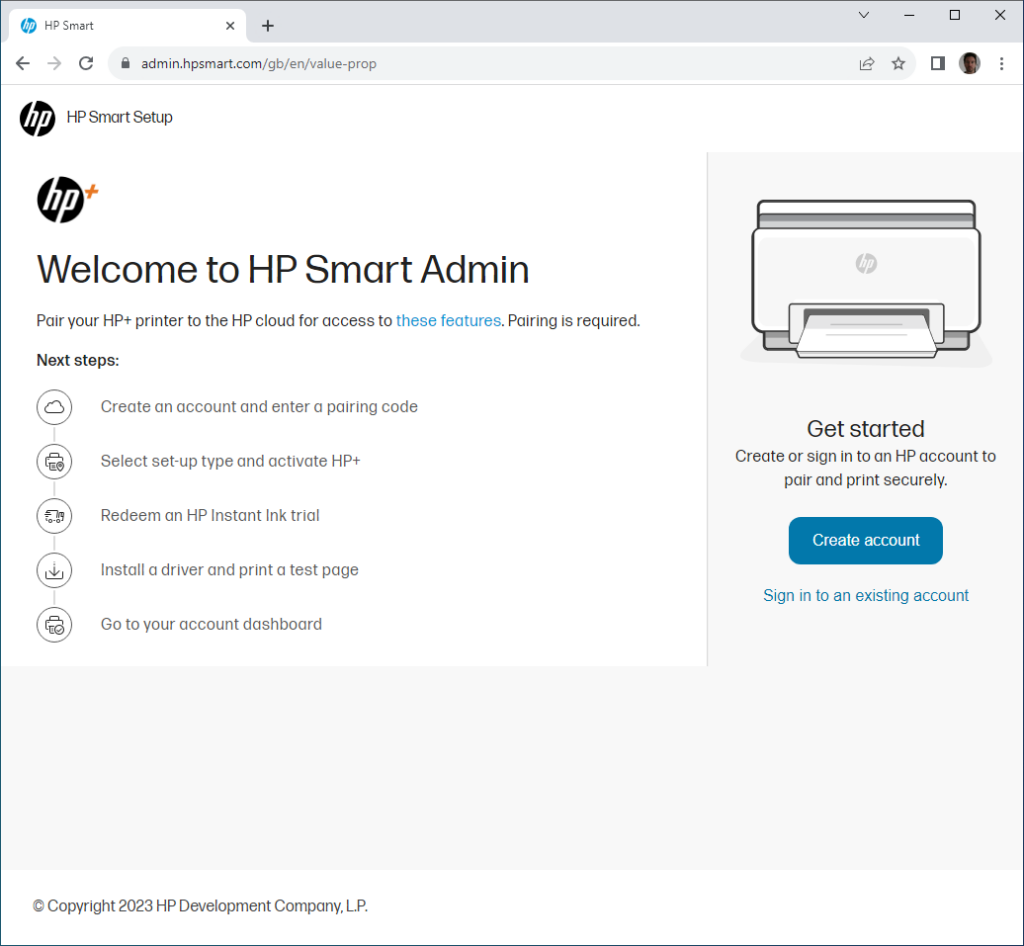
Screenshot of the activation process
Image Credit (Trusted Reviews)

Personally, I’m unconvinced by the need for HP+ printers, which require that you sign up for the service, register them, and agree only to use HP consumables for the life of the printer. Thereafter, the device will only work while it has an internet connection – even if you connect to it via USB.

This seems like an unnecessary complication, particularly given that it’ll render your printer useless whenever your internet connection goes down. The requirement for genuine HP supplies could have other implications for users: during my testing, the 3102fdwe warned me that the (genuine) inserted supplies weren’t communicating with the printer, and it refused to print. The message cleared when I removed and reinserted the toner, but printers can be annoying enough for users without imposing additional hurdles.
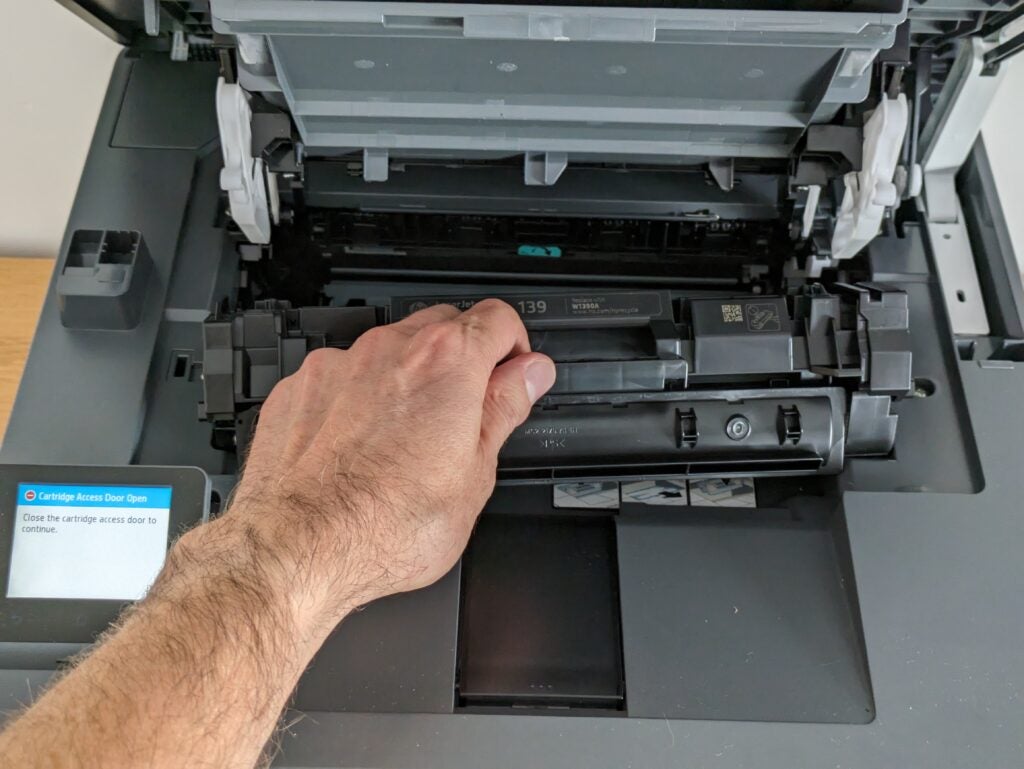
Photo of the toner cartridge being reinserted
Image Credit (Trusted Reviews)

Fortunately, there is a non-HP+ alternative, the MFP 3102fdw, which is otherwise identical. With both devices, you can choose whether to sign up for Instant Ink or buy consumables yourself.

Print Speed and Quality

  • Fast at everything, except high-resolution scans
  • Strong print, scan and copy quality
  • Unimpressive running costs

In use, this is mostly an impressive MFP. While some laser printers impose a warm-up time if you haven’t used them for a while, the MFP 3102fdwe sprung into life to deliver a first page in as little as nine seconds, regardless of how long it had been idle. Like other printers, its print speeds were dependent on the type of job. Longer documents require a longer job preparation, so the first page took 34 seconds in our 20-page standard test, and the MFP 3102fdwe peaked at only 7.3ppm. Switching to a different test in which we repeat a single page 25 times, it peaked at a much more impressive 27.8 ppm.

Complex graphics usually slow printers down, but our single-page graphics test cut the preparation time, giving a best result of 25ppm over 20 pages. Tested with a more complex, multi-page document, this dropped to 16ppm – still a decent result.
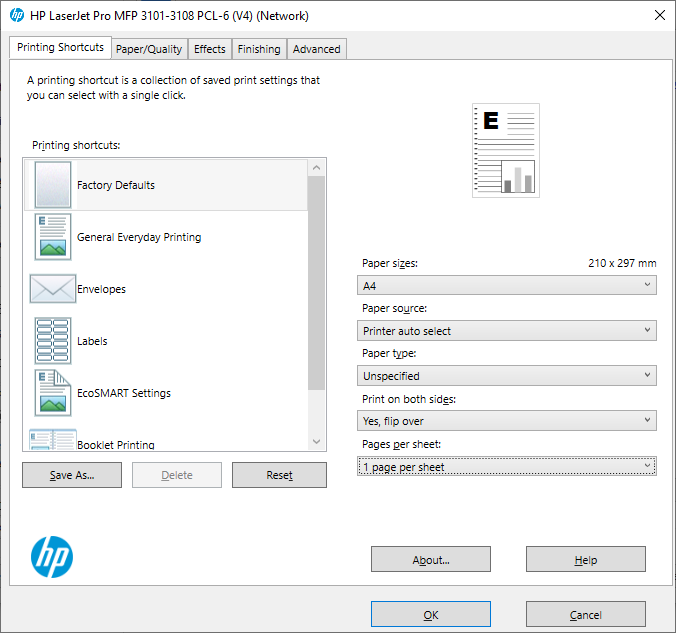
Screenshot of the print driver options
Image Credit (Trusted Reviews)

The LaserJet Pro MFP 3102fdwe has a fast scanner when working at low resolutions suitable for archiving and copying office documents. It could capture an A4 page at 150 dots per inch (dpi) in nine seconds, needing just 20 seconds at 300 dpi. Only at the maximum 1,200 dpi was it less impressive, needing a minute and 40 seconds to finish scanning a 10x15cm photograph.

This MFP combines quick scanning and printing to race through photocopies. It finished a single mono copy in 16 seconds and could complete 10 single-sided pages in an impressive 37 seconds.

Happily, this nippy performance didn’t come at the cost of quality. All of our test prints were excellent by the standards of a mono laser. The text was bold and very crisp, as you’d expect, but mono graphics and photographs were surprisingly detailed and mercifully free of the banding you often get from cheaper laser printers. This great quality extended to photocopies, which were near-perfectly exposed, with no resulting loss of detail in light or dark areas.

While HP’s scan interface feels a little overblown, I have few complaints about this MFP’s scan quality. Document scans were again excellent. At higher resolutions, the picture was a little more mixed. The Auto Exposure feature tended to over-expose the lightest shades in photos, but with it off the results were very good. However, viewed at 100% zoom I could see evidence of digital processing, which could leave the results looking odd and artificial.
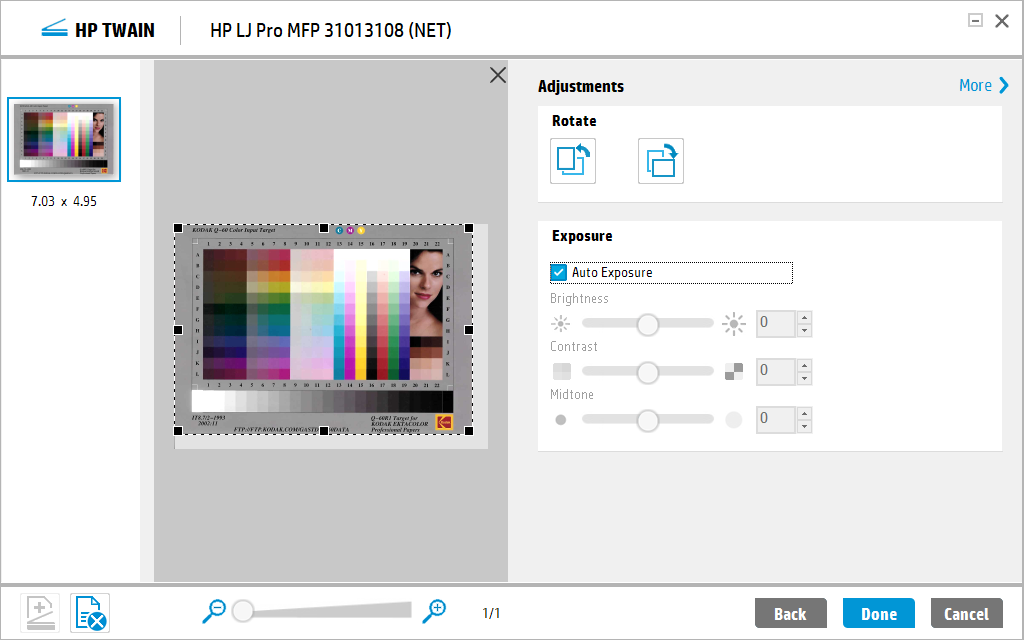
Screenshot of the scan driver
Image Credit (Trusted Reviews)

Buy your own consumables, stick to the high-capacity toner that lasts for 4,000 pages, and you’ll pay around 2.5p per page to print. That’s not especially competitive for a mono printer in this class, but it’s not outrageous. Alternatively, you can sign up to HP’s Instant Ink service (which is separate from HP+), and choose from toner plans covering 50-800 pages per month.

For inkjets and colour lasers, these often work out better value, provided you print at or near the relevant monthly volume, but they work less well for a mono laser. At 2.25p per page, only the £18-per-month top tier offers any saving over buying your own toner, although it does cut down the hassle of shopping for supplies.

Like all laser printers, the MFP 3102fdwe has comparatively high peak power use – I measured 872 Watts while copying. This is a result of heating up the fuser, which bonds the toner to the page, but it’s more typical to see a consumption of around 200W when printing. I measured 5W of standby power use, dropping to just 1W in sleep mode – which is where printers spend most of their time.

Latest deals

Should you buy it?

If you want a small office all-rounder

This is a solid MFP for small offices that need fast prints, scans and copies. It delivers good results across the board and is generally easy to use. It’s also compact, and comparatively good to look at.

If you want a cheap, non-subscription option

HP+ membership does impose some restrictions, most significantly the need for a permanent internet connection. In addition, this isn’t a particularly cheap MFP to run, even if you sign it up for Instant Ink.

Final Thoughts

With the HP LaserJet Pro MFP 3102fdwe, it’s hard to avoid the impression of an excellent multifunction, hamstrung somewhat by HP’s attempts to protect its consumables sales. Set that to one side, however (or spend another £20 or so on the 3102fdw), and this MFP still seems a little too expensive to buy and run. It’s a good compact device that offers fast printing, scanning and copying, but it’s hard to strongly recommend it.

If you’re set on a mono laser office MFP, I’d recommend Xerox’s B305DN – it’s uglier, but it’s just as fast. It’s also cheaper to buy, and significantly cheaper to run. Alternatively, check out our best printer 2023 guide for picks like the HP Smart Tank 5105 or Epson EcoTank ET-3850.

How we test

Every printer we review goes through a series of uniform checks designed to gauge key things including print quality, speed and cost.

We’ll also compare the features with other printers at the same price point to see if you’re getting good value for your money.

Measured the time it takes to print with various paper

Compared print quality with other printers

Tested printing with monochrome and coloured ink

FAQs

How do I connect my HP LaserJet printer to Wi-Fi?

The easiest way is to enter the setup menu, choose WPS, and then follow the prompts to press the WPS button on your router. Alternatively, you can choose to manually add a network and provide its passkey. On LaserJets without a display, install the HP Smart app, which will guide you through connecting and installing drivers on your devices.

What is the meaning of ‘MFP’ in HP LaserJet?

It stands for multifunction printer or multifunction peripheral. It basically means that the relevant model has a scanner as well as a printer, so it can print, scan and copy. If there’s a fax modem (usually signified by a lowercase ‘f’ in the model number), it’ll fax as well.

Can laser printers print colour?

Some can, but it depends on the printer. The LaserJet Pro MFP 3102fdwe is black only. You can buy full-colour equivalents, but they’re bigger and they cost more.

Trusted Reviews test data

‹

Energy consumption

Printing A4 mono speed (single page)

Printing A4 mono speed (5 pages)

Printing A4 mono speed (20 pages)

Printing A4 colour speed (single page)

Printing A4 colour speed (5 pages)

Printing A4 colour speed (20 pages)

Printing A4 colour photo speed (20 pages)

Scanning speed test (single page)

HP LaserJet Pro MFP 3102fdwe

872 Watts

34 sec

41 sec

206 sec

16 sec

23 sec

48 sec

34 sec

9 sec

›

‹

UK RRP

USA RRP

EU RRP

CA RRP

AUD RRP

Manufacturer

Quiet Mark Accredited

Size (Dimensions)

Weight

ASIN

Release Date

First Reviewed Date

Model Number

Model Variants

Ports

Connectivity

Ink Cartridge support

Printer Type

Scanner?

Ink Type

HP LaserJet Pro MFP 3102fdwe

£300

Unavailable

Unavailable

Unavailable

Unavailable

HP

No

418 x 398 x 313 MM

10.5 KG

B0BFBJGVGB

2023

21/09/2023

3G630E

MFP 3102fdw

USB host, USB, Ethernet, telephone, 802.11b/g/n dual band

Apple AirPrint, Mopria

HP 139A black toner cartridge (1,500 pages), HP 139X black toner cartridge (4,000 pages)

Monochrome

Yes

Cartridge

›

Verdict

HP’s LaserJet Pro MFP 3102fdwe is a compact and rapid multifunction full of useful small office features. It delivers great prints, scans and copies, and is generally pretty easy to use. However, it’s not especially cheap for a mono MFP, and it doesn’t make up for it with low running costs. As with other HP printers denoted by an ‘e’, it will only work with an internet connection and HP’s own consumables. That makes it hard for us to recommend it.

Pros

  • Neat, compact and easy to use
  • Great print and copy quality, good scans
  • Fast performer

Cons

  • You have to sign up to HP+
  • Not especially cheap to run
  • Need an internet connection


  • A four-in-one wireless MFPThe MFP 3102fdwe can print, copy, and fax in grey, and scan in full colour

  • Supports a toner subscriptionToner subscriptions can reduce the hassle of keeping this printer in action

Introduction

HP’s LaserJet Pro MFP 3102fdwe is a reasonably well-specified laser multifunction peripheral (MFP), designed for small and home offices. It’s a mono device, so it can only print, copy or receive mono faxes, but its scanner operates in full colour.

This MFP supports both wired and wireless network connections. You can also use it to print from, or scan to, any USB drive inserted in a slot just in front of the colour touchscreen. It’s built to cope with regular use, with HP recommending a monthly print volume of up to 2,500 pages. It’s fast, with a 33 pages per minute (ppm) speed rating.

Like all current HP printers ending with an ‘e’, the 3102fdwe is an HP+ device. This means it must be registered on the HP+ service, that it won’t function unless it’s connected to the internet, and that you can only use it with genuine HP supplies. The printer comes with a pre-installed black cartridge, rated for around 1,000 pages.

Design and Features

  • Compact and smart
  • Mostly easy to use
  • HP+ limitations could be annoying

Mono laser MFPs aren’t known for their looks, but there’s not much wrong with the LaserJet Pro MFP 3102fdwe in this department. It’s fairly squat and made from tasteful white and dark grey plastics. At the front left of the top panel, a 6.9cm colour touchscreen offers direct control over copies and features such as USB prints and scans. It’s an easy screen to use, although with copies in particular it often feels as though operations take one or two more taps than ideal.

MFP photographed directly from the front
Image Credit (Trusted Reviews)

Squatting low above the printer’s 150-sheet paper output, the scanner is fitted with a 50-sheet automatic document feeder (ADF). This pulls through multi-page documents, letting you fax or copy them without shuffling paper around, but it’s a shame it doesn’t support duplex (double-sided) scanning. You can also lift the ADF to use the scan platen, which is flush with its plastic surround – this makes it much easier to retrieve originals after you’ve scanned them.

HP LaserJet Pro MFP 3102fdwe post-scan
Image Credit (Trusted Reviews)

In the printer’s base, there’s a fully enclosed 250-sheet paper cassette, but there’s no bypass or multipurpose feed. If you want to print headed paper or special media, you’ll need to load it in the cassette, which is a bit of an inconvenience.

This, and the lack of duplex scanning, are probably the only slight letdowns. The printer itself does offer a duplex, which is essential to saving paper and producing professional-looking reports and printouts.

Like most printer manufacturers, HP has stopped shipping drivers with its products, instead pointing customers at an online setup process. This seems more complex than necessary, with the freshly switched-on printer displaying a pairing code which you then need to enter online. With this done, you need to sign up for HP+ and agree to its terms before HP will let you set up your printer.

Screenshot of the activation process
Image Credit (Trusted Reviews)

Personally, I’m unconvinced by the need for HP+ printers, which require that you sign up for the service, register them, and agree only to use HP consumables for the life of the printer. Thereafter, the device will only work while it has an internet connection – even if you connect to it via USB.

This seems like an unnecessary complication, particularly given that it’ll render your printer useless whenever your internet connection goes down. The requirement for genuine HP supplies could have other implications for users: during my testing, the 3102fdwe warned me that the (genuine) inserted supplies weren’t communicating with the printer, and it refused to print. The message cleared when I removed and reinserted the toner, but printers can be annoying enough for users without imposing additional hurdles.

Photo of the toner cartridge being reinserted
Image Credit (Trusted Reviews)

Fortunately, there is a non-HP+ alternative, the MFP 3102fdw, which is otherwise identical. With both devices, you can choose whether to sign up for Instant Ink or buy consumables yourself.

Print Speed and Quality

  • Fast at everything, except high-resolution scans
  • Strong print, scan and copy quality
  • Unimpressive running costs

In use, this is mostly an impressive MFP. While some laser printers impose a warm-up time if you haven’t used them for a while, the MFP 3102fdwe sprung into life to deliver a first page in as little as nine seconds, regardless of how long it had been idle. Like other printers, its print speeds were dependent on the type of job. Longer documents require a longer job preparation, so the first page took 34 seconds in our 20-page standard test, and the MFP 3102fdwe peaked at only 7.3ppm. Switching to a different test in which we repeat a single page 25 times, it peaked at a much more impressive 27.8 ppm.

Complex graphics usually slow printers down, but our single-page graphics test cut the preparation time, giving a best result of 25ppm over 20 pages. Tested with a more complex, multi-page document, this dropped to 16ppm – still a decent result.

Screenshot of the print driver options
Image Credit (Trusted Reviews)

The LaserJet Pro MFP 3102fdwe has a fast scanner when working at low resolutions suitable for archiving and copying office documents. It could capture an A4 page at 150 dots per inch (dpi) in nine seconds, needing just 20 seconds at 300 dpi. Only at the maximum 1,200 dpi was it less impressive, needing a minute and 40 seconds to finish scanning a 10x15cm photograph.

This MFP combines quick scanning and printing to race through photocopies. It finished a single mono copy in 16 seconds and could complete 10 single-sided pages in an impressive 37 seconds.

Happily, this nippy performance didn’t come at the cost of quality. All of our test prints were excellent by the standards of a mono laser. The text was bold and very crisp, as you’d expect, but mono graphics and photographs were surprisingly detailed and mercifully free of the banding you often get from cheaper laser printers. This great quality extended to photocopies, which were near-perfectly exposed, with no resulting loss of detail in light or dark areas.

While HP’s scan interface feels a little overblown, I have few complaints about this MFP’s scan quality. Document scans were again excellent. At higher resolutions, the picture was a little more mixed. The Auto Exposure feature tended to over-expose the lightest shades in photos, but with it off the results were very good. However, viewed at 100% zoom I could see evidence of digital processing, which could leave the results looking odd and artificial.

Screenshot of the scan driver
Image Credit (Trusted Reviews)

Buy your own consumables, stick to the high-capacity toner that lasts for 4,000 pages, and you’ll pay around 2.5p per page to print. That’s not especially competitive for a mono printer in this class, but it’s not outrageous. Alternatively, you can sign up to HP’s Instant Ink service (which is separate from HP+), and choose from toner plans covering 50-800 pages per month.

For inkjets and colour lasers, these often work out better value, provided you print at or near the relevant monthly volume, but they work less well for a mono laser. At 2.25p per page, only the £18-per-month top tier offers any saving over buying your own toner, although it does cut down the hassle of shopping for supplies.

Like all laser printers, the MFP 3102fdwe has comparatively high peak power use – I measured 872 Watts while copying. This is a result of heating up the fuser, which bonds the toner to the page, but it’s more typical to see a consumption of around 200W when printing. I measured 5W of standby power use, dropping to just 1W in sleep mode – which is where printers spend most of their time.

Latest deals

Should you buy it?

If you want a small office all-rounder

This is a solid MFP for small offices that need fast prints, scans and copies. It delivers good results across the board and is generally easy to use. It’s also compact, and comparatively good to look at.

If you want a cheap, non-subscription option

HP+ membership does impose some restrictions, most significantly the need for a permanent internet connection. In addition, this isn’t a particularly cheap MFP to run, even if you sign it up for Instant Ink.

Final Thoughts

With the HP LaserJet Pro MFP 3102fdwe, it’s hard to avoid the impression of an excellent multifunction, hamstrung somewhat by HP’s attempts to protect its consumables sales. Set that to one side, however (or spend another £20 or so on the 3102fdw), and this MFP still seems a little too expensive to buy and run. It’s a good compact device that offers fast printing, scanning and copying, but it’s hard to strongly recommend it.

If you’re set on a mono laser office MFP, I’d recommend Xerox’s B305DN – it’s uglier, but it’s just as fast. It’s also cheaper to buy, and significantly cheaper to run. Alternatively, check out our best printer 2023 guide for picks like the HP Smart Tank 5105 or Epson EcoTank ET-3850.

How we test

Every printer we review goes through a series of uniform checks designed to gauge key things including print quality, speed and cost.

We’ll also compare the features with other printers at the same price point to see if you’re getting good value for your money.

Measured the time it takes to print with various paper

Compared print quality with other printers

Tested printing with monochrome and coloured ink

FAQs

How do I connect my HP LaserJet printer to Wi-Fi?

The easiest way is to enter the setup menu, choose WPS, and then follow the prompts to press the WPS button on your router. Alternatively, you can choose to manually add a network and provide its passkey. On LaserJets without a display, install the HP Smart app, which will guide you through connecting and installing drivers on your devices.

What is the meaning of ‘MFP’ in HP LaserJet?

It stands for multifunction printer or multifunction peripheral. It basically means that the relevant model has a scanner as well as a printer, so it can print, scan and copy. If there’s a fax modem (usually signified by a lowercase ‘f’ in the model number), it’ll fax as well.

Can laser printers print colour?

Some can, but it depends on the printer. The LaserJet Pro MFP 3102fdwe is black only. You can buy full-colour equivalents, but they’re bigger and they cost more.

Trusted Reviews test data

‹

Energy consumption

Printing A4 mono speed (single page)

Printing A4 mono speed (5 pages)

Printing A4 mono speed (20 pages)

Printing A4 colour speed (single page)

Printing A4 colour speed (5 pages)

Printing A4 colour speed (20 pages)

Printing A4 colour photo speed (20 pages)

Scanning speed test (single page)

HP LaserJet Pro MFP 3102fdwe

872 Watts

34 sec

41 sec

206 sec

16 sec

23 sec

48 sec

34 sec

9 sec

›

‹

UK RRP

USA RRP

EU RRP

CA RRP

AUD RRP

Manufacturer

Quiet Mark Accredited

Size (Dimensions)

Weight

ASIN

Release Date

First Reviewed Date

Model Number

Model Variants

Ports

Connectivity

Ink Cartridge support

Printer Type

Scanner?

Ink Type

HP LaserJet Pro MFP 3102fdwe

£300

Unavailable

Unavailable

Unavailable

Unavailable

HP

No

418 x 398 x 313 MM

10.5 KG

B0BFBJGVGB

2023

21/09/2023

3G630E

MFP 3102fdw

USB host, USB, Ethernet, telephone, 802.11b/g/n dual band

Apple AirPrint, Mopria

HP 139A black toner cartridge (1,500 pages), HP 139X black toner cartridge (4,000 pages)

Monochrome

Yes

Cartridge

›

Previous Post

Time Celebrates a Hundred People and the City Toasts Elmhurst’s Frontline Workers

Next Post

What Is John Eliot Gardiner’s Musical Empire Without Him?

Related Posts

Xiaomi Pad 8 Pro Review: A Solid iPad or Samsung Tab alternative
Reviews

Xiaomi Pad 8 Pro Review: A Solid iPad or Samsung Tab alternative

by New Edge Times Report
April 24, 2026
iRobot Roomba Plus 505 Combo Review
Reviews

iRobot Roomba Plus 505 Combo Review

by New Edge Times Report
April 24, 2026
Brane X Review: Insane in the Brane
Reviews

Brane X Review: Insane in the Brane

by New Edge Times Report
April 23, 2026
Leave Comment
New Edge Times

© 2025 New Edge Times or its affiliated companies. All rights reserved.

Navigate Site

  • About
  • Advertise
  • Terms & Conditions
  • Privacy Policy
  • Disclaimer
  • Contact

Follow Us

No Result
View All Result
  • World
  • U.S.
  • Politics
  • Business
  • Science
  • Tech
  • Youth
  • Entertainment
    • Gaming
    • Movie
    • Music
    • Arts
  • Sports
  • Lifestyle
    • Fashion
    • Food
    • Health
    • Travel
  • Reviews
  • Trending

© 2025 New Edge Times or its affiliated companies. All rights reserved.

Welcome Back!

Login to your account below

Forgotten Password?

Retrieve your password

Please enter your username or email address to reset your password.

Log In
