
• Washington DC |
  • New York |
  • Toronto |
  • Distribution: (800) 510 9863
Friday, June 12, 2026
  • Login
No Result
View All Result
NEWSLETTER
New Edge Times
  • World
  • U.S.
  • Politics
  • Business
  • Science
  • Tech
  • Youth
  • Entertainment
    • All
    • Arts
    • Gaming
    • Movie
    • Music
    A Kennedy Center Drama: Whether Trump’s Name Stays

    A Kennedy Center Drama: Whether Trump’s Name Stays

    Blake Lively Awarded Legal Fees in Ruling After Justin Baldoni Settlement

    Blake Lively Awarded Legal Fees in Ruling After Justin Baldoni Settlement

    Rick Jackson, Georgia Governor Candidate, Is Also a Film Producer Battling the IRS

    Rick Jackson, Georgia Governor Candidate, Is Also a Film Producer Battling the IRS

    Video: ‘Disclosure Day’ | Anatomy of a Scene

    Video: ‘Disclosure Day’ | Anatomy of a Scene

    Nick Reiner, Accused of Killing Parents, Asks to Use Trust Fund for His Defense

    Nick Reiner, Accused of Killing Parents, Asks to Use Trust Fund for His Defense

    Video: Maximalism Is Back at the Tonys

    Video: Maximalism Is Back at the Tonys

    2026 Tony Awards: What to Expect

    2026 Tony Awards: What to Expect

    Video: ‘Ask E. Jean’ Illuminates Cultural Shifts

    Video: ‘Ask E. Jean’ Illuminates Cultural Shifts

    • Gaming
    • Movie
    • Music
    • Arts
  • Sports
  • Lifestyle
    • All
    • Fashion
    • Food
    • Health
    • Travel
    Spaghetti Carbonara Is a Classic for a Reason

    Spaghetti Carbonara Is a Classic for a Reason

    Can’t Pay Medical Bills? Trump Administration Suggests Getting a Loan

    Can’t Pay Medical Bills? Trump Administration Suggests Getting a Loan

    Tony Awards 2026 Red Carpet: See the Looks of Broadway’s Biggest Stars

    Tony Awards 2026 Red Carpet: See the Looks of Broadway’s Biggest Stars

    Rubio Suggests U.S. Return to Global Vaccine Program in Rebuke of Kennedy

    Rubio Suggests U.S. Return to Global Vaccine Program in Rebuke of Kennedy

    Video: The Fashion References in ‘Cats: The Jellicle Ball’

    Video: The Fashion References in ‘Cats: The Jellicle Ball’

    Marilyn Monroe Fans Descended on Palm Springs For Her 100th Birthday

    Marilyn Monroe Fans Descended on Palm Springs For Her 100th Birthday

    Dua Lipa Wears Bianca Jagger-Inspired Wedding Look to Marry Callum Turner

    Dua Lipa Wears Bianca Jagger-Inspired Wedding Look to Marry Callum Turner

    Giant Stone Urns Hint at the Death Rites of a Lost People in Laos

    Giant Stone Urns Hint at the Death Rites of a Lost People in Laos

    • Fashion
    • Food
    • Health
    • Travel
  • Reviews
  • Trending
  • World
  • U.S.
  • Politics
  • Business
  • Science
  • Tech
  • Youth
  • Entertainment
    • All
    • Arts
    • Gaming
    • Movie
    • Music
    A Kennedy Center Drama: Whether Trump’s Name Stays

    A Kennedy Center Drama: Whether Trump’s Name Stays

    Blake Lively Awarded Legal Fees in Ruling After Justin Baldoni Settlement

    Blake Lively Awarded Legal Fees in Ruling After Justin Baldoni Settlement

    Rick Jackson, Georgia Governor Candidate, Is Also a Film Producer Battling the IRS

    Rick Jackson, Georgia Governor Candidate, Is Also a Film Producer Battling the IRS

    Video: ‘Disclosure Day’ | Anatomy of a Scene

    Video: ‘Disclosure Day’ | Anatomy of a Scene

    Nick Reiner, Accused of Killing Parents, Asks to Use Trust Fund for His Defense

    Nick Reiner, Accused of Killing Parents, Asks to Use Trust Fund for His Defense

    Video: Maximalism Is Back at the Tonys

    Video: Maximalism Is Back at the Tonys

    2026 Tony Awards: What to Expect

    2026 Tony Awards: What to Expect

    Video: ‘Ask E. Jean’ Illuminates Cultural Shifts

    Video: ‘Ask E. Jean’ Illuminates Cultural Shifts

    • Gaming
    • Movie
    • Music
    • Arts
  • Sports
  • Lifestyle
    • All
    • Fashion
    • Food
    • Health
    • Travel
    Spaghetti Carbonara Is a Classic for a Reason

    Spaghetti Carbonara Is a Classic for a Reason

    Can’t Pay Medical Bills? Trump Administration Suggests Getting a Loan

    Can’t Pay Medical Bills? Trump Administration Suggests Getting a Loan

    Tony Awards 2026 Red Carpet: See the Looks of Broadway’s Biggest Stars

    Tony Awards 2026 Red Carpet: See the Looks of Broadway’s Biggest Stars

    Rubio Suggests U.S. Return to Global Vaccine Program in Rebuke of Kennedy

    Rubio Suggests U.S. Return to Global Vaccine Program in Rebuke of Kennedy

    Video: The Fashion References in ‘Cats: The Jellicle Ball’

    Video: The Fashion References in ‘Cats: The Jellicle Ball’

    Marilyn Monroe Fans Descended on Palm Springs For Her 100th Birthday

    Marilyn Monroe Fans Descended on Palm Springs For Her 100th Birthday

    Dua Lipa Wears Bianca Jagger-Inspired Wedding Look to Marry Callum Turner

    Dua Lipa Wears Bianca Jagger-Inspired Wedding Look to Marry Callum Turner

    Giant Stone Urns Hint at the Death Rites of a Lost People in Laos

    Giant Stone Urns Hint at the Death Rites of a Lost People in Laos

    • Fashion
    • Food
    • Health
    • Travel
  • Reviews
  • Trending
No Result
View All Result
New Edge Times
No Result
View All Result
Home Reviews

HP Chromebase All-in-One 22

by New Edge Times Report
April 14, 2023
in Reviews
HP Chromebase All-in-One 22
Share on FacebookShare on Twitter

Verdict

The HP Chromebase All-in-One 22 is a great option for office spaces and schools but won’t fit the bill for the everyday worker due to its Chrome operating system and 10th-generation chipset. However, for the very low price and simple setup, there is nothing stopping the Chromebase AIO from becoming a budget family or work desktop.

Pros

  • Versatile screen setup
  • Professional and minimal design
  • Great B&O intergrated speakers
  • Bundled with mouse and keyboard

Cons

  • ChromeOS has lots of limitations
  • Slower than most Intel/Apple desktops
  • Miminal port selection
  • Screen is not great for media content

Availability

  • UKRRP: £649.99
  • USARRP: $868.99

  • 21.5-inch versatile touchscreenThe 21.5-inch screen is more than large enough to work with multiple tabs open and can be configured in either landscape or portrait mode.

  • Bang & Olufsen integrated speakersB&O Dual 5W speakers are integrated into the base and provide punchy and vibrant audio.

  • Runs on Chrome OSThe HP Chromebase AIO runs on Chrome OS, making it a simple device to navigate with a lot more security than Windows or Apple rivals.

Introduction

The HP Chromebase All-in-One 22 (22-aa0000na) is a solid option if you’re looking for a simple set-up that doesn’t require extra hardware, like a chunky tower PC or standalone speakers.

The HP Chromebase AIO is a sleek, if not slightly odd-looking, desktop and monitor combo that is ideal for productivity work. It comes bundled with a mouse and keyboard as well as integrated speakers, meaning you don’t need to worry about buying peripherals.

The £649.99/$479.99 price tag is very reasonable, but it’s balanced out by the fact that it runs on Chrome OS, which can be a limiting operating system when compared to Windows and macOS. Still, the Intel Core i3-10110U processor provides enough power for general workloads and would make for an easy office setup. But, is it good enough to grab a spot on our Best Desktop PC roundup?

Design

  • Stingy port selection
  • Secure and sturdy build that’s easy to move around
  • Bundled with keyboard and mouse

The HP Chromebase All-in-One 22 has an odd look, but… I like it. Its sole colourway is Snowflake White, featuring on the keyboard, mouse and bottom of the stand. The rest of the base is covered by a grey mesh, with a silver HP logo subtly placed on the front.

The port selection is pretty stingy, especially for a productivity device. There is a 3.5mm audio jack, alongside two USB-C ports and two USB-A ports. With no Thunderbolt 4 or HDMI ports in sight, I wasn’t able to connect the monitor to another display, limiting its productivity chops. There’s no Ethernet port, so anyone who suffers from a poor internet connection should consider another AIO, like the HP Envy 34 (2022).
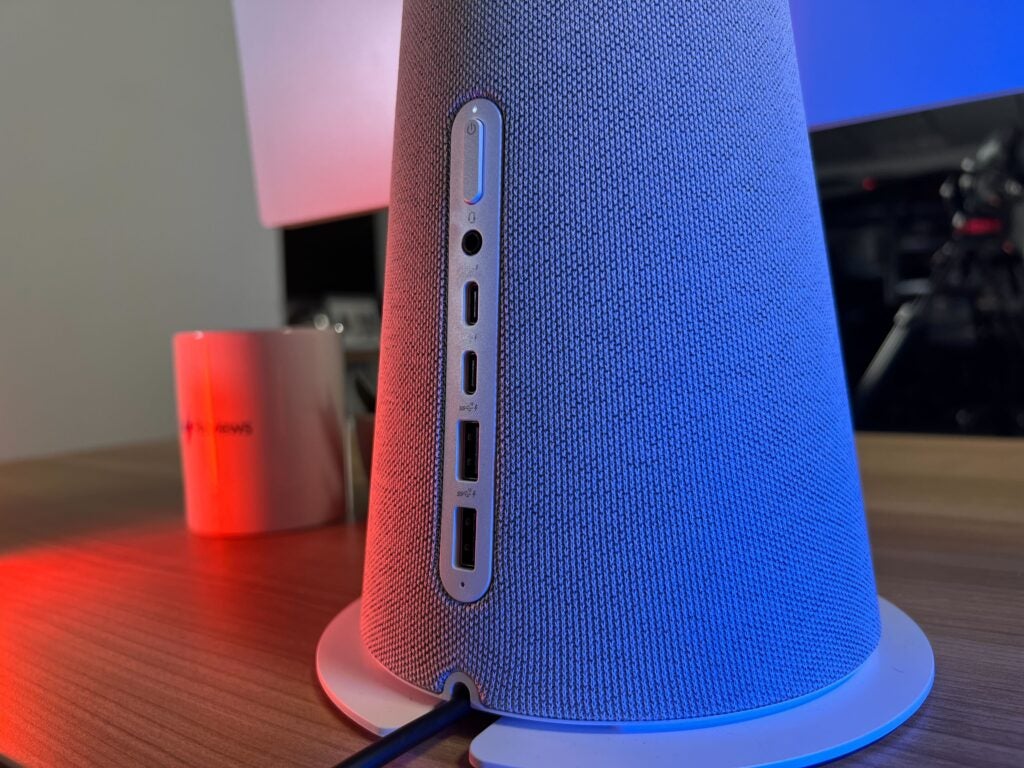
Port selection on the Chromebase AIO
Image Credit (Trusted Reviews)

The build quality is solid and the 6.98kg weight makes it easy to move and adjust. I was disappointed to see that there is no height adjustment for the display, but there is a 20-degree tilt that allowed for some customisation.

There is support for Bluetooth 5.0 and Wi-Fi 6 as well as two M.2 slots, with one for SSD and one for WLAN. The dual 5W Bang & Olufsen speakers inside the stand provide great audio, with a lot more quality than I expected. Music was punchy, detailed and surprisingly loud. It easily filled up our office space, making the audio one of my favourite aspects of this AIO. There’s also a 5-megapixel webcam embedded into the display, with a handy privacy switch on top that ensures some security.
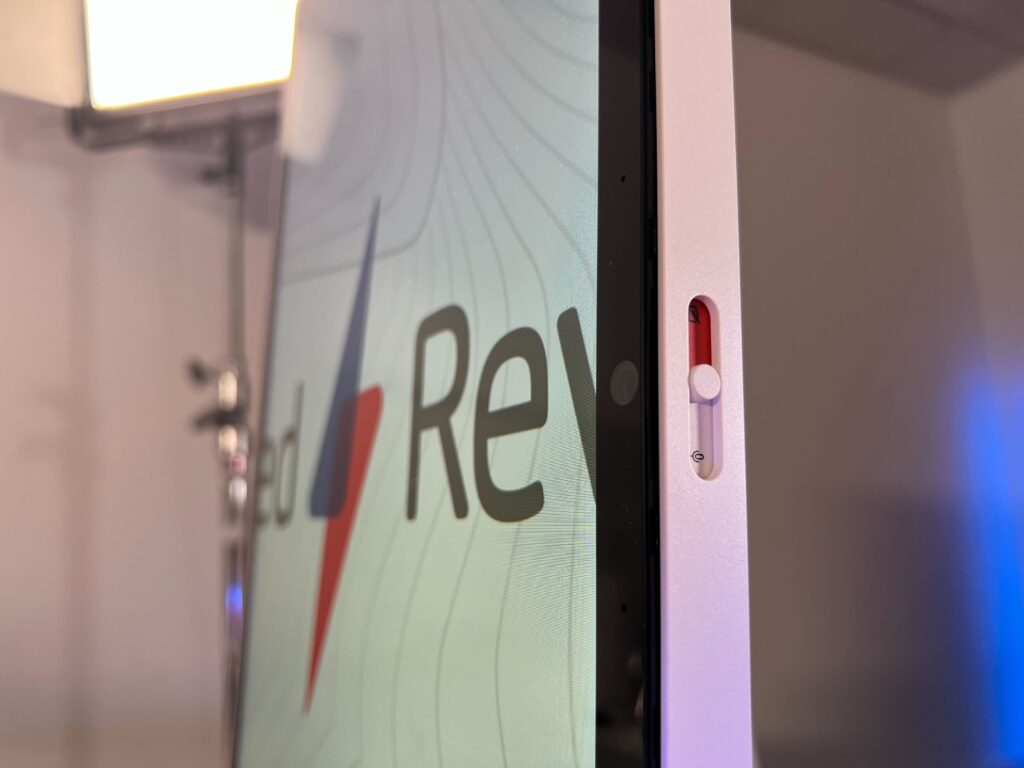
Webcam shutter on Chromebase AIO
Image Credit (Trusted Reviews)

The wireless mouse and keyboard are sleek and simple, but too small for my tastes. The keyboard was responsive and had decent travel but, due to the small size, it did feel awkward to use and took me a while to type without needing to stare at my hands.

The mouse is far from sturdy and I found myself worrying about breaking it when I had to insert the batteries inside. I haven’t needed to replace the batteries since I started my review, but I still wish that this mouse could be recharged through a wire, both for convenience and environmental reasons. The mouse wheel was, in fact, too responsive, with only a small flick of my finger resulting in massive amounts of movement.

Despite these criticisms, the keyboard and mouse are perfectly usable and I like that they come bundled with the desktop. However, I would recommend investing in more high-end peripherals that offer better responsiveness and build quality, especially concerning the mouse.
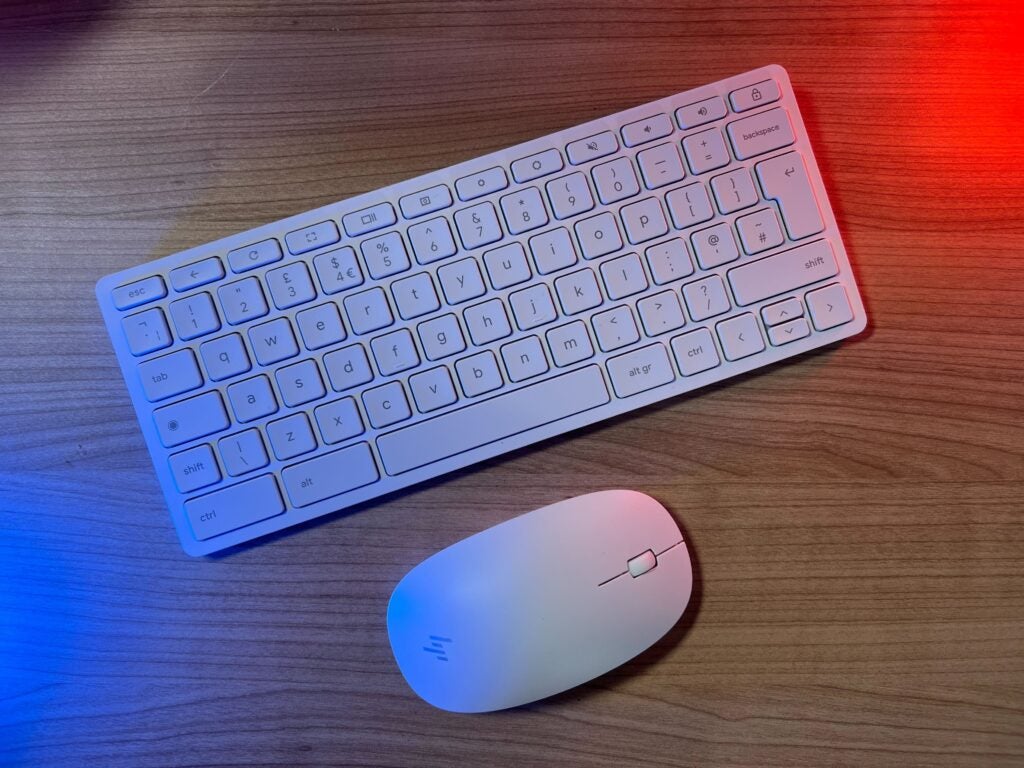
Chromebase AIO keyboard and mouse
Image Credit (Trusted Reviews)

Screen

  • 21.5-inch IPS display, ideal for productivity
  • Versatile design that can be adjusted to landscape and portrait modes
  • Touchscreen panel works well when in portrait mode

I want to start with my favourite feature of the entire desktop: the rotating screen. The display can seamlessly rotate from landscape to portrait mode. I like the mechanics but, unfortunately, I can’t quite figure out its intended use case. Working on the screen in portrait mode was awkward – I had to strain my neck upwards to see the very top of the screen, with no height adjustment to solve this.
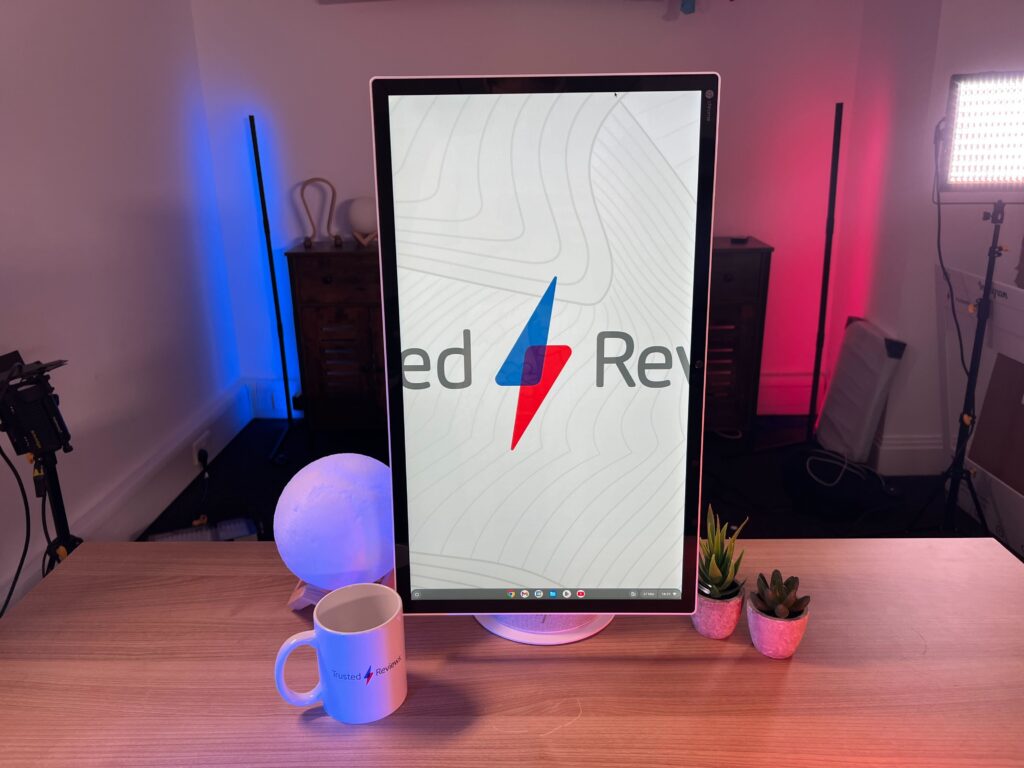
Portrait of Chromebase AIO
Image Credit (Trusted Reviews)

I enjoyed using the touchscreen to read through documents and scroll through social media, with vertical video like YouTube Shorts being ideal for this setup. Typing in portrait mode did not work for me, due to the aforementioned straining issues. In certain circumstances, rotating the screen added to the experience, with some of that coming from how smooth it felt to move – like a large fidget toy.

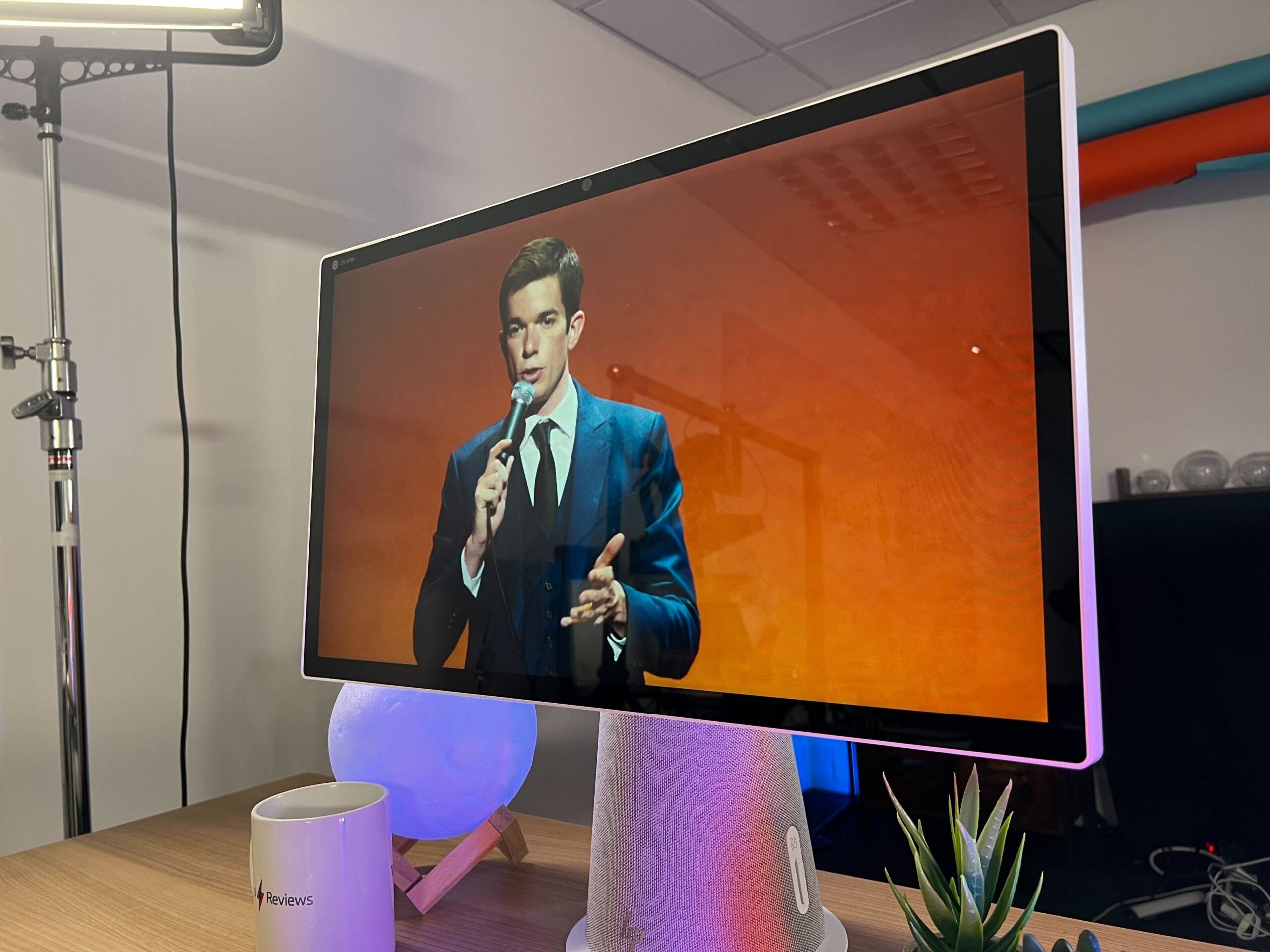
HP opted for a very simple spec sheet. The screen is 21.5 inches with a 1920×1080 resolution and a 60Hz capped refresh rate. There is no way to configure the display and the resolution is too low. Work documents look fine, but video media from YouTube and Netflix isn’t crisp or clear. The quoted 250-nit brightness rating did not help. Scenes look dark and undersaturated, with very dull and lacklustre colours. This is a productivity device, so it’s not a dealbreaker, but it’s worth keeping in mind if you’re planning to binge-watch any of your favourite shows.
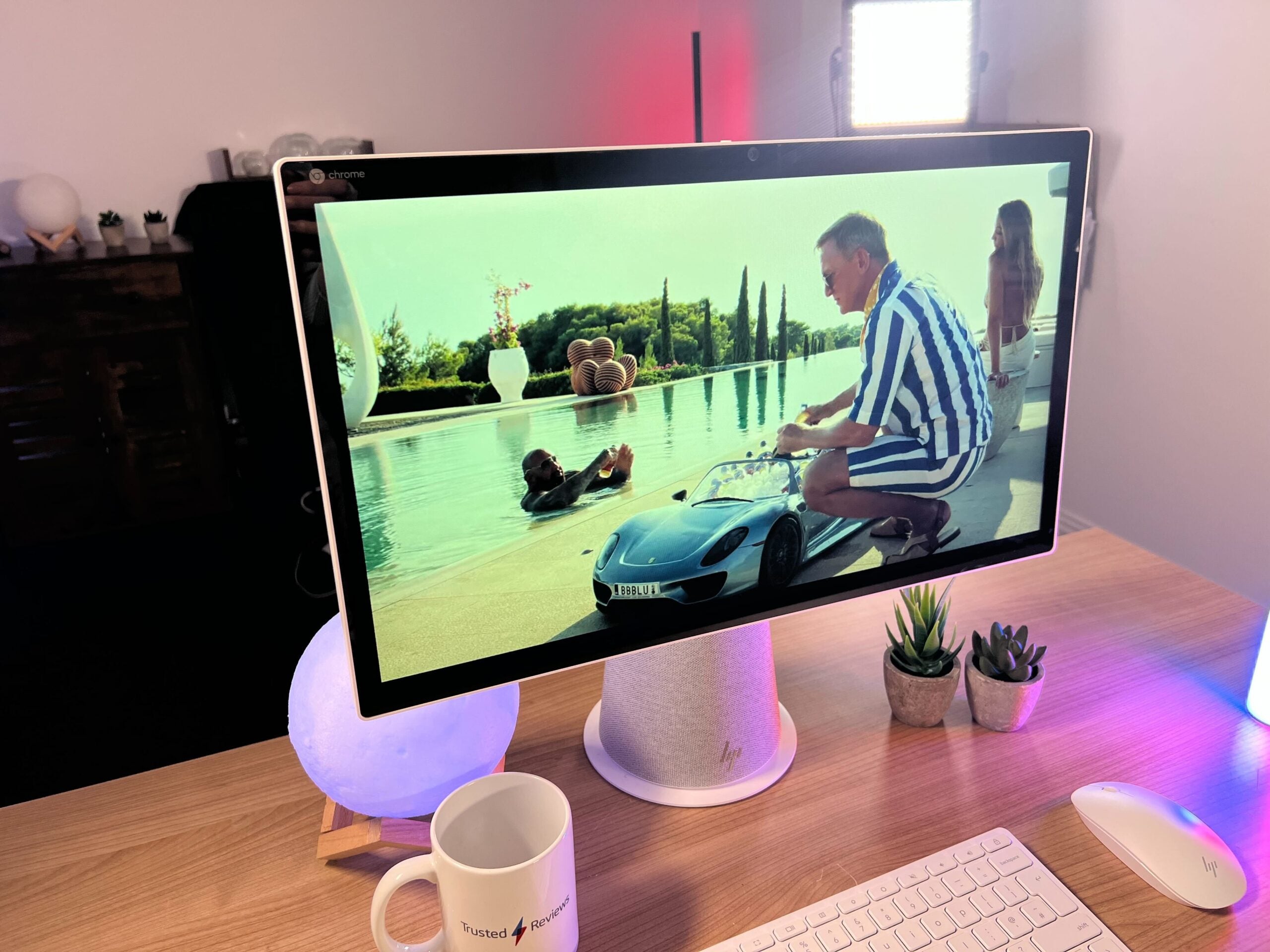
Glass Onion on the Chromebase AIO
Image Credit (Trusted Reviews)
Comeback Kid on Chromebase AIO
Image Credit (Trusted Reviews)

As you can see from the pictures above, Glass Onion looks very bland and dark, with yellow and blue tones seeping into the white imagery. It’s not unwatchable but seems pretty uninspiring considering the large screen. John Mulaney’s standup show looks better, likely due to its sparse set-up, but close-ups of his face don’t have the same crisp qualities I’ve experienced with laptops like the Huawei MateBook X Pro (2022) or Acer Swift X.

The 60Hz refresh rate is expected for this type of desktop and scrolling through documents did not feel too disjointed or unnatural. Open multiple Chrome tabs and apps then things will noticeably slow down, but that’s the result of the processor, not the refresh rate.

The screen is suitable for work but I would not recommend it for play. Due to its low price, it’s no surprise that this machine doesn’t have the highest screen specs. I’d only really recommend it for office and schoolwork.
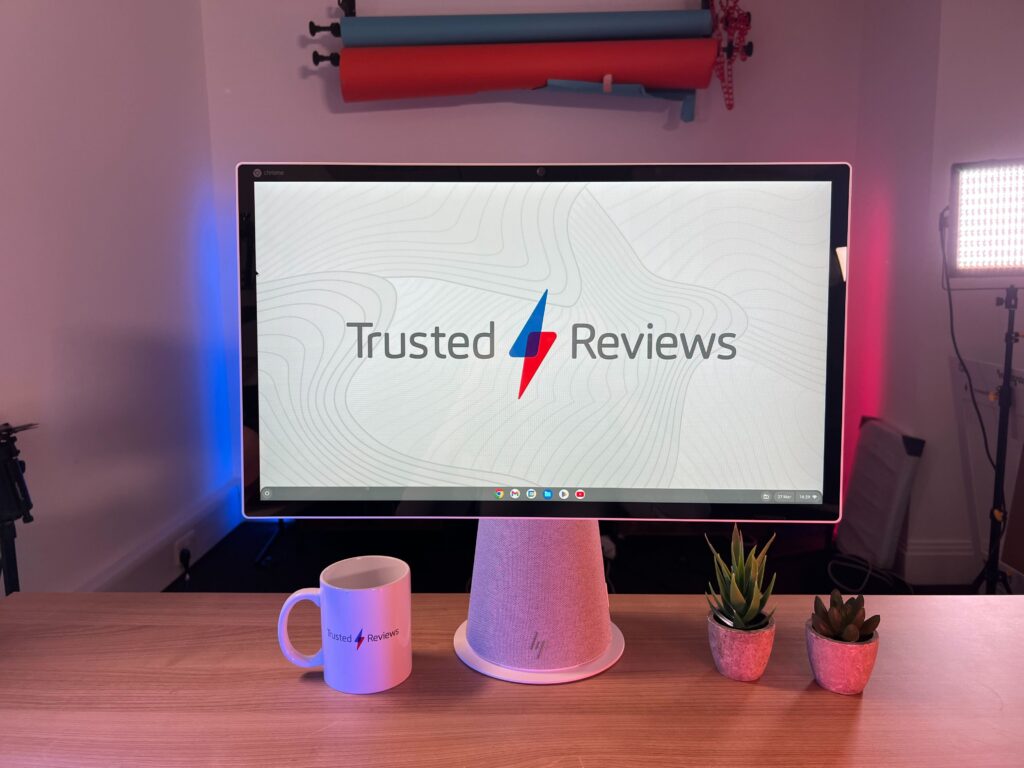
Chromebase AIO with TR background
Image Credit (Trusted Reviews)

Performance

  • ChromeOS does come with its limitations
  • 10th-gen Intel i3 processor – not as smooth as I would have liked
  • Integrated Intel UHD Graphics is not suitable for gaming or creative workloads

The HP Chromebase All-in-One 22 doesn’t come with the most recent specs on the inside either. It features a 10th-generation Intel i3 processor and comes with integrated Intel UHD Graphics, meaning it won’t be suitable for gaming or creative workloads. I was able to download and use Canva but it was pretty slow to remove backgrounds or load new images. This is the most you will get out of this machine in terms of creativity.

The 10th-gen i3 processor did hold up during productivity tasks, with some limitations. WordPress and Google Docs worked very well but, things would slow down as I started to open up more apps and tabs, such as Spotify, YouTube or other web pages. The sweet spot seemed to be fewer than 10 tabs, with as little video content as possible on the screen to maximise speed. Depending on your workload, this will be suitable, but it did drag down my momentum.
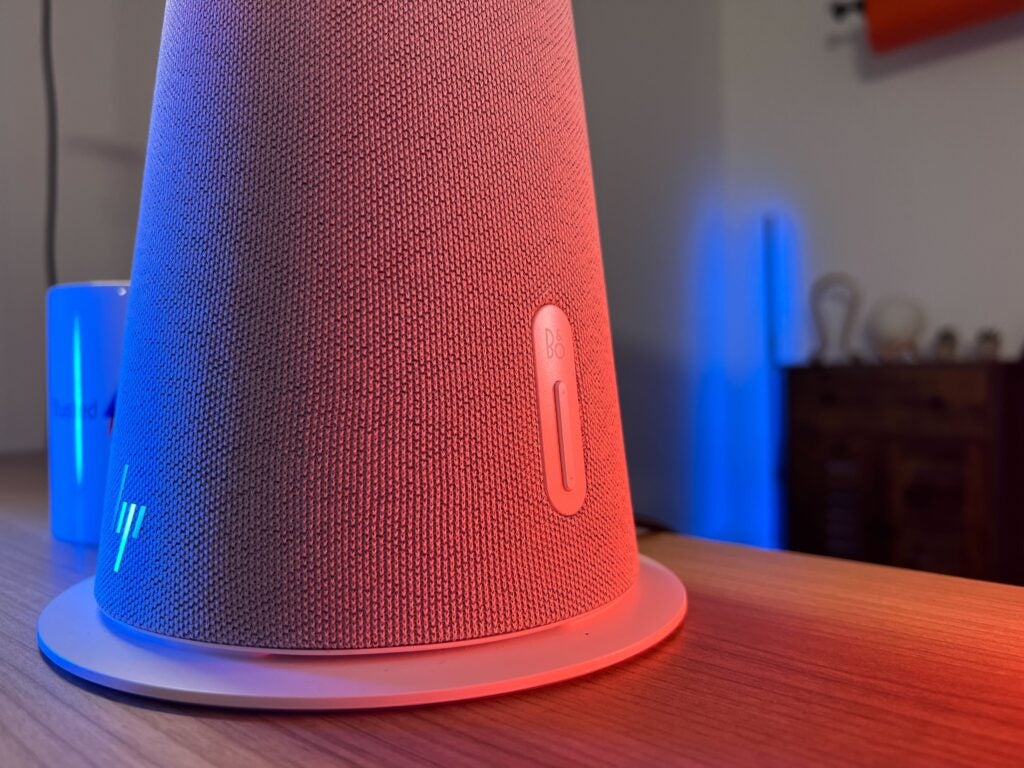
B&O speakers on the Chromebase AIO
Image Credit (Trusted Reviews)

I ran the Geekbench 6 benchmark to see how this desktop stacked up in terms of raw data. It scored 929 in the single-core test and 1825 in the multi-core test. This falls well below what the latest Apple Mac Mini (2023) can achieve, but it can’t match up with other AIO desktops either, like the HP Envy 34 (2022). Since we have not yet tested another all-in-one desktop with Geekbench 6, we can’t make any strict comparisons here, but it’s clear that the Chromebook AIO is not a power juggernaut.

The biggest restriction of the Chromebase AIO is running on ChromeOS. For anyone unfamiliar, ChromeOS is known for offering a secure, simple interface. It, unsurprisingly, favours Google platforms, such as Google Docs and Gmail. However, the downfall of ChromeOS is that it offers limited computing capabilities and cannot run resource-intensive apps like photo or video applications. It is not completely useless when not connected to the internet but it is fairly constrained.
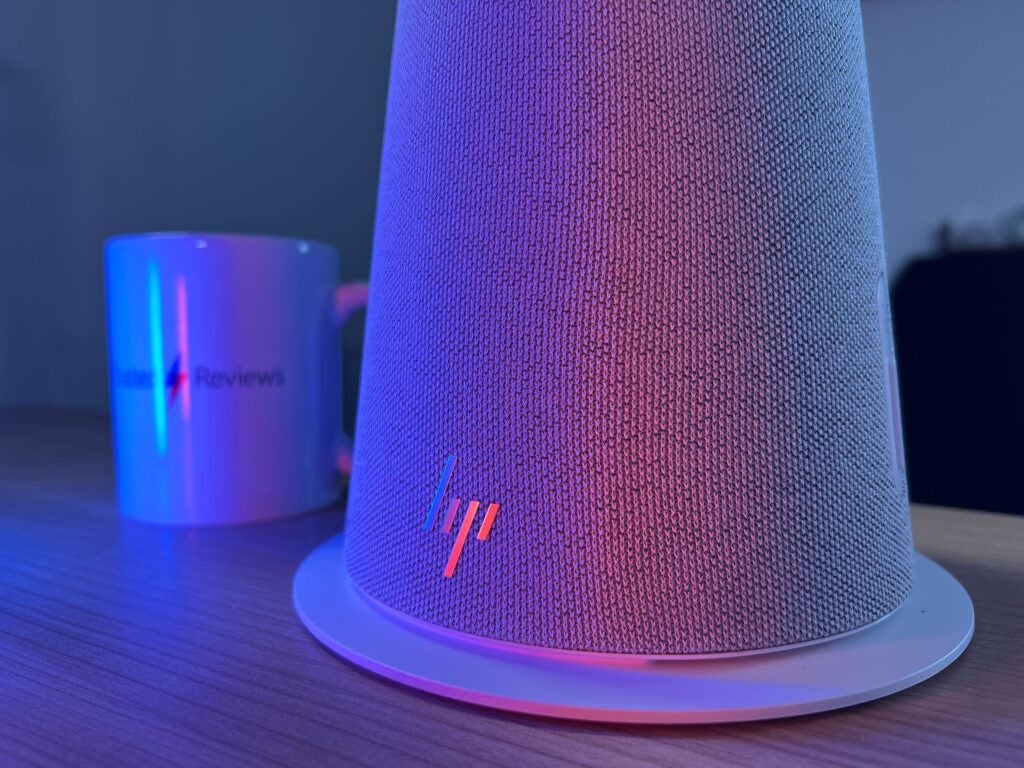
HP branding on the Chromebase AIO
Image Credit (Trusted Reviews)

ChromeOS comes with some small but annoying downfalls, with some work apps being unavailable on the Google Play Store – the main app store on ChromeOS – and the lack of well-sized internal storage. The Chromebase AIO comes with just 128GB storage and 8GB RAM, mainly because you’re supposed to take advantage of services like Google Drive and Google Docs. As someone that regularly switches between devices, this was not an issue for me, but you may want to look for something with more storage offerings if you’re looking to keep media and files on your device.

Latest deals

Should you buy it?

You want an all-in-one desktop with great speakers

The HP Chromebase All-in-One 22 offers a streamlined experience and comes packed with fantastic B&O speakers, as well as a bundled mouse and keyboard, so you don’t need to invest in any additional hardware.

You want more performance power

Anyone looking to game or engage in creative content will want to look elsewhere. The HP Chromebase AIO does not offer the best speeds in terms of performance and ChromeOS will bring a lot of limitations in terms of creative apps.

Final Thoughts

It’s sad to say but the HP Chromebase All-in-One 22 just didn’t cut it for me. To be fair, it offered a clean, simple experience and the 10th-gen Intel chip was capable of running simple work applications, although it can only handle so many things being opened at once. The integrated B&O speakers are also fantastic, offering a lot more oomph than I would have expected.

However, the inclusion of ChromeOS was just too restricting. If you’re only looking to access platforms like Google Docs and Gmail then it won’t be an issue, but creative, gaming and some general third-party apps will be off-limits. Plus, the low resolution of the screen and poor colour accuracy does make it less appealing for those wanting to watch media content.

If you’re after a more well-rounded, but more expensive, experience, you’ll want to consider the HP Envy 34 (2022), or the Apple Mac Mini (2023) if you aren’t married to the idea of an AIO. However, if you’re after a budget all-in-one desktop, then the HP Chromebase AIO is a solid option. It offers an easy experience and comes bundled with all the peripherals you will need, I just wouldn’t expect it to be anyone’s first pick.

How we test

Every PC we review goes through a series of uniform checks designed to gauge key aspects including build quality, performance, and accessibility.

These include formal synthetic benchmarks and scripted tests, plus a series of real-world checks, such as how well it runs an AAA game. 

We used it as our main PC for at least a week.

We tested the screen using a colorimeter and real-world use.

We tested the performance via both benchmark tests and real-world use.

FAQs

Is the HP Chromebase AIO suitable for gaming?

No, the Chromebase AIO is suited to productivity and media content rather than gaming since it runs on ChromeOS and does not have a high resolution or refresh rate. Its limited storage and RAM will also block users from downloading many games, especially triple-A titles.

Does the HP Chromebase AIO support Thunderbolt 4?

No, there are two USB-C ports but neither has support for Thunderbolt 4.

Trusted Reviews test data

‹

Geekbench 6 single core

Geekbench 6 multi core

HP Chromebase AIO

929

1825

›

‹

UK RRP

USA RRP

CPU

Manufacturer

Screen Size

Front Camera

Size (Dimensions)

Weight

Operating System

Release Date

Model Number

Resolution

Refresh Rate

Ports

GPU

RAM

Connectivity

Colours

Display Technology

Screen Technology

Touch Screen

Convertible?

HP Chromebase AIO

£649.99

$868.99

10th Generation Intel Core i3-10110U

HP

21.5 inches

5MP

50.76 x 17.45 x 45.44 CM

6.98 G

Chrome OS

2022

22-aa0000na

1920 x 1080

60 Hz

2x USB-C , 2x USB-A, 3.5mm headphone jack

Intel UHD Graphics

8GB

Wi-Fi 6, Bluetooth 5.0

Snowflake White

IPS

IPS

Yes

Yes

›

Sustainability

TrustedReviews holds the fact that global warming is not a myth as a core value and will continuously endeavour to help protect our planet from harm in its business practice

As part of this mission, whenever we review a product, we send the company a series of questions to help us gauge and make transparent the impact the device has on the environment

We currently haven’t received answers to the questions on this product, but we will update this page the moment we do. You can see a detailed breakdown of the questions we ask and why in our sustainability info page.

Jargon buster

IPS panel

IPS stands for In-Plane Switching and offers consistent, accurate colours at wide viewing angles, as well as quick response time

Refresh Rate

The number of times the screen refreshes itself per second.

GPU

The graphics processing unit is designed to render graphics, which is particularly important for gaming, creating 3D models and editing video.

Colour Gamut

The range of colours an output device is capable of reproducing.

Verdict

The HP Chromebase All-in-One 22 is a great option for office spaces and schools but won’t fit the bill for the everyday worker due to its Chrome operating system and 10th-generation chipset. However, for the very low price and simple setup, there is nothing stopping the Chromebase AIO from becoming a budget family or work desktop.

Pros

  • Versatile screen setup
  • Professional and minimal design
  • Great B&O intergrated speakers
  • Bundled with mouse and keyboard

Cons

  • ChromeOS has lots of limitations
  • Slower than most Intel/Apple desktops
  • Miminal port selection
  • Screen is not great for media content

Availability

  • UKRRP: £649.99
  • USARRP: $868.99

  • 21.5-inch versatile touchscreenThe 21.5-inch screen is more than large enough to work with multiple tabs open and can be configured in either landscape or portrait mode.

  • Bang & Olufsen integrated speakersB&O Dual 5W speakers are integrated into the base and provide punchy and vibrant audio.

  • Runs on Chrome OSThe HP Chromebase AIO runs on Chrome OS, making it a simple device to navigate with a lot more security than Windows or Apple rivals.

Introduction

The HP Chromebase All-in-One 22 (22-aa0000na) is a solid option if you’re looking for a simple set-up that doesn’t require extra hardware, like a chunky tower PC or standalone speakers.

The HP Chromebase AIO is a sleek, if not slightly odd-looking, desktop and monitor combo that is ideal for productivity work. It comes bundled with a mouse and keyboard as well as integrated speakers, meaning you don’t need to worry about buying peripherals.

The £649.99/$479.99 price tag is very reasonable, but it’s balanced out by the fact that it runs on Chrome OS, which can be a limiting operating system when compared to Windows and macOS. Still, the Intel Core i3-10110U processor provides enough power for general workloads and would make for an easy office setup. But, is it good enough to grab a spot on our Best Desktop PC roundup?

Design

  • Stingy port selection
  • Secure and sturdy build that’s easy to move around
  • Bundled with keyboard and mouse

The HP Chromebase All-in-One 22 has an odd look, but… I like it. Its sole colourway is Snowflake White, featuring on the keyboard, mouse and bottom of the stand. The rest of the base is covered by a grey mesh, with a silver HP logo subtly placed on the front.

The port selection is pretty stingy, especially for a productivity device. There is a 3.5mm audio jack, alongside two USB-C ports and two USB-A ports. With no Thunderbolt 4 or HDMI ports in sight, I wasn’t able to connect the monitor to another display, limiting its productivity chops. There’s no Ethernet port, so anyone who suffers from a poor internet connection should consider another AIO, like the HP Envy 34 (2022).

Port selection on the Chromebase AIO
Image Credit (Trusted Reviews)

The build quality is solid and the 6.98kg weight makes it easy to move and adjust. I was disappointed to see that there is no height adjustment for the display, but there is a 20-degree tilt that allowed for some customisation.

There is support for Bluetooth 5.0 and Wi-Fi 6 as well as two M.2 slots, with one for SSD and one for WLAN. The dual 5W Bang & Olufsen speakers inside the stand provide great audio, with a lot more quality than I expected. Music was punchy, detailed and surprisingly loud. It easily filled up our office space, making the audio one of my favourite aspects of this AIO. There’s also a 5-megapixel webcam embedded into the display, with a handy privacy switch on top that ensures some security.

Webcam shutter on Chromebase AIO
Image Credit (Trusted Reviews)

The wireless mouse and keyboard are sleek and simple, but too small for my tastes. The keyboard was responsive and had decent travel but, due to the small size, it did feel awkward to use and took me a while to type without needing to stare at my hands.

The mouse is far from sturdy and I found myself worrying about breaking it when I had to insert the batteries inside. I haven’t needed to replace the batteries since I started my review, but I still wish that this mouse could be recharged through a wire, both for convenience and environmental reasons. The mouse wheel was, in fact, too responsive, with only a small flick of my finger resulting in massive amounts of movement.

Despite these criticisms, the keyboard and mouse are perfectly usable and I like that they come bundled with the desktop. However, I would recommend investing in more high-end peripherals that offer better responsiveness and build quality, especially concerning the mouse.

Chromebase AIO keyboard and mouse
Image Credit (Trusted Reviews)

Screen

  • 21.5-inch IPS display, ideal for productivity
  • Versatile design that can be adjusted to landscape and portrait modes
  • Touchscreen panel works well when in portrait mode

I want to start with my favourite feature of the entire desktop: the rotating screen. The display can seamlessly rotate from landscape to portrait mode. I like the mechanics but, unfortunately, I can’t quite figure out its intended use case. Working on the screen in portrait mode was awkward – I had to strain my neck upwards to see the very top of the screen, with no height adjustment to solve this.

Portrait of Chromebase AIO
Image Credit (Trusted Reviews)

I enjoyed using the touchscreen to read through documents and scroll through social media, with vertical video like YouTube Shorts being ideal for this setup. Typing in portrait mode did not work for me, due to the aforementioned straining issues. In certain circumstances, rotating the screen added to the experience, with some of that coming from how smooth it felt to move – like a large fidget toy.

HP opted for a very simple spec sheet. The screen is 21.5 inches with a 1920×1080 resolution and a 60Hz capped refresh rate. There is no way to configure the display and the resolution is too low. Work documents look fine, but video media from YouTube and Netflix isn’t crisp or clear. The quoted 250-nit brightness rating did not help. Scenes look dark and undersaturated, with very dull and lacklustre colours. This is a productivity device, so it’s not a dealbreaker, but it’s worth keeping in mind if you’re planning to binge-watch any of your favourite shows.

Glass Onion on the Chromebase AIO
Image Credit (Trusted Reviews)
Comeback Kid on Chromebase AIO
Image Credit (Trusted Reviews)

As you can see from the pictures above, Glass Onion looks very bland and dark, with yellow and blue tones seeping into the white imagery. It’s not unwatchable but seems pretty uninspiring considering the large screen. John Mulaney’s standup show looks better, likely due to its sparse set-up, but close-ups of his face don’t have the same crisp qualities I’ve experienced with laptops like the Huawei MateBook X Pro (2022) or Acer Swift X.

The 60Hz refresh rate is expected for this type of desktop and scrolling through documents did not feel too disjointed or unnatural. Open multiple Chrome tabs and apps then things will noticeably slow down, but that’s the result of the processor, not the refresh rate.

The screen is suitable for work but I would not recommend it for play. Due to its low price, it’s no surprise that this machine doesn’t have the highest screen specs. I’d only really recommend it for office and schoolwork.

Chromebase AIO with TR background
Image Credit (Trusted Reviews)

Performance

  • ChromeOS does come with its limitations
  • 10th-gen Intel i3 processor – not as smooth as I would have liked
  • Integrated Intel UHD Graphics is not suitable for gaming or creative workloads

The HP Chromebase All-in-One 22 doesn’t come with the most recent specs on the inside either. It features a 10th-generation Intel i3 processor and comes with integrated Intel UHD Graphics, meaning it won’t be suitable for gaming or creative workloads. I was able to download and use Canva but it was pretty slow to remove backgrounds or load new images. This is the most you will get out of this machine in terms of creativity.

The 10th-gen i3 processor did hold up during productivity tasks, with some limitations. WordPress and Google Docs worked very well but, things would slow down as I started to open up more apps and tabs, such as Spotify, YouTube or other web pages. The sweet spot seemed to be fewer than 10 tabs, with as little video content as possible on the screen to maximise speed. Depending on your workload, this will be suitable, but it did drag down my momentum.

B&O speakers on the Chromebase AIO
Image Credit (Trusted Reviews)

I ran the Geekbench 6 benchmark to see how this desktop stacked up in terms of raw data. It scored 929 in the single-core test and 1825 in the multi-core test. This falls well below what the latest Apple Mac Mini (2023) can achieve, but it can’t match up with other AIO desktops either, like the HP Envy 34 (2022). Since we have not yet tested another all-in-one desktop with Geekbench 6, we can’t make any strict comparisons here, but it’s clear that the Chromebook AIO is not a power juggernaut.

The biggest restriction of the Chromebase AIO is running on ChromeOS. For anyone unfamiliar, ChromeOS is known for offering a secure, simple interface. It, unsurprisingly, favours Google platforms, such as Google Docs and Gmail. However, the downfall of ChromeOS is that it offers limited computing capabilities and cannot run resource-intensive apps like photo or video applications. It is not completely useless when not connected to the internet but it is fairly constrained.

HP branding on the Chromebase AIO
Image Credit (Trusted Reviews)

ChromeOS comes with some small but annoying downfalls, with some work apps being unavailable on the Google Play Store – the main app store on ChromeOS – and the lack of well-sized internal storage. The Chromebase AIO comes with just 128GB storage and 8GB RAM, mainly because you’re supposed to take advantage of services like Google Drive and Google Docs. As someone that regularly switches between devices, this was not an issue for me, but you may want to look for something with more storage offerings if you’re looking to keep media and files on your device.

Latest deals

Should you buy it?

You want an all-in-one desktop with great speakers

The HP Chromebase All-in-One 22 offers a streamlined experience and comes packed with fantastic B&O speakers, as well as a bundled mouse and keyboard, so you don’t need to invest in any additional hardware.

You want more performance power

Anyone looking to game or engage in creative content will want to look elsewhere. The HP Chromebase AIO does not offer the best speeds in terms of performance and ChromeOS will bring a lot of limitations in terms of creative apps.

Final Thoughts

It’s sad to say but the HP Chromebase All-in-One 22 just didn’t cut it for me. To be fair, it offered a clean, simple experience and the 10th-gen Intel chip was capable of running simple work applications, although it can only handle so many things being opened at once. The integrated B&O speakers are also fantastic, offering a lot more oomph than I would have expected.

However, the inclusion of ChromeOS was just too restricting. If you’re only looking to access platforms like Google Docs and Gmail then it won’t be an issue, but creative, gaming and some general third-party apps will be off-limits. Plus, the low resolution of the screen and poor colour accuracy does make it less appealing for those wanting to watch media content.

If you’re after a more well-rounded, but more expensive, experience, you’ll want to consider the HP Envy 34 (2022), or the Apple Mac Mini (2023) if you aren’t married to the idea of an AIO. However, if you’re after a budget all-in-one desktop, then the HP Chromebase AIO is a solid option. It offers an easy experience and comes bundled with all the peripherals you will need, I just wouldn’t expect it to be anyone’s first pick.

How we test

Every PC we review goes through a series of uniform checks designed to gauge key aspects including build quality, performance, and accessibility.

These include formal synthetic benchmarks and scripted tests, plus a series of real-world checks, such as how well it runs an AAA game. 

We used it as our main PC for at least a week.

We tested the screen using a colorimeter and real-world use.

We tested the performance via both benchmark tests and real-world use.

FAQs

Is the HP Chromebase AIO suitable for gaming?

No, the Chromebase AIO is suited to productivity and media content rather than gaming since it runs on ChromeOS and does not have a high resolution or refresh rate. Its limited storage and RAM will also block users from downloading many games, especially triple-A titles.

Does the HP Chromebase AIO support Thunderbolt 4?

No, there are two USB-C ports but neither has support for Thunderbolt 4.

Trusted Reviews test data

‹

Geekbench 6 single core

Geekbench 6 multi core

HP Chromebase AIO

929

1825

›

‹

UK RRP

USA RRP

CPU

Manufacturer

Screen Size

Front Camera

Size (Dimensions)

Weight

Operating System

Release Date

Model Number

Resolution

Refresh Rate

Ports

GPU

RAM

Connectivity

Colours

Display Technology

Screen Technology

Touch Screen

Convertible?

HP Chromebase AIO

£649.99

$868.99

10th Generation Intel Core i3-10110U

HP

21.5 inches

5MP

50.76 x 17.45 x 45.44 CM

6.98 G

Chrome OS

2022

22-aa0000na

1920 x 1080

60 Hz

2x USB-C , 2x USB-A, 3.5mm headphone jack

Intel UHD Graphics

8GB

Wi-Fi 6, Bluetooth 5.0

Snowflake White

IPS

IPS

Yes

Yes

›

Sustainability

TrustedReviews holds the fact that global warming is not a myth as a core value and will continuously endeavour to help protect our planet from harm in its business practice

As part of this mission, whenever we review a product, we send the company a series of questions to help us gauge and make transparent the impact the device has on the environment

We currently haven’t received answers to the questions on this product, but we will update this page the moment we do. You can see a detailed breakdown of the questions we ask and why in our sustainability info page.

Jargon buster

IPS panel

IPS stands for In-Plane Switching and offers consistent, accurate colours at wide viewing angles, as well as quick response time

Refresh Rate

The number of times the screen refreshes itself per second.

GPU

The graphics processing unit is designed to render graphics, which is particularly important for gaming, creating 3D models and editing video.

Colour Gamut

The range of colours an output device is capable of reproducing.

Previous Post

Abortion issue appears headed back to the Supreme Court after all

Next Post

The Secret Behind the Premier League’s Smartest Team

Related Posts

Hoover HF6 TurboSense Review
Reviews

Hoover HF6 TurboSense Review

by New Edge Times Report
May 4, 2026
JBL Charge 6 Review
Reviews

JBL Charge 6 Review

by New Edge Times Report
May 1, 2026
Stihl ASA 20 Cordless Secateurs Review: Pruning made much easier
Reviews

Stihl ASA 20 Cordless Secateurs Review: Pruning made much easier

by New Edge Times Report
May 1, 2026
Leave Comment
New Edge Times

© 2025 New Edge Times or its affiliated companies. All rights reserved.

Navigate Site

  • About
  • Advertise
  • Terms & Conditions
  • Privacy Policy
  • Disclaimer
  • Contact

Follow Us

No Result
View All Result
  • World
  • U.S.
  • Politics
  • Business
  • Science
  • Tech
  • Youth
  • Entertainment
    • Gaming
    • Movie
    • Music
    • Arts
  • Sports
  • Lifestyle
    • Fashion
    • Food
    • Health
    • Travel
  • Reviews
  • Trending

© 2025 New Edge Times or its affiliated companies. All rights reserved.

Welcome Back!

Login to your account below

Forgotten Password?

Retrieve your password

Please enter your username or email address to reset your password.

Log In
