





Verdict
Best known for enterprise-grade endpoint security, Trend Micro Maximum Security brings some of that malware detection prowess to home users, delivering outstanding performance.
Pros
- Excellent malware protection
- Wide range of security and system optimisation tools
Cons
- High renewal costs
- High false positive rate in some tests
-
Password manager:An adequate password manager is included -
Silent detection mode: Get protection without being disturbed -
Parental controls:Time limits and content filtering for children of various ages -
Parental controlsProvides content filtering, app restrictions, time limits for younger members of the household
Introduction
Trend Micro Maximum Security is the top-tier home anti-malware and computer security suite from a company that’s perhaps better known for its enterprise solutions.
Its Internet Security tier is almost identical, with wider device support and a free password manager, and there’s also a simple, low-cost Antivirus+ subscription, if you neither want nor need extra features.
Pricing
If you buy from Trend Micro’s website, Internet Security costs £19.95 for a first year’s subscription for three Windows PCs. Maximum Security, which covers two more devices and adds macOS, Chromebook and mobile device protection, a password manager and 24/7 support, cost $49.95/£29.95 for a year’s subscription.
Watch out for those renewal prices, though: they rise to £59.95 and $89.95/£79.95 respectively.
Trend Micro Antivirus+ Security for a single Windows PC, which lacks the parental controls, social media privacy and system optimisation tools of its more expensive siblings, costs $19.95/£9.95 for the first year and $39.95/£19.95 for renewals, if you buy it direct from Trend.
As ever, retail editions are cheaper, so shopping around can get you a better price; but watch out for extremely cheap keys from key sellers with dubious reputations.
Features
- Includes a password manager
- Features parental controls
When you install Trend Micro Maximum Security, you’re invited to add Trend Micro’s password manager to your PC. Trend’s Folder Shield ransomware protection is automatically enabled for your Documents, Pictures and OneDrive folders.
You can add or remove folders from Folder Shield protection whenever you like via the Trend client’s Data settings. You’ll be notified if any unauthorised programs or processes try to make changes to these directories. The Data screen also allows you to configure a password manager and encrypt or securely delete files.
Maximum Security’s homescreen isn’t as info-packed as those of many rivals. Instead, there’s a notice to assure you that your system is protected (or in need of attention, as the case may be), an on-demand scan button, and shortcuts to further option screens.
Device covers your security settings, system optimisation and mute mode, which you can use to configure the notifications Trend shows you and when.
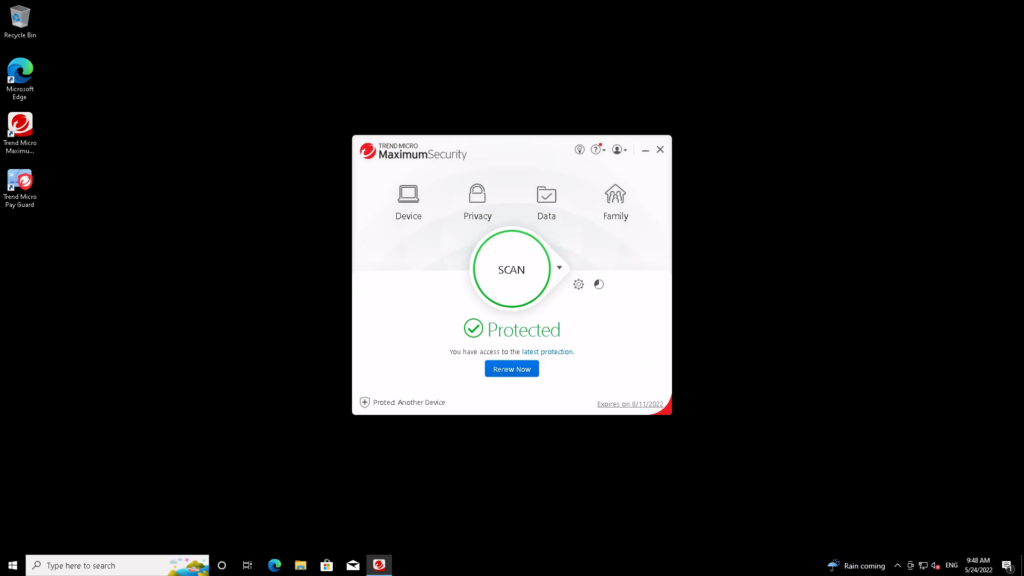
Privacy includes social media protection and anti data-theft tools that, once configured, can warn you if you share sensitive data too freely, as well as a hardened browser to protect your financial translations.
A small gear wheel next to the main scan button gets you to the option-packed advanced settings, where you can control everything from scheduled scans to spam controls for local email clients, as well as a tick box to enable Trend’s firewall enhancement and botnet detection features to supplement the Windows firewall.
Under Family, you’ll find security options that include parental controls to limit and monitor the software and internet use of your family members’ accounts, including the ability to block images from search results.
To me, the interface still feels pokey and unresponsive; but everything works well enough, and it’s easy to see all the options available to you.
Performance
- Perfect scores in two tests
- Flagged a number of legitimate sites
I have recent test data for Trend Micro’s anti-malware engine from independent testing houses AV-Test and AV Comparatives. In the case of SE Labs, I’ve had to go back to the first quarter of 2021, so I won’t place as much weight on this in my overall assessment.
In AV-Test’s latest tests, Trend Micro achieved perfect protection scores, and was one of the few products without a single false positive misidentification of legitimate software as a threat.
| Testing facility | AV-TEST | AV-Comparatives | SE Labs |
| Real-World Threat Protection | 100% | 100% | 95% |
AV Comparatives similarly give it a perfect real-world protection score, but it flagged 28 legitimate sites and applications as threats.
It did less well in SE Labs’ 2021 tests, with a protection accuracy score of 95%. Although it detected 99 of 100 threats, it blocked only 98. One was neutralised after infection, and another compromised the system. It also misidentified legitimate software as a threat in three of out 100 instances.
Trend Micro is a little twitchy about potential threats compared to Windows Defender, but it also detects a few more genuine ones.
Best Offers
Should you buy it?
If you need lots of features:
Trend Micro Maximum Security’s extra features are useful, but Norton 360 Advanced has more. If you like buying your software with an all-in-one subscription, opt for Norton; but if you prefer to pick and choose, Trend Micro is the way to go.
If staying safe online is your priority:
Trend Micro provides extremely comprehensive protection, and is a great choice for solid security, rivalled only by Norton 360. However, if you don’t want to have to deal with false positives, it might be a good idea to stick with Microsoft Defender.
Final Thoughts
Trend Micro’s malware defence scores are very good, and it picked up fewer false positives than Norton 360. It doesn’t have quite as many features as Norton and covers fewer devices, but if you don’t need the sheer volume of extras that Norton 360 Advanced offers, Trend Micro Maximum Security is a cheaper and lighter-weight alternative.
How we test
We use every antivirus suite ourselves, so we can check out their various features, from scanning options to integrated extras such as parental controls. The results we use to assess malware detection performance come from reputable testing houses including AV-Test, AV Comparatives and SE Labs.
We download and use the software ourselves to test the included features
We use data from trusted and approved testing houses to determine the malware detection performance
FAQs
No, you need to pay a yearly fee for the antivirus, although there are some free mobile apps and widgets available.

Verdict
Best known for enterprise-grade endpoint security, Trend Micro Maximum Security brings some of that malware detection prowess to home users, delivering outstanding performance.
Pros
- Excellent malware protection
- Wide range of security and system optimisation tools
Cons
- High renewal costs
- High false positive rate in some tests
-
Password manager:An adequate password manager is included -
Silent detection mode: Get protection without being disturbed -
Parental controls:Time limits and content filtering for children of various ages -
Parental controlsProvides content filtering, app restrictions, time limits for younger members of the household
Introduction
Trend Micro Maximum Security is the top-tier home anti-malware and computer security suite from a company that’s perhaps better known for its enterprise solutions.
Its Internet Security tier is almost identical, with wider device support and a free password manager, and there’s also a simple, low-cost Antivirus+ subscription, if you neither want nor need extra features.
Pricing
If you buy from Trend Micro’s website, Internet Security costs £19.95 for a first year’s subscription for three Windows PCs. Maximum Security, which covers two more devices and adds macOS, Chromebook and mobile device protection, a password manager and 24/7 support, cost $49.95/£29.95 for a year’s subscription.
Watch out for those renewal prices, though: they rise to £59.95 and $89.95/£79.95 respectively.
Trend Micro Antivirus+ Security for a single Windows PC, which lacks the parental controls, social media privacy and system optimisation tools of its more expensive siblings, costs $19.95/£9.95 for the first year and $39.95/£19.95 for renewals, if you buy it direct from Trend.
As ever, retail editions are cheaper, so shopping around can get you a better price; but watch out for extremely cheap keys from key sellers with dubious reputations.
Features
- Includes a password manager
- Features parental controls
When you install Trend Micro Maximum Security, you’re invited to add Trend Micro’s password manager to your PC. Trend’s Folder Shield ransomware protection is automatically enabled for your Documents, Pictures and OneDrive folders.
You can add or remove folders from Folder Shield protection whenever you like via the Trend client’s Data settings. You’ll be notified if any unauthorised programs or processes try to make changes to these directories. The Data screen also allows you to configure a password manager and encrypt or securely delete files.
Maximum Security’s homescreen isn’t as info-packed as those of many rivals. Instead, there’s a notice to assure you that your system is protected (or in need of attention, as the case may be), an on-demand scan button, and shortcuts to further option screens.
Device covers your security settings, system optimisation and mute mode, which you can use to configure the notifications Trend shows you and when.
Privacy includes social media protection and anti data-theft tools that, once configured, can warn you if you share sensitive data too freely, as well as a hardened browser to protect your financial translations.
A small gear wheel next to the main scan button gets you to the option-packed advanced settings, where you can control everything from scheduled scans to spam controls for local email clients, as well as a tick box to enable Trend’s firewall enhancement and botnet detection features to supplement the Windows firewall.
Under Family, you’ll find security options that include parental controls to limit and monitor the software and internet use of your family members’ accounts, including the ability to block images from search results.
To me, the interface still feels pokey and unresponsive; but everything works well enough, and it’s easy to see all the options available to you.
Performance
- Perfect scores in two tests
- Flagged a number of legitimate sites
I have recent test data for Trend Micro’s anti-malware engine from independent testing houses AV-Test and AV Comparatives. In the case of SE Labs, I’ve had to go back to the first quarter of 2021, so I won’t place as much weight on this in my overall assessment.
In AV-Test’s latest tests, Trend Micro achieved perfect protection scores, and was one of the few products without a single false positive misidentification of legitimate software as a threat.
| Testing facility | AV-TEST | AV-Comparatives | SE Labs |
| Real-World Threat Protection | 100% | 100% | 95% |
AV Comparatives similarly give it a perfect real-world protection score, but it flagged 28 legitimate sites and applications as threats.
It did less well in SE Labs’ 2021 tests, with a protection accuracy score of 95%. Although it detected 99 of 100 threats, it blocked only 98. One was neutralised after infection, and another compromised the system. It also misidentified legitimate software as a threat in three of out 100 instances.
Trend Micro is a little twitchy about potential threats compared to Windows Defender, but it also detects a few more genuine ones.
Best Offers
Should you buy it?
If you need lots of features:
Trend Micro Maximum Security’s extra features are useful, but Norton 360 Advanced has more. If you like buying your software with an all-in-one subscription, opt for Norton; but if you prefer to pick and choose, Trend Micro is the way to go.
If staying safe online is your priority:
Trend Micro provides extremely comprehensive protection, and is a great choice for solid security, rivalled only by Norton 360. However, if you don’t want to have to deal with false positives, it might be a good idea to stick with Microsoft Defender.
Final Thoughts
Trend Micro’s malware defence scores are very good, and it picked up fewer false positives than Norton 360. It doesn’t have quite as many features as Norton and covers fewer devices, but if you don’t need the sheer volume of extras that Norton 360 Advanced offers, Trend Micro Maximum Security is a cheaper and lighter-weight alternative.
How we test
We use every antivirus suite ourselves, so we can check out their various features, from scanning options to integrated extras such as parental controls. The results we use to assess malware detection performance come from reputable testing houses including AV-Test, AV Comparatives and SE Labs.
We download and use the software ourselves to test the included features
We use data from trusted and approved testing houses to determine the malware detection performance
FAQs
No, you need to pay a yearly fee for the antivirus, although there are some free mobile apps and widgets available.



