





Verdict
The DualSense Edge is the most customisable controller Sony has ever released, featuring a wealth of new software features and buttons. I had a blast gaming on this controller, but the high price suggests its best use case will be for competitive gaming.
Pros
- More personalisation options than ever
- Replaceable stick modules
- Function buttons on the front and rear
- Comes with a sturdy carrying case
Cons
- Extremely expensive
- Poor battery compared to the DualSense
Availability
- UKRRP: £209.99
- USARRP: $199.99
- EuropeRRP: €239.99
- CanadaRRP: CA$269
- AustraliaRRP: AU$339.95
-
Removable joysticksThe Joysticks can be easily removed and replaced. -
Braided USB-C charged with lockable connectorThe new DualSense Edge charger is thicker with a braided designed and can be locked onto the controller during play.
Introduction
Sony has finally thrown its hat into the ‘pro’ controller ring with the DualSense Edge, the most customisable controller ever made by the company.
Despite the PS5’s default DualSense being one of the best controllers for the current generation of consoles, Sony has decided to kick things up a notch with the DualSense Edge. While it may look strikingly similar to its predecessor, the Edge is brimming with customisation options, even more buttons, and seamless integration with the PS5 software.
However, with a steep price of £209.99/$199.99, it can be argued that the DualSense Edge controller is only worthwhile for competitive/professional gamers, as some may find the excessive customisation options to be overwhelming.
Design
- White and black colour
- Removable joysticks and joystick caps
- Comes with a white carrying case
The DualSense Edge feels like a premium controller; it weighs a tad more than the original DualSense at 322g and feels very sturdy. Every button has great responsiveness, with the back buttons and triggers feeling satisfyingly clicky.
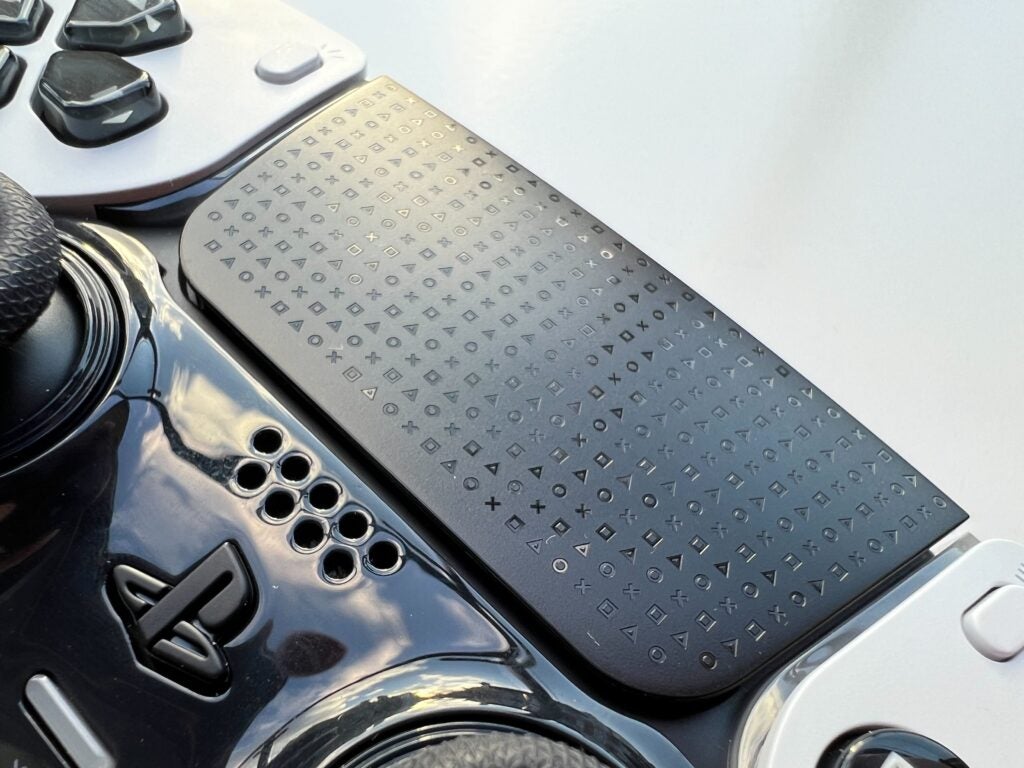
The Edge moniker fits the aesthetic, as the design is edgier than the original, sporting the same black and white design as the PS5. The buttons and trackpad are sleek black, with shiny black plastic surrounding the joysticks. And while only a small detail, I love the PlayStation branding on the touchpad; it feels like it has a little more personality than the original controllers, even if the slick plastic picks up fingerprints easier.
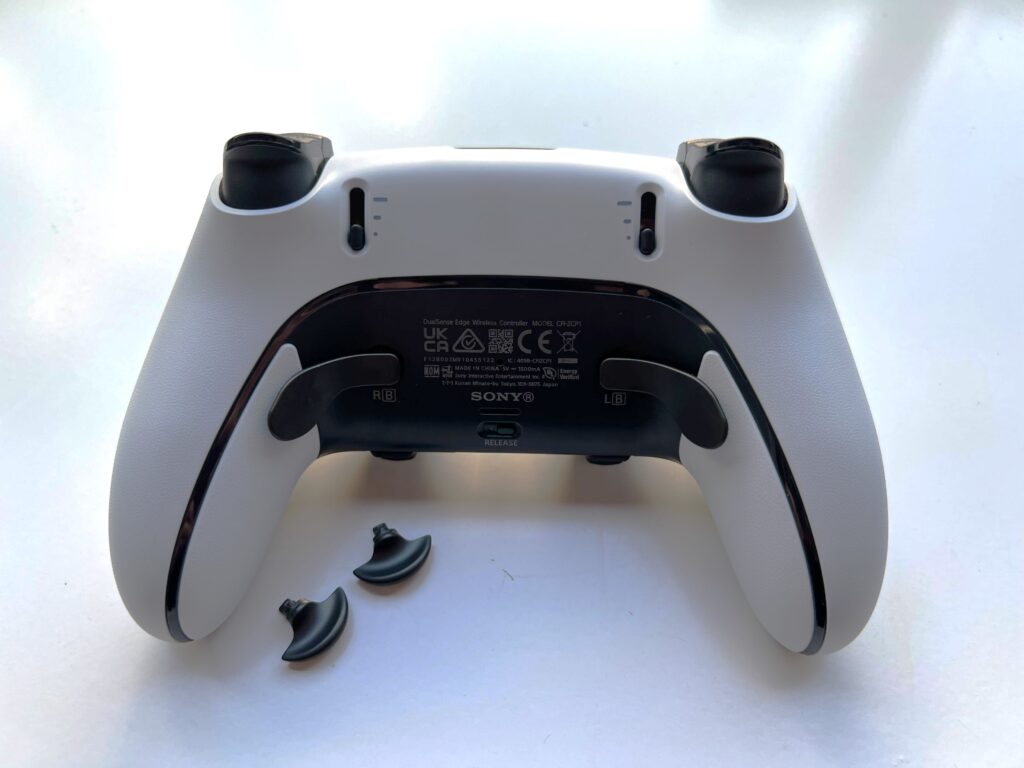
Each trigger button on the back of the controller is now rubberised, which provides a much better grip. The two new function buttons live underneath the joysticks; I don’t think they’re as easy to access during gameplay as I would like, but due to their intended functionality this was not a major issue.
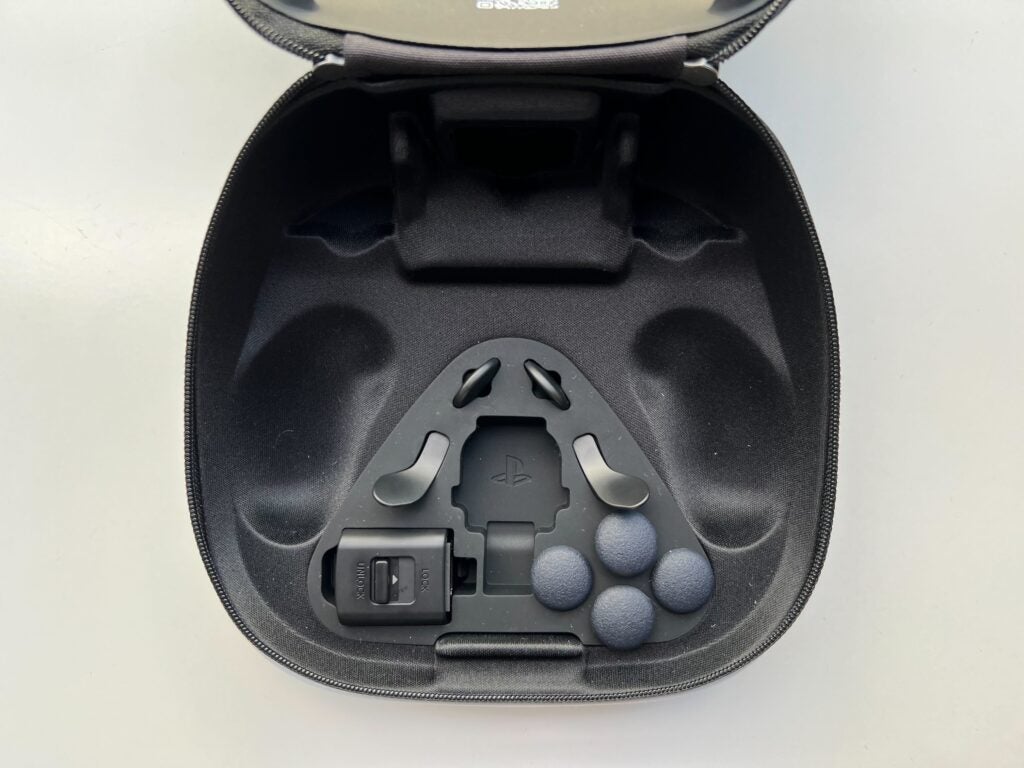
The controller comes with a plethora of accessories, including two pairs of joystick caps, a charger lock, two domes and two levers that can be attached to the back of the controller. The controller features the traditional caps, with the extras being high-dome and low-dome. After some testing, I found that the low-dome sticks worked best for me, as they reduced travel time and I felt like they were more accurate.
I massively preferred the dome buttons over the levers, as when using the latter I would constantly press them on accident. The domes were very comfortable and allowed for better hand placement. Since they can be attached magnetically, switching them out is really simple, and I did find some games worked well with a mix of the two.
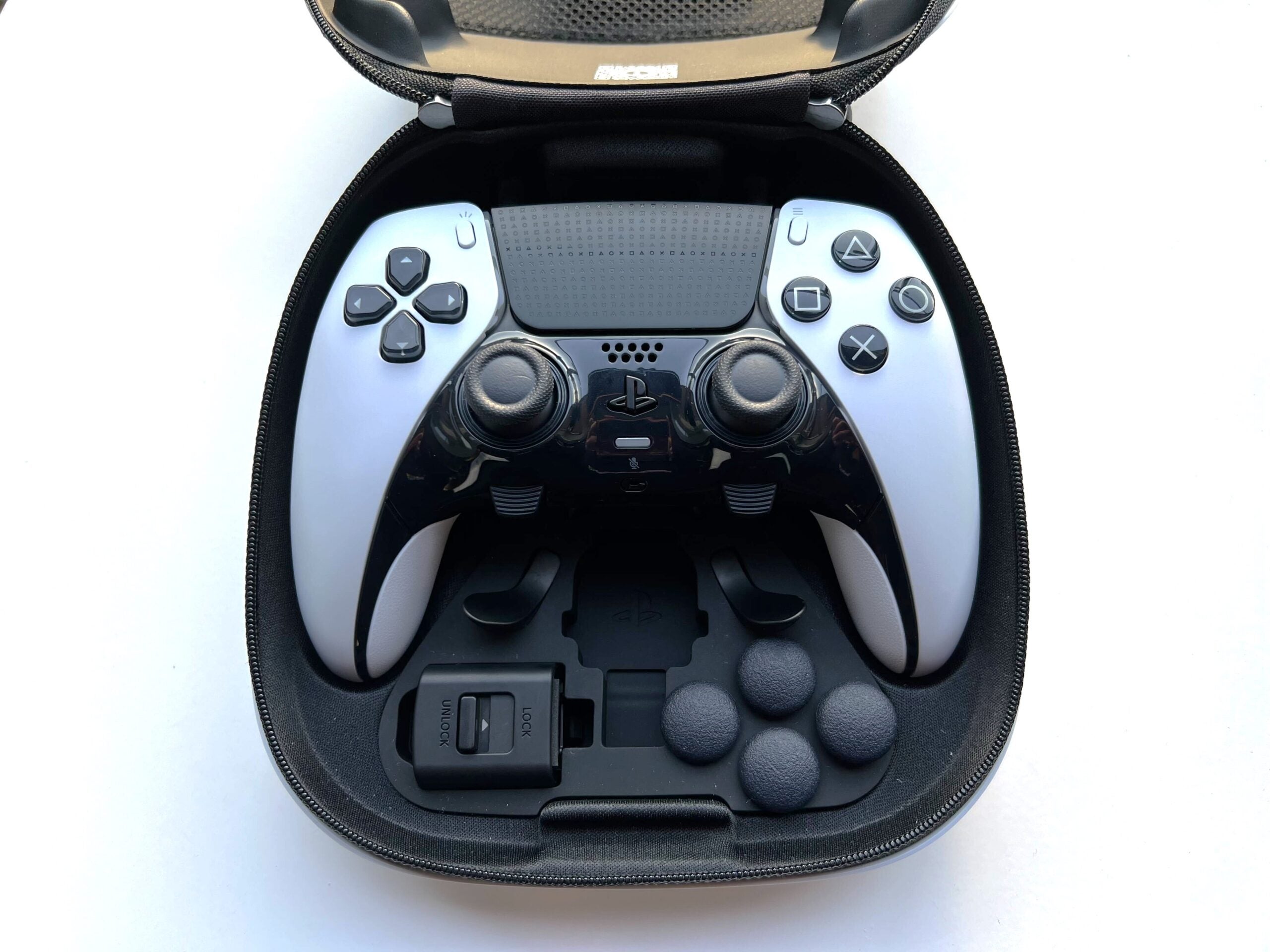
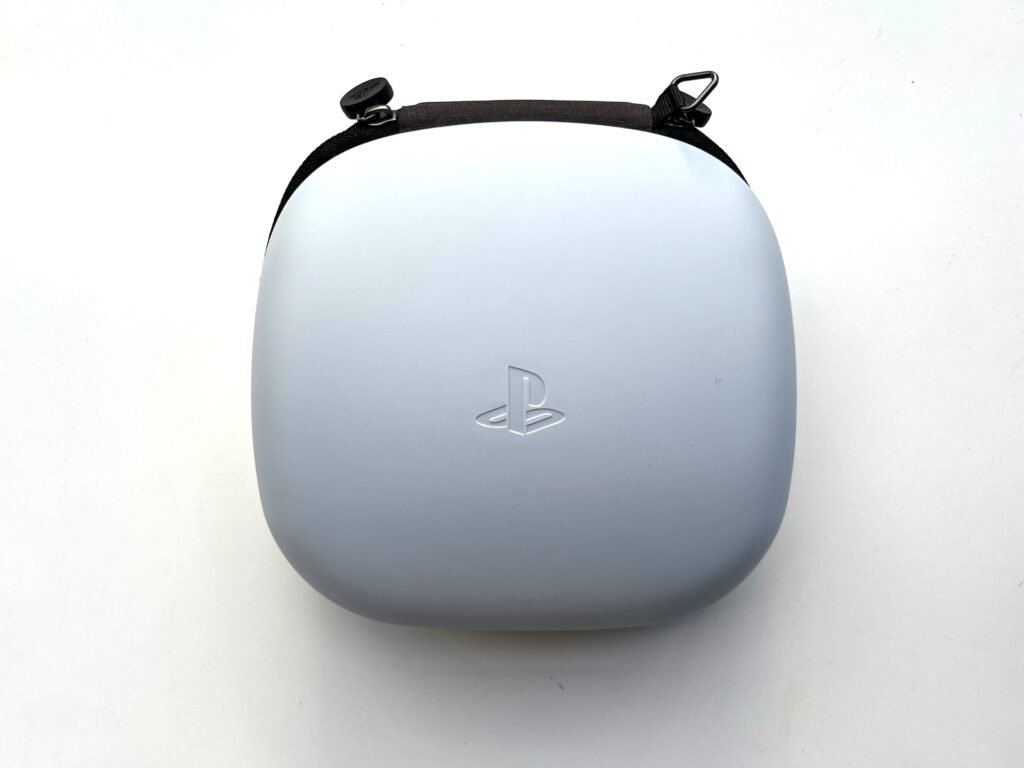
These are all included in a white carrying case, which features a passthrough port for charging. While I can’t see myself using the case to take the controller out on the go, I think it’s a necessity for keeping all the accessories together. The case is sturdy and hefty, and I do believe that it would protect the controller very well if you did choose to use it for travel.
There is a section in the case for an extra joystick. Almost every controller can suffer from joystick drift – although I’ve always found that the Joy-Cons from the Nintendo Switch are the worst offenders of this – so it’s nice to see Sony giving people the option to swap out the joystick instead of replacing the controller entirely.
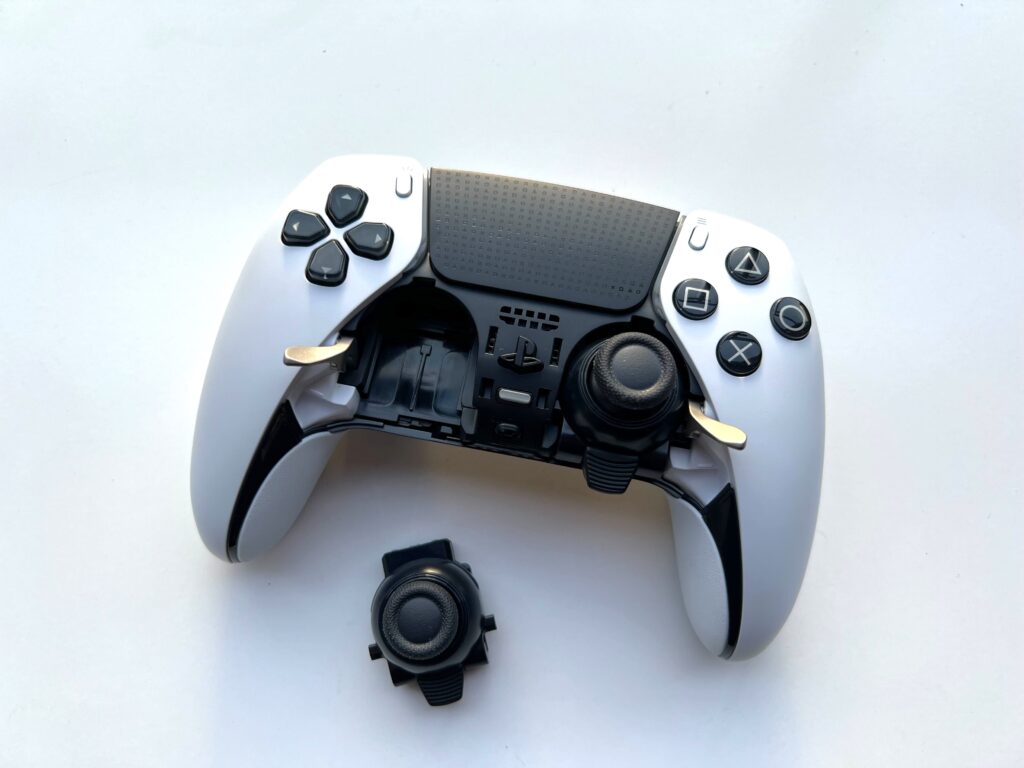
Switching out the joysticks is very simple; just release the front panel from the button on the back, flip the switches next to the joysticks and slide them out. The fact they’re only £19.99 from the PlayStation website makes this a lot more accessible and is one of the only features of this controller that could be considered affordable, albeit in the long run.
While I don’t own a Dualsense Charging Station, the DualSense Edge is just the right size to utilise it and features a 3.5mm headphone jack too, so you won’t need to worry about replacing any existing PlayStation accessories.
Performance
- Powerful haptic feedback
- Adaptive triggers
- Poor battery compared to the DualSense
I was impressed with the performance of the DualSense Edge, as it only seems to have one weak point: the battery. Sony claims that all the added features shortened the battery life, which is definitely the case in my experience when compared to the regular DualSense controller.
I managed to play around two hours of Cuphead on the PS5 and three hours of Binding of Isaac on the PC before my controller died, using the default settings. I assume that bringing down the controller light and turning off haptic feedback would lengthen this. The braided charging cable it comes with was long enough to accommodate my setup comfortably, although that won’t be the case for everyone.
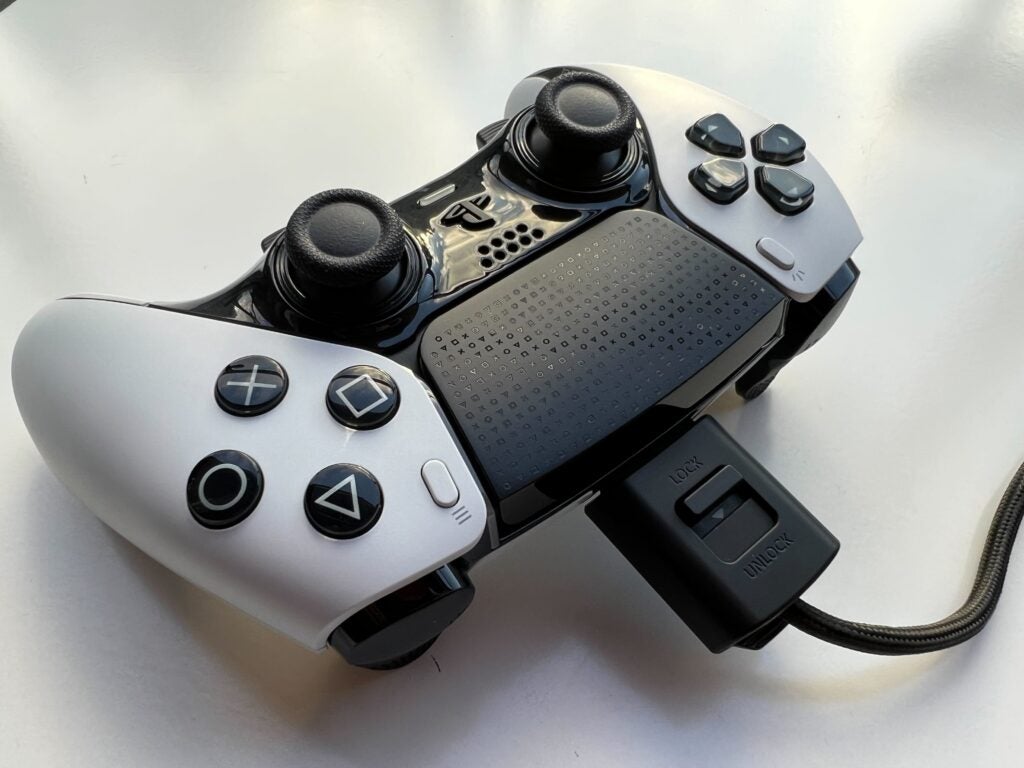
The included charger lock also came in handy, as I have had constant issues with my regular DualSense disconnecting from the USB-C charging during particularly intense gaming sessions. I think its inclusion here is great, although I do hope that it can be purchased as a standalone product in the future.
The DualSense Edge features haptic feedback, although it isn’t stronger or more defined than the base DualSense. The vibrations add a great level of immersion; in God of War Ragnarök I could feel the Leviathan Axe leave Kratos’ hands, and I could feel the gentle purrs of my cat protagonist in Stray. While I can’t say it felt much different to the DualSense, I always think that haptic feedback is a welcome presence.
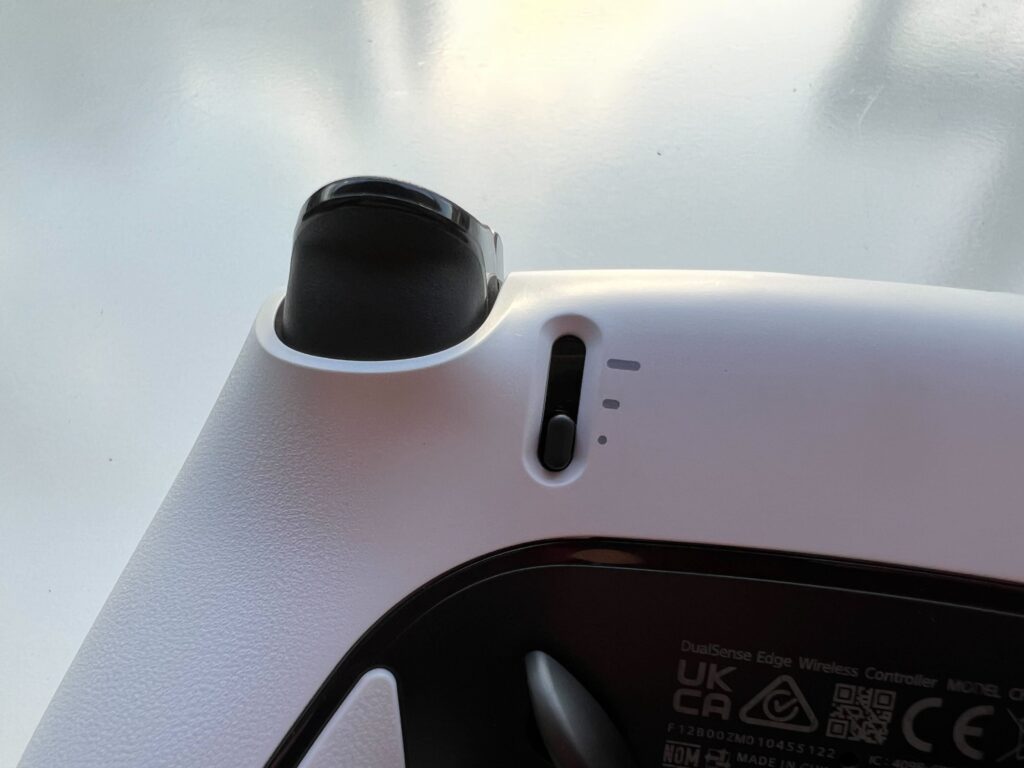
Turning to the adaptive triggers, there is the choice between full range, medium range and short range. Full range does not alter the triggers and is better suited for gradual control – like braking in Gran Turismo 7 – while the short range is much tighter and precise, and I found it worked best in FPS titles like Call of Duty: Modern Warfare 2. The dead zones for the triggers can also be customised.
I had a great time using the DualSense Edge and it did feel like I had more ways to play than before. However, actually getting used to new button layouts was more cumbersome than I expected and I noticed my muscle memory taking over in a few instances, rendering the back buttons and some new features useless.
As more time has passed I think I’m much more adept with the new layout, but I wouldn’t buy this controller with the expectation that it will immediately improve your performance while gaming.
Software
- All buttons are customisable
- Adjustable joystick and trigger dead zones
- Function buttons are very helpful
Once you connect the DualSense Edge to your PS5 you have the option to run through a tour of all the software features. While this menu originally felt a tad overwhelming, Sony did an excellent job of running through each feature and made customising the controller a lot easier than I expected.
In terms of software customisation, there are a lot of options. Firstly, I was able to remap every button on the controller, including the new buttons on the back of the controller. The only downside to this is that games do not update to these new settings, so I had to ensure I remembered my new button layout whenever I was given a button prompt within a game.
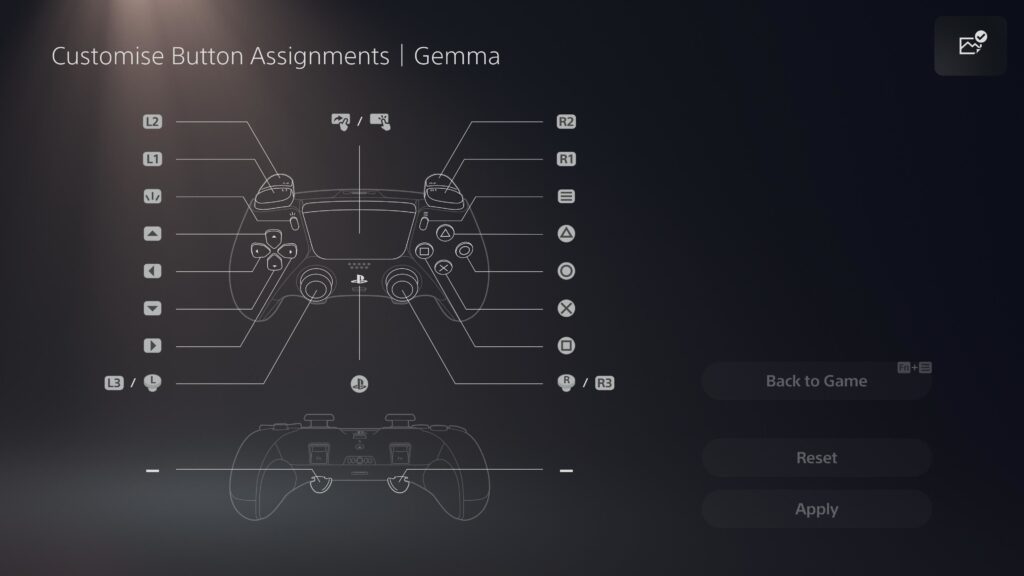
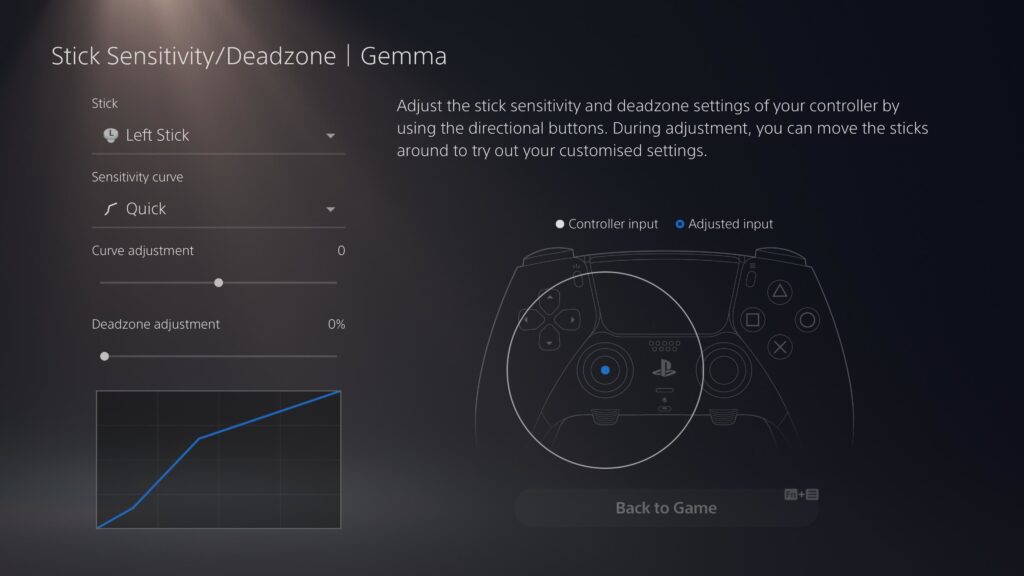
I was able to adjust the joystick dead zones and customise the preset sensitivity curves, with the last section allowing me to adjust the dead zones for the triggers on the back of the controller. Unlike button mapping, these settings do require a little trial and error as I found that certain modes and presets did not complement certain games, and I concluded that dead zones within the adaptive triggers only worked for me in a handful of titles.
While this is not necessarily a bad thing, it does take some time to find out which settings work best for you; I found that the Quick mode and a high curve adjustment worked best on my joystick in games like Battlefield 2042, as it allowed for faster response time, while games like God of War benefitted from a slower and more gradual movement.
The Function button brings up a small overlay menu, with four different profile options. After some tinkering, I think the best way to approach this would be to create four profiles for different genres, such as FPS, platforming and racing games, as I found that most games benefitted from having a specific setup that was tailored to the gameplay style.
Switching between profiles was incredibly easy and a lot less intrusive than I expected, with the ability to jump straight back into my game. Creating and editing these profiles was also pretty seamless, and while it’s only a small feature, the ability to give each profile a customised name meant I could be as specific as I wanted without the fear of forgetting which profile matched up to which game, or person.
I was originally frustrated with the limit of having only four assigned profiles, but Sony remedied that by having a section dedicated to unassigned profiles. This gives the profile system a lot more freedom and meant that I could create profiles for almost every game in my PS5’s library and simply store them away for when I needed them, while keeping my most used profiles at the forefront.
Latest deals
Should you buy it?
You’re a competitive gamer that wants more customisation options:
The new buttons and software features open up a whole new world and will allow gamers to create the perfect layout for every game genre imaginable. Plus, the removable joysticks mean you won’t have to worry about joystick drift.
You’re a casual gamer:
If you’re someone who only games on occasion, the DualSense Edge is just too expensive. It introduces new features that may be overwhelming for some, and some players may not get all the full benefits of this device.
Final Thoughts
It’s hard to say whether I can truly recommend the DualSense Edge, and that’s mostly down to its price. Hardcore and professional gamers that have been waiting for more customisation options will likely see the most benefit here, as I did find that certain games were made easier or more streamlined with the additional buttons. Taking the price out of the equation, this is a fantastic controller and gives more control to the player than ever before.
However, if you only game on occasion or predominantly engage in non-competitive titles, I’m not sure the DualSense Edge is for you. It introduces a new learning curve and many may find that they much prefer the button layouts and features that they’ve already grown so used to. Combined with a high price – so high that you could almost buy an Xbox Series S – this a hard sell unless you’re desperate to improve your gaming performance.
How we test
We tested the DualSense Edge by playing a variety of games on the PS5 console to see how each setting interacted with each genre. We also ensured to try out all of the customisation options, both on the controller and in the PS5’s software, to see how it impacted our experience and performance in games.
Tested out as many customisation options as possible
Tested with the PS5 consolee
FAQs
No, the DualSense Edge is an exclusive controller for the PS5 console. It is compatible with PC, however.
Yes, the DualSense Edge comes with a white carrying case. Inside the case are multiple customisable pieces, including function buttons for the back of the controller as well as switches that can be attached to the back of the controller.
Sustainability
TrustedReviews holds the fact that global warming is not a myth as a core value and will continuously endeavour to help protect our planet from harm in its business practices.
As part of this mission, whenever we review a product, we send the company a series of questions to help us gauge and make transparent the impact the device has on the environment.
We currently haven’t received answers to the questions on this product, but we will update this page the moment we do. You can see a detailed breakdown of the questions we ask and why in our sustainability info page.

Verdict
The DualSense Edge is the most customisable controller Sony has ever released, featuring a wealth of new software features and buttons. I had a blast gaming on this controller, but the high price suggests its best use case will be for competitive gaming.
Pros
- More personalisation options than ever
- Replaceable stick modules
- Function buttons on the front and rear
- Comes with a sturdy carrying case
Cons
- Extremely expensive
- Poor battery compared to the DualSense
Availability
- UKRRP: £209.99
- USARRP: $199.99
- EuropeRRP: €239.99
- CanadaRRP: CA$269
- AustraliaRRP: AU$339.95
-
Removable joysticksThe Joysticks can be easily removed and replaced. -
Braided USB-C charged with lockable connectorThe new DualSense Edge charger is thicker with a braided designed and can be locked onto the controller during play.
Introduction
Sony has finally thrown its hat into the ‘pro’ controller ring with the DualSense Edge, the most customisable controller ever made by the company.
Despite the PS5’s default DualSense being one of the best controllers for the current generation of consoles, Sony has decided to kick things up a notch with the DualSense Edge. While it may look strikingly similar to its predecessor, the Edge is brimming with customisation options, even more buttons, and seamless integration with the PS5 software.
However, with a steep price of £209.99/$199.99, it can be argued that the DualSense Edge controller is only worthwhile for competitive/professional gamers, as some may find the excessive customisation options to be overwhelming.
Design
- White and black colour
- Removable joysticks and joystick caps
- Comes with a white carrying case
The DualSense Edge feels like a premium controller; it weighs a tad more than the original DualSense at 322g and feels very sturdy. Every button has great responsiveness, with the back buttons and triggers feeling satisfyingly clicky.
The Edge moniker fits the aesthetic, as the design is edgier than the original, sporting the same black and white design as the PS5. The buttons and trackpad are sleek black, with shiny black plastic surrounding the joysticks. And while only a small detail, I love the PlayStation branding on the touchpad; it feels like it has a little more personality than the original controllers, even if the slick plastic picks up fingerprints easier.
Each trigger button on the back of the controller is now rubberised, which provides a much better grip. The two new function buttons live underneath the joysticks; I don’t think they’re as easy to access during gameplay as I would like, but due to their intended functionality this was not a major issue.
The controller comes with a plethora of accessories, including two pairs of joystick caps, a charger lock, two domes and two levers that can be attached to the back of the controller. The controller features the traditional caps, with the extras being high-dome and low-dome. After some testing, I found that the low-dome sticks worked best for me, as they reduced travel time and I felt like they were more accurate.
I massively preferred the dome buttons over the levers, as when using the latter I would constantly press them on accident. The domes were very comfortable and allowed for better hand placement. Since they can be attached magnetically, switching them out is really simple, and I did find some games worked well with a mix of the two.
These are all included in a white carrying case, which features a passthrough port for charging. While I can’t see myself using the case to take the controller out on the go, I think it’s a necessity for keeping all the accessories together. The case is sturdy and hefty, and I do believe that it would protect the controller very well if you did choose to use it for travel.
There is a section in the case for an extra joystick. Almost every controller can suffer from joystick drift – although I’ve always found that the Joy-Cons from the Nintendo Switch are the worst offenders of this – so it’s nice to see Sony giving people the option to swap out the joystick instead of replacing the controller entirely.
Switching out the joysticks is very simple; just release the front panel from the button on the back, flip the switches next to the joysticks and slide them out. The fact they’re only £19.99 from the PlayStation website makes this a lot more accessible and is one of the only features of this controller that could be considered affordable, albeit in the long run.
While I don’t own a Dualsense Charging Station, the DualSense Edge is just the right size to utilise it and features a 3.5mm headphone jack too, so you won’t need to worry about replacing any existing PlayStation accessories.
Performance
- Powerful haptic feedback
- Adaptive triggers
- Poor battery compared to the DualSense
I was impressed with the performance of the DualSense Edge, as it only seems to have one weak point: the battery. Sony claims that all the added features shortened the battery life, which is definitely the case in my experience when compared to the regular DualSense controller.
I managed to play around two hours of Cuphead on the PS5 and three hours of Binding of Isaac on the PC before my controller died, using the default settings. I assume that bringing down the controller light and turning off haptic feedback would lengthen this. The braided charging cable it comes with was long enough to accommodate my setup comfortably, although that won’t be the case for everyone.
The included charger lock also came in handy, as I have had constant issues with my regular DualSense disconnecting from the USB-C charging during particularly intense gaming sessions. I think its inclusion here is great, although I do hope that it can be purchased as a standalone product in the future.
The DualSense Edge features haptic feedback, although it isn’t stronger or more defined than the base DualSense. The vibrations add a great level of immersion; in God of War Ragnarök I could feel the Leviathan Axe leave Kratos’ hands, and I could feel the gentle purrs of my cat protagonist in Stray. While I can’t say it felt much different to the DualSense, I always think that haptic feedback is a welcome presence.
Turning to the adaptive triggers, there is the choice between full range, medium range and short range. Full range does not alter the triggers and is better suited for gradual control – like braking in Gran Turismo 7 – while the short range is much tighter and precise, and I found it worked best in FPS titles like Call of Duty: Modern Warfare 2. The dead zones for the triggers can also be customised.
I had a great time using the DualSense Edge and it did feel like I had more ways to play than before. However, actually getting used to new button layouts was more cumbersome than I expected and I noticed my muscle memory taking over in a few instances, rendering the back buttons and some new features useless.
As more time has passed I think I’m much more adept with the new layout, but I wouldn’t buy this controller with the expectation that it will immediately improve your performance while gaming.
Software
- All buttons are customisable
- Adjustable joystick and trigger dead zones
- Function buttons are very helpful
Once you connect the DualSense Edge to your PS5 you have the option to run through a tour of all the software features. While this menu originally felt a tad overwhelming, Sony did an excellent job of running through each feature and made customising the controller a lot easier than I expected.
In terms of software customisation, there are a lot of options. Firstly, I was able to remap every button on the controller, including the new buttons on the back of the controller. The only downside to this is that games do not update to these new settings, so I had to ensure I remembered my new button layout whenever I was given a button prompt within a game.
I was able to adjust the joystick dead zones and customise the preset sensitivity curves, with the last section allowing me to adjust the dead zones for the triggers on the back of the controller. Unlike button mapping, these settings do require a little trial and error as I found that certain modes and presets did not complement certain games, and I concluded that dead zones within the adaptive triggers only worked for me in a handful of titles.
While this is not necessarily a bad thing, it does take some time to find out which settings work best for you; I found that the Quick mode and a high curve adjustment worked best on my joystick in games like Battlefield 2042, as it allowed for faster response time, while games like God of War benefitted from a slower and more gradual movement.
The Function button brings up a small overlay menu, with four different profile options. After some tinkering, I think the best way to approach this would be to create four profiles for different genres, such as FPS, platforming and racing games, as I found that most games benefitted from having a specific setup that was tailored to the gameplay style.
Switching between profiles was incredibly easy and a lot less intrusive than I expected, with the ability to jump straight back into my game. Creating and editing these profiles was also pretty seamless, and while it’s only a small feature, the ability to give each profile a customised name meant I could be as specific as I wanted without the fear of forgetting which profile matched up to which game, or person.
I was originally frustrated with the limit of having only four assigned profiles, but Sony remedied that by having a section dedicated to unassigned profiles. This gives the profile system a lot more freedom and meant that I could create profiles for almost every game in my PS5’s library and simply store them away for when I needed them, while keeping my most used profiles at the forefront.
Latest deals
Should you buy it?
You’re a competitive gamer that wants more customisation options:
The new buttons and software features open up a whole new world and will allow gamers to create the perfect layout for every game genre imaginable. Plus, the removable joysticks mean you won’t have to worry about joystick drift.
You’re a casual gamer:
If you’re someone who only games on occasion, the DualSense Edge is just too expensive. It introduces new features that may be overwhelming for some, and some players may not get all the full benefits of this device.
Final Thoughts
It’s hard to say whether I can truly recommend the DualSense Edge, and that’s mostly down to its price. Hardcore and professional gamers that have been waiting for more customisation options will likely see the most benefit here, as I did find that certain games were made easier or more streamlined with the additional buttons. Taking the price out of the equation, this is a fantastic controller and gives more control to the player than ever before.
However, if you only game on occasion or predominantly engage in non-competitive titles, I’m not sure the DualSense Edge is for you. It introduces a new learning curve and many may find that they much prefer the button layouts and features that they’ve already grown so used to. Combined with a high price – so high that you could almost buy an Xbox Series S – this a hard sell unless you’re desperate to improve your gaming performance.
How we test
We tested the DualSense Edge by playing a variety of games on the PS5 console to see how each setting interacted with each genre. We also ensured to try out all of the customisation options, both on the controller and in the PS5’s software, to see how it impacted our experience and performance in games.
Tested out as many customisation options as possible
Tested with the PS5 consolee
FAQs
No, the DualSense Edge is an exclusive controller for the PS5 console. It is compatible with PC, however.
Yes, the DualSense Edge comes with a white carrying case. Inside the case are multiple customisable pieces, including function buttons for the back of the controller as well as switches that can be attached to the back of the controller.
Sustainability
TrustedReviews holds the fact that global warming is not a myth as a core value and will continuously endeavour to help protect our planet from harm in its business practices.
As part of this mission, whenever we review a product, we send the company a series of questions to help us gauge and make transparent the impact the device has on the environment.
We currently haven’t received answers to the questions on this product, but we will update this page the moment we do. You can see a detailed breakdown of the questions we ask and why in our sustainability info page.



