





Verdict
For everyday home use on a Windows 10 or 11, Microsoft Defender Antivirus is efficient, accurate, and all you need to protect your PC.
Pros
- Built into Windows 10 & 11
- Extremely accurate
- Includes family controls and per-folder ransomware defence
Cons
- Windows 7 & 8.1 are no longer supported
-
Gaming modeNotifications can be disabled to make Microsoft Defender run silently -
Per-folder ransomware protectionSelect specific folders to be protected against unauthorised changes -
Parental controlsProvides content filtering, app restrictions, and time limits for younger members of the household -
Cloud backupsCloud backups can be used to protect critical files
Introduction
Microsoft Defender Antivirus, completely free and fully integrated into Windows 10 and 11, has gone from strength to strength to become the most consistently reliable antivirus suites around.
The sheer volume of malware and potentially unwanted programs that Windows systems encounter and report back about gives Microsoft a huge pool of data to help identify and protect against active malware threats.
But how does it compare to the other best free antivirus options out there, and should you look elsewhere for protection?
Malware detection performance
As usual, Microsoft Defender Antivirus achieved perfect 100% protection scores in AV-Test’s most recent real-time and reference malware detection tests, with just one false positive.
| Testing facility | AV-TEST | AV Comparatives | SE Labs |
| Real-World Threat Protection | 100% | 99.7% | 98% |
In SE Labs’ latest test, it fell just short with a 98% protection rating – it detected 100% of malware, but failed to prevent one virus from getting on the test system. The SE Labs team found that Defender gave no false identifications of legitimate software as potential threats.
I was pleased to see that Defender appeared in AV Comparatives’ latest real-time malware defence tests, where it blocked 99.7% of malware again and scored no false positives.
Features
Microsoft Defender Antivirus is conspicuously hassle-free. It comes installed and active on every fresh Windows deployment, so you don’t need to worry about setting anything up.
In most cases, it will automatically activate when you uninstall any third-party anti-malware solution you may be using, although this is always worth checking in case your previous software doesn’t uninstall cleanly.
Accessible through the Windows Security interface, Microsoft Defender Antivirus has multiple components including the ubiquitous Windows Firewall, parental controls and remote management of your family’s devices, reputation-based site blocking in Edge, and application blocking in general. You also get general health reports about your system.
There isn’t a specific ‘do not disturb’ mode for movies and gaming, but if you’d rather not be interrupted by your PC’s malware defences, you can turn off either all or some of Defender’s notifications.
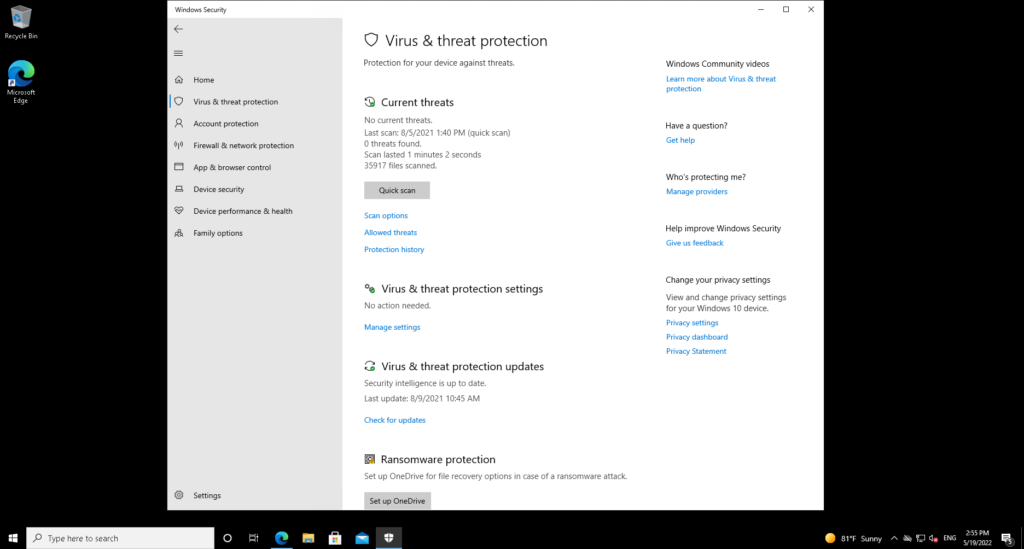
Core anti-malware components include real-time protection and on-demand scans covering everything from quickly checking a folder, to a comprehensive offline scan that checks for hard-to-remove threats such as rootkits by scanning the system without booting into Windows.
While Defender Antivirus runs its own full scans when it reckons you won’t be using your PC (midnight by default), you can schedule your own with a little bit of faff. You’ll need to do this via the Windows Task Scheduler, under the Windows > Windows Defender tab.
I’d really like a dedicated interface for scheduled virus scans, but it’s a minor complaint given that real-time protection is the most critical component of any modern anti-malware suite. Similarly, although Defender will block access to your webcam from programs it thinks are malicious, you can’t control this. A dedicated webcam defence module would be a welcome addition.
There’s also ransomware protection in the form of both controlled folder access that prevents unauthorised software from making changes to your personal files, and data recovery backups made using Microsoft OneDrive. Everyone gets 5GB of storage by default, but long-time OneDrive users (as well as subscribers to services such as Microsoft 365) may have more.
Latest deals
Should you buy it?
You want hassle-free protection:
Defender outperforms most free and paid-for rivals, with more features than many.
You use an old version of Windows:
If you’re only able to run a version of Windows that’s no longer in support, then Microsoft Defender will no longer receive updates.
Final Thoughts
Microsoft Defender is an incredibly good, hassle-free anti-virus. However, there are still use cases for other antivirus suites – just about. If you use a version of Windows that’s no longer supported by Microsoft, then you’ll definitely need third-party antivirus: Avast and Trend Micro are all good choices here.
How we test
We use every antivirus suite ourselves, so we can check out their various features, from scanning options to integrated extras such as parental controls.
The results we use to asses malware detection performance come from reputable testing houses including AV-Test, AV Comparatives and SE Labs.
We download and use the software ourselves to test the included features
We use data from trusted and approved testing houses to determine the malware detection performance
FAQs
Yes, Microsoft Defender was successful at detecting and blocking 100% of the malware in testing, with only one false positive. You will, however, get extra features be spending money elsewhere.
Yes, Microsoft Defender is built into both Windows 10 and Windows 11.

Verdict
For everyday home use on a Windows 10 or 11, Microsoft Defender Antivirus is efficient, accurate, and all you need to protect your PC.
Pros
- Built into Windows 10 & 11
- Extremely accurate
- Includes family controls and per-folder ransomware defence
Cons
- Windows 7 & 8.1 are no longer supported
-
Gaming modeNotifications can be disabled to make Microsoft Defender run silently -
Per-folder ransomware protectionSelect specific folders to be protected against unauthorised changes -
Parental controlsProvides content filtering, app restrictions, and time limits for younger members of the household -
Cloud backupsCloud backups can be used to protect critical files
Introduction
Microsoft Defender Antivirus, completely free and fully integrated into Windows 10 and 11, has gone from strength to strength to become the most consistently reliable antivirus suites around.
The sheer volume of malware and potentially unwanted programs that Windows systems encounter and report back about gives Microsoft a huge pool of data to help identify and protect against active malware threats.
But how does it compare to the other best free antivirus options out there, and should you look elsewhere for protection?
Malware detection performance
As usual, Microsoft Defender Antivirus achieved perfect 100% protection scores in AV-Test’s most recent real-time and reference malware detection tests, with just one false positive.
| Testing facility | AV-TEST | AV Comparatives | SE Labs |
| Real-World Threat Protection | 100% | 99.7% | 98% |
In SE Labs’ latest test, it fell just short with a 98% protection rating – it detected 100% of malware, but failed to prevent one virus from getting on the test system. The SE Labs team found that Defender gave no false identifications of legitimate software as potential threats.
I was pleased to see that Defender appeared in AV Comparatives’ latest real-time malware defence tests, where it blocked 99.7% of malware again and scored no false positives.
Features
Microsoft Defender Antivirus is conspicuously hassle-free. It comes installed and active on every fresh Windows deployment, so you don’t need to worry about setting anything up.
In most cases, it will automatically activate when you uninstall any third-party anti-malware solution you may be using, although this is always worth checking in case your previous software doesn’t uninstall cleanly.
Accessible through the Windows Security interface, Microsoft Defender Antivirus has multiple components including the ubiquitous Windows Firewall, parental controls and remote management of your family’s devices, reputation-based site blocking in Edge, and application blocking in general. You also get general health reports about your system.
There isn’t a specific ‘do not disturb’ mode for movies and gaming, but if you’d rather not be interrupted by your PC’s malware defences, you can turn off either all or some of Defender’s notifications.
Core anti-malware components include real-time protection and on-demand scans covering everything from quickly checking a folder, to a comprehensive offline scan that checks for hard-to-remove threats such as rootkits by scanning the system without booting into Windows.
While Defender Antivirus runs its own full scans when it reckons you won’t be using your PC (midnight by default), you can schedule your own with a little bit of faff. You’ll need to do this via the Windows Task Scheduler, under the Windows > Windows Defender tab.
I’d really like a dedicated interface for scheduled virus scans, but it’s a minor complaint given that real-time protection is the most critical component of any modern anti-malware suite. Similarly, although Defender will block access to your webcam from programs it thinks are malicious, you can’t control this. A dedicated webcam defence module would be a welcome addition.
There’s also ransomware protection in the form of both controlled folder access that prevents unauthorised software from making changes to your personal files, and data recovery backups made using Microsoft OneDrive. Everyone gets 5GB of storage by default, but long-time OneDrive users (as well as subscribers to services such as Microsoft 365) may have more.
Latest deals
Should you buy it?
You want hassle-free protection:
Defender outperforms most free and paid-for rivals, with more features than many.
You use an old version of Windows:
If you’re only able to run a version of Windows that’s no longer in support, then Microsoft Defender will no longer receive updates.
Final Thoughts
Microsoft Defender is an incredibly good, hassle-free anti-virus. However, there are still use cases for other antivirus suites – just about. If you use a version of Windows that’s no longer supported by Microsoft, then you’ll definitely need third-party antivirus: Avast and Trend Micro are all good choices here.
How we test
We use every antivirus suite ourselves, so we can check out their various features, from scanning options to integrated extras such as parental controls.
The results we use to asses malware detection performance come from reputable testing houses including AV-Test, AV Comparatives and SE Labs.
We download and use the software ourselves to test the included features
We use data from trusted and approved testing houses to determine the malware detection performance
FAQs
Yes, Microsoft Defender was successful at detecting and blocking 100% of the malware in testing, with only one false positive. You will, however, get extra features be spending money elsewhere.
Yes, Microsoft Defender is built into both Windows 10 and Windows 11.



