





Despite its best efforts, the Dell Pro Webcam just doesn’t live up to its name. Consistent AI tracking and an eye-catching build definitely help its case, but the lack of any finer detail in recordings and the appearance of far too much noise holds it back from being one to recommend.
Pros
- AI tracking works well
- HDR does a decent job in low light
- Great design
Cons
- Recordings lack detail
- Far too much noise
- There are better ‘pro-level’ webcams out there
Availability
- UKRRP: £155.99
- USARRP: $134.99
-
2K video capture:The Dell Pro Webcam is capable of shooting video at Quad HD resolution. -
AI Auto FramingThe camera can intelligently keep you in the centre of the picture, even when you’re moving around. -
Integrated microphone:A built-in microphone allows you to speak to friends or colleagues via the webcam.
Introduction
With the Dell Pro Webcam, the company offers an alternative to professionals and content creators alike who want higher quality footage.
Webcams have had a bit of a renaissance in recent years. With more people working from home than ever, there’s a growing market for dedicated webcams that can put built-in laptop cameras to shame.
Dell is no stranger in the computing space, and so it only makes sense that the company would throw its hat into the ring. Unfortunately, however, the company’s expertise that has gone into making excellent products like the Dell XPS range, are nowhere to be found here.
Design and features
- Cylindrical build that oozes style
- AI tracking works well
- The magnetic privacy shutter is a great idea
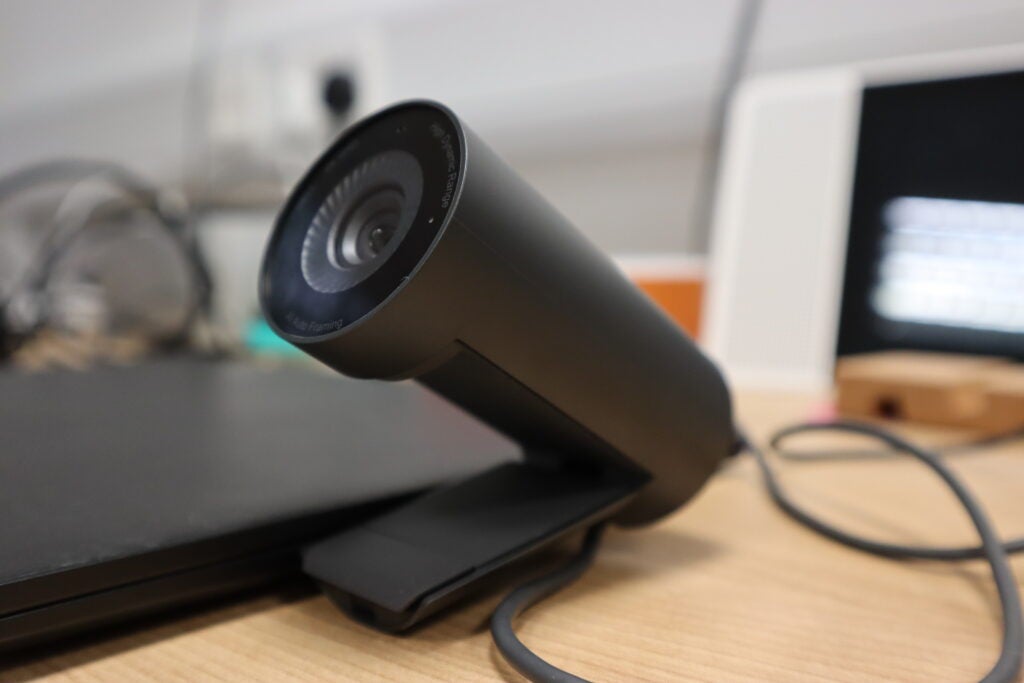
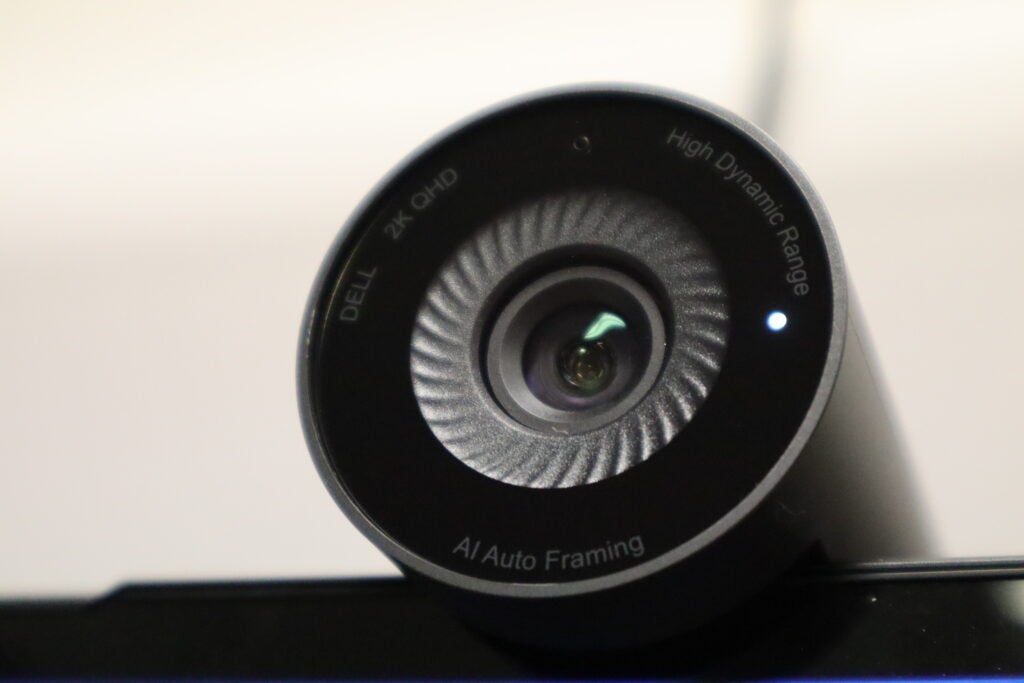
To its credit, the Dell Pro Webcam does look like a premium product. The cylindrical design makes it look more like a camera lens than a typical webcam and the build feels solid when held in the hand. I do appreciate that the mounting clip recedes into the body of the webcam itself when not in use, which makes the Pro Webcam one of the easiest of its kind to transport in a bag.
The mounting clip is also capable of extending to a near 90-degree angle, so there’s a good amount of flexibility available particularly if you have a larger than average monitor. The real cherry on top is the magnetic shutter cap which can attach seamlessly to the front of the webcam when you want a bit of privacy, or stored at the rear when it’s not needed. It’s a small touch but one that’s appreciated, and the cap itself remained sturdy and never showed any signs of falling off the sensor.
If you have a tendency to shift around in your chair then you’ll be glad to know that the Pro Webcam offers up AI Auto Tracking to keep you in the frame. The feature is a bit slow to react and because the tracking is happening digitally as opposed to the physical movement that’s possible on webcams like the Insta360 Link, there is a decent amount of noise that crops up if you move too far to the edges. But it still serves its main purpose of keeping the attention fixed on you.
For those who don’t want the AI to follow them round, you can always switch the feature off and swap between static 65 or 78-degree FOV, the latter of which can be handy if you’ve got multiple people at one desk and you all want to be visible on the call.
Performance and video quality
- Video lacks the detail you’d expect from 2K recording
- Far too much noise creeps into the image
- HDR does a decent job with low-light scenes
One of the headline features of the Dell Pro Webcam is its supposed ability to shoot in 2K, which is a noticeable markup over the typical 1080p standard found on most webcams in 2022. Unfortunately, I struggled to see that 2K claim come to life in recorded footage.
For starters, any detail that one might expect from a 2K stream simply isn’t noticeable here. Instead the footage captured by the Pro Webcam has a softness to it, with the device preferring to capture the right colours as opposed to the finer details.
To its credit, and particularly when HDR mode is switched on, the Dell Pro Webcam does a decent job of keeping everything bright enough that you won’t have people complaining on the other end of the call that they can’t see you. Even when I turned off the lights in my home office, the Pro Webcam was still able to create a sense of separation between myself and the background behind me.
What really hampered the whole experience with the Dell Pro Webcam however, is the amount of noise that crops up when filming. Of course, the degree of onscreen noise will depend on the amount of light you have available, but in almost every situation I found it impossible to get rid of it completely, and it wasn’t long before I found myself pining for the much better (albeit more expensive) Insta360 Link.
Luckily I found a better experience when testing out the webcam’s noise reduction microphone. Just like its name implies, the mic does a pretty job of honing in on your voice against the intrusions of background noise – although if you want crystal clear audio, then I’d recommend picking up a dedicated mic instead.
Software
- Dell Peripheral Manager offers granular controls
- Next to no control over the microphone
- Doesn’t quite compare to the Insta360 Link Controller
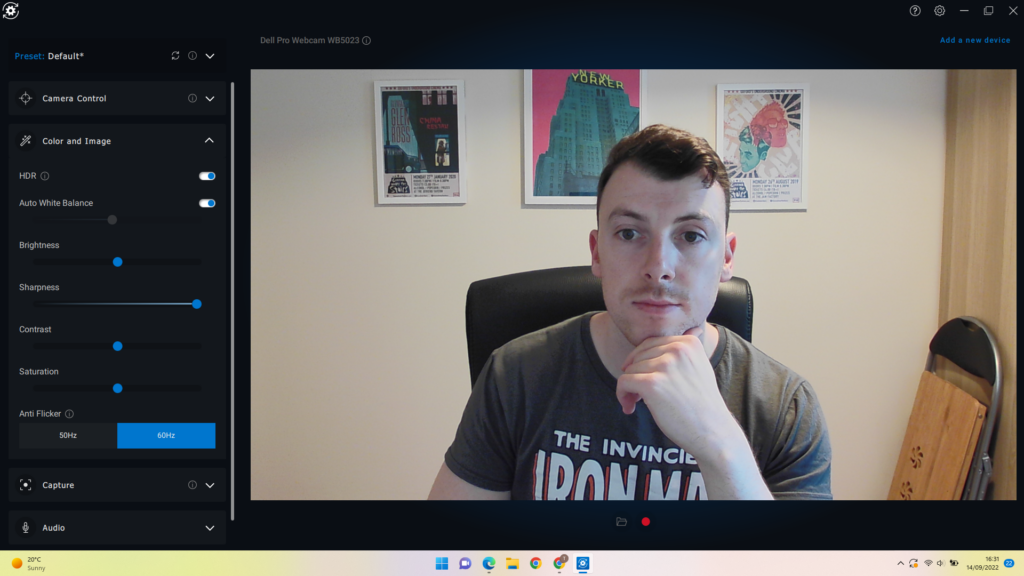
If you want more control over the Dell Pro Webcam then users can dive into the accompanying Dell Peripheral Manager. It’s here that you can find options for Presets, Camera Control, Colour and Image, Capture and Audio.
Presets offers up a range of pre-made filters that you can switch to at your leisure, but you do get the option to make your own presets if there’s a style of capture that you prefer. Camera Control is all about positioning for the right angle, while Colour and Image lets you tweak more granular options like the white balance and contrast.
There’s nothing here in terms of audio beyond simply turning the mic on or off, and Capture lets you pick the resolution and the frame rate of your footage. Overall the software works well, and it’s easily signposted to make it a breeze for less experienced users, but I would have liked to see a permanent taskbar for quick access to camera controls, much like what you find with the Insta360 Link Controller.
Latest deals
Should you buy it?
You want a no-fuss webcam that’s easy to use: While it won’t be toppling the competition anytime soon, the Dell Pro Webcam is still quite user friendly and can perform reasonably well when there’s a good amount of natural light nearby.
You want a premium level webcam: Even though it has lofty aspirations, the Dell Pro Webcam just can’t compete with the likes of the Insta360 Link so if you want a device for high quality recording then I’d recommend looking elsewhere.
Final Thoughts
With a premium build that easily makes it one of the most stylish webcams on the market, the Dell Pro Webcam clearly has high aspirations, but its overall performance holds it back from greatness. Despite being labelled as offering 2K recording, its footage lacks polish and there’s far too much noise, even in brighter environments. If you want a high-end webcam that doesn’t disappoint, then the Insta360 Link should be your go-to option.
How we test
We use every webcam we test as our main device for video conferencing throughout the review period, while also running its proprietary software through its paces.
We also check the device’s compatibility with more widely available software for professionals and content creators.
Tested over a period of seven days
Checked the capture quality with real-world testing
Tested all available software and features
FAQs
Yes, there’s a microphone built into the webcam.
Sustainability
TrustedReviews’ holds the fact that global warming is not a myth as a core value and will continuously endeavor to help protect our planet from harm in its business practices.
As part of this mission, whenever we review a product we send the company a series of questions to help us gauge and make transparent the impact the device has on the environment.
We currently haven’t received answers to the questions on this product, but will update this page the moment we do. You can see a detailed breakdown of the questions we ask and why in our sustainability info page.

Despite its best efforts, the Dell Pro Webcam just doesn’t live up to its name. Consistent AI tracking and an eye-catching build definitely help its case, but the lack of any finer detail in recordings and the appearance of far too much noise holds it back from being one to recommend.
Pros
- AI tracking works well
- HDR does a decent job in low light
- Great design
Cons
- Recordings lack detail
- Far too much noise
- There are better ‘pro-level’ webcams out there
Availability
- UKRRP: £155.99
- USARRP: $134.99
-
2K video capture:The Dell Pro Webcam is capable of shooting video at Quad HD resolution. -
AI Auto FramingThe camera can intelligently keep you in the centre of the picture, even when you’re moving around. -
Integrated microphone:A built-in microphone allows you to speak to friends or colleagues via the webcam.
Introduction
With the Dell Pro Webcam, the company offers an alternative to professionals and content creators alike who want higher quality footage.
Webcams have had a bit of a renaissance in recent years. With more people working from home than ever, there’s a growing market for dedicated webcams that can put built-in laptop cameras to shame.
Dell is no stranger in the computing space, and so it only makes sense that the company would throw its hat into the ring. Unfortunately, however, the company’s expertise that has gone into making excellent products like the Dell XPS range, are nowhere to be found here.
Design and features
- Cylindrical build that oozes style
- AI tracking works well
- The magnetic privacy shutter is a great idea
To its credit, the Dell Pro Webcam does look like a premium product. The cylindrical design makes it look more like a camera lens than a typical webcam and the build feels solid when held in the hand. I do appreciate that the mounting clip recedes into the body of the webcam itself when not in use, which makes the Pro Webcam one of the easiest of its kind to transport in a bag.
The mounting clip is also capable of extending to a near 90-degree angle, so there’s a good amount of flexibility available particularly if you have a larger than average monitor. The real cherry on top is the magnetic shutter cap which can attach seamlessly to the front of the webcam when you want a bit of privacy, or stored at the rear when it’s not needed. It’s a small touch but one that’s appreciated, and the cap itself remained sturdy and never showed any signs of falling off the sensor.
If you have a tendency to shift around in your chair then you’ll be glad to know that the Pro Webcam offers up AI Auto Tracking to keep you in the frame. The feature is a bit slow to react and because the tracking is happening digitally as opposed to the physical movement that’s possible on webcams like the Insta360 Link, there is a decent amount of noise that crops up if you move too far to the edges. But it still serves its main purpose of keeping the attention fixed on you.
For those who don’t want the AI to follow them round, you can always switch the feature off and swap between static 65 or 78-degree FOV, the latter of which can be handy if you’ve got multiple people at one desk and you all want to be visible on the call.
Performance and video quality
- Video lacks the detail you’d expect from 2K recording
- Far too much noise creeps into the image
- HDR does a decent job with low-light scenes
One of the headline features of the Dell Pro Webcam is its supposed ability to shoot in 2K, which is a noticeable markup over the typical 1080p standard found on most webcams in 2022. Unfortunately, I struggled to see that 2K claim come to life in recorded footage.
For starters, any detail that one might expect from a 2K stream simply isn’t noticeable here. Instead the footage captured by the Pro Webcam has a softness to it, with the device preferring to capture the right colours as opposed to the finer details.
To its credit, and particularly when HDR mode is switched on, the Dell Pro Webcam does a decent job of keeping everything bright enough that you won’t have people complaining on the other end of the call that they can’t see you. Even when I turned off the lights in my home office, the Pro Webcam was still able to create a sense of separation between myself and the background behind me.
What really hampered the whole experience with the Dell Pro Webcam however, is the amount of noise that crops up when filming. Of course, the degree of onscreen noise will depend on the amount of light you have available, but in almost every situation I found it impossible to get rid of it completely, and it wasn’t long before I found myself pining for the much better (albeit more expensive) Insta360 Link.
Luckily I found a better experience when testing out the webcam’s noise reduction microphone. Just like its name implies, the mic does a pretty job of honing in on your voice against the intrusions of background noise – although if you want crystal clear audio, then I’d recommend picking up a dedicated mic instead.
Software
- Dell Peripheral Manager offers granular controls
- Next to no control over the microphone
- Doesn’t quite compare to the Insta360 Link Controller
If you want more control over the Dell Pro Webcam then users can dive into the accompanying Dell Peripheral Manager. It’s here that you can find options for Presets, Camera Control, Colour and Image, Capture and Audio.
Presets offers up a range of pre-made filters that you can switch to at your leisure, but you do get the option to make your own presets if there’s a style of capture that you prefer. Camera Control is all about positioning for the right angle, while Colour and Image lets you tweak more granular options like the white balance and contrast.
There’s nothing here in terms of audio beyond simply turning the mic on or off, and Capture lets you pick the resolution and the frame rate of your footage. Overall the software works well, and it’s easily signposted to make it a breeze for less experienced users, but I would have liked to see a permanent taskbar for quick access to camera controls, much like what you find with the Insta360 Link Controller.
Latest deals
Should you buy it?
You want a no-fuss webcam that’s easy to use: While it won’t be toppling the competition anytime soon, the Dell Pro Webcam is still quite user friendly and can perform reasonably well when there’s a good amount of natural light nearby.
You want a premium level webcam: Even though it has lofty aspirations, the Dell Pro Webcam just can’t compete with the likes of the Insta360 Link so if you want a device for high quality recording then I’d recommend looking elsewhere.
Final Thoughts
With a premium build that easily makes it one of the most stylish webcams on the market, the Dell Pro Webcam clearly has high aspirations, but its overall performance holds it back from greatness. Despite being labelled as offering 2K recording, its footage lacks polish and there’s far too much noise, even in brighter environments. If you want a high-end webcam that doesn’t disappoint, then the Insta360 Link should be your go-to option.
How we test
We use every webcam we test as our main device for video conferencing throughout the review period, while also running its proprietary software through its paces.
We also check the device’s compatibility with more widely available software for professionals and content creators.
Tested over a period of seven days
Checked the capture quality with real-world testing
Tested all available software and features
FAQs
Yes, there’s a microphone built into the webcam.
Sustainability
TrustedReviews’ holds the fact that global warming is not a myth as a core value and will continuously endeavor to help protect our planet from harm in its business practices.
As part of this mission, whenever we review a product we send the company a series of questions to help us gauge and make transparent the impact the device has on the environment.
We currently haven’t received answers to the questions on this product, but will update this page the moment we do. You can see a detailed breakdown of the questions we ask and why in our sustainability info page.



