













Verdict
1Password is powerful, configurable, and easy to use. It has an excellent range of features, combined with an interface that won’t intimidate the non-technical, making it a great choice for families.
Pros
- Excellent interface
- Can share passwords with anyone
- In-app TOTP password generation
-
SecurityPassword data is secured with AES-GCM-256 authenticated encryption -
SharingGenerate link to share with anyone (including non-members) for designated up to 30 days, vault sharing with family members and up to 5 family account guests -
Storage1GB encrypted attachment or secure file storage
Introduction
1Password is a fantastic password manager.
Although it’s one of the few that has no free tier, it does a lot to justify its subscription price, and even allows you to share passwords with people who don’t have a 1Password account.
It also has one of the best user interfaces I’ve encountered in a password manager, with a very consistent cross-platform interface that puts everything you need at your fingertips.
Pricing
1Password is one of the more expensive password managers around, but that still doesn’t come to much. A single-user Personal subscription costs just $35.88 (£28.26) per year, while a Families subscription with five accounts costs $59.88 (£47.17) per year.
Even if your subscription lapses you can always access and export your stored passwords, which is a nice courtesy, although not as good as a free password management tier to fall back on in case of emergencies.
Features
- You get 1GB of storage space for notes and files
- Travel Mode is a killer feature
- Password sharing is open to anyone
As well as being able to autosave and autofill browser passwords, payment cards and address forms via its extensions, 1Password can store a huge range of different kinds of manually entered data so that you can keep it securely at your fingertips.
The scale of this becomes apparent when you manually create a new entry, and a selection box offers you custom templates for everyone from API credentials and SSH keys to medical records and driving licences. You get 1GB of storage to keep additional attachments, notes, scans and key files in as needed.
Most password managers, of course, have a notes field you can use for this stuff, and LastPass has almost as many categories, albeit hidden, but it’s very well presented here. In fact, both the dedicated apps and browser extensions have conspicuously good user interfaces. There’s even a “Travel essentials” suggestion box that proposes sites and documents you might need for a trip and reminds you to add these to a Travel Mode vault.
1Password’s Travel Mode remains something of a killer feature, although LastPass’s Identities settings can be used in a similar way. When you travel, only password vaults that you’ve designated as travel-safe will be shown when you – or a customs and immigration official – examines your phone. This is particularly useful for people who retain sensitive corporate passwords travelling to places that regularly engage in device checks, such as the USA and China.
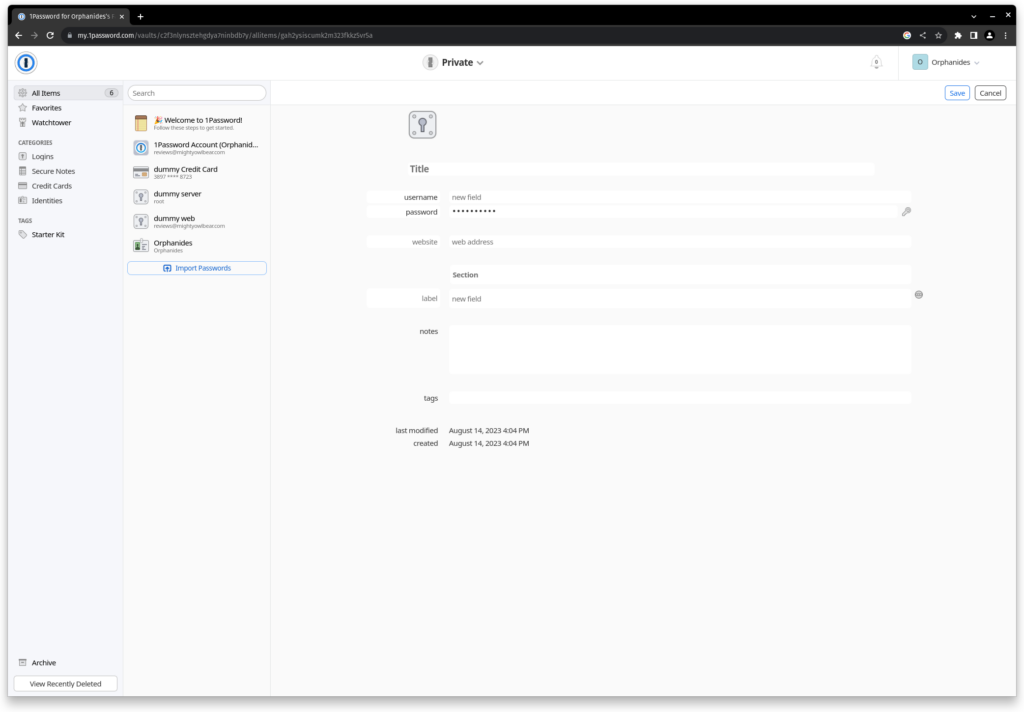
1Password has a fantastic range of features, and is one of the first password managers to start implementing support for Passkeys, a cryptographic key-based passwordless authentication system supported by a select range of services, including 1Password’s own beta versions. It supports email alias creation via Fastmail, to make each of your login credentials truly unique
In keeping with 1Password’s enthusiasm for doing away with traditional passwords, the desktop client and browser plugins make it really easy to use your system password or biometric login method instead of typing your master password every time, which is a nice touch – do make sure you use a highly secure system password if you’re going to do this, however.
Your passwords re-lock after 10 minutes or when the browser or app is closed, and this timeout period is user configurable. You can add two-factor authentication to access your passwords, in the form of either a TOTP (Time-based One-Time Password) authenticator or a security key and, for stored passwords. If you want to use your password manager as authentication, there’s also an integrated TOTP code generator, but bear in mind that this does away with some – but not all – of the advantages of having two-factor authentication in the first place.
1Password is a zero-knowledge service and doesn’t support granting emergency account access to other users, although it helps you create a physical emergency kit to be safely stored or entrusted to your loved ones in case the worst happens.
If you forget your password, you can always use the password information in this emergency kit to get back into your account. Family and team administrators can also recover their users’ accounts, and you can also export passwords from any device that’s still logged in (for example because biometric or system authentication login is enabled) and then reset 1Password and re-import all your passwords.
Unlike most password managers, password sharing isn’t limited to just other 1Password users. You can generate a link to share with anyone for a designated period of up to 30 days, while 1Password Family adds vault sharing with family members and up to five family account guests.
Should you buy it?
If you’re looking for convenience: 1Password has fantastic browser extensions and a great desktop app. It ties in brilliantly with system passwords and biometric logins, making it one of the most seamlessly functional password managers around.
Final Thoughts
1Password is an outstanding password manager. Its controls aren’t quite as granular as those of Bitwarden and there’s no equivalent to Bitwarden’s Free Organisation tier – you need a family or business-oriented team account to share entire vaults with someone else.
However, 1Password has a friendlier interface that provides less friction for non-technical users, making it a great choice for families with a range of technical proficiencies in particular. Bitwarden is cheaper, though.
How we test
We test each password manager ourselves on a variety of computer and mobile operating systems. We carry out comparative feature analysis against industry standards and rival products, and test security and convenience settings such as default logout behaviour and offline access.
We used for at least a week.
Tested all of the available features.
FAQs
No, 1Password is one of the few password managers that does not offer any kind of free tier, beyond the ability to export your passwords if your subscription expires.
1Password is an early adopter of various passwordless authentication systems, and members of its private beta programme can now use a passwordless passkey to unlock their password vault.

Verdict
1Password is powerful, configurable, and easy to use. It has an excellent range of features, combined with an interface that won’t intimidate the non-technical, making it a great choice for families.
Pros
- Excellent interface
- Can share passwords with anyone
- In-app TOTP password generation
-
SecurityPassword data is secured with AES-GCM-256 authenticated encryption -
SharingGenerate link to share with anyone (including non-members) for designated up to 30 days, vault sharing with family members and up to 5 family account guests -
Storage1GB encrypted attachment or secure file storage
Introduction
1Password is a fantastic password manager.
Although it’s one of the few that has no free tier, it does a lot to justify its subscription price, and even allows you to share passwords with people who don’t have a 1Password account.
It also has one of the best user interfaces I’ve encountered in a password manager, with a very consistent cross-platform interface that puts everything you need at your fingertips.
Pricing
1Password is one of the more expensive password managers around, but that still doesn’t come to much. A single-user Personal subscription costs just $35.88 (£28.26) per year, while a Families subscription with five accounts costs $59.88 (£47.17) per year.
Even if your subscription lapses you can always access and export your stored passwords, which is a nice courtesy, although not as good as a free password management tier to fall back on in case of emergencies.
Features
- You get 1GB of storage space for notes and files
- Travel Mode is a killer feature
- Password sharing is open to anyone
As well as being able to autosave and autofill browser passwords, payment cards and address forms via its extensions, 1Password can store a huge range of different kinds of manually entered data so that you can keep it securely at your fingertips.
The scale of this becomes apparent when you manually create a new entry, and a selection box offers you custom templates for everyone from API credentials and SSH keys to medical records and driving licences. You get 1GB of storage to keep additional attachments, notes, scans and key files in as needed.
Most password managers, of course, have a notes field you can use for this stuff, and LastPass has almost as many categories, albeit hidden, but it’s very well presented here. In fact, both the dedicated apps and browser extensions have conspicuously good user interfaces. There’s even a “Travel essentials” suggestion box that proposes sites and documents you might need for a trip and reminds you to add these to a Travel Mode vault.
1Password’s Travel Mode remains something of a killer feature, although LastPass’s Identities settings can be used in a similar way. When you travel, only password vaults that you’ve designated as travel-safe will be shown when you – or a customs and immigration official – examines your phone. This is particularly useful for people who retain sensitive corporate passwords travelling to places that regularly engage in device checks, such as the USA and China.
1Password has a fantastic range of features, and is one of the first password managers to start implementing support for Passkeys, a cryptographic key-based passwordless authentication system supported by a select range of services, including 1Password’s own beta versions. It supports email alias creation via Fastmail, to make each of your login credentials truly unique
In keeping with 1Password’s enthusiasm for doing away with traditional passwords, the desktop client and browser plugins make it really easy to use your system password or biometric login method instead of typing your master password every time, which is a nice touch – do make sure you use a highly secure system password if you’re going to do this, however.
Your passwords re-lock after 10 minutes or when the browser or app is closed, and this timeout period is user configurable. You can add two-factor authentication to access your passwords, in the form of either a TOTP (Time-based One-Time Password) authenticator or a security key and, for stored passwords. If you want to use your password manager as authentication, there’s also an integrated TOTP code generator, but bear in mind that this does away with some – but not all – of the advantages of having two-factor authentication in the first place.
1Password is a zero-knowledge service and doesn’t support granting emergency account access to other users, although it helps you create a physical emergency kit to be safely stored or entrusted to your loved ones in case the worst happens.
If you forget your password, you can always use the password information in this emergency kit to get back into your account. Family and team administrators can also recover their users’ accounts, and you can also export passwords from any device that’s still logged in (for example because biometric or system authentication login is enabled) and then reset 1Password and re-import all your passwords.
Unlike most password managers, password sharing isn’t limited to just other 1Password users. You can generate a link to share with anyone for a designated period of up to 30 days, while 1Password Family adds vault sharing with family members and up to five family account guests.
Should you buy it?
If you’re looking for convenience: 1Password has fantastic browser extensions and a great desktop app. It ties in brilliantly with system passwords and biometric logins, making it one of the most seamlessly functional password managers around.
Final Thoughts
1Password is an outstanding password manager. Its controls aren’t quite as granular as those of Bitwarden and there’s no equivalent to Bitwarden’s Free Organisation tier – you need a family or business-oriented team account to share entire vaults with someone else.
However, 1Password has a friendlier interface that provides less friction for non-technical users, making it a great choice for families with a range of technical proficiencies in particular. Bitwarden is cheaper, though.
How we test
We test each password manager ourselves on a variety of computer and mobile operating systems. We carry out comparative feature analysis against industry standards and rival products, and test security and convenience settings such as default logout behaviour and offline access.
We used for at least a week.
Tested all of the available features.
FAQs
No, 1Password is one of the few password managers that does not offer any kind of free tier, beyond the ability to export your passwords if your subscription expires.
1Password is an early adopter of various passwordless authentication systems, and members of its private beta programme can now use a passwordless passkey to unlock their password vault.



